


![Cryptocurrency Explained: Understanding "Double-spend", Block Re-Organization, & Consensus [Bitcoin]](https://i.ytimg.com/vi/hixM4u7ep58/maxresdefault.jpg)

















Flashbots protects transactions from sandwich attacks by using a private mempool that only miners running Flashbots can access, preventing bad actors from seeing pending transactions and exploiting them through front-running or sandwiching attacks on decentralized exchanges.
Understanding Flashbots and Preventing Sandwich Attacks in DeFi
Added:Understanding of the Ethereum mempool structure and how transactions are broadcast, validated, and ordered by validators.
Fundamental knowledge of Decentralized Exchanges (DEXs), Automated Market Makers (AMMs), and the concept of price slippage.
Basic concept of Maximal Extractable Value (MEV), specifically how front-running and back-running tactics are executed by searchers.
Familiarity with Ethereum developer tools and interacting with testnets (such as Goerli or Sepolia) using Web3 libraries like Ethers.js.
Deep dive into Proposer-Builder Separation (PBS) and the architecture of MEV-Boost in Ethereum's Proof-of-Stake consensus.
Designing and coding advanced searcher bots to submit Flashbots 'bundles' for risk-free arbitrage and liquidation strategies.
Evaluating modern order flow auction protocols like MEV-Share and MEV-Blocker that rebate extracted MEV back to retail users.
Analyzing MEV mitigation strategies and sequencer architectures on Layer 2 rollups (e.g., Optimism, Arbitrum) and alternative Layer 1 blockchains.
16.4K views394likes9:33Original Release: 2021-12-25
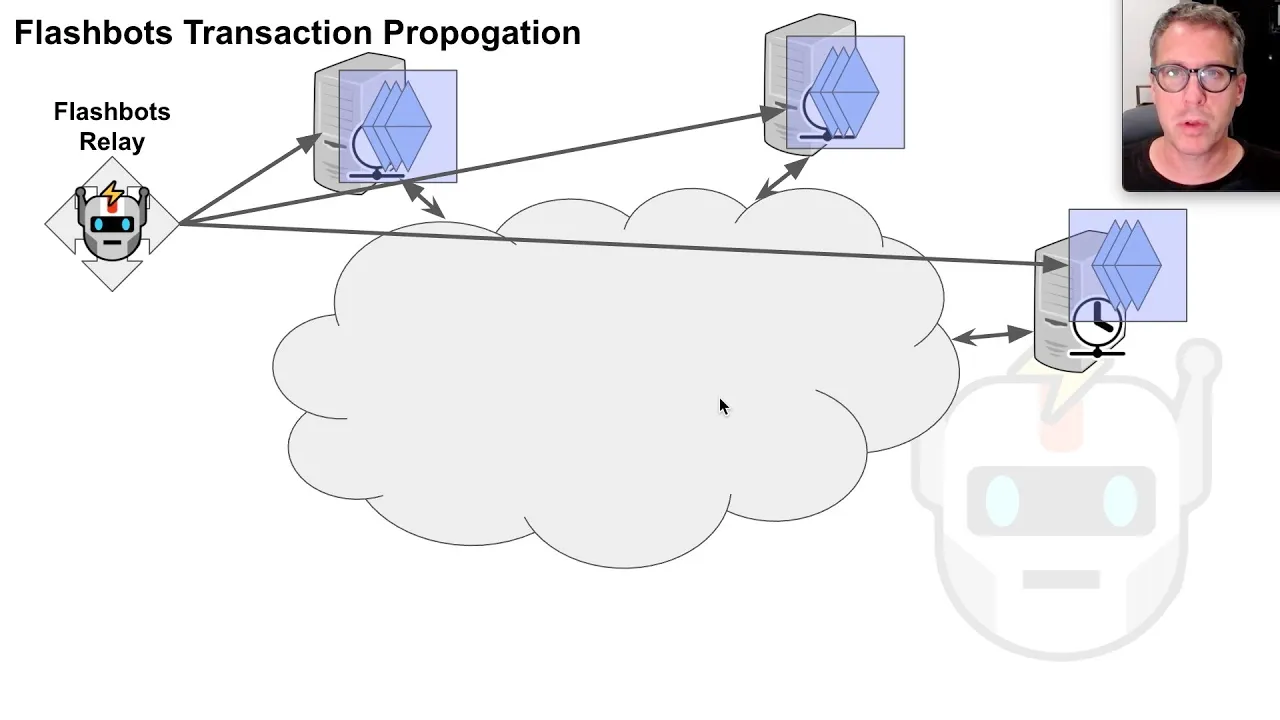
flashbacks protect transactions from sandwich attacks what is a sandwich attack and how does flashbot protect against sandwich attacks let's take a look here we have alice and she wants to send the transaction to the ethereum network now there are other users that have already submitted their transaction and waiting for their transaction to be mined on this block over here the place where these pending transactions the transactions that are yet to be mined are stored is called mempool and everyone can see all of the pending transactions inside the mempool alice submits her transaction her transaction gets included in the mempool now because the mempool is public anyone can see all of the pending transactions inside the mempool a bad actor eve can look at all of the pending transactions and try to submit her transaction in the same block to exploit alice's transaction for example he can try to submit her transaction before alice's transaction to make some profit this is called the front run or there might be a transaction where eve submits transaction right after alice to make some profit this is called a background and maybe it makes sense for eve to submit a transaction in between alice's this is called a sandwich attack this is a common attack used on dexes like uni swap eve sends two transactions on unisop sandwiching alice's transaction to make some profit and of course eve is not the only actor that is looking for sandwich opportunities and nothing is stopping them from doing a sandwich attack on a sandwich attack sandwiching a sandwich using flash spots how can alice protect herself from sandwich attacks instead of sending her transaction to the ethereum network alice sends her transaction to the flashbots relayer flashbots relays her transaction to a set of miners that are running flashbots these miners also have a mempool where pending transactions are stored however unlike the ethereum mempool which is public so anyone can see all the pending transactions the mempool of flashbots are private only the miners that are running flashbots can see the pending transaction eve and rob can see all the pending transactions inside the public mempool but they won't be able to see the pending transactions inside the mempool maintained by flashbots alice's transaction gets included in the mempool of the flashbots and because their transaction is private even rob cannot see her transaction so they cannot perform a sandwich attack this is how flashbacks protect transactions from getting sandwich attacked the user who sends a transaction to the flashbots is called a searcher the transaction that you send is called a bundle actually you can send multiple transactions at once so this is why it's called a bundle the server that you're sending the bundle is called a relayer and the relayer broadcast their transaction to the miners running flashbot let's build a simple script that will send a transaction to flashbots the packages that you'll need to install are here ethers and a plugin called flashbots ethers provider bundle and we'll also install some typescript libraries and be sure to fill out the file.m with an ethereum rpc url for this example we'll send our transaction to the gorlie testnet and for the ethereum rpc url i'll use a url from inferior.io and then also paste in a private key of your account the contract that we're going to be calling for this example is called contract waste gas and as the name implies what it does is just burn gas now for the flash spots to include your transaction in the block there is a minimum amount of gas that you need to use and that minimum amount is 42 000 gas so this is why we have a contract that simply burns gas and inside source.index.ts this is where we will write our script to send our transaction to the flashbots first we'll import providers and while they from ethers.js and we also import some stuff from the flashbots library for convenience we'll declare some constants gray is 10 to the 9 and ether is 10 to the 18. notice that here we're not using any big number library javascript now supports bigint and these are the syntax for using bigint this script will run on the gourley testnet so the chain id is equal to 5.
we'll send our transactions to the flashback at relay gordyflashbots.net initialize the provider so that we can connect to the ethereum network for the url we're passing an efrpc url from the environment variable which you will specify inside the dot m file and then we will initialize a wallet where the private key also comes from the environment variable dot m.file next we'll write the script that's going to submit a transaction to the flashbots i'll name this function async function main we'll write our code inside here and we'll execute it by calling main the first thing that we need to do is create a wallet this is a wallet different from the wallet that we imported from the private key the purpose of this wallet is to establish identity when we're submitting a transaction to flashbots you can either create this wallet by pasting in a private key or you can also call the function wallet.createrandom for this example i'll initialize a wallet with this private key and then we'll initialize the flashback providing the provider the signer this is the wallet that we just created here and the flashbots endpoint we'll send the transaction to the flashbots on every block until our transaction is mined to do that we type provider.on block so this is the function that will be executed on every block and then we will put our code inside here first thing that we'll do inside this code block is log the block log the current block next we'll sign a transaction by calling flashbot dot sign bundle and notice that we're passing in our array which means that we can sign multiple transactions but for this example we'll submit one transaction passing in the signer this is the wallet that we initialized with our private key and inside the transaction object we'll put the details of the transaction the chain id is equal to the constant that we define which is equal to five this is the quarterly test net transaction type we'll set it to two this is eip1559 transaction we'll set max fee per gas max priority fee gas and gas limit to these numbers i got these settings from another tutorial which i'll put the links in the descriptions moving on the amount of heater that we're going to be sending is 0.
the data that we're going to be sending is empty data so just 0x now if we were to call another function then this data will be abi encode of the function and the inputs and the contract that we're going to be calling is this contract this is the address of the waste gas contract that is deployed on the coordinate network when this transaction is executed inside the waste gas it's going to call the fallback function and just burn some guess once the transaction is signed we'll target the block to be the next block from the current block by saying target block is equal to the current block plus one we'll run a quick simulation on the transaction that we're about to submit by calling flashbot.simulate passing in the signed transaction and the target block if there's an error in the simulation then we'll log the air browse wheel console.log simulation is successful if you want to take a look at the full detail of the simulation then comment out this code and you'll be able to see all of the details stored in the sim once the simulation is successful we'll actually send our raw bundle passing in the signed transaction and the target block and then we'll check that there is no error in the bundle that we just sent now we don't want to be keep on sending a transaction that fails on every block or send a transaction that's already been mined to either stop sending a transaction bundle if there's an error or if the transaction is mined to do that on the rest object that we assigned over here we call the wait function and if this response bundle resolution is equal to flashbots bundle resolution dot bundle included this means that our transaction was mine so we'll console.log some details of the transaction and exit the script else if the bundle resolution is equal to block passed without inclusion this means that our transaction was not included in the target block then we want to continue running the script so we'll just log not included in target block or else if there's an error with the account announced then we'll just exit the script and this completes a simple script that will submit a transaction to the flashbot let's now run the script and make sure that you have already filled out the dot m file open the terminal and then type emb dollar sign parentheses cat dot emb this command will read the content of dot emb file and the emb command will load the content of emb file into the environment variable and then followed by the actual command to execute the script mpx ts node source index dot ts notice that after several tries our transaction was mined when you submit a transaction you would usually see that a transaction is pending but using a flashback this transaction will appear instantly again this is because flashbacks use a mempool that is private because the transactions are not public your transaction sent to the flashbot is protected from sandwich attacks
Up Next
31:49
Flashbots NFT Minting Bot with TypeScript and Ethereum
@epheph33
59.5K views•2021-09-04

52:00
Hybrid Key Establishment in Production: Post-Quantum Cryptography
@durumcrustulum
14.7K views•2025-08-27
11:06
Solidity Vault Smart Contract with Deposit and Withdraw Functions
@smartcontractprogrammer
11.7K views•2022-05-24

11:49
Understanding Ethereum: A Comprehensive Beginner's Overview
@99Bitcoins
3.1M views•2018-06-26
Related Study Plans & Knowledge Roadmaps
Structured learning paths in Blockchain & Crypto
blockchain-and-crypto
MPC Wallets: TSS, DKG & Secure Custody
01Foundations of Cryptography & Digital Signatures
02Secret Sharing & Introduction to MPC
03Distributed Key Generation (DKG)
+ 2 more learning modules
24h5 modules
Explore Roadmap
blockchain-and-crypto
ERC-4626: Yield Aggregators & Leverage
01Blockchain, Ethereum, and Solidity Foundations
02DeFi Primitives: Lending, Pools, and Yield Farming
03Mastering the ERC-4626 Tokenized Vault Standard
+ 3 more learning modules
35h6 modules
Explore Roadmap
blockchain-and-crypto
DePIN: IoT Registries, Proofs & Rewards
01Foundations of Blockchain & IoT
02Introduction to DePIN and the Flywheel Effect
03Designing IoT Device Registries & Secure Identity
+ 3 more learning modules
30h6 modules
Explore Roadmap
blockchain-and-crypto
Building EigenLayer AVS: Operators & Contracts
01Blockchain, Ethereum, and Smart Contract Basics
02Proof of Stake and Ethereum Staking
03Introduction to EigenLayer and Restaking
+ 3 more learning modules
24h6 modules
Explore Roadmap