



















![Host Your Own Tor Hidden Service with an Onion Address [Tutorial]](https://i.ytimg.com/vi/GVMjk9pj2Cw/maxresdefault.jpg)







When Tor is blocked by internet service providers or network administrators, users can bypass censorship by configuring the Tor Browser to use bridges (non-public relay nodes) and pluggable transports (traffic obfuscation techniques), which make Tor traffic appear as normal web traffic to prevent detection through deep packet filtering.
Bypassing Tor Censorship: Bridges and Pluggable Transport Guide
Added:Basic understanding of the Tor network and the fundamentals of onion routing (entry, middle, and exit relays).
How Internet Service Providers (ISPs) and firewalls perform network censorship, including IP blocking and DNS filtering.
The concept of Deep Packet Inspection (DPI) and how network administrators identify specific protocol signatures.
Fundamental networking concepts, specifically the TCP/IP suite, routing, and how proxy servers function.
In-depth analysis of specific pluggable transports, such as obfs4, Snowflake, and meek (domain fronting).
Traffic analysis and website fingerprinting countermeasures used to detect or protect obfuscated traffic.
Configuring and hosting Tor Onion Services securely under adversarial network conditions.
Comparative study of alternative censorship circumvention technologies like Shadowsocks, V2Ray, and decentralized VPNs.
397 views1likes13:03Original Release: 2024-06-11
okay so now that we have Tor Browser installed let's go ahead and make sure that it's working as expected and is routing all of the traffic through the tour Network now I'm going to be using the tour browser on Windows but as seen before the interface is identical on Windows Linux and OSX the installation is different and I showed you how to install it on all of these operating systems so once it's installed using the browser is exactly the same so I'm going to double click the launcher and as you can see you get a normal browser window and don't maximize this window ever and I'll talk about that later but for now just to check to make sure that tour is working I'm going to go to check.
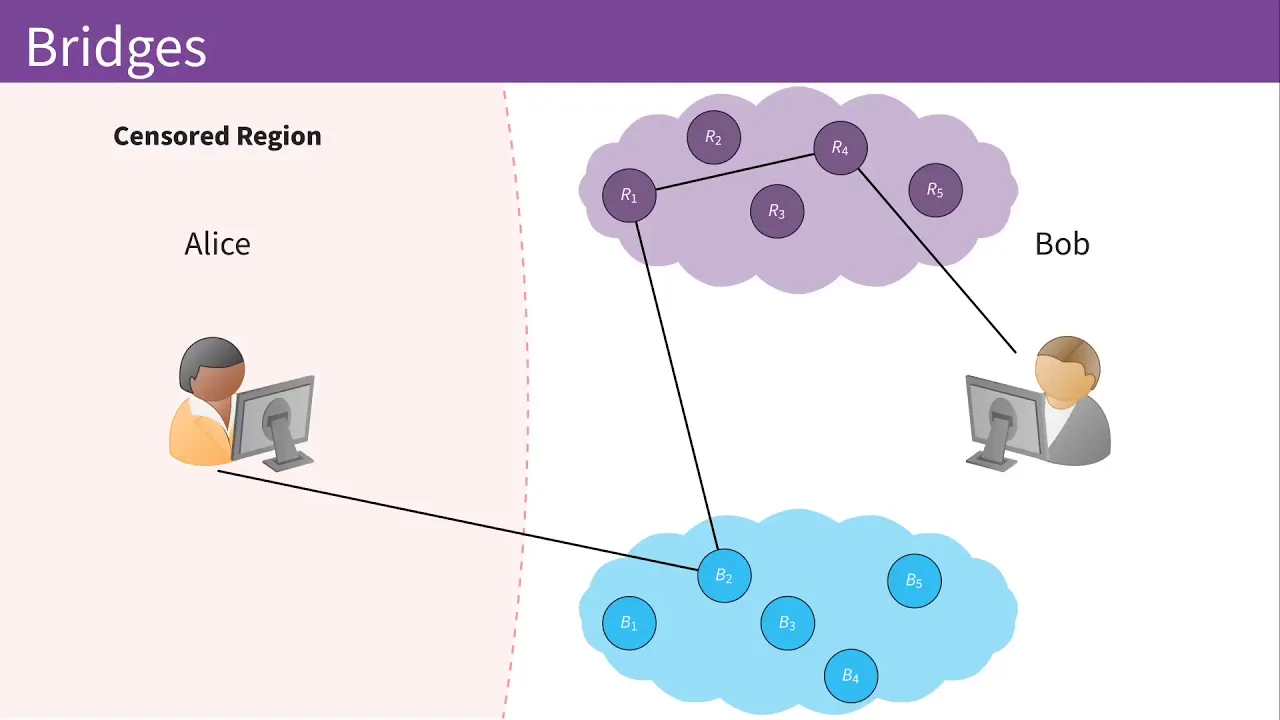
torproject.org and as you can see it's saying congratulations this browser is configured to use tour and it's giv us the IP that our browser appears to be coming from so this is not my real IP this is the IP that I will appear that I'm coming from so this is all perfect and I'll talk about more tour settings in a future lecture but right now I want to show you how to bypass tour being blocked so in case you came to this website and it didn't load or if you saw a warning here saying tour is not working then this could be because your network administrator or your internet service provider is blocking you from using tour see when you try to access tour as I mentioned before the first thing you'll have to do is connect to the tour Network and send your traffic to a random t node so you're going to pick one of these nodes and you're going to send your traffic through it as the first node the problem is before you can actually connect and send data to this node your data can easily be intercepted by your network administrator or your internet service provider before it even reaches the first node and before it's even able to connect to the tour Network so what your internet service provider or ISP can do is they could identify all the available Tor nodes right here the white circles because they are publicly available and then just block them all prevent you from connecting to any of these white circles so therefore whenever you try to connect to tour you're passing by internet service provider which is running a firewall checking if you're trying to connect to any of these nodes and if you are it'll block your connection the result of this is when you come in to load this page it'll either not load or it's going to tell you that you're not using the tour Network a simple solution to this is to use a Tor Bridge as the first node what we mean by Tor Bridges they are normal nodes similar to all the white circles that we can see in here but they are not publicly available so the only way that the internet service provider was able to block us is because they know all the white circles they know all the public nodes and they have a rule in their firewall to prevent any user from connecting to any of these white circles so to bypass this we can just use a node that is not publicly available it's not being advertised that way when we try to connect to it the internet service provider will not have this node in its list and therefore we can connect to it and then continue using T going out to another website or even going in and accessing an onion service so this is pretty good it's a pretty good solution until firewalls and service providers became smarter and implemented more advanced methods what they started doing is they started using deep packet filtering or what's known as DP pi to identify T traffic and block it so they don't even care about which node you're trying to connect to they started analyzing all traffic that you sent out of your computer and they managed to identify what tour traffic looks like so like I said before when you use tour they can't really see which websites you're trying to go to but they'll be able to see that you're trying to use the Tor Network either by identifying the node that you're trying to connect to or by using the packet filtering which will tell them that the traffic of this user matches a signature of a tour traffic therefore this user is using tour therefore we will block this traffic so the solution to this is to use a pluggable transport plugable transports will try to make your traffic look similar to any other normal traffic so when you're trying to connect to a bridge we're going to use a bridge that can use a pluggable transport and this way all the traffic that we're going to send will not look like tour traffic it will looks similar to traffic that's generated when you're trying to access Google or Facebook or any other website similar to any normal web traffic now this is a pretty good solution it will work in many cases but it can still fail in some instances but the worst case scenario even if it fails the internet service provider will be able to know that you're using tour but again they won't really know which websites you're trying to access unless they run a more sophisticated attack now keep in mind this will slow down your connection so if you were able to browse this page and it's telling you that everything is working then maybe you don't you shouldn't really use them it really depends on your case and in the next lecture I'm going to show you how to configure tour to use a bridge with a pluggable transport to access the tour Network even if it's being blogged okay so now that we know what Bridges and pluggable transports are let's see how we can get them and configure our tour browser to use them so we can access tour even if it's being blocked by our internet service provider or by our network administrator so the first thing you want to do is right here I have my normal Firefox browser this is not detour browser and I've loaded the bridge database which you can get by going to bridges. torproject.org I'm going to include this link in the resources of this lecture and once you're here you can just click click just give me Bridges to get the normal bridges that will allow you to access tour if the firewall is only blocking the known tour nodes so if it's not using DPI and we can also set the advanced options here and select a pluggable transport so that we can access tour even if the firewall is using de packet filtering analyzing our traffic and blocking all traffic that seems like it's tore traffic so I'm going to keep everything the same I'm going to keep using the same plugable transport but as you can see we have a number of options that you can try if one of them didn't work you can try the other one but I'm going to keep this on Ops 4 so right now all I have to do is just click on get ridges but if this page did not load for you because chances are if your service provider is blocking you from us using tour they might be blocking this as well so in order to get your Bridges you can send an email to Bridges at torproject.org you have to send this email from either a Gmail a Yahoo or a rise up account once you do that if you just type bridges in the email you will actually get an email with all the available Bridges and pluggable transports similar to the email that I got right here so if I wanted to get normal Bridges so bridges that you can get by clicking on the green button here all I have to do is just send an email saying get Bridges or if I want to get a bridge that uses a pluggable transport so similar to me clicking on the purple button here then I can send get transport followed by the transport type and again as you can see the available transport type tyes are similar to The Available transport types here that we get when we click on the drop- down list so let me show you how to get the transports if this page is blocked so all I have to do is compose a new email we're going to send this to Bridges at theor project.org and I'm going to say I want to get transport so we're doing this command and the transport I want to get is the Ops 4 so space Ops 4 we're going to send this and this will take less than a minute and you should get your bridges in an email in your inbox and perfect as you can see I have an email here if we click on this you'll see I have my bridges which I can just copy and paste them in my tour browser but as you can see right here it's working for me and it could be working for a lot of you so if this was working all you have to do is just literally click on get Bridges it's going to ask me to fill up the capture so I'm going to set this to Q so I'm going to try to fill it hopefully I get it right from the first time and perfect as you can see I have my bridges that use the Ops for pluggable transport as you can see so all I have to do is select all it's already selected I'm going to copy it contrl C and then I'm going to go to my tour browser which I have already loaded before I'm going to go on tour network settings I'm going to take the first box T is censored in my country I'm going to click on provide a bridge that I know and I'm going to paste the bridges that I just copied crl + V and I'm done I'm going to click on okay and now Tor should be going through the bridges that we just configured it so if again you'd only need to do this if this page did not load or if it loaded and told you you're not using the tour browser so in my case it's already working but I'm just going to double check to make sure that I didn't break anything by using the bridges and perfect as you can see it's telling me that tour is working and all my traffic is going through the tour Network right now now like I said with this method you might notice that the connection will get a little bit slower than a normal Tor connection again because obviously the traffic is being obfuscated to make it look like it's normal traffic and not t traffic also like I said in worst case scenario even if this didn't work your internet service provider will be able to know that you're using tour but they won't really be able to see which websites you're trying to go to unless they run a more active attack so if being flagged as a tour user would put you in trouble in your country or if you don't want to be identified as a person that could be using tour then a really good solution is to use a VPN and I'll talk about that in the next lecture but for now this is a free and a very good solution to access the tour network if it's being blocked
Up Next

11:20
Algorithmic Bias in AI: 5 Types and Fairness Solutions
@crashcourse
231.6K views•2019-12-13

57:48
Secure Multiparty Computation (MPC): Foundations & Challenges
@SimonsInstitute
7.3K views•2015-05-28

59:47
Meaningful Human Control of AI: A Framework for Responsible Innovation
@xomnia-BV
136 views•2021-01-27

18:41
Neural Networks Explained: Math, Layers, and Learning Fundamentals
@3blue1brown
21.9M views•2017-10-05
Related Study Plans & Knowledge Roadmaps
Structured learning paths in Artificial Intelligence
artificial-intelligence
Aligning LLMs: DPO, TRL & Custom Datasets
01Foundations of Python & Machine Learning
02Transformers and Large Language Models (LLMs)
03Aligning LLMs: SFT and RLHF
+ 3 more learning modules
24h6 modules
Explore Roadmap
artificial-intelligence
Federated Learning: PyTorch, Flower & Privacy
01Python & Machine Learning Foundations
02Deep Learning Basics with PyTorch
03Introduction to Federated Learning
+ 2 more learning modules
35h5 modules
Explore Roadmap
artificial-intelligence
Securing LLMs: Guardrails AI & NeMo Gateway
01Introduction to LLMs, Python, and APIs
02Understanding LLM Vulnerabilities & Threats
03Defending LLMs with Guardrails AI
+ 2 more learning modules
15h5 modules
Explore Roadmap
artificial-intelligence
Building Recommenders: Two-Tower & Vector DBs
01Foundations of Python & Machine Learning Basics
02Introduction to Recommender Systems
03Deep Learning & Representation Learning
+ 3 more learning modules
75h6 modules
Explore Roadmap