
![What is TCP-IP With Full Information? – [Hindi] – Quick Support](https://i.ytimg.com/vi/jPUHSlo121E/hqdefault.jpg)








![Urządzenia OT - jak stworzyć bezpieczny produkt - Krystian Rykaczewski [2024]](https://i.ytimg.com/vi/xDHoWtF5HBQ/maxresdefault.jpg)









Medical devices like patient monitors can transmit sensitive patient data in clear text over networks without encryption or authentication, creating significant security risks; the Contec CMS8000 patient monitor was found to send unencrypted vital signs data to a hardcoded Chinese IP address, demonstrating that even critical healthcare devices may have intentional backdoors or poor security configurations that could allow unauthorized access to patient information.
Reverse Engineering a Patient Monitor's Binary Protocol for Vulnerabilities
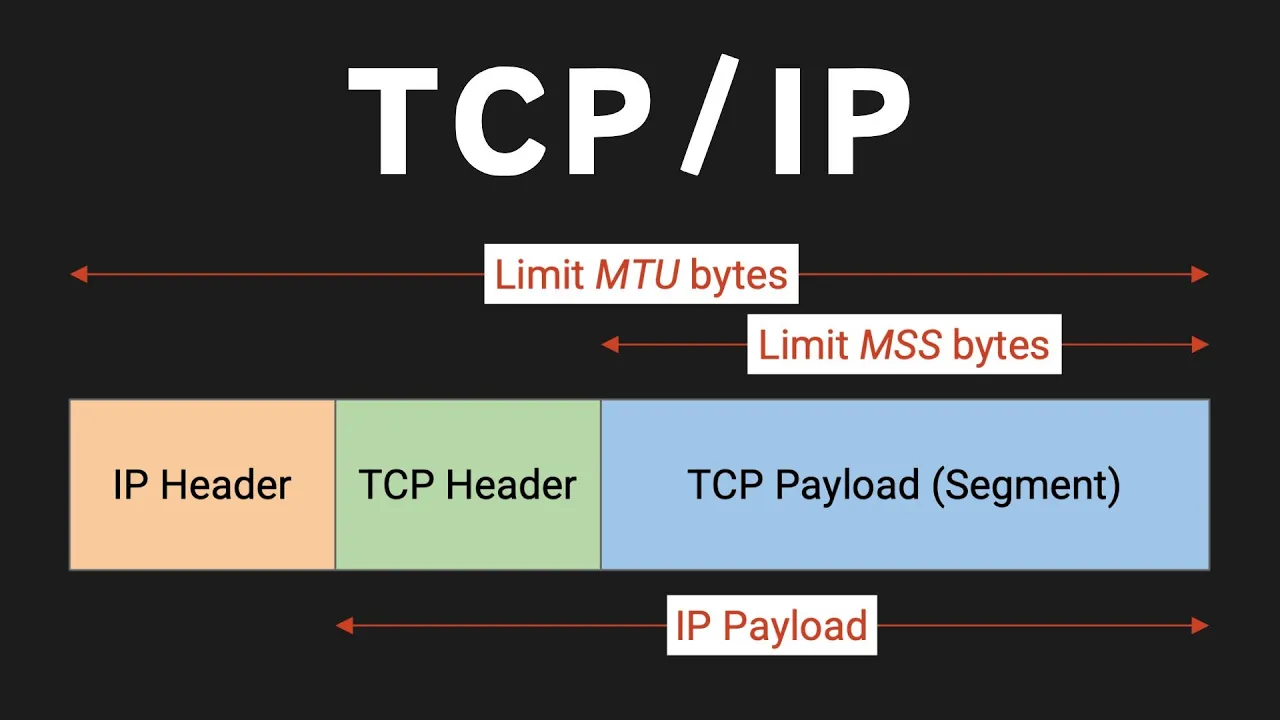
Added:Fundamentals of the TCP/IP protocol suite and network communication architectures.
Proficiency with network packet capture and packet analysis tools, such as Wireshark.
Understanding binary data representation, including byte ordering (endianness), hex dumps, and bitwise operations.
Basic methodologies of reverse engineering undocumented or proprietary network protocols.
Advanced protocol fuzzing techniques to identify software vulnerabilities (such as buffer overflows) in proprietary parsers.
Implementing secure-by-design principles, including transport-layer security (TLS/DTLS) and robust authentication, in constrained IoT/IoMT environments.
Studying healthcare cybersecurity frameworks and regulations, such as FDA pre-market guidelines and UL 2900 standards for medical devices.
Developing custom Intrusion Detection System (IDS) rules (e.g., using Snort, Suricata, or Zeek) to detect anomalous behavior in clinical networks.
46.5K views2.2Klikes34:14Original Release: 2025-02-10
what's up everybody this is Matt Brown with another iot hacking video today over on my workbench I have the cont CMS 8000 patient monitor this is a device that is used in hospitals to Monitor and alert on patients Vital Signs it is very critical that there are not security flaws in this but it has recently been the center of controversy over whether or not there is a Chinese back door in this device so so we are going to discuss that in this video and then we're going to take a look at another claim that it is sending data in an insecure way potentially to a server locally potentially to a Chinese server we're going to talk about that and we are going to decode that binary protocol and show how we can extract clear text patient data that we see on the screen over the network and so this is going to be a fun reverse engineering exercise and we're going to get to dissect some of the claims made by the United States government and the sisa agency so first what I want to do is I want to get a second opinion because they have written up their claims that there's a back door they even talk about how you know the team determined that the the functionality was unlikely to be some kind of mechanism that was you know just it was just a simple mistake right and they and and they actually think that this is this is intentionally this is an intentional back door placed by the device manufacturer for malicious purposes and the guys over at Clarity if you do not know them I'm going to drop a link to this blog post in the description of this video they have another opinion as you can see here that that it really the situation is more complicated and I'm going to give the teal R of this article their conclusions are that there's some pretty pretty serious evidence to suggest that it is not an intentional back door because of how dumb it would be G given given some of the things that they found in the manual right so so right here in the operator manual and I have a hard copy of it here too uh it mentions this Chinese IP address here it tells you that the server IP is to 20 24419 that that this device is trying to potentially connect back to and they they dig into this and what they really say is that this is really just poor security and that they're actually telling you in this manual to set up a local network but within that local subnet to have the subnet be this publicly routable IP set of IP addresses which is not a good idea it doesn't make any sense why wouldn't you just use a non routable IP address but their conclusions are pretty convincing to me that this is not a back door in the firmware update update mechanism and they do a bunch of stuff to rever to to pull the chip off stay tuned and definitely hit the Subscribe button because we are going to perform this firmware uh extraction via taking this chip off the board as well well but in this video I want to dig in to this other thing they talk about down here a little bit and this is the binary protocol that they see in wi shark when they pretend to be this other server this Chinese IP address and so we are going to recreate that today and then we're going to go a step further and something I did didn't see in the sisa article released and uh this blog as well and the just a little bit more of decoding the binary protocol and specifically the vitals here so we're going to take a couple of Vital Signs here and we're going to try to decode those inside of the packets we see actually going over the network and we're going to prove that they're not encrypted that there's no authentication happening right you can just if if you can set up a server and pretend to be this or if you have man in the middle and you can see the packets going by you're going to be able to get all of that patient data which is is not good so what we're going to talk about first is our setup and I have talked about this on the channel before this is man the middle router I'll put a link in the description I I did not do anything genius here I'm just taping together different open source Linux utilities we're going to plug our iot device into an Ethernet interface that's going to show up on the Bro interface or Bridge zero and then we're going to be able to sniff that traffic so what we're going to do though is we're going to set that up a little bit different because of the unique Network situation so this device it has a hardcoded IP address of 202.4 do415 and the server that it attempts to reach out to is119 and so what we want to do is we want to set up a situation where this box thinks that it's on the same subnet this same layer 2 Network as our Linux machine here and so that's what this is going to do for us in man inth middle router and then all we're going to do is we're going to set the subnet again to be a sl24 and then this DHCP range we're just going to put it out of the way of those IP of those two IP addresses so we're not getting any conflicts on the network we're not really using any DHCP here because again it's a static it's a statically assigned address on this device and we're already running that here and then if we come over to wire shark I'm getting packets and we're going to watch what happens when we take a packet capture we don't actually need to reboot the device today but what we are going to do is we're going to set up this fancy view so we can see everything that's going on because this is going to be helpful when we start to decode data and so there you can see uh you got you can see a couple things on the screen uh you can see uh down here is the hardest thing to read but there's T1 there's a temperature sensor so I have this like skin temperature sensor here I can hold in my hand I can see this number go up and later we're going to we're going to mess with the pul Sox stuff up here but first I want to go and look at the network packets and see what's going on so here we see a lot of connection attempts from that 115 address so that's the patient monitor it's connecting to 119 so that's that's us that's that's our Linux machine here and it's trying to connect to Port 515 now what's interesting about that port and this is a huge rabbit hole that led nowhere that I went down is that's actually commonly reserved as a printer port it's an old school printer protocol and this like like they are not using that protocol at all even though though they're using that Port they're they're absolutely not using the printer protocol but what we'll see in wire shark when we start to sniff this data is that it actually will like like wire shark will try to interpret the packets as this printer protocol which really threw me off at first I should have just looked at the raw data so but we can see that a resets getting sent back and that's because nothing on our machine is listening on this port so we're going to come over here and first all we're going to do is we're just going to set up netcat to listen on Port 115 and we going to have to run that as root because any port below 10,24 is a privileged port in Linux and yeah all all that stuff so what we're going to do and I'm just going to feed this into a hex editor and that should start getting data flowing in and then we're going to see a very similar set of data show up down here in our pcap and so what I'm going to do here with this TCP stream is I'm just going to find one of those TCP packets and I'm going to right click on it and I'm going to click follow TCP stream so here we're going to get that very similar kind of view that we got uh right up here in the article right we see this similar pieces of data and if you're wondering what these are so it's kind of hard I can't make this bigger so this says C8 89 DD so that is is a piece of clear text Data among some other binary data and so if we look over here on the patient monitor we can actually go toit menu and then we can look at patient setup and there you can see uh yeah you probably can't see that cuz here let's let's go let's go to the desk view there we go we can see right here that that is you know related to the Department patient Number bed number Doctor identifiers there that data is getting sent in clear text very obviously we're going to exit out of that menu so so so it's pretty clear that that data is getting an exit out of the other menu there we go so it's it's very clear that from the get-go that this patient data is getting sent in the clear and that's what they talked about in both those articles I want to go a step further and I want to find the actual other pieces of data like this temperature reading down here and then I have this pulse oxygen thing right here and so what we're going to do is we're actually going to capture that right now so we have our little you know fake server running here and so we got the pacap and so I I have to wait for it to get like a full set of readings and then I should get numbers up there okay cool 74.99 or 7399 awesome but 99 was a constant number that I saw there so I'm going to hit stop on my packet capture and I'm going to come down here and then I have to tell this thing to silence cuz it it detected that oh no the patient disconnected their the device all right so here we go let's look at this packet see if I can find the right thing all right gonna make sure I'm dealing with a good packet here I am all right all right yeah so this is going to be this is going to be a great packet for us to look at all right gota make sure all right sweet so let's go right here go follow TCB stream again and actually let's just just zoom in on this right here so here we can see a bit of this data packet and what we're going to do is is we're going to look through here for that value and we can do this in wi shark but I'm actually going to start to develop a python script and we're going to walk through this together and this was my process that took way longer than this video is going to be but we're going to look through all this data and we're going to try to find kind of like the needle and the Hy stack here and so we found that value 99 right so we know there was a 99 reading somewhere so if we you know come over here and we uh stop that server let's just open Python and what is so so what is 99 in HEX it's 63 all right so now what we can do is now we can start to look through here for a 60 three byte and uh I kind of know where to look and I need to find it aha so right down here we see a 63 by now obviously we'd have to like you know narrow down some false positives but here I see 63 and then I see a zero and then I see a 4 a and a zero well that's interesting what is what is 4 a so let's let's do that the other way let's say what what's that in an integer 7 74 and I think that's what we saw at one point up here for my not my pulsox my beats per minute so my pulse and so those are starting to look like those binary values so what we're going to do here is we're actually going to code a python socket server to receive to to listen on Port you know 515 and then it's going to receive these data packets and it's going to start to them and so what I have written so far is this is just very basic python socket code so we're setting up a TCB socket we're setting this thing so it doesn't it's not annoyed when we want to constantly like kill the program and recreate the socket we're going to listen on Port 515 we call the listen we call listen or we're binding and then we're listening then we accept connections and once we get a connection it will start to receive packets and so what we're going to do here here is we're just going to print out you know let's say packet.
heex and then let's surround this with just something that's going to be make it easy for us to see where the delineation between different packets is there we go and so now we're going to run our little program here and again we're going to have to run it as root because we're listening on Port 515 so there we go that data is rolling through and I'm going to once again take a reading and then we're going to get ready to control C it once we have steady data there we go okay 85 and 98 85 and 98 okay what do we want to look for and 85 and a 98 awesome patient monitor silence okay let's open up our little actually let's here we can sneak a little python terminal over here and all I'm going to use this for is for math things so 85 again we just want to do Hex of 85 right there okay so we need to look for the 50 5 byte so you'll notice that what we saw in wire shark and we're going to see here too is that it actually sends like it's sending a packet it sending like one packet and then another packet kind of really quickly and that's happening every second or so and so we can really easily start to see that some of these packets start with DD and then other packets start with 38 and so what we're going to do actually I gotta so we're going to we're going to kind of show like for reals how I how I do some of this reversing some of this is really funny and sketch but I will open vim and I'll copy all his binary data here in this packet so what do we need to look for we need to look for a 55 byte well there we go so we we see here we see a 55 and then it is uh after it there's a 0 0 now there's also z0 before it I'm just going to say that I know that this uh that this is sometimes not a zero so I'm just going to just going to speed us ahead and give us that hint so here we have that 55 and then what do we have here we have 62 oh we have a 62 actually ahead of this well what's 62 let's go back cuz I'm guessing it's that other number we're looking for hex boom there we go okay so we so so now we found these two two pieces of data here and so again let's just like Mak this nice and big so what we what we want to do is we want to find the offset of this first piece of data here and you'll notice it goes 62 and then 0 0 and then 55 and then 0 and this is a TW byte each of these are two byte values but usually you would expect it to be flipped if it was little endian but since these are bites traveling over a network Tri typically Network bite order is Big Indian which means the little part is at the front and so what we want to get is the offset here so we are going to again just going to open up a little python shell and we're going to say length of this string divided by two and there we get 322 and so that is the offset to get us to this bite right here this 60 this uh yeah 62 by so what we're going to do is we're going to come over to our script and we're going to start adding some cool little stuff to our python script and so what we're going to do is first we need to go up here and we're going to import the struct library and that's going to help us do a bunch of data parsing over multi-te little data types and so what we're going to do first is the okay so we have to remember what is the order so which one of them was first the 62 was first so that is the higher number which is is no no no no I actually got that messed up no no no the 62 is first 62 is this number which is the pulo okay so we're going to say pulsox which is called SP spo2 here we're going to set this equal to and then we're going to use this cool struct thing and we're going to say unpack and then we are going to do this which I'm going to explain in a minute what this means but for now I'm just going to write it and then we're going to only take part of the packet and the part of the packet we're going to take is 322 colon 342 because we're slicing that packet data down to just those two bytes and when you do slices in Python the first indic is inclusive and the last uh in the ending is is exclusive it doesn't include this bite at the position 32 4 so it's actually just taking two btes the the bite at 322 and the bite at 323 and so we're going to do that and then we're additionally going to also at the same time uh parse wait do I have that yeah that looks like a good line of code all right we're getting rid of this so we can see our stuff and then uh we're also because the beats per minute is right after that we're also going to go and parse that next bit there cuz again here we're talking inclusive slices and this is exclusive now what is this so we can see that if we go to like python struct so this is a very cool thing which lets us parse a lot of different common data types and so here is this fancy little table that says an unsigned short which is a TW byte integer uh is is specified by this H value and then there's the the angle brackets so what the angle brackets are doing is they are specifying the indianness so we're going to specify uh wait we're going to specify little Indian but that doesn't seem right actually I think we want to do this well let's let's let's experiment all right I think okay it seems like it should be like this we're going to we're we're we're going to find out I don't know if that documentation is actually correct or if I'm not understanding something correctly because my code over on this other screen doesn't I it makes me think this is not going to work so okay but we're parsing these two values and then let's print them out let's assume that we're going to parse these correctly and so we're going going to say that spo2 comma [Music] spo2 BPM BPM there we go all right so we're going to start this up again and it's going to connect unpack requires a buffer of two bytes whoa that's interesting and it doesn't like okay why doesn't know 322 that looks good uh yeah this is funny why isn't it working let's change this back we're just we're just running hypothesis here right now oh oh that's right that's right that's right I forgot a critical piece of code here so right now every pack pack we're trying to parse every packet and uh find something at this this really high offset but we forgot that every that only the first time we get this packet right at the beginning that gives us all that you know patient data and stuff like that and that is a lot smaller of a packet you'll see here yeah like this packet is only like what 1 2 3 four five six seven bytes right so we want want to find one of these packets and see every one of them like we're talking about right here it has the first bite of 38 and so we need to all we need to do is to put all this stuff in here we can say if packet at spot one equals 0x 38 then we do all our analysis otherwise we don't care right now that's what our problem was haha no learning things learning things on the Fly here all right cool oh yeah I forgot those are tles I have to like do like array spot zero but we can see that we're matching what we see on the screen that's awesome so now we're parsing the data for the spo2 beting and the beats per minute that is really cool so we're going to do one more field and this is a fun one and I'm going to tell it to silence that's really annoying and so it's kind of hard to see you're just going to have to trust me down here uh maybe we can switch to the desk cam really quick aha there we go you can see that this say temp t121 so that is this little skin temperature sensor so I can hold it with my fingers and it will get bigger so that is kind of cool and this this is going to be a little bit of a challenge because that is a floating Point that's not going to be as easy to decode as a straight up integer and so what I want to do is I want to find again it's going to be in this same packet uh you can just just believe me I've been reverse engineering this for hours and so let's okay yeah let's let's let this stabilize actually okay so 25 uh okay so 24.9 okay oh okay because what I want to do is I want to get that temperature to stabilize and then over here I'm going to hit contrl C and we're going to be able to find and and we're going to be able to find the float inside of this data somewhere so okay I'm going to hit control I when when when it goes to 24 okay I stopped it we're coming over here so 24.0 we want that to be a float and so what we're going to do to find out what that should be is we're actually going to come over here and need a cyber Chef so if we want you know something to be 25.0 and we can say you know bloat oh really does it not like that one to blow okay this is really funny because I just switched to a different cyber chef and it's not acting the same way that's so dumb cyber Chef because you know let's use this one who wants my data yay oh this is the one that works okay 25.0 float yeah so we're going to change it to a float and then what I want to [Music] do wait no I want from float right yes I want from float and then I want to say to hex so here is what the floating Point number should look like in our data Stream So 41 C800 Z so let's look for a 41 and a C8 in our binary data so 41 unless I control seed it too fast which is always possible there's [Music] 41 41 c0 I think I control C to too fast so what we're going to do is we're going to kind of cheat okay so we we see the 41 at the end I have a hunch that this is it so if I control C it too fast then it was the temperature would have been higher than it was so it been like or no it was like [Music] 24.9 okay there's that 41 C1 99 A1 okay yeah yeah yeah so I think this will actually serve us really well oops oops wrong way okay so this is potentially yeah [Music] 41 okay let's like put this in and let's do it backwards I I I think this is it so we're going to say from hex and then we're going to say to float I'm doing it wrong big Indian little Indian ah there we go we found it guys all right so our offset is one two three four we just count it from the top five six seven eight okay so there it is eight all right so now we're going to just call it T1 to one struct unpack and we're going to say you know there's our Indian flag F comma packet and our offset is going to be is going to be eight and then we're going to go four bytes so 12 so there's our packet and we are going to print out T1 our floating point value oh yeah here we're going to fix we're going to kind of fix this up we're going to have it not print out in that tle format there we go all right here we go starting it and I'm going to hold on to the temperature sensor and we're going to have the pulseox on awesome 26.5 Yep looks good it's heating up and now we have our other values so now we can capture all three of those values and there are certainly others that we could reverse engineer in the same fashion right I could hook up all of the other probes and stuff like that and we could figure out where in the binary protocol the offsets for those data fields are but I think that's pretty good to show us that we are able to write a program that's able to completely parse this data and act as this server and this kind of a server is potentially what that that Chinese University could set up to capture data where these devices have been misconfigured and have access to the internet and the routing is such that they actually will get routed out to the internet and properly routed back over here again it might not happen that way in reality but this is a huge risk and again there are telling people to set up these systems inside of the hospital so if an attacker was on the local network at the hospital they would be able to see this data and it's not secure I if you have one of these devices honestly if you don't have remote monitoring on it just unplug the ethernet and don't use the Wi-Fi right like that's probably the best solution for this device uh definitely don't follow their terrible advice on how to configure it in the manual but I hope I hope you saw in this video how the process of reverse engineering these these binary protocols is slow sometimes and sometimes you take like a couple steps forward and a couple steps back right I I went down the rabbit hole of thinking it was actually using that printer protocol that we saw it be decoded as in wire shark right so uh when you're reverse engineering these custom protocols these binary protocols you're you're chipping away and you're gaining a little bit more knowledge and a little bit more knowledge you're you're testing hypotheses you're ruling them out and eventually you get to a really cool result and the other thing you have to remember is that you don't have to decode everything right I didn't write a decoder that decoded everything in that packet I just decoded really interesting data that I wanted to get out of the protocol so thank you for watching this video If you like this kind of content Please Subscribe because it really helps me to grow the channel and to make more awesome educational content for people like you and uh if you're a company and you're watching this and you need a device pentest please consider Brown find security have a good day
Up Next

11:33
Portal on Nintendo 64: Performance Optimization and Technical Challenges
@james.lambert
599K views•2023-11-16

57:48
Secure Multiparty Computation (MPC): Foundations & Challenges
@SimonsInstitute
7.3K views•2015-05-28
13:03
Bypassing Tor Censorship: Bridges and Pluggable Transport Guide
@Coding_ForEveryone
397 views•2024-06-11
18:41
Neural Networks Explained: Math, Layers, and Learning Fundamentals
@3blue1brown
21.9M views•2017-10-05
Related Study Plans & Knowledge Roadmaps
Structured learning paths in Artificial Intelligence
artificial-intelligence
Aligning LLMs: DPO, TRL & Custom Datasets
01Foundations of Python & Machine Learning
02Transformers and Large Language Models (LLMs)
03Aligning LLMs: SFT and RLHF
+ 3 more learning modules
24h6 modules
Explore Roadmap
artificial-intelligence
Federated Learning: PyTorch, Flower & Privacy
01Python & Machine Learning Foundations
02Deep Learning Basics with PyTorch
03Introduction to Federated Learning
+ 2 more learning modules
35h5 modules
Explore Roadmap
artificial-intelligence
Securing LLMs: Guardrails AI & NeMo Gateway
01Introduction to LLMs, Python, and APIs
02Understanding LLM Vulnerabilities & Threats
03Defending LLMs with Guardrails AI
+ 2 more learning modules
15h5 modules
Explore Roadmap
artificial-intelligence
Building Recommenders: Two-Tower & Vector DBs
01Foundations of Python & Machine Learning Basics
02Introduction to Recommender Systems
03Deep Learning & Representation Learning
+ 3 more learning modules
75h6 modules
Explore Roadmap