















![[Intra Rede] Ferramentas de segurança que um administrador de redes deveria conhecer](https://i.ytimg.com/vi/IcKSPGb1WnE/maxresdefault.jpg)



A CHROOT jail is a Linux security mechanism that creates an isolated environment by changing the root directory to a restricted subdirectory, preventing applications and processes from accessing or modifying files outside this designated area; this isolation protects the real root filesystem by trapping all activities within the chrooted environment, which requires mounting system directories like /proc and copying essential configuration files such as /etc/resolv.conf to maintain functionality while ensuring that any potential security breaches remain contained within the jailed directory.
Creating and Using a Chroot Jail in Ubuntu Linux | Part 2
Added:Basic proficiency with the Linux command line (CLI) and managing system files with sudo privileges.
Understanding of the Linux Filesystem Hierarchy Standard (FHS) and how absolute versus relative paths are resolved.
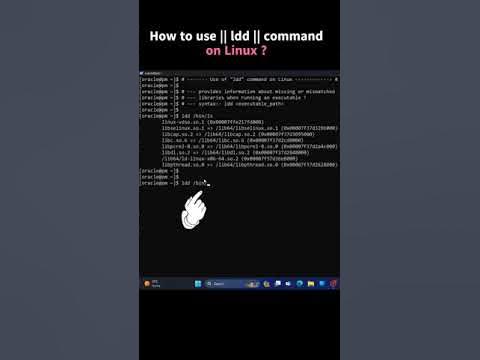
Knowledge of shared library dependencies in Linux and how binaries utilize the 'ldd' tool to link to dynamic libraries.
Concept of process isolation and the security philosophy of limiting a process's access to the host operating system.
Transitioning from basic directory isolation to modern containerization technologies like Docker, LXC, and Linux Namespaces.
Analyzing chroot vulnerabilities (such as root escapes) and implementing advanced security mechanisms like AppArmor, SELinux, or seccomp profiles.
Automating the creation of clean, minimal directory trees for jails using tools like 'debootstrap' or 'schroot'.
Configuring isolated network namespaces and firewall rules (iptables/nftables) to secure network services running inside a jail.
13.8K views85likes10:07Original Release: 2010-12-23
and if I wanted to I could go into that root level so like let's say let's say that here I am and I need administrative privileges so now I'm in the real rout right by PWD this is the real route this is my real false system right here so now with that installed and set up if I were to change to that directory let's say I were to go to um security and jail and list the contents notice this this you know looks a lot like my root F system but in this case I'm in security jail and if I go to my root F system you there's a security folder so if I want to I'll use the CH root command with PSE suda and security jail okay so I'm going to temporarily change my route from the real route to the fake route security jail and when I do that now look at the if I list the contents there's no security folder because I'm actually in the security jail folder two subdirectories down um but if I print my working directory for all intense and purposes the system thinks I'm in root so I couldn't recurse out of it I'm trapped or I'm in jail so to speak when I print my working directory and that's great because now any program that I run here any application it's trapped or locked into this folder and that way if something bad happens my real file system two directories up is protected nothing can get out of this folder here hence the term or hence why it's called a CH root Jail and to get out of here I'd simply type exit and once I exit now I'm at my real route so again this was my fake route up here when I did used to see true command now in my real route and there the directory is there are a few uh post setup activities that we should engage in as well let me clear the screen here um first off if I want to manage uh processes or you know list processes with the PS command or kill processes then I'll need to mount you know B basically I'll have to mount the a proc folder directory f system in the CH route um and the way to do that you know again I could do uh pseudo Mount um I'll pass it an option here I'm going to bind and I'm going to do proc and I want to go and find security and jail um in this case the the folder that I was in and then I want to go and mount it to the proc folder and again if I list security jail you know so now it's mounted to the actual prodct folder here inside the the two subdirectories that comprise or hold my my CH jail the other thing that I might want to do is if I have DNS settings remember where that is in ETC resolve. comom so again if I were to cat that notice that you know in this case I'm using name servers here and this was just automatically updated or added by network manager but I want to copy that or Implement that in my chel as well and so the easiest thing to do I could just do pseudo and copy and Etc resolve. comom and where I want to put it is the equivalent folder in my CH root jail so that's security Jail uh there is an Etc folder just like in my real file system and resolve.
comp okay and then that that'll give me name resolution so let's say you know now if I want to I can go into my I can use the command stage rout s go into my rout and run like Firefox or some other program and still I'd be able to you know resolve host names connect to the internet that sort of thing okay um now that we've set up and configured our CH Vel let's um actually activate it and use it so I'm going to use the command PSE sudo CH root um well actually before I do this again take a look at my directory structure notice here's the security folder and inside of security is the jail folder so two subdirectories down and then that's where the file system is for my C3 gel so if I were to print working directory this is root for me now with the security folder now Watch What Happens pseudo CH root and I'm going to change my route to security and jail and now when I do this now look if I list the contents there's no security folder there like there was before if I print the working directory yeah sure I'm still at root but that's not the real root that's the that's illusion um you know that's that's deception because I'm actually stuck in a CH root jail I can't recurse out of it so anything that happens here stays here and that means that my real F system is safe um but for all intents and purposes until I exit the shell the the system shell believes that this is root and I can't go any I can't recurse up or go up any further you know in reality I'm actually in security SL jail and um now that I'm here let's install a few applications and there's not very much installed here by default but I'm just going to do pseudo appt get install in Nano um oops haven't even installed Studio yet so let me do app get install Nana okay um that'll give me Nana and I I first thing I need at least a couple of text editors good grief um and you may want to install 177 megabytes I don't know if I want to wait that long I'm going go ahead and say yes and we'll come back I won't make you watch while all of these things download okay I told you I wouldn't make you wait so we finished downloading 177 megabytes worth of packages and files and we're going to unpack them so far we've installed Nano in our chroot jail and we're setting up gedit in our CH rout jail so two text editors and then the next thing I'm going to grab is some internet tools so maybe Firefox and a bit torrent client and gftp or an FTP client typically you know things I would be using on a network or internet again where I might want to protect them with a CH Gill also I'm thinking I may install inmap um netcat socat and a couple other Network Tools in my C do let's say I want to watch a graphical application from within my pH routel which I'm currently in so um one of the things I could do is simply export uh the display to my X server so to do that um you could simply say exports space display equals and then colon 0.0 and where I to do this let me let me go ahead and launch something here I can launch Firefox and I still have to I I still need to install a few more dependencies here but just to give you an idea though okay so now I'm running Firefox okay but I'm not running Firefox in my actual operating system so let's say I go to a really naughty place a bad website and my browser gets hijacked and my system gets infected well the only thing that gets infected or hijacked is actually my um I'm just go to Yahoo here one that actually gets infected would be what's in my C root jail so I can surf I can use Firefox but I'm not using you know if if I click on Firefox out here now I'm actually running it from my real operating system and where I had to go to a bad place and something got past my defenses my my far antivirus you know then my system would be infected security compromised or my browser hijacked but running it like this inside my CH root gel not so it can't get out of that folder so I could just run Firefox there um still need to install I need to app get and install a lot more applications here um if if I wanted I you know if I were willing to consume gigabytes of extra disc space I could do an entire complete other operating system but just to give you an idea of a few more applications um let me launch gedit okay and then here's gedit and the same thing here in just a graphical application I have I'm now exporting it to an X window but I'm running it from with inside my St jail okay and then if I want to again if I want to get on my S root J I would just say exit and now I'm actually in the real rout whereas before I was in the fake root
Up Next

21:21
Linux System Calls Explained: Kernel Architecture & Syscall Tracing (Part 1)
@CyberGizmo
24.7K views•2020-09-18

87:26
Introduction to Secure Multiparty Computation with Yehuda Lindell
@fhe_org
7.7K views•2021-02-04

4:55
HTTP Requests Explained: GET, POST, PUT, DELETE
@codecademy
103.1K views•2021-10-07

19:25
Enigma Machine Mechanics: WWII Encryption Explained
@JaredOwen
13.2M views•2021-12-11
Related Study Plans & Knowledge Roadmaps
Structured learning paths in Computer Science
computer-science
Container Runtimes: Namespaces, Cgroups & Go
01Linux Systems & Go Programming Foundations
02The Core of Isolation: Chroot and Filesystems
03Linux Namespaces: Process Isolation
+ 3 more learning modules
32h6 modules
Explore Roadmap
computer-science
Building a CHIP-8 Emulator: Rust & CPU Basics
01Computer Architecture Foundations (Bits & Bytes)
02Rust Programming for Systems Development
03CHIP-8 Virtual Hardware Specifications
+ 2 more learning modules
32h5 modules
Explore Roadmap
computer-science
Building BitTorrent: Go, P2P & Concurrency
01Go Fundamentals & Concurrency
02Networking Foundations & P2P Architecture
03Bencode Parsing & Torrent Metadata
+ 3 more learning modules
26h6 modules
Explore Roadmap
computer-science
Actor Models (C++ Concurrency & Lock-Free)
01C++ Multi-Threading Foundations
02Thread Pools and Task Scheduling
03Atomics and Lock-Free Queue Design
+ 3 more learning modules
45h6 modules
Explore Roadmap