



![25. Master Certified in CyberSecurity [CC Exam]: 400+ Top Practice Questions & Answers](https://i.ytimg.com/vi/_a_tdho7jnc/maxresdefault.jpg)













![Docker Tutorial for Beginners [ FULL COURSE in 3 Hours ] #dockertutorial #DockerForBeginners](https://i.ytimg.com/vi/iARL7iFyasE/hqdefault.jpg)


A container is a sandboxed process that runs in isolation using Linux namespaces (for process isolation) and cgroups (for resource limits), containing all application dependencies within its own isolated environment; containers are created from images, which form a hierarchical tree structure with parent-child relationships, allowing efficient sharing of common layers and enabling multiple application versions to run on a single operating system without conflicts.
What Is a Container? Container Technology and Image Layers Explained
Added:Basic understanding of operating system concepts, particularly the distinction between the kernel and user space.
Familiarity with traditional virtualization, such as Virtual Machines (VMs) and hypervisors.
Fundamental knowledge of the command-line interface (CLI) and basic terminal commands.
An understanding of application deployment challenges, specifically dependency conflicts and environmental consistency.
Container orchestration tools and concepts, specifically Kubernetes and Docker Swarm, for managing multi-container deployments at scale.
Integrating containerization into Continuous Integration and Continuous Deployment (CI/CD) pipelines.
Container security best practices, including image vulnerability scanning, minimal base images, and non-root execution.
Advanced container networking and persistent storage solutions, such as volumes and bind mounts.
Microservices architecture design principles and how they leverage containerized environments.
679.2K views10.5Klikes18:23Original Release: 2017-05-16
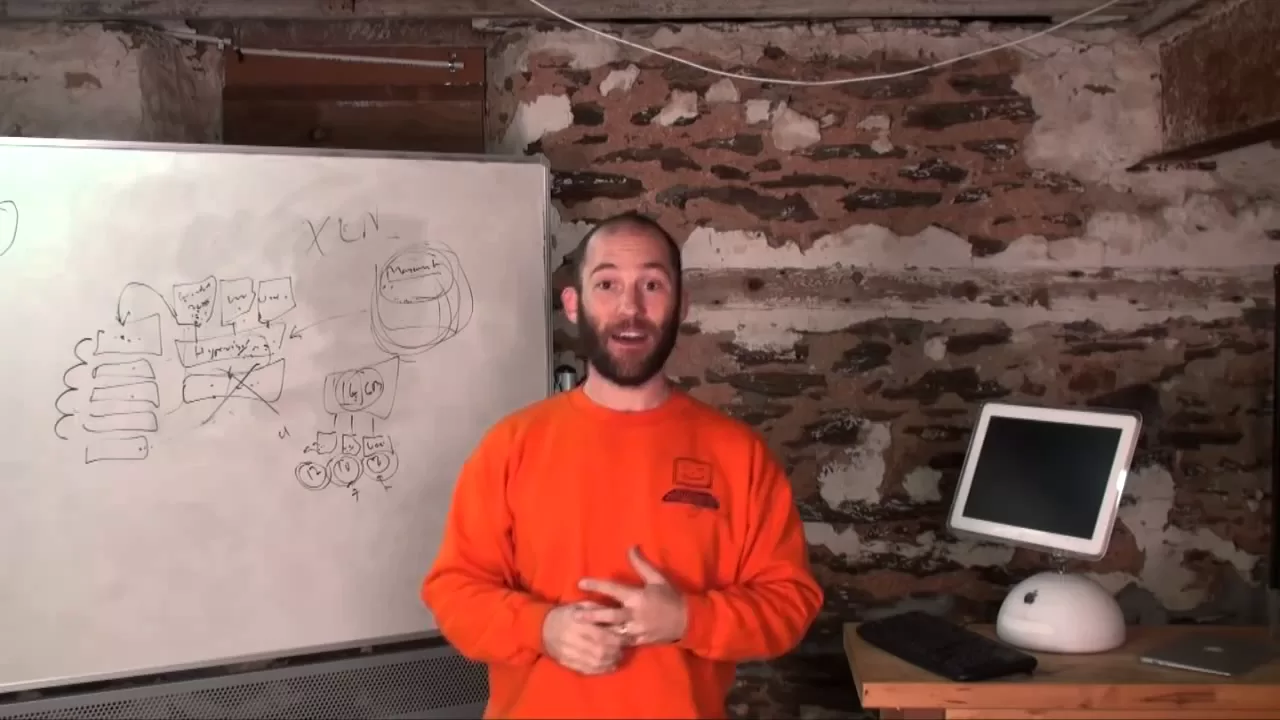
[Music] hi my name is Ben Cari and I'm here to talk to you about what is a container now that may sound like a a very basic question to be asking in 2017 but I can tell you every time we go to VM world every year and we talk about vsphere integrated containers and and container um Technologies all the kinds of stuff that we're working on here at VMware often times we get a kind of a sheepish look and like actually what is a container like you know I maybe you've heard a few things about it I you know I know some things maybe some some of the things I know are wrong um so before I deep dive into Vere integrated containers which is going to be a subsequent lightboard I actually just want to tackle this fundamental question of what is a container um so I think the word container to some extent is used to cover a multitude of things that's one of the things that I think is a little bit confusing about it so let's start the very most simple uh the very simplest form of what a container is so here we have an operating system okay an operating system this could be an a VM it could be bare metal doesn't matter but it's an operating system uh and for argument sake um let's say that it's Linux I mean these days most containers are in Linux and inside of that operating system you can run processes okay now in the normal scheme of things you can run any number of processes inside of this operating system and these processes um share an address space they share a process name space they share pretty much everything now um that's useful absolutely you know in many cases you're going to be running all sorts of things inside of one of these operating systems it's designed to do that it's designed to schedule these things and that's all well and good however what if you actually want to isolate one of these processes from one of the other processes what if you want some kind of sandbox for that process to run in okay that and its most basic is the notion and the concept of a container right at least as it was originally envisaged it's basically a Sandbox for a process now what do I mean by sandbox well what I mean by sandbox is that the process for start has its own process namespace okay so when you um if I were to get a shell into this container I would see just the processes running inside of that container it has its own process Nam space um so we've got a process namespace we also have um uh uh we also have cgroups which allows us to also restrict um what this process is able to do right there are certain capabilities um there are certain um resource limits that we can apply to this container um and that allows us for a certain degree of isolation when it's combined with the process name space that's the most fundamental notion of the runtime uh definition of a container it's basically an isolated process a process running in a sandbox that typically only sees other processes or other things that are started in the same container now in the in the concept in the container concept that I've drawn here you see one process per container and that's typically the uh the way that containers are used and in fact the way that a container is used in in the docker sense and in in in in most cases that you'll see um the container process is actually completely tied in with the cycle of the container itself so when you start the container it starts the container process when the container process exits the container ends right so the container process and uh and the container life cycle are completely tightly coupled now within the container you may have other processes running right there may be um uh threads that are kicked off there may be a demon process that are started um you can actually go in and execute other process processes in in containers but typically you've got this one main process and then um and then other things running so this is what I would say um the runtime sort of basic runtime definition of what a container is it's a Sandbox for a process so then let's think about you know I said earlier on this whole notion of a container is uh somewhat overloaded um let's think about what other things um the word container um can mean well there's such a thing uh as a container image and quite often when we talk about containers we actually conflate the word container with with an image we actually mean an image and what is a container image well an image is very simply um a binary um representation it's just a a bunch of bits on a file system somewhere right um in the same way as a vmdk is a dis image and an OVA is an image uh for a VM it's basically an image that contains some binary State the interesting thing though about a container image at least in the way that we think about containers today is that there's also a notion of um a parent child relationship and image layering let me explain what I mean so uh if we start at the at the root of this parent child tree we have an image called scratch and the scratch image basically is just a completely EMP think of it as an empty formatted file system right it's it's basically nothing now on top of scratch we might have the basics of an operating system so let's say we have something like uh busy box or we might have Debian or we might have whatever right but there's some image built off of scratch that is just the bare bones of an operating system then that image can be the parent of another image and let's say that that image is I don't know let's add something into this let's say we add uh sshd into here let's say we add I don't know some um let's say we add Pearl into here whatever it is we want to add but now we have an image based off of busy box that also has sh sshd and pearl then on top of that maybe we'll have another image that has I don't know um maybe maybe a small application right the whole point though is that the images are arranged in this image hierarchy and um uh it's think of it it's very much like the notion of snapshots right like um dis snapshots you know you've got this uh binary State here and you add something and that creates a snapshot you add something else to it and that creates a snapshot the beauty of this there's a number of advantages to this a number of reasons this is really nice um one of the good things about this is that it allows you to share images right because you end up with this tree effectively and anytime that you want to run an application well you'll pull uh a branch of this tree um but the other nodes May well be shared by other things that you're running so it actually allows for quite a lot of consolidation of binary state which is a good thing right not having to shift around entire application Stacks in single files which is which can be kind of painful another big advantage of this is it allows you to concentrate specific things in specific places right and know where they are so for example um this busy box here it could be aun it could be it could be anything it could be Centos but let's say that I discover a particular vulnerability in the user libraries in Centos right or in busy box and I'm like oh wow okay I need to replace this well now I need to understand and all of the other applications that I'm running that is going to be impacted by that vulnerability well now because of this tree structure that's actually pretty easy to figure out because every single child node every descendant of this busy box node is going to be impacted by that vulnerability because I know that it's here and I know that all these things inherit from that node so by rebuilding this and then rebuilding everything else and redeploying everything else I have a high degree of certainty that the thing that I patched here is now inherited by everything else so that's also a good thing so this whole question of of of images um is tied in with this uh this whole question of uh the runtime notion of a container and it's a little bit like uh the whole class object concept right an image is like a class right it's a template for something and then you can create any number of instances of that template and it has this runtime representation so let's talk then in more detail about how we tie these things together and actually before we do that let's talk about how we build images and in fact by implication how we build containers so let's talk specifically about the docker use case because it's it's helpful to do that Docker has added a ton of really useful abstractions to the whole container abstraction this basic container abstraction that makes life way easier uh and and is adds huge value to this whole experience so let's talk about the docker file okay you may have heard of a Docker file what is a Docker file a Docker file is is basically an environment in a file in a text file and you may not know but uh the start of a Docker file is just from right from what what does that mean well from is the parent image that this Docker file is inheriting from so here we'll say from and we'll say from busy box for example and then within here we can basically run any number of things that we want to configure the image that this Docker file is going to create so Docker file ultim ends up creating an image so we use docka files and docka build to create this image tree of images that we can then use to instantiate Containers um now every line in the docker file is uh is also uh a layer um there are cache layers that's a little bit more advanced but suffice to say that a Docker file is typically uh starting point for an image um because it makes that really really easy then how do we make containers well containers come from images so we go from Docker file to image to container but uh we can also create an image from a container we can actually go from here back to here again and the way that we can do that is we can say okay I'm going to run a container and I'm going to um log into it I'm going to get a shell into it and I'm going to run install this and modify that and add this configuration file and do whatever modifications I want to make and then I can commit that as an image and then from that image create more containers so I don't have to start from the docker file I can move between uh these two things here but hopefully that's a good and helpful illustration of the relationship between these things now another thing that's worth uh worth calling out here is that you'll notice that um a container is packaged with all of its dependencies which again is distinct to some extent from from most applications most applications you'll install into your operating system and your operating system will already have quite a few dependencies in it it will certainly have the user libraries uh it may well have some Basics like SD Pearl they may already be installed in there um and um there's a presumption that there's a whole bunch of configuration and and and and operating system State already there when you type apt get install whatever you type to install your application well with with containers it's expected that all of the dependencies pretty much above the kernel are packaged inside of the container so when you run the container in an operating system you actually don't install anything right nothing is actually installed into this thing it just it sits above the operating system in its own uh in its own world and its own stack and that again is a really powerful thing and it's partly why we use this word container because the whole notion of a container is it contains right it contains everything that you need to run an application so one of the things people have found about containers that's actually really nice is you can run any any number of uh different versions of uh applications that require different versions of libraries um and you can run them all on top of a single operating system and because none of these dependencies are installed if you delete these images it's all gone right you just the whole thing is back to a completely clean State and so in the in the in the world of um uh things like Jenkins slaves this is a this is a huge Boon because we can actually run stuff on them without polluting them right so okay we've looked at images we've looked at the runtime notion of containers and we've looked at Docker files so let's tie all of this together so we have uh a thing called a Docker host and again I'm being specific to Docker at this point because it's it's it's it's the most popular thing out there and it's a helpful illustration so we'll say Docker host okay so how do we tile these things together well out there in the world somewhere there will be a thing called a registry now the registry is a thing that contains these images right these snapshots that I mentioned and you can pull and push from the registry at will okay now remember when you're pulling and pushing you're typically only pulling and pushing the bits that you need because inside of uh this host there is an image cache so if I want to run let's say my application and I do Docker pull what it's going to do is it's going to say okay how many of these uh uh parent nodes do I already have in this image cache and it will pull the ones that it needs and if I then create choose to create um a derivative of this a child of this I can push that to the registry but I'm only pushing the diff because that's all I need to push because everything else is in the registry so the beauty of this relationship here is we're pulling and pushing diffs and this image tree is then basically replicated here inside the cache uh inside the image cache as as necessary so how do I actually do all this Docker pull Docker push Docker whatever well there's a client so there is a Docker client and the client talks to a demon that runs in here demon okay so client talks to the demon the demon exposes an API of the client and the client can do all sorts of useful things like pulling and pushing images like creating a container like running a container like committing a container we've been through some of these things already but these are some of the basic things the client so the client manages the life cycle of containers inside of this Docker host but it actually does more than that it not only manages the life cycle of the containers but it's also designed to be able to configure the infrastructure inside of this Docker host as well so it's not only container life cycle management but it's also able to do uh network uh uh configuration and storage configuration so what do I mean by Network and storage configuration well um inside of this Docker host Docker will set up um um certain kinds of networking right now we're not going to go into detail on that because that that would be a topic for another day but using the client it's a it's a kind of network virtualization that happens in here using the client I can basically choose to do port forwarding uh I can choose to do all sorts of I mean there there's all sorts of plugins as well that give me much more complex overlay networking and other capabilities but from the client I can control all of that networking and I can say Okay I want to create a network for containers to talk to each other on um I want to um you know assign this container to this network I want to um create uh links uh so that containers can refer to each other by certain types of host name there's all sorts of network configuration I can do from this Docker client in terms of storage configuration um typically the the main thing I want to do with storage is to create volumes so there is a thing in Docker uh called a volume and a volume is very simply a persistent uh area of storage so a container will have or may have a volume if it wants to persist any data beyond the life cycle of the container remember early on we talked about how the process is completely tied to the life cycle of the container well the container state is also ephemeral and completely tied to its life cycle the moment you delete a container you delete all of the state that it wrote so if you actually want to persist any state you've really got two options you either create a volume and you mount it to a container or you'll push it out on a network socket to somewhere right those are the two things that that you typically do so the client manages storage the client manages let's just put a network in here right the client manages networking um and it manages the container life cycle so let's say we start a container let's say we start my app well we go client Docker run my app okay well let's say it's pulled all of the images it needs from the registry and the images are in the image cache or what it's then able to do is it's then able to set up the cgroups in the process namespace and do all the magic with the networks and all the magic with the manting and everything that needs to happen to run your application in a sandbox inside of this Linux host and of course uh you know life cycle management you've got stop you've got kill you've got delete but all the fundamentals uh are there in terms of what I've just described so to summarize when we talk about a container we're talking about a whole bunch of things we're talking about the container image and its relationship to other images we're talking about the runtime represent representation of a container we're talking about the way in which we create and build and Define what a container is and then when we tie all that together with something like a registry and a client we have this ecosystem this world in which we can then uh spin up containers control infrastructure and tile these things together I hope that was informative thanks very much [Music]
Up Next

53:38
Linux Namespaces Explained: UTS, Mount, Network, and PID Isolation
@NDC
24.5K views•2019-09-19

87:26
Introduction to Secure Multiparty Computation with Yehuda Lindell
@fhe_org
7.7K views•2021-02-04

4:55
HTTP Requests Explained: GET, POST, PUT, DELETE
@codecademy
103.1K views•2021-10-07

19:25
Enigma Machine Mechanics: WWII Encryption Explained
@JaredOwen
13.2M views•2021-12-11
Related Study Plans & Knowledge Roadmaps
Structured learning paths in Computer Science
computer-science
Container Runtimes: Namespaces, Cgroups & Go
01Linux Systems & Go Programming Foundations
02The Core of Isolation: Chroot and Filesystems
03Linux Namespaces: Process Isolation
+ 3 more learning modules
32h6 modules
Explore Roadmap
computer-science
Building a CHIP-8 Emulator: Rust & CPU Basics
01Computer Architecture Foundations (Bits & Bytes)
02Rust Programming for Systems Development
03CHIP-8 Virtual Hardware Specifications
+ 2 more learning modules
32h5 modules
Explore Roadmap
computer-science
Building BitTorrent: Go, P2P & Concurrency
01Go Fundamentals & Concurrency
02Networking Foundations & P2P Architecture
03Bencode Parsing & Torrent Metadata
+ 3 more learning modules
26h6 modules
Explore Roadmap
computer-science
Actor Models (C++ Concurrency & Lock-Free)
01C++ Multi-Threading Foundations
02Thread Pools and Task Scheduling
03Atomics and Lock-Free Queue Design
+ 3 more learning modules
45h6 modules
Explore Roadmap