









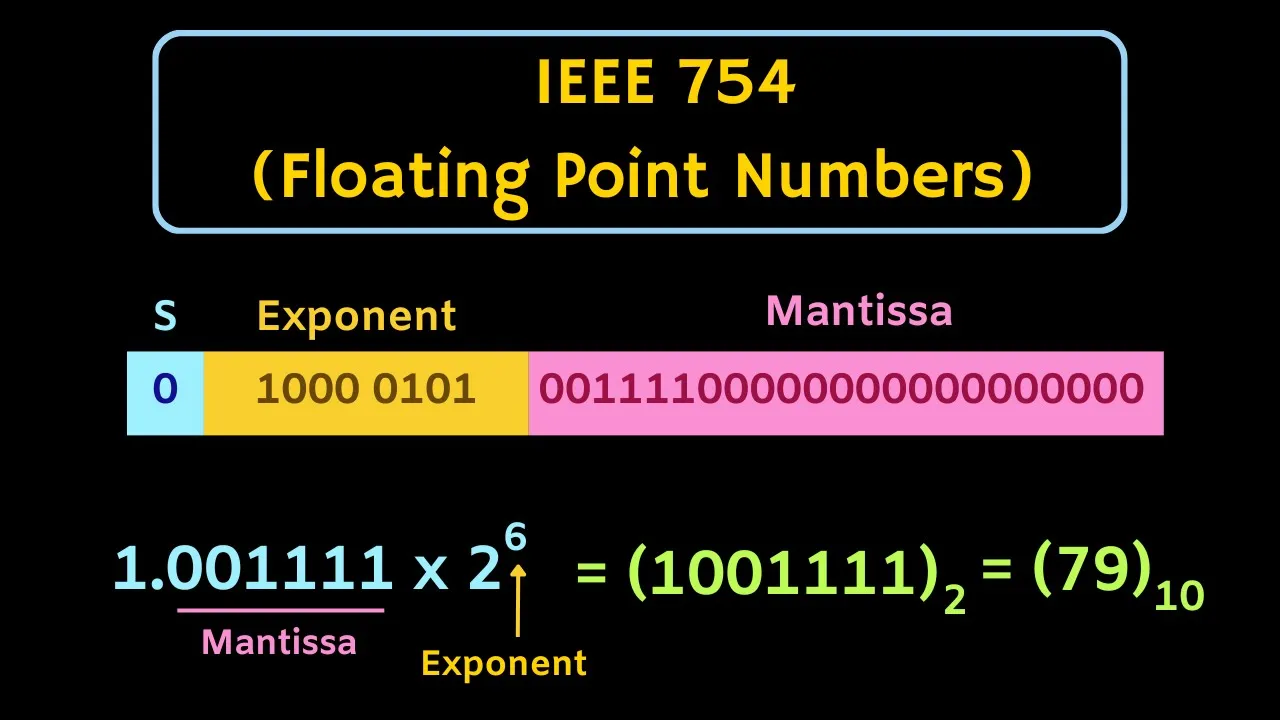

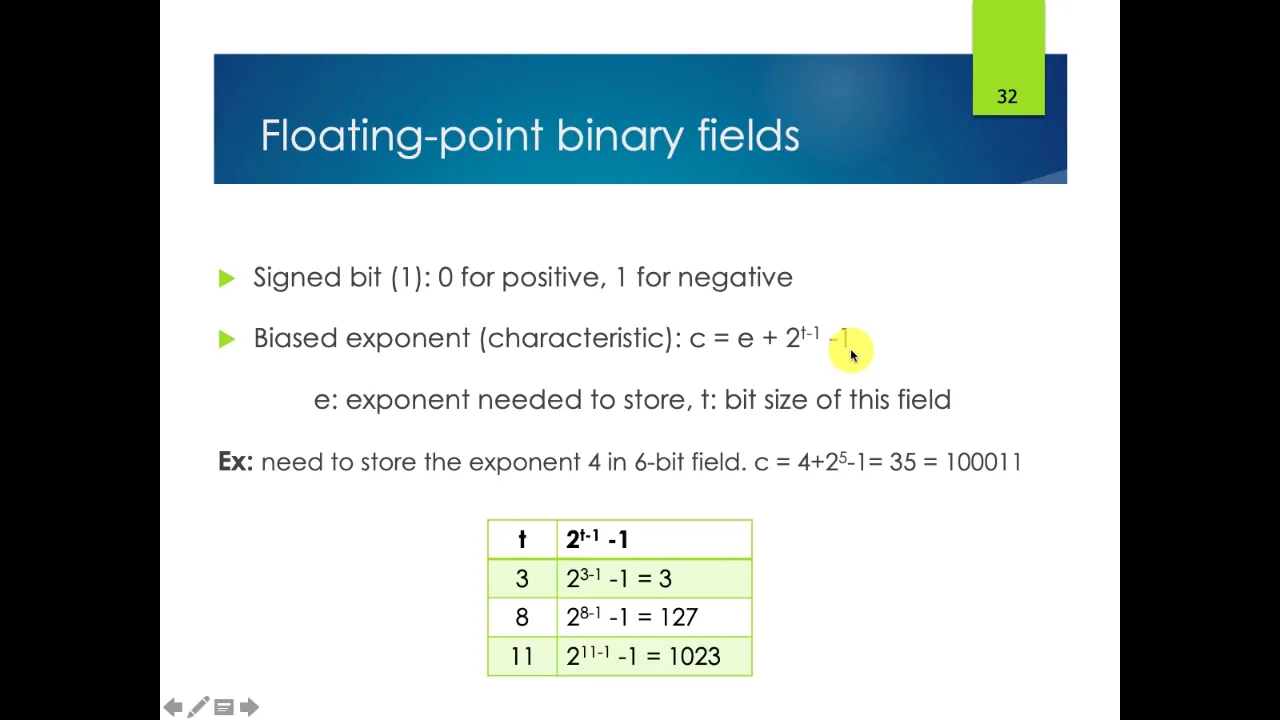
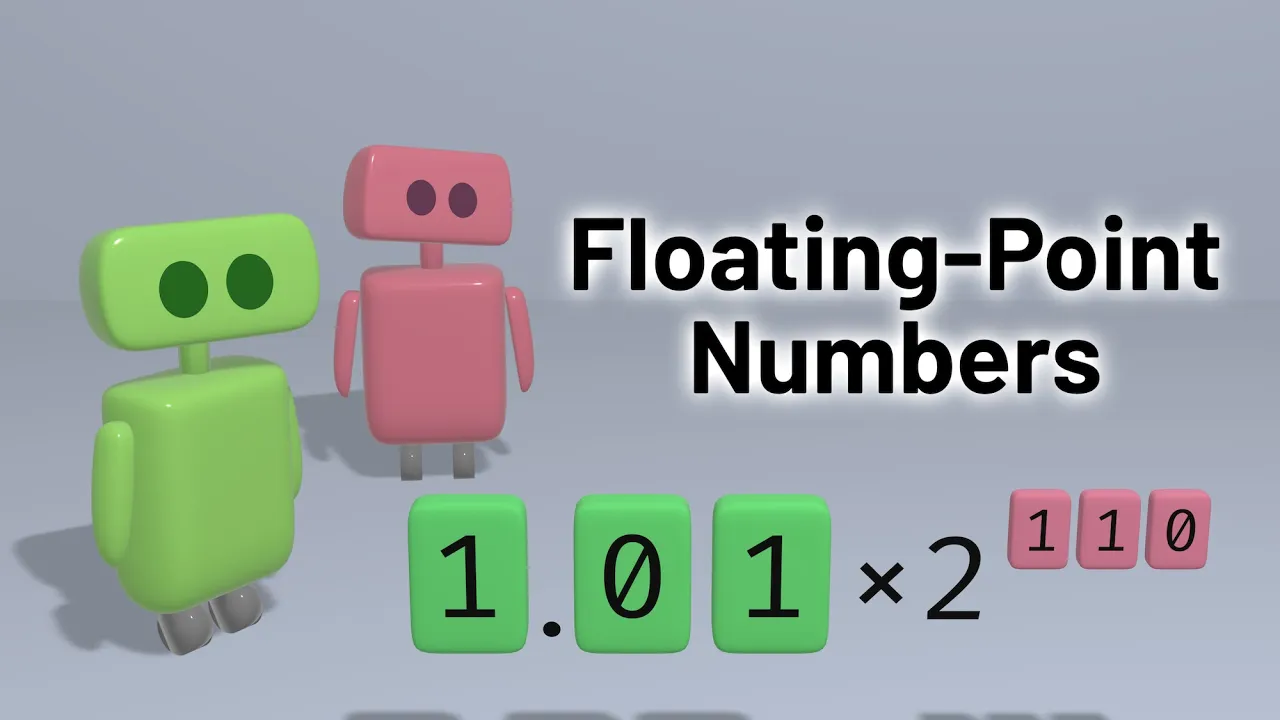








Floating point data types represent real numbers using a sign bit, characteristic (exponent), and mantissa (fraction), enabling computers to handle both very large and very small numbers with adaptive precision—smaller gaps between representable numbers for small values and larger gaps for large values—while introducing roundoff errors that accumulate during arithmetic operations, requiring careful consideration of machine epsilon and numerical stability in computational algorithms.
Floating Point Data & Numerical Analysis | Lecture 1.1
Added:Understanding of the binary (base-2) number system and basic binary arithmetic.
Familiarity with scientific notation in the decimal system, including concepts of significand (mantissa) and exponent.
Basic computer organization concepts, specifically how data is represented using bits and bytes in memory.
Fundamental algebraic concepts of limits, approximation, and absolute vs. relative error.
The IEEE 754 Standard for Floating-Point Arithmetic, including single (32-bit) and double (64-bit) precision formats.
Numerical stability and error propagation, analyzing how roundoff errors accumulate over multiple algorithmic steps.
Methods for mitigating numerical errors, such as the Kahan summation algorithm and avoiding catastrophic cancellation.
The concept of condition numbers and distinguishing between well-conditioned and ill-conditioned mathematical problems.
133 views3likes1:31:07Original Release: 2025-08-29
If I ask you to write a decimal expansion, like in your homework, it says exercise one, write the decimal expansion. This is what I would expect you to do.
This looks stupid. It looks redundant, but I just want you to remember this that if you see 9876, what that means is 9 * 10^ the 3 power plus 8 * 10^ the 2 power + 7 * 10 1 power + 6 * 10^ the 0 power. We're talking about powers of 10. And this is also what we call place value. Where we place the digit tells us how much value it's worth.
Um, we do not store numbers on our computers in the decimal system.
In our computers, numbers are stored in memory.
And I'm not a hardware person either, but uh whatever hardware we have, like for example, a transistor can be in one of two states. And so the states don't have anything to do with the numbers zero and one, but we use zeros and ones on paper to keep track of these things as a isomorphism uh as a way to represent it to ourselves.
So what we're going to do is we're going to represent numbers in the base 2 system or the binary system. We're going to use 0 and one along with implied place place values. This time the place values are going to be in powers of two to represent numbers. Um so let's do a binary expansion.
If I have this number then what this means is starting from the right side this is 1 * 2 to the 0 power. Okay.
Moving over I've got 1 * 2 to the 1 power. Moving over, I've got 0 * 2 to the 2 power. Moving over 0 * 2 to the 3 power 1 * 2 to the 4 power 1 * 2 to the 5 power uh 0 * 2 to the 6 power. Six power.
I'm not used to writing right to left.
So 1 * 2 the 7th power. Okay. So that's my binary expansion.
Next part of this question exercise two says convert this bit string to a decimal number. And we can do that just by remembering you know that is the number one. This is the number two.
Those are zero. This is the number What's two to the fourth power?
16. This is the number 32. And this is the number 128. Okay. So now these are numbers in decimal format that we're all nice and comfortable with. We now know how to do math in our head. When we look at these numbers, we can say 128 + 32 is 160, 176, 178, 179, right? And so that that's the that's the idea.
You all have done this before probably, right? Computer science people, I've seen this before.
>> I don't remember.
>> Okay.
Well, the purpose of this exercise is to say, listen, if I've got eight transistors and they can be in one of two different states, then as long as I know how to interpret those states, I can represent the number 179 by putting those eight transistors in the right states next to each other. Right?
So this is how computers represent numbers in computer memory.
>> Yep.
>> Where does two come from?
>> You're talking about which two? The twos everywhere.
>> Yeah.
>> All of them. All of the twos come from the fact that we have chosen to use the binary number system. Whenever we choose to use the decimal number system or the base 10 system, those twos are tens for place value, right? That's how we're used to seeing our numbers.
But with today's computers, uh, we don't have little transistors that can exist in 10 different states.
We have little transistors that can exist in two different states. And so we're sort of forced into using the binary system when you want to represent a number on a computer. And again, when you use the binary system, then place values have to do with now powers of two, not powers of 10.
It's a good question.
All right.
Um, if I say natural numbers, these are the counting numbers. 1 2 3 4 5 and so on. Um, depending on the context, sometimes people include zero as part of the natural numbers. Sometimes they don't. It just depends on kind of what you're talking about.
The set of integers includes the natural numbers includes the negative natural numbers and it the set of integers always includes zero.
If we can represent a natural number in binary like the way I represented this 179 as this string of eight bits. By the way, whenever we have a decimal number like this, we say there's four digits.
When you have a binary number, we say that there are eight bits because a zero or a one is a bit. And then um well how could we represent an integer like positive integers? Okay, those are just natural numbers. But how would I represent an integer like this where it's negative 321?
Um what we would do is we would first look at this number and we'd say for the number 321, what's the largest power of two? That's still less than 321.
>> Power of two. Think about your powers of two. So, uh, if you need to, you can write them out. I especially recommend this on a test, >> right? Uh, there's 2 4 8 16 32 64 128 256 512. Oops. Okay. 256. Yeah.
So um 256 and that would be 2 raised to what power?
1 2 3 4 5 6 7 8 to the eighth power.
Okay.
And then if I take sorry 321 minus 256 then I get the number 65.
And what power of two is as big as you can get with still being less than 65?
>> 64.
>> 64. And 64 is 2 raised to the power 6.
And then if I subtract 64, I get 1 and that would be 2 raised to the 0 power.
So 2 to the eth power plus 2 6 power plus 2 to the 0 power. Now I can write down this number in binary. Right? There's 2 to the 0ero power and then I also have to include 0 * 2 to the 1 power and 0 * 2 to the 2 power and 0 * 2 to the 3 power and that would be boom boom boom. Also 0 * 2 to the 4th power 0 * 2 to the 5 power 1 * 2 to the 6th power and then 0 * 2 to the 7th power and then 1 * 2 to the eth power. Okay. So my my binary is 1 0 1 0 0 0 1. That's the number 321.
Okay. What if I want to make this negative? Because right now this is just positive 321. What I would do to make this negative is I would set aside in my computer memory an extra bit that would tell me is it positive or negative? And you have to make a choice.
You have to say zero is going to be positive and one is going to be negative.
And in fact, it doesn't really matter, right? As long as you know what it means, then you can make sure the computer is both saving numbers that way and interpreting numbers the same way. But you've got to choose one to be positive and one to be negative. To be honest with you, I can't even remember off the top of my head what the convention is.
uh with regard to that um but I do know that you can just save the plus or minus sign as an extra bit. So in order to make this let's say negative 321 you just have to add a bit that saves the sign the plus or minus sign.
And so we might call this my sign bit.
Okay. So the term digit refers to one symbol um chosen from a base 10 system.
The term bit refers to one symbol chosen from either zero or one. Um like we talked about on computers, there's actually physical transistors that are super duper duper duper tiny that can represent a bit because they can exist in one of two different states. A bite is what we call eight bits.
My internet at home is supposed to be one gigabit per second and a gigabit is like a lot of bits, right? It's like a million or something bits. Not a million. That's wrong. Cuz kilo is a thousand, mega is a million, giga is a billion, right? So, it's supposed to be about a billion bits um per second.
And then meanwhile, uh, if you buy like a a thumb drive, maybe you've never seen one. I don't know. Maybe y'all are too young for thumb drives. You know what I'm talking about? The USB port things that you plug into your computer. Uh, those come in bytes. For some reason, you can only buy them in bytes. Like you buy four gigabytes or 10 gigabytes or whatever. Uh, but the bite just means it's eight times as much as the bit. So if you have only one bite of computer memory available to represent an integer, what are the least and greatest integers you can represent with one bite of computer memory?
>> Are we assuming sign or >> signed?
Yeah. If I say the word integer, you can assume that I want it to be signed. And so a bite, right? So there's one, two, three, four, five, six, seven, eight bits that I can use. One of those, like Colin pointed out, is going to be the plus or minus sign. It's going to be my sign bit.
Now, if I want the least and greatest numbers, what should I do to fill the rest of these blanks with?
>> Ones. Yeah, if I put any zeros there, then it's only going to make my number smaller. So, we choose all ones and remember what these represent in terms of place value.
I could calculate all these powers of twos and add them together, but there's a shortcut.
Perfect. Yeah, Sage is right. So, if I just do 2 to the 7th power minus one, that's going to give me the same answer.
Does everybody understand why?
Okay, good. Um, so 2 to the 7th power is going to be is that 124 And so whenever I I think about the plus or minus sign, there you go. So the least integer I can represent is negative 1,023.
The greatest integer I can represent is positive 1,023.
Hold on.
Did I count wrong?
You guys got to correct me if I make mistakes. Okay, so 2 to the 7th power is a 128.
Is that what you tried to tell me? Is 127? Sorry. Uh, I was way off.
There we go.
So, not that much.
The greatest integer I can represent is 127. The least one is negative 127.
Sound good, Aaron? That makes sense. Okay. Uh so the rational numbers is the set of all numbers that can be represented as a ratio of an integer to a natural number.
One such rational number I can uh represent as the ratio of an integer to a natural number. 4 / 3 has a decimal expansion of 1.3333 33 33 33 33 33 33 33 33 333. So how do I represent this in computer memory if it doesn't even have a finite decimal expansion? Right?
Um that's a question we'll get to. Uh maybe first we should also talk about you know what would I do even if it uh doesn't have an infinite decimal expansion like what if I instead just have the number 1 you know 257 how do I represent that in memory because it's a little bit trickier what we're going to do is we're going to introduce a data type called the floating point data type.
Quick show of hands. Who has heard of the floatingoint data type?
Three people. Okay, three and a half people. Um, we are going to have to use this fancy data type. Um, and just like before, we're always going to save one bit to be our plus or minus sign bit. And I think I was right before about the convention because if my sign bit is zero, negative 1 to the 0 power makes this number positive. And if my sign bit is one, negative 1 to the one power makes this number negative. So we always save one bit in our memory to represent the sign bit. Then we'll have some bits set aside for the characteristic.
So I'm using capital C to represent the characteristic here. And the characteristic tells us about how big the number is.
And we're also going to save some bits for what's called the mantisa, which specifies precisely what number it is.
So the mantissa is more like for precision, for like fine-tuning. The characteristic is like making big adjustments as far as the magnitude of the number. Are we talking about billions or billionths? that would be like a characteristic type of change versus if we're talking about 1.21 or 1.22 that would be like a mantisa type of change.
You're already familiar with something like this. Um you're probably already familiar with scientific notation. You know in scientific notation if I want to represent this number 5,123 well in scientific notation I would write 5.123 * 10 ^ 3 and if I wanted to represent the number 05123 I would write 5.123 * 10 ^ -3 three.
Scientific notation is a good analogy because I've got some digits in scientific notation that tell me precisely where my number lies and I've got other digits that appear in scientific notation that tell me on what scale we're talking about, right? Like what's the magnitude of this number? Are we talking about thousands or thousands?
Um, so it's really similar. It's a very similar idea happening right here when I um have this formula shown to you right here. Um of course S is the sign bit. It's either a zero or a one. C is the characteristic bits. And whenever I use this formula right here, I've already I've already interpreted this as a number, right? I don't want you to literally write down the zeros and the ones and interpret in base 10. And I want you to to use the number.
And then uh same thing for the mantisa is the capital m. This is kind of a complicated formula. You'll notice the c knot or the c's subscript zero is going to be the maximum number you can get for your characteristic minus one divided by two kind of puts you in the middle. Uh the maximum number you can possibly get for your characteristic is going to be 2 raised to the power um and this is supposed to be a lowercase n with a subscript capital c.
I know that's a little bit goofy.
But um what I'm talking about here that's just two raised to the power of something. It's two raised to the power and the NC is supposed to be the number of bits that you allocate for the characteristic. And that changes depending on what data type we're talking about. But let's say if you've allocated five bits just for storing the characteristic then you'll have 2 to the 5ifth power which is 32. 32 - 1 is 31.
So the maximum value you can get for the characteristic is 31.
31 - 1 is 30. 30 divided by 2 is 15. And so C knot in this formula would be 15 in that case. Sorry it's a little bit complicated.
This is the way it has to be.
Capital M is a way to interpret the mantisa. But you'll notice in this little summation here, it's kind of like kind of like we've been doing with place value in the binary system, but since this is a negative exponent, it's kind of like place values on the right side of the decimal.
But we're not going to use decimals in base 2. But you can imagine that idea of like now they're like negative powers of 10. We go listing digits to the right of the decimal. Well, in this sum, we're going to have place values as powers of two that are going in that direction. So, that's a lot. Uh, it's a lot to remember. I would recommend making a note card for this because this is going to be something that I definitely test you guys on. Um, but make a note card.
Make the front of the note card say like formula for interpreting floatingoint data type. On the back side of the note card, you might have to write down all this junk and uh try to put it to memory for your test.
I haven't written your test yet.
So, I'm not like 100% certain of how much I'm going to give you on the test. Like, I don't know if I'm going to give you this formula or not. Um, but it'd be a good thing to remember and we'll talk about that closer to the next test time.
Okay. Exercise five in the E standard and I think that stands for I can't remember now.
something about electrical engineering, right? Does somebody know what I E stands for? The Institute of Institute of Something in Electrical Engineers. I think it's electrical and electronics engineers. I think that's what I E stands for. The Institute for Electrical and Electronics Engineers.
They have standards for how to do this.
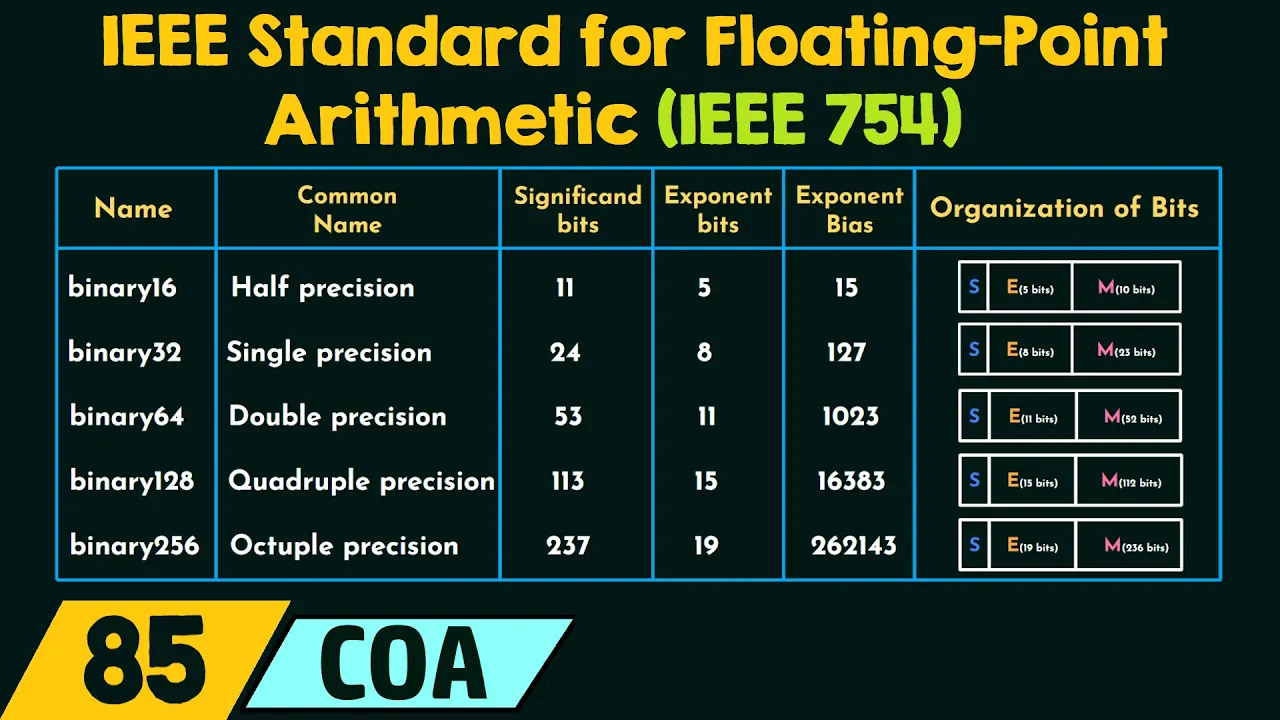
um they're standard for the half precision floatingoint data type. They allow for two bytes. So in your computer's physical memory, you get two bytes to store each number. One of them is a sign bit. There's five characteristic bits in 10 mantis bits that adds up to 16. 16 bits and two bytes. Um let's think about what are the least and greatest numbers you can represent in this data type.
Well, so to get the least or the greatest, you would just have to figure out whether this is a plus or minus sign, right? So let's ignore the sign bit for right now and just try to make the biggest number we can make using five characteristic bits and 10 mantis bits. And to make the biggest number possible, we're going to use all ones.
Okay? In other words, we're going to make this characteristic as big as it can possibly be. In binary, it's going to be one one one.
In decimal, this would be 2 to the 0 power plus 2 to the 1 power + 2 to the 2 power + 2 to the 3 power plus 2 to the 4th power.
Or I could have said 2 minus one, right?
I could have said 31. So the largest I can possibly make my characteristic is the number 31.
I get 10 mantis bits.
So let's talk about the mantisa.
This lowercase m is actually the bit that we're referring to. Okay? And so if I want the largest mantis possible, I would want all of these m to be ones.
Now I'm going to make a sum. I'm going to add all of these up where K goes from 1 to 10 because I get 10 mantis bits and every term in the sum is going to look like 2 ^ - K.
So first I have 2 ^ -1 then I have 2 raised to the power -2 then I have 2 raised to the power -3 and 2 raised to the power -4 and 2 raised to the power5 and 2 raised to the power -6 and 2 raised to the power -7 and 2 raised to the power8 eight and -9 and10.
Okay, those are all the negative powers of two. And again, I'm making sure every bit in my mant seta is the number one because I want it to be as big as possible.
So, we add all these up.
So, I don't like adding fractions because you have to find a common denominator blah blah blah. What I can do instead is say, "Hey, this kind of looks like I'm getting closer and closer and closer to the number one, doesn't it?" Right? Like if I continue this on infinitely, that would get me to the number one because I'm adding a half plus a fourth plus an eighth. Have you guys seen that proof in calculus 2 of Okay, so we're approaching the number one. How far am I away from the number one? Well, I'm only one out of 1,024 away from reaching the number one. So this must be 1,023 over 1024.
That make sense? Okay. So for my mantisa, I've got the number 1023 over 124.
And then to figure this number out, I just got to follow my formula. So there is a lot to do here. Um 2 raised to the power capital C minus C 0.
Okay.
The capital C was 31.
Let's find out what C 0 is going to be because my number of bits for my characteristic in my problem says five.
So uh five characteristic bits. So 2 to the 5ifth power is 31 - 1 sorry 32 32 - 1 is 31. 31 - 1 is 30 divided 2 is 15 times 1 + the value of that mantisa.
So we've got 2 raised to the power 16 times whatever that is.
And this is where it would be nice to have a calculator.
And you remember you're allowed to use a calculator on your test. Um, using a calculator would look like this.
2 ^ 16* 1 + 1023 / 1024.
I typed that in wrong.
All right.
So the biggest number we can possibly represent in this data type is 131,000 8.
That's the greatest number. And then of obviously the least number would just be negative 131,08.
Okay. Can you represent the number 1,00 sorry 131,100 in this data type?
No. Who said no?
Connor. Uh why don't you think we can?
because >> Oh, yeah. You're right.
Let me ask you another question because you're right. Yeah. I mean, that's definitely bigger than bigger than the biggest number we can make.
What about uh if I instead asked you about this number 131,000?
Can we represent that number?
We got one vote for yes. Colin says yes.
Anybody else?
We're nodding. Yes, we can. Yes, we can.
>> Surely.
So, I don't think we can. Um, we can try. Maybe you'll prove me wrong, but I don't think that this number is possible to represent using this data type. Uh, this is the biggest number I can possibly make, right?
What would be the next biggest? What would be the second biggest number?
Well, I would probably want to leave the characteristic alone because remember the characteristic is like for making big changes.
Uh, the thing I want to tweak just a little bit is going to be the mantissa.
Um, tweaking the mantissa in the smallest possible amount would mean that instead of having 10 consecutive ones for the biggest number, I would have nine consecutive ones and followed by a zero. That would give me the next biggest number.
And this zero in place value would represent one out of 1,24.
Right? This thing right here. If I change this one to a zero, I'm basically just multiplying this times 0.
Scratching that out. So let's take away one out of 1,024 from our number.
So now our number is going to be 26th power * 1 + 122 over 10,024.
And let's see what the next second biggest number I can make is um like that.
So there's a gap between the biggest number I can possibly represent in this particular half precision floatingoint ile e data type and the second biggest number I can possibly represent specifically the number 131,000 I can't do it I can't represent that number if I choose this data type there are other data types that would allow you to represent that number.
But the problem with doing math on a computer is you've got to select what data type you are using and you've got to stick with it because the computer has to know how to save numbers and how to interpret the numbers that it's saved. It's got to stick to whatever convention you tell it to stick to.
So anyways, there's numbers that fail to fit, right? There's gaps.
Um it's a little bit uh it's a little bit extreme right here in this example because we're talking about the IE half precision data type.
Normally Microsoft Excel, Python, etc. operates on a double precision data type and that means in between half precision and double precision there's also an IE E single precision convention. And so we're talking about doubling the amount of bytes available in memory to go from half to single and then doubling the number of bytes available again to go from single to double. So there's actually typically at our disposal four times as many bytes in memory that we can use to represent numbers per number than in this example.
But uh it's still true, right? Like what's true for this is true for all floatingoint data types is that there's going to be gaps between the numbers that you are allowed to represent on a computer.
So while we obviously can't represent numbers that have infinitely long decimal expansions, we can't represent pi on a computer because pi just keeps going and going and going and there's no patterns and there's no way to represent that. Um, we also just can't represent just a lot of ordinary numbers that have perfectly finite decimal expansions because we only have these finite little machines that have a finite number amount of space and a finite number of transistors and a finite amount to what they can store.
So we make these decisions. Um, at the least value of the characteristic, what is the size of the gaps between representable numbers? Okay, let me tell you what that means. The least value of the characteristic would be having a characteristic with five bits of 0 0 0. That's the least value of the characteristic.
Um, going back to my formula, clean this up a little bit.
The least value of the characteristic is going to be let's see 2 raised to the power 0 minus c 0 and that hasn't changed that's still 15 times 1 + the mantisa. And we talked about this a second ago. If I make the very smallest possible change to the mantisa, it's going to change by 1 over 1.
And so if I'm talking about the difference between this number and this number, how big is that change?
Let's find out. 25 times 1 over 1024.
That's the size of the gap between numbers when we are at the very very very lowest end of what this floating point half precision data type is capable of representing.
um that's the smallest possible gap between the numbers. And the numbers are also going to be small, you know, like that one is uh like the numbers are going to be around the scale of like 2 to the -15 whenever we're talking about this. And so really small number, really really small gaps between the numbers that we're representing at that range. when we're at the other end and we're trying to represent really large numbers, the gap is bigger. So the genius of the floatingoint data type is that if your numbers are very very small, like you're trying to measure very small things, right? Very small uh distances like you're trying to measure the length of a molecule or something like that, then it will accommodate that and it will give you this extra precision. this extra precision that is it'll give you smaller gaps between the numbers that it can represent. But if you were measuring something really giant like how many pounds does a Navy warship weigh or something like that? Well, then it knows you don't need the same level of precision and it adjusts. It's adaptable. On the big end, you get big gaps. On the small end, you get small gaps.
The gap size is proportional to the numbers that you're dealing with. And that's a good thing. That's the way it should be.
Okay, let's do a little experiment.
If I type in 1.005 minus one, who can tell me what the answer is going to be here?
Yeah, it should be right. It should be 0.005.
Um, Excel thinks the answer is 0.0049999999999999999999999999989.
Do you know why that's happening?
Because Excel can't represent the number 0.005 in an e double precision floatingoint data type.
Of course, whenever I hide all of these digits, right, it's going to um it's going to round it for me so that it displays as 0.005.
But every time I reference the cell in my spreadsheet from now on, what's really happening behind the scenes, the number that it's using to multiply, divide, add, subtract, whatever is actually this number because this is the closest representation in the double precision floatingoint data type.
Whenever you do math, your computer first takes your input numbers and matches them to the closest match that it can represent. Then it does all the operations. Add, subtract, multiply, divide, finds a new number, and if it's not representable, it will round it to the nearest number that's representable in the data type that you're using. And so this is an example of, you know, sorry, 0.005 wasn't among the set of numbers it can represent, but uh this one is, and it's close enough, honestly.
Okay. Um, there's a new vocab word that you should be familiar with. It's called machine epsilon.
People want to know what is the machine epsilon there mean um what is the relative roundoff error resulting from a single computation on a particular data type. uh the machine epsilon is half the size of the gap between the number one and the next smallest representable number larger than one.
So if I wanted to represent the number one the sign bit would be zero. I would choose my characteristic bits so that C minus C 0 was zero. That way I would have two to the zero power and it would be one. And then lastly for the number one I would make sure that my mantissa was all zeros. So that this would be 1 + 0. So I would represent number one. To get the next representable number larger than one but still as small as possible, I would keep the characteristic the same because I don't want to make big changes. I want to make a small change. So I change my mantissa to be all zeros but with a one at the end. Right?
So machine epsilon has only to do with the number of bits allocated for the mantissa.
Another way to say this is that the precision of your calculations only has to do with how many bits you allow for the mantissa. Um the characteristic just tells you how big and how small you can make your numbers. The mantissa tells you how much accuracy you have. But this is how you calculate machine epsilon.
This is a Greek letter lowercase epsilon.
The word machine is in the subscript equals 2 raised to the power that's supposed to be a lowercase n with subscript capital m. So um we say this 2 raised to the power n m and like it says that's the number of bits that we are allowing the mantis to take up and then we subtract one from the exponent.
So when I had well we'll have an example later.
If I had 10 bits for the mantisa this would be 2 to the^ 11. There we go.
That's what I wanted to say. Um so suppose x is a real number and let's make x hat to be the closest approximation to that real number we're trying to represent.
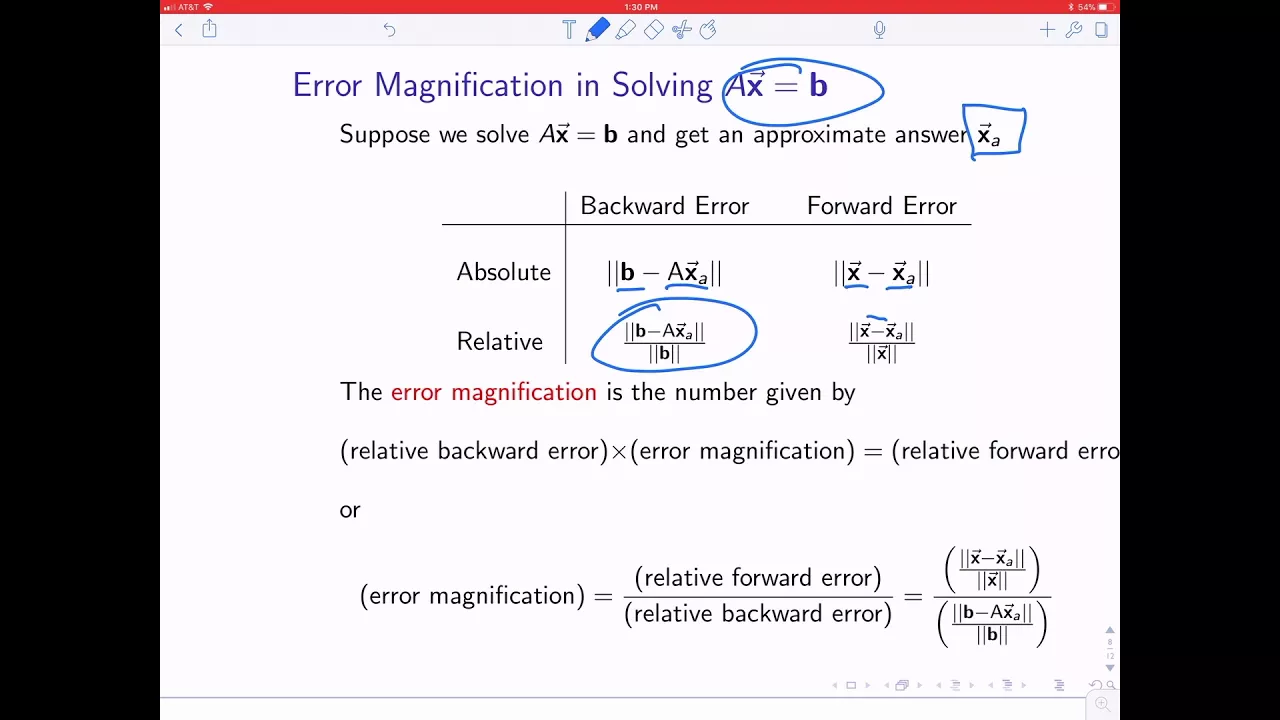
Then whenever I write x - xhat absolute value, we call this the absolute error.
Absolute value means absolute error.
Error is the difference between my approximation what I want it to be.
Well, this theorem is stating the absolute error is always less than or equal to the machine epsilon times the absolute value of the real number I'm trying to represent.
This is always true for floatingoint data types the way that we've represented them.
This is why it's useful to know what is the machine epsilon. It gives you an idea of how much error you can expect.
I just answered exercise 11 a moment ago.
Because there's 10 mantis bits that means number of bits for the mantisa is 10 and then are there any questions so far?
really okay.
So I mentioned this uh in most typical computer programs it e double precision is the default data type. It's just that double precision is like a golden mean between having like enough precision to do what you need to accurately and having uh enough computer storage. like you don't want to like max out your RAM from doing a stupid easy calculation, right?
So, you meet somewhere in between. There are data types that are less precise and there's data types that are more precise, but that one's just right there in the middle. Um, when would you want to use a more precise data type?
There's a question for you guys.
>> When you need more precision.
>> Yeah.
There are certain like chaotic systems you know like the weather for example is a pretty chaotic thing. It's very difficult to accurately predict the weather. So if you are someone who's trying to run a forecast for like a hurricane and you want to predict what's going to happen over the next 5 days.
Maybe you want a lot of precision so you can minimize the effect of the chaos on your simulation. And so you choose a really high precision, quadruple precision or octuple precision data type because you want to maximize the amount.
And of course you'd have to have a lot of RAM ready right on your supercomput.
You'd have to make some kind of um sacrifice there for all that extra precision. But that's one situation.
When would you want to use a less precise data type?
Yeah. And one example I can think of is artificial intelligence, right? You've got these AI models that are running on these, you know, enormous enormous data centers. Have you seen the news about like Facebook, um, Google, Apple, Microsoft is everybody's building these enormous data centers. They're like a square mile, literally just like a building that takes up a whole square mile. They've got their own power plant.
They've got their own like water sources. Uh it's insane the size of these data centers and they're just supposed to be, you know, running these AI tools. Well, the thing about AI is it's all like kind of probability based anyways. Like once you get the output from your neural networks, it's going to be run through a softmax function and then it uses a random number generator to select the next token from this distribution. Uh there's a certain degree of randomness to it that allows it to give you a different response every time you ask the AI the same question. Well, if you were going to introduce a little bit of randomness to it anyways, does it really have to be that precise?
No.
And so I guarantee you if you were an engineer working for Microsoft on their AI uh division, you would not be using double precision floatingoint data because one of your concerns is these data centers cost billions of dollars to build. How can we make this any cheaper?
Like please, let's save money. Let's reduce the amount of hardware we have to have in these computers so that we can reduce the size of the buildings. We don't have to build as many power plants to run this thing. we can save money all across the board. Cost is really important. So what you do instead is you choose like a half precision data type maybe for AI because again at the end there's going to be a little bit of randomness introduced. We don't care about exact values anyways. So you use less precise data types, you do faster calculations, you require less memory, everything is better.
Um, another reason is if you're dealing with uh real life data that you're measuring and you just happen to know that you're measuring equipment isn't that precise, right? Like if I'm working at an oil refinery and I've got temperature probes all throughout the refinery and these thermouples are measuring temperatures, I know that measurement is only good to within plus or minus one degree Fahrenheit. It's not going to give me pinpoint accuracy on the temperature. So then I obviously don't care what data type I'm using because I know that my measurement wasn't that precise to begin with.
All right. Actual error is the approximation minus the real value that I want to approximate.
Absolute error is the same thing but I use absolute value. Absolute value.
Absolute error. Relative error tells me how big is that error relative to the number I'm actually trying to represent. So I take the absolute value of the difference divided by the absolute value of the number. In practice, we mostly only care about relative error. Why would I only care about relative error and not absolute?
If I'm measuring an aircraft carrier, is one millimeter going to make a big difference?
No. If I'm measuring an ant, is 1 millimeter going to make a big difference?
Yeah.
So relative error is, you know, putting the air in proportion to what you're measuring, right? I could say, if I'm measuring an aircraft carrier, is 5% going to make a big difference? And everybody nods their heads yes. If I'm measuring an ant, is 5% going to make a big difference? Yes. You know, relative statements like 5%, that's a measure of relative error. and it makes sense and it's meaningful no matter what the scale is whether it's big or small numbers.
What is one scenario in which we might care about absolute error?
measuring the what?
>> Possible precision of your device.
>> Yeah.
Um maybe let me reword this question so I can get the right answer that I want to get from you guys.
What is one scenario in which you cannot calculate relative error?
>> Yeah.
What if the thing I want to measure is zero?
then it doesn't make any sense to talk about relative error because I can't divide by zero. Um, I'll give you an example of that later on this semester.
But we pretty much only only care about relative error. We're going to be comparing relative errors to machine epsilon and so on. Um, again remember machine epsilon is a measure of the relative error inherent in the data type we've chosen.
But we'll talk about later in the semester a few cases where we might want to use absolute error in our algorithm rather than relative. And we will only bother calculating absolute error in the context of an algorithm if calculating relative error would result in dividing by zero. So that will come later.
We started at 145. So, we still got time. Um, this is called machine arithmetic.
Pretend you've already selected your favorite floatingoint data type and now you want to represent a real number in that data type, right? So, you want to represent pi, but you're only using half precision. So, you got to choose the closest number.
That's what I mean by capital R. Capital R is going to take a real number input and it's going to map it to the closest number that exists in your data type.
So when I put a circle around the plus sign, I'm saying we're going to add these two numbers together the way a machine would add them together. And that means first map those numbers to the nearest number that belongs to the data type. then add those and whatever we get for the sum, we're going to map that to the nearest number that exists in my data type. And then that will be our result of the machine arithmetic.
And so we can use the circle to represent machine addition, machine subtraction, machine multiplication, and machine division.
Okay, exercise 10. In the LE E standard for the half precision floatingoint data type, they allow for the use of two bytes per number. One sign bit, five characteristics, 10 bits. Calculate the absolute and relative errors of the following machine arithmetic operations.
So, we've got the numbers X and Y, and they're pretty close to each other, but slightly different.
Let's calculate the machine addition of X + Y.
So, the first step is going to be to find what is the closest representable approximation of X.
This is not an easy thing to do.
But when I look at x, I see something like 1 + 1 / I'm looking at this x right here. Do you know the number is 0.125?
What's that as a fraction?
>> Yeah. 18.
So I've got the number x as 1 + 1 over 8.
And this is actually representable.
Um, I know it's representable because my my sign bit would obviously be zero because it's positive. My characteristic bits, uh, I could choose them so that the characteristic part of that formula is 2 to the 0ero power, right? I don't need anything from there. And then the mantissa part of my formula is 1 plus the mantissa.
And I just have to choose my mantissa, which is 10 bits long. 1 2 3 4 5 6 7 8 9 10 to be such that I get 1 over 8 which would be 0 * 1/2 0 * 1/4 * 1 8th boom boom boom boom boom boom boom that needs to be my amantissa in order to get 1/8 there but that means that x is representable and so after I map it to its closest representation that is itself is very good. Uh y might not be that easy because when I look at y um I'm in a similar situation where this could be 1 + 1 over8 and that would get me close. That would be 1.125. But I also have this 0.5 that I have to worry about.
this leftover part.
Um, and that's kind of annoying, right? It's a little bit frustrating, but I still have a whole bunch of other bits in my Mantza that I can tweak and move around with. Uh, like if this is a half and this is a fourth and this is an eighth and this is a 16th. I still think that's smaller than 16th, but 32nd, 64th, 128th, 256, one over 512, one over 1,24.
Um, that's about a half of a thousandth.
Oh no, I think it might be too close. I think it might actually resolve to the same number.
Do you see my problem?
Yeah. I think that this is actually less than half of No, maybe it is more than half. Let me actually do the number right. I can't think straight.
One over 124. That's the smallest jump we can make.
But 0.00005 000 Z5 is a little bit more than half of that, isn't it?
Right. So, if I'm rounding up to the nearest one, I would actually move up to the next one. I wouldn't stay at the same number. I would go up to the next number. Okay, cool. Very good.
Very good. So then this is going to be like this.
That is going to be the closest representable number to y.
Now, we have to add these together, right? So, I've got um 1 + 1/8 for the x part.
And then I have to add y, which is + 1 + 1/8 + 1 over 1.
And so that's going to be something like 2 + 14 + 1 over 124.
Now that I'm larger than two, I need to increase my characteristic bits.
I need my formula to have a positive sign plus 2 to the 1 power time 1 + my mantisa.
And then if I'm going to multiply this part by two, that means I have to think about how do I make 1 + the mantisa equal to half of this, which is 1 + 1 8 + 1 over48.
Then I can cancel the one from both sides.
1/8 is represent representable in the mantisa. I did that earlier. In fact, this is how you represent 1/8. But one over8 is not representable. But if we're going to round, we should round up, right? If it's halfway, we should round up. And that's halfway to the next thing. And so the uh rounded up version of my final answer is going to make sure the mantissa is equal to 1/8 plus 1 over 1024 because that is not representable but we are going to round up.
So the representable answer here is going to be 2 * 1 + 1 over 8 + 1 over 1024 which is 2 + 1/4 + 1 over 512 off.
Now, this is where I'm going to get lazy.
I'm just going to use the computer. Uh 2 + 1/4 + 1 over 512 is that number.
This is the machine arithmetic version of x + y.
If I actually want the real x + y, I would just have to do 1.125 plus 1.1255 like that.
And then to get my absolute error, I'm going to take the absolute value of the difference of these two numbers.
And then if I want my relative error, that just means I'm going to take the absolute error and divide it by the number I was trying to represent. So the real x + y.
Now you can do all this in your calculator, right? But uh the relative error is like 0.065%.
And this is just an ordinary everyday calculation that you might do if you had half precision floatingoint numbers.
Every single time you add two half precision floatingoint numbers, it might be reasonable to expect a relative error to enter your calculation of 0.006, which is not big, but it's also not really tiny.
It's not big for one operation, but if you were going to use the same numbers to do a lot of operations like you do in general with linear algebra, then it would compile. It would compound. it would keep snowballing into a bigger and bigger error the more calculations you end up doing.
Um, let's try to do x machine minus y and see what we get because that might be even crazier.
And to start, we would do the same thing, right? If I want to subtract, I would first find the closest representation of X, which is itself.
Then the closest representation of Y, which would be that. And now I'm going to subtract those two numbers as they are represented in the machine.
And when I subtract those two numbers, I'm going to get the number 1 + 1/8 minus 1 + 1/8 + 1 over 1.
We're doing the subtraction problem now.
And this would be 1 over 10,024. And of course, it's going to be negative, right? Um, but this is actually a perfectly fine representable number.
It's just where you have the mantis as being nine zeros followed by one.
And so, uh, x machine minus y is -1 over 1024.
Is everybody okay with what I'm just talking about? Did you follow that part, Kevin? Feel good? Okay. So, now we've got the machine minus version. Let's talk about uh the errors because the machine minus is one over 124 negative. The actual one is 1.125 minus 1.1255.
My absolute error is saying um it's pretty small, but I I never care about absolute error really. What I care the most about is taking the absolute error and dividing it by the absolute value of the number I'm trying to represent to get my relative error.
This is relative error as a decimal.
A lot of times we like to talk about errors as a percent.
That's a huge relative error, right? 95% that's like way off.
So um I mean I guess you can you can see it in in just looking at the numbers too is that whenever I use the half precision data type I got 0.009 and whenever I used the double precision I got 0.00005 00 zero five and uh those are not even close to being the same number if I really care about relative errors.
When we added the numbers relative error was really small. When we subtracted the numbers the relative error is huge. So this might introduce one more vocabulary word that I can say to you before we leave and that is um ah I didn't put it on here I didn't put it on the list okay but uh stability we say that addition and multiplication and I think even division are stable that means like small errors s that result from roundoff. Small roundoff errors remain small roundoff errors after you do addition, multiplication, division.
Subtraction is an unstable operation because small roundoff errors that happen from data types can actually snowball into massive huge egregious data invalidating errors when you subtract numbers. And so the funny thing is whenever you do like numerical linear algebra is we try to avoid algorithms that subtract. We try to choose algorithms that only add and multiply and divide and try to avoid subtraction as much as we can.
So this says suppose we want to calculate the derivative of sin of x at the point x= 1 using the definition of the derivative. I'll be more specific.
I'll tell you exactly what definition I'm talking about and that is um if I have a function f ofx then its derivative frime of x is going to be defined as the limit as h approaches zero of f of x + h minus fx / h. Okay, that's what I mean by definition of the derivative.
Hopefully you learned that in cal one, but then you probably forgot it since cal one. Um and the question is asking is a smaller step size always better and h is the step size.
And so what I'm saying is I know that the derivative is defined as the limit as h approaches zero. But if we were going to calculate using this kind of definition on a computer, then we can't just set h equal to zero.
We're going to make some kind of approximation for what the derivative is by not taking the limit, but instead just saying let's make h be a pretty small number.
and then calculate this fraction.
I'm leaving pretty small up to interpretation. Like 0.001 or smaller would be ideal. Uh but that's what it's asking. So let me uh go ahead and plug in the sign function which means let's take s of and if my point is x = 1 then we'll say sine of 1 + h minus s of 1 / h.
And the question now is if I'm using this to approximate cosine of one, which is really the derivative of s at x= 1, then am I always going to get a better approximation if I choose a smaller number for h?
Raise your hand if you think yes.
Kevin, did I see you nodding?
>> I started to.
>> You started to raise your hand if you think no.
Most of you are too scared to answer.
you know, you don't lose anything if you get the answer wrong. This isn't betting yet, although we could make it more interesting. If you want to like bring some cash to class, we can do more bets.
Um, and so the answer is in theory, right? Like if we're just talking about uh Aristotle's world of ideals, then yeah, the smaller the value of h, the closer you really get to that limit. But if we're using a machine to do this calculation for us, then the answer is no. And I'll show you.
I think this is a cool experiment. If you get if you have like a laptop with Excel, I mean, I encourage you to try this on your own, too. But um we're going to choose different values of h and then we are going to calculate that derivative approximation.
um for that value of h. And so we'll start off with 0.1 and then we'll do uh 10 raised to the power negative row.
So what that does in Excel, row is going to give me the row number.
So three is the row number there. And so it's 10 raised to the power3.
um and then this will make it easier for me to get smaller and smaller values of h.
Now the derivative approximation is basically an approximation of the cosine of 1. But we're doing it in such a way where we take s of 1 + h minus s of 1 / h.
And then we'll find actually what is cosine of one?
That's already pretty close.
And then we'll find the error. We'll talk about absolute error to make this easy.
And so absolute error is going to be the absolute value of this difference here.
And we'll keep going until we get a problem.
Like that seems to be a problem somewhere. I don't know why it gave up.
It's just telling me zero.
That's obviously not right. So, let's get rid of these rows. And here we go.
What I want to do now is plot the step size and the absolute error together on a scatter plot.
You know what's a better idea? Rather than doing that, I'm going to do a log log plot.
which is to say I'm going to take the log of the step size and the log of the absolute error.
When I say na log I mean the natural log of these things and so you remember the natural logarithm is a strictly increasing function and so this is still directionally telling us how everything works um even if it doesn't uh give us the exact values.
So in the x axis what we have is decreasing step size.
Well actually let me think about that.
They're numbers that are close to zero and so they would actually be negative numbers after I take the logarithm and the closer it is to zero the more negative the number. Okay. So sorry these are the smallest step sizes on the left. Okay. the largest step sizes are on the right and then in the vertical direction we have the absolute error or I should say the logarithm of the absolute error. So when we have the step size of um 0.01 that's this point farthest on the right and then 0.001 and then 0.00001 0001 and 0.00001 0 01 and so on and it decreases the error in my approximation to a point right and then when I continue to make it the step size smaller the error starts to increase again it's kind of weird so what's causing the error if this theoretically should continue to decrease increase and get better and better and better. Why does it suddenly make a Vshape and start increasing in error again?
>> Yep. This is because of that stupid roundoff error that we were talking about last time. Every time your computer adds, subtracts, multiplies, or divides, it takes the two numbers that it's supposed to be working with. It rounds them to the nearest number it can approximate in the floatingoint data type. And then it performs the operation add, subtract, multiply, and divide. And then whatever the result is, it also rounds that to the nearest number it can represent in the data type.
And so as you're doing this, uh, of course it has to evaluate the sign function and the cosine function.
And there's lots of multiplying and adding and subtracting in those. And um then after doing that it has to subtract in which case there's a lot of rounding error and then it has to divide in which case there's a lot of rounding error.
And whenever you've got a larger step size those rounding errors don't really make a big difference, right? Like they're not a big part of the error in general. the error is coming from this just being an approximation and not the true definition of the derivative. But as the h gets smaller, you're getting closer and closer in theory to getting the real definition of the derivative, but then the rounding errors become a larger fraction of what the heck you're doing. Um especially with subtraction.
We talked about last time how subtractions can sometimes cause really large rounding errors. um in a relative sense whenever we did the addition problem the rounding error I think was only like 06 or something like that and when we did the subtraction problem it was like 0.95 was a lot bigger for subtraction we're talking about how subtraction is not very stable and in this case with the difference quotient that's exactly what we're doing we're subtracting numbers that are really close to each other in value and so we can expect there to be a large rounding error if we start to get to the the extreme end of our floatingoint data type. So we end up with this this V-shaped curve where the best choice of step size is not the smallest choice.
It's somewhere between one and machine epsilon, right? It's like somewhere in the middle. And uh we're limited in terms of how close we can get an approximation of a derivative. And we do know that the derivative of sign is cosine. But there are functions that live out there in the world where we don't know their derivative. And a numerical derivative is the best really the only thing we can do to learn about it. And so it's of some kind of importance to like scientists and mathematicians to be able to evaluate the derivative of a function when you don't know what it is. And um you just have to keep in mind that smaller step size is not better. And by the end of this semester, this is going to be the last topic that we talk about at the end of the semester. We're going to talk about some strategies for calculating derivatives that get even more accurate than this. But we have to be really clever about how we do it, right? Decreasing step size is not going to get us there. We have to be smarter.
We have to be more clever about our derivative strategy if we want to get a better approximation than that.
Okay, does everybody understand like why we're doing floating point and why we don't use some other kind of scheme for doing everyday versatile calculations here like this C max characteristic max that's 2 raised to the power of the number of bits allocated for the characteristic minus one. Do you know like why that is? Because if I were going to if I was going to have five bits allocated for the characteristic, then the largest that could possibly be is the number 31 in binary.
And so that's why we have this formula here.
This C with a little zero subscript is supposed to be like the middle value of the characteristic.
So we divide by two because we're aiming for the middle. We take the maximum number it could possibly be and we divide by two because we want it to be smack in the middle. Only the characteristic max is always going to be an odd number and we can't divide by two if it's an odd number. So we have to subtract one from the max. So that way we can divide by two and get a natural whole number.
So the C 0 is supposed to be somewhere in the middle of the range of values you can get for your characteristic.
The reason we want to subtract C0 away from the what you actually get from your characteristic number is because we want to be able to get to really big numbers which is positive values of this exponent. Two to a positive value would be a big number. And we also want to get to really really little numbers as well.
We want the full range of scales from, you know, aircraft carriers down to atoms or whatever molecules.
And if I can take small values of the characteristics like 0000001 or 000000 and then subtract something that would be about in the middle. Now I have a negative exponent and two to a negative exponent is going to give me a very small number and it allows me to access the numbers that are on the small end of the scale.
Of course 1 to the s is just the plus or minus sign. 1 + m.
What m does is it says okay I can have these numbers between one and two and the m is only going from 0 to one. M itself can only be numbers between zero and one. Right? The mantissa because the first bit of the mantissa is is it going to be 1/2 or is it going to be zero. The second bit is saying is it going to be one quarter or is it going to be zero. The third bit is going to say is it 1/8 or zero. Right? So even if you get all ones for your mantis, you're still adding up half plus quarter plus an eighth plus a 16th plus a 32nd plus a 64th. And you're never quite reaching one. Um you can only get these numbers between zero and one.
And when I add one to that, it's going to give me all of these different values that I can get between one and two. It's going to give me half, a quarter, 3/4.
It's gonna give me 1/8 and 38 and 5/8 and 78. And it's going to give me all of the 16s and it's going to give me all of the 30 seconds and stuff like that.
And it will fill in all the gaps as best it can depending on how many bits I allocate for the mantisa.
That's only going to cover the numbers between one and two because this parenthesis is just 1 plus m. If I actually want to reach these values that are between two and three on my number line, then what I would need to do is increase the characteristic by one. Because if I increase this characteristic by one in the exponent, it's going to multiply everything by two. And when I scale this up by two, well, now I've got 1 + 2. It's going to essentially allow me to take all of these values, right?
Multiplying by the characteristic is going to stretch my range by two. and multiply by the character or increase the characteristic by one multiplies by two and that stretches my range again by two.
So, I don't know. It's a hard thing to try to explain intuitively, but like I said before, on on the small ends, when your numbers are small, it gives you a lot of really fine precision where the gaps between numbers are small. And on the high end, where your numbers are really big, it gives you larger gaps between numbers. But that's still okay because relatively, when we talk about relative error, the gaps between the numbers have the same relative error. And this is a really important vocabulary word.
But when we talk about machine epsilon, machine epsilon is a measure of relative error.
Um the characteristic is the only thing that really matters when you're talking about how big and how small the numbers you can reach are.
Like if you want five uh times 10 to the power a million then you would really need a really large characteristic. The characteristic tells you how large numbers are and how small the numbers are that you can reach. The mantisa tells you how much precision we can get. So when we talk about calculating miss epsilon we only care about the number of bits allocated for the mantisa and this is talking about relative error.
If I didn't before, I should have rearranged this equation because um this is saying that the relative error of a floatingoint approximation has to be less than or equal to the machine epsilon.
Up Next

107:58
MIT 6.868J Lecture 6: Consciousness - Marvin Minsky
@mitocw
112.1K views•2011-08-29

87:26
Introduction to Secure Multiparty Computation with Yehuda Lindell
@fhe_org
7.7K views•2021-02-04

4:55
HTTP Requests Explained: GET, POST, PUT, DELETE
@codecademy
103.1K views•2021-10-07

19:25
Enigma Machine Mechanics: WWII Encryption Explained
@JaredOwen
13.2M views•2021-12-11
Related Study Plans & Knowledge Roadmaps
Structured learning paths in Computer Science
computer-science
Container Runtimes: Namespaces, Cgroups & Go
01Linux Systems & Go Programming Foundations
02The Core of Isolation: Chroot and Filesystems
03Linux Namespaces: Process Isolation
+ 3 more learning modules
32h6 modules
Explore Roadmap
computer-science
Building a CHIP-8 Emulator: Rust & CPU Basics
01Computer Architecture Foundations (Bits & Bytes)
02Rust Programming for Systems Development
03CHIP-8 Virtual Hardware Specifications
+ 2 more learning modules
32h5 modules
Explore Roadmap
computer-science
Building BitTorrent: Go, P2P & Concurrency
01Go Fundamentals & Concurrency
02Networking Foundations & P2P Architecture
03Bencode Parsing & Torrent Metadata
+ 3 more learning modules
26h6 modules
Explore Roadmap
computer-science
Actor Models (C++ Concurrency & Lock-Free)
01C++ Multi-Threading Foundations
02Thread Pools and Task Scheduling
03Atomics and Lock-Free Queue Design
+ 3 more learning modules
45h6 modules
Explore Roadmap