


















This tutorial teaches Go programming through building a to-do list application, covering core concepts including package organization, variable declaration, data types (strings, integers, arrays, slices), loop iteration using range, function creation with parameters and return values, and HTTP server implementation for web accessibility, demonstrating how Go simplifies concurrent application development for modern cloud infrastructure.
Learn Go Programming by Building a TodoList App | Full Golang Crash Course
Added:Basic programming logic and constructs, such as variables, loops, conditional statements, and functions in at least one programming language.
Fundamental terminal or command-line navigation, including how to install software, navigate directories, and run scripts.
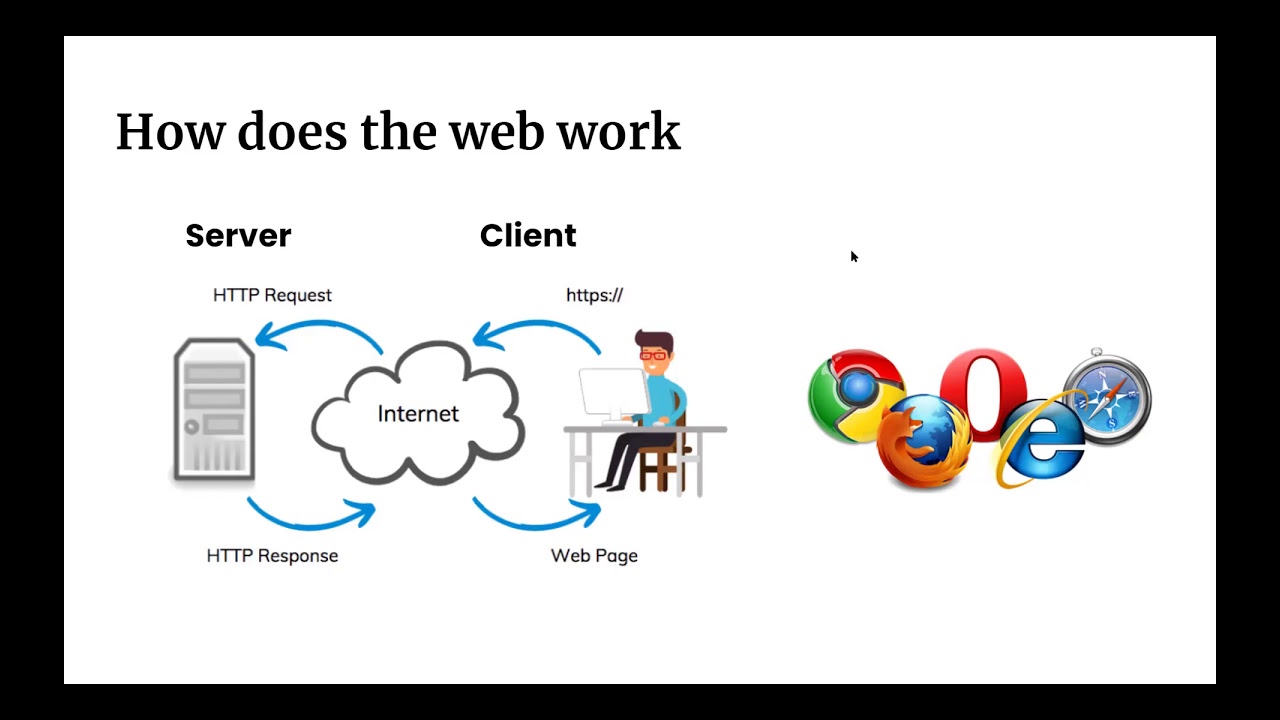
An introductory understanding of how the web works, specifically client-server architecture and basic HTTP concepts like requests and responses.
Database integration in Go, transitioning from in-memory data storage to persistent databases using PostgreSQL, MySQL, or SQLite.
Go's unique concurrency model, focusing on Goroutines and Channels to handle asynchronous programming.
Advanced REST API development using modern Go web frameworks and routers like Gin, Fiber, or Chi.
Writing robust unit and integration tests using Go's built-in testing toolchain.
Containerizing Go applications with Docker and deploying them to cloud platforms.
202.2K views5Klikes1:34:55Original Release: 2024-10-14
in this crash course you will learn about one of the youngest programming languages that is becoming very popular in the cloud engineering World which is go or also commonly known as goink you will learn the most essential Concepts and syntax of go while building an actual application throughout the entire tutorial so let's see a detailed overview of what we will learn before diving into the syntax we will first understand why was go even developed didn't we already have enough programming languages so you will understand specific use cases of go and how it differs from other programming languages then we will set up our local development environment and see how the basic structure of a go file looks like then as we start writing our simple to-do list application you will learn the Core Concepts and syntax like some common data types such as strings integers arrays and slices you will also learn about variables and variable Scopes about formatted output we will learn about loops and why they're needed as well as how to encapsulate logic in functions and finally we will make our simple go Application accessible for HTTP clients so we will learn how to start a simple web server in go and how to handle user requests to our go web application so we're going to learn quite a lot in this crash course and I hope you're you're already excited to get started also note that all the code in each demo section is going to be available in the git repository which we will link in the video description so you can follow along easily now we have put a lot of effort in creating this course so if by the end of this video you think it was valuable for you please share it with one colleague or friend who you think will find this course as useful as you did and also be sure to check out our website on tech.com to browse our online courses and complete devops educational program if you want to learn currently probably the most futureproof profession that will be very difficult to be replaced by AI now if you're absolutely new to programming in general you can also check out my python course on YouTube which is even more targeted to complete beginners in coding and with that let's get started go was created by Google in 2007 and open sourced in 2009 so it's a pretty young language now whenever you hear about a new programming language the first question you probably have is why do we need yet another programming language what is the purpose of it or how is it better or different from other already existing languages so before diving into the syntax let's see what was the motivation behind creating the go language while the infrastructure where the applications were deployed changed a lot in the last few years multi-core processors became common and also using Cloud infrastructure with hundreds or thousands of servers with multiple processors to deploy applications became pretty Universal so infrastructure became much more scalable Dynamic and had more capacity however most languages couldn't help in writing applications that would take advantage of these infrastructure improvements so basically you had applications that would just execute one task at a time in order but with infrastructure improvements it was possible to now write applications that would execute tasks in parallel do multiple things at once this way making the application faster and more user friendly a simple example is if you are using Google Drive you may be uploading or downloading files and folders but you can keep navigating back and forth in the UI so downloading uploading and navigating the UI all happen in parallel or consider YouTube you can be listening to this video then scroll down to the comments write a comment yourself like the video Etc so the application allows you to do multiple things at once without affecting any other task and this is a concept of multi-threading so each thread is basically processing one task and you can have many of them running in parallel and this makes applications fast but may also cause some issues for example on Google Docs many users can work on the same document at the same time so when you have two users changing and adding stuff at the same time to the same document this should work smoothly without one user overwriting all the changes that another user is making another example where such issues may happen when things are processed in parallel is a booking system for buying tickets or booking a hotel Etc let's say again two users are trying to book the last remaining ticket at the same time of course this should work in a way that no double booking happens and this concept is called concurrency and needs to be handled by developers in code so they must write code that prevents any conflicts between the tasks when multiple tasks are running in parallel and updating the same data and many languages do have features for implementing such applications however the code can get pretty complex and handling and preventing the concurrency issues can be pretty hard and with complexity of course there is always a higher risk of human errors and that's where the main purpose and difference of go comes into the picture so go was designed exactly for that purpose to make make writing multi-threaded concurrent applications that take advantage of the new performance infrastructure much easier so logically enough the main use case of go or what it's best used for is writing applications that need to be very performant and will run on the modern scaled and distributed infrastructure with hundreds and thousands of servers typically on a cloud platform for developing go they wanted to take the Simplicity of syntax of a more highlevel language like Python and the speed and efficiency of a lower level language like C++ so you will see the combination of these things in go and I have to note that go is used on the server side or the backand side of the applications and these types of applications can range from microservices and web applications to database services and so on in fact many Cloud Technologies or technologies that run on Modern Cloud environments are actually written in go like Docker hash Corb Vault kubernetes cockroach TB and so on now on top of this main purpose of go go actually has a lot of other advantages one of them that I already mentioned is it has a very simple syntax which makes your code very maintainable easy to read and extend another Advantage is that go applications can be built very fast they are also very fast in startup and also when they're running plus go is very resource efficient which means it uses few resources or it requires fewer resources like CPU and RAM to run go is also a compiled language and it compiles actually very quickly into a single binary and you can deploy it and run it on different Platforms in a consistent way so no matter which operating system or which environment you're using you can take that same binary and basically use it across different platforms so considering all these benefits of Simplicity and speed and so on go is becoming more and more popular for writing simple automation applications and command line interface applications for devops and SRE tasks as well so now that we know why go was created and what differentiates it from other languages let's jump right into learning The Core Concepts and syntax of go so the first thing we're going to do is we're going to download goand idim so let's search for it and goand is actually an integrated development environment that is perfect for writing and working with go applications that's why we're using it in the course because it comes with everything we need for developing and go out of the box which is especially important if you're a beginner because everything is just made much easier but goland can actually be used for many other programming languages as well like JavaScript type form python applications you can even write terraform projects with it so it's not just for go lank but you can use it with many other different Technologies as well and it's also very useful for experienced Engineers because they have built-in tools like code completion Autos suggesting code refactoring help and basically just helps with coding much faster so let's download it of course based on your operating system you're going to download the respective one for me it's going to be mechos installer and once it's download it double click and install it in the applications so it's pretty easy actually let's launch our goand ID and we're going to see how to create our first first go project directly from the IDE and this is the welcome window where we can create a new project so if I click on new project this will give us location of the new project and there is one thing we need to configure which is the SDK so SDK stands for software development kit and basically we need to download and install go compiler on our local computer in order for the go Application that we write in this IDE to execute and to run and conveniently the Goen ID actually gives us a way to download that directly from internet instead of us going to the official website of go and downloading it from there which is also not very difficult but I still think it's more convenient to just click a button and download it from here so this will basically do the same as installing the go compiler from their official website so if I click on download this will actually give me a selection of the last two versions and this is the latest version 1.23.1 and this is the location where it's going to be downloaded in and where the Goen ID will also find it so I'm going to click okay and now we can select this as the Go version of our project and it's important to not that these are two separate things so this is an integrated development environment where you can write your go Application where you can structure it if you have hundreds of different files in the program you can organize those files so it helps you write the go application and once we have written the application it has to run right you you need to be able to execute and run that go Application locally on your machine and that's where this go compiler comes in so we need both of them to write the application and to run the application so this is configured right here which means with the SDK we are going to be able to use different go packages and functionality while writing the code so with this basic configuration I'm going to create a new project and as you see it automatically created the structure for the go project it generated the main.go file and basically gave us some boilerplate Hello World or hello and welcome program I'm going to clean this up because we're going to write our program from scratch and you can also see that go root configuration that we just configured with the latest Go version right here in the project settings so how do we start writing code in go like printing a simple message to the console let's actually write print hello go World however this will not work first of all let's see the highlighting here the red underline which says package expected got print so program doesn't know where this print is coming from and this is the first concept I want to explain which is everything in go similar to many other programming languages actually is organized in packages and when you install go program it actually comes with some some built-in packages that you can use to print out messages to write some logic so it comes with lots of packages that let you write your application and one of those packages is called fmt or format and packages have functions that we can use for certain Behavior so whenever we want to use a buil-in goal function to print a text get user input and so on we need to import it from one of the packages so think of the packages as containers of various functionalities that go gives you readily available for you to use when writing your applications now how do we know which function is in which package well you learn by heart actually for most used ones or you can always look it up in documentation for example if you're building something that needs to use dates maybe you want to integrate a calendar in your application you look up dates in go to see whether there is a built-in package that gives you different functions for handling dates like you know printing out today's date do some calculations on dates and so on so if you look up on go official docs you will see that there is a built-in package called time which has functionalities to work with dates so in our case we just want to print out a simple hello world message so let's import the fmt package that has a function to print out those messages and it's as simple as just saying import fmt which is the package name so we are telling go hey I want to use functionality from this package in my go file so make this package and all its functions available within this file and then from that package we're going to use one of the functions called print to print out a message now this this still will not work because whenever we want to execute a function we need the main starting point for execution because if you have multiple files in your go project you will need to provide the program executor basically a starting point to tell it which file has this main function that is going to be the starting point of the application and everything else all the other files basically in the project will be connected to that main function so that's where the execution of the program will start so basically we're telling the go compiler start executing the program from this specific line and we're going to do that using what's called a main function and this is a similar concept as in Java because Java also has this main function that tells Java compiler this is where the execution of this program starts so right here I'm going to create the function called Main and is as you see in the goand IDE you actually have this Auto suggestion for syntax of how to write main function and I'm just going to hit Tab and it will automatically fill out the rest and our print statement will actually just go inside that main function block and again let's use the indentation now there's one more thing we need to do for this program to work so these main goal file here just like any other go file that you're going to create needs to start with a package statement and as you see here in the underline it is actually warning us that it was expecting package declaration and it found import so right here at the beginning we're going to put all our code into a package by defining the name of the package and again it's Auto suggesting us to call this one main which is what we're going to use and we're going to be naming this whole file or this package Main and this is actually mandatory as you saw because otherwise the program will not run as I said everything in go is organized in packages including your own files so what we wrote here is basically the main structure of a go program with the package name which is mandatory the main function which is also mandatory and serves as an entry point to the program and importing any go built-in packages that we need in our main function now this program is actually ready to be executed and as you see right here as soon as we fix this issue the goand ID actually automatically added this triangular run button that says run application so here is a very convenient thing about an ID like goand whenever you are programming in whatever language is that instead of downloading the programming language compiler locally on your operating system and then running it from a terminal you basically have everything integrated in one UI that's why it's called integrated development environment so we used goand to install go compiler or to download and install it on our operating system and we don't even have to go to the terminal we can literally just directly run the program from here and in the background it will execute that go uh command to run the application so if I click here run go project there you go the program executed and we have hello go World printed out here and you see that we have the same button right here so for example if I had hundreds of other go files and I was anywhere in the application I could just hit run anytime from anywhere in the project and it will execute or run my application because this button is only next to the main function because as I said that is the entry point of execution that's why we can run the application directly from here but if I had another function with the same code for example it's not going to get this run button because it's not the the main or the entry point function awesome so our very basic application is running now as I said this run button in the background actually executes this go command with the go compiler that we downloaded through the go so we could also execute this application ourselves with go commit so here in the ID I actually have the terminal just like your operating system terminal and I can access it very easily using this tab right here and in that terminal window it opens the session directly in my project so for example if I were using my own operating system MEC OS terminal then I would have to navigate to The Go project and so on here I can just use the terminal built in in the ID I don't have to switch back and forth and because we installed the SDK using the goland we can actually use the go commands directly in the terminal because it was installed on our OS so if I do go run main.go this should execute our program as well with hello go world and for clean formatting we can actually add a new line at the end of our message using slash in so this will add a new line and again if I run the go command you will see the updated program and the same way we can just rerun the program like this awesome so this was a basic setup to just get started with writing the go Application we have everything prepared the program is running we can execute it as soon as we make changes so now we're going to start writing our actual application and we're going to learn lots of Concepts while actually building something that is functional and it works in real life so let's go ahead and do that so now we're going to create a to-do list application and we're going to learn all the concepts that I'm going to explain from now on in the context text of an actual application instead of coming up with some random examples that are not related to each other so that you can learn and understand those Concepts much easier so first of all I'm going to start by printing out Welcome to our to-do list app and the first Improvement we're going to make is if I do a new line here and if I do fmt you have this function here another function that's called print Ln which is print line so basically what this does is it prints out whatever text we provide here and it adds a new line at the end instead of us having to add a new line character explicitly so it kind of makes that small Improvement so if we use print line here we actually don't need this back sln and let's print out a Todo item which is watch go crash course that's your first to do and let's run this and as you see both are on new lines because we have used print Ln now let's print another to-do and let's say this is to watch Nana's goang full course which by the way I'm going to link in this video if you want to learn even more Concepts in a full course and let's add a third one and let's call this reward myself with a cheesecake because after watching all those goang tutorials and doing them you deserve a small treat so those are your to-dos let's run them we can re run with this button here as well and here is our welcome and here are our items so we are only using this one function and just providing some text now let's add some additional elements to this text to differentiate for example this is the welcome message and let's decorate it a little bit with this pound characters and we can do one two three here let's see how it looks there you go looks better right and here's the first concept of go programming language which is the concept of data types generally in programming languages we have data types and the basic ones are strings and numbers and also in most programing languages we need to explicitly tell the programming language what data type we are using and the way to tell the programming language is the syntax and the Syntax for Strings is always to enclose them in these quotes So double quotes at the beginning and at the end tell the programming language everything that's within those quotes is a string and string is basically any sequence of characters that you see on your keyboard so if you look at your keyboard you have all these letters you have all the number characters on the top you have the space you have commas you have these pound signs and exclamation marks and so on all of this enclosed within the quotes is string for go programming language now you will be asking what about the numbers because I see numbers on my keyboard how are they strings well if we want go language to interpret a value as a number then we simply put a number without enclosing it within the quotes and you see this syntax highlighting difference here we have the green color so to say for the string and this is the number and again we can do the same for whatever other number and if I print it out you'll see the numbers printed just like text so let's delete those now let's for a second think about an actual to-do list application usually you have this flat list of all the items that you want to check off and usually you can group them into groups or labels like private work related or you can even add them date so you have a list view of everything that you want to do today tomorrow on Wednesday and so on right so let's say this is a list of all the items and somewhere down the line in the application we have let's say you create a group called tutorials and you add those two in that category and maybe you have another label or group and let's call it reward or rewards self-reward basically and you put this third item in there and let's remove those numbers because now they're just listed in any order so I'm going to run this again and let's see what we have so we have list of all the to-dos and then tutorials and Rewards now there are two things that you probably notice here first of all is that we have this space within the editor but we don't have a space right here and that is a very important principle which is a simple detail but interesting one is that the editor and what we see here is for us human programmers to write the code in a way that it's easily readable for us but if we want to tell the program to execute something that we need to always explicit tell it with commands so if we want a new line then we have to print a new line so for example right here I would do this let's run it and we have our new lines here so it's also cleaner in the output not just in our editor so that's the first small detail now the second one is is that you probably notice that we are repeating the same value twice and if we had another group for example let's say you created another label and you call that my project so you're working some startup project or whatever and you need to learn different things for that specific project and one of them is go so you want to watch the goang full course for this project so now you repeating it even three times in your code and usually this is just a simulation but in actual programming an application you're going to have hundreds of files and these names may be just spread around across multiple files so now let's see what happens if I change the name of this task let's say instead of watch Nana's goink full course we wanted to change this name to watch Tech with Nana go link full course and now we need to replace it here and replace it here because it is the same task so the name should be updated everywhere and let's say you saw some very compelling Instagram video of a tasty dut so now you don't want a cheesecake anymore you want a dut so we're going to change our test name here and here as well you see whenever we have a value repeating multiple times in our code and we need to make a change to that value we need to think where is all the places in my code where this value is used and then I have to fix the name everywhere and second of all you actually have to repeat the same value if you want to use it in multiple places and that's exactly the use case for what's called variables in a programming language so instead of typing out the value the X actual value in 100 different places you take that value actual string value in this case you give it some arbitrary name which is the variable name and then you reference the actual value by using that reference name anywhere in the code where you need the value so right here we're going to do what's called a variable declaration so we're going to take this value I'm going to do command X to cut out the value and I'm going to save this value in a variable so I'm going to do VAR and let's call this task one equals so now whenever we need this actual value in all the different places like here and here as well instead of typing out this whole thing we can basically just say task one task one task one that's it so now if I needed to actually change the value back to nanas go link full course I just need to do it in one place and this references that are spread around again across hundreds of go length files will automatically be now referencing to the new updated value and as you just saw we can print the actual string values the numbers or we could print the reference to a variable that references the final value and if I run this there you go we have the new value printed out everywhere and here's a great thing about variable names you can choose what you want to to name a specific value so for example instead of task one if we want this to be more descriptive we can say full go lank and we're going to replace it everywhere as you see if you actually change the variable name then you also need to change that everywhere that you are using that variable and now we can repeat the same for all the other values so we can take this one and we can call this short go link because it's a crash course right here and reward dessert and now we can just paste it everywhere that we're using this value and as you see the code also got cleaner because instead of having all these repeated text we now simply have the references to the actual values that we can change anytime without affecting the rest of the code so again let's rerun and we should see everything is printed out the same way but the code is cleaner and more maintainable and that is the main usage of variables and you can assign any value that you want to a variable for example you can say number of tutorials you can save numbers as variables and reference that specific number whatever you want in the code so for example maybe you have a limit to how many items can be per category so we can say Max items in category or in group and let's say we only allow maximum 20 items so whenever we need this number this actual number because maybe we change it later we can reference it using the same variable name now there's one more thing I want to show here which is an alternative Syntax for declaring variables which actually is a newer and cleaner way of doing it which is we don't need the VAR keyword and right here we use colon equals so this does the same thing as the previous line it assigns a value to a variable and I'm going to this so you can use any of those two syntax Alternatives and let's clean all this up and now let's say I want to Define all these values in a list so instead of having them one by one like this I want to have a list that contains all those items and then I want to print out the entire list instead of printing out every single item especially if I have hundreds of them just in one print statement and that is another very important data type in programming languages which is lists or arrays they're called differently in different program languages in go specifically we have arrays and slices and they allow us to define a list of items and to also reference it as a single variable so it's actually very simple so I have the same variable declaration syntax and let's call this task items and the way we Define a value for such a list in go is using square brackets then we have a data type so we are telling go program this is going to be a list of strings or this is going to be a list of numbers in our case we have a list of strings as values so we're going to say string and here come the actual values and let's copy this the second one the third one and as you see goand is actually giving me a suggestion automatically intelligently suggestion to use the third one and I'm just going to click on Tab and there you go so I have all my three items task items in this list and this declaration here this thing is actually called a slice in go programming language and if I remove this and use task items so I'm only printing the task items you see that goand is highlighting with a red line which usually means there's something wrong with your program and you need to fix it and in this case it is telling us about an unused variable so let's see what happens when we run our application with a red warning signs it fails because it shows those variables are not used so I'll teach you one additional Concept in go which is a concept of comments and this is one of the important news cases of comments if I don't want to remove this code but I also don't want it to be executed because my program is failing when these lines are getting executed I can simply tell go specifically ignore these lines do not execute them I want to have them in my code but they're not for execution and that's where comments come in handy and comments have their own syntax because go needs to differentiate this is a code this is a comment and very simply it's slash slash two times and this line of code now as you see it's gr out as well so you see it is a comment for you as well and go knows it is a comment so now if I execute this those um lines will be ignored and we have our list printed out in one line basically so let's do one more thing now which you probably already thought about let's comment this in again and since we already have those values defined and referenced as variables let's use the variable name instead of the actual string and this shows you that those variables can be used in any single situation as a representation of the value so whether it's in a print statement or in a slice like this variable name can always be used in place of an actual value that it's referencing so now let's print again we should get the same result and I mentioned that go has slices and arrays and this is a definition of slice now you're probably asking yourself so what is an array very simply if I want to limit the number of items by default if I want to tell go this is a list but it can only have maximum 20 items and that's it this is going to be an array so array is with a fixed size slice is with a variable or dynamic size so we can expand to as many items as you want so for example if I put two here you see before I even execute goand is telling me hey you have a fixed size array with two items maximum allowed and you have three items so this is not going to work we can see when we execute it is telling us that our array doesn't have any more place for the third item and that's basically the difference very simple differentiation between between array and slice and again the example that I gave before is if we want to limit every group to maximum 20 items we can use that for example right here awesome and same as with variables we also have the alternative Syntax for slice or array declaration which is same with colum and equals but let's keep it consistent for now and let's make one small Improv here which is before this whole thing is printed I want to print out tasks right here in front of it so in this line in this print line statement I want to have a string that says tasks so here I can write tasks column and if I separate them by comma goang will basically print this on one line let's see that and there you go we have tasks colum which is a string that we're using and as you see it even adds the space between those instead of us explicitly having to add a space character and then it prints out whatever the value is of all those task items and that's basically how you can use string and variable reference in the same print statement awesome now you obviously noticed that that we have this one long line of tasks instead of what we had before which was a nice list of toos on separate lines which looked much cleaner and we could see exactly this is one item this is second item here we just have everything on one line there's no comma separation nothing so that's what we want to fix next okay so we want to print out those elements one by one on new line instead of just one endless string chain so the question is now how do we get each element of a slice or an array separately to do something with it either print it out maybe add some additional information whatever it is so basically get each item one by one and then print it out for example that's where a concept of Loops come in and this is a concept in every single programming language where we Loop through a list of values we iterate through the list and do something with each specific value one at a time that's the concept of loops and the most common type of loop which you can see in every single programming language is what's called for loops and that's what go link has as well so it's actually a super simple concept and this is how it works so right here instead of printing out everything at once we want to print out each item from the list separately so it goes like this four which is a keyword for for Loop so logic is for each item in the task items list we want to do something specific in our case we want to print them out now this is go link specific in four Loops we actually get two values instead of just one one is the value itself so we have a slice or an array and we have the items so each item has a value but we also get a second piece of information which is the index of that item so this is the first item this is the second item this is the third item so we get that order basically as well whether it's the first one second one and so on and in programming language that order is called an index so we get index and the individual task we had both items and as you see again goand is very conveniently suggesting as the rest of the syntax but I'm actually going to type it out because I want you to follow each detail here so colum and equals and remember this from an alternative syntax of variables so that's how it works and then we have another keyword of for Loops which is range and this is the list or range that we want to iterate through and that's going to be our task items and then we have a block of code so I'm going to make this disappear so we can focus on this one so basically you can read this as an English sentence we're saying for every item in this range called task items give me the task and its index and right here I'm going to do something with it in our case we want to print it out one task after another so again from this list from this range we're getting each item separately with its index and we can do something with it and because it's a loop it goes through this list one by one and we have multiple iterations until it goes through all the items in the list so it starts by iterating and it gets the first item we print it out then it goes to the next iteration to get the second item then it goes to the next iteration to get the third item goes to the next iteration and sees hey it's an end of the the range there's no no more values inside so it ends the loop so that's basically how it works in the background and as you notice here we have this red underline let's say we only want to print this task but we don't need to use the index so we're still getting it and if we don't use use it our program will not run because we have an unused variable reference so if I try to execute here again you see index variable is defined but it's not used so two things to understand here first of all in a for Loop specifically there are cases where you only need the value of the item of the list you don't need the index in which case you can conveniently ignore that index by just saying underline character which tells go we don't care about the index you can return it but we're just going to ignore it so Do Not Crash our program during execution just let it run so we're explicitly saying we don't need index with this underlying character and the second thing to understand is both of them are variables so just like we have an actual value that is being referenced by a variable in a for Loop every item is assigned so to say to a temporary variable so the value of task on the first iteration is going to be this one right here then on the second iteration the value of task is going to be the second value of the list and so on and that's another use case of variables that you can also use it to store some values temporarily when you don't actually have the actual value because it changes on every single iteration right so now if I print it out let's see what happens and there you go we have list of my to-dos and then we have each item on a new line printed one by one so we can remove this and let's add something interesting here let's say we also want to add number to the task just like we did at the very beginning to have one watch go crash course two watch full course three and so on so I want to have the number also in front of it but we wanted to have it dynamically because as you saw before if we put those items into different groups obviously that number will be different right so we want that index to be always Dynamic instead of us hardcoding that one 2 three right and that's where we have the index so let's bring back our index variable and let's use it to print out the number before the task and we want that number to be right in front of it so we want index and task let's actually print it out and let's see what comes out okay and there you go we have something interesting which is our numbers start with zero and that's another important concept of index in arrays and lists in any programming language it works the same everywhere not go specific is that index starts with zero not one so this is index zero index one index 2 and then we can translate that to the numbers that are common for us humans because you never start counting something from zero right and that's where it's important to be able to get each item of the list right here so we can do anything with it in this case we're just printing it out but the important concept is that we can actually do much more so this entire block of code we can use it to transform the value to add prefix to it to add commas to decorate the string in any way that we want so this is kind of our playground and we can change it as we want in a flexible way that's what programming and coding allows us to do so what I want to do is I want to have here a list starting with one instead of zero and then after that I want to have a DOT so that's how I want everything to be printed out so how I'm going to do that first of all I'm going to say print out index plus one instead of index itself that's it so it's going to add one to the index and print out the result let's run again there you go very easy fix now I want to also have a DOT here I'm going to add a string and comma remember in print line you can have combination of strings and variables and so on and you can do it in any order in any combination with multiple such values so now I have this dot afterwards and then a task now let's run it and we're going to see one small problem which is it actually adds an extra space character here which is what happens after when we have this comma separation so there is another print function in go called print F so print F which stands for format so we can format the value that we have here as a parameter in a more flexible way so the way it works is that I have a whole string here which is a formatted string and the formatted string basically has placeholders for the actual values that you want to print out and it lets you then add those commas and special characters and dots or whatever in between so in the print F what I'm saying is that I want to have a number here which is represented by percentage D that's for number data type or a decimal which is going to be the index itself and then after that I want to have Dot and after that I'm going to have a string value which is going to be the task and after that I'm going to have a new line because now we don't have that Ln at the end so we need to explicitly add like this okay so we're going to have a decimal dot then some string and then new line and now we have to tell print F what those actual values are going to be for decimal and string and those are going to be index + one so the first value after this comma in print F function corresponds to the first placeholder and the second value corresponds to the second placeholder so this will be substituted here and task will be printed here let's comment this out and rerun and there you go so we have index plus one for a decimal then it adds dot here then has a space remember this is a string everything within the quotes is a string including space character we have a DOT character we have a space character then we have a placeholder for string and then we have a new line character this value corresponds to this one and this value corresponds to this one if we had a third one then we would have third value that corresponds to the third placeholder and now we can do any other change here let's say instead of a DOT we want column here let's rerun there you go and that's the use case of Lo Loops which is when you have a list and you want to do something with each individual item of the list to print it out or to save it somewhere to add some adjustments and save it back in the list whatever it is you can use Loop for that and do whatever you want with every single value in the list which is one of the common things that you're going to be doing in programming so this is a very important concept and also see how clean the code actually is we have one definition of a list and we have three lines of code that print out everything in the list now let's go back to thinking about an actual to-do list application where we have this logic of printing out a list of items and let's say this is a logic that we need in multiple places of our program so for example we have complete list view where we want to print all the items but we also have these separate groups that you create to kind of group together similar types of tasks and you want to be able to show all the items within a specific group you may also want to be able to print all the items for today or for next Wednesday so the same exact logic is needed in 100 different places in our application now does that use case sound familiar where you have something that you need to use in multiple places throughout your application code it's the same concept as with variables right but here instead of having a value like a string or number we have the entire logic that needs to repeat so let's say these four lines of code is a logic that we want to use in 100 different places do we want to copy paste and write the same four lines of code in all those places imagine if this was 20 lines of code do we want to copypaste 20 lines of code in multiple places of our application for every single logic that's going to be first of all a lot of code second of all whenever we change something in that logic even a small thing then we need to go and update all those instances of the same logic it just doesn't make sense right it's going to make your code completely unmanageable and that's where the concept of functions come in so basically think about function like a variable for a block of code so instead of saving a string giving it a name and then referencing that string value with that name we save the entire block of code with a name and whenever we need this block of code we just reference it with that one single reference name so we avoid code duplication and make our lives easier so very simple concept actually and one of the most important ones because as a programmer you will be writing functions and using them all the time and if I scroll up here do you see this line that says Funk main that stands for function so we actually already have a function called Main and this is a special function that go Application expects to find in our code because that's where he knows where the application starts there entry point of the application is so just that we have this main function we can create our own functions with whatever arbitrary name we want just like with variables and we can assign entire block of code to that function so let's do that right here so on the same level as the main function we're going to create our own function and let's call this print tasks and the same syntax we have brackets and we have curly braces for defining the block of code and I'm actually going to take this whole thing this four lines of code and I'm going to paste it in here and this is going to create a function called print tasks so we have an arbitrary name that describes what this block of code is doing which is much easier to read and have an overview than trying to understand or remember what this line of code does so we're giving it a descriptive name now as you see we have a couple of issu isues here that are highlighted is red which means we need to fix something so what is happening here and goand again is helping us understand it basically says I don't know this task items variable where is it defined and here it also says I have a variable task items which is not used so basically there are two important Concepts that we're going to learn by fixing those two issues first of all you may be asking but we have defined this variable here why doesn't it recognize it it was working fine here well that's the concept of variable Scopes this variable is only visible within the main function but it's not visible outside and since the print Tes function is outside of the main function it doesn't know anything about whatever variables are defined here so for example if I wanted to use this variable it will not know what it is because this block of code does not have visibility into any other functions outside of it however there is a way to define variables to declare variables to be visible for every single function in your go application file so if I copy this whole thing and right outside all the functions on the same level as this import statement and the functions Define them you see see now the issue is fixed because now these variables are what's called Global variable instead of function scoped variables so instead of just being visible within one single function where it's defined is now visible for all the functions so that's one important concept and the second important concept is you see this function name is gray and also let's see what happens if I execute this application now you see this line was printed Welcome to our to-do list app but nothing else happened so the list of toos and the tasks themselves are not printed so what happened here we defined the function we have the same logic why is it not executing anything well the thing is just like with variables we have two parts we create variable or a function and then we use that variable or a function so now we are creating a function but we're not using it anywhere and in programming using a function is called calling a function so we're not calling any of this logic and executing any of these lines of code in our application and that's why it's also great so the editor is telling us print task is not referenced anywhere and the way to use a function is the function name and the brackets this became blue and in the main function we are executing print tasks function if I save this rerun there you go go found the main function it said okay this is the first line This is Where I need to start executing the program it so the first line of code executed it saw the second line of code which is a reference to a block of code with other line of code and it basically executed whatever this is referencing line by line and that's how we got this result and since we have those global variables go also executed all these lines of code declaring all the variables and then creating this task items slice before executing the main function now maybe you are thinking so what is the purpose of these empty brackets like they're empty why are we using them and also since this is also a function we also have brackets here but here we have actually something inside the brackets so why is it empty here and here and during the execution and why is it not empty here for example in other functions and that's another concept of function parameters so let's say we don't want those variables to be Global meaning we don't want these variables to be and values to be accessible to every single function in our replication we want them to be scoped and only expose it to specific functions that we want so we're going to bring them back into our main function which will mean we're going to have the same issue as before the task items is not visible for this function so how do we make it visible explicitly well we can what's called pass spefic specific values or specific information to a function when we're calling or executing that function and that's where parameters of a function come in so right here we can say we want to get a list of tasks as a parameter so that we can print it out in a loop so first in the function definition where we're creating the function we're going to tell go this is a function that is expecting a parameter which is a list of tasks so task items that's going to be the name and this should be a list of strings so it's basically expecting a slice of strings as a parameter and we're calling it task items and it will then go through that list of items and print them one by one now as soon as we edit this parameter here this is complaining saying this function is expecting parameter but we're not giving it one we're not passing in that parameter so to pass a parameter to a function is very simple we is specified inside those brackets so that's what the brackets are used for if we don't have any parameters they just stay empty if we have parameters we specified in there and we can actually add multiple parameters let's say if we had another variable here like Max items for example and we wanted to pass that in the function as well we can Define another parameter here and by the way the names of the parameters that you specify for your function can be whatever you want arbitrary it doesn't have to be the same as the variable that you're passing so I can say item limit here and we're saying this should be a number and the data type of the whole numbers in programming is called int or integer and now we can do Max items and we can then use that variable inside the function as well so you can pass as many parameters as you want to a function however if you want your code to be clean you should limit the number of parameters to a function if you have a function with 20 parameters that's definitely not a good coding practice and also functions should usually be capsules of one specific logic so one function should be doing one thing instead of 20 different things and that's basically a foundation of clean code or clean coding practices and there you go now we have variables defined within main scope main function scope they're not Global and we are explicitly passing them or giving this information to print tasks function so that it can use it inside its logic and now whenever we need these four lines of code this logic and let's say we have hundreds of go files here we can simply take print tasks pass the list of items and reuse this logic multiple times again let's execute to make sure everything works and there you go okay now let's actually make our program a little bit more interesting and let's create another function for eding the tasks because we have predefined tasks we are defining three items as soon as the program starts but we also want to be able to add tasks dynamically in our program right because how else can use a to-do list app if you can't add additional tasks to it so let's create a function called add task and here we're going to have a logic that basically takes the task items so the same task items list that we have here and basically add a new task to it so that means we want to pass parameters to this function that has a list of tasks task items and the new task to be added to that list right so just like we do here we're going to pass the task items and new task and this is going to be a string type and here we're going to learn a very very simple syntax of how to add a new item to an existing slice which is very simple we have a function called aend and this function takes the list whatever list that is a slice basically and a new item to add to that list and it returns an updated list with a new item and that's why we have this red underline because it says let's see it's not used meaning the value that this returns which is again an updated list with a new item we need to assign it back to a variable so let's call this updated task items and there you go so we just added a new task to the existing task items list and we can again iterate we can write a four Loop here to go through the list and print out every task one at a time or we actually have that logic already in this function right so we can just reuse that Loop functionality to print all the items in a list by calling it here and passing it a list of items obviously you see so we created an additional function and already here we needed the same exact logic that we have defined in this function so instead of repeating and writing this logic again we can just reference the function very easily pass the parameter and that's it now this is just the function definition we are not using it or calling it yet and that happens back in the main function so here we are printing out the tasks that are defined here and after that we're going to add a new task and let's see our add task function requires the task items and a new task that we want to add which is a string and let's do go for a run that's our next to-do which will add that new item to the list and we'll also print the updated list and let's add a new line between those two with just an empty line and let's execute our program and see what happens okay so this was print tasks execution with those three items that we have defined at the beginning and then we add a new task using add task function which then prints the updated list now here is something interesting that we're going to see now let's go back to our main function and let's see what happens let's add a new line and what happens if I print the task items again right so we are printing this out we're passing it to add a new item to it we're printing it out so what do you think happens to task items list let's execute the program and see okay so we have these three items then we have Ed task that adds another task and prints those items but back in the main when we print task items slice elements we don't have that additional value and that is also an important part of variable concept that whatever happens here is only affecting the very variables within Ed task function that goes back to the scope of variables so these task items that we are passing to a task is a variable within a task so these are also called local variables within the function so this variable here these parameters these are all local variables of the it task function so whatever we do here does not actually affect anything in the main function which is good because our functions do something in isolation and they don't affect some things outside of the function giving us some unexpected results so this is actually a good thing but in this case we explicitly want to modify and change the task items right this is the main list basically that the the main function has that it passes on as parameter to all the functions so we actually want the new item to be added to this variable to this list instead of just being done once here and then have no effect right so how can we do that and that brings us to another important concept of functions which is returning value from function execution which is returning the result of Ed task function execution back in the main function so whatever this does basically take that value and give it back to the main where the execution happened so basically just like main function passes some value to the function as input the function can then pass back the value as an output or result of the logic execution so we can give back here is an updated list after adding this new item and that's also very easy to do so instead of printing out this variable this updated task items list at the end we're going to return that updated task items list back to the main function and whenever we are returning a value from a function we also need to specified in the function definition we need to tell go this is a function that takes two parameters and returns a value and we do that right here and this is by the way specific to go length some program languages for example do not need to Define what you are returning from a function so this is go specific syntax so basically it's the same as with parameters we're defining what parameters of what types are we passing how many of them and here we are defining what result of what type are we returning from the function back to the main and we only need the data type not the name of the variable by the way so we are returning a slice of strings and in go you can return multiple values again specific to go lank so you can return multiple values however if you're returning just one then you actually don't need the parenthesis that's what this warning is saying so we can remove that so this is defining what input or what parameters the function is getting this defines what output or result the function is giving back so now let's make a space a little bit right here this line of code actually returns a new value that we can assign back to the variable so what we can do is we can take our existing list and we can say take the updated list and set the value of that updated list to the original list so we are overwriting basically the original list with a new updated list value so again this function is getting the original list adding an item to it and then returning that updated list and then we are saving that updated list as a value of the task items and now when we print the task items again this should actually be the updated list instead of the original list so let's run our program and let's see so this was the original list and this is the updated list so right here I can say updated list so if we run our program again let's see this is the original list and this is the updated list and now we can do this multiple times we can add another item to the list let's say practice coding in go and let's see what happens so we are adding one item here we are adding another item here and then we are printing out an updated list so let's run it and there you go item four item five edit awesome now as a final part of our project let's make this application usable from outside users because till now we have been defining the tasks and we have been adding the tasks so there's no user user who is interacting with our program everything is hardcoded into the code so let's say we want to make this available to someone who can add their own tasks and then print out their own to-do list themselves right to make the program actually usable for the end users and even though this is a crash course I wanted to include that to actually show you how the real end application looks like when it's usable by external users and for that we're going to build a very simple web API so basically an interface a web interface that users can interact with the application using HTTP end points if it sounds complex for you don't worry we're going to demo it in a very simple way but if you want to better understand HTTP HTTP server and client before jumping right in the demo we actually decided to make one lecture of our it beginners course temporarily public where HTTP URLs and IP addresses is explained in a detailed but very simple way we will leave the link to this lecture temporarily in the video description and if you don't know our popular it beginners course this is basically a mini boot camp to understand the whole software development life cycle from programming to writing automated tests to spinning up virtual server environments to packaging and deploying the applications that you programmed to these deployment environments so whether you are a junior software developer or tester or product owner who is involved in software development process it basically will give you that big picture understanding of the whole process and fill any knowledge gaps that you might have and just give you that important technical fundamental engineering knowledge you will need at work so again if you think it's useful for you definitely check it out and now let's go back to our demo okay first let's create a boilerplate code which is the most basic code to get something to work for HTTP API so that users can use our application using HTTP clients or web clients so first I'm going to clean up all this and you can actually back it up or save it somewhere if you want to but I'm going to remove all this code in main function and right here I'm going to start what's called a local server to make our application available to end users at HTTP endpoint so just like we imported this fmt package there is a package called a HTTP which has a function called listen and serf and as soon as I hit enter goland automatically Imports this HTTP uh package in our go file to make it available and here we have two parameters that we're passing to this function the first one is address as you see and that is where the application will be running or on which Port the application will be running and as you see our application will start on Local Host which is my local computer so nobody else in the world will have it available just me on my local computer will be able to run it that's what Local Host is and my machine my computer has multiple addresses where different programs can run and listen for any requests and one of those addresses is 880 which is kind of a standard for web applications and that's the first parameter and the second parameter is basically if something goes wrong and if we Mouse over here we are going to see this is the address and this is Handler which is what happens if the application cannot start but we're going to ignore it using nil which is basically like an empty value so we're saying ignore if something happens and this actually starts a local server that that will make application available on this port let's actually run it and see how it looks like because it may sound a little bit abstract for you right now and as you see we ran the application it printed out the first line and now it's waiting so unlike before when we executed our go Application before it's still running and it's blinking Mouse because it's waiting for something to happen so the application started the local server started and the application is available on this port and it's still running I can explicitly stop the application but it doesn't stop by itself so now let's try one interesting thing going to our browser and type in Local Host 8080 let's see what happens it says page note found However the fact that we actually got something here means that there's an application available at this address which return a specific message page not found because if I did the same on Local Host I don't know 80 85 where there's nothing running I would get this message so instead I'm getting a response from the server that we just started cool now let's actually return some message that we see here from our application so right here we're going to make space and we're going to write what's called a Handler so whenever user tries to access our application it handles that user request and sends back some kind of response so we have a request from the user and we're sending a corresponding response back so this HTTP package has a handle function and I'm going to type this out actually and this takes two parameters the first one is the URL so this is a URL basically this is a root URL we can also have hello go some additional string and so on so right now we are saying whenever this specific URL so the root URL is requested by the user we want to execute some logic that returns user a response and we're going to put that logic in a function and let's call this hello user and if I Mouse over here you have this create function hello user so let's click on this and let's see see what happens you see it automatically created a function Handler for our HTTP application and you can hit tab on all places to accept basically so let's see what happened here it created a function called hello user and it automatically edit these parameters so what are these as I said we are getting a request from a user and we are sending a response to the user so we're getting the response automatically so HTTP this package here manages everything in the background starting the server allowing requests to come in and as you see this is the variable name this is the data type so a request comes in and it also gives us so-called response writer to write a response back to the user so now we're going to define a greeting message and we're going to say hello user Welcome to our to-do list application and we can actually remove it from here and now we want to send this greeting back to the user and as you see we have again suggestion from goand that is offering us another function from fmt format which is f print F or F print line we can use either which is a specific function that can take this response writer from HTTP package as an input and using that response writer WR send any value back to the user as a response okay and we're seeing These Warnings here because it's warning us about unhandled error so basically anytime something happens or something fails in this execution what we're going to do about it right now we are just ignoring it we're we're not not going to do anything about it we're just letting the application crash which is fine for us for now okay so again let's see what's happening we are registering a Handler function whenever someone accesses our application at this is called a root URL we are executing this specific logic which is sending a greeting back to the user so now we're going to restart our application or we can just stop it and start it again and let's go back to browser and now let's see if I refresh we get our message from the go application and now let's do one more thing to really understand what this value is let's put here hello go like this and let's restart and now if I refresh this I again get page not found however if I put hello go here you see that's where I'm getting the message so this basically defines which URL of the application is this logic going to execute and whatever that URL is basically I provided here in the browser so every such URL can have its own Handler so for example let's see this is the root one so basically a general one that welcomes the user and let's say this is show tasks so I'm going to have show tasks function here and again let's use goang to create the function so here I'm going to bring back my task items and let's actually Define them as Global variables so that I can use them right here and we're going to send back as a response to the user the list of task items that I have this is a little bit more complex so let's go through this step by step so let's try the same logic as before by taking this print line instead of grading let's try sending back the items let's see what happens and again we've defined that on show tasks this function logic will execute sending back the task items so let's see what happens so this is where we get the welcome message and let's see what happens if I do show tasks and as you see we get this slice with all my to-do list items inside print it out like this and to display them as individual items we can use the loop we don't care about the index we just need the task let's say and have the range of task items and inside we want to print one task after the other and again let's see what happens let's go back refresh and there you go and we can delete both of these functions because everything now is happening via the HTTP endpoints and their function handlers and we just made our application into an HTTP program that any HTP client can actually talk to so browser is actually just one of the HTTP clients that is sending HTP request to a program but there are other ones as well for example we have a CLI HTTP client called curl so for example if I go to terminal and if I do curl Local Host 8080 let's see what we get you see the welcome message and we can leave out the slash obviously it's just a default for root and now if I do show tasks here we're going to get the list of task items so curl is a command line HTTP client while browser is a UI based HTP client and the goand IDE actually has it's built-in HB client and you see this globe icon here and if I click on it you have this request generator and if I click on it we have get local post so as you see this is a built-in program of the editor and if I run this it shows the welcome message I can also run show tasks instead let's run it and there you go we get the list of arguments here so I wanted to show you just to highlight that our application is now an HTTP backhand application that any HTP client can connect to that is running on our local machine or Local Host and interact with it instead of before where we were just executing the code within the editor and that was it and to make sure that you're not confused this is the execution of the HTTP client request and this is our application so just click on it to go back to the app now I hope you learned a lot in this go crash course thanks for watching and see you in the next video
Up Next
55:26
Implementing a Load Balancer in Golang: A Step-by-Step Guide
@easydev4all
447 views•2024-06-26

12:54
Triumph of Orthodoxy Icon: Byzantine Art & History Explained
@BenCallan
2.1K views•2024-08-06

21:30
Prometheus Monitoring Architecture: A Technical Guide
@TechWorldwithNana
1.2M views•2020-04-24

1:42
Game of Thrones Opening Credits: A Cinematic Analysis
@gameofthrones
46.3M views•2011-04-18
Related Study Plans & Knowledge Roadmaps
Structured learning paths in General & Interdisciplinary Studies
general-studies
Elevator Engineering: History, Physics & Cities
01From Hoists to Safety Brakes: The Dawn of Vertical Lift
02Hydraulic vs. Traction: The Engineering Physics of Elevators
03Modern Speed, Safety, and Algorithms
+ 2 more learning modules
12h5 modules
Explore Roadmap
general-studies
Rubber: Material Science, History & Geopolitics
01Origins of Natural Rubber & Mesoamerican History
02The Chemistry of Natural Rubber & Vulcanization
03The Geopolitics of the Rubber Boom & Colonization
+ 2 more learning modules
12h5 modules
Explore Roadmap
general-studies
Containerization: Evolution, Logistics & Trade
01Ancient Trade & Bulk Cargo: Amphorae to Barrels
02The Industrial Revolution & Cardboard Packaging
03The Containerization Revolution: Malcom McLean
+ 2 more learning modules
12h5 modules
Explore Roadmap
general-studies
Textile Tech: Evolution, Labor & Global Impact
01Pre-Industrial Textiles: Handloom & Cottage Industry
02Mechanization: The Spinning Jenny to the Power Loom
03The Factory System & Global Labor Transformation
+ 2 more learning modules
10h5 modules
Explore Roadmap