

















![Mojo - 2025 Revisit Part 2 [Programming Languages Episode 40]](https://i.ytimg.com/vi/ybdbM6Pf-vs/maxresdefault.jpg)





![The FASTEST web framework 2020! Simple TODO service with Actix [1/3]](https://i.ytimg.com/vi_webp/gQwA0g0NNSI/maxresdefault.webp)
Rust is a compiled programming language that emphasizes memory safety through ownership and borrowing concepts, featuring immutable variables by default, strong type system with primitive types (integers, floats, strings, booleans, characters), and powerful control structures including conditionals (if/else/else if), loops (for, while, loop with break/continue), and functions with parameters and return types.
Rust Programming Basics: A Complete Beginner Tutorial
Added:Familiarity with basic programming concepts such as variables, loops, conditional statements, and functions in any high-level language.
A foundational understanding of how computer memory works, specifically the concepts of the stack and the heap.
Basic comfort using a command-line interface (CLI) or terminal to navigate directories and run basic commands.
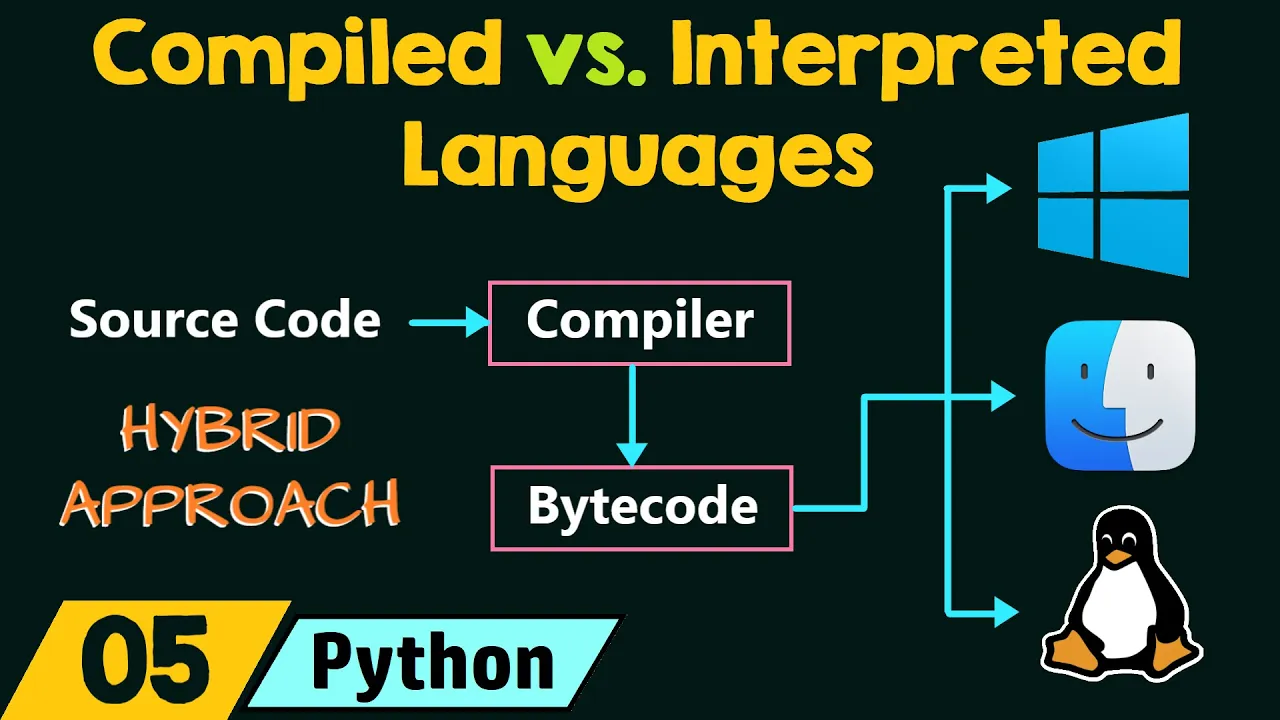
An understanding of the difference between compiled languages (like C/C++) and interpreted languages (like Python).
Rust's unique ownership, borrowing, and lifetimes model, which guarantees memory safety without a garbage collector.
Advanced error handling strategies using the Result and Option enums, along with the propagation operator (?).
Structuring code using Structs, Traits, and Generics to implement polymorphic behavior.
Concurrency and multi-threading in Rust, utilizing its safety guarantees to prevent data races.
Developing real-world applications such as building Command Line Interfaces (CLIs) or writing web services using frameworks like Actix-web or Axum.
17.4K views567likes1:00:01Original Release: 2022-05-21
hey guys what's going on becca's here and welcome to rust programming language in this video i will do my best to teach you everything you need to know so you can start programming in rust rust is a compiled programming language like c java or c sharp and it delivers high level simplicity with low level performance it is also a great choice for building systems or performance is critical like building operating systems or game engines a quick history lesson rust started as a side project of grade and in 2007 who named it after the rust fungus and then it was sponsored by mozilla in 2009 and according to the 2020 stack overflows developers survey those who get the opportunity to use rust have fallen in love with it and 86.1 percent of 65 000 developers rated rust as the most loved programming language since 2016. one of the most distinctive features about trust language is its memory efficiency techniques high-level languages like python provide garbage collector for better memory management control while lower languages like c provide functions for memory allocation rust does not have garbage collector instead it uses concept called ownership and borrowing by default every variable in rust is immutable and this allows the variable to be used in stack memory in the most efficient way because the size of the variable is known and prefixed as it's immutable however mutable values with dynamic or undetermined size are stored in the heap memory you can think of it as lockers granted by the language to store in each locker one character and every value in rust program is assigned to a single variable known as its owner and when that variable goes out of scope the memory allocated to it is dropped automatically in some cases you may want to pass a reference to a different part of the program this might sound a little bit technical but we might touch on it when we're going to practice the concept of borrowing allows you to access a reference in memory without actually taking ownership of that reference rust also has a package manager called cargo and cargo is similar to npm if you do note development or pip if you code in python cargo is mainly used to create trust projects and after the installation of rust i'm going to show you how to do it that's it for the introduction now let's go ahead and install rust alright so in order to install rust go ahead and write in your browser rust dash lang.org tool slash install you will have different access points here install learn playground and so on to install rust simply you can download it if you are working on microsoft windows you will have 32-bit installer and 64-bit installer go ahead and you most probably your system is 64-bit so you can download that it's an msi you will install it just simply you will click next and the download process is very straightforward very easy if you're running on linux or mac you can just simply take that curl and go to your terminal obviously i'm on microsoft windows but you can go to your terminal uh or bash or whatever and just hit enter and it will install rust on your system and below here some notes about trust installation how to configure the path in the environment variable how to uninstall rust tool chain management with rust up but we're not going to touch on rust up in this video and in order to make sure that trust is properly installed on your machine you can go ahead and type cargo so just to check cargo version first and cargo as we said this is the package manager cargo dash dash version there you go and also the rust compiler so we want to check out the rust compiler or rust c version and there you go now you're sure that trust is properly installed now for the code editor i'm going to be using vs code and i recommend you to install it unless you are already using another text editor like maybe adam or sublime text or whatever vs code is lightweight and just the best code editor to develop in rust in my opinion alright and just let me show you if you want to install vs code you can go ahead and type code.visualstudio.com if you're running on windows you're going to click this going to install an msi installer here and if you're running on mac os or linux the same you can download the stable releases here and some of the best extensions you can find them on visual city code so you get trust analyzer you get visual aids with air lens adding crates without context switching and tamil language support tamil is just um this is file i'm going to show you after we're going to be using cargo it's very similar to package.json if you're doing node development but more on that later so go ahead and click on extension if you decided to work with vs code and in the search extension tab here just type rust and um the first let me just make it bigger for you guys let me actually hold done you just make like that okay so uh the first result here this is uh very important you would want to install rust for visual studio code it has everything that supporting the language right when you're developing you're free to use the rust analyzer so you can install this as well and i i don't have it installed actually i only have rust extension so you have code completion definition implementation and so on but i find that all that is available only if you will download and install rust breast extension so as we are all set we have rust installed on our computer let's go ahead now and code in rust alright so i'm inside my visual studio code and the first thing that i want to do is to of course print hello world so in order to do that i'm going to create a folder i will call it hello world and inside that folder i'm going to create a file i will call it hello.rs everything inside rust is invoked inside a main function and the main function executes when you run the program so to create any function in rust in general not necessarily the main function you have the keyword fn which stands for function of course f and main parentheses and curly braces and here to print ln exclamation mark and inside parenthesis we can say hello world all right so control shifts and tall day to open integrated terminal here let's go to hello world to execute a rust file you will type rust c which stands for rust compiler space and the name of that file hello dot rs and you should get some warnings usually rust shows you some warnings we don't want to be bothered by these warnings every time we execute our program so i'm going to have a flag warnings like that so now the compiler is working and actually it has created an executable file called hello.exe for us which is up here all right will not be viewable of course okay so now in order to run that executable file simply you will type dot slash hello and it has printed hello world to us okay so this is a very simple way to print a statement in rust but actually in a real world application in rust you won't do this instead you're going to use cargo the package manager so to create a project in rust simply you're going to type cargo new and the name of that project so let's say hello rust so let's see what we have in that folder so we have uh cargo.tamil and cargo.tamal is very similar to package.json in node okay so you have the package name of your project the version and edition and then the dependencies that you might eventually install you have cargo.log okay so this file is automatically generated by cargo we have dot git ignore to ignore any packages that we might want to ignore actually when we push our code to github then we have the target this is not really important it's all generated by cargo actually is for the bug rust seeing info.json we don't need to worry about all that the most important thing to know is inside the source folder let me just shut this now so we have inside the source folder we have the main dot rs with a standard main function with the print line hello world so i have only changed from hello world to hello rest now in order to run your project file using cargo package manager you will simply go to your terminal and you will go to your hello rust project let's check what we have perfect we have our source folder our target folder the dot get ignore cargo.log and cargo.tamil but for now i want to go to the source folder and we're not going to do this rust c main.rs we're not going to do that here instead you're going to run the command cargo run main dot rs all right it's going to compile and run the file instead of compiling on one step and then running on different step and there you go low rust is printed just like that and any changes you're going to do it's going to compile and run again hello rust again save hit up or just if you want to type cargo run main.rs just hit up and run and enter is going to compile while updating and run in the same step so rust has a lot of primitive data types let me just paste that here and here what i did is that i actually have imported the standard library in rust so we have different data types we have integer of 8 bit characters 16 32 64 unassigned 8 16 32 64 and assign means that if you're sure that your integer is not going to be of a negative value this is integer based on the buffer size also unassigned size f32 and f64 for floating point if you have any decimal points in your variable so these are primitive data types for integers and then i'm using here use standard column column i o or input output column column standard input okay and this constructs a new handle to the standard input of the current process so any variable in rust is mutable if you want to declare a variable in rust use the keyword let and if you'll type let num for example equal to 10 by default num will be immutable and if you want to explicitly show the data type of that variable you can type here column and the data type that you want so let's say for example this is i8 right an 8 bit sign integer type and by default any variable has i32 data type okay unless you know that you're not going to use too much memory for your variable you can just set it to 8 or on the contrary if you know that the number will be very large you can set it to 64.
and if i want to print that number i can type print ln so we have print exclamation mark and println and the difference between those is like we have seen in kotlin before so print this prints to the standard output and if you'll print more than one variable will be all attached together on one line however if you will use print ln it will print the standard output with a new line so every time you will use print ln it will print whatever you want to print out on a separate line so of course we're going to use println and parentheses double quotes and we'll have curly braces and this is just simply placeholder for the value of that variable that you want to print then comma and what you want to print actually we can even make it like this this number or the number is all right and semicolon this is a semicolon type of language now let's go ahead and run that one more time and there you go the number is 10. let's also declare string variables so let's say let name and here we're going to use ampersand stir like that okay this is the data type for string i'm going to assign it to a name for example let's say back let's also add another variable sir underscore name and this is a very good practice in trust this is called snake case and it's very recommended by the rust community and let me just change that back brace and let me print ln and i'm going to say my name is curly brace curly brace and i'm going to say here name and surname all right and let's just print that and let's see what we will have up enter and there you go my name is backbrace alright so this is how to use interpolation in rust language by the way if you don't want to get any warnings if you will not use a snake case variable declaration you can go up here in your program hash exclamation mark and inside brackets allow non underscore snake underscore case so how to do comments will be exactly like in java c c sharp the same thing single line comment with um double slash like that double forward slash and double line comment will be slash asterisk asterisk slash alright so this is multiple line comments and single line comment by the way let keyword is used to declare mutable and immutable variables so we have up here let num equal to 10 and we have printed it but let's actually try to change the num's value and instead of writing 10 we will write 100 for example let me type num is equal to 100.
now let's actually try to print that so print ln we'll save let's run that one more time and we will get of course a compile error let's see why we have this error now so cannot assign twice to immutable variable num is a variable that is immutable by default so in order to solve that problem we are simply going to add the word mute before the name of the variable so let mute num equal to 100 and now we have transformed this num variable from an immutable variable to a mutable variable let's save that and let's get back here let's run that one more time and there we go first it was printed as 10 and then it was changed to 100 and got printed right so this is simply how to change the variable from immutable to mutable let me also show you if you want to print the minimum and maximum values of the different data types all right so you can see that the maximum for the integer of 8 bit character 127 the minimum is -128 and so on for the 16 32 64 for the eye size for the unsigned size we also have other data types so we have seen the string we have seen the integers uh we have also booleans so we have booleans so let's say for example that let is valid and the data type is bull equal to true also we have characters so just one character so let's declare variable we'll call it one underscore character or char and inside single quotes we will have our character so let's now try to place the variables in placeholders let's say for example print ln my name is and my favorite character is and here we will have name surname one character all right let's execute that my name is back brace and my favorite character is a as expected you can also define multiple variables on one line so we'll say let inside parentheses so the variables names not the values right country and capital and this is equal to again inside parenthesis and these are the values right so the country here is france and the capital here is paris and you can print them of course so print ln parentheses double quotes and here we can say country and capital and semi-column don't forget the semi-column let's run that one more time and we should see france paris as expected we can also check out the operators for math calculation in rust the basic plus minus multiply and divide the standard addition subtraction multiplication division and the modulus and the modulus gives you the remainder of division of two different numbers all right so let's check that out [Music] okay so so far we have seen different data types so we have talked about primitive data types for integers we have seen here in the main function we have printed a simple hello rust or hello world we have seen the immutable integers and how to convert them or to change them into mutable integers using the mute keyword we have seen how to print strings and how to declare strings in general so we have seen different values the minimum and maximum values for the integer of 8 bits 16 32-64 eye size by the way um all these are to be deprecated soon based on um rust latest updates i don't know what's going to um what's going to replace them but i've just read a couple of days ago that all of these data types are going to be deprecated soon anyway um let's continue so we have seen also booleans true or false like in any other programming language characters which is a bit new uh you don't see a data type which is of type char just printing one character place variable in placeholder so here we just we have substituted these curly braces which is you might call it string interpolation like we have seen in kotlin all right also we have seen oh we haven't seen floats by the way uh let me just show you a quick float example so above here we have for the floats f32 and f64 right these are the two and i think there is f128 as well if i'm not mistaken so uh let's check that out let's say let the underscore float equal to 2.5 for instance and let's just put data type here f32 all right and these yellow lines so is valid here on this boolean it's complaining because it's unused variable as we said rust is very strict about memory efficiency so if you're not going to use it sometimes it tells you to put underscore at the beginning you see now the line has disappeared this is just um to tell russ that hey listen i have assigned or i have declared this variable but i'm not going to use it so just simply ignore it right uh same thing here but we're going actually to we're going to we're going to print them so let's see here print this is and simply we can is valid uh oops not print print ln exclamation mark excuse me um also the same thing let's just copy that come here and paste it and this is a float this is a boolean right and here we will say um the float right and it's going to just print these values so we have lost them let me actually change the theme because it's not very clear for me and i reckon for you guys um i know some of you guys you like jellyfish theme um it's clear um by the way i want to show you in rust documentation there is playground this is very cool you can actually play with rust online so what we've been doing here you can actually do it in the playground and it's going to compile and run your rust file with no problems all right also i wanted to show you in uh learn in check out trust by example i think maybe let's check that out yep so if you will take a look to primitives here you will find that there are scalar types and compound types of primitives so rust provides access to a wide variety of primitives so scalar types like the signed integers we said sine integers the i 8 8 16 32 64 128 any size and also the unassigned integers which are basically the same but for positive values if you're sure that your data type or your variable is going to be off a positive value only also floating point f32 f64 char bull and unit type is just empty parenthesis or empty tuple right so uh this is the scalar types another type of types is or another kind of types is compound types which is uh which composed of arrays right which is a list of homogeneous data types and also doubles one true which could be a mix of different data types tuples floats um other tuples inside the main tuple nested tuples i mean and so on right so this is the compound type so we're going to see that later so i think it's a good idea not only to [Music] just watch this tutorial or other youtubers tutorials but you need to do your homework right you need to read the documentation if you're really serious about trust language um i can tell you that trust is a very very cool language i love it i started to love it even more than python so it's a very good idea to put the manual or to put the book because they wanted to call the documentation of russ the book so put the manual or put documentation next to you while you're watching my tutorial or other youtubers tutorials and that's all what i have for you guys for data types and variables okay let's talk about constants constants are just variables that are declared in the global scope and cannot be changed so if variables are declared with the let keyword for example let keyword could be only used inside the function main scope okay you cannot declare a variable outside of the global scope right you cannot say for example let name of type string equal to rust right you cannot say that and you can see that trust is complaining expected item found key let however if you will take this and you will insert it inside now it's okay so if let is declaring a variable whether mutable or immutable the keyword const declares a constant and a constant cannot be changed can never ever be changed it's not like you will put the keyword mute before your constant just it doesn't work there are some strict rules about constants so the first thing is of course the keyword cons the second thing is that the the constant's name should be all in capital letters and if it's more than one word should be separated by an underscore right so we can say the underscore const underscore end for instance just to declare an integer of type um let's make it u8 and we'll give it a value of 10.
and it's complaining here because it's not used right so to solve this problem as we said just add an underscore before let's also so let me just copy that and let's have also a string of type and stir and let's say for instance cairo right the capital of egypt and you can see that these constants are okay to be declared in the global scope right so just i'm going to add a comment here you cannot declare variables in global scope and let's print first the integer and with the respective order of course so we'll say the const end and the constru right don't forget the semicolon here and let's run that [Music] right the integer is 10 and the city is cairo now let's try to assign the const int or the conster to different values so the const int is equal to 20 right and you will see immediately that rust is complaining right you cannot also say for instance let you cannot do that you cannot just change the declaration of a constant and change it to be an immutable variable even right or even immutable variable you cannot do that let bindings cannot shadow constants and we're going to talk about the concept of shadowing later right so once declared once a constant declared always declared and it cannot be changed all right and that's all what i have for you guys for constants alright so let's talk about conditionals so conditionals are a way to execute certain code and if statement as in any other programming language is an example of flow control which will evaluate whether a statement is true or false so the execution of your code takes different path depending on the decision that you take if evaluating to true or false if to true then you might go to the right if false you might go to the left so let me just give you a very simple example on if else statement and how the syntax works in rust so let's have an integer x of value 15 for instance and now i want to say if x is less than 20 you can say of course less than or equal to 20 right we want to do what we want to print a line that says you are less than 20.
so let's do that print ln we will say you are less than 20.
20 years old oops i i don't know why i did that okay and don't forget the semicolon else we want to print that you are less than 30 years old so let's actually try what we will have let's try the program and see what we'll get [Music] right you are less than 20 years old because indeed i am 15.
so let's say for instance that i am now 25 i changed the age let's run that again now you have a different output you are less than 30 years old now let me change the value to be 40 instead of 25 and here below i want to say else if x is less than 30 right so we have our x is equal to 40.
now if x is less than or equal to 20 i want to print you are less than 20 years old else if x is less than 30 or we can even make it also less than or equal to 30 years old we want to print you are less than 30 years old and then finally i want to print whatever other cases might be i want to print it and i'm going to plug in whatever x is x value is and don't forget the semi column all right cool so let's go ahead and try that [Music] your age is 40 indeed because it's not less than 30 or equal to it's not less than 20 or equal to 20. it's equal to 40. so that's all what i have for you guys for now for conditionals all right let's talk about infinite loops break and continue so first of all loops as in any other programming language is used to do something on every element in a collection but if used without conditions the loop could be infinite and might crash your software or your program let me declare a variable here and this is equal to zero you will just type the keyword loop and open curly braces like that so now i want to increment n by one so you can say n plus equal to one for instance this is one way or you can simply say n equal to n plus one will do the same thing incrementing n by one now i want to print line here i want to say the value of n is and the crazy end that is going to crash the memory cargo run we need to stop this madness just hit ctrl c so as we said the best way to run a loop is through f statement we have just seen it in the last lesson so let's try that one more time uh let me actually i will keep all that wait hold on so i will keep this and i will keep this just as comments for you guys for your reference after you can grab the code from github in the link below and i want to check using if n is equal to or more than 15 right i will break out of the loop i will exit the loop and then down here below i will let me just grab the same line and let's go ahead and run that let's see what we'll have so indeed it has exited on number 15.
i will change it and make it just more than 15 so it it will take 15 will be inclusive in the count let's try that and there you go see so this is how it works let me also show you continue so for example i am superstitious and i don't like number 13 and i want the count when it comes to number 13 here i want it actually to skip it so it will print 12 it will skip 13 and it will continue 14 15 and so on so here just let me write break and here let me write continue so to do that i will say if n is equal to 13 i want to continue right i want you to skip it and actually to continue cargo run and it should print 11 12 skipped 13 as expected and jumped directly to 14 and then 15. so this is what continued as it just skipped number 13 here and that's all what i have for you guys for infinite loop continue and break statements all right so let's talk about for loops we have just seen what infinite loop does so we will need to add a condition to not let the loop run forever so for loops are used to iterate over a range of elements and it does that using an iterator and that iterator just iterates over that list of items and print them or does whatever you want and if you will print it doesn't print the last element in that range so if you want to print from 1 to 10 it will take from 1 to 9 it will not print 10.
the reason for that being is it's of zero index probably it starts from zero so from zero to ten it's the same as from one to nine and uh you know for python for example you have a range so you can say in python for instance you can say from i in range right you will print it reader will print from one so you will print one two and three so that range in rust is displayed in two dots so you will say 4i in 1 dot dot let's say 11 so we can print from 1 to 10 actually and we want to do we want to print line and we will say for instance number is we're going to print that number and we'll pass here the iterator so let's do cargo run [Music] and there we go number is 1 2 3 till 10. you also can do it differently let's say for instance that let x is equal to and you can define a range as well so we want to print from 1 to 5 so i will make it from 1 to 6 this is the range and in order to loop in that x variable we can say for i and x just like that cargo run again and indeed we have printed from 1 to 5.
we can also use for loop by the way to look over a vector maybe people will need that so i will put an underscore here so here i'm going to declare fruits variable and this is going to be a vector so you cannot put inside the vector for example a string and then a float and then a boolean you cannot do that so a vector of different strings let's say for instance orange look if i will put 12 it will complain it doesn't like that right trust does not allow it so we'll need another string let's say apple and here let's say mango and don't forget the semi column so i want to iterate over that fruits vector four and here i will have two different arguments the first argument will be index so here for example this is your position one and the actual element it's represented by the i or the iterator in fruits go ahead print line that says fruit number whatever is whatever and we will need our two arguments here the index and the i so rust is complaining because we need two more methods right on the fruits vector so the first one is iter and it just simply is going to return an iterator over the slice of inside that vector so orange apple mango it could work without it but if you will not use it the ownership of that fruits vector is going to be transmitted or changed inside that for loop right it will not be red outside for loop and also we will need a method called enumerate and enumerate simply is an iterator that yields the current count and the element during the iteration so because we have two different arguments here we will need to enumerate and we have the same enumerate in python right it does the same thing it returns the index and the iterator okay so let's actually try that out for the powershell and there you go fruit number zero is orange number one is apple number two is mango alright so let's talk about while loops so the while loop as in any other programming language loops through a block of code as long as a specified condition is true so let me declare variable i will make it a mutable variable immutable number and this number is equal to 1. now if i want to use the while loop i will say simply while number while that variable is less than or equal to 20. so the program will start executing from 1 to 20. then it will print each number print line and then i want to increment that number by one so you can say number equal to number plus one simply you can say let me just change for you guys to see different alternatives number plus equal to one i'll do the same thing uh i don't know what's that little guy doing here all right so now let's go ahead and cargo run that and there we go from 1 to 20 inclusive let me also show you another example so here i want to check if from number one to number 40 for instance what numbers are odd and what numbers are even while number is less than or equal to make it 40.
i want to check if that number is a multiple of 2 simply or if it's divisible by two the remainder of that division will be zero if number modulus two is equal to zero i want to print line that says that number whatever is even number else let me just take that line be the same else that number will be an odd number and the last thing don't forget to increment that number by one right number plus equal to one all right so let's go ahead and run our program cargo run and let's maximize this and there we go it has printed from number one till number 40 and says that each so one is odd two is even three is odd four is even and so on so that's all what i have for you guys for while looping this lesson so let's talk a little bit about doubles so doubles are just a collection of various variables wrapped in parentheses if you do python coding you would know what tuples are tuples can contain strings integers any other data type it contains even mixed data types together so in one tuple you can have integer string boolean float and so on it could even contain nested tuples inside so let me just show you what i mean here so in order to declare a tuple you will use the keyword let and let me just say let's actually define a string tuple and we'll open parentheses and i'm going to enter different strings so rice for instance so this is a string double another tuple that we can have could be an integer double so this is a string double let's also have an integer tuple so simply i'm going to add an i you say that this is an integer tuple and we're going to add just one two three four five right um let's have a mixed double and we're going to add different data types inside as we said so we can say smith laura true 5.2 can have an integer let's have a character between single quotes like that we can also return any member of the tuple um using the zero index basis so print line and we're going to say um the second name is and the integer is while the boolean value is so second name so it will be zero one so we need index one the mixed tuple dot one i need also the integer so zero one two three and four okay so let's cargo run right perfect so the second name is laura and the integer is 100 while the boolean value is true um another thing i wanted to show you is the nested tuple and underscore mixed double okay so let me have another double we'll say 10 20 and 30 right so let's try to print a value here so print ln first value of nested double is second is and the third is and we will type our um nest that makes double so we need double indexing right so the first indexing should be um the the main indexing so we have zero one two three four five and six so dot six first and then outside here dot whatever uh the number that we have so we have zero one two zero four ten one for twenty two four thirty so that's the first one and i need two more so here are two and here is one and let's run that first value of nested double is 10 second is 20 and third is 30. all right so that's all what i have for you guys for doubles in this lesson we have seen actually how we can write functions in rust we have seen the main function right which is the main entry point for the program but if you want to write any other function you can write it outside of the main function somewhere here or above and then you can invoke it inside the main function and let's take a quick look to the book or the rust documentation you can read here that functions are prevalent in rust code you've already seen one of the most important functions in the language the main function which is the entry point of many programs you have also seen the fn keyword which allows you to declare new functions okay so the first function that i want to create is to add two integers simply so add underscore end or let's say num rather and we need two arguments or two parameters the first is going to be um x which is integer of 64-bit character and the other one is i 64. so we have an x and y of i 64.
next what i want to do is i want to define or declare a variable called z and it's going to be equal x plus y and here simply i want to print a line that says the addition of should be x and y is equal to z right and here we will just add our x y z variables and don't forget the semicolon and in the main function our entry point to the program i'm going to call the add so add num and automatically you can see that trust has displayed to us the parameters that should be entered right we need two integers so notice if i will enter for example a float 2.5 take a look expected i-64 found floating point number all right so let's have for instance uh 121 and 78 okay now let's go ahead and we have what's called functions right cd functions cd source and cargo run all right perfect the addition of 121 plus 78 is equal to 199 okay great let's have other functions one two three now let's go ahead and invoke all of that sub mult div the only parameters that russ is not happy about is this because should be f64 right so these are the functions that we have invoked inside the main functions and we got the results very neat very clean we have passed some arguments so i'm going to try to write another function inside the main function not necessarily outside here in the global scope and then invoke it in the main function so let's say for example that i have a string so let z string equal to bananarama and it's complaining because it's not used yet so let's add this underscore here and let me actually create the function lower and this should uh return the nanorama in a lowercase and i'm going to say the lower case of the string is and then i will pass this inside here and then i will take this string and then i will access a method called to ascii lowercase so as this variable or the string is outside of the lower function scope it can't see it the lower function cannot actually see that variable so to solve that problem i'm going to cut it and paste it inside that scope now lower function can read it clearly right if you will hover over you'll find that it's of type string and it has the value of bananarama so we have created the function but we didn't invoke it here so simply we'll say lower and let's try that again [Music] and there you go the lowercase of the string is bananarama and you can see that it's in lowercase now all right you can also create another function let's call this new function len just to display the length and we're going to leave it to a normal and i'm going to say the length are going to take the same z string and instead of that method we are going to invoke another method called len right.lan also invoke it here below and let's run that one more time so now we get the lower case and we get the length of bananarama which is ten characters one two three four five six seven eight nine and ten all right so that's all what i have for functions in this lesson thank you i will see you in the next lesson enums is just a type that represents data which is one of several possible variants and the structure of enums looks exactly like struct and i know we haven't seen struct yet but keep that in your mind for the future and let's take a look here to the definition of num in rus documentation so enums are a way of defining custom data types in a different way than you do with structs so instead of reading all of that let me actually show you what do we mean by enum so like i said enoms is just a type which represents data that's one of different possibilities right you have different variants inside curly braces and you can choose between these variants first what i want to do is i want to define an enum and this is a reserved keyword interest and the enum that we will have is called compass and this is a compass that we're going to use for soldiers that can use it actually in game of thrones war and this compass has four directions right so it has north south [Music] east and west alright so this is our enum and here in the main function i will define the first soldier so i will call him soldier 1 and this comes from the compass or just mapping towards the compass that we have defined above and this is equal to the compass and we want to access the variant the first variant will be north so double column means that i want to access the enum compass and i want specifically to access this north variant okay and don't forget the semi-colon and we can have different soldiers as you can imagine so let's have the second the third and fourth here soldier two is going to south east and west okay uh they are of course unused but we're going to use them in our main function now and then i want to match each soldier so if soldier won his compass is indexing towards the north i want to print a line says that going to winterfell right king in the north for example so let's do that um you have in c or c plus plus switch statement but it's more powerful so yeah so let's say for example that we want to match uh soldier one so the first soldier this is how you write the match statement the name of the enum so compass and i want to access the variant of north for instance and if so i want to print a line that says soldier 1 two winterfell and likewise for the three others so compass accessing the south east and west to westeros uh in the east we're going to king's landing casterly rock all right so these are our options we're going to match each soldier based on the enum compass that we have here above alright let's run that and see what we will get cargo run and this by the way for soldier one only so we are checking now soldier 1 there you go soldier 1 to winterfell if we will change to soldier 2 run that again we will have different outcome soldier 2 to westeros we can make even like that so let's take all of this 1 2 3 and we will match soldier 2 we will match soldier 3 oops ok soldier 2 soldier 3 and soldier 4.
right save run again [Music] all right soldier one to winterfell to westeros and so on and that's all what i have for you guys for enum thank you and i will see you in the next lesson
Up Next
45:50
The Mess We're In | Complexity, Entropy, and the Future of Computing
@StrangeLoopConf
393.3K views•2014-09-19

87:26
Introduction to Secure Multiparty Computation with Yehuda Lindell
@fhe_org
7.7K views•2021-02-04

4:55
HTTP Requests Explained: GET, POST, PUT, DELETE
@codecademy
103.1K views•2021-10-07

19:25
Enigma Machine Mechanics: WWII Encryption Explained
@JaredOwen
13.2M views•2021-12-11
Related Study Plans & Knowledge Roadmaps
Structured learning paths in Computer Science
computer-science
Container Runtimes: Namespaces, Cgroups & Go
01Linux Systems & Go Programming Foundations
02The Core of Isolation: Chroot and Filesystems
03Linux Namespaces: Process Isolation
+ 3 more learning modules
32h6 modules
Explore Roadmap
computer-science
Building a CHIP-8 Emulator: Rust & CPU Basics
01Computer Architecture Foundations (Bits & Bytes)
02Rust Programming for Systems Development
03CHIP-8 Virtual Hardware Specifications
+ 2 more learning modules
32h5 modules
Explore Roadmap
computer-science
Building BitTorrent: Go, P2P & Concurrency
01Go Fundamentals & Concurrency
02Networking Foundations & P2P Architecture
03Bencode Parsing & Torrent Metadata
+ 3 more learning modules
26h6 modules
Explore Roadmap
computer-science
Actor Models (C++ Concurrency & Lock-Free)
01C++ Multi-Threading Foundations
02Thread Pools and Task Scheduling
03Atomics and Lock-Free Queue Design
+ 3 more learning modules
45h6 modules
Explore Roadmap