
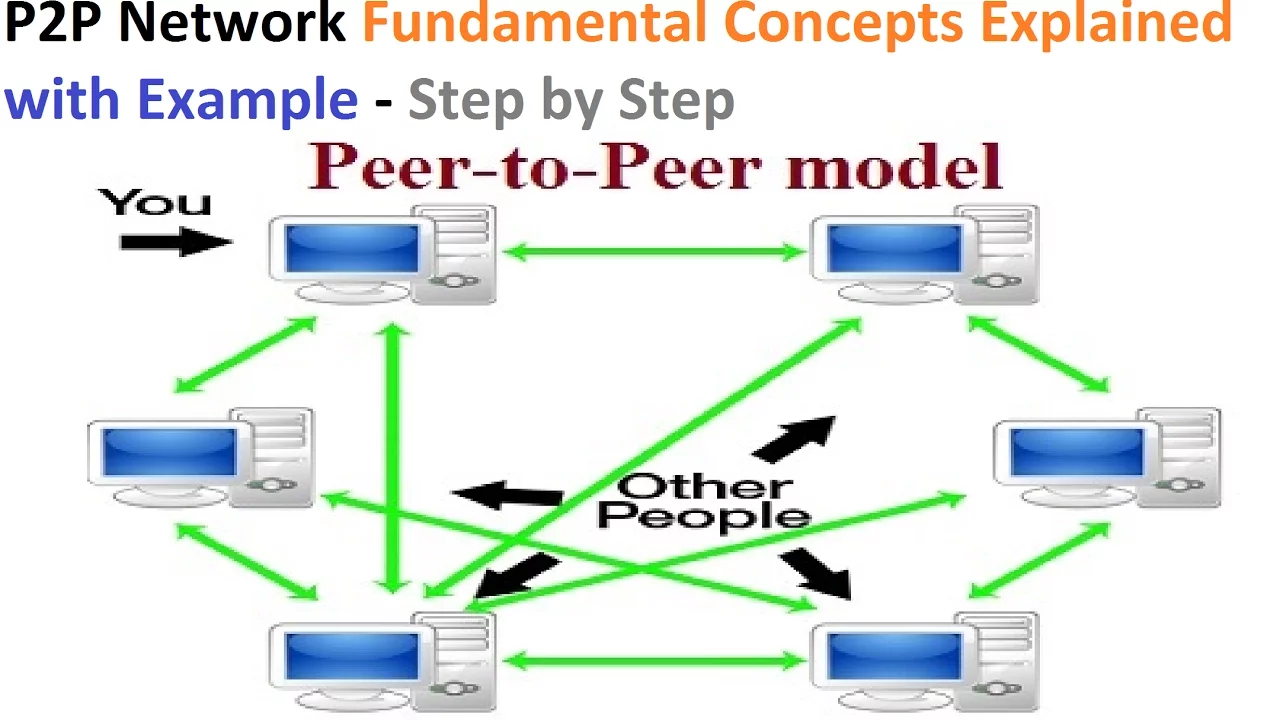






















BitTorrent is a peer-to-peer file sharing protocol where files are divided into pieces and blocks, and distributed across multiple peers in a swarm. When a new peer joins, it contacts a tracker to discover other peers, then establishes TCP connections to download pieces from multiple sources simultaneously. The protocol uses specific messages including handshake for identification, bitfield to indicate available pieces, request for specific blocks, and piece messages for data transfer. To ensure efficient distribution, peers use strategies like rarest first to prioritize uncommon pieces, and choking mechanisms to manage bandwidth fairly. The availability of a torrent (number of complete copies in the swarm) determines download success, with higher availability providing more download sources.
BitTorrent Protocol Explained: Piece Selection & Peer Choking
Added:our initial peer or our peer that enters the network contacts a tracker. The tracker sends back a response which contains a list of information including IP addresses of other peers, other computers in the internet. And those other peers should have the entire torrent if they're seeds or parts of the torrent if they are downloaders.
So our peer gets the addresses of some other peers and starts to contact them.
It creates TCP connections to the some other peers. It selects some of them.
We'll discuss how many later, but it selects a section a a subset of the peers. So there may be 1,000 peers in the swarm. Our peer here selects say 10 of them to contact at the start with the intention of downloading parts of the torrent from each of these peers.
Different parts from different peers at the same time. So instead of downloading the file from one, you download parts of the file from multiple.
We went through an example of the structure of the torrent file. Remember that's a descriptor. A it describes the torrent. It doesn't contain the actual content including the address of the tracker and some information about the pieces because our torrent is broken into multiple pieces.
And that peer-to-tracker communications is done using uh HTTP where we send a request to the tracker including some statistics. The tracker sends back a whole list of peers that we can contact.
Once we know the other peers or at least some of the other peers, we can start downloading pieces and that's what what the peer exchange protocol is used for.
So we're going to focus on a single client and it's going to the idea is to download pieces of the torrent from other clients from other peers.
So our peer creates a TCP connection to some other remote peer multiple remote peers and they exchange messages with the intention of downloading pieces of this torrent.
And of course, as my peer wants to download pieces from other peers, those other peers may want to download pieces from me as well.
And this peer exchange protocol for how do we exchange these pieces has different types of messages. The first thing that they do is perform some handshake. And there's a a message called a handshake message.
So we're going to focus on some pier P1. It's going to create a connection to some other pier P2.
A TCP connection is created between the two. So if we focus on this is our pier, our computer.
It gets the IP address from the tracker, creates a connection and then starts exchanges bit torrent messages. Well, the first one is a handshake message.
We send a hand handshake message to the other peer saying who we are. Give some identity of our peer. It has an ID and then that can be followed by what's called a bit field message.
And the idea of the bitfield message is to inform the other peer what pieces you have available to download.
So initially our pier has no pieces let's sorry to avoid confusion instead of calling it P let's call it something else instead of PC computer one computer two because I would like to name the pieces as well piece piece one so our torrent is divided into multiple pieces. Let's give them some numbers.
These P means a piece in this case. C is our computer or our peer.
Our new peer client C1 has no pieces at the start. It doesn't have any of the torrent. But when it joins the network, other peers will most likely have some pieces. So in this example, this other pier has four pieces. Piece 1, 2, 10, and 20. Just some random pieces.
So the bitfield message is used to inform the other pier of what pieces are available. Essentially we send a bitfield message from C2 to C1 saying I have piece 1 2 10 and 20.
So each pier informs the other pier of what pieces they have available.
Now in fact this is from one pier to another. We do that with other peers.
So our peer will have multiple connections.
So eventually our peer C1 will learn that C2 has piece 1 2 10 20. C3 has pieces 2 5 16 and 20. C C4 has these other pieces. So for all the peers that we connect to, we learn about the pieces that they have. Our goal is to download all pieces of the torrent.
So when our one peer connects to another, they send a handshake message to identify themselves and then a bit field message to indicate the set of pieces that they have available.
If this was a seed pier, it would have all pieces available.
Once that's done, that's just done at the start. Then they can try and start exchanging pieces, downloading the pieces on from C1's perspective. It may want to request from C2 to download a particular piece.
So there's a request message And so we send a request message if we want piece one.
We send a request message requesting that piece.
But more specifically requesting a block within that piece.
If we go back to the structure of our torrent, one of our earlier slides, remember the torrent is broken into pieces and this each each pier has a list of pieces that they currently have that they've already downloaded. We want to get all of the pieces. Let's say in our example there are 100 pieces in total.
Each piece is divided into blocks.
What we do is we actually request blocks not pieces.
So this request would be say I want block one.
The request would contain some information. I want block one from piece two.
For example, it would be a request for a block in a particular piece where the piece is in the set that C2 has available.
And then actually to be closer to this slide, let's say block A in in a particular piece, block A in piece two.
And then if everything's okay, C2 will send back that block.
So we request a particular block in a piece. We send back the block say 16 bytes of data and then we request another block.
So in this case we may request each of the blocks in piece in this case in piece two. So request block A, block B, block C and so on until we've got all the blocks in that one piece. And once we've got all the blocks in piece two, then C1 now has piece two and other peers can download pie 2 from C1. Now, so going back to our messages and this is where the confusion arises.
We request a block and to send that block back the pier sends it into message in a message and unfortunately that message is called a peace message.
But that's confusing because the peace actually for the terminology we're using and it's the common ter terminology in bit torrent that peace message peace is the name of the message. it contains an individual block.
So we re send a request for a block in a particular piece. C2 sends back a piece message which contains say the 16 kilobytes of that block.
So note although it's called a peace message it contains actual block where a block is a subset of a piece.
So we just continue exchanging such such messages. Request a block, receive a block, request a block, receive a block.
We'll talk later about ways for selecting which pieces to request from.
Why did I say block A from piece two?
Why not from piece one?
Normally the blocks may be done in order. Okay, that we get the first block of the piece, the second block, the third block. But normally the pieces are not done in order. One way to request pieces is to randomly select pieces.
That is okay, we know that C2 has four pieces. We could select randomly from those four values and say, okay, it comes up with piece two. So let's first download piece two. We don't have to download the torrent in order. We just need to down all of the download all of the pieces. And it turns out generally it's better not to download in order.
So we have request messages and peace messages.
Send a request for a specific block, receive that block back.
And that that's for the data transfer.
And we continue doing that with different peers until we have all pieces.
There are some other messages that are used.
The bitfield message was used at the start of the connection to inform the other pier of what pieces I have available.
At the start of our connection, C1 had no pieces available. So when it told C2 in the bitfield message it says I have no pieces available. That was at the start but C1 may be downloading from other peers at the same time. So after some period of time it starts to collect some pieces piece three piece 31 P 63 from other peers not shown in this case because it's doing the same with other peers as well as with C2. So now at this point in time C1 has four pieces available.
The have message is used to indicate that a app a pier has a particular piece.
So C1 sends a have message to C2 saying I have P2, P3, P31, P63.
And now C2 may send a request to C1 saying I want to download a block from say piece P3 because C2 doesn't have P3. It wants to download P3 so it can request and download from C1.
So the have message indicates what I have at this point in time. What pieces I have.
there's possib a possibility to cancel a message if you uh request a block and you no longer need it. Maybe you've downloaded from another peer at the same time or you've requested from one pier, it's taken a long time to respond. So you request from another peer, you receive the block, you may cancel the first request. So there's a cancel message.
We will see shortly that our peer maintains connections to multiple peers, TCP connections.
One issue with TCP is when we have connections and if we don't send anything across those connections, then eventually the connection automatically shuts down. So we have our C1 has connections to three others.
Maybe we're downloading some pieces from C2 and C3.
We still have a connection to C4 because in the future we may want to download from C4.
In TCP, if we don't send anything across that connection, then our operating system will shut the connection. So there's a keep alive message to keep that connection open even though we're not sending anything now we may want to do in the in the future. So keep that connection open so that we can use it in the future. So that's just to to handle an issue with TCP.
So we establish multiple TCP connections to other peers.
We tell them who we are with a handshake message. We tell them what we have, what pieces we have with a bitfield message.
And then we start downloading pieces by requesting a block and receiving a block.
And we keep doing that until eventually we have all the pieces.
We can inform the others of what we currently have, what pieces we currently have with a hat message. We can cancel a request and we can keep our TCP connection alive with a keep alive message.
The other main messages sent in Bit Torrent when we're downloading data.
U we'll come back to that.
which pieces to download first.
So at the top we just have some typical numbers about uh torrent pieces and blocks. A torrent size has no limit. A torrent is made up of one or more files.
The limit there's no limit on the size.
It can be any size. It's generally most efficient for larger sizes.
Small kilobyte files because there's some overheads. We have multiple connections. small size files it's not so efficient.
How big are pieces? They can vary in size. Some some typical values 256 kilobytes, half a megabyte, 1 megabyte, even larger. So some typical sizes of pieces and block 16 kilobytes. There are some other possible values as well.
So our client C1 that's on this diagram there are pieces available. What did C2 have at the start? P1, P2, P10, P20.
Let's say we have this scenario. We have our our our pier that we're focusing on is currently connected to three other peers. And this is the set of pieces they have available. C2 has four pieces, 1, 2, 10, and 20. C3 has the pieces from two all the way through to 30. I just made that so it's I don't have to write many down, but it has multiple pieces.
Piece 50, P 60, and C4 has all pieces.
It's a seed. piece one through to 100 just as an example. Okay, so C1 wants to download those 100 pieces.
Which one does it choose first? Well, random is one option. Just randomly download the pieces.
Why not go piece one, piece two, piece three, piece four? That that's another alternative download in order. If there are 100 pieces, download the first piece first, then the second piece, and so on.
The problem with that is that if everyone does that, then the peers will the peers in the swarm will end up having the initial set of pieces. Piece 1 2 3 4. whereas no one will have or fewer peers will have the end pieces piece 90 91 92 and so on. So the distribution of the pieces across the network will not be even. What we'd like is that all peers in the swarm there are multiple copies of pieces and the same number of copies. That is ideally if there are 100 uh peers in the swarm there's the same number of piece one distributed across those peers as there is a piece 100. If we download in order then peers will get piece many peers will have piece 1 2 3 4 few peers will have piece 99 and 100. So that's the problem of downloading in order. So random is one approach.
So simply learn about what other peers have and randomly choose a number from that set and download that and then choose another random number to download the next piece. And that's a way to make sure that the piece is uh distributed in an equal number about about the swarm.
Another approach, rarest first download the pieces that are not so common in the swarm.
Uh in this case, piece 2 is available in all three peers.
Piece 100 is available in just C4.
So that's rarer, less occurs less frequently than piece 2. So download piece 100 first because again that evens out the distribution of pieces across that that swarm because if C1 downloads piece 100 now it's available at C1. So piece 100 is now available at C1 and C4.
So C2 and C3 have the option of downloading piece 100 from either C4 and now C1.
So getting the the piece which occurs less frequently is another way to make sure that the pieces uh occur in approximately equal numbers throughout the swarm.
If we downloaded piece two first, doesn't matter from which one, but if we download from piece piece 2, then that doesn't really help C2 or C3 or C4 because they already have piece two.
What would help C2 or C3 would be if that if this one has other pieces that they don't have available. So rarest first is another option available.
The idea is to make sure that the peers in the swarm have a have copies of all pieces and preferably have multiple copies of those pieces as many as possible.
If there's just one pier that has all pieces, then there's less less peers to download from. But if there are peers that have if the pieces are distributed amongst all the peers, there are more peers to download from. And the start of this this lecture slide, we had the example the more that we can download from, the faster the download can be.
Does that make sense?
Yeah.
Okay. Uh C1 knows about the pieces that these three have.
So we can choose. So there's another issue of okay, which one can see one download fastest?
Well, that depends something upon the the connections between the the peers like the speeds of the peers, but we generally do not consider that. We preferably for the for the network to work well, we'd like to make sure that the pieces are distributed amongst all the peers.
So yes, if C4 is busy, that is there's a high load on C4, then trying to download piece 100 from it may take a long time for C1.
Whereas if C4 was busy, then we could quickly download say piece 2 from C3, someone who's not so busy. So that would be uh an advantage of accessing a piece which is more common. But the disadvantage of that is that it doesn't help other peers and we lead to a state where all the peers have some pieces say the first 10 pieces but because in the future C4 leaves the network.
If C4 leaves the network, then no one has piece 100 and no one can download the entire torrent. That's a problem. But if we download the rarest piece, piece 100, then if C4 leaves, of course, we've lost many pieces, but at least we have P 100.
So that's the advantage of downloading the rarer pieces.
The disadvantage, like you point out, that the the performance of doing that may be a problem. Any other questions on that aspect of try to distribute the pieces amongst the peers?
While we're on this because I slipped uh skipped through to this slide to explain just that only. Another term that's commonly used is availability of a torrent.
It's the number of copies of a torrent in a swarm. If we look at all the peers in a swarm at some point in time, how many copies of the torrent are present in that swarm?
If the availability is one, that it means all pieces are available in the peers in the swarm.
Uh let's keep a simpler example.
Let's say we just have four pieces in our torrent. Keep it simple. If we have P1, P2, P3, P4, if there are the torrent contains four pieces in this swarm, the availability is one because there's one copy of the torrent in the swarm. If we take the torrent break it into four parts there's one copy distributed amongst all the peers. It's not at one of the peers but uh is distributed amongst different peers. So this is a case of availability of one if the torrent has four pieces.
If another scenario, same size torrent, four pieces. If C1 is a seed, what's the availability?
What's the availability of our torrent?
No.
Four. One. No.
Two. Two. We have two copies of the torrent in the swarm. This is a seed.
What does that mean? It means it has all pieces.
So in total there are two copies of the torrent distributed amongst the swarm.
There are two copies of P1, two of P2, two of P3, two of P4. Okay, so there are two copies in total. If it wasn't a seed and had two pieces then it would have be availability of 1.5. We have one and a half copies of the torrent in the swarm. Okay, because we have 100% of the pieces and then another 50% of the pieces. So the availability in this case is 1.5.
What's the availability now?
The availability in this case is 50%.5 because even though we have two copies of piece one and piece two, we don't have any copies of piece three or piece four. So, we've got 50% of the pieces.
So this would be availability of of 0.5 because we're missing piece three and piece four.
Uh so the the main point uh let's do we have one more example.
What have we got?
If if the availability is less than one then it means you cannot download the torrent because in the swarm at that point in time all pieces are not currently available. So if the availability is less than one the entire torrent is not available.
You can get just part of it. If it's greater than one then you can potentially download it. And the higher the availability, the a larger value means there are more copies of the torrent and a more chance that you'll be able to find another peer that has a piece that you want to download. And importantly, the more chance that you'll find another peer that is willing to exchange or let you download that piece.
So the larger the availability, the better. less than one, you cannot get the entire torrent unless another node joins the the system that has pieces.
Greater than one, more than one copy available.
Let's go back to what we skipped over.
Of course, with a peer-to-peer system, it only works if other peers allow you to download from them.
Of course, that uses some of their resources.
If C1 downloads many pieces from C2, then from C2's perspective, it's using up its network connection because C2 is transferring a lot of data to C1.
C2 preferably would like to get some benefit out of this and the the benefit should be the ability to also download pieces from C1.
So the peer-to-peer system works best if as I download pieces from one pier then that peer can also download pieces from me.
So as an example, we have some pieces available.
Let's make it out of 10 now. Easier.
Let's make this a seed. Even easier.
Of course, at the start, C1 has no pieces available.
So, no one can down anything download anything from C1. But let's say that C1 requests piece piece one from C2. They download piece one. Then eventually they get piece one and from C3 they download a piece piece two.
So they eventually download piece two.
So from C2's perspective, it has transferred one piece to C1. What does it get in return? Well, hopefully now C2 realizes that C1 has piece two.
C2 needs piece two. So it can request to download piece two from C1.
So if we can have some algorithm such that they share pieces that is some one for one I download one from you you download one from me or more generally uh over some period of time over some window that you download and upload the same amount between a pair of peers then that makes the network fair.
So although we cannot necessarily enforce that that's a goal in some of the algorithms for which pieces do you download from and in particular do you allow another peer to download from you and we'll see that it's possible that a peer to block another peer.
Let's say C1 now requests piece three from C2 and C2 requests piece two from C1.
C1 may block C2 say no I will not let you download. So we send a request and it may not send back the the the block of that piece. So it may reject the request in which case eventually C2 may reject C1's request.
Okay. So if you allow others to or if you send pieces to others then you would hope in the future that they would send pieces to you.
If they do not then you may eventually stop sending pieces to them. So there are some mechanisms for controlling this.
This this simple approach is called a tit fortat algorithm in that as I download one from you, you would like to download one from me.
So there fairness amongst the the peers.
That's an aim used in some of the clients to be fair amongst the peers.
How does it work or or how can we implement some parts of this? There are some each client maintains some status about the connection to the other peer the remote peer and you can stop other peers from downloading. The concept is called choking a peer.
When one client let's say C1 chokes a remote pier it means they will not handle requests and no requests will be handled by the remote peer. So we can choke another peer and similar that other peer can choke us. Choke means we reduce or restrict the flow of information.
we throttle the the flow of information.
So that's stopping something from downloading.
We'll see a more detailed example in a moment. The other concept is are we interested in pieces that the other peer has?
is let's say C1 would be interested in pieces that C2 has because C2 has pieces that C1 doesn't.
C2 has piece three and P7. So we'd say C1 is interested in the pieces of C2.
And similar C2 would be interested in the pieces of C1 because C1 has piece two, C2 does not. So they'd be interested in each other in this case.
If C1 did not have piece 2, then we'd say that C1 is interested in C2, but C2 is not interested in C1. Okay? So it depends upon what pieces they have as to whether you're interested in what they have.
So what a what each pier does is they maintain the status for every other remote pier. So it's separate. So C1 has some status with the connection with C2 and similar with C3 and C4.
And the way they maintain that status we think of we have four different variables boolean variables. They can be true or false.
am choking. I am interested. The other peer is choking or the other peer is interested. Let's go through them.
uh let's say in C1 with its connection to C2 we have these four variables so it stores the values of these four variables am choking am interested The remote pier is choking and the remote pier is interested.
We'll see some example values in a moment. So what happens is that each peer runs some algorithm such that over time they update these four variables to work out whether they interested in what the other peer has and or whether they want to block or stop the other peer.
They want to choke them.
there are some messages that they can exchange between them to tell the other peer about whether they are being choked, unchoked, interested and un uninterested. Before we see them, let's give an example. So from let's say from C1's perspective its connection to C2 it is interested in C2 because it's most likely interested in the pieces that it has.
Is C2 interested in C1 in that example? No, because C C1 doesn't have anything that C2 wants.
So that would be false in that case.
So those values generally depend upon what pieces they have. The other two about choking is depending on what's happened in the past. So they would apply some algorithm to determine whether they should choke this pier or not. So from our example, we cannot work out what the values would be. But if let's say this was true and this was also true.
What that would mean is that in this case C1 is choking C2.
If C2 sends a request to C1, it would not respond.
This is C1 blocking C2 from downloading from it.
Why would it be doing that? Maybe something's happened in the past that it uh it no longer wants to send anything to C C2 in this case. So this depends upon what's happened in the past and what algorithms being applied at a particular P appear. I'm just we'll go through some different examples here.
So m choking means this pier C1 is choking the other pier blocking. Choking means if they send me a request I will not send back the block or the the information that they want. I will not respond to their request and similar C2 is choking C1 in this scenario.
So if C1 sends a request to C2, they will not get a response.
They may be different values.
Can can C1 download any values from C2?
Can it download any pieces given this current status?
No. First, C1 is interested in pieces from C2. C1 I am interested in C2's pieces. But C2, the remote is choking C1. So even though C1 is interested in C2's pieces, if I send a request to C2, C2 will not send back a response. Okay. So maybe because what h has happened in the past, C1 has downloaded many pieces from C2, therefore C2 starts choking C1 means I will not send you anymore until something changes in the future. For example, you start sending me some pieces. So there are different algorithms that can implement that. This is just the the current status whether they are interested or choking the other pair.
What sets these values? Again different algorithms can be applied to do that.
Uh and it generally depends upon what's happened in the past about what data they've delivered. Also in some cases about the performance for those peers.
One last case.
If this was the case, it's different from over there.
Let's say C1 had some other pieces.
Then this would be the case where Sorry, I've I've done that wrong. It should be false.
Both peers are interested in pieces from each other.
Both peers are not blocking each other.
So they can freely exchange pieces.
That's the ideal situation where two peers are connected. They have p pieces that each other want and they're not choking the other peer so that they send requests and exchange pieces. So they start transferring a lot of data in either direction. C2 sends pieces to C1 and vice versa. So that's a a scenario where everything's working well in that case.
And C1 has the same set of variables for each pier that it's connected to. It would have another four variables for C3 and another four for C4.
And they remained independent. they maintained independently.
Okay. So we may be choking one while un not choking another to inform the other peer of what your current status is. There are some messages to tell the other peer that I am choking you. There's a choked message.
And to tell them that I'm no longer choking you, there's an unchoked message. So we have this current situation and the status over there and then let's say C2 is also downloading from other peers and eventually downloads piece two and piece eight from some other peers.
then it can send a message to C1 saying uninterested because I'm no longer interested in the pieces that you have because I have them all. So in that case if C2 sends an uninterested message to C1 then C1 would update its status here.
The remote peer is not interested.
Okay. Okay. So depending on what's happening in the network in the swarm, these various will variables will change over time depending upon the pieces each one has and what's happened in the past in the exchange of those pieces.
And similar with choking, if one decides to block the other, they can send a choke message to inform them that you're blocked and that they will not no longer send requests or at least no longer respond to requests.
So there's some algorithm called a choking algorithm to determine when to choke and unchoke peers and needs to such algorithms need to consider different factors like the the speeds at which they can download from the ability to for the other peer to respond whether they they've been sending us some pieces uh the piece pieces that they have and that they're interested in. So the idea is to have a set of peers unchoked that you can download from and that they can transfer pieces to you so that over time you get all the pieces in the torrent.
Normally at any one time one peer may have connections with many other peers, tens of peers.
Generally only several several of those connections, four 10 it can vary but not all of them. Only some will be unchoked at any one time.
So we get something like this. Focusing on our peer here, the lines indicate connections to other peers. So in our swarm, we have many peers. Our peer has connection to some of them.
In practice, tens of peers. So we maintain connections with them, but we unchoke only some of those peers.
So in this case, only three of the the peers are unchoked.
And we may change them over time, which means that let's say we're transferring data between the blue al along the blue connections because everything's working well. They've got information or pieces that we need. So, we're exchanging quickly. But over time, we may want to choke one of these peers and unchoke one of the other ones and start transferring data with them.
Maybe because this pier is slowing down.
It's it's link speed is no longer suitable for us. So we want to find another pier which is faster. So there algorithms for working out when to try and change and find another peer to transfer data with.
Now all of this is for a for a single torrent. So this is all about all these peers are in a swarm with just one torrent. Okay. So if this pier has wants to download five torrents at the same time, there'll be five independent swarms.
It's separate. So if it's downloading one torrent, it may be part of this swarm and unchoke with some peers. But if it's also trying to download another torrent, then it's a completely separate swarm and have different connections. So if you have five torrents and you have let's say 20 connections per swarm then you have a total of 100 TCP connections open uh from that peers's perspective.
So everything everything we're discussing is relative to a single swarm to a single torrent and most of the algorithms at least the basic form work just within a a particular torrent. So whether you choke, unchoke, interested and and not interested is only related to that one torrent.
The fact that this pier may have pieces of some other torrent is not has no influence on this current torrent. Okay, so the torrent are separate.
That covers everything or the main features that we want to go through. So with bit torrent in fact there are two parts.
Once you have a dot torrent file, Bit Torrent specifies how to contact the tracker to learn about the other peers.
And once you know about other peers, Bit Torrent specifies how to exchange pieces with them. And we saw those different messages of a handshake, a Bitfield message, and so on. So they're part of the Bit Torrent protocol.
The individual algorithms, there can be different algorithms especially to when to choke and unchoke. Uh it may depend upon the software you're using. Uh may depend upon uh what some some um swarms may restrict or require certain algorithms to be used or recommend particular algorithms.
To finish, the idea is to download files faster than downloading via a server.
That's our peer-to-peer file sharing here. We can download from a single server, but we'd like to download pieces from different peers, from different sources. How do we get good performance?
Well, there are a number of different issues and these are just raising the issues not answering them. So to work out how to get good performance is quite complex. So need to consider many different things like how many peers to connect to. So for a particular torrent how many connections do you have open?
We said where it may be tens of connections open at any one time and maybe up to 100 more than 100. So tens of could be 10 20 50 100 but usually only a handful that is less than 10 maybe a few more unchoked at any one time. that is transferring data. The others are open but not uh transferring data.
But in the future may you may swap and go from an a currently unchoked will be choked and start using another pier.
How many do you have open? Well, the more connections you have open, the more chance of being able to download data from another pier. But every connection you have open is some overhead for your computer. Some TCP connection you need some memory for your computer and there's some messages exchanged which cause some small overhead in the network. So you cannot have an infinite number of connections or all peers connected.
Okay. How many peers to download from at any one time?
We said four to 10 where it can be larger but again there's uh you need to trade off with downloading from multiple and the overhead from having connections to multiple peers.
How big should the pieces and blocks be?
We've seen some typical examples but they may not be optimal in some cases.
So to get the best performance that the piece size and the block size has some impact especially the choking algorithms when to uh unchoke a pier. I'm currently choking a pier. We're not transferring any data.
I'm transferring with some other pier.
But then I realized with this current pier it's slowing down. I'm not getting much from them. So that's not good for my download. So let's try another pair and hopefully we get a better performance. So when do you try another pair after how long do you give up on the current one? And how do you select another one? How do you know that the other one will be better performance than the current one you're using?
That's not easy to determine.
How do you make sure other peers will send you data that users will upload content?
And one thing that comes back to TCP, remember all of these connections to peers are using TCP.
If we've got 100 connections open and we're transferring data across many of those connections, remember TCP is fair amongst connections.
So if your bit torrent application on on your computer has let's say 10 unchoked connections per torrent and you have five torrents, then there's 50 TCP connections transferring data from your computer.
Then at the same time your web browser is open where you have two or three connections maybe 10 connections.
Comparing your web browser versus your bit torrent application the torrent application has hundreds of connections.
The web browser has just 10 connections.
So remember TCP is fair amongst connections. So effectively your browser gets onetenth of performance compared to your bit torrent application. So it may be extremely unfair amongst applications. Bit torrent gets much more of the network bandwidth because it has many more connections.
And there are many other issues about performance and the impact of bit torrent as a protocol on other applications and on the network itself.
But that's all we're going to cover. Any questions on the basics of of Bit Torrent?
Try to remember the the the types of devices, the tracker, the indexer, the a seed, a downloader, and the concepts of being interested and being choked.
Uh the concepts that we break a torrent into pieces and blocks and we download pieces.
And the idea for our network is to get those pieces distributed in multiple copies amongst all the peers so that one peer will be able to download pieces from multiple different locations.
Up Next

Optimal Maze Storage & Safe Speed Runs in Micromouse Robotics
@ukmars
584 views•2021-07-05

Introduction to Secure Multiparty Computation with Yehuda Lindell
@fhe_org
7.7K views•2021-02-04

HTTP Requests Explained: GET, POST, PUT, DELETE
@codecademy
103.1K views•2021-10-07

Enigma Machine Mechanics: WWII Encryption Explained
@JaredOwen
13.2M views•2021-12-11
Related Study Plans & Knowledge Roadmaps
Structured learning paths in Computer Science