


















This lecture covers three fundamental application layer protocols: FTP uses two separate TCP connections (control and data) for file transfers, SMTP implements store-and-forward email delivery using 7-bit ASCII encoding on port 25, and DNS provides hierarchical name-to-IP address resolution through a distributed database system with root servers, top-level domain servers, and authoritative servers, supporting both recursive and iterative queries with various record types (A, MX, CNAME, NS) and TTL values for caching.
Application Layer Protocols | HTTP, FTP, SMTP & DNS Explained | Computer Networks Lecture (Part 2 of 3)
Added:Basic understanding of the OSI and TCP/IP reference models, specifically how layers interact and how data flows down the stack.
The conceptual difference between Client-Server and Peer-to-Peer (P2P) network architectures.
Fundamentals of the Transport Layer, specifically the distinct service models of TCP (reliable, connection-oriented) and UDP (unreliable, connectionless).
An introductory grasp of IP addressing (IPv4 and IPv6) and how hosts are uniquely identified on a local or global network.
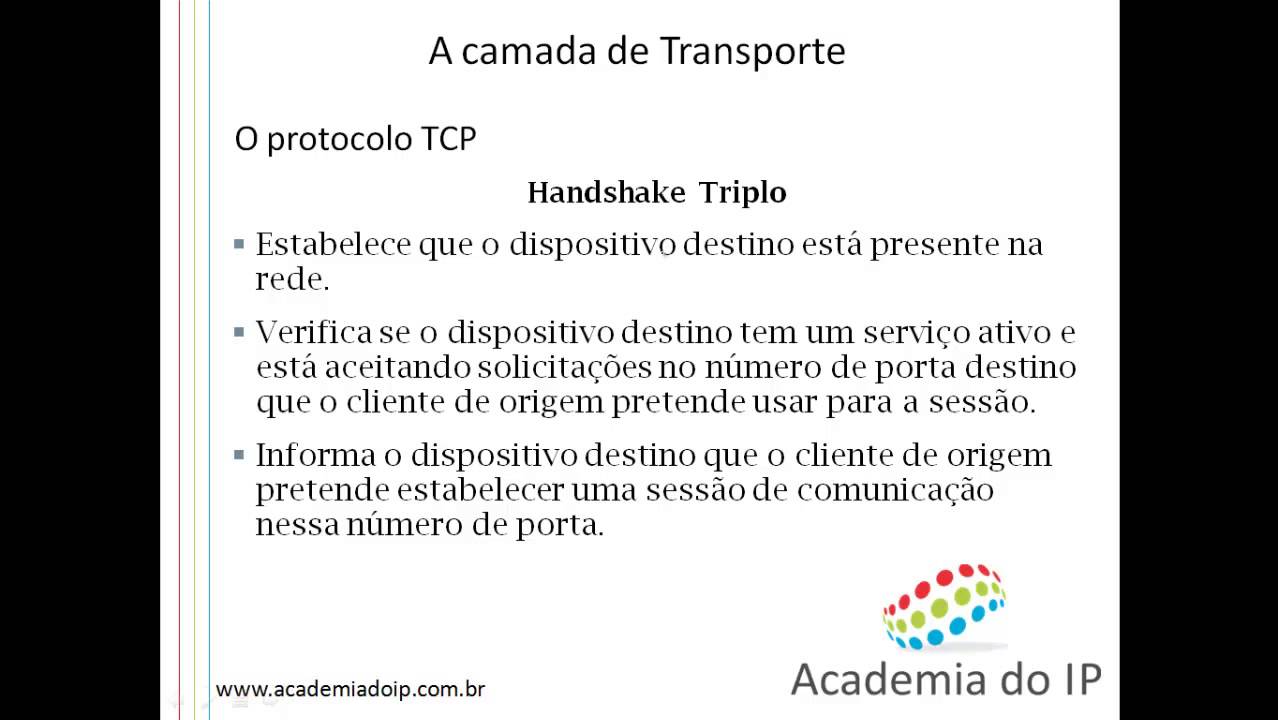
Deep dive into Transport Layer mechanics, including TCP flow control, congestion control, and the three-way handshake process.
Network security standards and encryption protocols, such as TLS/SSL (converting HTTP to HTTPS) and DNSSEC.
Socket Programming, where you write code to implement custom application-layer protocols using TCP and UDP sockets.
Advanced web performance and modern application protocols, such as HTTP/2, HTTP/3 (QUIC), and RESTful API architectures.
12.7K views36likes1:17:27Original Release: 2014-06-04
I just finished this slide last time I don't remember but basically these are the commands and these this is not the whole set of commands if you do FTP in a command box in a Dos box and then you can say help it will list a whole set of commands and um so these are some sample examples of the commands FTP will understand user usern name password pass list is directory retrieve file name is like getting the file name storing the file name is like putting a file name anyway the responses come back with a number and the text if it is a guy kind of interface then you will see this user okay password required if it is um not a go then you will see probably the whole thing anyway the key thing to remember in FTP is that there are two different TCP connections a control connection and a data connection as opposed to in HTTP there was only one connection that was used for both control and data so the main difference in FTP is that um it is um two separate connections all right then and so every time you you you retrieve a file a new connection is set up and broken down when the file is sent file is done and the control connection remains throughout so the final thing we come to is not the final thing but the next application we come to is electronic [Music] mail so you most of you have been using electronic mail and at least know that you have a mail server your males come to the server and your computer is what we call a male agent or user agent and some of the mail can come to the user agent and most of it is stored in the server and once it is transferred you can delete it from the server anyway servers use a protocol to talk to each other and that protocol is called SMTP simple male transfer protocol so when you want to send a message to somebody else you just give it to the server and it doesn't has gone it doesn't really gone anywhere other than the server server keeps a cue of messages to send and it is quite possible that the server of the receiver is not available right now or or something like that then it will keep [Music] trying all right so basically each server has a queue of messages that need to be sent out to the next server now it doesn't have to be directly to the destination it is quite possible that a message can go to some intermediate server from there it can go to some other server before it reaches the final server so it is a store and forward kind of thing as opposed to FTP where there's no store and forward in FTP the destination and the receiver have to be both up at the same time before FTP can take place you cannot submit a command today and get the answer tomorrow in FTP in mail you can do that you can send the mail today and get it tomorrow so basically SMTP is the protocol SMTP stands for simple male transfer protocol this is one of the oldest protocol basically when they invented Internet one of the very few applications that they started using was the mail and it allows only 7 bit Sky messages in those days back in 6 70s we didn't have all these different encodings of the characters that we have today and only thing we knew was aski in s every character is encoded as 7 bit every character is from0 through 128 because of that seven bit and so that's the only thing now if you want to send a program or something which is a binary object which has eight bits you need to convert eight bits to seven bits so there are methods of changing coding 8 Bits to 7 bits and basically that means you need more than one bite to send those extra bits and this protocol originally used Port 25 so that is Port 25 is the default Port so so far we have three applications what is the default P for HTTP port for HTTP 8 for FTP somewh from here 21 21 and for DP is 25 it is not necessarily the only Port that you can use you can use any port you want but the users have to know that Port then and then they they can use that Port otherwise they will be talking to the wrong Port so here the exchange and again interesting thing is that you can do this on your computer you don't need a male program to do this on a computer you can say tnet to mail.
se.
w.edu for 25 tet means basically you're connecting to that port and everything that you're typing is going to that Port okay that Port doesn't know that it is talking to you directly on your keyboard and not to a program like a Outlook Outlook does this for [Music] you then server will say when you said this the first thing server will say is 220 post office. c.b. edu Microsoft esmtp Mail Service version so and so forth 75 ready on Tuesday 13th September 2011 this time okay then you can say hello and hello has to be spelled like this h e l o acm.org now why h l and not h e l o because every big and bite was important in those days in 74 when it was done and why spell two letters when only one will do right so they said hello acm.org so so this one says 250 server says 250 post office sees anyway one of the things you will notice is that every time there's a number just like Visa in HTTP that number is the status code that the computers can understand and then there's a text which computers don't care they just flash it to the user the users can understand those things so this one says 250 post office sees blah BL blah blah address then you can type mail from Jan acm.org so this is the mail from field then it says sender okay then receip to this is the two field and then it says okay then you say data and then you can start typing whatever you want to type it will say first you will say start nail input end with crlf do crlf you know what is crlf yeah car and Line Feed so that is character 13 LF is 10 SC character 13 and 10 followed by a DOT and so I I typed actually this is all I typed so I typed this is test email dot this serves as an example for cs473 class Dot and then on the last line I said dot right when the last line is dot that means this is the end of the message that dot will not be sent but basically this end of message and so 250 mail cued for delivery then I said quit and says by and you can do that yourself on your computer [Music] yeah where it says 250 post office whatever and it says hello what's the Hello part is that the topic of the email okay so basically I told him who I am so I said that I'm calling from acm.org this is my site it could be harvard.edu or something okay then it say I you know This Server says okay this is coming from this Ser website not this site C's.
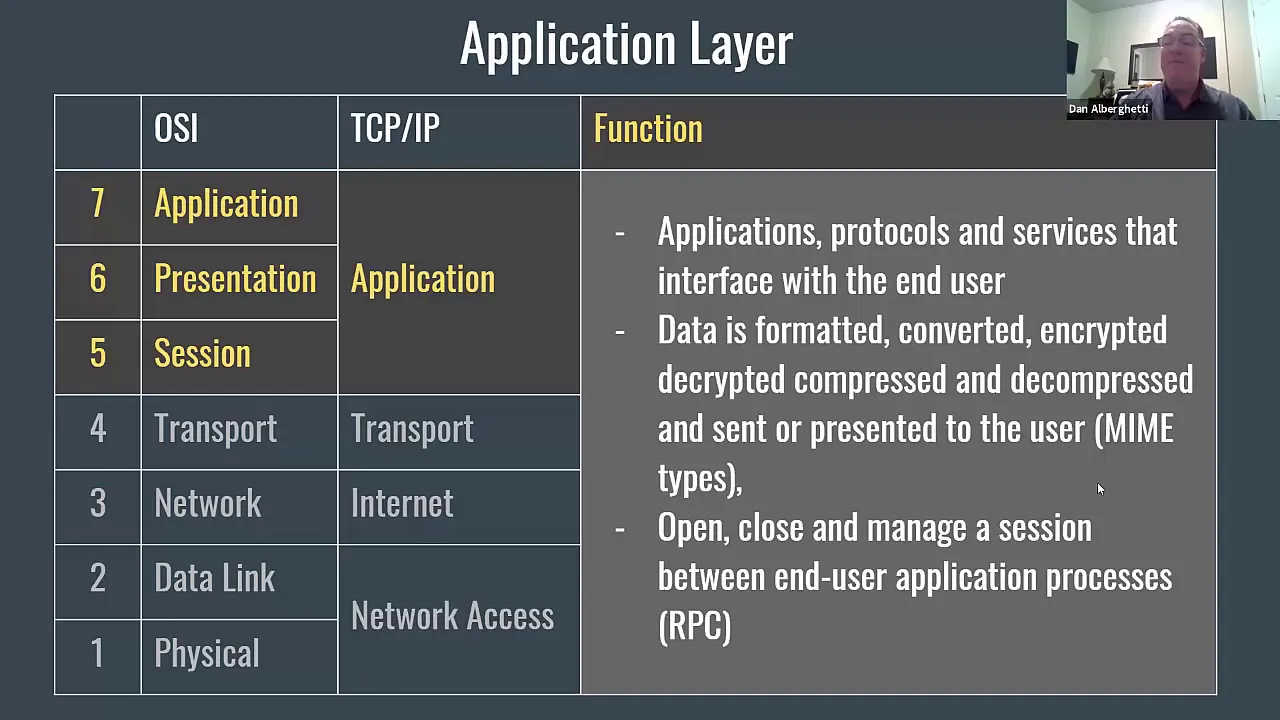
w.edu post office so that's it name and that is the IP address that is the IP address for this same thing I'm sorry is does that answer a question okay what is the question next next yeah is there any sort of security builing so I can't just say I'm like president at White house. yeah there's no security built in even today you can go to Outlook and when it says username just put that presedent at White house.gov it will take it and when you send the email it will go and when the person receives it it will say president at White house.gov however however if they wanted to tr trace it back they can trace it back to you because of the IP address so some inter I have gotten emails from godaven.com right obviously from president at White house.gov anybody is gotten everybody has gotten so you can write whatever you want they don't check that so when you say hello acm.org what's the point of that it doesn't really even check anything yeah it doesn't check anything it doesn't check but basically when they designed the protocol they just designed it so that first you tell where are you calling from and where you want and then you then you say you know what is your email address and so first it said acm.org actually that is kind of irrelevant because when I say mail from J acm.org I'm telling the same information again right so the first handshake actually doesn't do [Music] much now this is really good exercise you can just try it from your Das box everybody understands what is a Das box right and so you can just try it and I typed it as again before uh when you type something it will not be a code and that's the problem whatever this response comes back will be written up so you will get the server responses but when you type hello H acm.org that will be blank you just type h e acmr also another thing you can do is if you have a program like wire shark which we actually provide to our students in network security class W shark lets you trace all the basically see all the messages that are going out of your computer if you had wire shark you can see these messages going in and out of your computer exactly as they are written here and so even if you use Outlook Outlook does send these messages to the server Outlook tells the server hello this is acm.org and then it says mail from and so on so forth so Outlook is simply a what they call interface it uses this protocol to talk to the server is it clear yeah um is this PO office that se like you only able to send mail to EU no you can send mail to anybody no no I just put here I could have sent the mail to White House and whatever it is so that doesn't matter is it saying I trying saying unable to relay for any other email unable to relay it says unable to relay yeah yeah yeah okay so that is that is the builtin feature at wasu server so wasu server does not let unauthenticated users if you're authenticated then yes you can send it if you're unauthenticated then only you can send um actually I don't know what you can do because unauthenticated it will probably let you send to only Bo people or something like that but you have to give the username and password Yeah question um I tried was when I receip J at w.edu receip to J w.edu and it say invalid address okay well that's a valid address but I don't know why it is invalid that's a valid see again this might be the case of Bo see the thing is there are some additional restrictions put by actually our our server I'm going to come in one more minute I mean our server doesn't even use port 25 okay so that is additional security that we have built in and I think port number is 465 or some number I have to go to my Outlook and see what you know instructions they have given me but um this is the starting simplest unencrypted mail in fact today's email if you were to send it today I mean I don't this one worked actually from my home or maybe office I don't remember whether I did this in the office or home but um at the office there is no there is no authentication required but from home if I do it I get that relay message issue if you're connected on the wireless there are two wireless connections one is secure and one is normal one if you're on the normal guest one obviously there they have to have protection but so otherwise I to put a command here user and password to authenticate myself all right so that gives us a summary of the difference between HTTP and SMTP HTTP can be persistent or non-persistent TCP connection everybody remembers what is a persistent TCP connection right you did probably in the homework as well but uh persistent means you don't close the you can close the and nonpersistent means you close the connection after every object here in SMTP this whole conversation that we had was one connection this is mostly pull means you get the information from the server this is mostly push SMTP protocol is used to send the mail not to receive the mail [Music] okay so this is mostly push except I'm going to come to the receiving mail in a minute if that is a question but excepts binary objects HTTP was designed when we understood the binary objects this excepts only 7 bit s key this has one object per response you can get multiple objects per message okay so you could have a message which has a picture in it and web pages and everything else all right so how do you get the [Music] email so to get the email you need another protocol which is the access protocol to get the email from your server and the protocol that is used for Access is called post office protocol pop all of you have heard pop right but never knew that was post office protocol right so pop is the post office protocol and nowadays we have version three of that so we call it pop three yeah both of these seem like they're more full protocols but it this is pull that is push yeah but it seems like when Outlook hooks up to exchange exchange pushes Emil towards the Outlook yeah right so you're looking from the client's point of view yeah from the client's point of view this is a push and this is a pull when you go to exchange when you send a message you are pushing when you're receiving message are pulling is there any different but so here the user agent is the one that requests the emails yet if your outlook client is hooked up to exchange exchange is the one that gives the emails to the out Cent right your exchange is I think more like a server right yeah yeah exchange is your server Outlook is right here so this is Outlook this is exchange so from the Outlook point of view you're reallying pop so I don't I'm sorry I didn't understand the question um so here the user agent is the one that's requesting email yeah in this case on this side on the right side the user is requesting the email but it seems like in modern Outlook and exchange it seems like exchange is pushing email towards Outlook is pushing email towards Outlook explicitly requesting okay all right so I mean like that's a that's a detail basically is that what you're saying is that when does this happen whether you know this is started by this side or that side okay so it's quite possible that the exchange does it the other way around pushes it okay the key is that there's a different protocol so basically the summary is that for sending SMTP for receiving you need a pop protocol and therefore sometimes you have two servers and you have to write down SMTP do yahoo.com pop. yahoo.com right for sending and receiving sometimes there is only one so in our case we write down mail do c.b. edu because the same server does both right but it uses two different protocols right so even though it is mail. c.b. edu same same computer but when I send the email I talk to it by SMTP when I receive the email I talk pop yeah um so how is s even possible since users don't generally have stable IP addresses is it always full no no no no no iable IP address has nothing to do with any of this so first of all when you are talking to the server you have an IP address doesn't matter what was your IP address yesterday who cares but right now when you're are talking to me you have an IP address and I have an IP address so you just use the SMTP protocol now um as I said it is mostly push that means mostly the client will send the message to the server and say look I want to send this message until then it will be if if the server is not available your message might be queed in your own computer so there's a queue in your computer too right Outlook has a queue right when the is available then it is pushed to the server at that time you have whatever Q IP address you have that's it basically that address is used so I don't know if it's stable and unstable makes any difference I mean I guess maybe it's a marketing term but like blacks consider themselves having push email meaning the server pushes the email as soon as it gets to the server to your BlackBerry device for instance and I guess that's what I was considering push is the push email to the mobile device itself not server um so generally now exchange might be different because I haven't use exchange but generally um this the mail is kept at the server until the client says that I want it so for example in my I don't have Blackberry but I have iPhone right here if I the email is there but it doesn't come to me I mean until I go to the email program when I go to the email program it starts pulling everything from the server and says you have five emails right if I don't go to that program I could program it actually they just the program itself is decides not to do that but I could have another program that could just pull it every minute and tell me that now you have 15 messages but you know so so that's all detail of the program nothing to be the protocol the key part of the protocol is these messages that we talked about and those are fixed how the interface does it is there's a lot of leave there's a lot of ways different interfaces provide different facilities to the user all right so the key point I wanted to say was that SMTP and pop are two different message different protocol SMTP is send pop is for [Music] receive another receive is IMAP another receive is is HTTP lot of people today are receiving email by web page so when you have a web email such as Yahoo Google everything else you may not be using the SMTP and and protocols those could be simple get and put Proto get and put messages HT HTTP messages so now pop three in pop three here a sample pop three sequence pop three server ready you say user Bob server says Okay Plus okay pass hungry this is the password and and then it says okay user logged in then it says list client says list then it says well you have two messages waiting first one is 498 bytes second one has 912 bytes and then they dot right that means at the end of the list then it says retrieve one and so it sends you one and then send a DOT then you say delete one you don't have to say delete one but if you want to delete it you say delete one then you say retrieve two and delete two quit and now next time when you come back one and two are not there because they have been deleted if you don't delete one and two when you come back it will say have two messages for you again same messages yeah does it not have a response for it doesn't show so see like here me it doesn't say Okay deleted I mean you know so I hope not that's one here now this is something that I have not tried myself as opposed to the other tet thing this is from the book yeah if you delete one why doesn't it re two to B1 yeah but I think it will re it if you just get out of there right now if you quit and then you come back it will say I have message one and that is 912 bytes but right now just for the sake of Simplicity because there will 2,000 messages you keep you read 15 5003 message and then now you have to remember number the rest of them so for this session I think the numbers are fixed all right IMAP is internet mail access protocol it is more sophisticated than POP 3 allows users to maintain folders I have not used my IMAP myself so I'm just kind of whatever is in the book and messages can be moved from one folder to other and the users can only get the headers or the component of the messages and there is IMAP organization so I don't yeah go ahead according to the internet um iMac you can get push um to your client saying that something's available and then so there's a a partly push in there so I the thing is yeah I mean again because we are not going into detail of high map protocol in the in the part three there was no push as such basically you have to say retrieve one to get the message list to get the list so you have to ask for it and you get it maybe in IMAP there's a command which says here is your list even if you didn't ask but I would be surprised though because most clients like this they not ready for just you know a whole bunch of information unless they ask for it so generally the servers Don't Take the Lead but that's no no they don't no no no see what they're doing is actually just the opposite you have to differentiate between what is happening in the background and what you see in front of you so it might say push email means it gives me a message saying that okay you got 46 email but that doesn't mean that the server pushed it into it it is pushing to you you server would have gone to server and say please tell me how many emails you have it is pulling from the server and then pushing to you pushing to you is not the same as pushing from server no no no no so this is why this is why exactly the cell phones don't actually my cell phone doesn't even right now pull the messages until I go to the mail Pro program so right now if I go and say mail then when it will start pulling otherwise for 7 days it hasn't done anything sure you can config huh and you can configure yeah I can configure differently then there be so for example in my laptop I have configured that every 1 hour it should go and pull right I can program like it should go every 5 minutes and pull or it should program every one day and pull so say your configuration thing but not the protocol thing you have to distinguish between the protocol and your configuration how often do you pull that looks like a push but it's not a push it's a pull has so basic yeah so so you can program your male program to pull every second and you pay the cost of it because at& will charge you for that many bytes right we'll continue this later yeah I mean so I'm not saying so this is not a part of the protocol or anything else this is not fixed this is user based it has to be user conv it has to be part of because otherwise there be way too much traffic and by default so by default okay so the default is no P yes it is on Modern smartphones the default is automatically again that is not the protocol part that is the cell phone you are you are not able to distinguish the protocol from the implementation you're not able to distinguish Outlook from the from the pop 3 and SMTP I'm sorry but anyway let's move on because because there is a protocol and then there is a users of it the say for example browser you know Firefox does many things which HTTP protocol has nothing nothing to do with you can type you can type in the Firefox Raj J which is not a URL it will just go to Google find out the URL and then open that page but that is not part of the protocol HTTP that is just the Firefox does it right so they made that facility extra facility all right let's move on all right so I'm not going to go into detail of IMAP because really all I wanted to do was to give you idea of the differences of these different applications how they worked and as compared to http and so on so forth so we have done that and so we finished FTP and mail FTP is a client server protocol and uses the port 21 it uses two parallel connection so again when you use two Port two parallel connections that means you use two different port numbers port number 21 is for the control connection and SMTP is the protocol to send email and it only does 7 bit ask key so there is a whole detail how do you convert messages to 7 bit and and then there are other protocols that can be used to receive the email yeah what port number does the whatp what what port number yeah that can be negotiated so basically what happens is there are there are two sides to Port numberers so when I'm talking let's go back to simple case HTTP HTTP the server has a port number 80 but when the messages come back to my computer they also need a port number to get in right that port number is totally arbitrary I could send to the server say that please I want this page and my port number is 321 right when the server responds because server is getting unannounced call right so it has to go to port number 80 if it right because we have to know who to give it right but I'm not getting an announced call when the answer comes back it goes to port number 321 because I said so so this one side of the port is is is random right similarly in the PTC in the FTP case when you want to just tell the FTP server that I want to talk to you you talk to Port 21 right when and then you say well my control port number is 323 and then connection is set up we say user password and so on so forth then I say okay I want then it might it might say okay for my data you know please use this port number or whatever it is so rest of the things are all arbitrary you need just the first time when you go unannounced you need a standard port number yeah provided by okay the question is who provides the port mechanism so basically if you go back to the I I am looking for a seven layer model somewhere I don't know whether it is in this slide set yeah here it is you see at any point we need an address to go to the next layer so when we come from the ethernet and there are dozen computer on this ethernet it has to know which computer to give this message to so there is a ethernet address that gives it to one of the computers in the IP layer right and actually there is a corresponding IP address then the IP whatever gets it so my computer got this message now it has to decide which of these applications to give so TCP when it gives it to any then it uses the port number so port number is simply a TCP address so TCP has one address for HTTP one address for FTP one address for SMTP and P2P and so on so forth so port number is nothing to with the socket whatsoever port number is the TCP layer address as the IP layer address is that four digigit number there the ethernet level address which we haven't talked about so each layer has its own address and actually applications have their own address too for example when you go to http server you give it a url url is the address so yeah if you want to make your own application you just choose a port arbitrarily there's somewhere you go to like get standardized good good good question the question is suppose I have a new application how do I get the port number you have to go to ietf and you have to say I want a standardized port number for my application you have to make your case and if they think that your case is important is strong enough then they will give you assigned number and there is an RFC which has all these assigned numbers hold on so once you get that then everybody in the world will follow that if you're not in that list you're not a standard so yes there is a person who does a sign actually it used to be a person who used to do this in the old days now it's a committee yeah so this is a convention right all the ports are not required to use one port yes all these standard ports are not required to use for example Port 0 you don't have to use you can use port 81 go I'm still on this PO go to slide eight slide eight so how does this socket okay socket concept is basically an operating system concept nothing to do with the networking in the original Unix when process a wants to talk to process B they opened a socket which is now looks like similar to port number but even if you are not going over the network suppose you want to talk to another processor on the same system you will open a socket okay now in the case of networks what happens is each of these applications is talking to the TCP process TCP IP process which is separate process so they have a socket opened and when 80 Port 80 comes in it knows that Port 80 has to go to that process okay so socket is an operating system concept Port is a networking concept and Port is related to TCP and UDP okay if you had another transport protocol which we don't have today then they would have a different address mechanism different address sizes different whatever but TCP and UDP use 16bit port numbers so the port numbers are between 0 and 2 15 or 2 16us [Music] 1 okay all right so there is homework number 2B again you supposed to read this an answer and you can program your client any way you want so for example we talking about you can program your client to read the email every 3 seconds every 3 minutes or never um and um and and to delete the messages to not delete the message again these are options in Outlook in my case I use the Outlook client in Outlook I can say for example when I read it on my smartphone I say don't delete when I read it on my computer I say delete and so you can do whatever you want in every client so the download and keep mode complete the transaction suppose you configure to oper in the download and keep mode then you know then you have to answer what to do so you have to read this about this more detail in your book and then um it will tell you exactly um what will happen if you delete or don't delete the messages all right in the next application layer protocol that we'll talk about is DNS DNS stands for domain name service and we will talk about hierarchy how it works what are the different records what are the messages how do you register and what are the attacks so dnf stands for domain name service now they are this is really not an application that you ever touch but you touch it every single time and you do any other application because in most applications you supply the name and it has to be translated to the address and this is done by DNS server so a DNS server has a record of every single host in the universe not the world Universe all right if there is a name there's an IP address your DNS server should know it yeah so so they literally keep a table just yes so they're literally a big database however this is a distribute a database so if everybody had to keep you know the whole universes database that would be too big so I will show you how it is distributed so it is distributed database of all host in the universe and then it also provides name to address but also provides other services for example you could say what is the alternative name for ww.com so this is a valid URL however it translates to this ad this URL right so all of you for example have a website in wasu you could get a domain name like this yourself and people could open the web page by writing the domain name and they would not know that it is going to wash you all right you could have an email address which is your own domain name so a lot of people when you go to ITF and everybody a networking Guru there they all have their own domain names and they all have their own email addresses which are very simple Bob at you know roman.com you know whatever their name is [Music] yeah that is valid what name record C name e name c name is like when you have one so this is basically host Ling um what else is called domain domain Ling that's the only name I know now I don't know about eame so could be anyway MX record is the is is for male server so you could for example go to DNS server and say where is the where is the mail for actually all it is I think doing is probably not looking at the whole thing where is the email server for w.edu so it goes DNS and DNS says well mail for.edu is received at mail. bu.edu and then it finds the address and then gives it to you so the servers can then basically send the mail there and load distribution multiple addresses so some sites have so much load that they cannot have one address for example google.com google.com get so much load that if they just send everything to one computer that computer will be overloaded right I mean obviously so so not only they if you do it in different cities the Google address is different but if you do different times even right here right on your computer just do ping google.com and then a few minutes later do ping google.com actually you don't do ping you say NS lookup name server lookup here it is name server lookup if you do name server lookup boost. edu you get the address [Music] all right you do google.com you get a bunch of addresses all right so our DNS server knows 1 2 3 4 five Google addresses and when you ask for it it will give you this list but the list is rotated every time so you ask it second time it will give you this as the first address third time you ask it will give you the same addresses but this will be the first address because most people just take the first address and use it so by rotating they want to make sure that the load is [Music] balanced yeah is there any sort of verticle in charge of registering or tying a domain name for Server oh yeah basically when you get the domain name your domain name register and it might be a good idea for you to get a domain name because you never know when you will need it so I have gotten it from my son and my wife and my kids and everybody else and so if they need it they have it it cost money it cost $10 a year but but basically so the idea is when you get the then they provide all this they provide the MX server they provide the name server they name to address translation everything else is done by them as a service all right so how is this database distributed well database is distributed by the names that you already know so the root database is called Dot and Dot has several children.org doedu us and all that so hundreds of what we call subdomains then has many of them so yahoo.com amazon.com and so on so forth edu has um.edu v.edu p.edu and so on so forth and AR and so on so forth and then Vu has many children so it will be c.b.
edu and you and so on so forth la.
bu.edu so and then La has many children and so this is a whole thing is a tree and the tree can grow independently of the other parts of the tree so for example doesn't have to go and ask youas can I have a children child name La you can have whatever name on you want for your child all right and so this tree everybody is responsible for their part of the tree so server is responsible for all the children if if amazon.com changes name changes ownership changes something then. server has to know right so that it can correctly send the queries and um so this is called the root is the top level and and these are the top level domains and this list has been growing like anything so every country has a two-letter codee we have us which we never use but there are countes like TV and um some other countries which are very in much in demand and um and see is for Canada and UK and so on so forth right so that is top level domains and then when you want to get to any server you can get to the authoritative DNS server so if you want to know about any names in w.edu you have to go to w.edu so if you are here somewhere working for Amazon and you want to know what is the address for mail. se.
w.edu Amazon would cast some of these answers if if it needs it right but if it if just nobody needs it then it will go to the root come down to the w.edu and say please tell me what is the address for mail. c. w.edu and then get it back to you so that is called authoritative every n every organization is responsible for its own addresses to tell to the world okay all right and so you can go can if there was a question here go ahead what was your question done okay yeah so if for instance Ed is in charge of their own subdomains um why do they have to pay for separate like SSL certificate for every sub no no no hold on certificate is different you bringing up it totally different for names you pay only once and you only pay for the top level for example I paid $10 or whatever for Raj jan.com now I could create you know Amit J Raj nilu whatever I know subdomains I don't have to pay anything names are free after that okay certificates the whole thing I haven't talked about certificates at all and I don't know what certificates are until I talk about them which will come in chapter seven or eight all right any other question yeah go ahead so what is non authoritative non authoritative non authoritative is if I if I just have a previous answer so suppose you asked me what is mail.
c.edu and so I I told you but I also kept it in my cash and then um you asked me somebody else asked me so I can say well I think this is the answer it's the guess because it could have changed in in the last few minutes right so non authorit means you know is a best guess and what will happen actually this is all coming up in the next slide um the best guess is good enough because this saves your time you got the answer right away but you send a message there it comes back says not deliverable then you'll say to the server look I want an authoritative answer all right then the server will make sure that it goes it's like proxy server remember proxy servers you can say reload the page means I really want the original origin server you to go to origin server same way here DNS now how does the DNS works okay so first of all every host has a host file right so your computer has a list of names and addresses in that file if that name is there in that list it doesn't go anywhere it just I don't think this is working today though it's not working my throat is already be hurting um okay I will work on this later uh okay so if it doesn't find in that host file then it goes to the DNS server which you have programmed in your computer remember when you set up tcpip it says DNS server obtain automatically or you know put the name put the number so it goes to the DNS server and says please give me the answer now it may have its own cash and it give you the answer if it not then it goes to some other people and when it gets the answer it send sends it back to you yeah uh so I heard that they're expanding uh tlds for intern so that mean you need a lot more DNS servers no actually so each TLD does not have to be a separate DNS server sorry let me go back to previous slide this one so for example there's no need that yahoo.com and amazon.com be two DNS server there could be one DNS server all right so for example Comm and AR you know they don't have to be different so by expanding this doesn't mean that you need DNS server but obviously the number of information the number of names is increasing and you need bigger and bigger DNS servers all right and um yeah and it actually is a good business for these people who are in this business because they can sell a lot more names all right so there are two kinds of queries one is called recursive query give me an answer a iterative quer is give me an answer or a hint come on um give me an answer or a hint um so in this case what this means is that if you don't know the answer please tell me where should I go so this is the question like you know I want to go to Kansas City and somebody says I go to somebody and say well can you tell me direction to cancer city and they say well I really don't know but can you give me a hint they say maybe you should take 170 from here that's good enough and so that's the kind of answer you can get is that you could go to the DNS server and actually more likely your DNS server will go to some other server and say you know where should I go and they will say well go to the this top level domain server and they might say well go to the UMAS server and then from UMAS server you will get the answer so that is an iterative query recursive query is give me an answer what that means is that if you don't know then please go and find out and then come back to me and tell me so this query for example is a recursive query here from the user this is a recursive query because I don't want to go to top level domain I don't want to go to UMAS and all that please go and tell me find out so this one will do it very quy from here but the computer is going to do a recursive query yeah go ahead question so it looks like every everyone yeah for the authorative answer yeah no no for the thing is authoritative answer for example this doesn't have to be for example um.edu server could have all UMAS names including DNS docs.
everything else so this is one server which is authoritative for whole UMass okay it might have many many domains there subdomains and subdomains and subdomains but each of them don't have to have their own server for example in our whole department I think they have just one server you know ciz is C has one server even though there is csse and there is and CSE can have its own no names and so there is no separate server for those names and there's no separate server for CSC all right is that clear how the domains work and how the service works all right so the DNS records have very simple database basically they have a name value type and time to live TTL type could be a means address NS means name server for the domain name c name is the canonical name somebody said eame you were using the word e name but it is C name is the canonical name for the host names is alternative name MX is the mail server so the type indicates what kind of record this is and there is a record Ms record C name record MX record a record is simple IP to address translation MX record contains the male server addresses for that name C name contains the alternative name for that name NS is a name server for that name so there are many records and each of them them have a TTL TTL is time to live so if you go to UMass or if you go to let's say Facebook well not really Facebook well so whatever you go to and then you get the answer that answer is good only for so many seconds or so many minutes or so many hours so many days things will change fast so for example if you have a smartphone IP address would be changing very fast in the day right so the that answer that will come back from AT&T or Verizon would have very small [Music] TTL whereas if you go to BU for unless you're connected with wireless it might give you a long TTL your you know it will say this address and this is good for 24 hours right depending upon the mobility the address changes and the TTL changes okay all right so we have name value type so we talk about type name and value basically name is the ask character string and value is the binary string messages are basically like this you have um ident ification field some Flags then how many questions you're asking how many answers are there how many authoritative um uh answers and additional answers so these things and then you have questions all the questions all the answers all the authorities and then additional information so what is a question question could be simply that here is the name and I want the MX record the name and retype answer could be name type value and TTL so the answer should be there Authority is the server that gave the answer and additional information is if it is you ask a question and then we give you more information for example you just ask for economical name then we might give you IP address as well along with the name but the economical name is just the alternative name all right now how do you get a registration so you can there are many many regist there's a big competition among the regist so you can go to any of these regist and say I want this name they will say this name is available or not once it is available you just pay them 10 bucks and the name is yours for one year and then you pay $10 every year and actually the way they do business is that first is $10 next year is $20 because once you become a customer they got you so you have to change the register every year to find $10 deal but you can get that so there a competition among them and um previously it used to be free in the beginning there was a guy who just went and said I want this name and they will write it down the name and just like the port number they would write down the name and the address and done but that person has died now and now it's a whole committee whole mean it's not even a committee now it's a whole world I mean the whole set of businesses so there is I can internet Corporation for assigned names and numbers that I can basically um accredit reg so it has to Beed by them and then there's a company called internet intern is the central thing so all these register register with internet so you Buy in the name from godaddy.com godaddy.com goes to internet.com internet.net and registers there once it is register with internet.net then everybody knows that registers Prov authoritative name servers a& MX records for the domain so when you go to the regist and pay $10 for that they will provide the name service for you so if somebody goes and says what is the address for raj.com my register will provide that that that is the official authenticated answer so ifu for example goes and says okay what is rajan.com address it will go to my regist they have a name server that has the official answer yeah what if you just the name don't yeah so the thing is the minute you buy the name you can you have the you have the address specified actually here I think though I mean like basically um few things here if you bought the name and you don't have the website then their record will probably be blank or zero or whatever it is right but you have the option of providing some other website to be used and so for example I put my wasu website and so they put that address wasu address in that record but they also sell you then here the thing though I mean will sell you any service you want they will sell you a single page free free page or you know for $1 or $5 or $3 some deal to put a page which says you know this is your page under construction yeah so you're paying them to run a server to keep all your web pages and for everything they tell you money so they can they can provide you email they can provide you name service they can provide you B service they can provide you FTP Service for everything there is a [Music] charge right so I use the minimum I'm just telling you my own experience I use the minimum that means I just pay them for the registration which is $10 a year and everything else I do at Vu right vashu does the email Vu does the web page and everything [Music] else all right so it might be a good idea for you to get your own name because once you become a networking expert by taking 473 you can go to somebody and say look I'm a networking expert my email is whatever your name is you know and say well my email is you know Bob at you know my name.com impressive right and um and then you can explain all about DNS and MX and everything else that you know all right attacks so DNS is also a source of attack um so first of all if nothing else people have tried this and they have succeeded in attacking the dot server the top level server so at one time few years ago some people attacked the dot server so that nobody could get any name resolved there was so much traffic that you could not get the name resolve that means you could not go anywhere all right now that has been solved by having 12 dot servers right so there is not single dot server but and Dot servers so that is resol but then you can also do cast poisoning you could install a server that gives all the wrong answers says well I know that Raj jen.com is this and here is the address YouTube do youtube.com exists in Pakistan and that happened okay all the traffic went to Pakistan all right and it didn't get anywhere all the YouTube traffic went to Pakistan right so you can do that right so now that has been resolved in the sense that now the servers don't talk to each other and just take your answer they have to authenticate that you are really the server that you're saying your server so there a password and authentication and certificates all those things but initially there are no such [Music] thing okay all right so that brings us to the end of DNS and so DNS now you know is what are the five key things first is DNS is used to resolve names to IP addresses but it also now started providing other services such as names to Alias names C names male server records and so on so forth It's a worldwide or Universe wide distributed database and therefore the servers go and ask other servers for answers when needed and you can have either iterative querry or recursive query recursive query means answer only artive query means you know basically give me a hint and then I will go and find out the answer then there's root servers and there are top level domain servers and authoritative server for every name that is athor to server okay any question about DNS all right then we move on to [Music] P2P so we will talk about um uh why P2P is better than the old method then we talk little bit about bit tarent and distribut hash tables and go down from there so P2P P2P the way it works and how many of you have not done P2P anybody clean here no everybody has done P2P well actually it's not bad it's not all bad but P2P if you have not done it you're not living in this world right now so if you're alive and well and if you need any information you got to get it by P2P and P2P is actually better than the old method as I will show you in a minute basically what happens is when you want a file for whatever reason the currently it works the way with T Works is that you go to a website and they tell you that here is the torrent torrent is nothing but a file which has all the information about that file so it is not the file that you want you want a movie which is 722 megabyte long and um that file is only 40 40 bytes or you know 100 bytes long torrent once you get the torrent The tarant has much information about that file and one key piece of information is where the tracker is so one piece of information in that tarent file if you can read it it says that all information about this particular copy of the movie is at this particular website not a website T I mean whatever T server Ty so you go to the tracker and the tracker has a list of all the people who are exchanging the file right this second all right so you get the list of all the people who are tracking this this file who are who are exchanging the file right this second then you contact them and connect them and say can I also have a piece of this file right so tarent so now this is a name actually so although that file which is has extension torrent we call it tarent file but tarant is the whole set of peers that are exchanging that file right some of them are called seeds and some of them are called leechers who are the seeds everybody should know the one that have complete file right and leas are the one that have incomplete files and so so there is some kind of if you give me one I will give you one kind of deal which I will talk about in a minute so that's that's how you exchange the information and um finally the Lees will become the seeds and there will be more seeds or less seeds depending upon when the seeds leave and all this is being monitored by the tracker tracker keeps track of all the people are coming in going out of that place of that group now for every file there is a separate set of tar separate set of seeds for separate sets of track tracker and everything else okay so you have [Music] to do that now so let's see how it saves the network bandwidth so P2P saves the network bandwidth so if you have one server which has the original file and you have n people who want it in the old method everybody has to go to the server and get the file excuse me is there something interesting going on there or trying something TR okay all right because you want to share something with interesting here so so here thing so if you go to the server how much how many bits you will have to send how how long will it take each of these users has a down link speed of DN and actually this is just the opposite it has a down link speed of unu n Uplink speed of DN that didn't make sense Uplink speed is UI and down link speed is di I think I would change the arrow directions here so that up link becomes like that down link becomes like that this is correct D1 is correct D1 U1 D2 U2 is correct and USU is correct but this one is wrong and is wrong so anyway so these are the speeds everybody has a different speed but anyway um if you take the d Min of all the down links that is will that will take the longest to get the file and it will if the file size is f speed is D Min this is how long it will take to get that file and since um n * fbit have to be transmitted what is n n is the number of users and F is the file size so n times F bits have to be sent by the server and the server speed is only us so you divide by that so maximum of that much time will be taken if you want to do client server that is how long it will take for the file to go to all the people on the other hand if you do P2P then only one client has to get it so only one file has to be sent and that can be sent at the speed of f of on us and if that happens to be the the bottle neck then that will take F upon dmin to receive and then although NF bits are being exchanged but the everything is being done in parallel and therefore all these Uplink speeds will add up and that is how long it will take to Uplink upload the files all right so the minimum of those three numbers in the bottom will give you how long it will take to get the file by P2P and the second number will show you how long by client server and you can plot these two numbers for any particular case and so P2P is here in the bottom blue [Music] curve blue curve and client server is here so unless you had one client P2P always [Music] wins okay so basically the idea is Distributing the load okay excuse me anything do you want to share with the class okay then please pay attention here so so the idea is client server the old method is at least in terms of delay is not very good right and um although in terms of traffic let's see what happens in terms of traffic let's just see the previous slide how many bits were transmitted in client server how many bits are transmitted anybody the file size is f n * F and how many bits are transmitted in the in the P2P same NF so the total traffic number of bits is same but this one is all coming from one location so there's a lot of congestion whereas this is distributed traffic P2P is distributed traffic but um client server is all coming from the server and therefore that causes bottleneck so in terms of um bottleneck capacity again P2P wins so all right so I think we already talked about how bit T Works the way bit tent works is that the feers are the note that participate in a file distribution tarant is the set of all peers tar file is a file contains file which contains the name of the tracker and all the file details and everything else files are segmented into equal chunks so that's the new word chunk so the files could be different sizes but whenever we want to get something we get in 256 kilobyte unit everything is sent in 256 kilobyte unit and that is called a chunk all right we already know seeds leechers and trackers so basically the steps are that um if you want to get something you first find the torrent for it you go to Google or you go to some other place and you find the torrent for whatever information you're looking for and then um that torrent has the name of the tracker so once you upload into your your bit torrent client it goes to the tracker and gets a list of peers now tracker may have you know 2,000 peers but it will not give you the whole list it will give you some top 50 maybe then you set up the TCP connection with those peers in parallel and each perer will tell you what chunks they have so somebody has chunk one three and five some people have five seven and eight so you get the whole map and then you request the least available chunk first so that's the rule is that if you because it's quite possible that the guy who had just chunk number one can leave any second so get that check number one first and before he or she leaves so get the rarest first every 10 seconds you recalculate the receiving rates every 10 seconds you calculate the receiving rates so so you calculate what rate I'm getting from this user from that user from that user and from that user and unchoke the top four senders the top four people who are sending to me I will send it to them too all right even though it's the same file you don't have it I don't have it but I'm collecting pieces of it you are collecting pieces of it and I will help you get faster because you helping me get faster all right so I will unchoke the top four [Music] senders every 30 seconds I will randomly select a paer and unchoke it so while the top four are by Mutual this one but I will take one random one and add it to the group because I want to see whether they will respond in kind if they respond in kind then they get in the top four so this way it helps find the height neighbors so this way we find out who are the neighbors who have high speed links and who can give us faster yeah so you're dropping one other yeah you you're dropping other people so basically if there are let's say I got this list of all 63 senders or peers I will try connections with them and I will see how much it's coming in but those guys are too far away I'm not getting but I'm getting too much from these four people I will concentrate on these four just Rand drop one yeah randomly select one more yeah every 30 seconds you do randomly one more huh there's four to one Rand one connect all time and you could have more than five too basically what will happen is you take top four then so basically the people who are so I mean I could be so if you go to bit T and it tells you how many it is connected to seeds and so there is a number it says okay I have a total 50 and I'm connected to 10 those numbers are visible I mean you can see it in your client and um so it is connected a lot more clients but then it takes the top four and then basically it it un chokes them in the sense that it sends them more information basically than the other people right so the more upload so here here the interesting thing is that if your upload speed is very low then your download speed automatically becomes low I like if you increase upload then your download increases but I have found that basically what happens is your computer becomes so busy uploading that it doesn't have capacity to download so you get bottlenecked that way so you cannot have upload too much either all right so there is some Optimum for the upload and download relationship all right so that's the thing okay you can read more about in Wikipedia I think um that would be a good place to stop we come back to this slide next time
Up Next

23:18
How BitTorrent's Rarest First Algorithm Ensures Fault Tolerance
@AsliEngineering
4K views•2022-08-15

87:26
Introduction to Secure Multiparty Computation with Yehuda Lindell
@fhe_org
7.7K views•2021-02-04

4:55
HTTP Requests Explained: GET, POST, PUT, DELETE
@codecademy
103.1K views•2021-10-07

19:25
Enigma Machine Mechanics: WWII Encryption Explained
@JaredOwen
13.2M views•2021-12-11
Related Study Plans & Knowledge Roadmaps
Structured learning paths in Computer Science
computer-science
Container Runtimes: Namespaces, Cgroups & Go
01Linux Systems & Go Programming Foundations
02The Core of Isolation: Chroot and Filesystems
03Linux Namespaces: Process Isolation
+ 3 more learning modules
32h6 modules
Explore Roadmap
computer-science
Building a CHIP-8 Emulator: Rust & CPU Basics
01Computer Architecture Foundations (Bits & Bytes)
02Rust Programming for Systems Development
03CHIP-8 Virtual Hardware Specifications
+ 2 more learning modules
32h5 modules
Explore Roadmap
computer-science
Building BitTorrent: Go, P2P & Concurrency
01Go Fundamentals & Concurrency
02Networking Foundations & P2P Architecture
03Bencode Parsing & Torrent Metadata
+ 3 more learning modules
26h6 modules
Explore Roadmap
computer-science
Actor Models (C++ Concurrency & Lock-Free)
01C++ Multi-Threading Foundations
02Thread Pools and Task Scheduling
03Atomics and Lock-Free Queue Design
+ 3 more learning modules
45h6 modules
Explore Roadmap