

![[Vietsub] How I use LLMs Andrej Kapathy #1 | ViruSs AI](https://i.ytimg.com/vi_webp/kHrxLqpDCZ8/maxresdefault.webp)













AI agents can be implemented as single-agent systems where one agent handles all tasks using a comprehensive system prompt and toolset, or as multi-agent systems where a manager agent delegates specialized subtasks to different agents focused on specific functions like communication, information retrieval, and calendar management; the choice depends on task complexity, with single agents suitable for simple needs and multi-agent systems necessary when system prompts, tool lists, or guardrails become too lengthy and complex for effective execution.
AI Agent Architecture: Single-Agent vs Multi-Agent Systems
Added:Understanding the fundamental definition of an AI Agent, including its core components: perception, planning, memory, and action.
Familiarity with Large Language Models (LLMs) and how they utilize system prompts, context windows, and instruction-following to perform tasks.
Basic knowledge of 'tool use' or 'function calling', which enables an AI model to interface with external APIs, databases, and code execution environments.
Familiarity with basic software architecture patterns, particularly API communication, microservices, and state management.
Practical experience with popular multi-agent orchestration frameworks such as Microsoft AutoGen, CrewAI, and LangGraph.
Studying agent communication protocols, task delegation strategies, and conflict-resolution mechanisms in collaborative AI environments.
Evaluating and debugging complex agent workflows, focusing on performance metrics like latency, token cost, drift, and loop prevention.
Implementing advanced security standards and safety guardrails, including sandboxing agent environments and preventing multi-agent prompt injection cascading.
2.1K views35likes7:26Original Release: 2025-06-10
Is one AI agent enough or do I need a multi-AI agent setup? Here's what you guys need to know before you choose. I'm going to walk you guys through some examples really quick. By the way, my name is Mason. I've been running my own AI automation agency for over a year and a half now. We've already helped dozens of businesses implement AI and eliminate their repetitive tasks. So, if you're a business and you want to know the best way to implement AI inside of your own business, I have a discovery call booking link for you. You can find it over in my profile bio. Let's dive into what a single agent system flow looks like. So, first we have our input. This can be a user input. This can be a web hook whenever a form is submitted. It can be really whatever. In this example, this is my Slack personal assistant AI agent where I as the user go to my designated Slack channel and I give it some input which then triggers and sends that data and information to this AI agent. It runs and does its thing and then gets back to me in that thread with a response. And that's exactly what we're seeing right here. Whenever I give input to this agent, this AI agent then takes that input, the data, the information, whatever I input and decides the goal that it needs to accomplish. And then based on the instructions, so the system prompt and the guardrails that I put in place, it determines which tools to execute to accomplish the goal at hand before giving an output. And by the way, those instructions in make AI agents are just the system prompt that you see right here. And I follow this really simple sevenstep format for my system prompts for my AI agents. And by the way, if you guys want this for free, I'll send it over to you. Just comment the word agent down below. Or if you want this document even faster, then you can just check out my profile link and sign up for the free community and find it in the free resources there. So anyway, back to this single agent system flow, right? We have our instructions, tools, and guardrails.
What that looks like in make.com, of course, we've already given this AI agent a brain and connected it to our open AI account. This is the system prompt right here. And then down here are a list of all the tools that it can execute to accomplish the task at hand.
Now, this is great, but what if our AI agent, our system prompt becomes too complex? It becomes too lengthy. The list of tools becomes too lengthy. The list of conditions and guardrails and everything just becomes too much. Then you'll probably start to notice that your single AI agent system is going to be too bogged down and it's not going to produce the results that you desire cuz it's just got too much to handle. It's too much information. And that's when we would use a multi-AI agent system flow.
And this is what that looks like. This is how it differs from the single AI agent setup. So we start off the exact same. We have our input whether that's from a user or a web hook, whatever it is. We have our input which then gets sent to a manager agent. This manager agent is not tasked with executing specific tools. What this manager agent does is it takes the input, analyzes the goal at hand and then delegates to different sub aents that are specialized in their fields to accomplish these subtasks so that the overall task and goal can be accomplished. So our manager agent takes the input from a user, right? And then from there calls upon the first specialized agent or the first sub aent. This specialized sub agent will run and do its task and then report back to our manager agent which at this point our manager agent will determine if there is enough information and enough has been done to say that the goal is accomplished basically. So that's where this step comes into play more work needed right is the goal accomplished or not. Do I need to call on a different sub agent to execute some more tasks? If the answer is yes, then it's going to call upon that specialized agent. That specialized agent is going to run and do its thing and then report back to the manager agent once again and go through that same system and determine is more work needed or is the goal accomplished. If the goal is accomplished, then it'll travel down here and give us the output of what was done. So, back to our single AI agent setup inmate.com. You can see we've got the system prompt again and our list of system tools. Let's take a look at how that differs when we have a multi- aent setup. This is accomplishing the same goals of answering frequently asked questions, drafting emails, looking up calendar events, scheduling events, so on and so forth. But the way that this system is set up is this is our manager agent right here. What we're looking at on the screen, this is our manager AI agent. And you see that the system tools down here are different sub aents. So we have our communication agent which is in charge of drafting and sending emails.
We have our info/retrieval agent which is in charge of getting information on the company or visiting a frequently asked questions document or a vector database, right? To pull information from and answer questions or use as context for other sub aents to basically pull from, if that makes sense. And then we have our calendar agent right here. And this calendar agent specializes in looking up calendar events, determining the next 30 days of context, or even scheduling events and booking calls. Let's take a look at the system prompt right here.
So, you are a manager agent. Your primary role is to receive user requests, break them down into specific subtasks, and delegate each subtask to the appropriate sub agent. Right? very different from this single agent setup right here. You're a professional executive assistant AI that supports a small business automation consultant by handling communication, answering frequently asked questions, and scheduling calendar events efficiently.
So, this single AI agent setup has access to all of the tools and it's an all-encompassing agent that does everything. Our multi- aent setup starts with a manager AI agent that delegates to different sub aents. In many use cases, you would follow a single agent system flow. But once your system prompt or your system instructions or your tools list or your guard rules or conditional statements, once that becomes too lengthy and too complex for the agent to follow, it's just too much to do where you start getting crappy results. That's when you need to restructure and build out a multi- aent system flow and then chunk up that original system prompt that was too lengthy for the single agent system and delegate it to specialized agents or sub agents. So that's what you need to know when building out your AI agents. One more thing to note, let's take a look at the sub agents and take a look and see what they look like. So these are sub aents. We have the info retrieval agent.
We have the communication agent. And we have the calendar agent. You can see right here the calendar agent has its own system prompt with its own system tools. So these are the tools. Schedule event next 30 days calendar context and calendar availability. Those are the tools that this specialized agent takes care of. We have our communication agent with its own system prompt and its own system tools. And I guess right now I only have the draft email tool. and then our info retrieval agent with its own system tools and its own system prompt.
Again, if you want this seven-step format for the perfect AI agent instructions, go ahead and comment the word agent down below. Or you can hop into the AWA free community. We've got 1.5 members and counting. Head over to the classroom underneath free resources.
You can find it right here. Thanks guys.
Up Next
31:49
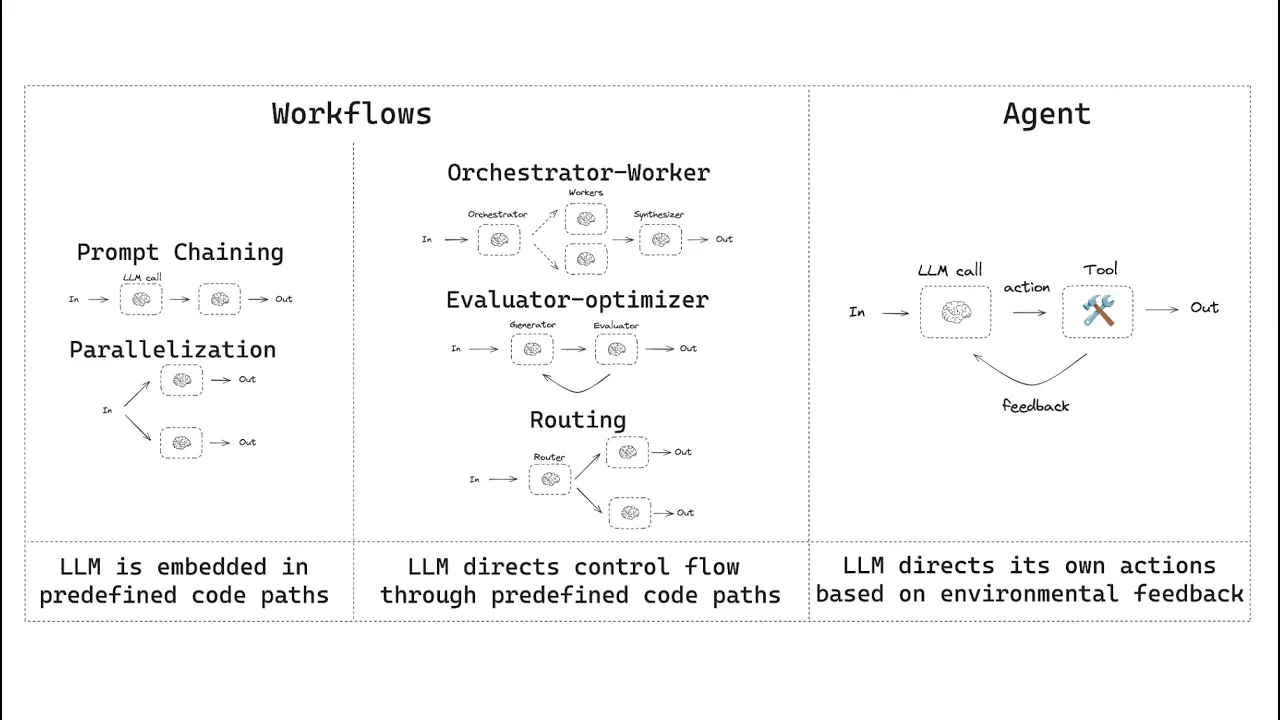
Building Effective Agents with LangGraph: Workflows vs Agents Guide
@LangChain
193.5K views•2025-01-27

57:48
Secure Multiparty Computation (MPC): Foundations & Challenges
@SimonsInstitute
7.3K views•2015-05-28

13:03
Bypassing Tor Censorship: Bridges and Pluggable Transport Guide
@Coding_ForEveryone
397 views•2024-06-11
18:41
Neural Networks Explained: Math, Layers, and Learning Fundamentals
@3blue1brown
21.9M views•2017-10-05
Related Study Plans & Knowledge Roadmaps
Structured learning paths in Artificial Intelligence
artificial-intelligence
Aligning LLMs: DPO, TRL & Custom Datasets
01Foundations of Python & Machine Learning
02Transformers and Large Language Models (LLMs)
03Aligning LLMs: SFT and RLHF
+ 3 more learning modules
24h6 modules
Explore Roadmap
artificial-intelligence
Federated Learning: PyTorch, Flower & Privacy
01Python & Machine Learning Foundations
02Deep Learning Basics with PyTorch
03Introduction to Federated Learning
+ 2 more learning modules
35h5 modules
Explore Roadmap
artificial-intelligence
Securing LLMs: Guardrails AI & NeMo Gateway
01Introduction to LLMs, Python, and APIs
02Understanding LLM Vulnerabilities & Threats
03Defending LLMs with Guardrails AI
+ 2 more learning modules
15h5 modules
Explore Roadmap
artificial-intelligence
Building Recommenders: Two-Tower & Vector DBs
01Foundations of Python & Machine Learning Basics
02Introduction to Recommender Systems
03Deep Learning & Representation Learning
+ 3 more learning modules
75h6 modules
Explore Roadmap