
























![Розподілені графи та мікросервіси в Prom.ua - Максим Кіндріцький [Fwdays Python+DS]](https://i.ytimg.com/vi_webp/AjDr2PCidhE/maxresdefault.webp)


GraphQL is a query language and runtime for APIs that enables clients to request exactly the data they need, solving common REST API problems like over-fetching (receiving too much data) and under-fetching (not receiving enough data), by allowing precise field selection and nested data fetching within a single request.
GraphQL for Beginners: A Complete Server & API Course
Added:Fundamental knowledge of JavaScript (ES6+) and Node.js runtime environments.
A solid understanding of client-server architecture and HTTP communication protocols.
Familiarity with REST APIs, including concepts like endpoints, request/response cycles, and JSON data formatting.
Basic experience using command-line tools and package managers such as npm or yarn.
Integrating Apollo Server with persistent databases (SQL or NoSQL) using tools like Prisma, Sequelize, or Mongoose.
Connecting a frontend application to the GraphQL API using client libraries like Apollo Client or Relay in React, Vue, or Angular.
Implementing advanced optimization patterns, specifically the DataLoader pattern to resolve the common N+1 query performance issue.
Securing GraphQL APIs with robust authentication, field-level authorization, and query depth/complexity limiting.
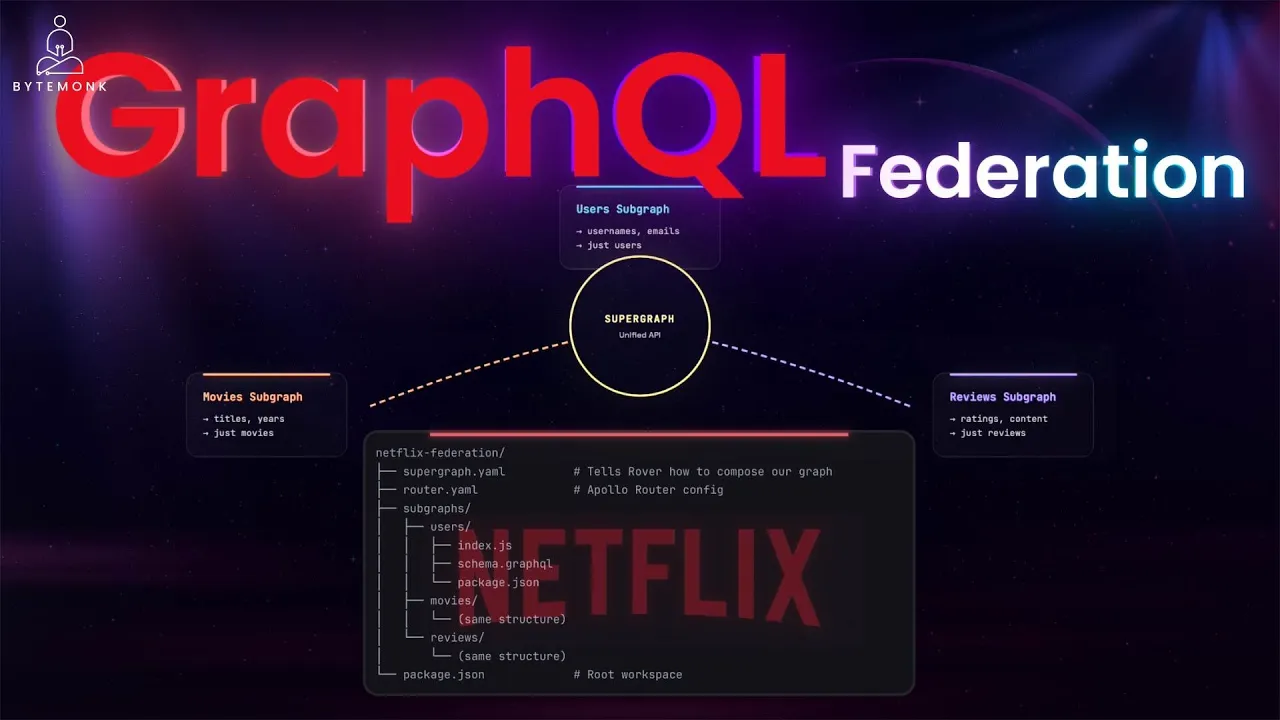
Scaling architecture using Apollo Federation to merge multiple microservice-based GraphQL schemas into a unified supergraph.
358.4K views7.5Klikes1:28:59Original Release: 2023-09-01
welcome to this comprehensive video course on graphql The Cutting Edge query language designed to empower your data retrieval needs for modern web applications throughout this course you'll learn its core principles explores advantages over traditional rest apis and gain the practical skills to design and Implement robust data-driven applications this beginner's course was developed by the net ninja he is one of the most popular graphql instructors on the internet so you're in good hands hey there gang and welcome to your very first graphql tutorial thank you okay then so although I do already have a graphql course it's about five years old now and I wanted to make a fresh up-to-date one with less bloat so that anyone wanting to get up and running with graphql quickly can do here before diving into more advanced tutorials and projects using it so in this series we'll be learning what graphql is and why we use it and then we'll build a graphql server from scratch using node.js and the Apollo server package we'll also look at how to make queries to that server using Apollo Explorer which is a free tool for testing different kinds of queries now before you start I would already expect you to have a basic understanding of node.js because we'll be using that to make our graphql server so if you want to learn that a little bit more first of all which I highly recommend then you can check out my node.js crash course on netninja Pro and also on YouTube so I'm going to leave a link to that course down below the video you're also going to need a recent version of node installed on your computer which you can get from nodejs.org just click on this download button and then go through the installation steps that easy and then finally before we start I've made course files for this entire series you can get them from this repo on GitHub graphql crash course the link to that is also going to be down below the video now each lesson has its own Branch so if you want the code for a specific lesson you can head to the branch drop down and select that branch that corresponds to that lesson then to download the code just hit the green code button and download a zip folder or if you prefer you can clone the entire repo to your machine so then let's get started by talking about exactly what graphql is and why we'd want to use it so graphql is what's known as a query language which is what the ql in the name stands for query language and by query language we mean a specific syntax that we can use to query a server to request or mutate data so it's kind of like an alternative to the more traditional approach of sending standard requests to a rest API using endpoints but whereas using a rest API is more of an architectural style an approach to serve and fetching data graphql differs in that it's an actual query language with its own syntax and rules and it still uses HTTP requests under the HUD like we'd normally send to a rest API it's just that we have this nice query language sitting on top of that to give us more flexibility and control about how we make them and what data we want to fetch or mutate and also the way a graphql server handles those requests is very different to how a typical rest API would handle them as well so let's take a quick look at those differences and see why in some cases graphql has the edge so when we use a rest API we typically send HTTP requests to specific endpoints like this to interact with a certain type of data right for example we might send a get request to this endpoint to fetch a list of Pokemon and we could also send a post request to that endpoint to add a new Pokemon to the data set we might send a get request to an endpoint like this with an ID on the end of it to fetch a single Pokemon with the ID and we might also send a delete or put request to this endpoint to delete the data or update it and the server would handle requests to those endpoints by connecting to a database probably where the data was stored and either fetching the data and sending it back to the client the browser or updating or deleting the data from the database instead so this is your traditional rest API and for the most part it's really effective and a good way to expose data to clients but there are sometimes some drawbacks when it comes to using a rest API when your application scales and your data gets a little bit more complex now the first drawback is something called over fetching another fetching is when we request some data from an end point and the server sends back too much data so much more data than we actually need for example I might have an endpoint which is forward slash courses and that gets all the courses so that request goes to the server the server gets the courses from the database and sends the whole list of them back to us in Json format now each course object might have a ton of different properties like an ID the title the author property which contains author name and the author ID maybe the price a thumbnail URL a description a video URL and so forth and it might actually be that in this case we only need the ID the title and the thumbnail for each one because that's all we're going to be showing on this particular page and so the rest of this data for each course is pretty much Obsolete and we don't need it for anything which means that we've over fetched what we do need so that's the first drawback of fetching the second drawback is the polar opposite under fetching and under fetching is when we don't get back all the data that we need from a single request and it could lead to making multiple requests to different endpoints to collate everything that we need together for example we might send a get request for a single course the server handles that request by getting the course from a database and sending it back in Json format and it might look something like this with an ID title thumbnail URL description the author property which contains the author name and the author ID price video URL Etc and in this case we need all of those things that's great so we show all of those on our course page on our website but we also want to show additional stuff on the page about the author of that course as well for example the other course is that this author has made and information about those courses such as the title the thumbnail the ID the price and so forth and we don't have all of that deeply nested data here in the course object that we got back so we've actually under fetched what we need in that single request and that could mean we now need to make additional requests to the server to different endpoints to get back that additional data so these are two potential drawbacks of using a rest API when your data layer gets a little bit more complex and these are two things that can easily be solved by using graphql instead so now let's look at how graphql works and how it combats both over fetching and under fetching so first of all when we send a request using graphql to a server we typically do that to a single endpoint which might be forward slash graphql and this is totally different to when we used a rest API where each resource typically has its own set of endpoints for get post delete and put requests Etc so whenever we send a query using graphql to the server it's always going to be sent to probably that single end point and then the server can handle it now the way that we send a query to the server is by using a special graphql syntax that looks something like this and we're going to talk more about this syntax later on in the course but essentially this syntax allows us to specify exactly what data and what fields we need back from the server so in the example from before if we want maybe the call courses data then we can send a query that looks something like this so we'd specify that we want the courses resource and for each course we can also specify which properties we want back as well so in this case that would be the ID the title and the thumbnail URL so it's send that query and the server would respond with a Json array of courses where each one of those courses would only have those properties that we need so there's absolutely no fetching going on there whatsoever which is really good the other thing graphql allows us to do is fetch nested related data within a single query so again for the example before where we needed a single course we'd send a query like this one and specify whatever properties we need from that course but we also said that we wanted extra information about the author of that course along with any related data or any related courses rather that author made and we can do that in graphql by nesting those properties inside the query so I can say get the author Name ID and then also get the courses of the author where for each course I want to get the ID the title and the thumbnail URL and all this is done in a single request or query so we're no longer under fetching the data that we need which is really cool and this right here is one of the really good things about using graphql the ability to Nest any related data we need into a single query instead of making multiple queries as you might do when you're using a rest API so that's the basics of why graphql might be beneficial to you and your application especially as like I said before you scale up the app and the data layer becomes a bit more complex now at the moment you've only seen how to retrieve data here and we'll look at this more closely later on but you can also perform something called mutations to do things like ask the graphql server to add new data or update it or delete it I'm watching the same way a post request might ask a rest API to add new data or a delete request would ask the server to delete some data so we're going to talk much more about that later on in the course as well so in this course then we'll be making a graphql server from scratch using node.js and a package called Apollo server and that server is going to be responsible for handling all the queries and mutations that we send to it now to send the queries we'll be using Apollo Explorer which is a graphql client that we can run in the browser you can kind of think of this as a bit like Postman but it's the graphql equivalent and postman by the way is a free tool to test out rest apis so you're going to learn how to set up a graphql server and also how to make queries and mutations from the front end using this kind of graphql syntax so my friends that's the introduction out of the way now in the next lesson we're going to go over the basic syntax of making queries so then before we get started actually making a graphql server that can handle all of our queries I wanted to go over the basics of this query language right here and show you how I typically structure these queries from the front end now to do this we're going to be using Apollo Explorer which I showed you briefly in the first video of the series an Apollo Explorer is a way for us to send test queries to a graphql server and see the responses that we get back from it now you might have worked with something called Postman before which is for rest apis and it's basically a graphql version of Postman what we're using here it allows us to test and sync queries as we would from a front-end application without having to actually build a front end so the way we're going to be making and sending queries from here is essentially the same way we'd be sending them from a client-side application like a react app for example so this window right here is where we're going to be making the queries and then to send them we'd press this button right here and the response from the server is going to show over on the right now for this lesson I'm connecting Apollo Explorer to a backend graphql server I've already made and it's the one that we're going to be making through the rest of this series but you can also use something called the Apollo sandbox which you can find on the Apollo docs right here I'm going to leave this link down below and when you open the sandbox it connects to a dummy graphql server so you can play around with requests without having to worry about making a server yourself but for now I'm going to go back to the Explorer connected to my own graphql server because that's more pertinent to the rest of this course that we're doing so then how do we make a query using graphql well first off we'd use this word query and then after that we can give our query a name if we want it for example I'm calling this one reviews query because I'm going to be fetching reviews from the server makes sense right so you can call this whatever you want then we open the curly braces and inside these we specify what data resource we want to get back now a graphql server can expose multiple different resources to the clients for example they might expose the reviews resource and author's resource a user's resource games resource Etc and we can specify any of those resources right here as our entry points for the query so right now we're saying we want to jump into the graph on this resource entry point in essence we want to fetch the reviews data to begin with now on its own that's not going to do much for us because although we've said we want to get the reviews data we've not specified which fields from each review that we want to retrieve now this is one of the major differences between graphql and using a rest API because when we send a request for a resource to a rest API endpoint we don't then specify which parts of that resource we want to get back we just get the whole lot back but in graphql we can manually choose which field from this resource that we want to fetch and the way we do that is by opening curly braces again and then writing down whatever fields we want so I could just say get me the rating field of each review and if I press send now I'll see the response is a bunch of review objects each one with just the rating field awesome now if I want more Fields I can just list them inside these curly braces right here so I could say that I want the content of each review and also the ID of each review as well and now if I hit send you're going to see this time I get back all of those fields in each review object so this is a really cool feature of graphql only getting back the fields from the data that we actually need now before we go any further I want to just jump to some slides to quickly explain from a bird's eye perspective how we query the graph and move around it to navigate data so when we make a graphql server or API we're making something called a graph right and a graph in visual terms is basically a bunch of connected data that looks something like this so in this case we've got three different data types we've got reviews authors and games and we can choose to jump into the graph at any point that's exposed to us by the server when we make a query and from there the graphql layout allows us to Traverse or walk through this graph to also fetch any related data to that starting point right so we just made a simple query whereby we requested all of the reviews data and specified which fields we wanted back for each review right so the reviews resource was our jumping in points we landed right there and from there I could say okay also get me the author of each review that I got back and I could also specify which fields of the authors that I want to get back as well and the query would look something like this and the reason I could do this is because when I made the graphql server I connected these data resources I said that each review was related to an author who wrote that review and the author is a separate resource and all of this data would be brought back from a single request we've only made one query and sent that one query to the server we didn't have to first get the reviews and then make a second request for the authors of each of those reviews even though it's a separate resource that we're getting right here another example could be that my initial entry point to the graph would be a specific game with a certain ID and the query for that would look something like this where we specify the ID of the game that we want as a variable now we'll learn more about query variables later on so don't worry too much about that for now but then having jumped in at these points on that game I could also say get me any review related to that game and from those reviews just get me the rating field and to take it one step further I could also say then get me the author of each of those reviews and just give me their name so you can see how this general idea of a graph allows us to initially jump in somewhere and then navigate between related data and fetch it all in a single query and that is the Crux of graphql so let's try one of these queries with nested related data again in Apollo Explorer all right so we saw before that we had this reviews query where we fetched all the reviews and we got the rating content and ID for each one so we got those back right but now we can also get nested content so say for example I want the author of each review now this author is actually a separate resource so they don't have author properties these reviews they're a separate resource but they're linked to reviews so the related data and we've specified that or I've specified that in the graphql server we'll see how to do that later on but let me just show you how we can fetch this stuff now so from the author I could get the name and the ID of the author we also have a verified property to say whether they're a verified author now if I click on this we're going to get all of the same stuff here plus the author details so it's grabbing that as well for each different review now we could also get the game associated with each of you so down here I could say game and then inside parentheses or rather curly braces we can say which properties we want back for the game so I could say the title of the game the price of the game and also the platform of the game and it looks here like we don't actually have a price property so let me get rid of that I mustn't have added that so let me just leave it with the title and platform press that and we can see now we get the title of each game and the platform of each game as well which is an array of different platforms so these are three separate resources author game and reviews but we're getting them all back from the same aquarium and we can take this one step further if we wanted to we could say okay well get me all the reviews now associated with each author for example so let's do it right here we can say we want the reviews from each author and from that we just want the rating and we want the ID of each of you click on that and now you can see nested inside the author we can see the other reviews they've done and again we can take this one step further we can say we also want the game for each one and we want the title for each one now this is getting a bit complex it probably wouldn't make a query this complex I just wanted to show you how we can work with this related nested data all right and how flexible it is that's really cool isn't it all in one query so like I said before we can also have mutations to add new games if we want to delete games or reviews whatever it might be to update different records so we're going to see all of that later on as well so now hopefully you can understand a little bit more about how these queries are made and how we can fetch related data within a single query now there is much more to graphql than making queries like this but for now I think that's probably enough to get us started I just wanted to make sure we all have a little bit of an understanding of this General syntax so in the next lesson we're going to start making our very own graphql server on the back end all right the gang so now we want to make a brand new graphql API and to do that we'll be using node.js and a library called Apollo server an Apollo server is one of many different libraries that you can use to easily spin up a graphql server and each library has their own kind of take on it but the nice thing about using Apollo server is that it automatically spins up an instance of the Apollo Explorer for us on localhost which we can use then to test out our API so when we use Apollo server it's going to create a graphql server for us that then allows us to easily set up resolver functions that can respond to incoming queries it also lets us easily model our different data types like authors blogs reviews Etc and decide how they're all connected on the graph by making something called a schema so we'll talk more about that in the next lesson but for now let's go ahead and make a new node project and install Apollo server alright so I'm on the Apollo docs right here Apollo server and I will leave this link down below just click on get started and this is going to show us how to make a new project with Apollo server so the first step is to make a new directory then see the internet and then we initialize a new project a new node project using npm we also set the type to be module and that allows us to use es6 modules so we can say import something from something rather than require and it also allows us to use top level awaits as well once we've done that we have to install a couple of dependencies graphql which is the meat and bones of graphql we need to install that but also Apollo server and that's the graphql library that we're going to use which makes it really easier to spin up a graphql server make schemas types respond to queries using resolver functions and all that jazz so it just makes working with graphql so so easy so we're going to install both of those right here now if you're using typescript then you can follow these directions we're going to be using JavaScript and basically we're just opening up the index.js file or rather we're making one and then opening the the file up and notice here we have that type set to module inside package.json as well so once we've done that it's all set up and we can go ahead and start defining the schema the resolver functions and all that stuff so to begin with let us go up here I'm just going to copy the installs up here so these two things so we can use them in our project alright so I've opened the terminal right here and navigated to this directory where I want to make the project then I'm going to say npm init and then hyphen Y and that's going to create our package.json file for us I also want to say npm PKG and then we want to set the type to be equal to module that allows us to use es6 modules we'll see that inside package.json in a second then I'm going to open up this director written Visual Studio code so codes and a space then full stop press enter and it's going to open up this project for us so inside package.json we can see that the type is module awesome okay so now we need to install those dependencies so open up a new terminal and you want to paste in that npm install that we grabbed from the Apollo docs so it should be at Apollo forward slash server and also graphql so press enter to install those dependencies all right and now that's done the next thing I'm going to do is create an index.js file and this is where we're going to set up our Apollo server for graphql so the way we do this is we first of all import a couple of things so I'm going to paste these in we import Apollo server from at Apollo forward slash server that was the package we just installed and then also we import this thing start Standalone server from ad Apollo forward slash server forward slash Standalone so basically this Apollo server is first to set up the server and configure it and tell Apollo how to handle all of our different types of data and respond to queries and things like that this one right here this is just to start up the server so we can start listing for requests so after we've imported both of those things I remember for this to work these import statements we need to be saying the type is module over here anyway after we've done that we can do our server setup so we can say const server is equal to new Apollo server like so so that's this thing right here all right like so and then down here I'm going to come back to that in a minute but down here I'm going to say const and then URL a destruction here is equal to a weight and then starts standalone server so that's the other thing we imported and then we pass in this Apollo server we just created and then as a second argument an object to say right here we want to listen to a particular port number so we're passing object as the value here and we say the port is four thousand and then down at the bottom I'll just do a little console log console.log and then in here I'll say server ready at Port and then it was four thousand Okay so we've got the basic setup sorted now we're using Apollo to create a new Apollo server and we start the server using this method down here now the Apollo server takes in an object as an argument and that object expects two properties the first is one called type defs which is short for type definitions and these are basically descriptions of our data types and the relationship they have with other data types so that's what we're going to be looking at in the next lesson but the other property is a resolver's property which is basically a bunch of resolver functions that determine how we respond to queries for different data on the graph so in the next lesson we're going to look at that first property type Deft and we're going to make up our own schema all right then my friends so now we're going to make some type definitions and then later on as well some resolver functions which we can then pass into the Apollo server so it can do its magic with them so let's start with the type defs what are type defs well type defs are definitions of the different types of data we want to expose on our graph for example we might make a type def for an author data type and specify the different fields that author might have like a name an avatar URL a bio Etc and we might have one for a game which is a title a price a platform Etc so these would be the different types of data that we want to make available on the graph that a user can then eventually query and the combination of all of these different types and the relationship to other types and the kinds of queries that can be made combine up to make something called a schema so the schema is something that describes the shape of the graph and the data available on it and normally your graphqbal schema the data that's available on the graph will be fairly similar to the data you're storing in your application database now it can be different they don't have to fully match or anything because graphql is a layer between your database and client-side queries but generally speaking the schema will probably look fairly similar to the kind of data that you have in your database so let's try making a schema then with a few different types of data that we want to add to the graph now to do this I'm going to make a new file called schema.js and inside this is where I'm going to Define all of my different types of data now before we do anything inside here I want to show you a package I've got installed so just typing up here graphql and it's this one graphql syntax highlighting so what this does is it allows us to have syntax highlighting for our different types in our schema because without this we wouldn't get that so if we scroll down it might show you an example you can see down here if we keep on going this is how we're going to be using it using a template string and then we start the template string with hash graphql and if we do that when we're making our types inside that template string we're going to get syntax highlighting on them so definitely install this package first of all or a similar one then if we go back to the schema file the way we're going to do this is by first of all exporting a constant because we're going to use this schema inside this index file over here so we need to import it later so make sure you export it first we'll call this type defs and we set this equal to a template string and like we just saw we started with hash graphql and notice when I press L now it goes green to Signal we are going to get syntax highlighting for this now inside here we're going to Define our different types and built into graphql there are five basic scalar types that we can use so they are ins which are just basically whole numbers floats which are decimal numbers we have strings we have Boolean types and also we have a special ID type as well now the ID type is something that graphql uses as a key for data objects now the basically serialized as strings and that's how we're going to declare the IDS in our data when we make it later but they are their own unique type in graphql and these five types right here are going to be the ones you find yourself using pretty much 99 of the time you can make your own types to build on top of this and use them which we'll see kind of later on but yeah these are the types we're going to be using so let's delete that and then go up here now we want to make different data types for our different types of data that we're going to have later on now we're going to have three types of data we're going to have game objects we're going to have review objects and also auth objects so they're the three different types we need to Define inside this template string now the way we make a type is by saying type first of all then the name of the type so we'll start with game and then inside here we'll Define the different properties that a game data type should have so it should have an ID property and then we do a colon and we say what data type is that using the five different types that we just saw well this is going to be of type ID then the second property is going to be a title because every game needs a title that's going to be a string and then the third one will be a platform now that could be a string as well however it might have multiple platforms so ideally we want this to be an array of strings and we can say that something is an array of a certain type by just putting square brackets around it so now we're saying the type of this property should be an array of strings all right so at the beginning if we were to make a new game using this type later on there's nothing to say that these are required Fields now we can make a field required by adding on the exclamation mark at the end of something if we don't have that then we're basically saying this is allowed to be null if we have the exclamation mark we're saying it's not allowed to be null so I want all of these to be required so this one this one and also this one now right here this exclamation mark is outside of the square brackets meaning we must have a value for platform which is an array of strings but the arrays sorry the elements inside that array can be nullable at the minute because we don't have an exclamation mark after this so we need it there as well to say that this string can't be nullable all right so we need two here one at the end of the entire value type and then one for the type inside the array as well okay so that's the first type done let's do another one I'm going to say type or review this time and then inside here we also want an ID which is of type ID required and then we also need the second property and by the way you don't need commas here the second property inside the review which is going to be the rating and that's going to be an integer also required and then the third one will be the content of the review and that is going to be a string also required so that's the second type the third one is author so type author and inside here again we need an ID which is required we also need a name for the author which is a string also required and get rid of the commas this is just habit and then the third one is going to be the verified property and that is going to be a Boolean and this is just basically to say whether an author is verified on a sign we don't need that I just want to demonstrate the different types that we can use okay then so now we've made three different types Game author and review now there's one more special tag that we need to make and that's the type we're going to call query now the query type is something that every graphql schema that you make needs to have it's not optional and its job is to define the entry points to the graph and specify the return types of those entry points so for example if I want users to be able to query the review data that we have and get back a list of reviews then I need to specify that inside this query type so I could make a field called reviews and then tell graphql that we expect the return type of this entry point to be a list of reviews and now if we left the query type like this we're essentially saying we only want to expose that one single entry point to the graph meaning a user would only be able to enter the graph at this point and then they'd be free to navigate around the graph to eventually get related data but they wouldn't be able to jump in at any other point whether that be a single review instead of a list of reviews or an author or game because we've not specified those entry points right here so this query type is our way of gatekeeping Entry onto the graph if you like and deciding where a user can jump into it initially so let's make some more entry points for our users so after reviews we shall say games and when a user lands on this when they request all the games we're going to send back a list of Game objects and the final one for now is going to be authors and same again it's going to be a list this time of auth objects now eventually we're going to allow Landing points for single reviews single authors and single games at the minute we're just allowing the user to land on a list of reviews to grab them all we'll see how to land on a single one later on so then now we've defined our types and we've also made a query type to say where a user can essentially land on the graph or where queries can start from the next thing we need to do is pass all these type definitions into the Apollo server that we made in the previous lesson so first off make sure these type defs are exported from this file so that we can then go ahead and import them in the index file somewhere near the top so do that first of all and then once you've done that we can then pass them into the Apollo server that we created as the first argument so that Apollo server knows about our different types and query entry points and I just said as our first argument I meant the first property in the object argument but anyway that's our first step completed making our type defs to map out what the graph looks like I also said that we need to pass another property into this Apollo server and that was a resolver's object which basically contains a bunch of resolver functions and the resolver functions are there for us to handle any incoming requests and return data to the client because at the moment all we've done is Define what the graph looks like in terms of the data types that we have and the entry points but we've not yet said how we want to handle requests or queries for that data and that's what the resolver functions are for so you can kind of think of the schema and the type definitions that we set up as like a map for Apollo to structure the graph but they don't actually handle any queries and then we make resolver functions to handle the queries based on our schema and type so I hope that makes sense so in the next lesson we're going to take a look at that and we're going to try making some resolvers for the different types of data that we're making available we're also going to set up some domain local data that we can use on the server as well so that we've got something to send back to the client so that's coming in the next lesson right then so in the last lesson we made our type definitions to describe the data on the graph and also specify the entry points to the graph using the special query type and we pass those into the Apollo server so it knows how to set the graph up next up we need to make some resolver functions which allow us to decide how we respond two queries to the graph so it might be that if a query comes in for all the games then we could maybe fetch all the games records from a database and return those as a response now in our case we don't have a database setup for this and instead I'm just going to use some local data stored in a variable in another file but you could quite easily hook this up to whatever database you prefer and work with that data instead so for now what I'm doing is making a new file called underscore db.js which stands for database and this underscore thing isn't necessary it's just a little naming convention I sometimes use when I'm making a data file but anyway inside this file I'm going to paste in a bunch of data which is essentially just three arrays stored in variables one array for the reviews one for the games and one for the authors and we can see the different properties that these objects inside the arrays have are the same ones that we defined in the types that we made in the last lesson the only difference is that the reviews objects we have a game ID property and also an author ID property and this is for later when we start to talk about how data is related but the rest of the properties match up to the ones that we defined in our different types so if you want to grab this data as well you can do it's all up on my repo I'm going to leave the exact link to that file to grab this data down below the video anyway now we have our data let's start making some resolver functions for the three entry points that we defined in our query type because we need to send a response for queries to each of those so then to make our resolver functions we'll first make a new constant called resolvers and then we're going to set that equal to an object and inside this we can make resolver functions for each different type that we defined now to begin with we want to make resolver functions for the query type because that root query type is where we Define entry points to the graph and specify what data should be returned for them we'll also be making resolver functions for other types later on as well like the review type and author type when we start talking about related nested data but for now we just want to make resolver functions for every field defined in the root query type so that's one for reviews one for games and one for authors and to do that we make a property called query capital Q which matches exactly the type name and this property is going to be an object as well and now we can Define in this object resolver functions for each of the properties defined on our root query type so the way this is going to work is that we need basically a resolver function for reviews called reviews one for games called games and one for authors called authors and the names need to match so if we go over here our first one is going to be for games and then this is a function which returns some data and basically we want to return the data to a user that they've requested now they've requested games so we need to send back an array of game objects now in order to do this we need access to this DB file so let me import that at the top I'm going to come to the top and say DB and then just paste in this import so import DB from dot forward slash underscore db.js and then down here we can use this to say DB Dot and then whatever the property is down here so we've got games authors and reviews that match up to this data so what you want to send back DB dot games and that's all there is to it we're sending back the array of games now remember when a user makes a query they can do so like this so let me just do some comments like this and if they make a query they might make a query that looks like this games and then inside here they want specific properties like just the title now if we're returning the full array right here you'd think well we're returning the ID the title the platform as well however Apollo handles that for us all it needs to know is where to grab the data and then if we're just requesting the title from each of the games it will do its magic on this data to take out any of the other stuff like the platform and the ID and it will just return the title property for each one so we don't have to worry about which fields are returned Apollo server is going to do that for us okay which is really cool so let's get rid of that that's the first resolver function done that's simple so the second one is going to be for reviews let's do that come back to index and we'll say reviews and this is also a function we need to return DB dot reviews and then the final one is going to be for authors so let's do that authors and then inside here we need to return DB dot authors all right and that's it we've made our three now basic resolver functions for this data over here and that's pretty much all we need to do so before this works we need to pass this resolvers object into here as the second property on this argument so let's do that we'll say resolvers and that's it so now what we want to do is start up this server so that we can test it from the front end so let me do that by opening up the terminal and if you've got node one installed you could type node Mon and then the name of the file which is what I'm going to do and basically what node mod does is it restarts the server every time you make a change to the server otherwise if you're just using node and then the file name you need to manually cancel the server every time you make a change and rerun it to pick up that change so we're going to say nerdman and then the name of the file we want to run which is index and hopefully oops we get an error so what's the error so refuse did you mean review let me have a look at this so we've got reviews down here let's go to schema oops there it is okay so this shouldn't be plural because it's a singular type Insider list all right so save that and now hopefully this is gonna work I'm going to cancel out this process and run it again and okay the app crashed again we have another error so let's have a look what this one is okay address is already in use okay so that's because I've got another instance of a graphql server up and running so let me just close that down first of all okay so I've just done that I'm going to cancel out of this again and try running it third time hopefully this is going to work now Okay cool so now the server is ready at Port 4000 awesome all right so now if you visit localhost Port 4000 in the browser you're gonna see Apollo Explorer so it automatically spins this up for us so we can test out our graphql server and let me just take you on a quick tour of this first of all if you go to schema then you're going to see the different queries that we can currently make so you can see it's looked at our code and it's seen the different queries we can make the different entry points our authors games and reviews right here and it also shows the data type so if we click on this it's going to show the different fields that that data type has and it shows what we can base get back all right so we have those three data types right here also if we look at scalar types it's going to come down here show us the different things we're using directives okay we don't really need to worry about directors for now if you go back to Explorer this panel on the left is where we're going to make the queries this is where we're going to get the response down here you might see another panel as well this is for variables which we're going to look at later on so let's make our first query you can name this something different if you want so I could say something like games query to get the games you don't have to name it that it doesn't really matter what it's called but now I want to get the games so I can click on that and remember we have to open up our curly braces and specify What fields we want from this particular resource so I could say that I want the title of each game and also the platform of each game so now if I click on this we can see we get an array of all the games inside a data object so we have this one the title and the platform title and platform and so forth so we're getting all of the games awesome all right so let's change this to something else let's try the authors and from each one we want the name and we also want the verified status click on this and it's going to fetch those for us Mario verified true Yoshi Falls Peach true awesome final one let us try the other resource which is reviews and then from here we can get for example the ID the rating and the content I'm going to click on this and we can see all those reviews now like I said you can just request some of the field so I could get rid of content and I could get rid of ID and just say that I want the rating click on this and now it still fetches all the reviews but we only get that rating property so we're not over fetching which is awesome so even though we explicitly return the full array of data Apollo is using our resolver function and the data we return to automatically filter out any of the fields the user doesn't need which is awesome so this is all working now but what if we wanted to fetch just a single review or a single author or a single game well for that we need to use something called query variables and we'll talk about those in the next lesson all right then gang so now we have some type definitions which describe the data we have on the graph and also specify the entry points to the graph which are to query all the reviews all the games and all the authors and we also have resolver functions for each of those queries too which return the data so it can be sent to the client but what if a user just wants to send a query for a single review or a single author or a single game well currently that wouldn't work for two reasons first we don't specify that a user can enter the graph in that way in the root query the only three entry points that we have are queries for other reviews all the games or all the authors and secondly we don't have any resolver functions to handle queries for single items we only have them to match these three entry points for lists of data so we need to address both of those things starting with this root query type and the way we do that is by just adding more entry points to the graph so underneath reviews I'm going to make another query available called review singular for a user to fetch a single review and that query is going to return a single review object now we need to add one more thing to this and that's a query variable to say that when a user makes this query we expect them to send a variable along with it as well and that variable would be the ID of the review that they want to fetch because we need the ID to find the review in our data in order to send it back to them so to do that we just add parentheses after the query name and then we can add a variable name which I'm going to call ID and we also need to specify the type of this variable that we expect as well which is going to be the ID type and finally we want to say that this variable is required when someone makes this query so it can't be null and we know to do that we can just add the exclamation mark at the end of it so now we're seeing a user can make an initial query for a single review but they must pass in this variable to the query which must be an ID so now we just need to make a resolver function for this query as well so back in the index file we can add a new function inside the query property of the resolvers object and that function is going to be called review singular again and inside this function we basically need to return a single review based on the ID variable that a user passes into the query so how do we get that ID in this resolver function well we automatically get three arguments available to us in these functions that we can use the first one is something called appearance which refers to the parent resolver in a resolver chain that probably doesn't make much sense at the minute but hopefully it will do later on when we start working with related data and nested queries I'm going to rename this first one to underscore because we don't need that in this function the second one which we do need is called args which stands for arguments and it's on here that we can access any query variable since with the query the third one is a context object which we can use for supplying context values across all of our resolvers such as authentication information or something like that but we don't need that third argument right now so we can get any query variables that a user sends in the query from this args object and what we want is the ID variable so we can just say args.id to get that and we can use the ID now to find whatever review has the ID in our data and then return it so the way I'm going to do this is by just taking db.reviews again and then I'm going to use the find method to find a single review so this find method basically finds a function for every item inside the reviews array and for each item we can take in a review as an argument so if we go back to the data if we're cycling through this it will refer to this first then this then this then this okay so each time we cycle through one of these items we can check the ID property of it now if the ID property matches the ID on this argument then we want to return true inside this function and when we return true it no longer needs to cycle through the rest of the array and it just returns that value for us right here okay so we need to say get the review dot ID and see if it's triple equal to args.id so when that is true that is the review that we want to return to the user hope that makes sense and that's pretty much all there is to it so now we can save this and test it out in the browser okay so how do we actually send a query variable from the front end when we're making a query well first of all after the query name we can use parentheses to declare any variables that can be passed into this query as a whole now that can be multiple variables in the future but for now it's just going to be one variable the ID and if you were using something like react to make this query you could pass those variables into the whole query from a react component and then within the query we can use those variables for different parts of the query so first of all let's declare what variables can be passed into the query as a whole so inside parentheses we declare each variable that can be passed in using a dollar sign and then the variable name so we can say dollar sign and then ID and then after that we use a colon and specify what type of data this variable should be in our case that's the ID type for all intents and purposes it's going to be a string that we pass in but it's an ID type now in order to pass that variable into the query from Apollo sandbox you can come down here to the bottom and select variables and then you can make a Json object of key value pairs one for each variable so we can add the ID one and set it to be one in quotations so now these variables are going to get passed into the query and populate the arguments inside the parentheses right up here so this variable will now have the value that we passed in from down here and we can use that variable when we request a single review inside this query so let's do that let's ask for a single review and then passing the ID of the review that we want to find so we can say ID is equal to the ID variable which in turn is equal to one and that's all we have to do to say that we want that one single review we can also specify which fields we want back as well though for example the rating and also the content properties so now we're asking for one single review with the ID of one and we just want these two fields for that review and if we hit send we should see the response from the server which contains that review and inside it the two fields that we asked for awesome so that's how we use Query variables from the front end now let's try and do something similar for the other two data types that we've got or rather than so back in a schema let's define our different entry points so underneath games I'm going to do a single one so game and that's going to return a single game object now again we need to declare that this needs an ID argument or variable which is of type ID and that's required and same for this down here author and again we need to define the query variable which is of type ID and required and that returns a single author so that's the schema done back over in index we need to basically do the same thing for author and game that we did for review so I'm just going to copy this and I'm going to paste it up here change the name of this to game and we still need the args the whole logic is the same however we just need to rename this to game and this to game as well so we're basically returning the game where the IDS match and then down here we need a comma first of all and we have authors so let's paste this in again do a comma change this to author singular and we'll change this to author and change this to author and also we need to change this one right here because we want to look inside the games array and this one should be the author's array I think that's pretty much it so now they should all work for the other two types as well but let's check it out in Apollo Explorer so let's give this a whirl I'm not going to change the name because it doesn't really matter but we're always still passing in the ID and we'll just pass in one it doesn't have to change I mean we'll change it to two just to have a look and then this time instead of review in fact let's try and review first of all to see if we can get a different one back which we do okay now let's change this to game with the ID of two now we need different fields for the game I think we have a title and also a platform I'm also going to return the ID just to make sure it's getting the correct one and we can see the ideas too the title and also the platforms uh let's try a different one so we'll say three here send that okay yeah that works and then finally let's try the authors so singular author I'm gonna go back to one and we want the name and we'll also get the verified status that's it verified like so and the ID press this send button and we can see this works as well let's change the variable to two and yeah it brings back the Yoshi one the different one awesome so this is all working now that's how we can send query variables in our queries all right then so things are starting to take shape now we can query lists of data and also we can query single data items as well using query variables and now I want to take this one step further and talk about related data in graphql so if we open up the DB data file and look at the reviews data we can see that each of you has an auth ID property and also a game ID property and that's the way in our data we're relating these different things so that every review has an Associated author an Associated game as well so if I was to pluck out a random review I would then be able to try and find the author and the game associated with that review and likewise if I was to pick out a random game I could look at the ID of that game and then run through the reviews array to find any review where the game ID matches that meaning I could pick out all the reviews associated with a single game now that's how this looks on the data side of things but currently in our schema we don't really Define any relationships between the data so when Apollo makes our graph based on this schema it won't know that every game has a list of related reviews at the moment and that every review has a related author and game and also that every author has a list of reviews that they wrote so we need a way of defining those relationships in our schema so that Apollo knows to make our graph that way with those relationships alright so let's start with the review type right here so we know that every review is associated with a game and an author so I could say that the game is going to be of type game like so and that's required right because we can't have a review for no game that's not going to exist also we have the author property which is going to be of type auth again required because every review needs an author alright so down here every game is going to have a list of reviews so we'll say reviews it's a list so square brackets and then inside the type is review now the types inside this can't be nullable the data inside it so we need exclamation mark right here but that's not to say that we have to have reviews we're not going to put exclamation mark right here this can be nullable as a whole if the game doesn't have any reviews but if we have some data inside this list it has to be a tight review that is required it can't be null okay so same down here for the author let's say the reviews by this author are going to be a list of review objects again exclamation mark but none at the end because there can be authors that haven't written any reviews yet all right okay so now we've made those connections in our different types we also need to make some resolver functions to resolve any nested queries for the related data for example I might query it for a single game and then make a nested query for all the reviews for that game and that query would look something like this where the initial jumping in point is for a single game but then we also ask for the reviews related to that game along with the rating and content for each review so at the moment Apollo doesn't really know how to handle that nested query for the reviews inside a specific game the only way it knows how to resolve reviews currently is either by grabbing all of them or just by grabbing one of them based on the ID and these are both root queries defined in the query type in our schema so it doesn't know how to get a subset of reviews based on the ID of a particular game we don't have a resolver for that so the way we make this resolver is not by making it inside this query object because these are resolvers for entry points to the graph as defined by the query type that we made in the schema so instead because this nested request is associated with a game object we make a new property inside the resolvers object called game which is also an object and then inside this we can make a resolver function called reviews where we can tell Apollo how to get all the reviews based on the pair inquiry for the single game so I'm going to make a function called reviews to do this and it's going to take in that first argument called parents now remember I mentioned this one in a previous video but we didn't need it back then however now we do need it so the way this is going to work is because our entry point for the query is a single game Apollo will run that initial resolver function inside the query object to get that single game then to resolve the reviews for that game it's going to look to the game object since that's what we just grabbed right again and then it's going to look for the reviews resolver inside that to grab the reviews so it's inside this function that we tell Apollo how to do that but how do we know what game we're getting reviews for well we can access the ID of the game via the parent argument because the parent argument is a reference to the value returned by the previous or parent resolver now in our case that's going to be the game one so the initial one inside the query object so that parent argument will basically be a game object and that game object is going to have an ID which we can then use so we can use the ID now to return all the reviews associated with that game ID and the way we're going to do this is by first of all returning DP which is the data remember that we imported and then we want the reviews array on that then we're going to use the filter method so what we're going to do is filter out any review that doesn't have the same game ID as the ID on the parent because if they are the same and we return true for each of those then it's going to keep those in the filtered array and that's what we want any review associated with the game where the IDS match if they don't match it's going to filter them out and they're not returned in that array so we fire a function for each item inside the array I'm going to refer to each review item as R and then we want to return r dot game underscore ID remember that is the property if we go over here each of you has a game underscore ID to associate it with a particular game and we want to check if that matches with a particular game the game we've just queried so we'll say triple equal to the parent which has the ID property because that is essentially the game object so where they match they're going to stay in The Returned array because they're associated with each other and that's what we want we want to return all the reviews associated with that game where they don't match the filtered out so we don't return those okay so let's save this and give it a whirl okay then so I've got this query already set up so we're using a query variable ID which we're passing right here so id2 we ask for the game with the ID and grab the title but also all the reviews associated with that particular game ID and we'll get the rating and the content from each one so let's give this a whirl and yep cool so we can see we get the game title and two reviews right here and what I'm gonna do is also put in here the game ID let me do commas here like so and then I'll say the game underscore ID that should be two oh in fact we can't do that and the reason we can't do that is because we didn't specify that on our schema all right so I'm not going to do that but if you remember in our different types on the review object we didn't add the game ID that is something you could do if you wanted to but it's not going to work here because I didn't add it but either way we can see that this works and if I put in a different ID like three and try that out we can see now we get a different game with one review I'm gonna put in an idea of one here and yeah that's working as well awesome Okay so we've sorted out related data when it comes to finding reviews for a game but reviews can also be associated with an author can't so if we take a look at author they could have a list of reviews as well so let's do the same thing for author so like we had a game property this time we need an author property like so which is an object and then we want the reviews resolver for this where we're taking the parents and then inside there we're going to do essentially the same thing as this so let's return reviews.filter this time we want to check the author ID is equal to the parent ID all right so the author ID on the review remember we have that right here we're checking this against the ID of the author we selected and then we're only returning the reviews where if this was the author for example one we'd return this one and this review okay so let's save that I'm not going to test it just yet because there's one more set of resolvers I want to do and that's for the review so imagine we select a single review if we go to our schema we can see that each review has an Associated game and author so they would be nested queries so we need to make a resolver function to get the game associated with that review and also the author so two resolver functions right here so let's do the auth first of all and we're taking the parents so the pair at this time is going to be a single review and we're going to return DB dot authors and then we're going to find a single author because this isn't a list of authors associated with a single review we only have one author per review so we're finding a single one so we fire a function for each element in the array and I'm going to call each element a for author and then what we want to do is grab the ID of that so a DOT ID and we want to return true when it's equal to the parent which is the review object dot author ID so where they match it means that author is associated with this review and we're returning that single author now we need to do the same thing but this time it's going to be for the game because again a single game is associated with a particular review so game and then we'll change this to G change this to G for game and then this is going to be game underscore ID and that's all there is to it oops this needs to be games right here cool so now we have our resolver functions for nested authors and games inside a review object and also for reviews inside an author alright cool so let's save this and try it out again all right then so let's start the starting off point as author we'll keep the ideas one that we pass in we want the author name and then we'll get the reviews associated with the author so we'll press that and we can see Mario has these reviews right here these two awesome and then let's try author with the ID of two like so so we have Yoshi and these three reviews awesome so that's working now what I'm going to do is I'm going to copy this and I'm going to make a new query so we can come back to this and I'm going to paste it in here and just change it so we'll change this to review query and then we'll pass in an ID again so let me go back here and copy this like so paste it in and then we want a single review right here with the ID we're going to get the rating of that review but then also we want the associated game and for the game we will get the title and the platform like so oops platform press send and we can see now we get the review and the single game associated with that review which is awesome we also can get the author Remember so let's do that as well and for the author we want the name and also we'll get the verified property as well which is true or false so now we get the author as well awesome change the ID and those should change as well yep cool awesome so this is all working now not only this but what I could do is I could get a single review and the rating get the game that is associated with that review and I could also say well I'll tell you what get me all the other reviews associated with that game and from those I could just get the rating now the reason I can do this is because we have a resolver chain so the first one the entry point is for a single review right so we use that initial resolver function defined inside the query object to get that single review then we move on to the game resolver inside the review object so it gets the game associated with that review that's the quick that's the resolver function we just made and then since we're asking for reviews inside the game it goes to the resolver function for reviews inside the game object and this time the parent refers to this right here so we have this kind of resolver chain and we always have access to the previous resolver as the parents so we can Nest as much as we want here and this is going to work which is awesome so we'll get the review and the rating for that review the game associated with it and all the other reviews along with the rating for that particular game awesome all right then my friends so now we can do quite a lot in terms of making queries to fetch data and related data as well which is cool but at the moment all we can do is fetch the data we can't add new data or edit the current data or delete data or any of that jazz so I want to address that now by talking about mutations and the mutation is basically a generic term in graphql for any kind of change that we want to make to the data whether it be to add new data delete data or edit current data so the first thing we need to do is Define our allowed mutations in the schema by making a new type which is called mutation and it's inside this type that we can then decide how users can mutate any data for example I might want to expose a mutation called delete gain and for that mutation we need an ID argument to say what game should be deleted we also specify the return type as well after a user makes this mutation much like we did for the root queries so for example once a user deletes a game from the data I might want to send back an updated list of all the games after that one has been removed so I'd use an array of game objects right here okay so that's the mutation defined but we also need to make a resolver for the mutation as well inside our resolvers object called mutation so right at the bottom down here comma and then mutation which is an object and we just make resolvers in much the same way as we did for these for these Etc so we want to make a resolver called delete game right here so let's do that delete game like so and it also takes in the same arguments so we have the parent we also have the args over here and then context if we want it so we don't actually need the first one which is parents to delete a game but we do need the arguments because we want the ID of the game that we want to delete so inside here oops inside here what we want to do is basically update the value of the games array because that's what we're editing right here we're deleting a game so we want to remove one right so let's say that DB dot games is equal to something new and that's going to be DB dot games dot filter and by the way in a real application you probably use a database right like maybe mongodb or something like that so you would use the library for mongodb to connect to that and just delete a game this way we're just using local variables as data because then it's easier for me to keep the focus on graphql all right anyway so dot filter so we want to go through this array and we fire a function for each game which I'm referring to as G inside this array and we want to return false whereby the ID is equal to the ID on here and we're returning false in that scenario because if we return false it filters it out of the array and therefore the filter array is not going to include that game that we want to delete so we say g dot ID is not equal to args.id so where they're not equal it returns true and it keeps that in the array where they are equal that's the game we want to delete it returns false and therefore we filter out the array all right so now we also need to return something and we specified the return type to be a list of games so the updated games array so all we need to do then is return DB dot games like so all right so let's save this and give it a whirl so how do we actually make a mutation from the front end because when we make a query we use this query keyword give it a name and then specify what we want now with a mutation it's a very similar we just specified that it's a mutation not a query it anymore then we can give this a name so I could call it delete mutation we can specify any variables that need to go into this query and we do need a variable that's going to be the ID and that's going to be of ID type and then inside here we can specify what mutation we want to make and that was called delete game so let me get rid of this because it's automatically created it for us and this should be ID instead to refer to this so now we need to pass in the ID variable down here and that is going to be 2. so we're deleting the game with the ID of two and remember we get back as a return an array of games with that game deleted so an updated version of it so we can specify now what fields we want back so I could say we want the ID of the game back the title and the platform so let's give this a whirl delete mutation all right so now we can see ID 1 and 3 and 4 and 5 but no two because it's been deleted now obviously when the server restarts that is going to be there again because we reinitialize the variables and all that jazz this is not permanent this deletion it's only while you know this current session is going on if you like but as soon as we restart the server that's going to return but like I said you'll probably use a database where you'll have a bit more persistence than this so anyway now we've deleted a game Let's also try adding a new game okay so now we've made this delete game mutation next I want to try making a mutation whereby a user can add a new game so how do we do that well first of all we need to go to the mutation type in the schema and we need to add the mutation which I'm going to call add game and it's going to accept some arguments so we do need parentheses but we'll come back to those in a second now as a return value we're going to send a single game object back to the user the one that we just created so for the arguments of this mutation we need to basically grab all of the fields that make up a new game minus one of them the ID because we don't want the user to decide the ID of the new game that they add instead we're going to generate a random ID in the resolver later for this mutation but we still need the game title and maybe the game platform maybe the game price if there is one basically any property that makes up a new game so we could add each of those fields as different arguments inside here or we could make a new special input type in our schema which allows us to group together several arguments into one type and then that can be used as a single argument elsewhere like in this mutation so the way we do that is by coming down here and first of all saying input instead of type which says to graphql that this isn't an actual type of data but more of a collection of fields that we can use in a mutation as a single argument for example so inside this then we can choose What fields we want this input to have and also the type of those fields so I've said right here we need two properties the title which is a string and also the platform which is a collection of strings or a list of strings and they're both required we don't want to add in the reviews because we're not making a review we're just making a game and then later if you were to have a review you would associate it with a particular game we don't need to do that right here when we're adding a game for the first time but now what we can do is we can say okay this mutation takes in a variable called game and that is going to be of type add game input and it's required so when we're making this mutation from the front end it's going to require us to add a game variable which looks something like this an object with these two properties okay so now we have that mutation sorted we can go back to the index file and we can add that mutation right here after delete game so I will call this add game and we're going to take in the args argument so we don't need the first one which is parent so underscore for that then args and the reason we need that is because the game property is going to be on the arguments because we're sending that from the front end and on that game it's going to be the title and platform properties so what do we want to do here well we want to make a new game object and add it to the game array right so we can make the object first of all by saying let's game equal to an object then we're going to spread out so dot dot dot args dot game and it's dot game because that is the name of this variable and on that will be those two properties the title and the platform so we're adding those two properties to the new object and then the reason I'm spreading that is because we also need an ID property which we need to randomly generate now you might be better off using some kind of random uid generator library or something like that I'm going to use the mass object to generate this for the sake of our tutorial but we're going to say math.flor then math dot random and this generates a random number between 0 and 1 in decimal format and then we'll times that by 10 000 so what this will do is generate a random number between one and ten thousand and it will have decimal points as well but then what we're doing is flooring that so it becomes an integer okay and then we'll convert it to string like so so we have our ID property we also have the other arguments that we passed along and we have the new game object now we just need to push that to the games array so we can say let me come back up a line DB dot push and then we're going to push on in fact not db.db.games.push to push onto the games array and we push on the new game awesome and then finally we return that new game that we created because if we go to the schema we can see we return a game type all right so that is pretty much it my friends so let's try this from the front end okay then so let me just copy this and then we'll go over here and paste it in and we're going to call this one add mutation we also need to pass in the ID no we don't in fact do well we need to pass in a game object and that is a type add game input like so all right so now we need to specify that the game is required here like so and then this is called add game instead alright so now down here we need to pass the variables in so remember we need a game property and that is an object and inside the object we have the title so we'll just say a new game very original right and then we also need a platform and that platform is going to be an array and inside here we will say switch and PS5 like so so remember it Returns the new game back and we're requiring D3 feels from The Returned game so let's try this add mutation and you can see now we get this random ID 263 the title and the platform awesome so that's worked and now I'm going to go back over here and I'm going to just require all of the games right here so games like so we don't need these anymore just so we can see an updated list of games and we'll get the title of each one and we don't need these parentheses let's run this and you can see now a new game so it's been pushed on to the array awesome so in the next lesson we're going to look at one more mutation and that is to update existing data all right then so in the last lesson we made our first two mutations want to add the game and one two delete a game and for adding a game we made this ad game input where we collated two Fields together so that could be our variable right here just this one variable called gain which has this kind of structure so we're gonna do one more mutation now and that is going to be for editing a game so I'm going to come down to the bottom and I will make a new one called update game like so now in here we need some arguments now what do we need we need the ID of the game that we want to update and we didn't need an ID here remember because we're adding a new game that doesn't have an idea yet but when we're updating existing data we need the ID of the game that we want to update so let's put that in but we also need any kind of edits that we want to make all right so what I'm going to do is make another argument called edits and for this I'm going to create a new input so let me copy this and paste it down here and I'm gonna call this edit game input and then we'll set that here edit game input like so and we're not going to make this yeah in fact we will make this required okay and this is going to return game now these things right here these two Fields they are the same so you might be thinking well why didn't we just reuse this one here and the difference is that I'm not going to make these two required because if you go to update a game you might just want to update one of the fields like title so I don't want to make there for the platform required if you don't want to update that and likewise if you just update the platform you might not want to update the title so therefore I don't want to make this required so if I reuse this we would have to basically update both of the fields in order for this to work but I don't want to make a user do that so by making a new one where they're not required it's a bit more flexible and also I'm not putting the ID in here like so and instead of specifying it here and the reason for that is because it's not really an edit is it so I don't want to group the ID into some kind of edits object I'd like that to be its own separate argument so let me delete that save it and now we can create a resolver function for this update game mutation all right then so let's add this in down here update game like so and we don't need the first argument the parent but we do need the arcs because the edits and also the ID are going to be on that and then down here what I'm going to do is just paste in a bit of code and this is what we're using to basically update the games array so we're taking the games on DB and we're setting it equal to db.games.map so we're mapping through the array and basically creating a new array out of it so we fire a function for each item in the array and for each item we check does that particular game that we're currently iterating have an ID that is equal to the ID on the arguments because remember we're going to have an ID property on this right here and if it does match then we're going to return this thing right here G so the current objective you like and spread those so whatever properties it currently has we're adding right here and I'm also spreading args.edits so if for example we update the title then it's going to override the title that's over here that we're spreading does that make sense so that's the returned object right here and that's going to go inside the array then if these don't match then we don't need to change it and we just return the original object to the array so I hope that all makes sense now at the end of this update game mutation we need to return something back to the user so if we take a look at the schema we return the game that we just edited so we shall say return and then we'll say db.games dot find to find a particular game and we can cycle through those and we want to return the game where the ID is equal to args.id because again remember we have the ID argument right here okay cool so now we have that mutation let's try it out okay then so back over here I'm going to create a new tab and I'm going to copy this mutation which is for adding a game I'm going to paste it over here and then I will call this edit mutation and this right here needs to be edit game input and this is called edits this and this right here is edits and dollar sign edits but also remember we need to pass in the ID so we can say the ID is equal to oops I need dollar sign first of all ID is of ID type like so we need the ID right here so let's say the ID is the ID variable awesome okay this is not ad game it's updates game like so and we don't pass in the ID we can pass in a title and a platform or imagine these are what we're going to get back so we can pass in the ID here if we want to for the variables let's copy this again because it's going to be very similar and paste it right here so we're going to have an edits property and we also need an ID property so let's do the ID down here oops done that incorrectly comma here and then ID or set that equal to two and we'll change this to I don't know Dark Souls like so and then we don't need to pass in an update for this so let's just do that so then we're going to get these fields back so what we're doing is we're passing in the edits right here of which we just have won the title and then the ID of the game we want to edit so we're passing both of those in here and then we're using those inside this mutation and we're saying look once you've made this mutation this edit send back the game and give us the title and platform so the title should be updated now so let's do that and we can see now the title is Dark Souls the platform is unchanged if I change instead platform and this needs to be an array of strings now doesn't it and we'll just change this to be I don't know um XBox whatever let's edit that again and now it's just Xbox I can change this now to PS5 if I wanted to and we'll do switch as well and also if we wanted to change the title as well we can do so we'll just say I don't know some other game can't think off the top of my head edit and we can see now we've made those edits awesome all right then gang so that's pretty much it for this series then I really hope you enjoyed it and hopefully you feel comfortable now with the basics of graphql in terms of making a graphql server but also in terms of the query syntax and actually making queries from the front end and if not then I guess thanks anyway for wasting the last two hours of your life watching my videos but yeah hopefully not and fingers crossed it wasn't a complete waste of time but anyway in the future I will do more courses to incorporate graphql like how to use graphql in a next JS site or maybe with super bass or something like that and that's one of the main reasons I wanted to make this course right here so that it serves as a jumping in point to learn the basics of graphql quickly so we can do more advanced stuff in the future
Up Next
39:43
GraphQL Tutorial: Build a Server with Node.js and Express
@WebDevSimplified
777.2K views•2019-03-02

87:26
Introduction to Secure Multiparty Computation with Yehuda Lindell
@fhe_org
7.7K views•2021-02-04
85:36
Rust Programming Tutorial for Beginners: A Comprehensive Guide
@freecodecamp
354.1K views•2021-11-30

19:25
Enigma Machine Mechanics: WWII Encryption Explained
@JaredOwen
13.2M views•2021-12-11
Related Study Plans & Knowledge Roadmaps
Structured learning paths in Computer Science
computer-science
Container Runtimes: Namespaces, Cgroups & Go
01Linux Systems & Go Programming Foundations
02The Core of Isolation: Chroot and Filesystems
03Linux Namespaces: Process Isolation
+ 3 more learning modules
32h6 modules
Explore Roadmap
computer-science
Building a CHIP-8 Emulator: Rust & CPU Basics
01Computer Architecture Foundations (Bits & Bytes)
02Rust Programming for Systems Development
03CHIP-8 Virtual Hardware Specifications
+ 2 more learning modules
32h5 modules
Explore Roadmap
computer-science
Building BitTorrent: Go, P2P & Concurrency
01Go Fundamentals & Concurrency
02Networking Foundations & P2P Architecture
03Bencode Parsing & Torrent Metadata
+ 3 more learning modules
26h6 modules
Explore Roadmap
computer-science
Actor Models (C++ Concurrency & Lock-Free)
01C++ Multi-Threading Foundations
02Thread Pools and Task Scheduling
03Atomics and Lock-Free Queue Design
+ 3 more learning modules
45h6 modules
Explore Roadmap