















![[Destination:Web] The Design Pattern That Shall Not Be Named](https://i.ytimg.com/vi/Q1YXEqCl650/hqdefault.jpg)







This video demonstrates a universal method for receiving unknown-length data over STM32 UART using DMA and IDLE LINE interrupt, which works across all STM32 devices without requiring device-specific register handling. The technique uses two buffers (RX buffer for DMA and main buffer for final storage) and handles data wrapping when receiving large files by tracking the current position in the main buffer. For Cortex-M7 series MCUs like H745, the Memory Protection Unit (MPU) must be configured to allow DMA access to the RX buffer, as DMA cannot access cachable regions like DTCM RAM.
STM32 UART DMA with IDLE Line Interrupt for Variable Data Reception
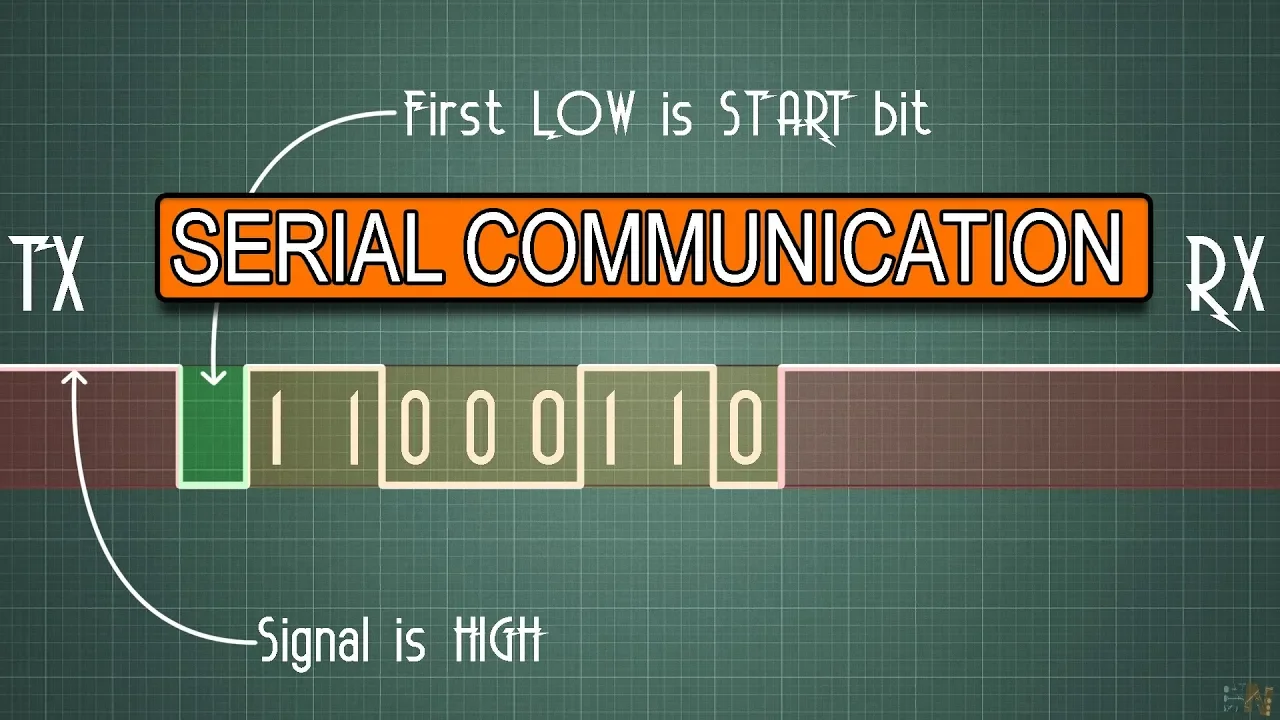
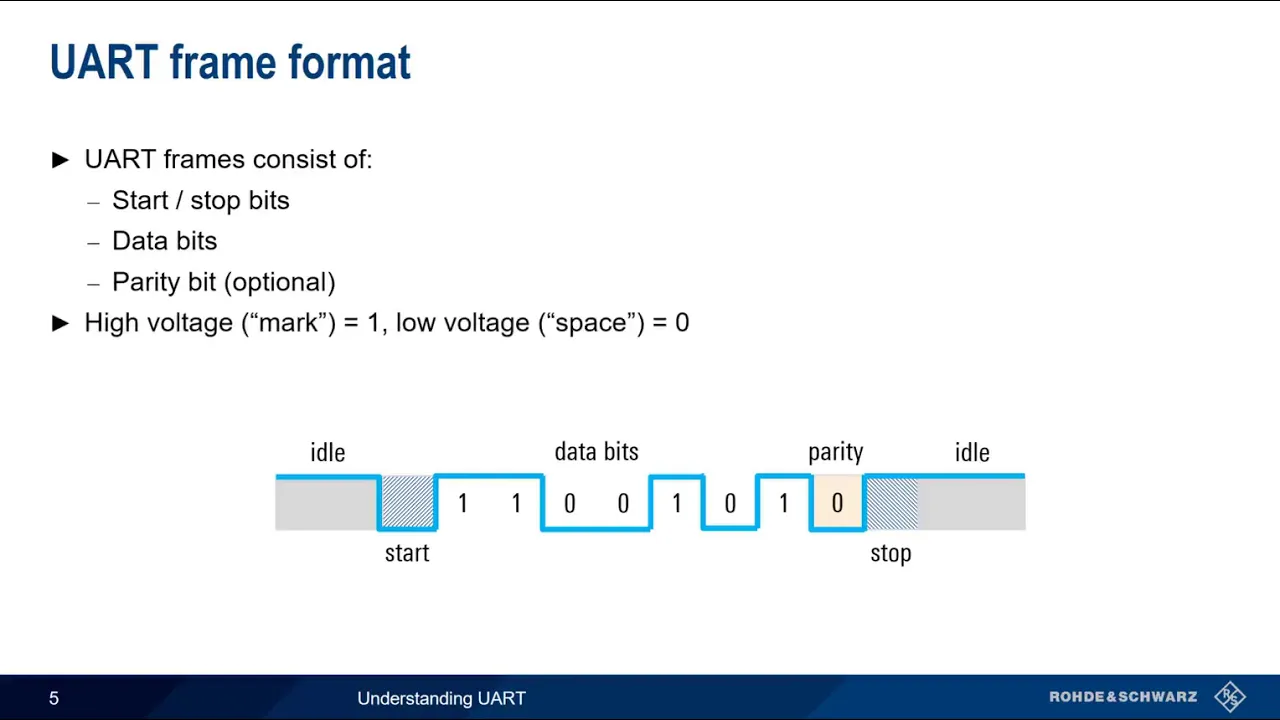
Added:Fundamental understanding of the UART/USART serial communication protocol, including baud rates, data frames, and start/stop bits.
Basic knowledge of STM32 microcontroller architecture, specifically memory mapping and the STM32CubeIDE/MX development environment.
Concept of Direct Memory Access (DMA) and how it offloads data transfer tasks from the CPU to memory peripherals.
Understanding of interrupt handling, Interrupt Service Routines (ISRs), and the Nested Vectored Interrupt Controller (NVIC) in ARM Cortex-M microcontrollers.
Implementing a robust circular ring buffer to process variable-length packets asynchronously without losing incoming data.
Designing and implementing a packet parser state machine (e.g., for processing AT commands, Modbus RTU, or custom JSON payloads).
Integrating UART DMA reception with a Real-Time Operating System (RTOS) like FreeRTOS, using task notifications or queues to signal data processing threads.
Optimizing power consumption by utilizing low-power UART (LPUART) and managing DMA transfers in low-power modes (e.g., Sleep or Stop modes).
76.3K views872likes19:26Original Release: 2021-06-19
[Music] welcome to another video of controllers tech in the past i have covered few ways to handle the incoming data from the uart like the circular buffer or the ring buffer even the methods were very effective there was always some issue with different microcontrollers it happened because there were some registers involved and they change with different series of the mcu so today we will be looking at yet another method which is not only easier to set up but completely based on the whole so the same method will remain universal for all stm32 devices cortex m7 processors needs a little changes due to memory restrictions and i will show them in the end so without wasting any more time let's start with cube id i am using f446re i will do my usual clock setup first now let's enable the uart 2 for the demonstration leave everything to default here go to dma and add a receiver request make sure the mode is normal because this process will not work with the circular dma data width is bytes as we transfer characters via the uart direction is peripheral to memory now go to nvic and enable the global interrupt for the uart this is it for the setup let's start the program i am going to use two buffers and these are their sizes in bytes of course create the buffers now rx buffer is where the dma is going to copy the data and the main buffer is where the data will be finally stored now in the main function we will call the uart receive function the data will be stored in the rx buffer and the size of data is the size of rx buffer this function receive idle to dma note that it's urtex here it's mentioned that it will receive data till either the data is completely received or an idle event occurs idle event means when there is no incoming data for some amount of time in that case it will trigger the interrupt the callback we are going to use is the rx event callback here the event can be anything it could be idle event or the complete event but that's okay and we will handle the data in the same way for both of them inside the callback we will check if the callback is called by the uart too i am putting this check so that you can use multiple uarts in the same function just make sure to check which you are called it this could be you art also it depends on if you are using usart or you aren't if the data is incoming in the uart too we will just copy the data to the main buffer now after the callback the dma will stop and we must start it again the hall sets all the interrupts for the dma by default and we will disable the half transfer complete interrupt this interrupt triggers when half the data has been transferred and we don't need it here so this is it let's build it now seems like i forgot to include the string file build it again and now we will debug i have added the buffers in the live expression let's put a break point here to understand the process i will send one two three four first we hit the break point even though the receive size was set to 10 the interrupt gets triggered with just four values this is because the line was idle after those four values and that's what set the interrupt the idle line another interesting thing to note here is the value of the size variable it's same as the number of characters we sent so whenever the idle line triggers the interrupt we will know how many characters actually got stored in the buffer now we will do the mem copy and copy the content in the main buffer this time i will send a single character you can see the value of the size it is one here it starts writing in the rx buffer from the beginning again and that's why we need a second buffer where we can store the data in the proper order not like this of course we will modify this code but before that let's see what happens if i try to send data greater than the rx buffer size these are obviously more than 10 characters this time the size is 10 so the remaining data is pretty much lost to avoid this use the larger size for the rx buffer but not very large i will demonstrate this in a while let's modify this code so that it can handle the incoming data in a proper manner here it is a big solution let me explain what's happening here we need to keep track of the current position in the main buffer now let's assume we got some data if the current position plus data size exceeds the buffer size then we need to overlap from the start of the buffer for example if the buffer size is 20 and our current position is 15 now if we get eight bytes of new data the new position should be 23 which is exceeding the buffer size here we will first find how many bytes are remaining in the buffer which in our case are five we will copy these 5 bytes of data now we have reached the end of the buffer so we will start from the beginning update the position to 0 and copy the remaining bytes which in this case r3 and finally we will update the position according to the current position in another scenario if the position plus the data does not exceed the buffer we will simply copy the data into the main buffer and update the current position i have also included a test check function this can be used for quickly checking for a particular string in the incoming data keep this very small as it might disturb the receiving let's build and run this let's see the working now since we have added a lot of stuff this time things will be different here we have the one two three four in the main buffer now the p is saved in the next position keep checking the values of the old position and the new position now the new data is saved in the proper order and the positions are also updating as per the changes now if i send this data let's see what happens here the data is written till the end of the buffer and then it started from the beginning again it's overlapping the old data let's see if this particular search thing works or not i will just send some random data and put ok in the middle of it notice this variable this should set to 1 if the ok is found you can see it's 1 since it found that ok in the middle if the data you can use this to check for the strings but not the large ones you can implement the functions from ring buffer code here and they will work all right you might need to modify them a little i will do that and update the code in few days keep checking the github the program works fine for small data but how effective is it if the large data arrives in the uart let's test it i am going to send a huge buffer so let's modify these size rx buffer can accept 512 bytes at once and the main buffer is 2 kilobytes here is the data i am going to send this is a text file which is 1.42 kilobytes 1459 bytes to be exact let's see if it can receive the file keep an eye on the position variable let's send the file now the new position is 1459 which was the size of the file this means the entire file has been received we can cross check the data here the file starts with this sentence and that's exactly we have in the beginning of the buffer the data is ending at 14 59 so let's check that part this is the end of the file here we have the same sentence in the end too so even the rx buffer was set to receive 512 bytes the entire data was received successfully this is because the transfers take place in chunks and we can receive one chunk of data process it and get ready to receive the next chunk there is enough time in between two chunks so that we can process this data so the things works just fine and we are able to receive the receive unknown length data from the uart soon i will make a video about file transfer using the uart where we can save the file in the sd card or the usb by using the uart and stm32 this is it for the video the next part will focus on the cortex m7 series mcu in the cortex m7 series we need to make few changes in our memory location i am using the h745 and i have the same code here that i used in f446 i would recommend that you watch my previous video on memory management first the link is in the description if we see the memory details here the rx buffer is at the location 2.4 million rc like i mentioned in the previous video also that in my case this location is in the axi ram so no issues for me as the dma do have the access to this ram but in some cases this location will be in the dtcm ram and there you have the issue as the dma can't access it so if you have the controller whose main ram is dtcm i would suggest that you move the buffer to some other location like sram one or two it's explained in that memory management video so watch it i have it in the sram so i will go ahead with the next step go to the cube mx and the cortex m7 tab here we will modify the mpu configuration just follow it for this video i will surely make another video to explain it in the details select this background region privileged access and mpu disabled during hard fault now enable the memory region enter the address of the rx buffer keep in mind that there is some alignment parameter also so if it doesn't work for you put the buffer at the start of any sram and then try with that address i will explain about mpu region size and or other things in few other videos next we have to choose the region size and since the rx buffer is set to receive 512 bytes we will choose 512 bytes or more here in the access permission select all access permitted and disable all the permissions so this region is not cacheable not shareable or bufferable that's all let's test it now i will send the same file again it received the file successfully the size is also exact we can cross check the data in the beginning and end of the file now if we send the file again the main buffer will be overlapped you might be wondering how the main buffer is able to work here since we haven't configured it in the mpu well that's because we are performing mem copy while copying data between rx buffer and main buffer and like i mentioned in the previous video the cpu have access to all the rams so it can freely copy the data around the dma was the problem and since the dma is copying the data from the peripheral into the rx buffer we need to modify the region for the rx buffer let me quickly show you what happens if we don't configure the mpu i will set a breakpoint in the callback function so we did hit the breakpoint means the interrupt is working just fine but if we see the rx buffer there is nothing in it this means that the data did arrived in the uart data register but it didn't got copied in the rx buffer this happens due to the cachable region and we will discuss it in another video if we send the data again the interrupt is working the positions are updating but there is nothing in the rx buffer so properly configure the mpu to avoid this this is it for this video i hope you understood the topic like i mentioned in the beginning this setup does not require particular registers to deal with so you can use it in any stm32 device if it supports idle line interrupt i will try to add few more functions to this so it can be used it with the esb or the gsm gps modules you can download the code from the link in the description keep watching and have a nice day ahead do you
Up Next

8:28
How Electronic Speed Controllers (ESCs) Work in Drones
@PilotInstitute
8.2K views•2022-05-25

30:32
Ultrasonic Transducers: Resonant Frequency Measurement and Horn Design
@imajeenyus42
229.9K views•2017-02-22

54:16
Polymer Environmental Degradation: Mechanisms & Stabilization
@iit
1.8K views•2012-07-10

33:39
How a Student's Question Saved a NYC Skyscraper from Collapse
@veritasium
22.8M views•2025-04-26
Related Study Plans & Knowledge Roadmaps
Structured learning paths in Engineering
engineering
Building Acoustic Levitators: Physics & Arduino
01The Physics of Sound and Standing Waves
02Piezoelectric Transducers and H-Bridge Drivers
03Arduino Programming: Generating 40 kHz Signals
+ 2 more learning modules
14h5 modules
Explore Roadmap
engineering
Building Peltier Cloud Chambers: Particle Tracks
01Cosmic Rays & Cloud Chamber Physics
02Thermoelectric Cooling (TEC) Fundamentals
03Custom Liquid-Cooling Loop Design
+ 2 more learning modules
18h5 modules
Explore Roadmap
engineering
Yagi-Uda Antennas: Modeling, Build & VNA Test
01Introduction to RF and Antenna Fundamentals
02Yagi-Uda Antenna Design Principles
03Antenna Modeling and Simulation in 4NEC2
+ 2 more learning modules
18h5 modules
Explore Roadmap
engineering
ECG Monitor Design: Op-Amps, Filters & Noise
01Electronics & Breadboard Basics
02Op-Amps and Instrumentation Amplifiers
03Bioelectricity and ECG Fundamentals
+ 2 more learning modules
18h5 modules
Explore Roadmap