
![[ALGO] Cours 2](https://i.ytimg.com/vi/wQvJIrF0TK0/maxresdefault.jpg)















![How Paging works [Memory Management]](https://i.ytimg.com/vi/oUbGhfJo5-c/hqdefault.jpg)






This video explains how to set up a cross-compiler for x86 architecture to compile code for a different platform than the development machine, demonstrating the complete workflow of building an operating system kernel by combining a bootloader (written in assembly) with a kernel (written in C), using tools like gcc, nasm, and ld to compile, link, and create a functional binary that loads the kernel from disk to memory, switches to protected mode, and executes the kernel's main function.
Build an OS: Cross Compiler, Bootloader & Kernel in C
Added:Proficiency in C programming, specifically low-level memory manipulation, pointers, and bitwise operations.
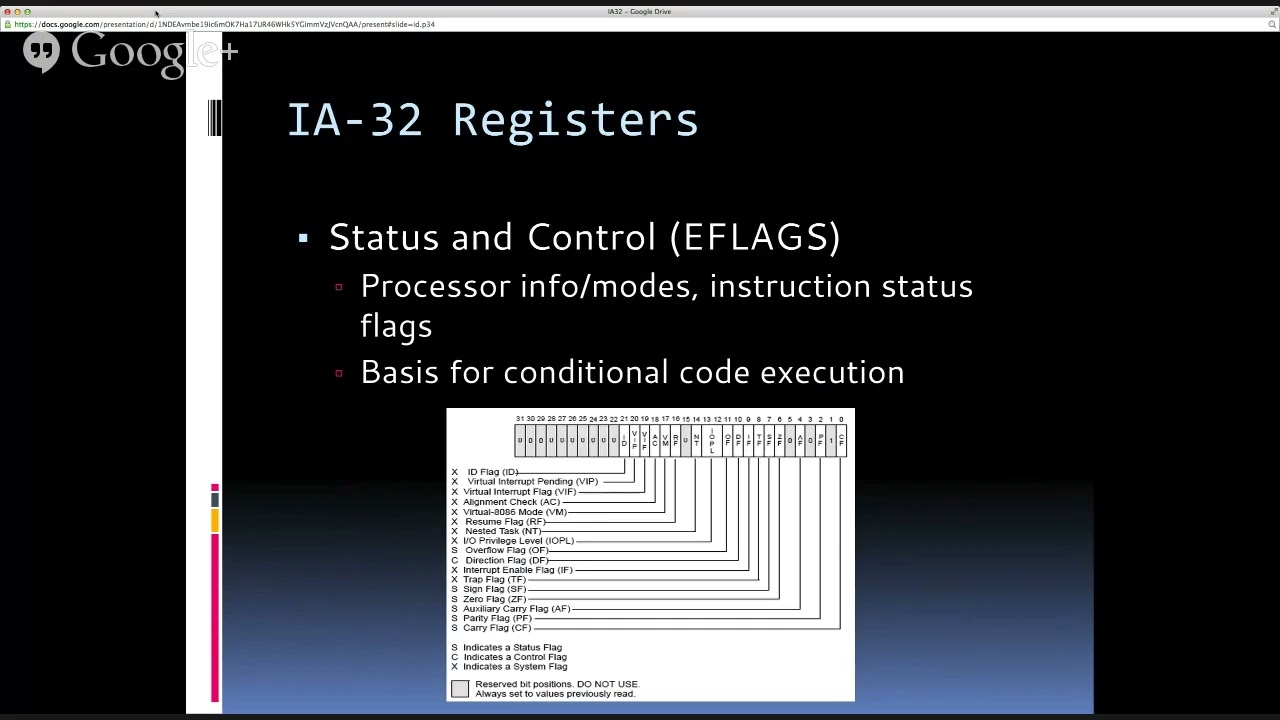
Basic understanding of x86 CPU architecture, including registers, memory segmentation, and assembly language basics.
Familiarity with the toolchain build process, including how compilers, assemblers, and linker scripts function to create an executable.
Fundamental operating system concepts, such as the distinction between user space and kernel space, and the basic PC BIOS/UEFI boot sequence.
Implementing an Interrupt Descriptor Table (IDT) to handle hardware interrupts and CPU exceptions.
Developing a memory management subsystem, including physical page allocation and virtual memory paging.
Writing basic device drivers, such as keyboard input handlers and disk read/write interfaces to interact with hardware.
Creating a multitasking environment with process scheduling, context switching, and user-space execution (Ring 3).
78.5K views1.7Klikes7:23Original Release: 2021-08-28
in this video we're going to start writing our kernel in c before doing that we're going to set up our bootloader with the concepts we described in the previous videos in order to load our kernel to memory and start executing it in order to compile code it runs on a different platform from the one you're using to compile it you cannot use the same compiler that you use for code that runs on your machine you need to use a different compiler meant to compile for your target machine this kind of compiler is called a cross compiler building a cross compiler can be rather boring as you need to install quite a lot of stuff i could take you through the installation step by step spelling each command you need to type but you would probably just stop the video and copy them so if you're trying to compile code for an x86 machine and you're using a debian derivative i've made a simple shell script you might want to adapt or use to build your cross compiler you'll find it in the description if you're using arch you simply need to use pacman and google a couple of package names to translate the script once you've done it if you want you can share your work with the other arch users in the comments if you're using windows there surely is a way to do it but it probably involves a lot of clicking and checkbox and buttons and i'll admit they make me a bit nervous so you might want to use a virtual machine or the linux subsystem or something i'll also leave you a couple of useful links to articles about cross compilers in the description once you install the packages which might take a while you should have this directory containing these files if you can find them it worked before using your cross compiler you need to add this directory to the path variable in particular the two files we're interested in are this one that ends in gcc and this other one that ends in ld as you surely know gcc is the gnu compiler collection which you can use to compile c code in my case though i only managed to make the cross compiler work with c plus plus because i would encounter errors by trying to install the c compiler i hope some of you find a better solution for now what i did was just to write my c code in a dot cpp file ld is a part of the gnu compiler involved in one of the final steps of compilation it is linker as it is rarely used by itself we're going to learn how to use linker to merge object files and solve their external references in short for those who do not know what a linker is if we compile two or more c programs that contain references to external identifiers and generate object files we can link those object files and try to solve the references if all the references are solved the two or more original programs are merged into one single binary file we're not only going to use it link programs written in c with other programs written in c but also to link them with programs written in assembly in particular what we want to do is link our bootloader to a new c program that we're going to write the kernel of our operating system first of all we need to combine everything we learned so far about real mode and bias to make a functioning bootloader program what we want to do is load our kernel from disk to memory clear the screen switch to protected mode and jump to the part of memory where we loaded our kernel let's do it real fast shall we add the magic button number define the position at which we want to load our kernel store the disk number in a variable copy paste the code used through the disk and change the memory location to the kernel position read as many sectors as you can if you're using a virtual machine and try to read more sectors than there actually are you might run into problems we're going to solve this problem later this interrupt switches to text mode and as a consequence it clears the screen then we want to switch to protected mode by copy pasting what we did in the previous video and after the start protected mode label we want to jump to our kernel memory address now we are ready to start writing our kernel [Music] the kernel is a program that handles pretty much everything there is to handle so interrupts peripherals memory management and a lot of other things you probably already know if you made it to this point we're now writing c code the first thing we want to write is a function let's call it main in which we're going to print a character to screen we know the address of video memory let's just write a character in color code to memory just like we did in assembly since we will need to call this function from the bootloader the linker will need to solve the references to its name so we need to define this function as an extern c function how can we link the c program we just wrote to our bootloader well first of all i'm going to write a new assembly program called kernel entry this program will be loaded at the kernel position we defined in our bootloader so we will jump to it as soon as we get to protected mode we need to specify that we're writing 32-bit code declare the main function as external call it and jump to the current instruction we can now use our gcc cross compiler to compile our kernel and create an object file using this command we can use nasm to compile kernel entry to an object file using this command and then link the two object files together using ld as you can see the output of this file is a binary file what's left to do is compile our bootloader and concatenate the two binary files before trying to run the output binary in the emulator i suggest to make yet another small step that might prevent a lot of headaches later on we don't know the size of the kernel so we don't know how many sectors of disk we need to read as i said earlier we need to read as many sectors as possible to make sure to include the whole kernel the problem is when we're using an emulator we might exceed the length of our virtual disk this way which will lead to a disk error a way to fix this is to compile this simple assembly program that will generate a binary file full of zeroes and append it to our os binary we can now try to run the final binary in the emulator and sure enough we'll see our letter printed on the screen we finally made it from now on we will be writing the kernel of our operating system there is only one video left in this series about interrupts and then i'll leave you to your own design decisions well i'll keep sharing mine from time to time for now i'm leaving you some exercises that i highly recommend you to try before watching the next video especially the second one [Music] learn about including assembly files in your bootloader to make your code a bit more readable play around with external variables and functions trying call assembly functions from c and c functions from assembly just like we did with main this exercise is very important and you will need to be familiar with this kind of stuff before you watch the next video read the article about moving the text cursor links in the description and write a c function that prints strings [Music] hi no the video is not over yet first of all you might have noticed that i should have published this video about a week ago for reasons and my time off made me realize that making a series is stressing me out a bit and i really want to make videos about different topics still computer science or mathematics but single videos the last episode is already available as an article you'll find it for free on my patreon you won't have to pay it's just there i hope i'll publish another video soon although the summer is almost over and the semester is about to start but i have many ideas and i really really want to share them thanks a lot for your support see you soon [Music]
Up Next

45:08
Building an IDT for x86 Operating Systems: Interrupt Setup
@olivestemlearning
7.6K views•2023-10-27

87:26
Introduction to Secure Multiparty Computation with Yehuda Lindell
@fhe_org
7.7K views•2021-02-04
11:28
OS Development Tutorial: Entering Protected Mode & GDT
@DaedalusCommunity
71.9K views•2021-08-15

19:25
Enigma Machine Mechanics: WWII Encryption Explained
@JaredOwen
13.2M views•2021-12-11
Related Study Plans & Knowledge Roadmaps
Structured learning paths in Computer Science
computer-science
Container Runtimes: Namespaces, Cgroups & Go
01Linux Systems & Go Programming Foundations
02The Core of Isolation: Chroot and Filesystems
03Linux Namespaces: Process Isolation
+ 3 more learning modules
32h6 modules
Explore Roadmap
computer-science
Building a CHIP-8 Emulator: Rust & CPU Basics
01Computer Architecture Foundations (Bits & Bytes)
02Rust Programming for Systems Development
03CHIP-8 Virtual Hardware Specifications
+ 2 more learning modules
32h5 modules
Explore Roadmap
computer-science
Building BitTorrent: Go, P2P & Concurrency
01Go Fundamentals & Concurrency
02Networking Foundations & P2P Architecture
03Bencode Parsing & Torrent Metadata
+ 3 more learning modules
26h6 modules
Explore Roadmap
computer-science
Actor Models (C++ Concurrency & Lock-Free)
01C++ Multi-Threading Foundations
02Thread Pools and Task Scheduling
03Atomics and Lock-Free Queue Design
+ 3 more learning modules
45h6 modules
Explore Roadmap