







![How To Learn Programming for Data Science [3 Steps]](https://i.ytimg.com/vi/VN12ZPFsApM/maxresdefault.jpg)


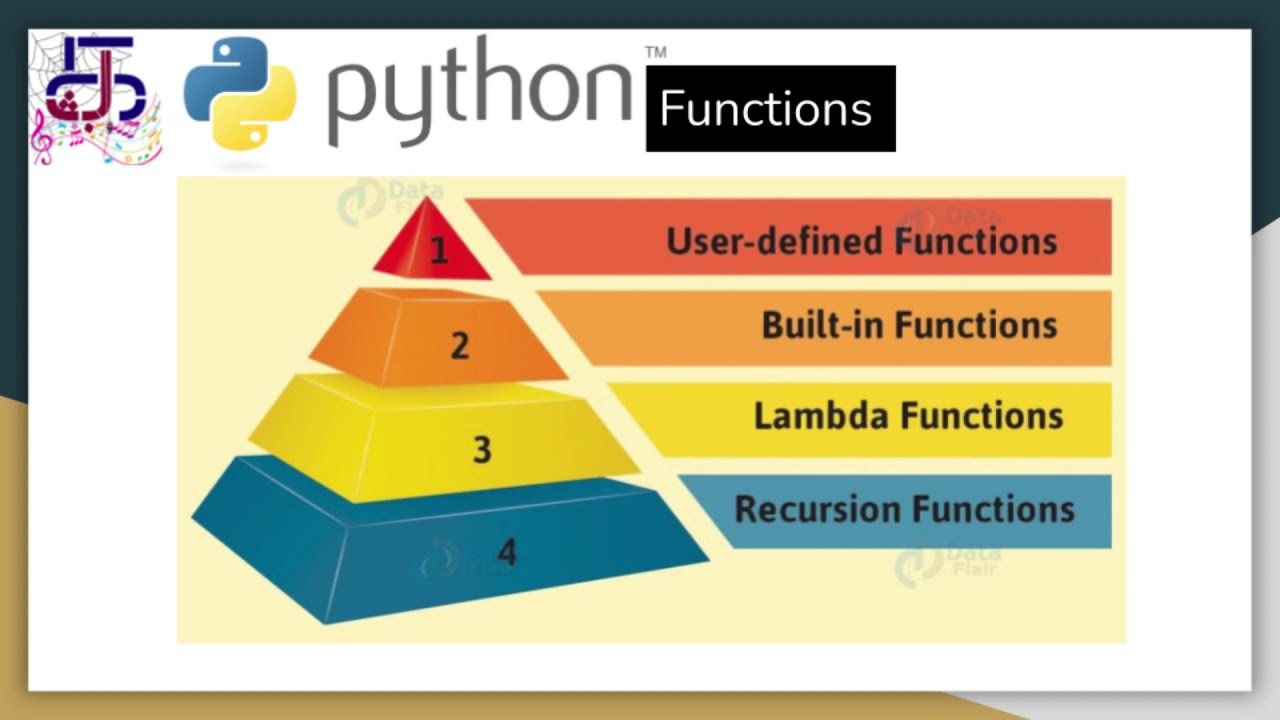

![Python Data Structures: Full Tutorial for Complete Beginners [tuples, lists, dictionaries, sets]](https://i.ytimg.com/vi/TyZLNjD8kHs/maxresdefault.jpg)



![[TUTORIAL] PYTHON para Análise de Dados - Aprenda do ZERO](https://i.ytimg.com/vi/FZODEbfcDwU/maxresdefault.jpg)


This live session introduces Python programming for data science, covering essential concepts including variable assignment, data types (strings, integers, floats), arithmetic operators (addition, subtraction, multiplication, division, floor division), relational operators (comparison), logical operators (and, or, not), and bitwise operations. The instructor explains that Python is widely used for data analysis and machine learning, while R is primarily used for statistical analysis and biological data. The course emphasizes practical learning through hands-on practice with data sets, and students can access recordings on YouTube and use discussion forums for doubt clarification.
Python for Data Science: Live Session 1 - Basics Review
Added:Basic computer literacy, including how to set up and navigate a development environment like Jupyter Notebook or Google Colab.
Fundamental mathematical concepts, specifically basic arithmetic operations and the algebraic concept of a variable.
A conceptual understanding of what programming is and its role in data analysis and data science.
Python Control Flow, including conditional statements (if-else) and loops (for, while) to manage program execution.
Built-in Python Data Structures, such as lists, tuples, dictionaries, and sets, for handling collections of data.
Defining and using custom Functions to write reusable and modular code.
An introduction to foundational Data Science libraries, specifically NumPy for numerical computations and Pandas for data manipulation.
1.2K views35likes1:46:36Original Release: 2024-07-31
I hello everyone good evening I hope I'm audible yes ma'am yeah so welcome to one of the live sessions for the course python for data science so yeah let me first introduce myself I am prti from IIT Delhi I'm doing my PhD I'm in the third year of my PhD so I'll be one of the TA for this course so yeah if you didn't know already there are two other ta the live sessions somebody saying something can you please mute your yourself unless like you have something to say or ask sorry about that okay there was a question hello ma'am is avilable on YouTube yeah we'll be uploading the recordings of all these live sessions on YouTube so my uh I'll be handling the live sessions every Tuesday from 6: to 8:00 p.m. am I audible like somebody's not able to hear me M your voice is breaking down is breaking I think it's just the internet connection I don't know yeah thanks for confirming yeah I was just saying I'll be handling the live sessions every Tuesday for four weeks so this is just a 4-week course so I'll be handling every Tuesdays 6: to 8:00 p.m. and I'll upload the recordings so so you'll have the recordings available on YouTube on when when you wake up it'll be available for you so is this like how many of you are attending the live sessions for the first time like there were two other live sessions that happened before I I guess last week how to get the video from YouTube okay how do you get it link 67 when we add 4 T can you mute I hear somebody's voice yeah maybe I just do that prel yeah I'm sorry if I'm pronouncing it wrong like did you have a question I see your hands right no ma'am you asked right who is joined for the first time so that's why so I'm not sure about I'm not exactly sure but there should be a page on your website on your nptl course portal like there should be links to the recordings I can just are you also aware of the I don't know what you call that uh yeah let me just check my yeah something called m'am can you please explain it from basic yeah I'm just like explaining how this uh live sessions are going to work and yeah so I was telling I'm not sure where you'll find the recordings to the the links to the uh what is this I think no it's not that yeah I'm not sure about that so I'll just check that and I'll let you know so if you didn't know so far there's something called a discussion forum so if you go to your course page can you see my screen the yes ma'am it's visible yeah so if you go yes ma'am it's Vis you there's something called discussion forum and you click on continue and yeah this is just this group like a Gmail group kind of a forum thing so yeah whenever you have questions or if you find any mistakes in your assignment questions or you like have any doubts regarding your assignments you can just like start a new conversation here and yeah one of the members of the team will address your issues so yeah I'll also let you know where you'll find the links to the YouTube after I confirm it so I'll be posting it on this for Forum like in the next two days you can just check that okay so about this course so yeah you'll find all the lecture videos here so these the the week one lectures are just very basic introductory lectures so it just tells you about python as a coding language and like how it's used for so the major languages that people use these days are Python and R so R is mostly used in like when you deal with biological data and statistics especially like when you do statistical analysis you mostly use R and python is mostly used when you have machine learning approaches ma'am basically R stands for what R stands for what that is a good question not sure if it stands for anything yeah I'll get back to you with that okay ma'am ma'am I have a question yeah I know some basic python uh and I have to increase my skills but in this course they are using very basic kind of python so how can I be able to increase my skills from this particular course is it going further advanced level or something what yeah I'm I'm really not sure about the upcoming weeks but I I can tell you that it's going to be very basic like if you have seen the week one lectures it's just like what is python how you use the interface how do you assign variables and all that so yeah it depends on what you want to apply python with like what kind of tasks you want to do so are you interested in something in particular like what's your major and what where you already intend to apply python uh yeah ma'am I would like to uh work in API handling it is fascinating to work with a large amount of data scrambling it and all so I would like to uh work in it okay so so the best way to like start applying python so if you like look at all these courses it's all going to be very introductory like they're going to start from the basics and you won't learn anything just by looking at the lectures yeah I can tell you that you will get to learn and you'll be able to think of how to code and how to like solve problems only when you start working applying it so you could always start with like if you look at like tutorials or you could just find some course materials online and you could see if they have example data sets or test data sets they have uploaded somewhere and you could just try working with those test data sets like whatever you want to do like whatever application it is or any other start handling data that's the good way to start so like yeah once you have a file in hand the first question is like how do I open the file how do I read the file from the directory so that is not explained in this course right now so for that there's a specific function a one line of script that you need to write right so like once you start doing something like the qu like you'll you'll be getting a lot of questions in your head like how do I do this how do I do that so that's how you learn like starting from how do I read this file so now that I've read the file there are many columns in the file how do I read one particular column and how do I just extract specific rows that match a certain value in this column so all these questions can be answered and you can learn all this when you start working so like how many of you are new to python like you have no idea you have never you just know it by like youve just know it by name can first year student yes anybody can do this course Kanan yeah anybody can do this course so the outcomes of this course I guess it just gives you an introduction to python like how you can start setting it up and how you can think of applying this to your uh like objective so that would be the major outcome of this course but yeah to be honest I'm not very sure of what the contents of the whole course material is yeah because I was busy I didn't get much time to look is no attending these live sessions are not compulsory it's just for people like who need more like help with like let's say there are people with no experience in Python so all your assignment questions would be based on python like how you like run something so people who are not very sure and who need more Guidance with them like they welcome to attend this live sessions it's not compulsory though m one question I have is this the first session live session you are doing yeah that I'm doing okay I've done like I've previous previously done other courses like data science with started last week I guess 26 and 26 yeah this is my first live session not compulsory so which week will we create project like predicting prize I have no idea professor in Del or what I have to confirm it or you are a student or I am a student I'm a PhD student so yeah like I'm majoring in bioinformatics so I deal with like cancer like spal you have heard it before work with r and I think my internet is unstable can I to learn machine learning e yes shivak Krishna so a lot of machine learning applications like tools that are built these days are based on Python and like you don't build the whole machine learning app from scratch like there are already a lot of libraries that do the thing you just have to supply the data you want to train so machine learning is basically you train data sets yeah my voice is break speak I think my internet is on ma'am uh will you be solving any problems in this live section ma'am or it's just a doubt clearing section so I had just like planned to show you spider notebook like yeah so today's plan for me was to just show give you an introduction to this anakonda thing and all the interfaces that you could use for python so I was just going to show Jupiter and spider is what we'll be working with in this throughout this course so yeah I made a script yeah just a minute sir congratulations doubts yes go ahead yeah somebody had a doubt what extent do you have to Learn Python so like to be honest like when I joined my PhD I had no experience with python at all like I knew R I knew R programming but I did not know python but yeah like like I said as and when how the exam is going to be like we have to write the answers or the code so your exams will mostly be like multiple choice questions you don't have to write any code so have you gone through your week one assignment so it's mostly yeah yeah it's mostly going to be like that and I yeah I don't think you'll be able to use Python during your exam right so um yeah you won't be able so what you have to do is you just need to understand the Logics of how the codes work like let's say we look at this sorry last week's assignment I mean last year's assignment requesting okay m yes talking please mute your I'm sorry but yeah excuse me ma'am yeah please go ahead ma'am may I know the purpose of studying python purpose of studying python what do you think is the purpose of studying python so these days everything is about data right like whatever you do like everything that you do is all data like each and every field like there's somebody like storing information in a computer so that is data so like to handle data you need some scripts because data is huge and even just to read the data you can't manually do it so that is like it starts from that so it can the application of python can be simple as that just to handle data and to read data and stuff create account m' same in case of java basic difference between Java and python if you're learning Java I I don't have much idea about Java but Java is still widely used for like building web appli ations and yeah like a lot of websites you build in the back end that uses Java like till da so Java is the widely used thing to build websites and all that stuff but python is mostly to do analysis kind of a stuff to like analyze existing data yeah let me just go through spyer is available for Windows yes spider should be available for all platforms for Windows and and Mac as well so like yeah you can install spider as a standalone or you can install this thing called Anaconda Navigator if you haven't done it already these are the platforms for coding for python oh yeah I can explain that to you so okay this is a platform so the widely I can just show you the things that are widely used so this this Jupiter lab Jupiter it you can code so Jupiter you can code yeah sorry about that okay so Anaconda Navigator gives you like a wide range of platforms like interfaces where you can where you can like code so the widely used ones are like Jupiter lab so there's some coding language called Julia which we're not getting into and I really don't have any idea what that is so Jupiter stands for Julia Python and r R so with Jupiter you can code Python and R so like let's create a new notebook so you can create a new notebook like I just have python based notebooks here so here basically you'll be able to select whether you want python why you keep unmuting I'm sorry about that so is an example of a script I'm just showing you things that from my work so it contains like each of this each of this is a cell you can run chunks of codes here so you do this and you run it so yeah you you this is just I'm just showing you what this is so you have cells you write the script you can run your script and your output also would be generated in the same page like you don't have any popups and all that so let's say like this script it generates a plot so the plot generate is generated right here so the advantage of this Jupiter is that you can it's good for documentation so you can just save this notebook as such and whenever whenever you open the notebook you can all you can see your outputs there already like if you have run the scripts all your outputs would be there and you can also like export your notebook into a HTML file like you can export notebook as a HTML file and you could like share it with other people like I can show you something that so yeah this is this is a jupyter notebook that I created I ran scripts I did some analysis all the scripts and I've exported into a HTML file so this is good explain to when you have a presentation to make reports this is very that you can integrate text into it paragraph and you can also add chunks of wordss and you can show your outputs of your scripts as well so this is we could say uh I am familiar with python what we have to learn to say that words you can say that just if you are able to uh like open a python interface and you know what to do where like let's say I open this Jupiter so if you know what this part is and what you can do here and where you can see the output that is one thing and one more thing is you should be able to read a line and understand so if you at this line be able to say okay this this and see there's something wrong with this line point out what's wrong and why there a cross here this one indicates that this wrong and it'll give you an error if you run it so like that's all you need to know that I know this language but you can so there are many somebody have a question yeah I'm sorry if I'm just muting you like when you're about something it's just I'm muting people because I hear all background noises but yeah feel free to unmute yourself and ask yours what are the basic functions we have to learn man to write ORD basic functions that you need to learn okay so yeah like you can you always need to start with how do you define things like variables defining variables is the first thing that you need to know because everything you do it starts with storing your information in a variable right so that is the first thing you need to know and you need to know like what library does what if you don't know that that's still fine you can always like Google things like how do I um create like what library can I use to make a plot so it will tell you you can use a library called Matt plot lip to make plot so that you can always do anything the important thing is you need to know how to how to do searches that's one thing you need to know and yeah thank you yeah so you need to start with like how to store variables how to import libraries and the basic syntaxes so like so in Python you assign a variable like age is equal to R but in other programming languages like R language you could using Arrow like this age is equal to 12 like this assign it into a like Supply a list of numers this doesn't work might not work in Python so yeah you need to know the syntaxes like yeah these are the basic things that you need to know when you start learning a language so once you know this you can always go ahead learning to build functions and all that I your exam will be online I think I'm not sure what the question is we will not be working with spider and Jupiter so I just showed you juper idea M can you execute some simple uh simple CES in this and so if may know what are the basic outcomes of this course like where we have to up this thing you're telling the our studio and all like so where we will apply all these things apply all this so uh like can I just have an idea of your background like are you all like college students like what do you do artificial intelligence yeah so AI would probably you be dealing with a lot of languages I mean like programming so yeah the the major goal of this course is to give you an idea like a lot of people will not be like might not be familiar with the existing programming languages so it's just to give you an idea that this program exists and you could use this for a wide range of applications so it's it's just like an introductory thing like it gives you like a starting platform for you to learn so now like you learned this course and now you have an idea of like how to uh read files with python so you like in future you could always like let's say you are let's say like you do a PhD in like biology so you have you you have collected bi iCal data doing experiments so now how do you visualize this data so you have all the data collected but that will not make any sense until you kind of see any pattern try to find any pattern in it right so like yeah that is like one of the applications so if you know this language you could straight away go ahead read that file and you could like like use this Library mat plot lip to make a plot and visualize it so yeah it just like like gives you an opportunity what all you could do with ma'am how are we able to continue python forward Direction so yeah I think the first thing would be to look for Co not courses uh what do you call that like online you there there must be a lot of online tutorials like even on YouTube you should find a lot of videos like how to do this specific task like how can I do this analysis with so there should be a lot of like tutorials it could be video tutorials or uh documents like markdown files like that gives you the whole workflow I have some experience in Python I have do it Advance how can I be able to do it I know what so yeah like whatever you want to learn like to go ahead like to go further the only way is to like look for tutorials or like you don't have to like register for such courses to learn that but you you should always be able to find online materials for this for any purpose so you just go ahead learning that and the most important thing is to practice like you just start practicing with your data set and yeah that's that's the like first thing you do when you want to learn something and there are no doubt clearing sessions for all courses of NP okay but yeah as far as I know most of the courses they have doubt clearing sessions like not it's not necessarily doubt clearing but yeah like all most the courses have these live sessions everyone say python syntax is easy than C whether it is true so yeah people say that because C when you look at a c script like when you look at a c script you might not understand what they have done but you can understand a python script because it's very readable when I say readable so let me just try to show you a script in which area you are working mam my PhD is on bioinformatics so I work with cancer samples so like I get a lot of cancer tissues and so we sequence DNA from those cancer tissues and I analyze that data like to identify what part of the DNA has gone wrong and why people are getting the cancer so yeah like to be very general that's what I do great okay so why do people say python is easier than C it's because it's readable so when you read this line it says warnings dos simple filter action ignore so just reading this line you can say that what this do this line does is so whenever you run a chunk you might get see you can see all these are warning messages soes or it just tells you what that line does it just gives you like a background what you tells the python to suppress ignore These Warnings like don't give me warning outputs so when you run that you won't get all these red boxes so the thing what what I mean to say is like you read this line and you kind of get an idea of of what this line does so that's why it's very easy when you look at a python script it's very easy to understand so now look at this so this is just the name of the library so read HF ad so HF ad is a file format so this is reading the file reading the H format right so it's very understandable like when you just read a python script it's very uh self-explanatory so that's why it's very easy to learn python what is that very lengthy like 1 2 33 34 that one which one these these things yes ma'am okay uh yeah this is just like a kind of work that I do so what you see here is we have taken like a cancer sample and we have so there are many cells in our body we have sequence the DNA in each cell so each dot one cell in the body so inside your body there are many different types of cells right like heart cells are different from liver cells and these liver cells are different from your brain cells so each of these different cell types have a unique signature so that's why you can see different clusters so all the cells that are belong to the same cell type they cluster together so yeah trying to identify which cluster is what self type based on the gene expression profiles and I'm doing that so yeah here this is just like assigning cluster number zero to this type of cell so I'm just renaming these clusters so ma'am uh this ion can be used in different field whether we are from bio informatics or any data science programming any field even like people electrical engineering and it people like anybody can you can use these languages it's not meant for any specific field it's just a very general field it can be used for any application okay can you tell about data science so data science is nothing but like any field you generate data so let's say you work in a like call center at company so what do what kind of data do you have there you have list of people and their phone numbers their probably their addresses their the country live in so all this is data right so now you want to see how many people are from this particular region so yeah like you can just write a code to tell you that so this all this is like one example of data science so any thing any science dealing with data is like data science this course is not sufficient to get a job in data science like yeah the data science there are like several aspects in data science right like just knowing what python like this is like a very introductory course like this might not be sufficient but yeah this can be the first step you take in learning data science yeah this course is for everybody like it doesn't matter if you're first year or like I've seen a lot of people who have done like mbbs and after doing mbbs they come and do this okay what is it so yeah anybody can attend this course it's just like you you need to be wanting to Learn Python and you need to know like why do you want to learn python or something like if you think you'd be applying this with your work or you think it might be useful for you yeah you can anybody can learn this coming from chemistry background and I want to know if there's any scope in data analytics for my domain after learning python yeah like I say like all the fields there is a data science aspect so because like let's say you do field work so like or you do experiments so what do you do when you do experiments whatever results whatever the outcome of the experiment is that is a recorded data right but somebody has to analyze data to make sense of the experiment the whole point of doing an experiment is to analyze the results so yes Anil she sh sh yeah I'm sorry if I'm pronouncing it wrong so yeah chemistry there there there's probably very good scope for data analytics in chemistry hello ma'am and yeah there's one more thing like these days there's a lot of demand hello ma'am yes ma'am in the sequence of data type second uh second week part two video is not clear ma'am it is not able to understand can you explain week two okay so this is just week one summary I haven't gone through week two yet so I'll be going through week two in the next on next Tuesday but yeah I can have a look which one second one part two ma'am how the uh outputs are visible ma'am okay it is not able to understand can you explain in a short and simple manner yeah I'm not sure I'll have time to do this now because I haven't gone through this week yes if you have any problems with week one you can let me know because yeah that's what this week is supposed to cover but yeah I can just like next Tuesday I'll be covering week two yeah I'll try to address it on discussion forum like I'll try to give you a summary please solve the week one assignment so I believe the deadline for your week one assignment would be tomorrow right I uh yeah there's one more thing I'm not supposed to directly solve assignments but I can just go to similar concept Sol we one so maybe I I'll do that first I'll just like give you an out a summary of what was covered in one quick like not much I can just quickly go through that and after that I can come back to answering all the questions is that okay yeah I think that's best otherwise it's just like an aimless yeah okay yeah then let me do that okay I'll start from the very Basics because there are some people that I can see some people like they want me to start right from the basics and why is it's not going okay okay so m' yes where can I see our assignments where can you see the assignments so you have access to this portal right like you should be having access like if you have registered uh you don't I don't know yeah like are you able to like go into this like are you able to look at the recordings and all so yeah if you look at this week one there is quiz week one assignment one so if you just click on this you should be having your assignment yeah and you need to like answer here and just submit your submit your answer that okay okay ma'am okay so yeah I believe like downloading python is probably simple like M this program is how many week schedule ma'am I'm sorry this program has been four we schedule or8 week schedule the four we course okay ma'am downloading python is m'am it is any difference about four week program or 8 week program 8 we program is just probably more a wide range of topics that are covered or like you might be going into like you you might be looking at the contents in more detail as compared to a four-week course is a beneficiary ma'am four weeks course or eight weeks course the longer courses are more beneficial I would say ma it's mean 8 weeks course is a certificate is more varable than yeah that depends College like some colleges they give you credits extra credits if you do all these courses so like if you do a 12we course that's equivalent to three credits like in some colleges like the college that I studed that was the case it might be for you but yeah apart from that apart from your grades like longer courses are beneficial because you learn a lot of things and yeah probably more in detail while this four week courses they just like either they tell you the very basic stuff or it's just like an overview of all like multiple Concepts not very much in detail in week one the PDF is visible maam available for downloading the live can you yes ma' in week one schedule yes the PDF is visible for all aess are visible from all students is this U not sure what do you mean by PDF we are able to understand the PDF uh completing the videos we have to practice sessions week one okay is there ma'am so you see the lectur port yes sir letur slides there is any PDF such type of PDFs all these are just like slides I can up uh I can upload all these scripts for you yes ma'am do access ma'am do the access for downloading for students yeah but like this is my first I'm not sure where you can the live session and the materials so you should be given ANW to that I can confirm that is there any deadline for assignments yeah I think Wednesday is the deadline like I think that is the norm like in general that's the norm sorry okay ma'am okay okay so I think I'll just like quickly go through the concepts because yeah somebody like might not have had time to watch the videos so I just quickly like brush up so yeah it's easy to install python you can just Google install Python and you can set it up on your Mac or your windows whichever one you have so you can run python different ways one is you open the terminal so every computer has a terminal so on Mac you just type terminal and you can get that window so this black thing so if you just go there and type python It'll like go get into your python console so you can do anything here like import you can import a library and do anything but this is not very convenient because it is hard to like document your script so like whatever do you do here it's gone it's not saved anywhere unless you like save the object but you don't have your script saved so it's not very easy to document and outputs are not saved directly like it just like comes up as a popup window so it's not very convenient so for that purpose to make things easy for you there are things like these a lot of interfaces that have been built to run python so you can install anakonda Navigator you can download this thing it's like a whole package of all these things so this Jupiter that I just briefly explained I showed you like how it is and you can also use R studio so this is a different programming language which we're not getting into now and so this also spider notebook which is dedic dedicated to python so this whole course uh all the demonstrations will be done on spider and also your lecture videos if you have seen like they just explain how to use spider there so we let's do that m in F IDE we have to uh complete the projects projects I'm not sure what that is but yeah you don't have to do anything like you don't in my in my students laptops and my my laptops my friends laptops anakonda is able to crashing the laptops anag is crashing your laptops yes ma'am one laptop is gone we have to choose the Pam is it is it oh yeah that's so if you're not able to download anakonda Navigator you can just download the standard loone applications by that I mean you can simply install pyam or you can just use install spider okay for now but whatever you use yeah I don't have py Cham but everything's probably similar to this I don't know how to erase all the scribblings coming to the exam ma'am how many points we have to get for certificates I am not sure probably 50% but that again yeah I think 50% is what you need to get for you to get the NP certificate yes ma'am how many credits we will receive from that manam so that depends on your colleges like the like you attending these exams you'll like on from our end we only give you the certificates but I don't know like it depends on your colleges some colleges they convert these into credits so you don't have to take up additional courses in your college you can instead you take NP courses so you can talk to your college like course coordinator this in exam how many points we have to get ma'am for the certificate I % ma'am I have a small doubt uh if we complete this course can we skip this subject in our bch this course no this is a very short course so I cannot say that yet but maybe the end of python it probably has much more topics covered useful take but yeah if you probably take an NP 12we course then yes you can skip your [Music] college have covered enough weeks only four weeks are available should so last semester I handled a 12we course which was data science with r so I think even python should be similar present the semester we have cannot find in the 8 weeks and 12 weeks course ma'am only four weeks are visible yes ma'am this list of all thees let me are you talking just python one more thing programming data structure algorithms using python there's an 8 we there's another 12 we scientific Computing yes yeah somebody saying something like I okay but yeah as far as I can see there I do see a lot of 12we courses as well M can we move on with the assignment yeah yes let's do that so your assignment like I can show you last year's assignment okay that has disappeared okay like mostly be about the syntaxes it's going to like the questions are going to be like if you run particular line of what will be it could either be an answer or it could an error something like that or you could have questions like AAL 2 they ask what is a plus b like this sorry yeah yeah and if somebody knows how I can erase these can you please tell me because I really don't know how do I is these okay any never mind okay so this is your spider interface so this part is where you can write your scripts and you can just save your scripts so all these if you just like play around with this you can understand this like if you go to file you can save your script either by using the shortcut or you could just use these drop- down options to save your script or you can like create a new script like file new file a new file will be created so yeah it's just as simple as that so yeah what you do is please tell how to use Spiderman yeah that's what I'm trying to do so this is where you write your scripts this part and this is your console so whatever you run so now you have written the script now you need to execute the scripts right so if you run this if you click on this green button it executes your whole script it runs all of your scripts but that is not ideal for us because we are just looking at very small chunks of codes so uh like in advanced levels what people do is they just have one task so to perform that one task they write multiple lines of scripts in that's in that case you just run this whole thing and you allow all these lines to be executed but we don't want to do that we just want to run one line at a time so to do that you can just right click if you right click you can see all this you can click on run selection or current line if you do that one this current line will be executed so that's what we want when you work on something you need to work on a specific spefic folder which is also called a directory so there are multiple folders in your computer so let's say all the files that I want all the fold I mean wait I can show you here if that's easier so all the folders all the files that I want are inside this folder npor python so I want to navigate inside this folder so that all the ma all the scripts that I run here will will be can be saved directly there so to do that I can go to the terminal no I'm not going to the terminal so what I can do is I can click on this folder icon that you can see here you can see a folder icon here right you can go here and select the folder like I wanted npor python folder right I select that folder and I click on open if I do that that path will be set so that is one way to do it or if you don't want to do that you can do it using these lines so you need to import the OS library to do that so I'm doing that run current selection or current line import OS is done so I'm doing OS do chdir that means change directory so I'm changing my directory so like for now I'm changing it to downloads no I'm changing to npal python so if I run this your path will be set so that's one way to navigate across folders' okay ma'am I think uh week one does not contain nay and python pandas module yes it does not I'm just this was this is just like to show you what a library is how you load it yeah I'll get to that okay okay okay okay thank you ma'am so yeah the first thing is like creating variables assigning variables so here everything is assigned by using an equal to sign so what I do is I'm storing I'm creating a variable called a and I'm storing it with a value of five so a is equal to 5 and now I want to create another variable B so B would be a + 20 so now I want to know the values of A and B so like to do that I can just do print small letters print if I just want a I just do print a or if I just want B I write print B if now I want to see both A and B what is it so I do print a comma B no I have not defined a so I didn't execute these lines right I just showed these lines to you but I didn't execute that's why I'm getting we need to do this run AAL we have run it a + 20 youve run it now you run print a Comm B so now you can see AAL 5 b = 25 we defined Bal to a + 20 so a yeah whoever yeah okay so there's one more aspect like if you are a programmer you write scripts writing scripts is not enough you need to annotate your scripts by that I mean like you it's if you just write all these scripts later when you go back and look at the script you might not be able to recall what the script does like what the specific line does you might not understand or if you want to share your script with somebody else they might not understand why you have written that particular line so to make it more understandable you comment lines so yeah so here you can see all these lines have commented by commenting I mean I'm telling you what these following lines do so here I've written importing libraries so the next three lines means that these lines are used to import libraries and here to view all functions a library does so yeah so basically just annotating like telling it's kind of creating a readable version of what the script does so to do that you just start the line with a hashtag you start with a hashtag and just write whatever you want and you can also do this so if you have all these lines you want to comment these you can just press control+ one it's not happening okay yeah uh for Mac it's command+ one for Windows it's control + one so if you press control + one these lines the selected lines will get commented so by that so when you do this what happens is when you execute the script these lines which are commented will not be executed so those lines will be skipped right so yeah the purpose of this is for you to understand why you have written that particular line line so that is one use case of commenting so one more use is when I don't want to import numai in this script so I can just comment out this line I don't want to run the script but I'm not I don't want to delete this line I'm keeping it but I don't want to run it so I'll comment it so these are two cases where commenting is widely used you could also just like right click and press on comment or uncomment to do that ma'am is it necessary to use numpy we can directly use operations uh in uh you in Python why is it necessary to use numpy for operating uh different integers or different kind of things yes so like whatever we have done in week one it does not require any libraries so all these are just very basic operations so yeah we don't use any libraries here so maybe in the following weeks you will be I'll probably explain why you dpai and what kind of operations so what these libraries are is so here I've written a plus b but let's say you want to perform a different task but I don't know what code to write task I don't know that but there are certain libraries where you already have inbuilt functions to use inbuilt functions you have to to load those libraries so let's say you write I don't know like you want instead of writing 100 numbers so manually writing a plus b plus C plus until like 100 it's impossible can't do that in of that easier to write a function sum of Z easier right in this case sum is a function but now you don't know how to WR that function such libraries they already have that inbuilt function that's inbuilt functions one word that was that clear yeah I hope it's clear okay maybe I'll do one thing I'll mute all and I'm disabling allow participants to unmute themselves so if you have a question you can raise your your hands and I will unmute you because I think that's better for everybody all right yeah I've done that okay so I just explained libraries so yeah we we are not using libraries yet but yeah because since this is just an introduction I'm telling you this is how you import libraries and if you want to know what a library does you just like go here you type in numai it gives you the whole documentation of what it does like it tells you like what this thing does like yeah so there are several other like like you can also look at math plot lip it tells you yeah if you just give me 2 minutes I'll try to erase all these markings e e okay yeah yeah I hope the screen is much clearer now yeah I'll keep this open just in case somebody asked something and I don't miss it yeah here we were talking about doc okay uh yeah is not important now okay so now the next thing is naming variables so yeah you can name variables in any way that you want it could be just alphabets or a mix of alphabets and numbers or it can be descriptive like age like it's easier to understand that like a variable like instead of a you might not know what a is but if you name the variable like of what it is that's more easy to understand so you can use like cap uh uppercase lower case and no special characters are allowed except underscore so when you name variables you can use one underscore in between the alphabets and numbers right like you can see here age underscore P1 here P stands for patient so aore P1 underscore is allowed but let's say I do age do P1 if I try to run this what happens I get an error should get an error so see it says yeah name error it gives you name error or let's say I use age hyphen P1 that's also not going to work it gives you syntax error like cannot assign to operator so you only underscore is allowed in between the alphabets and one more thing is your variable cannot start with a number it always has to start with an alphabet so you can't write one age you can write age one like age one but you can't start with an with a numerical value so this is the like basic Norms of how you name a variable and to assign a variable you just you do equal to so age is equal to 12 or like you can also assign multiple values like simultaneously like age uncore P1 comma age uncore P2 comma agore P3 is equal to uh three three values separated by commas so let's say I run this code what happens is that so all these are assigned now I I just want to print agore P2 so what would you expect here you can see that I have assigned age P2 is 43 so when I print age P2 I should get 43 right see you get a 43 here so this is how you assign multiple variables in one go instead of doing like writing three lines you can just write this one line to assign multiple variables so the next section was data types so the major data types are strings strings which are just a list like a character I mean like a sequence of characters which is this so s is a character a is a character N is a character right so the whole thread of characters is a string so you always enclose strings within double quotes like here so here your patient name is equal to Sanjay you're writing a name if there's any Sanjay please excuse me yeah yeah so age is equal to 49 I'm assigning the age variable 49 and and I'm assigning the height which is a decimal number so now I want to know what is the data type of patient name what is the data type of height uh height I simply write type of the variable name right so let me run all of these so to run all of these you just simply select all the lines and run the selection so all these lines will be executed now you want to find type of this so type of patient name is a string so you get Str str s Str stands for string now type of age age is a number 49 so 49 is a number right but what number it's it's a whole number so like it's an integer so type of age you get int in in which stands for integer now height since height is a decimal value it is a float it's it's it's called float like any number with decimal value it's called float in like this these languages so this is one thing so one more thing that we can do is we can convert one data type into another so here this is stage like this variable is assigned stage one so if you see type of this DC stage You' get string because it's enclosed within quotes so anything enclosed within single or double quotes is a string you can also convert this into an integer data type by simply writing decease stage is equal to integer of decease state so now if you write type of deas State you can see an integer so if I now but okay now I'm trying to convert the name to a float so like if you logically think about it it's impossible to convert a character like it's impossible to convert a name to a number right here you're just converting a number to a number that's possible that's why you are able to run this but if you try to do patient name is equal to float patient name you'll get an error it'll say it'll give you a value error which says could not convert string to float so yeah you can you can convert an integer to a float or you can convert a float to an integer but you can't convert a string to an integer a string to an integer is Possible only when the value enclosed within the code is a number this is one thing so the next thing is performing operations um across the these uh variables so the basic ones are arithmetic operators so like we assigned two values A and B let's say a is equal to 2 and B is 5 we have assigned these so now I want to do addition addition is simple like you just do A+ B you get the answer and then subtraction is also just a minus B which yeah these are all straightforward now what is a star b a asri b so this stands for multiplication a asri b is multiplication so you might get an assignment question multiply A and B so what do you do then here you don't have the into the cross sign for multiplication so here instead of that you use Aster the Star Sign so now you run this a asri b you'll get 2 into 5 10 you get the answer and now what is double Aster like if you write two stars what does that mean it means a to the power B right so a is 2 2 raised to the power 5 power now if you run this you should get the answer 2 raised to the^ 5 you get 32 and now for division so all these three lines that I've written here they do division but yeah what value is returned that's the difference here so the standard division so like a divided B no let's do B divided by a so 5 divided 2 you usually get the so wait let me explain with the whole number so 10 / 2 is 5 right so that's the quotient because 5 into 2 is 10 so that's the quotient so this single slash gives you the does a division and Returns the value of the quotient so it gives you 2.5 like 5 / 2 is 2.5 and but if you 2 B uh percentage symbol a it gives you the remainer so 5 divided by two you you have 2 2 are 4 and 5 - 4 is 1 so your REM remainer is one right so if you do B uh percentage a you get one you get the reminder value like you can see you get the reminder value now there's one more thing that's called flooor division that is given by double slash so b double slash okay let's do that let's just let's first try b/ a so that is kind of straightforward so 5 / 2 it the absolute the actual coent is 2.5 but floor division means it just gives you the nearest integer that is smaller or equal to X so in this case your answer is 2.5 so what is the nearest integer that is smaller than 2.5 it's two right the nearest integers 2.5 are 2 and three but which is smaller two is smaller so that is the answer for the floor division like when you have double slash it's called floor Division and that's what that gives you so here you get 2.5 but in case you have a negative number the let's say minus B / by a it is minus 3 because your answer would be minus 2.5 what is the nearest integer it's min-2 and Min -3 comparing -2 and-3 which is smaller -3 is smaller right so it gives you the nearest smaller integer to your uh quotient so that's what is Flo division this might not have been covered in the lectures but yeah you might be having having these kind of problems in your assignment so if you see a double slash don't get confused I don't think it's a typo that is actually a function in Python and the next thing is assignment operators it's just like so when I write A+ is equal to B it means a is equal to a + b so now a is equal to 2 right B is equal to 5 now if you do a okay let me do this print so I have done a is equal to a plus b and then I print a what do I get so I should get a is equal to 7 let's see if I get that yes I get a seven so yeah you can just go through all of these like I can share the script and you can try running it by yourself and you can try to make makes sense out of it as a thing and then these were assignment operators and then relational operators the these basically just compare and give you a Boolean value by Boolean value I mean true or false so now I have two variables X and Y X is equal 12 and Y is equal 4 so now I want to print X is less than y is so that is false right do I get false yes I do get false so that's what these operators do they just like return if the comparison is true or false so print X less than or equal to Y it sees if x is lesser than or equal to Y similarly greater than y and this greater than or equal to Y and if you write two equal to signs it means X is exactly equal to y so in this case it's false so you'll still get false if both X and Y is equal to 4 and if you write this you'll get a true value and exclamatory Mark followed by an equal to sign means not equal to so X is not equal to Y is true right X is 12 Y is 4 so these are not equal to each other so X is not equal to Y would be true let me run that so I get a true so basically relational operators are just used to compare um variables and it tells you the comparison is true or false and then there's logical operators yeah two people have raised hands okayish yeah one uh thank you ma'am I have a question uh uh you didn't print anything then how did you get the output ma'am uh what I'm getting the outputs here if you didn't follow can you not that ma'am not that can you see the floor division you didn't uh print anything I did print here you did print but uh you you you get the output it is printed here that is the output so it just gives you the it doesn't solve anything okay okay ma'am and by the way uh I'm using visual I'm using visual studio code is thatf to visual studio okay thank yeah so visual studio code is another in okay okay thank you ma'am yeah I'll just explain it to others as well open with so there's another thing called Visual Studio code you can open like any language script here and execute it yeah this is how it looks so this is also an interface yeah you can use any interface that you're comfortable with with so that's not a problem so yeah when I did floor division it just gives you the output but what I did was I was explaining how you get this output yeah right that's why you might have been confused there somebody else had raised their hand rames hello yes uh ma'am sorry uh actually I didn't I didn't understood the floor function so yeah that is a bit what does that double double division means okay like I'll explain it in an easier way yes yes so let's say I I do 10 ided by 10 by 5 isible so let's not to okay let's do that no that's already an integer let's do 10 ID 4 okay so 10 ided 4 wait let's do normal Division 10 / 4 so I do normal division first so I'll probably get a quoti right so the quotient here is 2.5 okay yes but when I do floor division what do do I get I get two so why do I get two so what flow division does is it Flo uh normal division would give you a decimal value so floor division it looks for the nearest integer that is smaller than the actual value so now the value is 2.5 right 2.5 is your actual quotient so what are the nearest integers to these actually 2.5 yeah yeah two and three are the nearest integers but FL division chooses the smaller value so two is the smaller integer so that's why your answer is two okay thank you thank you 10 divid by 8 10 / by 8 I get like 1 Point 1.25 so even in this case your value is one let me do 10 / three now I get 3.33 so even in this case the smaller integer would be three right so but when you have negative values it might be tricky but it's still the same concept it looks for the smaller integer so when you have negative numbers you have minus 3 and min-2 which is small -3 is small right so when when you have negative values the bigger number will actually be the smallest so is that clear or is that confusing let me do 10 by 4 so minus 10 by 4 answer normal division will give - 2.5 now nearest integer to - 2.5 is -2 and -3 but on a negative scale - 2 - 3 which is small - 3 is smaller so floor division of - 10 by 4 will give you -3 yeah yeah for your information I can understand Tamil I can see some conversations here all right uh Ramesh Kumar had a question I guess yeah if you have a question you could you could go ahead okay if that was clear I can just move on to the next thing where was I okay logical operations so logical operations the three widely used operators are or logical or logic local and and logical not so to explain this in simpler ways let's say this one comparison so so we you have two comparisons so one comparison could be true and one comparison could be false or both comparisons could be true both comparisons could be false right hello ma'am yes please go ahead ma'am hello yeah yes yes I can hear you uh ma'am please take one numerical expression and explain the athematic operators how it is being evaluated in which order it is getting evaluated which order I think I'll come to that or no I think I skipped that yes you completed the athematic operators I want to know how the being uh evaluating a numerical expression okay by let's say I have 10 + 2 no let's say I have 2 + 10 / 5 so this is an expression I've given I I think I wrote it somewhere did I not write it okay the order in which it performs the operator is you can remember yeah you can remember this like you you must be familiar with the term board Mass like it stands for bracket and like division multiplication addition subtraction so similarly here you have like you can you can remember it as ped Mass p is parenthesis so when you have a bracket in your expression it first tries to solve what is inside the bracket and E stands for exponential Operator by exponential operator you mean this thing power like a to the power B like double star B that is an exponential operator that is computed next and then division is computed next and then multiplication and then addition and subtraction are given the same weightage like it doesn't matter if addition is done first or subtraction is done first so this is the order in which the computation happens so you can remember this like first is parenthesis and then exponent and then division multiplication addition and subtraction okay like here for example if you run this so 10 ID 5 is 2 2 + 2 is 4 but so that should four should be your your correct answer but let's say if you by like in your exam you'll be asked to solve this you might not be able to run python so when you're asked to solve this you need to know which order to solve this in so in this case division is there so you solve division first and then you perform the addition right but if you do 2 + 10 it is 12 12 divided by five it will give you 2 point something so let's see what answer you get do you get 2 point something or do you get four so I get four right that's because you do division first addition next was that clear like did I answer your question yeah yeah you have to remember this because you might be asked in your exam you like final exam where you might not have access to python you'll be asked how does python solve this so if you do it in the wrong order you'll get aong wrong answer you'll get 2 point something if you do 2 + 10 first and then you divide by five you'll get wrong answer so you need to remember this yeah thanks for pointing that out I yeah I missed that so here yeah talking about logical operators yeah I said the different combinations that can happen so when you write a logical or what it does is if you have one true it gives you output is true if you have two trues your output is true if you have two false your output is false this is what R does logical R does this what does logical and do you have true false you can have false true you can have true true you can have false false right so when there's a logical and if you have false in either one their output is false here I have one false so output is false so I get an output true only if both the uh combination both these operate uh what what is this called both these relational operators are true only if both are true I get true if there's an and if both are false this are false okay you just need to understand the and not is just like not equal to so not so we have assigned x isal 12 and Y is equal 4 what does this do so X is not equal to Y so instead of this can also be written as x exclam equal to Y small letters so so both of these are the same thing not of x equal equal to Y is the same as X exclamatory equal to Y you're just writing it in different ways yeah and you can all just work these out you just need to understand this is the logic behind these thing if either one is true when you have an or it gives you true if yeah and similarly for and the you just remember the and then there's something called bitwise operation so what it does is so every number or uh every number is composed of bits of zeros and ones so when I say five the bit value of five is one1 and the bit value of three is 011 okay so when I perform a um logical operation on these it what it does is it Compares every single bit so now let's say uh can you see what I'm doing so the first value is 1 and zero so The Logical operation is and here so what does and do there's one zero it gives the output is zero and here 0 1 output is zero and then final last term I have two ones so two ones I finally get a one so your answer is your binary string answer is z 0 01 okay now but what what does 01 mean what integer is that so if I need to find that out I can just run this code I can like do this your answer is one so 0 0 1 is the bit but the binary value for the integer one so five and three if you run this script you'll get answer one see you get an output one here as well so this is bitwise oper operators so your assignment one should be based on these yep so this was all that was covered in week one so I just I've also given you some examples that were not explicitly covered in the lectures but might be there in your assignments yeah I think yeah I hope that was fine and yeah we we have already like we way past the time so yeah if you have any questions you can always post on the discussion forum that I had mentioned and yeah we can meet next Tuesday if you don't have any questions now yeah please go ahead Kavin k excuse me ma'am yeah M can you explain the the bit voice operator again okay so bitwise operator just uh Compares every value every position of a bit binary string right so these values might be given to you in an exam so you not expected to know what is the bit value for five so this might be given to you in an exam so when they give five and three they will give you these values as well so what you have to do is you need to compare the first position so yeah if you remember this thing that I highlight here that's enough so here in this case we have an and operator right so and operator you get your output is true only if both your values are true so in bitwise operators yeah I forgot to mention in bitwise operators zero means false one means true okay so now you you just keep this in mind and you keep this in mind so your output will be true only if both your values are one otherwise if you have 1 0 or 0 one or 0 0 your output is going to be zero so that's what we do here the first position we have one and we have zero right so your output is zero second position you have one zero you have a one so your output is one and then third value you have both both the positions you have one so your output is one right so your output is 0 0 1 so that is your binary string but now I don't know what what integer that is what what integer is 01 the binary string for so to know that you just do integer of like int of why do you do int of because I want to convert the binary string to integer so we saw this right the data coer this thing coercing an object to new data type so if you want to convert a float to an integer you write integer inside the bracket you write the thing so here you do the same thing integer of you write your binary string your binary string was 0 01 and comma 2 is just like the syntax to tell the computer that two like two stand two means bin binary value so you're just telling the computer that this one is a binary string so you do that so your output is one so so okay let just to cross cross check we here we already know that five it's already given that five bitwise string is one 1 okay now let's try converting that convert one 1 to an integer you should get five see we get that so yeah I'm just showing you here you perform the operation your and operation is done here and you get the output I'm just telling you how to convert that into a binary uh into an integer okay I I hope that answered I I will share the script like should be shared with all of you you can just run this like at your own pace all right like there are no more questions like I'll see you next week yeah we already late all right thank you so much for attending thank you ma'am thank you ma'am thank you ma'am you ma'am ma'am is there any other doubt solving problem session or is this the last one so my session is next Tuesday but I think there are other sessions this Friday and maybe Wednesday I guess I'm not sure I know there's one on Friday I'm not sure about the other sessions where can we find the link of that session so you should be getting emails like reminder emails on your registered email address wait I can just share the screen I didn't receive that email so yeah you get all these not this ma'am yeah ma'am please tell the shortcut key for printing a selected line printing a I think it works different for I'm not sure about like Windows where did this go printing a selected line9 you click F9 so yeah all on the right yeah I have done it but it is not working in my laptop so what can I do it should work right right9 if it doesn't work then try restarting the application but it work with the press control plus enter but it's not working with the F9 key okay then yeah you can go ahead using that okay ma'am thank you my computer is not working now ma'am uh currently I am in for data science Ma how much DS is required for that uh how much sorry DSA what is that uh how much DSA required for data science I I'm not sure like is this a different nptl course BM means m data structure and algorithm okay I'm not sure about that that depends on individual courses I guess okay good evening ma' yeah M where can I find these lectures previous lectures so are live your do you mean the live lectures that we're doing now the recordings or your actual course yes ma'am recording problem solving oh that I'll let you know so you should be given access to an Excel sheet where you'll find the links to all these sessions I I don't know if they have circulated that yet but they should be doing that soon or yeah let you know in two days I can ask around and let you know okay ma'am yeah okay thank you ma'am I'll see you next week and yeah if you have any doubts please always post it on the discussion forum and one of the da we'll get back what do you mean by discussion forum ma'am okay I had explained that in the beginning I can show that again oh no no so how do I do that so if you go to your course page like wherever you see your lectures so you see week one week two all this right so you have this page and you you go to Q&A so it tells you discussion forum and it'll redirect you to a Google Forum so you just click on continue and you can see this so if you have a doubt you click on new conversation so if you do this it'll send an email to everybody in this course registered it'll send this email to the T to the uh people who set the question paper so it'll do that so whenever you have doubts you can just post it here and one of us will look at it and get back thank you ma'am when is your next session sorry uh when is your next session next Tuesday 6 p.m. Tuesday 6m this Tuesday today is Tuesday right yeah like every this 6 p.m. yeah yeah okay ma'am one last J yeah uh how many questions uh we are getting for the final exam H I think 50 to 100 yeah that again depends on the course I think probably 50 to 100 this is a four weeks course this is a four weeks course yeah okay and the duration 3 hours usually for 12 weeks course it's like three hours it depends on how many questions you have so the max limit would be y all right thank you man thank you [Music] ma'am ma'am which data set you are use the data mining
Up Next
18:45
Deploying ML Models with FastAPI, Docker, and Heroku: A Step-by-Step Tutorial
@AssemblyAI
126.2K views•2022-07-30

12:54
Triumph of Orthodoxy Icon: Byzantine Art & History Explained
@BenCallan
2.1K views•2024-08-06

9:49
FastAPI vs Flask vs Django: Choosing the Right Python Web Framework
@TechWithTim
302.5K views•2024-05-26

1:42
Game of Thrones Opening Credits: A Cinematic Analysis
@gameofthrones
46.3M views•2011-04-18
Related Study Plans & Knowledge Roadmaps
Structured learning paths in General & Interdisciplinary Studies
general-studies
Elevator Engineering: History, Physics & Cities
01From Hoists to Safety Brakes: The Dawn of Vertical Lift
02Hydraulic vs. Traction: The Engineering Physics of Elevators
03Modern Speed, Safety, and Algorithms
+ 2 more learning modules
12h5 modules
Explore Roadmap
general-studies
Rubber: Material Science, History & Geopolitics
01Origins of Natural Rubber & Mesoamerican History
02The Chemistry of Natural Rubber & Vulcanization
03The Geopolitics of the Rubber Boom & Colonization
+ 2 more learning modules
12h5 modules
Explore Roadmap
general-studies
Containerization: Evolution, Logistics & Trade
01Ancient Trade & Bulk Cargo: Amphorae to Barrels
02The Industrial Revolution & Cardboard Packaging
03The Containerization Revolution: Malcom McLean
+ 2 more learning modules
12h5 modules
Explore Roadmap
general-studies
Textile Tech: Evolution, Labor & Global Impact
01Pre-Industrial Textiles: Handloom & Cottage Industry
02Mechanization: The Spinning Jenny to the Power Loom
03The Factory System & Global Labor Transformation
+ 2 more learning modules
10h5 modules
Explore Roadmap