





![[기업진단 5분특강] 진단구비서류, 이것만 알고 가자 [임화섭 세무사의 5분특강]](https://i.ytimg.com/vi/m1WKwMka2HE/maxresdefault.jpg)





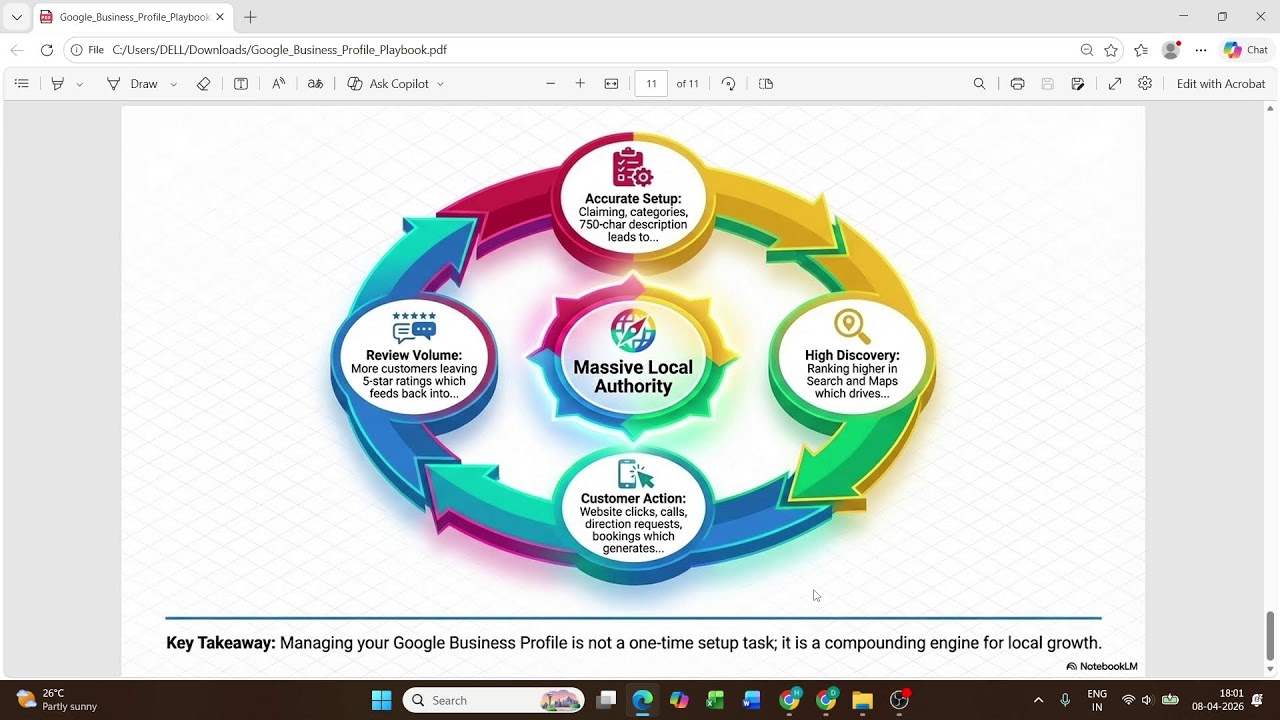






To build trust and credibility with potential customers, businesses should verify their presence on Google by creating a Google account, setting up a Google My Business profile with accurate business information (name, category, location, phone number), and completing verification through phone code or video submission, which enables customers to find and trust the business when searching for it online.
Google Business Profile Setup Guide for 2024
Added:Understanding of Local Search Engine Optimization (Local SEO) fundamentals and how search engines prioritize geographically relevant results.
The concept of NAP consistency (Name, Address, Phone number) and why uniform business directory listings are crucial for building search engine trust.
Familiarity with the Google ecosystem, specifically how Google Accounts interact with Google Maps and organic Google Search results.
Basic knowledge of business verification documentation and standard legal registration requirements needed to prove business legitimacy.
Advanced reputation management strategies, including techniques for acquiring, managing, and professionally responding to customer reviews.
Analyzing Google Business Profile Insights and performance metrics to track consumer behavior, search queries, and call-to-action clicks.
Content optimization strategies for Google Business Profile, such as utilizing Google Posts, updating products/services catalogs, and managing the Q&A section.
Integration of Google Business Profile with broader digital marketing efforts, such as running localized Google Ads or setting up Google Local Services Ads.
678 views0likes24:33Original Release: 2024-04-21
one of the major reason why you are not making Sales Online is because people do not trust you yet your competitors are doing well they are making their sales they are doing their sales they are getting contract and you are wondering how are they doing it whereas I am here I don't have contract I I hardly get sales I've been dancing on Instagram dancing on Tik Tok yet I don't get sales look no further because in this video I am going to be teaching you one of the ways at which you can make people trust your brand you can make people trust your business online and that way is getting yourself verified on Google you see most people that will buy in large quantity that will give you a better contract yes they will go to your LinkedIn account they will go to Instagram account check you out you know but one thing they will do first is they will go to Google and they will search your business name so searching your business name on Google if they cannot find you on Google you are in trouble because what that means is that you don't have that Integrity yet and that is why you need to watch this video to the very end because I will be teaching teaching you how you can get your business on Google how you can verify your business on Google welcome to my channel my name is kudu aminu I'm an enterpreneur i talks around how to clarify business uh how to make business more easy and how you can run a profitable business importation business um in this video I'll be teaching you how to get your business verified on Google so that when people go to Google and search for your business name they can see you there and because of that they can trust your brand they can you know do business with you because they know you have some credibility because if you don't have a credibility definitely you won't be on Google have two step here which will guide you on how you can do that number one the step one I have create a Google account so the first thing you need to do is to create a Google account you need a Google account with a Google account you be able to put your business position your business on Google so that whoever comes to Google type in your name bam your name is there okay so you need a Google account you know it's could be the name of your business it could be any name just create a Google account then the step two is set up a page on Google my business so don't worry I'm going to be teaching you everything how you're going to to do it here in this video so this is exactly what I am talking about if you go to your Google Map you will see some you know businesses that are already existing on on Google Okay so let's take for example you can see this me Garden Hotel limited you can see their pictures and everything and their reviews they have you know a 3.8 star review so that is how you put yourself on Google Map okay we have f f on me hospital we have the hotel and suit how do you how do you put yourself there how do you put your business on this kind of map okay so it's not necessarily you know g at the days where you you think oh is is big businesses that are on Google no even as a small business owner you can be on Google as a small business owner you can be on Google this is my business uh this is my business on Google so you can see we have another business here we have favorite Hotel you have a airb hotel pain and quoting manufacturing you know this is how your business to is going to be showing on Google so wherever type in your name the name of your business is going to be showing that you are Google verified so now the first step I mentioned here is that you need to create a Google account so now let's try to create a Google account for this purpose so come here try Gmail okay okay gmail we want to create a Google account so here you have uh can you see create an account I can even come here to say create an account let's say for personal use it doesn't matter as long as you know is U okay so next so now okay so this is how you create your Google account so it's giving me you know quite some option that I need to choose from so let me just see if you don't like it you can create your own from here you can click on create your own Gmail address or you know you choose anyone that has given you okay so I think I like this Q Amino 360 okay so I'll just go with Q Amino 360 gmail.com so here I need to you know create my password okay okay so create my password so I'm trying to show you how you can create your Google account in case you don't know how to do that so before we move to the next stage so after putting your password you need to put your phone number okay okay so you input your phone number so they're going to send So you you're going to receive a code on your phone number so all what you need to do is just input that code 7868 94 7868 94 okay so then click on next okay so your recovery email this is the email that will be used as your primary okay so after you have done that you click on next so it is set now right so we have q q Amino 360 at gmail.com and this my phone number so you click on next so the next thing you need to do is scroll down and agree agree scroll down agree okay so once you do that you have created your Gmail account simple as ABC ABC you can see it's not that hard it's not that hard and this is for those people that have not created their Gmail okay that don't have their Gmail account yet so I mentioned the first thing you need to do here is create a Google account so we have successfully create a Google account and what's our Gmail again Q aminu 360 so that's our Gmail uh account okay so we have successfully done that so the next thing is to what the next thing is to set up gole business so what you need to do is go to your Google either Microsoft soft Mozilla or whatever so you type in Google my business so after you type in Google my business so the first thing you're going to see is this okay so you click on Google my business profile okay so then you come to either manage now or sign in okay so either manage now or signning you can see this is the account that we created just now Q aminu [email protected] okay so now um let me remove the account so that I want to I want to remove it so that I can reenter it again so now let's reenter it Q Amin 360 at um Gmail can either put Gmail or you don't put it it will go anyway so Q Amin 360 so then you click on next so here you input the password okay you input the password then you click on next okay so you allow it to load so once you do that it's going to take you here so once you get here now the next thing you need to do is search for input the name of your business the name of your business the name of my business is squ store okay so you can see I there is nothing like qu St the one that wants to resemble that name is QA a z store Boutique and it's not even in Nigeria okay I think is in kalala Sango I don't know I don't know this country anyway so you can see create a business with this name are we together create a business with this name so ensure that you input the name of your business okay so if you if you come here and you input the name of your business and you are seeing the name of that business meaning that somebody else is using that name you need to change your name are we together so you need to change your name so right now nobody is using this quad store okay so I I will go ahead and create a business name with this okay so you can see so he's writing continue so now you need to set up your business is it a is it an online retail is it a local store is it a service business so you need to choose the one that suits you so I am choosing online retail so I will click on next okay so if you have a website you can input it and if you don't have a website it's fine just keep this website aspect are we together so then you go ahead with the business category so you need to input the business category the business is uh e-commerce e-commerce business okay let's let's pick this so you click on next so depending on the business you're doing so just follow us the steps and you know is it's going to give you that option so we need to enter the location so if you don't have you know probably you don't have an address you don't have a store yet just put your home address there okay just put your home address you can later change the address later okay so it doesn't really matter so just put your your uh home address so I'm using this my store address okay so this is my store address so 11 AB Street lore we show Theos okay so um local government that's o okay so then you scroll down we have the poster code so if you don't know your poster code just go to Google type in the name of your location and you know ask for the poster code you're going to see it there so you can input it here so you come to State what state is it Legos state so you input Legos state so depending on your location you can be in Ghana you can be in uh Sagal just follow the steps so it's the same uh pattern okay so anywhere you are in the world is the same pattern so you click on next so here you need to input your phone number you need to you need to input your phone number so this is my phone number I'm going to input my phone number right now 2648 so this is my phone number is Nigeria so okay so you click on next so put your business on the map okay put your business on the map so get discovered by people in your area you know so many people if they want to buy something they might just type in you know um cake vendor around me or you know uh wholesalers around me so if you if you if if they search something of suchar so let me let me just search um uh food vendor around me and see what I'm talking about I want you to see what I'm talking about you can see restaurant delivery near you in Lagos okay so you know you can just search for let let me just put this you can see so it's going to break so many things so this is gloal I don't want gloal I just want you know something in general okay so food vendor around me you can see all these people all these people puts on the map that's why they are been noticed okay that is why they are being noticed let me do something maybe because I'm using dark mode let me go to my usual mode and type that same exact so now I want to type in food vendor around me or food vendor nearby okay so and you will see what is going to be bringing okay so you can see I have this gloal here so this is my location this this based on my location are we together you can see what Google is bringing you can see check out all this name check out all this name social Comedia uh Yaba is at Yaba this one is at um what's this one sh BS stop tank I don't know this area you know um this one is at Ley this one is at gr this one is at a the reason why I am seeing all these people is because they have put themsel on the Google Map okay so they have put thems on the Google Map and that's the beauty of what I am teaching you right now anybody can just go to Google and type in whatever depending on what you are doing and they will go to Google and they will search s thing nearby so if those people H their map and is showing their exact location and is closer to where are you will be the first person that is going to be shown to apart from the fact that if you want if people want to give you big contract they will go to your to Google and search for your name and if they couldn't find your name definitely you are not trustworthy enough for them to trust their money with you okay so that's the beauty of what we are talking about in this video that's the beauty of what we are talking about in this video now let's go back let's go back to what we are doing so here get discovered by people in your area so response to review for your business so you can get review you can ask people you can get a review link probably if you want me to to tell you to teach you how you can get a review link to send to people to give you review let me know in the comment section of this video so that I can do that uh in my next video so manage your business detail across Google okay so this is how you can just take this get news and tips about how to improve your pro uh business profile good so I I don't want to participate in any survey so the next thing you do is continue continue okay so this is how you put yourself there this is how you create trust this is how you create trust with people so now we need to verify select a way to get verify so you can do that by business video or by phone code so they are going to send me a code via you know via this uh number okay so there are more options there are more options so but let's choose this option of uh of code so I want I want to choose the option of text message is not giving me that option so it's giving the the option of call so let me let me let me click on next maybe I'm going to receive the call so then I can input the code so I'm waiting for the call so I I couldn't get the phone call okay so here is another way record the video of your business business show your location equipment proof of management your video is only used for verification and won't be shown publicly so this one might be tedious so let me choose again and see if it's going to to go let me try again so resent code resent code I'm trying to choose this uh test and it's not showing so let me see if they are going to call me again then if it doesn't work if they don't call you you can change your phone number okay so you can change your phone number and you know use a different number so that it's going to probably they going to call you on that other line or you know they testt you I'm having difficulties in you know trying to verify so but let's try to say verify later okay so it says you can continue making edits to your business on Google but they will not be visible to customers until you complete verification okay okay now let's click on verify later so here you can choose the number of days that you come to work okay so you can choose um Sunday Monday you always close on Monday I mean on Sunday Monday so you can input the time okay that you open your store probably you open by 900 a.m. and you close by 4: p.m. 4 p.m. okay so you do the same thing for Tuesday for Wednesday blah blah blah blah blah like that okay so you click on next oh you already understand what I'm trying to say here so AC set message yeah next so here you need to tell us uh what your business is all about okay so I'm going to to skip this um you need to put a photo of your business or your store okay photo of your business or your store here so here if you want to advertise there is gole hard if you want to advertise so you can see this how my store will be shown to people okay so anybody that types in e-commerce agency show the or types in the name of my business store okay so this is how it's going to be showing to them are we together so this gu is going to be showing to them if you run and hard if you run and hard you'll be seeing something like this okay ad here so skip okay so now uh try Google workspace now okay so your edit will be visible once once you are verified okay so click on continue you can see my business is already here the only problem is is not publicly visible okay so you can see qu store are we together you can see it here so verification code requested enter the code received on your phone and get your business on gole so we need the code before we can get verified and that's what we need to find a way to do right now so I'm going to split this video so this will be just part one so part two I'm going to you know conclude on how to get verified on your Google business profile if you are here to subscribe please subscribe to my YouTube channel if you get value from this video please subscribe to my YouTube channel and if you are already my subscriber thank you so much I really appreciate I really appreciate thank you so much see you in my next video
Up Next

0:58
Strategies for Increasing Google Reviews for Local Business
@WhitesparkCa
1.1K views•2024-03-28

12:54
Triumph of Orthodoxy Icon: Byzantine Art & History Explained
@BenCallan
2.1K views•2024-08-06

9:49
FastAPI vs Flask vs Django: Choosing the Right Python Web Framework
@TechWithTim
302.5K views•2024-05-26

1:42
Game of Thrones Opening Credits: A Cinematic Analysis
@gameofthrones
46.3M views•2011-04-18
Related Study Plans & Knowledge Roadmaps
Structured learning paths in General & Interdisciplinary Studies
general-studies
Elevator Engineering: History, Physics & Cities
01From Hoists to Safety Brakes: The Dawn of Vertical Lift
02Hydraulic vs. Traction: The Engineering Physics of Elevators
03Modern Speed, Safety, and Algorithms
+ 2 more learning modules
12h5 modules
Explore Roadmap
general-studies
Rubber: Material Science, History & Geopolitics
01Origins of Natural Rubber & Mesoamerican History
02The Chemistry of Natural Rubber & Vulcanization
03The Geopolitics of the Rubber Boom & Colonization
+ 2 more learning modules
12h5 modules
Explore Roadmap
general-studies
Containerization: Evolution, Logistics & Trade
01Ancient Trade & Bulk Cargo: Amphorae to Barrels
02The Industrial Revolution & Cardboard Packaging
03The Containerization Revolution: Malcom McLean
+ 2 more learning modules
12h5 modules
Explore Roadmap
general-studies
Textile Tech: Evolution, Labor & Global Impact
01Pre-Industrial Textiles: Handloom & Cottage Industry
02Mechanization: The Spinning Jenny to the Power Loom
03The Factory System & Global Labor Transformation
+ 2 more learning modules
10h5 modules
Explore Roadmap