DocSend is a secure document sharing platform that enables users to create unique, customizable links for sharing documents with real-time control features such as permission settings (block lists, passcodes, expiration dates, download restrictions), automatic content updates without notifying recipients, and real-time analytics on page-by-page content consumption and document forwarding to enable timely business decisions.
DocSend Overview: Secure Document Sharing with Analytics and Control
Added:Deep Dive
Basic understanding of cloud storage and digital document management, such as uploading, downloading, and sharing files.

Curso de Cómputo Básico ✅Certificado totalmente GRATIS!
6K
Cloud storage provides network-based storage included with email services, offering folders for public access, pictures, and documents. To upload files: create new folders, drag files from PC, or use the Add button. Files are protected by trash folders for recovery. Collaboration tools enable real-time teamwork through shared documents, chat, comments, spreadsheets, and presentations. To share: click Share, enter collaborator emails, and click Done. These tools increase team efficiency by enabling simultaneous document editing and communication.
Click to watch →

COMO SUBIR Y DESCARGAR ARCHIVOS DE LA NUBE
25.1K
Cloud storage services provide comprehensive file management capabilities. Users can upload various file types including documents, images, music, spreadsheets, and compressed files. The service processes uploads and displays completion messages. For sharing, users access links through the three-dot menu next to files, then copy and share these links with others for direct downloading. To download files, users paste the shareable link into their browser and press Enter, prompting the download. Recovery keys should be downloaded and stored securely in text files, USB drives, or password-protected locations to ensure account access if passwords are forgotten or authentication devices are lost.
Click to watch →

ICDL شرح منهج التعاون عبر الانترنت الخاص بالرخصة الدولية لقيادة الحاسب الآلي
173.5K
Cloud storage applications provide comprehensive file management capabilities including creating folders and files (documents, presentations, spreadsheets, forms), uploading files from local devices, downloading files to local devices, deleting files permanently or moving to trash, moving files between folders, and sharing files with specific individuals. Permission management controls access levels including view-only access (recipients can see but not modify files) and edit access (recipients can modify and save changes). These features enable efficient file management and collaboration through cloud-based platforms.
Click to watch →

Giảng bài 6: Lưu trữ và chia sẻ tệp tin trên internet | Bài giảng tin học 11 kết nối tri thức
456
Cloud storage services provide three basic functions: (1) Uploading files and folders from local devices to online storage, (2) Creating and managing folders and files within the online storage space, and (3) Sharing folders and files with other users. These functions enable users to store data remotely and access it from any internet-connected device.
Click to watch →

191 OneDrive: cos'è e come si usa, in diretta con Daniele Castelletti | Associazione Maggiolina
48.8K
Cloud storage services provide basic file management capabilities including upload, download, and deletion. To upload files, users select files from their computer and initiate the upload process, which transfers files to the cloud storage. To download files, users select files and initiate the download, which transfers files from the cloud to their local computer. Deleted files are moved to a trash bin rather than being permanently removed immediately, providing a safety net for accidental deletions. Users can restore files from the trash within a certain time period (typically 30 days) or permanently empty the trash when certain they no longer need the deleted files.
Click to watch →
Deep Dive
Fundamentals of digital security, including access control, passwords, and link-sharing risks.

CS50 Cybersecurity - Lecture 0 - Securing Accounts
335.9K
Digital account security rests on two pillars: authentication (proving identity) and authorization (determining access rights). Unlike physical keys, digital accounts use usernames (publicly identifiable) and passwords (supposedly private) for authentication. Password security faces two primary threats: dictionary attacks (testing common words) and brute force attacks (testing all possible combinations). A 4-digit numeric password offers only 10,000 possibilities, making it extremely vulnerable to automated attacks. The fundamental trade-off between usability (easy-to-remember passwords) and security (complex, hard-to-guess passwords) shapes all security decisions.
Click to watch →
![잘 모르는 문자 링크 클릭하면..? 인터넷 정보 보안! [정보보안과 화이트해커 2부, 스틸리언 신동휘 부사장]](https://i.ytimg.com/vi/z5xII0yF5lw/sddefault.jpg)
잘 모르는 문자 링크 클릭하면..? 인터넷 정보 보안! [정보보안과 화이트해커 2부, 스틸리언 신동휘 부사장]
20.2K
This section covers foundational digital security principles. Authentication relies on three factors: what you know (passwords/PINs), what you have (devices/tokens), and what you are (biometrics). South Korea implements strong multi-factor systems combining ID/password with phone verification and biometrics. Password complexity is critical because attackers use dictionary attacks, brute force, and rainbow tables to crack weak passwords. Default passwords on routers and devices are publicly searchable and must be changed immediately. Credential stuffing exploits reused passwords across services—once one site's credentials are stolen, attackers try them everywhere else. Antivirus software uses signature-based detection but cannot guarantee 100% protection, struggling with zero-day exploits and new malware variants. Phishing attacks exploit human psychology through convincing fake websites and urgent messaging.
Click to watch →

Google'daki BİLGİLERİNİZİ Nasıl Silersiniz? | Siber Güvenlik UZMANI Anlattı
73.7K
Digital security requires understanding that password length exponentially affects cracking time (6 characters: ~1 minute, 9-10 characters: months), that browser password managers are insecure, and that VPNs protect data on untrusted networks; users should categorize accounts by importance, use password managers, enable two-factor authentication, and be aware that companies collect extensive personal data (Google Takeout revealed 185GB of data from one user) which can be accessed if email accounts are compromised; social engineering attacks exploit human trust, making vigilance essential, and children require special protection protocols.
Click to watch →
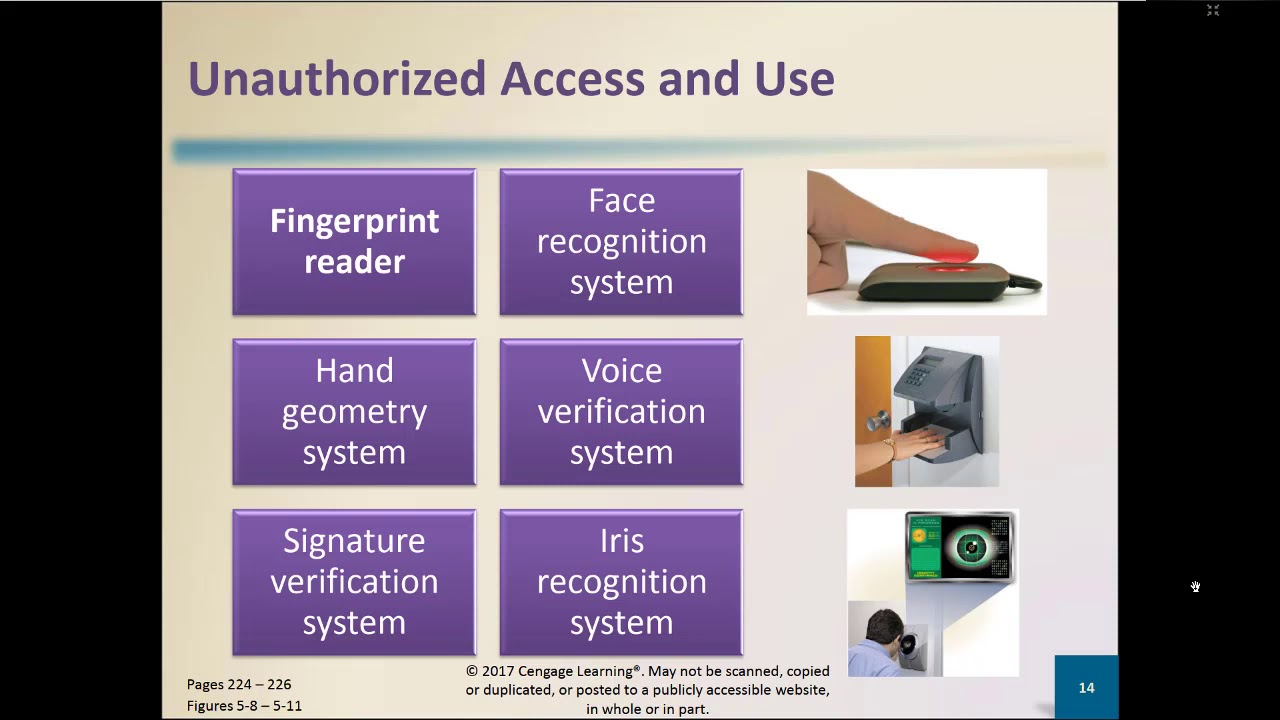
Introduction to Computer CSCI200 CH05 lec02
100
Digital security encompasses multiple interconnected concepts. Access control systems protect resources by answering three questions: who can access, when they can access, and what actions they can perform. Methods include passwords, PINs, physical objects, and biometric devices (fingerprints, hand geometry, voice, signatures, iris). Authentication layers like two-step verification combine multiple factors. Software protection involves activation processes, license agreements, and encryption to prevent unauthorized access. Digital forensics enables evidence discovery for investigations. Digital signatures and certificates verify identity and secure communications, with HTTPS indicating encrypted connections.
Click to watch →

23 Corso di computer principianti 2022 Associazione Culturale Maggiolina - Daniele Castelletti
28.6K
An account is a registration to an internet service, functioning like a bank card that identifies you digitally. A password is a keyword enabling access to services. The username (account name) identifies you alongside the password. Before using any internet service—whether email, document downloads, or social media—you must first register by creating an account. This registration creates your digital identity for that specific service. Once registered, you can access the service repeatedly using your account credentials. The process mirrors physical banking: just as you need a bank card to access funds, you need an account to access online services.
Click to watch →
Deep Dive
The concept of digital analytics, specifically how user engagement metrics (such as views, clicks, and time spent) are captured and interpreted.

Digital Marketing Course 2025 | Everything You Need To Know
712.5K
Engagement metrics track how audiences interact with content, including clicks, click-through rate (CTR—the ratio of users clicking on links out of total views), and time spent on website. Longer time typically indicates greater interest and engagement in content. These metrics help assess how well content resonates with audiences and whether they find value in what's being offered.
Click to watch →

Adobe Analytics Champion User Group - Office Hours (December 2024 - Americas)
104
Time spent on page is a double-edged metric requiring contextual interpretation. High time spent could indicate genuine engagement or confusion from poor UI design. Low time spent could indicate lack of engagement or efficient task completion. For Single Page Applications, custom scroll events help capture engagement that standard metrics miss. Alternative metrics like pages per visit and time on site provide different engagement perspectives. Analysis should combine time spent with entry traffic (external sources) versus cross traffic (internal navigation) to understand user behavior patterns.
Click to watch →
Kumar Dhanagopal - Don't trust the numbers!
724
Low page views don't automatically indicate unpopular content—consider page age, product adoption, discoverability, and structural changes. Bounce rates require contextual interpretation: high rates on content pages may indicate satisfied users finding exactly what they needed, while landing pages with high bounces may signal problems. Time spent interpretation varies by content type—conceptual pages benefit from longer engagement while reference pages suggest quick information retrieval. Always combine metrics rather than interpreting them in isolation.
Click to watch →

Digital Media Analytics Introduction & Google Analytics Dashboards | Edureka
2.1K
Digital analytics measures multiple categories of metrics: (1) User engagement - activities users perform on websites/apps like reading reviews and comparing products; (2) Marketing channel performance - social media reactions, email open rates, display ad clicks, paid search performance; (3) Technology metrics - website downtime (target 99.8% availability), page load time (under 4 seconds is optimal); (4) Sales metrics - average revenue per product, average revenue per transaction, average products per transaction. These metrics help identify opportunities and areas for improvement.
Click to watch →

Digital Analytics
126
Digital analytics involves the systematic analysis of website data to understand user behavior and optimize marketing strategies, with key metrics including bounce rate (percentage of visitors who leave after viewing only one page), traffic sources (channels through which visitors arrive), funnel analysis (steps users take through a defined process), heat maps (visual representations of user activity), segmentation (dividing audiences into specific groups), metrics (quantifiable performance measures), user engagement (level of user interaction), and KPIs (measurable values indicating campaign success).
Click to watch →
Deep Dive
An introductory awareness of typical business collaboration workflows, such as sending sales pitches, fundraising decks, or legal agreements.

An Introduction to BS 11000 Collaborative Business Management
1K
The Awareness stage involves appointing a Senior Executive Responsible (SER) or SE, defining a collaborative working policy, setting overall strategic business objectives, and defining what value you want to obtain from working together. Following this, organizations should identify and segment opportunities, define necessary resources, competencies, and behaviors, undertake an initial risk assessment, establish an implementation plan, and initiate the Relationship Management Plan (RMP) at the business level prior to appointing a team at the project level.
Click to watch →

Business Collaborations | SBIL | One Shot🔥 CS Exe Dec 25/June 26
7.4K
Business collaboration occurs when two or more businesses work together to achieve common goals by sharing resources and expertise. There are five main types: (1) Horizontal collaboration - businesses with same functional areas partner up, (2) Vertical collaboration - occurs within supply chains between manufacturers, wholesalers, retailers, and consumers, (3) Intersectional collaboration - businesses with different functional areas work together despite no similarities, (4) Joint venture - two or more businesses form a new company together, (5) Equity collaboration - one company purchases shares of another for ownership stakes.
Click to watch →

Connect! 2021: Case Studies in Collaboration - de Koning, Stensberg, Barberán (Arup)
227
When introducing new collaborative workflows, teams should start simple by identifying isolated project ideas, developing interesting workflows without telling everyone, and building a group of allies. Once something works and demonstrates benefits, the group can grow. Starting with large projects and many people is challenging.
Click to watch →

The AI Behind Higgsfield: How They Hit $100M ARR in 1 Year
6.1K
Beyond content creation, teams need collaboration workflows for reviewing, discussing plans, and project management. These workflows provide additional value beyond content creation credits, reducing user churn by giving teams reasons to stay and use the platform even without producing new content.
Click to watch →

Google Workspace 2024 | Agora com Inteligencia Artificial e Novos Layouts
14.2K
Google Workspace is a cloud-based collaboration platform enabling real-time document creation, storage, and sharing across devices. Core applications include Gmail, Docs, Slides, Sheets, Forms, Drive, Calendar, Tasks, Chat, and Meet. A typical business workflow involves creating client forms, converting responses to spreadsheets, drafting documents, sharing via Chat for team review, storing in Drive, sending via Gmail, and conducting meetings via Meet. This eliminates software installation and enables seamless collaboration from any device.
Click to watch →
Prerequisite Knowledge
- Concept 01Basic understanding of cloud storage and digital document management, such as uploading, downloading, and sharing files.
- Concept 02Fundamentals of digital security, including access control, passwords, and link-sharing risks.
- Concept 03The concept of digital analytics, specifically how user engagement metrics (such as views, clicks, and time spent) are captured and interpreted.
- Concept 04An introductory awareness of typical business collaboration workflows, such as sending sales pitches, fundraising decks, or legal agreements.
Subsequent Learning
- Step 01How to analyze document engagement data to refine and optimize sales decks, marketing materials, or investor pitches.
- Step 02Strategies for setting up Virtual Data Rooms (VDRs) for sensitive corporate events like fundraising, audits, or mergers and acquisitions.
- Step 03Integrating secure sharing and tracking tools with Customer Relationship Management (CRM) systems like Salesforce or HubSpot.
- Step 04Understanding compliance and data protection laws (such as GDPR or SOC 2) in the context of outbound business communications.
Unique Links
Custom Permissions
Easy Updates
Real-Time Analytics
Unique Links
0:01Playing Section
- 1
DocSend enables secure document sharing via unique links.
- 2
Provides real-time control and insights for shared content.
- 3
Eliminates reliance on clunky email attachments.
Recipient Friction and the Privacy Counter-Response to Document Analytics
While document-sharing platforms like DocSend provide senders with valuable analytics and control, they face significant criticism regarding recipient privacy, trust, and user experience. Critics argue that tracking a recipient's reading habits—down to the exact seconds spent on a specific page—is highly intrusive and can damage the mutual trust required in business negotiations, particularly in venture capital and legal fields. This tracking has led to a recipient backlash, where prospects actively resist tracked links, demand standard offline PDFs, or use tools to bypass tracking entirely. Furthermore, security experts point out that these platforms offer a false sense of absolute security; 'viewer control' features cannot prevent basic workarounds like screenshots, digital photography, or optical character recognition (OCR). Finally, the friction introduced by requiring email verification or navigating gating screens can disrupt workflows, frustrate high-value recipients, and occasionally cause corporate spam filters to flag the links as security risks.
Deep Dive
How to analyze document engagement data to refine and optimize sales decks, marketing materials, or investor pitches.

AngelNV Bootcamp Nov 15 Faye Almeshaan and Dan Steele
124
Using analytics tools like DocSend helps optimize pitch decks by tracking investor behavior. Key insights include: (1) Investors spend an average of 2 minutes and 50 seconds on decks; (2) Successful decks have specific slide orders that maximize engagement; (3) Analytics reveal which slides investors spend most time on; (4) Iterating based on data improves deck effectiveness. The key principle is to use data to understand what resonates with investors and optimize accordingly. This approach transforms pitch deck creation from guesswork to a data-driven process.
Click to watch →

How To Personalize Your Sales Outreach At Massive Scale | Salesman Podcast
658
Content engagement analytics provides dual benefits: micro-level guidance for individual sales conversations and macro-level insights for marketing strategy. Salespeople can determine what content prospects actually consume—whether technical documents or pricing pages—and prepare accordingly. Marketing can identify which content drives closed deals versus unused assets, enabling evidence-based investment decisions. Combining engagement data with CRM purchase data enables buyer readiness scoring—predicting likelihood to buy based on content consumption patterns. This allows advising sales teams on statistically proven content recommendations for specific situations, improving conversion rates across the board.
Click to watch →

DocSend CEO on Investor Tracking: Pitch Deck Analytics
19.8K
Analytics on pitch deck engagement provides significant value for founders during fundraising. The data helps founders understand whether investors have viewed their deck, which pages received attention, and how long they spent reviewing content. This information allows founders to update decks appropriately without needing to ask recipients directly, maintaining professional relationships while ensuring materials remain current. The analytics also help identify when decks are being forwarded to other investors, protecting founders from situations where their materials circulate without proper attribution or compensation.
Click to watch →

Cambia tu forma de pensar y vende más con Sales Navigator de LinkedIn - 24 de Febrero 2022
218
Smart Links provide detailed engagement tracking including which pages of a document were viewed, how long each page was read, and when the document was accessed. This data helps identify if prospects are only reading the price section without reviewing the full proposal value, allowing sales teams to address concerns proactively.
Click to watch →

This Sales Pitch Deck Made Daniel $25k+ Per Month Inside His Agency
200
Data is the most valuable commodity in the world, more valuable than oil or gold because it can generate more revenue. Businesses should collect the name, email, and phone number of every person who contacts them. After collecting data, businesses should use that information to guide clients through specific paths based on their characteristics. For example, knowing whether a client is male or female helps tailor messaging appropriately—using images of females in marketing materials targeting males reduces engagement and damages conversion rates.
Click to watch →
Deep Dive
Strategies for setting up Virtual Data Rooms (VDRs) for sensitive corporate events like fundraising, audits, or mergers and acquisitions.

How to Easily Set Up a VDR and Speed Due Diligence with DFIN Venue® Virtual Data Room
987
Virtual Data Rooms (VDRs) are secure online platforms that enable efficient document sharing and management during business transactions such as mergers and acquisitions, fundraising, and licensing deals, allowing users to instantly upload documents in native formats and launch multiple rooms to accelerate due diligence processes.
Click to watch →

¿Qué es y Cómo hacer un Data Room para tu Ronda de Financiación?
324
A Virtual Data Room (VDR) is a digital, organized space storing all key startup documentation to facilitate investor analysis and demonstrate professionalism during fundraising. It eliminates multiple communications by providing all necessary documents in one place and facilitates Investment Memo creation for fund analysts. VDRs ensure confidentiality while providing real-time updates to all investors. Three main tools exist: Google Drive (free, easy but limited customization), Droom (designed for VDRs but still limited), and Notion (recommended for extensive customization, branding control, exclusive document access via invitations, and web-based URL sharing with user tracking). VDR access should be granted after investors review the deck and financial plan, with feedback solicited for continuous improvement.
Click to watch →

Fired with $10K, I Returned as Chief Compliance Officer for $320M Buyout
1.5K
Virtual data rooms are secure cloud servers that hold millions of pages of internal corporate data accessible only to lawyers and auditors involved in a merger or acquisition. They serve as the primary repository for due diligence information, containing financial statements, legal documents, operational data, and other materials necessary for evaluating a target company.
Click to watch →

What is a VDR by Ansarada
582
A Virtual Data Room (VDR) is a secure online platform used during business sales, mergers, acquisitions, and fundraising to facilitate due diligence by allowing controlled sharing of sensitive information like contracts, financials, and intellectual property with authorized parties while maintaining confidentiality, preventing unauthorized distribution through watermarks and access controls, and enabling efficient tracking of buyer interests and document reviews.
Click to watch →

Ansarada (ASX:AND) CEO Sam Riley interview
1.7K
Virtual data rooms (VDRs) are digital platforms used in mergers and acquisitions to securely share sensitive information between parties. Before VDRs became common, buyers would conduct physical due diligence by flying to locations and manually reviewing mountains of paper documents. VDRs provide a faster, cheaper, and more controlled method for sharing confidential information, allowing multiple stakeholders to access and review documents simultaneously while maintaining security and tracking who accesses what information.
Click to watch →
Deep Dive
Integrating secure sharing and tracking tools with Customer Relationship Management (CRM) systems like Salesforce or HubSpot.

Hubspot Upload Document and Email it 2 7 18
2.5K
This video demonstrates how to upload documents to HubSpot and email them directly to contacts, with the system tracking when recipients open the document, which pages they view, and how long they spend on each page, while also capturing when they forward the document to others by requiring them to enter their email address.
Click to watch →

An Intro to Splash’s Top Integrations | Webinar
556
The Salesforce integration is Splash's most popular CRM integration, solving approximately 95% of customer use cases. Key capabilities include: (1) Campaign integration that auto-creates campaigns or links existing ones when events are created, with configurable naming conventions and campaign member status mapping; (2) Lead and contact creation that syncs registration data to Salesforce, handling duplicates based on email and mapping all form fields including custom fields; (3) Bi-directional sync that eliminates manual spreadsheet management by establishing a real-time source of truth within Salesforce campaigns. The Hubspot integration enables capturing net new contacts and tracking event registration/attendance through contact creation and timeline integration, allowing filtering by event attendance and setting up workflows triggered by event-related activities.
Click to watch →
How To Integrate HubSpot With Salesforce ! (Full Tutorial)
3.8K
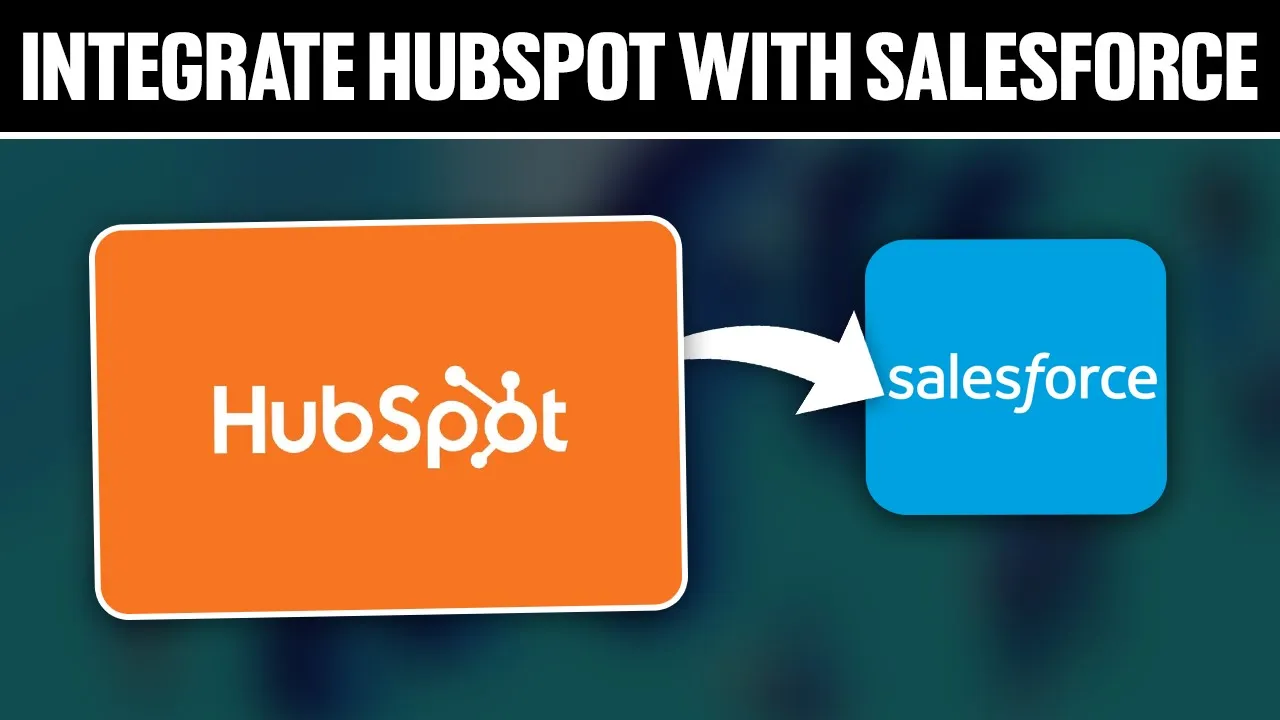
This tutorial demonstrates how to integrate HubSpot with Salesforce for enhanced CRM capabilities, covering account setup, marketplace navigation, app installation, and bidirectional synchronization features including lead data, email opens, website activity, lead scores, and revenue data transfer between platforms.
Click to watch →

HubSpot-Salesforce Integration Deep Dive | HubSpot Admins HUG | January 18, 2023
1.8K
The Salesforce-HubSpot integration is one of HubSpot's longest-running strategic integrations, supporting three primary use cases: marketing teams syncing lead generation data to Salesforce, organizations using both HubSpot sales tools and Salesforce for reporting, and service teams using HubSpot Service Hub with Salesforce as their main CRM. Key technical features include the Connected Apps page for managing integration settings, Sync Health page tracking Salesforce API call usage, and Sync Error screen providing advanced troubleshooting. Account synchronization limitations exist for merging companies and parent-child relationships, with workarounds involving Salesforce-side merges. The recommended approach for syncing Salesforce campaigns is through custom object sync rather than the legacy campaign ID field method. Data synchronization configuration includes field mappings, contact/lead management logic, and the HubSpot Visualizer module for embedding HubSpot data in Salesforce Lightning pages. Field mapping best practices require matching HubSpot single line text fields to Salesforce pick list values to prevent sync errors.
Click to watch →

Webinar Efficy CRM SMB - Découvrez vos nouveautés produits
124
The CRM-Thibaut integration enables secure document sharing with prospects through project-based workflows. Users can create projects linked to CRM deals, select templates, set expiration dates for sharing links, and add contacts to projects. The system tracks document viewing behavior with detailed statistics showing access frequency, device information, and page-by-page engagement. An interest score algorithm evaluates prospect engagement based on viewing patterns. Signed documents automatically update deal status, and administrators can configure rules for automatic stage transitions.
Click to watch →
Deep Dive
Understanding compliance and data protection laws (such as GDPR or SOC 2) in the context of outbound business communications.
Outbound EU Lead Generation in the post GDPR world
110
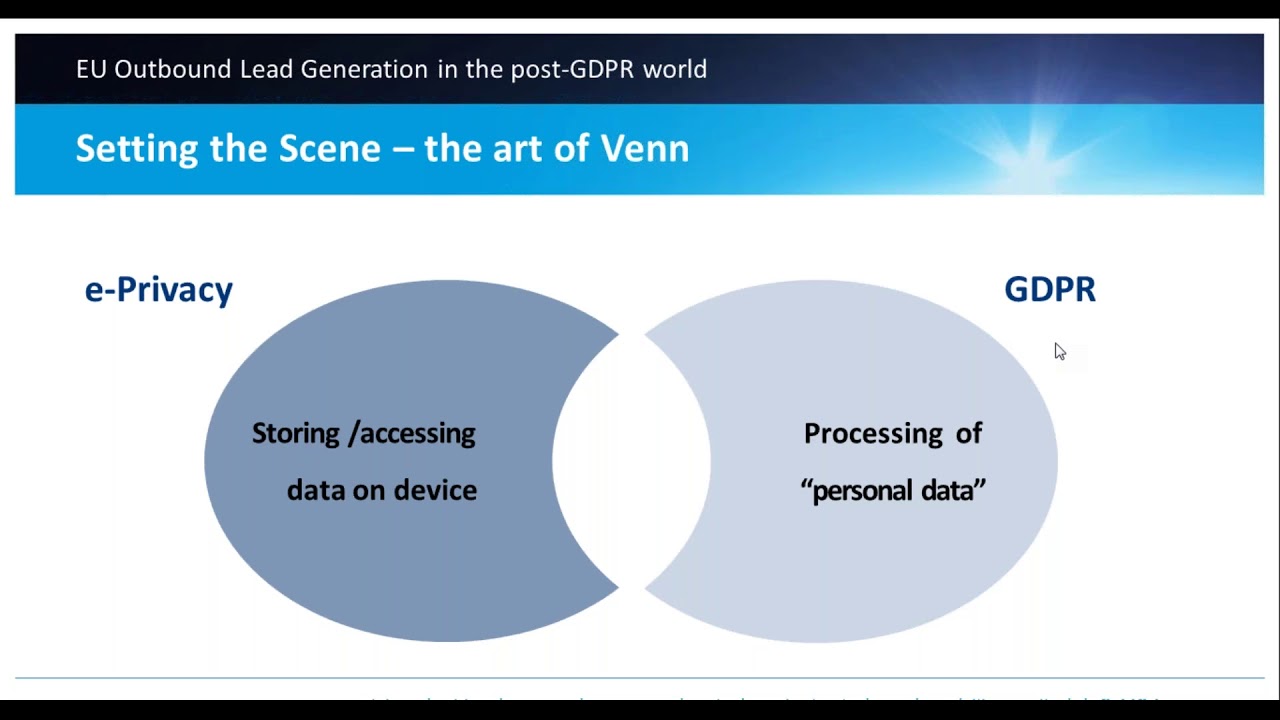
Outbound lead generation remains legal under GDPR but requires careful navigation of multiple compliance requirements: organizations must distinguish between GDPR (which governs personal data processing) and ePrivacy laws (which govern electronic marketing communications), understand that consent is required for privacy purposes while legitimate interest may suffice for marketing purposes, comply with transparency obligations under Article 13 (direct collection) or Article 14 (third-party data) by providing clear notices about data sources and processing purposes, and implement proper vendor due diligence and contractual protections when using third-party lead generation services.
Click to watch →

Club UB - Digitaler Vertrieb & Lead-Management: Mehr Know-how, mehr Beratung
139
The General Data Protection Regulation (GDPR) and the Telecommunications Act are separate legal frameworks requiring compliance. Businesses must obtain explicit consent before contacting customers via email or other channels. The Robinson List (opt-out registry) has existed for 15 years and should be checked periodically. Consent must be specific to each communication method and cannot be bundled. Businesses must document consent properly, as verbal consent alone is insufficient. Cloud service providers should be checked for Privacy Shield certification or European alternatives. Any service used for business communications is considered a data processor requiring proper agreements. When transitioning from social media to email communication, businesses should document consent clearly, including keeping screenshots or records of consent obtained on the platform.
Click to watch →

GDPR Compliance Requirements For Marketing And Business
12.2K
GDPR (General Data Protection Regulation) is a comprehensive EU data protection law that requires businesses to obtain explicit consent for data processing, implement cookie consent mechanisms, provide full disclosure of data usage, honor the right to be forgotten, and report data breaches within 72 hours; businesses with over $20 million in revenue must appoint a Data Protection Officer, and these requirements will likely extend to the United States in the future.
Click to watch →

Everything you need to know about GDPR
482
GDPR compliance is essential for cold email marketing because companies cannot send compliant emails without being compliant organizations. Internal procedures, risk assessments, and data processing registers are foundational requirements. Proportionality requires sufficient but not excessive information in disclaimers, including company name, processing type, and objection mechanisms. Compliance should begin immediately rather than delaying.
Click to watch →

XO Ruby New Orleans 2025 - Do the Right Thing: Practical lessons for your.. by John Paul Ashenfelter
112
Compliance frameworks like HIPAA, PCI, SOC 2, and FedRAMP often intimidate developers because they seem complex and outside their comfort zone. FedRAMP requires compliance with NIST RMF 800-37, control baselines from 800-53, FIPS standards, and continuous monitoring. However, compliance is fundamentally about doing the right thing, not about being threatened by scary robots. Policy governance involves boards setting policies, management reporting on compliance, and third-party audits. The COSO framework, established after WorldCom and Enron scandals, requires executives to set controls, staff to provide evidence, and auditors to review adherence. SOC 2 compliance requires security as mandatory, with availability, confidentiality, integrity, and privacy as optional categories. Modern development practices like source control naturally satisfy many SOC 2 controls for logical access, authentication, segregation of duties, and change management.
Click to watch →
Unique Links
Custom Permissions
Easy Updates
Real-Time Analytics
Unique Links
0:01- 1
DocSend enables secure document sharing via unique links.
- 2
Provides real-time control and insights for shared content.
- 3
Eliminates reliance on clunky email attachments.
Recipient Friction and the Privacy Counter-Response to Document Analytics
While document-sharing platforms like DocSend provide senders with valuable analytics and control, they face significant criticism regarding recipient privacy, trust, and user experience. Critics argue that tracking a recipient's reading habits—down to the exact seconds spent on a specific page—is highly intrusive and can damage the mutual trust required in business negotiations, particularly in venture capital and legal fields. This tracking has led to a recipient backlash, where prospects actively resist tracked links, demand standard offline PDFs, or use tools to bypass tracking entirely. Furthermore, security experts point out that these platforms offer a false sense of absolute security; 'viewer control' features cannot prevent basic workarounds like screenshots, digital photography, or optical character recognition (OCR). Finally, the friction introduced by requiring email verification or navigating gating screens can disrupt workflows, frustrate high-value recipients, and occasionally cause corporate spam filters to flag the links as security risks.
Basic understanding of cloud storage and digital document management, such as uploading, downloading, and sharing files.
Fundamentals of digital security, including access control, passwords, and link-sharing risks.
The concept of digital analytics, specifically how user engagement metrics (such as views, clicks, and time spent) are captured and interpreted.
An introductory awareness of typical business collaboration workflows, such as sending sales pitches, fundraising decks, or legal agreements.
How to analyze document engagement data to refine and optimize sales decks, marketing materials, or investor pitches.
Strategies for setting up Virtual Data Rooms (VDRs) for sensitive corporate events like fundraising, audits, or mergers and acquisitions.
Integrating secure sharing and tracking tools with Customer Relationship Management (CRM) systems like Salesforce or HubSpot.
Understanding compliance and data protection laws (such as GDPR or SOC 2) in the context of outbound business communications.
34.1K views71likes1:20@DocsendOriginal Release: 2022-04-19
What is DocSend?
With DocSend, it's all about unique links.
DocSend allows you to securely share your documents with real time control and insights.
No more clunky or insecure email attachments.
Creating custom links.
You can create different shared links for the same file, each with custom security settings based on the viewer.
Permission controls like block lists, passcodes, expiration dates, and download restrictions ensure only the right people access your documents.
Update content easily.
DocSend's unique links also take the stress out of worrying that someone is viewing an outdated version of your content.
All you need to do is replace the content hosted behind that link and it's automatically updated on the viewer's end.
No need to notify anyone of a new version.
Share, track, and optimize.
What's more, DocSend empowers you to take timely action for worthwhile conversations with real time analytics on page-by-page content consumption.
And you can monitor if your document is forwarded on to someone you should engage so that you can confidently share confidential information with DocSend.
Learn more at docsend.com.
Up Next
18:48
Tap Water Safety: Endocrine Disruptors and Filtration Methods
@HubermanLabClips
1.4M views•2023-10-27

12:54
Triumph of Orthodoxy Icon: Byzantine Art & History Explained
@BenCallan
2.1K views•2024-08-06

9:49
FastAPI vs Flask vs Django: Choosing the Right Python Web Framework
@TechWithTim
302.5K views•2024-05-26

1:42
Game of Thrones Opening Credits: A Cinematic Analysis
@gameofthrones
46.3M views•2011-04-18
Related Study Plans & Knowledge Roadmaps
Structured learning paths in General & Interdisciplinary Studies
general-studies
Elevator Engineering: History, Physics & Cities
01From Hoists to Safety Brakes: The Dawn of Vertical Lift
02Hydraulic vs. Traction: The Engineering Physics of Elevators
03Modern Speed, Safety, and Algorithms
+ 2 more learning modules
12h5 modules
Explore Roadmap
general-studies
Rubber: Material Science, History & Geopolitics
01Origins of Natural Rubber & Mesoamerican History
02The Chemistry of Natural Rubber & Vulcanization
03The Geopolitics of the Rubber Boom & Colonization
+ 2 more learning modules
12h5 modules
Explore Roadmap
general-studies
Containerization: Evolution, Logistics & Trade
01Ancient Trade & Bulk Cargo: Amphorae to Barrels
02The Industrial Revolution & Cardboard Packaging
03The Containerization Revolution: Malcom McLean
+ 2 more learning modules
12h5 modules
Explore Roadmap
general-studies
Textile Tech: Evolution, Labor & Global Impact
01Pre-Industrial Textiles: Handloom & Cottage Industry
02Mechanization: The Spinning Jenny to the Power Loom
03The Factory System & Global Labor Transformation
+ 2 more learning modules
10h5 modules
Explore Roadmap