

![ปูพื้นฐานการเขียนโปรแกรมเชิงวัตถุด้วยภาษา Java [FULL COURSE] ☕](https://i.ytimg.com/vi/AuEetL9SepE/hqdefault.jpg)






















![Equals and Hashcode Contract in Java [Important Java Interview Question] | Code Decode](https://i.ytimg.com/vi/4X5Kgi2VltI/maxresdefault.jpg)










The Java Collections Framework provides three essential collection types: ArrayList (List interface) stores heterogeneous data with insertion order preserved, allows duplicates and multiple nulls, and uses index-based storage; HashSet (Set interface) stores heterogeneous data without preserving insertion order, does not allow duplicate elements (including nulls), and uses hashing algorithm for storage; HashMap (Map interface) stores key-value pairs where keys must be unique but values can be duplicated, does not preserve insertion order, and uses hashing for efficient key-based access.
Java Collections Framework: ArrayList, HashSet, and HashMap Explained
Added:Basic Java programming and Object-Oriented Programming (OOP) concepts, such as classes, objects, and methods.
An understanding of standard Java Arrays, including their fixed-size limitations and memory allocation.
The concept of Java Generics (e.g., <T>), which is crucial for defining type-safe collections.
The foundational ideas of interfaces and polymorphism, as ArrayList, HashSet, and HashMap implement standard Java interfaces (List, Set, Map).
Advanced collections and map implementations, such as LinkedList, TreeSet, TreeMap, and LinkedHashMap, to understand sorted and ordered structures.
Time and Space Complexity (Big O notation) analysis of operations like insertion, deletion, and search across different collections.
The contract between the hashCode() and equals() methods, and how to correctly override them for custom objects used in collections.
Concurrent and thread-safe collections (e.g., ConcurrentHashMap, CopyOnWriteArrayList) for multi-threaded applications.
Leveraging the Java Streams API and Lambda expressions to filter, map, and process collection data efficiently.
551 views17likes1:51:37Original Release: 2024-12-30
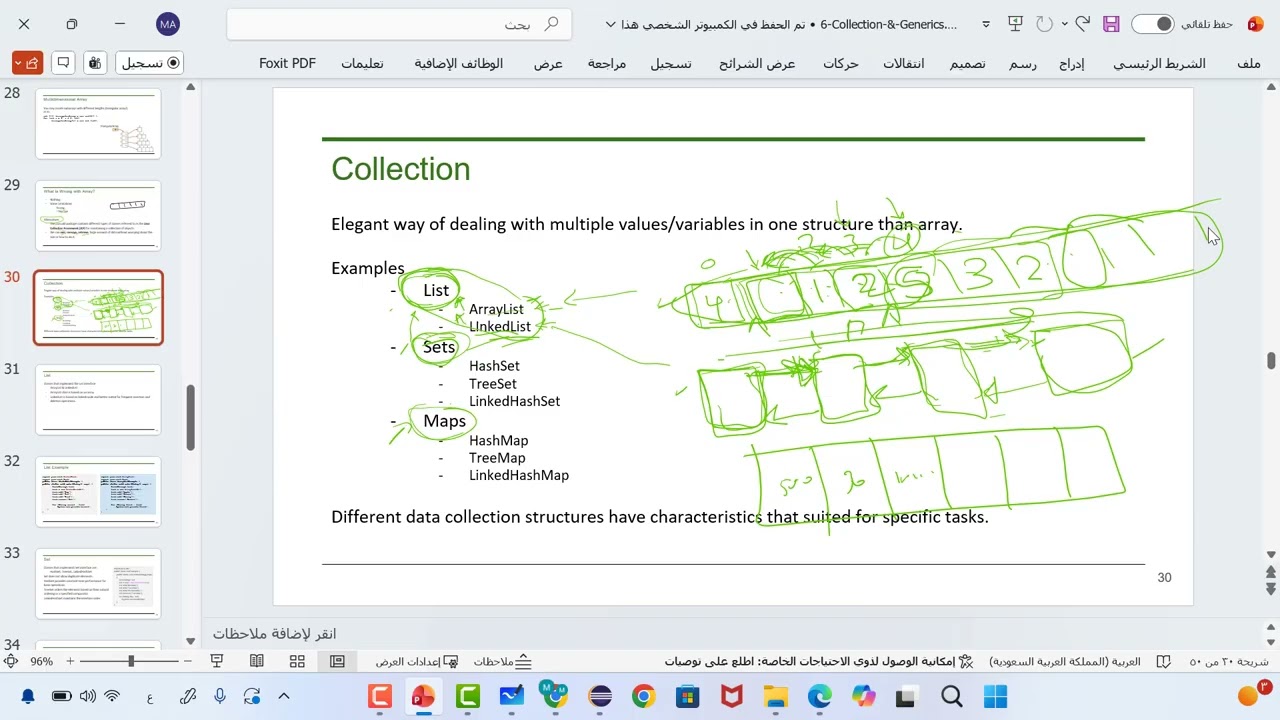
so in this session we are going to discuss about collections an important topic in Java even in the perspective of interview as well so collections what are collections what is a collection so collection is used to represent a group of objects into single entity so uh to represent a group of objects into one single entity we need to have a collection so how can we Define a collection is like it represents a group of objects to it represents group of objects into single entity this is what we mean by collection so group of objects can be anything like say for example I define a class employee right and if I wanted to create bunch of objects of employee class so to represent all those group of objects employee objects so we can create a collection so in the same way like if I wanted to group some some strings or you know if I wanted to group some objects right it objects could be anything right employee student any object right so the user Define class we define a class and if you wanted to create multiple different object objects regarding that class right so with respect to that class then we can group all those similar objects or even non-similar objects into one single entity so if we wanted to represent like that then we need collections so that's the definition of collection now collection is an interface which is available in a package called java.util so what is a collection so collection the keyword right so collection is an interface this is itself is an interface so there is an interface called collection in Java which is available in a package called java.util java.util right now let us see the hierarchy of collection so this is the complete hierarchy of collections so collection is an interface which extends iterable interface iterable is also an interface so whatever are in blue here are representing the interface and whatever are in green rectangles are representing the class here all right so itable is an interface and collection is an interface which is extending itable interface right and again list q and set are the interfaces extending collection interface so list q and set are the interfaces which are extending collection interface right and list has its own implementations meaning so array list link list Vector so all these three are like the classes so green here represents green rectangle represents classes so this dotted line means that these classes are implementing this interface right so list is an interface and array list link list Vector are the classes which are implementing this list interface again stack is another class which is extending vector class right and coming to Q so Q is an interface and you can see DQ is an uh another interface which is extending Q right and you can see you can see the hierarchy of all the other interfaces and classes as well right so set is another important interface and you can see sorted set is a CL is another interface which is extending it and you can see hash set here this is important so hash set haset is implementing set interface linked haset is also implementing set inter pH right so this is the overall collection hierarchy in available in Java but in selenium like we are not going to use all of them so we are going to use only some of them and we are going to learn only what we are going to use in selenium right so here you can see this is what we are going to discuss in this session right so collection is an interface and uh you can see right uh list and set are the two interfaces which are extending this collection interface and list is uh you know implemented by a class called ARR list so we are going to discuss ARR list today and then we'll discuss about set so hash set so what is Hash set hash set is another class which is implementing set interface which is implementing set interface right and then map is completely different which doesn't come under the uh collections umbrella but it's a different interface but still map is an interface and uh hashmap is a class which is implementing map interface so we are going to discuss today in this session what in green color here right AR list has it followed by hman so let's start with ARR list any questions is it clear all right so what is an array list array list is a class which implements list interface so you seen that now just now right so we are going to start with ar list AR list is a class which is implementing list interface and what are the characteristics of array list we'll see that now so array list is a class which is implementing list interface right so it can it can store heterogeneous data so it can store heterogeneous data meaning so data of non-similar type so if I can have an array list so array list is a collection right so is a class which is implementing list interface so array list if I declare an object of array list right so using that object we can use the methods of array list and using those methods like we can store the heterogeneous data meaning non-similar data so I can have say for example I have an AR list of five objects so I can have multiple data types stored in it so data of multiple types can be stored in the array list so that is allowed then coming to the insertion order so insertion so if you remember array list so is also follows the array index like say for example I have an array of five objects right so what how how we actually represent an array using the index if you remember so we represent using the index right so we do have this is zero index [Music] one 2 three and four right if if we have an array we do represent it with the index so elements are stored in order right in order according to the index right so first element stores in first index and the index starts array index starts with zero right the same the same thing applies to array list as well so AR list also follows an order so follows an insertion order so if you wanted to access an element at the second position you can easily get it using the index one right and so on if you wanted to get it an element at the position four so four then the index of four will be three one always one minus the actual position because the index start with zero right so say for example I have some a here and uh and some string here I can have some double value some integer value right like this I can have Boolean value nonsimilar data type can also be stored in an array list right so array list preserves the order so when it can preserve the order when it has the index when it follows the IND Index right so there are like two types how actually the you know the data is stored in memory right so say for example this is memory so index based is like if I wanted to store it an array list so array list is stored in a chunk of memory like so a chunk of memory will be allocated and you know so this this part right so this is an array list say for example it will be divided into index and within the memory it will be stored in sequence in sequence of memory locations so this is about array list right and uh if what are all the hash set or hash map right so those are stored in a in different algorithm so these are the algorithms right so index Bish is one algorithm so where a sequence of memory memory locations so elements are stored in a sequence of memory locations and are accessed using the indexes and coming to the hash part right hash part so it is stored random say for example one element can be stored here there won't be uh it it won't be stored in a sequence of memory locations so when we use the hashing algorithm so which is not based on index so we'll see that when we are discussing about the uh haset but just for now you can you should be thinking of like there are two types of algorithms how we can store the elements in memory so first type is like index based so in index Bas a sequence of memory elements are stored in a sequence of memory locations and using the hash algorithm so there won't be such sequence so it will be at a random order but still there there is something called hashing algorithm which will actually calculate some hash and based on hash is something like an integer so that integer will be will actually give you the actual memory location where the element has to be stored right so based on that it will be stored and all those hashing hash hashing integers will be stored according to a bucket within the hashing algorithm I'm not going in detail about how how the implementation will be but just think it of like if it is an array list it if any collection is an index based it so the elements are stored in sequence using the index and if it is Hash based algorithm so it is stored in a random locations in the on the memory but still they are connected using uh using a something called hash so which is calculated internally right so yeah that that's about how the elements are stored in memory with respect to index based collection right and AR list is an index based collection so insertion order is preserved so whatever order we insert the elements we can can retrieve them in the same order that's what we mean by insertion order so array list preserves the insertion order next coming to duplicate element so can I have like something like this say for example I have 10 in AR array list so can I have 20 and if I wanted to store the same element 10 again so is this possible yes AR actually allows the duplicate elements to be stored so that's what the this point me right and then multiple nulls so we can store the null values as well so we can store null value as one element in the array list right so not only one element we can store multiple null values in the in an array list right so this is about the arist characteristics some of the arist characteristics now let us see an example on that so I'm going to create one AR list example so for today we'll create a new package called day 20 I'll create a class we call it as a demo first we you'll see how to declare how to declare an array list right so how to declare an array list so there are like multiple ways I'll show you array list array list is a class right so we need to create a object for it new array list so our list is coming from util package java. package it automatically imported that java. package because array list has been is a class which is defining a package called java. all right so if it is not imported you have to import it like Hing on this array list for example so you have to hover on this array list and then you need to choose this statement import array list java.
from java. package right so you need to do that so we created an AR list object now AR list is a class which is implementing list interface and uh we are we created an object for AR list class now all right so we do have as list is so AR list is class which is implementing list interface so if you remember while discussing while discussing the interfaces we have seen this so can I have something like this so This Is Possible right so we can create an object we can't create an object object for interface so list is an interface here but we can create an object for a class which is implementing an interface in this case array list so I created an object for array list using a keyword called new new array list creates an object in memory and I wanted to store that as a reference variable so can I can store that in a reference variable of the corresponding interface right so this is possible so this is one kind of Declaration so you can declare the array list like this as well right so it is asking to this is throwing error it wants to import this list so list is a class again like which is sorry interface which is present in java.
package so you just need to import it so this is other way of declaring it so if you don't know like what data type yourist you going to store so definitely arist is going to use is going to use to store the objects so no primitive dat types so we have discussed this even in the earlier sessions why we need the rapper classes as well right so arist is a collection so collections can never store directly the primitive data Ty it can only store the objects so AR is no exception to that and you know it it actually stores the data types of different data types as well so it can store the different types of data as well uh but if we wanted to store the similar data type like if you wanted to store the group of object which are of similar type right so in that case there's other type of Declaration so array list so it it follows the same as this but only thing is like we need to we can specify the type here what type I'm going to store say for example I'm going to store all the strings in my AR then the declaration has to be like this it will be like this so you have to specify the object type just beside the array list class name so in angular bases right so ARR list string of like this say for example I created a class called employee and I wanted to store in my array list group of employee objects right then it is just something like this you just replace string with employee if it is student student objects you wanted to store in an AR list then you just replace employee with student and so on right there are these are all the different types of declarations so let me take the first declaration so AR list so ARR list is an object here and which is actually holding the reference of the new object created new object of array list created here right so these are all the possible declarations now all right now I wanted to add data add data into my array list how do how do we do that adding data so array list is an object right so array list is an object dot add so there's a method called add so array list is a class so we created an object so we created an object called array list itself but you can see it's a lower case array list right so variable start with lower case letter right so I have created an object as array list ARR list do add so there is a method defined in Array list test called add right so add uh you can see here array list so we need to pass any object here right so we can pass any object say for example I'll take our example like a I wanted to store some car variable like this how many elements I can add so array list so if it is an array we declare array size right at the beginning itself during the Declaration part we will will have the we will mention the array size as well if you remember right but array list is a resizable implementation resizable implementation of array uh so you don't need to it's Dynamic you don't need to specify the size before while declaration itself so it grows on demand so AR grows on demand say for example I wanted to add some five elements today right I added and later I wanted to add more elements so then I don't need to change the size of size or Declaration anyway for the ARR list it grows automatically right so that's a great feature of array list right so and now let's coming coming to this adding part right so I can add a c a string see I can add an integer and say for example I wanted to add some float float or double value like this right so we can add then number of objects so I'm just adding like six object six objects right for no so AR list this AR list is of you know it it it has multiple values and uh just so let me add some more values here so I'll add let's make this as 10 so if You observe I'm adding null values as well and intentionally I'm adding duplicates as well see this is duplicate 10 we are adding two times and also I'm adding null values as objects to the array list and also I'm adding multiple null values to the array list right so now let's see so I wanted to print the size of this array list first of all right so and you can see here right so we are adding different kinds of values intentionally we are doing this right so we wanted to check if ARR list can actually hold this type of data or not right so we wanted to check all these properties now we'll see so first thing like I wanted to print the array list and even before that let's actually find the size of array list so how do we find the size of array list array list dot there is a method called size so which actually Returns the size of the array list right and I wanted to print this on the console this actually gives us the size of the array list yeah you can see here so the size of the list is nine seems like there are nine elements yeah there are nine elements so it actually gives you the result as nine right the size of the array list so this is how you get the size of the list using the method called size right now how do I display the array list I wanted to display array list on the console how do we do that just you can say something like this array list that's all it will actually display that array list we'll just have some captions here this is size right size of theist and here we wanted to display display data of array list right display data of AR list that's it you just need to know the array list object so just have have it written here that it it should actually display the array list object see display data of ARR list this is the data right and you have to observe here it actually is following the insertion order so as ARR list is based on index see whatever order we added the elements so it is preserved right and also you have to observe all the null values are also accepted in the ARR list and multiple null values we have stored right and also you can see 10 is duplicated here but still 10 has been added two times even though it is duplicate right so which means that so it actually follows the insertion order this is proved heterogeneous data is allowed and also we are able to store the duplicate elements 10 we have stored it intentionally two times multiple null values are also allowed right so this actually proved the all the characteristics of the AR list we def all right and we displayed it on the console just uh you need to use the object name here right and to find the size of the list we use the method size now if I wanted to remove remove an element from array list how do we do that again Syle ARR list dot there is a method called remove and you have to pass the index to it so you have to pass the index to it so you can see int index so pass the index rate so say for example in our array right so this this is this is our array right so yeah let's let's actually get this output here this is our array list right so let let me clear this other part and you can see this is is the this is our ARR list right now so a is at the zero index Java is at first index like that right so so this is at zero index one two and so on right so till eight there are nine elements so it will be eight right so now I wanted to actually remove one one object from my array list so how do we remove you have to specify you have to know the index of that element say for example I wanted to remove 10 here or I wanted to remove this this 10 here which is a index two see 1 2 3 say third position but the index of it is two so how how can I remove that I just need to provide its index we just need to mention the index of it remove do array list. remove and then we just need to specify the index of it so I'm specifying the index of it as two so in that case what happens it actually removes the removes the element which is present at index 2 it removes the index two right so here two is the what is two two is the index so after removing let's print after removing the after removing one element what's the AR list we wanted to look at it so you can see this is the array List actual array list and if You observe we we actually removed one element which is located at index two index 2 is 10 here right so you can see that element has been removed so once the element has been removed so the following elements will be shifted one index to the left side right so you can see here the index will be changed here for this no for this 25.5 it will be two No 3 4 5 6 7 and so on right so that's how we can remove one element from the ARR list so if you wanted to remove a particular element you need to know the all that you need to know is the index of that element if you know the index of the element you will just pass that as an argument to the remove method and that's it it the uh we just call the remove method and pass the index to it so the element which is present at that particular index will be removed from the array list now I wanted to insert insert an element into the array list so how do we do that so what do we mean by insert we already added right so we add we added the elements using a method called add right so we able to add the elements using a method called add and we are able to remove it using a method called remove now what is insert so there's a difference so there's a difference between ADD and insert so let me show you say for example this was my array list right so adding it is always at the end so AR ARR list actually follows the index and how it actually preserves the index right so whenever we add the elements it goes on ADD add it at the end end of it like right so say for example there are nine elements in it right so say uh if you wanted to add an extra add element new element right so then it will be added to the end of the array list Always by default array list adds the elements at the end of the list end of the list right so it will add to the array list at the end of the list right so now insert what does insert mean I wanted to insert somewhere between the elements so this is not the new ARR list right we have removed it so 10 is not there here so say for example I wanted to add um after Java right so let say for example after a I wanted to add it so where it is like index of first object is a second object Java is one but I wanted to add it at the before Java so it will be one right so I wanted to add an object new object at a particular index not at the so if I just do add or is going to add the element to the end of the list but no I wanted to insert it at a particular index particular location so say for example in between zero and first index so in that case I have to provide the index index uh number right so we we are going to use the same method add but which takes two parameters here so say for example I wanted to add dot add at the first index I wanted to add python right so this will add at the first index it will add python so just before Java it will we will have python so if You observe add we use the same method add but we pass two parameters what is this called you remember we are using same method but we are passing two arguments here earlier we used to pass one argument so what is this called so this is called method overloading so add method has been overloaded here after insertion what's list now you can see clearly right so this was the current array list and you can see before Java we wanted to add one element so we specified the index one to have that element stored at that particular location right so after insertion you can see this element like this we can provide any index any valid index within the ARR list and uh we can actually store the value at that insert the value at that particular index at that particular position right so this is how we can insert an element in the ARR list at a particular Index right so next we wanted to modify element in the array list so modify so what does modify modify represent so as we have access to the indexes right so indices so we wanted to actually set uh update a value at a particular location so how how how can we do that say for example I wanted to make this uh make this true to false right so which at what index it is present first we have to know the current elements so after removing this is the this is the output right so let me put it here after removing right and the current array list is this all right now I wanted to modify my array list so modify in the sense like I wanted to modify an element so we do have the elements but I don't wanted to insert the element at the end of the list which I can do it using add if I wanted to remove an element I can use remove method and if I wanted to insert an element at a particular index we can use add method by passing two parameters specifying the index particular index and the value which has to be added right now I wanted to do something different so I wanted to modify the element modify the element in the array list so how do we do that ARR list dot there's a method called set now we wanted to modify the existing element so we do have an element but I wanted to change the value of that object right so how can we do that say for example I wanted to change this true to false so at what index it is 0 1 2 3 4 fourth Index this true but I wanted to change it as false so this is how we can do it after modifying this is the array list you can see here after modifying you can see true has become false so for that also you need to specify the index right we need to specify the index index so that you can actually modify the element value so we can modify the element present in the array list by specifying it index so two parameters index and the new value right so we need to use the method called set for that to change the value of the element or we can say replace or we can say change right all our synonyms to modify all right now I wanted to access specific element specific element in the specific element in theist specific element from rist how do we do that so array list there is a method called get again we need to pass the index to it so we wanted to access the specific element from theist right so we definitely need to specify the index at what index you wanted to retrieve the element from say for example I wanted to access uh maybe this one 200 right 0 1 2 3 4 5 fifth index I just I can just pass the index of it just print it on the console and good specific element so using get method we can actually read or access the element which is which is stored at the particular location in the particular index in the array list right be accessing specific element 200 right so we wanted to access this 200 so we specify the index of it 0 1 2 3 4 5 so it was stored with the fifth index so we just need to pass this five as a parameter to the get method so that it will actually access the element which is present at the index five in the array list right so this is how you can actually access the specific element from the array list now this is important how do we read all the elements from the the we wanted to read all elements from the so we can do this in different ways we'll see all the different ways reading different elements different reading all the elements from array list so first we'll see how how we do it using the traditional for Loop for I I'll take the index I'll start the index with zero in index less than so my index less than R is do size so I don't know the size right so I I need to get it using the size so we are using the index here so for Loop I'm using the traditional for Loop initializing the value index with zero and then my condition condition has to be index less than AR list. size so it should not be less than or equal to right so AR starts with index zero right so it can't go till the size so less than size size minus one right so it has to be less than less than size right if you wanted to have it equals to then it will be size minus one both are valid anything you can use so starting from zero so less than size right so this is the condition condition and each time index has to be incremented by one all right now what method we use we use the same method we every time we get the index right so we'll just pass it to the get method that's all and we wanted to print it on the console see earlier we displayed the elements but that is we just displayed the array list as like right so it was like like this so it's a complete array list we are not accessing one specific element right but in this case like we wanted to read all the elements one by one one by one using the index right so so for that we we definitely need a loop right so we used the traditional for Loop for that and we are trying to access each element using the index we wanted to read all the Els using the index now you can see see this is this is the actual way how you read the elements from the array list right so the earlier ones these ones are we are just displaying the array list as it like right so you you are sping the AR list so whatever elements are present in the AR list currently AR list so it will be displayed in square presses each one separated by comma but I wanted to access it each element read each element specifically so so in that case so we can do it in different ways so the first way we are trying is using the traditional for Loop and we know each element can be accessed using its index so this is the reason we have actually used a loop on the index index values right and we'll use the same method get so when we pass index to the get method we can access the element at a particular index in the list right so this is how you can read all the from the AR using the traditional for Loop now let me commment this out and then we'll use for each Loop so if you remember what what is for each loop I I have an array list okay from this from this so what is my data type so from this I wanted to read each element from the AR list so that's what the for for each Loop says right so from the complete object we wanted to read one by one so when when we use for each Loop when we wanted to read all the elements right then we actually use the enhanced for Loop or for each Loop so this is also called as for each Loop or enhanced if you remember this is also called as enhanced for Loop so I'm passing the object and wanted to read each element from this array list but and we for that we need to know the data type of the element stored in Array list but if You observe we don't have one similar data type stored in this AR we in our case we we stored different kinds of data different kinds of data in our array list so in that case what will be our data type object so we'll get an object object data type right so we don't know the what objects are present in the array list so different data types right so we don't know each data type so we can have a generic object called object class and we are creating an object for that so this can hold any data type so this is the reason we declared this object as object right so o is an object of object class if you remember object class also is a super class of all the classes this we discussed now we can just display display the element like this right which actually displays all the elements from the array list see it displays all the elements from the array list so this using the for each Loop which is also called as enhanced for Loop so AR list we specify array list this is the syntax if you remember from the array list I wanted to read each element what is the data type of each element if it was a string only string then we would have had it as string if it is an employee object student object then we would have represented with with that particular class name but we do have the heterogeneous data that is different kinds of data in our ARR list so it can't what data type we can specify we have to specify some generic data type here so we specified this that as you know object because object is a super class of all the objects and object can hold any any data type right so we declar it as object and using that object we display the data so and for that we use the enhanced for right all right so this is the second way of reading all the elements from the AR now we'll see the third one this is important so there is a there is something called iterator using iterator also we can actually iterate the elements so how do we do that ARR list dot there's a method called iterator R do iterator right so we need to use that method on the array list first right and what is iterator wring it is wring iterator iterator object right so iterator we have to hold this in iterator let's say for example this is iterator or let's have it like this you need to import it right iterator is a is an interface we have we have seen that here right ible but you can see this is an iterator iterator is an interface right so for interface we can have the reference variable so we are having the reference variable and what is iterator iterator is a method iterator is a method which we are using for the ARR list on top of AR list object so AR list do iterator and then just to hold it so it is wring iterator so we are storing it in the reference variable of iterator interface all right so this will be the first step next how do the so our aim is to read all the elements from the AR list right so this will be the first step right we are actually calling the iterator method on array list and we are showing it in the in some reference variable called in some reference variable of iterator all right now see what will so I'm now I'll be using the while loop here while loop what will be my condition iterator dot has next there is a method called hased so let's take an example here here I have an array list AR list maintains the indexes like this right and it can have some values in some Val is like this all right so how do we iterate it using iterator so what we can do is the condition says that this condition it do has next what it says is it actually looks for the first it starts with the first index so has next it returns true if there is there is the next element right so here it is first element has next actually returns if the element is present or not if the element is present it will result it will uh it will return true so here the first element is it present the at the first index first index it is there right so it is a or uh the first element at index zero is a but what here it consider it it if there is any element exists so it has it will just check for nonm so it is there right so it return returns true so it do has nexts true then it do next method actually gives the object that particular object right has next actually points to the index the next value next object in the and if it is present it will result it is not empty or it if it is present then it returns true you can see returns true if the iteration has more elements right then if in other words returns true if next would return return an element rather than throwing an exception right so has next actually returns true if the there are element more elements in the then it will actually return true so it returns true in our case for the first time then using the iterator object we actually use the me another method called next next actually Returns the element which is actually Returns the next element in the iteration right so it actually Returns the particular element at that specified index but here we do not specify any index like in enhanced for Loop If You observe in enhanced Loop also we did not use Index right so we wanted to read all the elements we just use the enhanced for Loop for that so we don't wanted to read some specific elements using the index we wanted to read all the elements this is the reason we uh we have seen like how to do that using the enhan for in the same way using iterator if you wanted to read all the elements then we need to have two conditions three things you have to remember so you have to call the iterator method on the list and store it as a reference reference variable and using that reference variable you need to check the condition has next if there is the next element is what it will check then if it is present then the next element or the element will be displayed using a method called next right so you can see here the data right the data here has been displayed this is using iterator right so you can even have it something like this display all elements or you can just mention it as reading all elements using iterator right now this is reading all elements using iterator so what did we do here it iterator is an interface so we using its method on AR list as AR list is implementing list interface right so you can see and iterator is a method so we use iterator method on it and we have Shing it as a reference variable and using that we are using two methods has actually return returns true if there are more elements in the AR list or if there there if there is at least the next element if it is there it will actually return return that true so if it is true it enters into the while loop and it will display the particular element right the current element using the method called next right so next it will go go on like right so it will go to the next element then uh say for example the next element first it will print a then it will go to the has next actually points to the next element in the list Java so it is there right so it will just return true then using id. next it will fetch the actual element present in that uh that Index right next again goes to Val it do has next the next element is present 100 yes so it it will just check that if the element is present or not has next if it is present next method actually reads the content within it right and so on so once it reaches the end so has next method once it prints the last element then what it does it will check for the next element has more elements has next actually checks for the next element it is not present right so it will return false so then it will come out of the while so this is how the iterator works so we can use iterator to read all the elements from the relation this is how we can use it so two methods has next actually checks the condition if the next if the element is present right next is you can remember you wanted to display the element then you can use the iterator do next method to display the content so this is how this is we can read the element from the ARR list reading all the elements from the list using different ways in three ways we have seen it right now I wanted to check if my AR list is empty or not so how do I check I wanted to check check if array list is empty is it empty or does it have any elements I wanted to check that how how do we check that check if iist if check if list is empty again there's a method called is empty there's a method called e empty which returns which returns true if theist is empty it returns false it returns false if it has elements in it so you can see it returns false in this case because AR list has some elements in it the current AR list has some elements in it so it returns false right so this is fine now I wanted to remove say for example um you know I wanted to remove elements from the ARR list see if I wanted to remove all the elements from the AR list there's a method called clear so there's a method called clear if you just call clear method on arist it will clear all the elements so meaning it will remove all the elements from the array list so we have seen how to remove at part specific Index right so how do we do that we just need to pass the specific index to the remove method it will remove the element from that particular Index right so this we have learned now I wanted to remove elements in you know I wanted to remove elements at some particular indexes like right so at particular index you can specify the index but and if I wanted to clear all the elements I can use just clear method we'll see that uh in few minutes right so we how to clear all the elements from the array but my requirement now is to clear you know to clear some particular indexes say for example I wanted to I don't want uh in from my list I don't want this 100 and as well as this say for example this 90 and this 254 some particular indexes right specified indexes I I wanted to remove the elements and I want I wanted to do it in one shot right so you might answer it like I can write three remove statements right so no I wanted it to be done in one one go so if I do clear all the elements will be removed if I do remove I have to call it I had to use remove method three times but I wanted to treat in one shot so how how can we do that so now let's observe so let's see here removing some elements from array list so how do we actually remove some elements so here there is no direct method direct method from AR so we'll do it using some workaround so for that what we do is we create another array list which we I call it as AR list two so I'm having another array list right so another array list which I'll call it as array list two and to this array list two to this array list to we'll add the elements so how do we add the elements say say I wanted to remove 100 what's the latest this one right so I wanted to remove this python say for example python I'll just add python to it and then do add there's 200 in it right so or let's remove let's remove some some other thing right okay let's remove 200 fine right so we'll just remove 200 see what did we do we added an array list new array list and added the elements which we wanted to remove from the original list now what we'll do is we'll actually call the actual ARR list now so do not get confused with this new list so this is this we created just now this is called as array list 2 this we are using as a temporary AR array list to remove some particular elements from the actual ARR list right so this is our original array list dot remove all we'll call a method called remove all remove all and then we'll pass the arist to so with this what happens remove all is a method which removes all the elements passed to it as an array list so what is the array list passed so it's a new array list where we had two elements called Python and 200 it has two elements these two elements right so this array list new array list we are passing it to removal method removal method you have to observe on which array list has been called it's called on our original array list on our original array list called array list we are using a method called removal which actually accepts another array list to remove the elements so we are passing uh newly constructed ARR list to it as an argument so it takes this as an argument so this new array list so it will have the elements Python and 200 so that will be removed from the original array list so this is how it works right now after removing so after removing I can say multiple elements what is my releas I wanted to display it wa do have errors okay there it's my SP yeah you can see after removing multiple elements you can see so what what has been removed so from this array list python has been removed 200 also has been removed right so this is our new AR list so what did we do here we wanted to remove elements multiple elements from the array list right so for that what did we do we actually used a temporary array list we created a new array list which we wanted to use it for temporary purpose right so we added the elements which we wanted to remove to that array list and we pass it as an argument to the removal method so AR list has a method called removal which actually accepts another array list so we just pass the new array list which we wanted to remove some elements from right so this actually removed the elements which are present in the new array list so you can see here right so from the original list we actually call the remove all method and pass the newly construct to it so the elements has been removed from that actual list and we have seen that output as well right all right now we'll see the removal method so remove all elements right not some elements we wanted to remove all the elements now we can just use a method called clear which actually removes all the elements from the array list now so once we remove all the methods so I can use if my array list is empty is released empty so what will this this return this statement return this time I'm not printing aish but I'm calling e empty method so earlier when we use e Mt method what did it print it print it displays false right because ARR list has elements now we are calling clear method clear method actually removes all the elements from the array list right so and after clearing we are calling e empty method so it has to return true see it return returns true because the list is empty now we have we cleared all the elements from the we removed all the elements from the aray list so it is it is empty now ARR list. is empty returns true because it is empty right so these are all the different methods uh and you know different ways and uh all all about the AR list is that clear is it clear okay so let's jump on to the next topic next is haset what is an hashset so hashset is a class which Implement set interface haset is a class which implements set interface so you can see here so set is an interface hashset is a class which is implementing set interface right so now let's see the hasset properties again like uh you know like array list it can even show haset is also can store heterogeneous data that is data of different kinds different types it can store and it can group it in one collection called has right and uh when we discussing about the memory right like how it can be stored it can be stored using hashing algorithm so hashing is like a hash will be calculated uh using the data we pass it and it will actually have an integer based on that integer a memory location will be will be identified and that at particular location we actually stor the element right so that's how theing algorithm works at a high level right and haset can actually allow the heterogeneous data to be stored meaning it can store different kinds of data in it then insertion order so this is important so you can even compare it while looking at the properties of the haset you can compare it with the array list as well so insertion is not preserved so why why insert is not preserved here because haset actually storing the elements at a different locations in memory right so it doesn't actually store it in one chunk of memory where index is maintained right so if it is stored in some particular chunk of memory in a sequence of memory locations then you can have the index right but it is stored in random memory locations using the hashing algorithm so we can't actually preserve the insertion order insertion order is might not be preserved so meaning whatever order you insert the elements you might not get back the elements in the same order so insertion order is not preserve this is because index is not supported in asset next coming to duplicate elements so we were able to add the duplicate elements to ARR list right so that is not allowed in a asset so duplicate elements we can't add it in the asset next multiple nulls not allow but we can add one single single null so as so so why is this if you go back to the last point so duplicate elements not allowed right so even it treats null as one element and null can also be added one time but duplicates are not allowed duplicate null values are not allowed we can so one single null value is allowed so it treats it as any other element so one null value is allowed but multiple null values are not allowed in the asset because duplicate elements are not allowed in the asset so you can compare it clearly right so it it looks almost like exact opposite to the AR list asset right so only common thing is both can store the heterogeneous data now let's see an example on hasset I'll just call I'll create a class I'll call it as hasset Demo First we'll see how to declare how to declare an asset that's it as it is a class right so we can we can create an object for it and just import haset from java. package right so this is one way and it is implementing set interface right so what we can do we can create an haset object and then we can store it in a set interface variable so set you can just say my set so this is also valid because hasset is implementing set interface so we can store hasset object in the reference variable of set interface so just import even set from java. package right so this is other way of declaring the asset object now if I wanted to have similar items say for example I have all strings then I can actually use something like this right my asset which actually stores strings new has set of strings so this is the Declaration like if you know prior that has in your hasset object you are going to store only string string objects then you can actually declare hasset like this so you'll just mention the data type right so these are the different ways of declaring asset now I'll just comment this to and we'll use this one so first let's see how to add elements adding elements adding elements into asset how do we add element into asset it's like the common method right for haset do add uh say for example 10 we can have heterogeneous data right so I'll just do it like this or what we can do is we can just get this the same here so that we can even compare it right so we can just replace our with asset all right so what did we do here we created an haset object and we are adding some elements to the haset right just for comparison we just did whatever elements we added to the arist we wanted to add it to the haset and observe like what will be the output right so first let's print the size of it or what what we can do is we will directly print the haset right so just say display that's it I'm displaying haset all right so now let's observe so if you see here we added these elements right so if you see the order of retrieval we added the elements to the hasset the order of retrieval is different so you see null here right null has been added somewhere at the end right so you see at the beginning a Java and then you can see 200 here 10 10 went somewhere here so the order of retrieval is not the same so it is stored in a different memory location so it doesn't preserve the order so insertion order is not preserved so you can see the randomness of the elements while retrieved while the elements retrieved one thing right so next If You observe we try to add the duplicate elements so the duplicate element here is 10 so if you see 10 appears only one time in the hasset so even though you try to add it so while adding you'll not get the error because it's it's only done at the run time right so you can add it but while hasset is taking it right so it will actually consider it will know that it is a duplicate and it will just eliminated right so the duplicate has been eliminated and another thing so null If You observe null also appears only one time we Tred to add multiple times now but it appears only once right so clearly says that duplicate elements are not allowed in the asset and if you go back so these two points we have seen duplicate elements not allowed so 10 was when we try to add 10 two times it appears only one time in the hasset and multiple null values also we try to insert two nulls but only we can see one null in the haset and we can clearly see we clearly saw that the insertion order was not preserved right so we inserted we started with a Java 10 like that but we can see a different order here when we try to read the elements or try to access the asset right so and we were able to actually add the heterogenous data to the asset all right now taking this into consideration we can't take this as is but let's take it so it can't be preserved right right so the order is not preserved so now I wanted to display the size size of asset asset do size size is a method again methods will be similar but the properties of the collections will be different see haset size is seven only seven now so even though I think we had nine elements here but it is the size of it is only seven because it just eliminates the duplicate elements right so this is how you can calculate you can know the size of asset all right now we'll see how to remove the element removing element from asset how do we remove asset dot there's a method called remove so how do you remove now so in arist we know we can pass the index so say for example this is my haet right if I want see if it was arrish then we can pass the index of it to remove a particular object now how do we actually remove we just need to pass the value directly we can pass the value of it say for example I wanted to remove this one the double value 25.5 right so I wanted to remove this so I can just pass the value dat so we pass value not Index right pass value not because index is not even supported you can't even pass right so index is not supported in asset so we just need to pass the value element itself to the asset remove method in hasset right so I'll just say after removing element what is theet see after removing the element we removed 25.5 right so it has been removed so all that you need to observe here is to the remove method we just we didn't pass the index to it so index is not supported in asset so we just pass the value itself directly what value we wanted to remove from the asset so it actually successfully removed that element from the haet all right now we wanted to insert the element what is insertion we saw how to add the element so adding the element is like it it was adding and anywh insertion order was not preserved now can we insert the element I wanted to insert element so inserting element in AR list how did we do so add is different insert is different adding in Array list so it was adding at the end of the array list always right and insert when we wanted we wanted we can insert it in between the elements because index was preserved there right so we used to have index there in AR and we can specify the index if you wanted to insert a element ATT particular position right but can we insert element in asset so this is not possible because asset doesn't have Index right index is not supported elements can be at a random order in can be stored in a memory location in a different in different memory location so we can't have have it retrieved using the indexes so we can't actually choose the location where it has to be stored at a particular location because it doesn't support the index insert element is not possible as index is not supported next can we access specific element at a specific position access specific element so using get method what did we do get and we used to pass the index in our list so I'm just comparing it so whatever we have done in the Rish I'm trying to do it in the haset as well and uh just for comparison and also to know the functionality of asset how it works right so insert is not possible as index is not supported can we access specific element even this is not possible for the same reason because you can't actually access the specific element so you don't know the index right so index is not supported so you can't access the specific element now how how can but we can do do it with a work so we can't access specific element Direct directly from the hasset but but we do have a work around so this is not the actual you know actual case like how to show how to retrieve it at a particular index but you can just consider this as a workout right so how do we access it at a particular index even though it doesn't have index so we wanted to access it at a particular index so how how we can do it right so how we can do it is we can create an array I'll call this as like this and then array [Music] list and we'll pass my asset to it just import AR list from java.
package now what we do is using this what did we do we just converted we just converted asset into asset to array list so how did we convert we just pass this haset object to the array list right so with that it actually converts this our haset into AR list now what we can do as we have the AR list we can actually print it right so we can actually access it from the index so once it is converted into AR list AR list will have the index ARR list will have the index right array list dot get do say for examp any index say for example first index we can have the value a so at first index so 0 one right so at first index we have a so it was we were able to access it so what did we do here we wanted to access a specific element from the asset but that is not possible as the index is not supported by hasset if index was supported we would have used the get method and pass the index to actually access the particular element stored in that specific index but as index is not supported in hasset we can actually access it or do it in a with a workaround so what workaround we followed here we actually converted our asset into R itself so that we have an array list now right so this is an array list we have an array list and you using that list what did we do we actually use the index index for the on the get method to actually retri the element at that particular Index this can be only called as an work current but not the exact method so still we can we should be seeing aing specific element in haset is not possible this is just a work in case if you wanted to have if you wanted to read the element at the particular position then this should be considered only as a workaround I'll just mention it as only work here all right so now coming to reading all the elements right so again reading all elements in different ways can we use traditional for Loop we can't right so traditional for Loop actually works on the index right so index is not supported here in has it so we can directly use the enhanced for Loop asset and it has different kinds of data so we will store it in an object object type and we'll just dis o here so this reads all the elements right read the all the elements from hasset right so we just use the enhanced for Loop same as how we did it for AR list hasset from the hasset we wanted to read each element so each element of is of different data type so in order to hold any data type we declared it as an object object class object right so this is using enhanced for Loop so we didn't use the traditional for Loop so because there is a no index so to use the traditional for Loop so we actually start with the index initial initialize the index we write the condition on the index we increment the index right so but there is no concept of index in hasset so we did not try it with the traditional for to read all the elements from the asset so we use just the enhanced for Loop or for each Loop and we can use iterator so we used iterator in ARR list right so the same thing can be used here as well so haset do iterator is a method which we need to call on it and that has to be held by some object just import iterator interface from java. package right no we'll write in while same as ARR list right so what did we do we did we didat dot as next has a method which actually returns true if there there is if the if the element is present if the next element is present right then do next just display if it is present then just display it value is what we saying if the element is present if there is an any any more elements in the hasset is what it returns right so hasset do iterator we created an you know we call this that iterator method and actually had this result right so iterator method is wring iterator object so we copied it into iterator reference variable and that we are using it to actually call the has next method so has next method it will just see if there are if the elements are present in the haset so if the element is present then it will WR true so it's in so it will just go one by one right so it seem like a for each Loop right so for for each Loop what it does it actually reads one by one right one by one object in the haet in the same way iterator also iterates from for each element so for each element it will check if it is there if it is present it will enter into the loop and then iterator will actually display the content in the content of that element same this is like same as arist right now let me show you see you can see the elements displayed right all right now we have seen how to read all the elements using in two ways so using traditional for Loop we can't use it as it uses index but we we are able to see two other ways using enhanced for Loop and using iterator method we able to read all the elements right all right now we wanted to clear all the elements so we wanted to clear all the elements so how do we clear all the elements simple we can use Clear method and you can check the size of it is empty if has it is empty this hash set empty we cleared it right so after removing elements so you can see is Hash empty has it empty yes true because we are clearing we removing all the elements we use Clear method which removes all the elements from the asset and we are just verifying it using easm method easm method here we return return true so these are all the different operations you can perform using hasset right so just to recap has it also compared to AR list like it can also store the heterogeneous data but unlike at least it can't actually preserve the insertion order because index is not supported in hash asset and and duplicate elements are not allowed so null can be allowed but only single time so these are the properties we have seen and we have seen different operations we can perform on the haset right different operations any questions is that clear is it clear all right now let's jump on to the next topic so hashmap what is hashmap hashmap is also a class which implements which implements map interface as we can see here so map is an interface and hashmap is a class which is implementing map interface so map actually works different it's not like AR list or haet so map when we say map map is a key value P so data can be stored in the form of key values so let me show you so it is always like not one value but it's always like a different like say for example it's it's stored in a key value pair say for example I wanted to store employee ID and employee name right so here I can say Smith comma 101 right K okay first we'll Store employee right so say for example it is something like this so it's always key value PA right like this only two values again so first value is called key second value is called it's value so it's called key comma value so it's always key comma Val value this is what map means right so a map is equal to key pair whenever we say a map object it will not be one one element like uh like any other other elements right till now we have seen list set like that those are all like one element one value but when we say map It's a combination of key value right it's a key value P so along we'll have both both key and value right so you can store any data type in the key and any data type in the value as well so this is this is what the high level understanding of map is so a map can only store key value pair always a map stores a key value pair so it's a combination right so an example can be seen here right so an employee ID and its corresponding name right it can be anything right a product product ID product name like that right so anything so you'll have a key and a corresponding value key a corresponding value so whenever we say an map element or map object then it will be both key and value so it will be both key and value now now let's see the properties so hashmap is a class which is implementing map interface and map interface so it has so whenever we say map it's a key value pair just remember that now let's see the properties of hashmap so you can see data can be stored in the form of key value PS yeah we learned it so data is always stored in the form of key value PS all right now key is always unique this is very important but we can have duplicate values so key is always unique unique in the sense it is distinct it can't be repeated so we can't have duplicate Cas here so if I have one not one stored in the map as one element so one object right so one not2 k with3 but in this example right so if I wanted to try to have another key with one one so it will not be it will not allow it so it will just override the value say for example I have one1 Smith right so if I wanted to have same one1 key and store it some other name say some Michael mik right so then Smith will be replaced with mik so at any point of time we can have only one uh one unique key right we can't have the duplicate case but we can have duplicate values so values can be repeated so the best example could be like username password say for example I have some username password right so username password we can have username will be unique right but password can be same right password can be same your username and my your username my M my username might be different but we both can have the same password right so that's the best example right so for the key value so key you here is username value here is password right so username should be unique that has to add actually identify the each ID uh each person right so in username password so username password can be considered as key value pair and a map object and here username will be unique so which means that key is unique right password can be repeated it can have duplicate values because uh two persons can have the same password right so the value can be repeated but key is always distinct here so the map is a key value pair where key is distinct where key is us right key can't be duplicate but value can be value can be duplicate right but value we can have duplicate values now insertion order not preserved so because again like index is not followed with in even in the map there is no index concept right so insert order is not preserved so with this understanding let's uh create let's uh actually see an example on hashmap so I'm creating a new class I'll call it as hashmap Dem first we'll see how to declare a hatm pman so hashmap is a class right so we need to import it from java. package and this is how we can declare an object for hashmap this is one way and hashmap is actually implementing map interface so we can actually store it in the map interface reference variable again UT map from java. package so these are the two different ways to declare the hashmap and also like uh we can store the values in hashmap in key value P right so we need to specify the data type say for example I'm storing some id id as the key and some name as my name as my value right so in so whenever we there's a map so it's always a key value P right so this is how you need to declare it declare the data type so usually what we do we declare data type in an angular basis we just place the data type in an angular basis but here as it's a key value PA we just need to specify both key and value so key comma value in angular B and we have to specify both the data types of key and value key here stores integer values and my value is always a string is what we are specifying here and how do we specify how do we complete this declaration is new hashmap of integer string I'll just commend this two declarations so all three declarations are valid right so we have to declare we have to declare hashmap according to our requirement now we should not say adding elements we will say adding pairs adding pairs to the map right so what's the method we used to use add method right so here the methods differ so use the method called put so put I wanted to store integer as my key and some string as my value right so I'll just have some names here right like this I'm going to add some values all right so say for example I'll say Smith here but here one not two and then I add from John right so what did do we used a method called put for hashmap where we wanted to add the key value pairs so first one is a key which we declared as an integer second one second one in a sense value here is a string so we enclosed it in the double code clearly right now we wanted to display it on the console so we'll just say hashmap now see when we try to display the hashmap see how it displays it always displays even even it displays in the key value page so one not1 is the key value is the Smith here right and so on but if You observe here so we had we added five elements total but you see only four elements this is because one not2 has been repeated so Keys has to be unique right so but we tried to actually had another key one not2 again right so we tried to repeat the key so what happened if You observe so one2 Kevin has been replaced with John so it will what happened it got overridden so it can't have the duplicate keys so it just overridden the value it thought that you wanted to modify the value for the key one or2 right so you just modified the value for the key one2 so you can see the updated value here John so which clearly says that duplicate keys are not allowed right and all the elements you can see even Smith the value we repeated right so the value can be repeated so we can have duplicate values but we can't have duplicate keys right all right so this is how we add the page right now I'll just put this here and how do we get the size how do we get the size of the hash map we just need to get use the size method say size of SI of f m is four right so you have key value p as four so both key and value together will be uh will be taken into consideration as one one pay right so when we say size so it's a pair size right so map is always a pair key value pair right so when we say size it's four when you say four it's like four key value P right that's what you need to know and how do we remove so now we have seen how to add add a key value pair to a map right so we use put method so now how do you remove a pair it's simple just use the remove method remove remove method and we have to pass the key here so we don't have the index concept but we do have key value pairs right so we always access the elements using the key here as key is unique so say for example I wanted to remove one element one two say for example I wanted to remove an element one not two so one two here is a key one2 is the key here right so I wanted to remove one2 so when we say one or two both are like key value P right both key and value will be removed so we'll see that now so after removing so after removing one p what's the hashmap how does hashmap look like so if you see here we just removed one or two right so it just removes both it doesn't it doesn't mean like it removes only key right so uh without value there is no key right without key there is no value it's like a pair always a pain in map right so when you when you access when you wanted to access the key value pair in a map we we can access it using the key right so what did we do using that what did we do we just pass the key to the remove method so that both key value pair of one or two has been removed from the map from the hash right we can see the new map here the updated map here so let me put it here this is how we can remove PIR from the hash now how to access a particular value access value access value of the key so we have seen this right so you just need to do get get off 103 so this is how you can actually access you can actually access the value of the key just place it here after removing this and one3 so you can access the value using the key right access value value of the key by just passing the key to the get method so get method when you pass the key to it it will return return the value value value of the corresponding key right so this is how you can access the value of the key now how do you get all the keys from the hashmap so get all all PS or all keys now you'll see hm do key set key set actually gives you all the keys key set method actually gives you the all keys right so you can see if you wanted to only retrieve only keys right so then this is the method you need to use key set key set is the method which actually retrieves only keys right now if you wanted to access only Val values if you wanted to retrieve only value then this is the method hm. values hash hashmap do values this actually return you the values right now if I wanted to have the both both key values if I wanted to display right so what is the method so we can use entry set entry set is a method which which actually displays key value all the keys and values in the hashmap so these are the different methods we can use to retrieve the you know key set for Keys values for values to retri values of the Hat map and entry set is used to retrieve the both key value PS in the hashmap right all right now how do we we read the data for all the elements right reading data one by one right so we wanted to this is like complete entry s values like that but we wanted to retri one by one so for that we can use for each using for each Loop or enhanced for Loop so far so observe not it is it is not like a straightforward hashmap right so we need to get the key set first what does key set return return we SE here it returns keys right using the keys we can return return the we can fetch the values right so each key is one integer right so I'm putting it into integer integer integer data type right so K here represents integer now what I can do this is key is K right or let's say for example this is key for each key I wanted the value so how do we get the value I'll just leave some space here and then hm dot get off pass the key here that's it so key set actually Returns the keys right and we know get method when we pass key to the get method it will actually uh return the corresponding value of that key right you have seen that here this actually t for us right now now what we wanted to do we wanted to use the for Loop and we wanted to actually access all the um all the key value P from the map right so for that what did we do we know key set actually returns Keys all the keys and we also know using each key when we pass it to the get method it will return the value so that is what we did here see we can see the key value page here so this is how you can use the for each Loop or enhanced for Loop to display the to access all all the PS in the map now we'll see how to use the iterator to retri all the elements right using iterator so iterator what we do the first step what we do is we create hm Dot we usually create iterator on on the object right but we have to do it on the entry set now so you can see entry set is so this is some special kind of collection right so it is not an element it's a key value pair right so it's an object of key value PA so we have to see entry set. iterator because we wanted to retrieve both key and value right so entry set what is gives it gives both key and value right so we have to iterate it on the entry set you have toate it on the entry set so first when you say entry set see what does it return it returns it returns and set right so if you see dot this we can store it as an entry entry of integer Comm string we'll come to this what does this mean and then on top of Entry set we'll use the iterator we'll have an idea object iterator object so let's import this first entry entry is also an interface right so what does this mean hm. entry set so we usually apply iterator method on on top of the respective object right but now as map is in as map is in key value pair so and I wanted to have the so as it is a key value pair how do I get the both key value pair using the entry set method so we use entry set and on top of that we use the iterator method right and to capture this entry sets so we need each entry each entry has to be captured right entry is key value P here in this case integer comma string so for that we had this entry and as we used iterator method it return returns iterator reference so we use the iterator so simple as entry set method we used to store this entry so we had this entry here right and we used on top of it we used iterator method so as like any other object iterator will return like iterator we have seen this in the asset as well so we storing it in the iterator reference variable now the this part while loop part will be the same like it will we'll call the hash has hash next method right has next method and then we'll display the values but how do we display the value it do next is what we call fine but what it will return return. next it will return return this entry right so this entry it is going to return so we need to capture that into one variable one object of entry and then using that entry so this entry is a entry entry set right so entry set will have both key and value so to get the key we use the get key method and the same entry we can use to get the value as well so it will be bit tricky it's it's not like hashmap is not like any other other interfaces right so other collections right so because it is key value PIR so it will be tricky so you just need to understand it it's so with the entry set we get the entry entry is key value P here in this case entry is integer comma string right so it we can so it. next actually Returns the entry set next entry so as it is WR next entry so we just so we need to capture it into some entry some key value pair so here we use entry interface so it actually stored in the entry object now so entry is a key value pair so how do using this entry we are actually rning both key and value for that there are two methods get key actually return returns key value Returns value now you can see the values right so using the iterator this is how we can actually retrieve the key value pair of the hashman and clearing right so removing all paves this will be same removing all PS hm do clear removes all the pay all the P from the map now we can see is M empty is empty yes it will be empty right so it will not have any key value page as we cleared all the page from the hashm so these are the methods different methods in the HM is that clear so this is how we need to use the hashmap so very important even in the inter perspective right so we will use this hashmap also while while doing the automation while writing the automation scripts right so we have to we have to learn all this uh all these collections at least these three right whatever we discussed in this session right so is that clear first of all all right so yeah so just to recap uh so we we started with collections right and we we just discussed three collections mainly which we are going to use in uh in the coming sessions right so array list haset and hashmap so each have its own characteristics and properties so we have seen example on each of this so you have to go through this so practice it more and more then you'll you'll get familiar with these methods and you know properties of this collections so if you have any questions you can ask or else we can wrap up the session so with this uh we completed this collections right so what collections we are going to use while writing the automation skps that we discussed so if you have any questions you can ask you can put it on the chat box I'm stopping here
Up Next

10:43
Inverted Index Explained | Information Retrieval | Stanford NLP
@AdityaAda
44.3K views•2016-08-24

87:26
Introduction to Secure Multiparty Computation with Yehuda Lindell
@fhe_org
7.7K views•2021-02-04

4:55
HTTP Requests Explained: GET, POST, PUT, DELETE
@codecademy
103.1K views•2021-10-07

19:25
Enigma Machine Mechanics: WWII Encryption Explained
@JaredOwen
13.2M views•2021-12-11
Related Study Plans & Knowledge Roadmaps
Structured learning paths in Computer Science
computer-science
Container Runtimes: Namespaces, Cgroups & Go
01Linux Systems & Go Programming Foundations
02The Core of Isolation: Chroot and Filesystems
03Linux Namespaces: Process Isolation
+ 3 more learning modules
32h6 modules
Explore Roadmap
computer-science
Building a CHIP-8 Emulator: Rust & CPU Basics
01Computer Architecture Foundations (Bits & Bytes)
02Rust Programming for Systems Development
03CHIP-8 Virtual Hardware Specifications
+ 2 more learning modules
32h5 modules
Explore Roadmap
computer-science
Building BitTorrent: Go, P2P & Concurrency
01Go Fundamentals & Concurrency
02Networking Foundations & P2P Architecture
03Bencode Parsing & Torrent Metadata
+ 3 more learning modules
26h6 modules
Explore Roadmap
computer-science
Actor Models (C++ Concurrency & Lock-Free)
01C++ Multi-Threading Foundations
02Thread Pools and Task Scheduling
03Atomics and Lock-Free Queue Design
+ 3 more learning modules
45h6 modules
Explore Roadmap