

![[Lecture] What's a word?](https://i.ytimg.com/vi/ZqFqd9qUQM4/hqdefault.jpg?sqp=-oaymwEmCOADEOgC8quKqQMa8AEB-AHUBoAC4AOKAgwIABABGH8gQCgbMA8=&rs=AOn4CLAS4jOn1iL_Ats0dQtu4gUVW9dcag)










![Regex Tool In Antconc | How To Search Words By Boundaries | [ English ]](https://i.ytimg.com/vi_webp/GD00E7UfbPc/maxresdefault.webp)
![[한국어 학습자 말뭉치 나눔터] 한국어 학습자 말뭉치 활용을 위한 분석 도구 활용법](https://i.ytimg.com/vi/boUGPkKaGs0/maxresdefault.jpg)


![Penelusuran korpus beranotasi POS tags [LK 107]](https://i.ytimg.com/vi/Y9wTSX_KWas/maxresdefault.jpg)








This workshop demonstrates how to use AntConc 4.2.4 for corpus or textual analysis, covering the complete workflow from installing the software (with installer vs portable versions for Windows/Mac) to preparing and loading corpora, followed by six key analytical tools: KWIC (Keyword in Context) for examining word usage patterns, Plot for visualizing word dispersion across files, Cluster/N-Gram for identifying word combinations, Collocate for finding associated words, Word Frequency for counting word occurrences, and Keyword/Keyness for comparing specialized corpora against reference corpora to identify distinctive vocabulary.
AntConc 4.2.4 Tutorial: Corpus Analysis for Textual Research
Added:Basic principles of corpus linguistics, including understanding what a corpus is and how it differs from traditional qualitative text analysis.
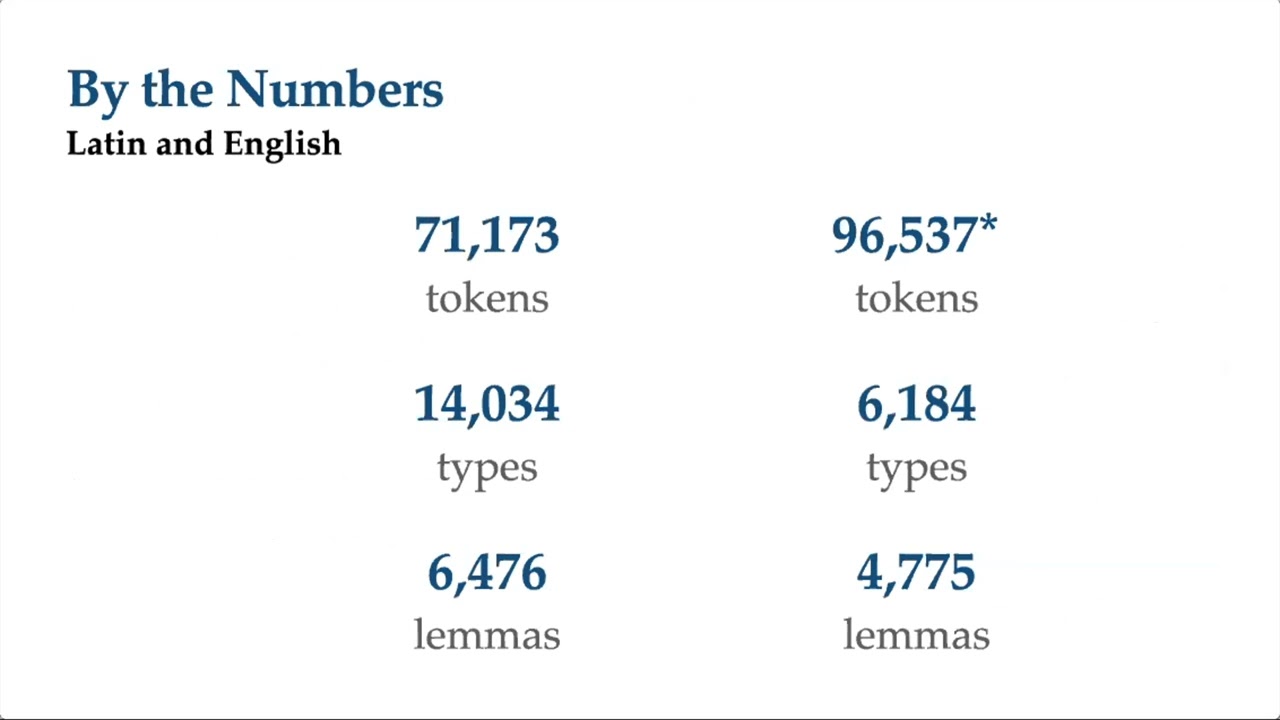
Fundamental linguistic terminology, specifically the distinction between 'types' (unique words) and 'tokens' (total running words), as well as 'lemmas'.
Familiarity with digital text file formats and data preparation, such as saving files as plain text (.txt) and understanding character encoding standards like UTF-8.
The conceptual meaning of 'frequency' and 'concordance' in the context of analyzing written or spoken discourse.
Utilizing Regular Expressions (Regex) within AntConc to perform complex, pattern-based linguistic queries.
Part-of-Speech (POS) tagging and lemmatization of corpora to enable more advanced syntactic and morphological searches.
Deep dive into the statistical measures of collocation and keyness, such as Mutual Information (MI) scores, T-scores, and Log-Likelihood.
Applying corpus analysis techniques to specific research domains such as Critical Discourse Analysis (CDA), stylistics, translation studies, or language pedagogy.
Transitioning to programmatic corpus linguistics tools using Python (e.g., NLTK, SpaCy) or R for large-scale, automated text mining and visualization.
3K views45likes1:15:23Original Release: 2023-11-29
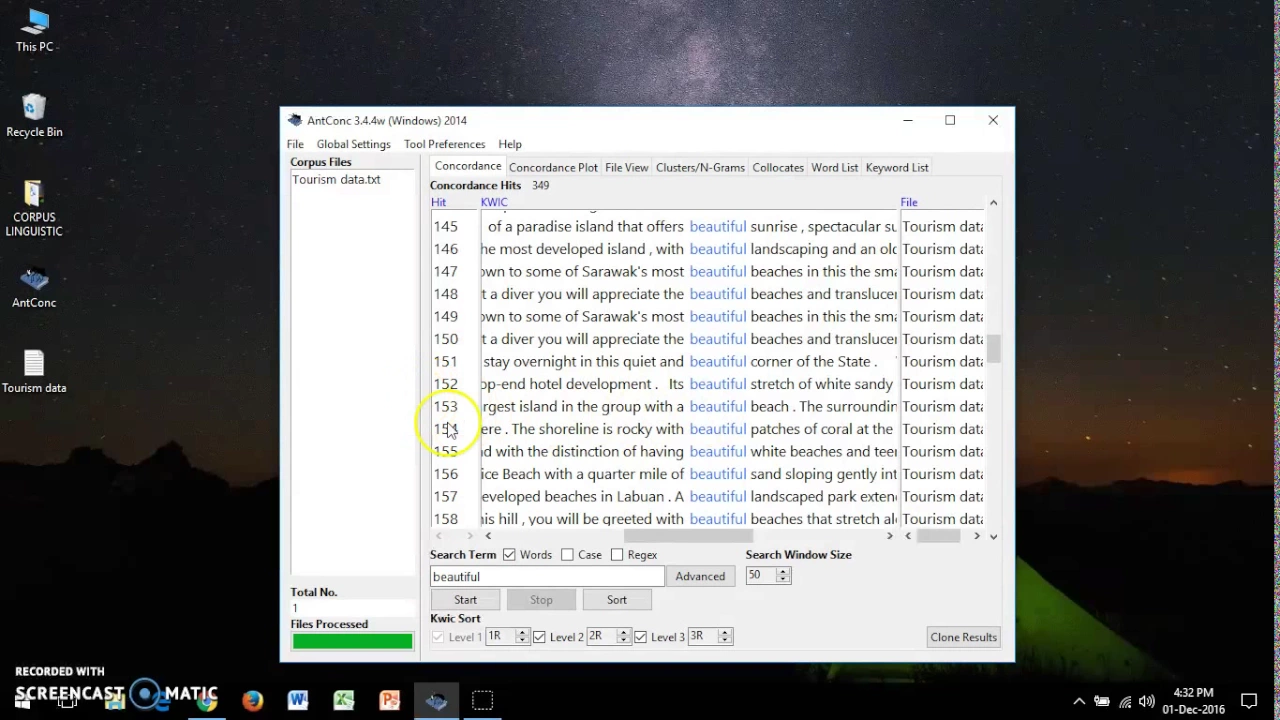
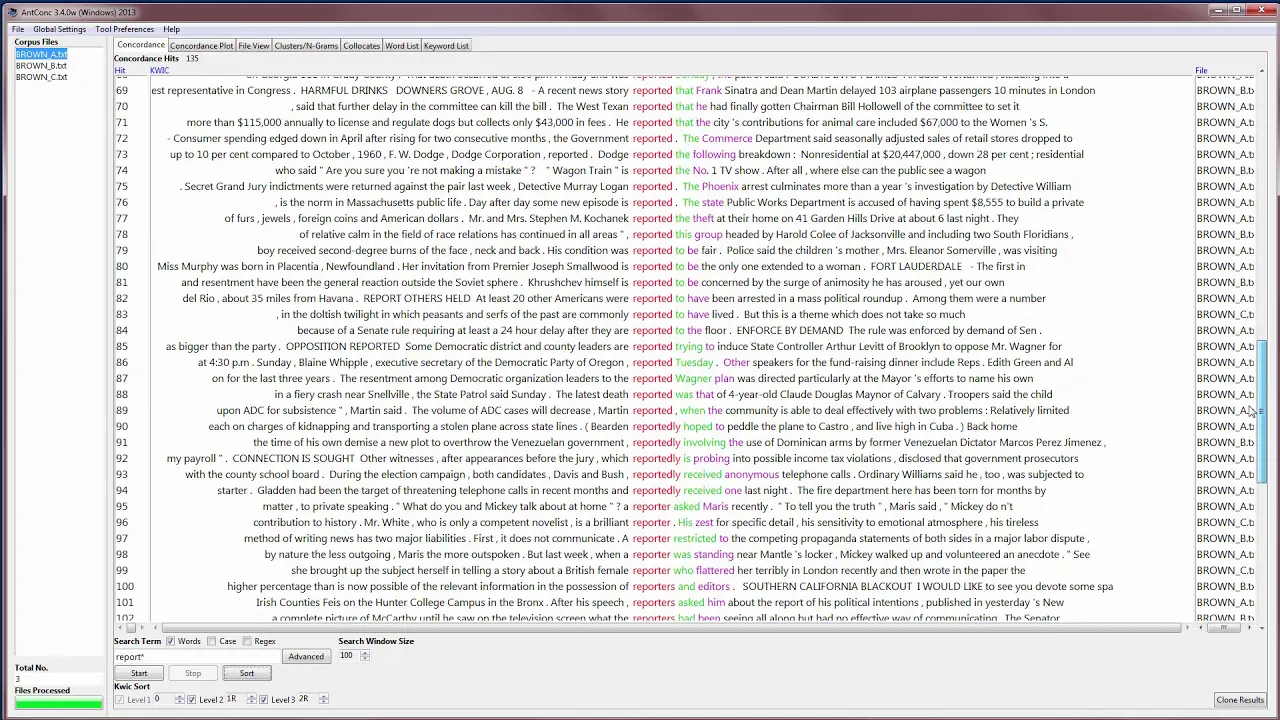
see the older version this is quite new so if you download I recommend you as recommended here if you're using Windows you download this installer version because uh it comes with the um list of coppers that you can use like American English coppers 2008 and also British English and all these Brown coppers and whatnot so it it comes with the existing coppers that you can play with um if you download the portable one this is easier meaning there's no installation involved you download you just click you can run it so this is suitable if you want to put in your time drive if you want to save it somewhere for easier usage um for Mac you can download this version unfortunately I've tested on Mac uh version as well the fourth one is not that stable so for Mac users you might want to try 3.5 but you can try uh 4.2 first um and if you encounter any problem then you can try 3.5 the problem is always what I noticed is the um the loading of coppus if you have a very large coppus once you load it crash you know it crashes uh for for this um Mac Mac version for Windows version somehow stable because I think they are using Windows anyway right so you can try download this and install it's quite straightforward just download the installer um and then install it accordingly once you have installed you will see uh this icon right but the icon um if you see the installer where is it yeah the installer and everything you make sure you create the um shortcut on your desktop all right or if you can't see the shortcut then you just search for andon in your in your computer all right for for Mac I think it's quite straightforward you just drag to the application folder then you can run it uh directly okay so now once you you install you will see this okay uh my advice to everyone before we even talk about um andon you need to have your cus ready or whatever you want to analyze if you're doing a simple discourse analysis then you need to make sure that your your Corpus is ready basically you know like a like a compilation so um the the tip is you can save your cus in Microsoft Word but when you want to use Enon it will be good if you save it as text file so what I Al do I will clean it uh directly using notepad right so if you go to your computer just find Notepad you will see a clean notepad like this right for example then you can search your CPUs let's say you're looking for the star articles let's go to the star um there there are some tools that you can extract web content directly but I noticed due to current situation of website full of ads um it's not useful because um how to put it there are quite a number of software that you can use to extract uh content from website the problem is because most website now they have ads so the extractor somehow will extract everything and then including all the like you know all these menu text everything will be extracted so it will it will disturb your your your kind of your text texture data right so let's say you found this article this is a bit manual um but I encourage you to do this first before you even go to Anon so let's say you want to take this sorry take this so I'm going to do it side by side um so that you can see it so you just copy the headline for example then paste it here um for the Encon data or the textual data you don't have to worry about um you don't have to worry about formatting as long as the word are all with space don't join them right so let's say done here if you don't need the details of the the person you just copy and then avoid copying all these things because this will disrupt your your data so copy paste and then for ads you can copy like this but uh later on I'll ask or you can copy everything like this first you delete it later but depending on how fast you can work on this like you can see this icon video then you just delete these are not related right delete also read also delete also read delete right or you can compile everything first and then do a search of also read you know like because like the star has this trend they like to insert this in between because you know that you're using the star for example as your main source then you can just search also read and then delete that thing because it's it's not your main data your main data is the article right so uh and also related stories to copy so this is one article depending on how you want to work um some people will do it one by one like now this is one right so you can do you can save it as the star let's o1 sorry o1 you can go by articles if you want to right uh if you don't want to go by article meaning if you have 1,000 article you have 1,000 text file right if you don't want then you can go by you know whatever categorization you want for example by by month so all the November one you just put in one text file so you can continue copying you just have to enter um you know enter down and then go to another article let's say just randomly pick yeah I'm not using any categorization so I just copy again all right and then paste and then you know repeat the same steps to compile your data I think this is the part where it is quite a bit more tedious because um if you are using software to do this it can do you know it can do the work but then you still have to do cleaning because uh the data capturing are going to capture everything it's going to capture every single text that they can find on the web page which is not meaningful because you still have to do the cleanup so if you do like what I'm doing now at least you can spend I don't know depending on how time but normally I'll spend about two two hours just to extract whatever I can first and then I'll move on uh to do something else and then come back and do it again if you want to all right but my point is compile it according to your categorization like this word you can remove because it's advertising for the web just now compile it first nicely organize it nicely then uh save it then we go to Enon because without having this you you can't really use Enon to to do whatever you want to do the analysis part right so this is one okay so I have quite a number of sample coppers here um including uh direct DMS and also Malay uh list cented so just to demo for you today but two ways you can do your discourse analysis for example by compiling your own data like you know the star Malaysia Kini or whatever or um you can also download existing coppers I think you can search there are many many coppers I have brown coppers here and all that that you can just download and then use it for your own analysis all right or you can use it as a reference okay now let's launch um andon now I'm not sure if you have downloaded if you have not downloaded then you can do it later um first thing I want to do is to enlarge this so that you can see so I'm going to go to sorry go to setting tool setting not Global setting font I'm going to make the font bigger so that you can see all right so you can change the font size if you want to so this is the new version 4.2.4 if you have the older version I encourage you to update because the analysis seems to be better in the 4.2.4 version so you try to download this uh version now you need to be familiar with the software interface first it looks complicated but it's actually very straightforward you have a Target coose here 0 0 nothing here Target corers is the the cus that you want to analyze for example if you're doing discour analysis on a certain theme in newspapers that will be your Target Corpus so you you compile everything first and then you're going to load it right so there are many ways to load the coppus if you go to file there's this open file as quick cus if you click on this it will immediately ask you to find your cus all right um let's say the start and then you will load this one I don't encourage you to do this because if you do a quick corus uh file once you close it right once you close and con um sometimes it doesn't save the whatever you need to save so I prefer uh whenever you want to use Anon go to cus manager so just open corus manager I have some loaded here already all right so once you open corus manager there's corus database raw file and word list right three types copper database are the one that you already created you can see under user is yours default list is given by anond uh Enon provide American English 2006 list and British English uh 2006 list so this this available CPUs normally we use it as a reference Corpus later to compare if you want to find for example academic words uh in in the uh British English cus then you can go for uh if you if you enlarge this you will see this they have press editorial religion blah blah blah these are some um available corers that you can download and you can compare right uh American one if um uh academic English is under learned learned DB so I have downloaded this so what you need to do let's say you want to compare your uh your coppus with the existing one let's say we press you just have to click on this select it right select it it if you see available mean it's not in your it's not in your on con yet select it click connect online and then click update and then it will ask you are you sure so yes then it will download this 5 megabyte of uh copper so you have your coppers ready if you go to your list you will see the Green Dot here so the Green Dot is indicating um you know the Green Dot is indicating uh the you have it in your database so now uh if I were to wait too big okay now this is this is copper database is whatever we have you your your own list and also the default list given by Enon this is one way of loading but I think most of us will be doing the second one raw file raw file means you you did just like what I did just now you compile from the Star you know Mia Kini or whatever if you if you are doing transcription you transcribe all the interviews blah blah blah you know just put it in the text file this is where you you create it so go for raw and then name it nicely no space you can use underscore but no space for example this is the star um I'm just using let's say smoking let's say I'm looking for articles from the Star about smoking right so I just put some name like this the star smoking then I have to add my files the coppus files are the one that I asked you to compile just now so just add go go and find your coppus let's say I have the star one now and then I can add another one the star two so if you have 10 11 you know 100s just load it right but make sure you know you know all this categorization so you can go by article you can go by date you can go by month you can go by themes right depending so you can load as many as you want right or if you want you can compile in one folder and then add directory and then you will load let's say if I want to use uh D my straat so I just put here and then I just select folder it will load all the DMS uh file that I have all right so uh you don't have to worry about the rest basic index uh setting like all these indexing they already uh uh done for you in a way so you don't have to change anything unless later on you prefer to do some deeper analysis then you can okay with this for now I think you just uh don't do anything yet just then create okay you can see the cus has been created so once you have created your Corpus you will have the corus name as the star smoking all right the star smoking so you can see the token count sorry the token count is this one I have 3,903 all right uh token may be fully words some um uh some could be you know letters depending on how you extract your uh how you compile your data just now so you have to do a bit of cleaning later but at least you have everything there right now what you need to pay attention to in this part is this thing called Target coppers and reference coppers so what we have loaded now is in the Target Corpus the one that we want to analyze so I'm going to return to main video uh main window then you will see only one here Target Corpus all right okay now we can start playing around with this tool uh kwi I is keyword in context used to be called concordance um kwi I concordant means you try to find how the words are used in context so this is useful if you are having a word list that you want to check for example you're looking for emotive words you already have the emotive word list let's say 20 words that you want to find then you can find them according to your uh Corpus database now based on whatever I have let's say I want to check on smoking so all I have to do is I just type smoking here um I take words I don't have to tick case or regex case means it will be case sensitive right case sensitive means it only detect the one with a small case or upper case so don't tick it if you tick it then it will look only for uppercase or lower case all right regex mean all combination so uh if you check for smoking it will be checking for Smalls King you know all this you will all look for all kind of combination which can be confusing so normally we don't use this then results set you can go for all hits you can go for top 10 top 50 100 depending but we don't go for random so we just see all this first then contact size normally is 10 tokens contact mean the before and after I think you will see once I click Start okay maybe I click Start you can see the context here is left context 1 2 3 4 5 6 7 8 9 10 10 1 2 3 4 5 6 7 89 10 10 so if you want a longer context or you want a shorter context you just play with this let's say you don't want that long you just want to see the the context within five words or five tokens click Start it will reduce the token size okay but normally 10 I think is quite nice if you want to you know when you do this course analysis you want to see the context then it will sort according to frequency so let's say you are checking the use of the word smoking in this article in this not article in this compilation of articles that you have from the Star you can see that smoking is widely used for smoking product smoking product blah blah blah can see because of the build anyway right and then you can you can also see other things right obviously if you look at this result it's quite biased in a way because I only compile articles about the you know the recent smoking product for public health 2023 bill right but um you can do all kind of sorting you can sort by frequency or by value but um sometimes if you want to check the this side you don't want to check on the right context you just change the option from uh sort to left and then start then it was sort by left okay so obviously for this uh database or this coppers that I have it's all anti-m smoking anti smoking blah blah blah because of the context okay so you can see how it's how it's organized this is for keyword in context now now the beauty of Enon is once you load it and you search for this one you can play around and click on it then you can see it's used in the article itself like now I can see how it's used all right so let's say you notice this one you can just double click on it and then it will show you exactly in the um Corpus that you have so let's say if you're reporting for your studies you can just extract it as your excert right take it out and put it as your excert to to prove how of smoking is used or you can just show the whole table like maybe top 10 right this is 1 to 51 you can reduce it if you want to um you can reduce it let's say top 10 all right or maybe top 50 depending on how you want it how do you copy um andon the previous version allows you to export um as um how to put it export as a text file you can see don't be confused with this one this is export setting nothing to do with the data so if you want to save this this one it's under this one now save current tab results if you click on this it will save as the uh kwc result and then txt let's say I try to save this first uh so that you can now it will be like this right then you will know the file right but not that nice so what we normally do is you can just click this top left just like Excel uh top left click it it will highlight everything if you want to see all then put all hits highlight this uh copy go to edit copy or contrl C open your Microsoft Word if you want to or Excel that's even better and then you can copy the whole thing right of course this one you have to change the orientation a bit okay so this is this this is how you kind of copy it extract it or if you want you can also open um Excel and then just you know paste it because you have to adjust all the all the you know all the things uh manually okay because the export for Enon is always text file txt so it doesn't um keep the formatting so if you want to keep the formatting like the colors and everything then you have to copy and paste to a Word document of excel right something like this I think what document will be quite quite easy obviously because my phone is bigger in the endon you can resize accordingly first before you copy um what I mean here is this before you even copy all this you might want to go to setting Global setting and then under font you change according to your your the font that you like first for example times in Roman okay time Roman font 12 change it first before you copy because it's easier you have to change the form meting later because later on if you go to Microsoft Word when you highlight everything and you try to change the font it doesn't work sometimes not all the time but you know uh it may happen Okay that's one this is under keyword in context now if you go to plot um I'm using the same data I'm using the same road again plot here means it will if you have more than one list here like I have one and two or if you have 10 it will detect the US usage of the word in terms of is dispersion according to your uh copper size for example let's say I just start first you can see I have two set of data here the star one the star two so from the plot itself I can see that smoking appears more in the first file it doesn't appear much in the second file because I'm searching for the word smoking this word the it's frequently used in the first one right because of the token and then the frequency is 41 and then you can see the dispersion is spread out across the you know whatever you have compiled for uh for the star two it's only used you know like maybe randomly or at you know at certain certain lines and only you can see the dispersion the plot may not be useful for your case maybe but um if you have a lot of Articles if you compile by articles then you can see how U the word is used across article um so it's kind of interesting to also visualize this so you can see the dispersion is 0.8 0.4 means the higher means the more is used across the um you know if you go by article then it's meaningful because you can say that the word spoken is widely used in that article not in the second one assuming that you have one article and second article and blah blah blah you have 10 articles that you can do this kind of comparison and it gives you a nice V visualization of how the word is spread out across the the U you know the article right if you want to if you want to see how it's used you just click on it and then it will show you all the detection like this line alone right this light alone has one two three four five five the word smoking is used five times in this line alone I mean that's the that's the that's the how to explanation for the plot okay I'm not sure if you have used this before but um normally this plotting uh visualization is is used for multi multiple articles or multiple uh corus comparison then you can see um you know the the usage of the uh certain words in certain context um for example another example would be dialects if you have like 10 dialects comparison you want to search how is used a word is used in across dialects once you search then you can see the dispersion then you will notice that oh maybe in that dialect the word is not used at all because it will be blank here it will be totally blank all right if if you don't like the color blue you can change the color to another color and and whatnot okay any questions so far so you can see the same data set can be used for keyword in context now I'm I'm moving to plot okay right and then the plot of course it will still show you the frequency so the word smoking is used 41 times in this file only 10 times in that file so obviously the distribution is higher in the first one all right file view is exactly the file that you have for example if I have two files here if you go to file view then you will see the exact um you know view of the whatever headers you have right so uh which is why when you copy all this into your text file you have to be very careful so that you don't um you know copy something that you don't need or something that is beyond your uh scope of analysis okay so file view is what you see so normally um the whenever you see all this keyword in context if you double click on the word you will always go to file view you can see here it's move move to file view all right it will move to file view because you can check how is used in that context itself okay all right you know just in case you're curious you can see like for example here the control the control just in case your your your you're curious why you know it's obviously you know why here because it's the name of the bill but in in case you're curious here you can just double click and then it will bring you to all these excerpts all right and whenever you want to go back you can just go back toy keyword in context and then find it again okay this is left context this is right context just to repeat uh what I said just now so that you see how how it changes now the phont size changes because I changed the font sizes now never mind but um I hope you get this point keyword in context is useful if you are searching for specific word list uh like previously some of my students were doing um emotive words in um Instagram caption and all that so they compile all the captions but they have the word list already like all the emotive words that they want to find so they find one by one and then they they compile it then you will see how um the emotive words are used in all these Instagram captions for example but you have to compile all this first in your u in your uh how to put it text file um there were some student who came to see me and say you know can you just just extract directly for unfortunately you can't I mean no way you can just give the link and then everything will be done for you you still have to do your manual job because you are the one who's going to decide which posting which caption you want to take right um uh at least the analysis part is easier for you because you don't have to manually do the coding or highlighting the words manually okay um f view cluster any question so far just in case before I go to Cluster these are these are one you know these two are related cluster engram and covid are related as well no yeah no questions okay let's go to clustering as the name suggests clustering is good it's similar to engram and even collocate um it's good if you want to find um clusters of words like when you check for the word smoking you want to know what are the combination right so uh if you go for smoking if I just start now you will see uh smoking is widely used smoking bill is you know second smoking all blah blah you can see how it's tested right if you prefer three three words or three tokens then you put three and then start right smoking product for blah blah blah obviously because of the word smoking um normally we go for two words because you know like you just want to find but it depends on what you are looking for if you're looking for more then go up the cust size but normally it's between two to five right so let's say I go back to two so at least I can see how it's used based on the frequency count my my copper size is not that big obviously for the star because I just randomly compile all these articles so you can see the um the range is not that big as well um you know the uh the the the frequency is not that big but you get the point of using clustering once you load it up then you will see the clustering or maybe I can load um something bigger let me just go to corus manager now go to corus database I'm going to load the American English database 2006 where is it yeah the academy English one okay I'm going to look you can see the this one has more one file to uh 0 let's say I search for the usage of however all right and just want to find out whether they use this so just start then you can see frequency is higher and then however and blah blah blah or you can say we maybe see whether personal pronouns I use we then we have we are these are clustering okay but this data is no longer the data that we use just now the smoking one this is American English 2006 corus uh so you can play around around with with whatever corus you want for now okay at least you you know what it means so you can have bigger uh cluster size if you want to but uh depending on what you're looking for then you can increase this and then click start again and then you will rerun it okay so cluster and engram are the same in a way because engram means how the words are used in terms of um you know one gr Byram and trigram means let's say just kick start same thing you can see it's quite similar right because this one is two angram sign is two so if I go for three you will see similar data right it's just a different name because angram um it comes with the um how to put it um the token comparison right you can see here engram tokens 52 three blah blah blah but if you're not using engram then you don't have to bother about this because clustering is enough right some people they um they they they're using engram analysis so you might want to use the engram version but you can see similar after all the meaning is the same anyway because it's looking for the the combination of the usage of the word all right whatever you're looking for here okay um collocate this one is like concordance plus angr if you go start right you can see collocate means the word that are normally being used with we right but not like this we have and all that but you can see C and we are quite close likelihood is 75 the higher the likelihood means the higher the chance of you looking at we and C together of course we is there right the like the association of all these words no know ourselves what blah blah blah so the higher the likelihood means the the closer it is with the the the word they looking for let's say if I search other words um what other words maybe book I'm not sure whether it exist in the yeah so you can see because of academic list likelihood of the word this is higher means probably we use this book this book all the time so the collocation uh size is higher the likelihood is higher all right but you can also see the frequency left right left right left right means the before and before and after left is before before the word uh before the word book you can see this is used before then after right because the right is after the word book okay so uh collocation is quite useful as well at times to see how uh certain words are being associated with other words so uh again depending on what you're looking for uh in your analysis okay uh word oh wait and cluster engram and collocation any question just in case I'm not sure if you're using this is but it would be useful when you encounter some um strange usage like um previously uh one of my students were doing on um slangs so we encountered some weird slangs that we have never heard before so we run the uh the class andram and colate just to check how it used just to get the meaning a bit and it will show you like okay that word is often used only with this words that kind of uh usage or maybe you can also uh detect the usage of um the the word by by by field right if you're looking at medical field for example then certain words are used more in those kind of text medical text or medical medical articles if you compare with uh normal magazine maybe you don't see the collocation so you can do comparison as well okay next one is word this is the most simplest uh the one that people use a lot it's just to check the frequency of the words meaning you don't have to search this one just leave it blank right just leave it blank let's say you want to find the frequency of any words used in all this of you know Corpus just click Start obviously in English the word d is the highest right so the frequency is 10,000 times more than 10,000 times then off and to blah blah blah blah blah so it will go by uh the top 10 usage or top top 50 okay this is for of course academic English if you have different set of data um you can search it right um You can search the the word itself let's say uh I'm not sure whether I can search book again right then you will see it's rank number one obviously but it's only 97 times but this one you don't get to compare because um you are limit you are limiting it by only one word right but for frequency count normally we will go for blank and then search everything right um what we normally do of course will be copying all this copy and then go to excel I start a new one paste right you will get your you will get your you know all this range and everything this one pos we don't have yet just delete then you will have the the rank like the is used how many time blah blah blah then you can delete the one that you don't want all right or in your Ancon itself you can go for Advan um query and then you can only you can take this one and search only for certain words but this one will be limiting same thing like what we did just now actually same thing like what we did here um um you know search certain words only but it will be limiting right um yeah depend on what you're looking for in this case again because um the tool is there but you can see X is there probably will be wondering why X is there so you can double click on this but no uh search term because it doesn't detect where it is not sure why maybe it could be you know the like X something all right XM or something but it's not it's not uh loaded in the database maybe I load our simpler one easier for you to see um let let's try let's try Malay Malay corus I have quite a number here uh let's say go for m one just go for Malay one and then this one is KL BM all right um this is I'm creating a new one so you have to click create then you will load a new one now every time you want to load a new uh new database you have to create one first right using raw file means you you create your own compus database is what we have created or what we have downloaded you can see now we have created one klbm now uh raw file is you know the one that we normally do we just compile everything in text file and then put it in right return to main menu so I have all my new K1 now so when you want to look maybe C right search you can see even in the Malay cus the word the is highly used right and then Dan say Yang Gaga all these are Malay words you can see there this is slang by the way this is Malay M You Know M so there's a mix of all this the S and all this so you can still search and if you want to see how it's used uh maybe load this one first oh yeah why is it oh okay oh yeah remember not to you know don't forget to uncheck this because every time you check this because I didn't put anything here uh so you won't find anything so uncheck this one first search then you will see how it's used I don't know where I think the start is still here oh I did remove it just now all right uh let's say C only one all right you can see the usage here all right so if if you see the word frequency I load it again it's 136 but if I remove s start then you get the whole list then you'll be wondering how come in M corus you have the because I think it's not the Malay corus is this two just now I I forgot to delete all right but uh um let's say done click double click on it then you will see done right and uh same thing just now same concept so you will see how the word is used um the right Contex is the you know after the word left is before the word so you need to see before and after then you get an idea how how the words are used but this is align by right if you want to see before then click sort to left you will see how the word is used before right gag I don't know why yeah because this is I think uh the data is uh trean it's a folk tale but but then told by the Malay in KL all right so so the spelling is a bit different okay all right so if you need to check the whole cont sorry yeah if you search can it be a phid like rather than words can can they say if you try to search if it exist no let me let me try Okay okay then okay you can sear you can search uh you can search more than one word okay depending on what you're looking at um uh but normally we go by word list okay that this is this is purely searching based on existing words that you want to find out like um like if you know you want to find verbs then you can probably search all the words but if you don't want then just click Start uh sorry just click um how to put it something okay something M you can put the aster or Maran something obviously it will it will just put everything there already right you can put the wall cart if you want to this is wall cart or um I don't know whether it can yeah you can put the aster for wild cut means any combination but because our coer size someh so you can't really see uh uh you can play with the as so you can find um any combination of makan something doesn't have to be doesn't have to be Ian but in in our case because the makanan seems to be more right so you will see makanan more here okay uh um yeah this is this is word by how to put it by frequency count keyword um this one is like comparison okay for keyword this one it means you are comparing your corus with another reference corus all right so this is a bit technical now if you if you go to file if you go for open corus manager I'm going to clear this first I'm going to clear clear this two first right this is this is my target coppus return return the file wait I think let me let me clear the database so that it's easier uh let's try to load back to the smoking one easier for you smoking one and then let's say you want to compare this is Target coers you can see the tab here Target coers this is the one that you have let's say you want to compare it with another coass uh like a compare Aron kind of uh style so go for reference corpus now it's blank because you have not selected any let's say you want to compare with the uh American englishes now right so just double click on the American coer this one is not complete oh yeah I didn't download yet um this one down here yeah ready make sure it's ready yeah double click and then you will load here right it will be loading uh loaded here then you will see your Target Corpus is yours reference corus is the one that you are referring to your the one that you want to compare right let's say I'm comparing this corus with the American English uh academic list so you will see two two part here Target and then reference all right just now know right just now you don't see this because you're not comparing anything this is useful if you want to check the likelihood of whatever you have in your coppers in comparison with some other coppers or copper that that that you have you know you want to compare let's say if I search this I just click Start then you can see in uh the word smoking appears more frequently in a target one t stand for Target but only appear twice in the the other Corpus but the likelihood is high the higher the likelihood means this word is really really important in the coppers that we have in the Target coppers really important as in is the keyword used in these two uh article as compared to the uh you know the reference one meaning it's not impacting the the reference Corpus right it's like this if you find it low right if if the likelihood is low means your word are not really technical words means it's commonly used in this corporate as well you know what I mean like um the higher the keenness the higher the likelihood means the more specific is the word for that particular um you know cose that you have for example you you have compiled like five articles from the Star you want to compare with academic word list right you downloaded the academic word list the academic word list will be or the academic Corpus will be your reference Corpus then you compare with yours suddenly you realize the likelihood is very high for one word like suddenly smoking is very high for example obviously the articles that you have compiled you have compiled are talking about smoking more than the common one so your you can say that the you know these articles are highly specialized to one theme or one one scope you get what I mean some common words like Malaysia is also more here because this is American English obviously the copper side may not have a lot of Malaysian word or even K and all this but you can see lower down some basic word like fine and all that even before appears more in the uh reference corus this is reference corus that means the likelihood the keenest likelihood is lower the higher the likelihood for all the keenness here means the most specialized is the word in the compus that you are targeting your target corus are your corus not the the one that you're referring to okay but it really depends on your comparison as well if you're comparing more or less the same um you know same same level let's say if you're are comparing by certain level like CFR you know CFR Comm framework like you want to compare C1 and C1 obviously the likelihood will be lower because it's supposed to be equal but let's say you assume it's equal uh when you run the when you run this Enon keyword analysis the likelihood suddenly very high that means there's one word used in all your compil text here it's weird you know weird as in could be good could be bad or uh could be too technical that is repeatedly used in all your articles but not in the CFR word list for example so the the higher the likelihood the the you know the more specialized it is obviously you can see all this top 10 is very specialized to the Articles because the articles that I compile are all about smoking bill in Malaysia all right okay any questions so far can I okay Monica ask for word can I search for more than one word at one time uh like Kami and Kita at the same time um you have to do one by one yeah you have to do one by one if you search multiple times um if you if you do more than one word sometimes it will be uh quite confusing because you will highlight different lines right it's better to do one by one I hope I answer that oneika okay work cloud is optional I think this you don't you don't really use it they just added this work Cloud uh you know from out of the blue for for this version so work Cloud work Cloud means you can whatever result you have here let's say I run one here let's say I run another time smoking you know all the results here that you have in whatever tab you have it can change it into wordcloud let's say I want to have a work Cloud for keyword in context kwi I I just click Start and then you will generate the work cloud based on the result here obviously it's smoking because I search for the term smoking anyway right but if you want to go for frequency then you can remove the word smoking start let's say you get all this uh you know all this uh results you go to work Cloud change to uh word and then start then you can see the is bigger because in your rank the is number one two is number two but I don't think it's useful somehow I don't really like the work Cloud visualization but just tell you just telling you that it exists all right you can even change the color and everything if you want right uh and then start again it will change the work Cloud color maybe more useful if you have specialized search of words all right maybe more specialized if you have that but I think if you are looking for like top 10 let's say I go for top 10 if I were to go to top 10 here just now it's all now it's 10 top 10 only if I click Start again and then if I go to word cloud then I get this not that meaningful all right but just to tell you that it exist here so we have keyword in context plot uh plot is useful if you have more than one if it's only one the plotting may not be that beneficial but unless you want to look at the dispersion uh file view is where you view the file clustering more than one word uh andram two these three are the same depending on what kind of mechanism you're looking at because engram you follow the engram format collocate somehow will give you more words than the direct combination meaning uh the words that quite close to the word in before and after and word is the word frequency right Mo most likely the frequency count the word usage um keyword is to find the likelihood of the word in another Corpus to compare the likelihood of the uh the word appearing in more than one CPUs all right and then work Cloud okay any question so far any any question so far just in case hello doctor uh I have two questions here the first one is uh can I directly put PDF file or Word file into an con okay for PDF you actually you can put more put PDF put word but uh the the advice is to use text txt because it's cleaner because if you put word when you sometimes when we copy Microsoft Word content it will you will accidentally copy all the what you call that the the webite script or whatever so you will have extra things that you don't see that's what I meant so uh if you use text file the text file will clean all your content and only words are being retained you know what I mean like here right you can see in text file it's clean if you use word it will copy everything including the table and everything when you load it on Enon it can still read but sometimes it will end up having some extra things that you don't need but it you can do that the answer is can but not advisable I hope you get my point yeah okay thank the thir second question is if I compare uh my target corus with reference corus uh should the number be equal uh the in other words if I have my target cose of two more than 200 files and reference cus only 50 50 files is it available it be performed it it can compare uh but you can see the likelihood this one the likelihood uh will be will be higher because obviously my size is uh smaller what happened is it still rank according to the likelihood but you can see the number is a bit ridiculously high right because the word count or the token size is different so if you want to reduce this extreme numbers you make sure that the the Target corus and the reference corus the tokens are quite equivalent in the in the size so so to make to make the number smaller so that it doesn't look so big then you make sure that the token size are similar but if you don't want to right if you don't want to meaning you have different in terms of size you can do it like what I did here it just that the reporting of the numbers will be slightly bigger still meaningful anyway because it's still rank number one you know what I mean for example if the token size is similar let's say I have 16,000 sorry 161,000 tokens here and if I have 160,000 here as well the token size will slightly be smaller because uh not not not to sorry the likelihood the number will be smaller maybe around maybe around 20 or 18 because the the size are quite similar um or else later on you can try if you put same size you will notice that the Keener size will be will be lower the the number is still lower but it's still rank number one anyway what I mean here is like this it still tells you the the same the same results still smoking is very specialized but the when you report then you know it looks very ridiculously high because your this this size is bigger all right get me so you can run but then you can run it just that when you report it then you probably you know might want to uh you know might want to justify why the number is so big right the closer the size of the token the smaller slightly smaller the uh the keenness or likelihood unless the usage of the word is extremely high right unless the the word is extremely high okay okay I see and what does uh kin effect mean uh what can those numbers show us K kenis effect um let me go to this tool setting if you go to Tool setting um if you go to keyword let me just can you sorry sorry let me just let me just enlarge the size for [Music] 16 okay let me enlarge the size a bit so if you go to Tool setting under keyword um if you go to effect size you have this all this lock likelihood two term four term so the default one is four term this one you have to go and check it out first which one you think is useful for you the the one that the uh Corpus linguage use is always lock likelihood not sure whether you're familiar but uh it basically means how lightly is the word appearing in the the bigger coppers as compared to yours the the one that they use is for Max but the the one the effect size is D Lock ratio this one is slightly more technical some people go for dice some people go for zcore but kind of same meaning what happened is effect size means um it's quite quite similar to likelihood in a way this word smoking for the your copper size the bigger the effect size let me just go by effect size can I go by effect yeah effect if you go by effect size it means the higher the effect size the more important is the word in your corus um yeah more more important as is is used widely in that coppers that you're using or coppers that you're targeting all right um in in this case because my articles are all about smoking obviously the word smoking should be the one with the highest effect if I take out smoking in other words if you take out smoking from your coers um basically your coppus is gone in a way like um how how how should I explain it it's like because it's about smoking if you take out the word smoking from all your Corpus it means the the the whole text Will kind of be no longer about smoking or um could be something general I don't know whether you get me okay like this when you comp compare two types of text can be one gen generic text can be anything right and then one is specialized text in order for this text to be specialized this specialized teex need to use certain words that distinguish it from the other text let's say if it's an academic text this text should be using a lot of academic words so the higher the keenness means all these words the academic words or whatever in this text should be there if you take this academic words out it's no longer academic it become generic you get me so the higher the effect size means the more important is the word to distinguish the specialization of that Tex or the U yeah the how to put it the specific uh genre of that particular uh corus or the text that you are analyzing okay but I think you don't have to report this I don't think we we use it I I myself don't really use this but it's good to know uh like key key keenness likelihood and keenness effect when you're comparing it's more meaningful if you compare equal um not to say equal similar tax right now M mine is a bit biased because I'm comparing news articles with academic English so may not be that accurate if I compile all academic text like all essays written by students I compile all essays and then I run it with this reference Corpus learn it means academic list then I can see a different Trend so I can say like in Malaysian academic text uh s is used Whitely for example in American academic text S is not used at all or maybe rarely used because the likelihood is higher in myopus get me I don't know whether I get I explain this well uh does that that number the effect number um mean uh related be related with a significance level not really um not really sign not not you I I don't really like to use the word significant because um it's more like importantance yeah I would say even though it sounds similar to significant means it doesn't mean that uh the the TCH doesn't you know um cannot stand on its own without a word it just mean that if you uh if you see the effect size this word this word is highly important in your news article because you're looking for that thing right like you're compiling compiling all about smoking obviously this one has to be higher but it doesn't mean that um how to put it um um I don't like to use the significant because when you say significant is like you are saying that this word is is significant that word is not significant it's more like the importance of it the level of influence that it has on other other other words okay I see thank you doctor thank you very yeah okay any other any other question no yes very clear thank you okay okay um I I did not incl um you know I did not include uh by type unfortunately in Anon this one um it doesn't come with the uh part of speech tagging meaning let's say in the uh data in your Corpus you want to find only verbs it doesn't allow you to search directly like that you have to do the better search so for those who want to do that you might want to download the uh the tech version the en cont uh go to the link is now oh yeah that link as H go to software and you might want to try this one so I don't have time to cover this maybe for next session but if you want to explore this is called uh tag and uh and is part of speech Tiger but only for English at the moment only for English at the moment uh for Malay and all that uh they you have to probably list give them the list like you have to upload your own list of categorization that you will be able to find for you uh the one that they have are all English uh POS uh part of speech this is for those who want to detect like verb usage noun usage or you know adjectives and what not this is this is uh tagging according to the part of speech all right you might want to try that but en cord itself uh doesn't allow that uh on on the main one Enon main one doesn't allow that because you need to search on your own okay all right if no further question just in case no seems seems to be one seems to be yeah uh Dr Dang is it okay sor but now um now um what you can do is you use all this uh image to text text text recognition so to text image to text yeah image we scan but those days this depending on the depending on the quality of the printing the quality of the but but I don't think it's free fully free but believe up to 50es snap then for example I go Google and see can Tex this one assuming your text is in um your text is image you just use Adobe Adobe Acrobat you just change it to text from from so let's say I put [Music] here text simple SLE text okay need pick okay let me try and find one image and see okay let's say I have this image the problem with image is always the quality of the image let's say I have this image articles scan oh exit too big oh too big okay I find a smaller one so the file size is a bit too big actually another one is Google Lens okay this is one file all right and then submit [Music] file so you will scan through right or you can see so so you can just download okay oh sorry so they can extract the uh they extract the content from the image to text file okay so all you can search image to Tex so you search for the file let's say I upload this uh article and then you you can choose whether you want to use dog PL text and then you make sure your language is there m m then convert it will take some time right let me see another one is Google lens gole on your mobile because you want to okay so article newspaper article cutting the one that I downloaded as imagees now sorry I just have to show some many window this one this is image Right image so you use the tool just now and it converted it to text right but but you can see depending on quality of the image some of the words the detect right some of the words to uh data detect all right so this is one but you can try other this okay any other to Dr hello here very [Music] interesting but my students my student I don't know how he did it he managed to get like uh 1 million uh yeah but maybe I think the person clean up you create your own that you have to clean up the data it's quite complicated manually I remember uh my students uh from comput Linguistics I remember I was there clean up the yeah had problem with the [Music] DAT certain things right symb [Music] [Music] ah so the the you can do it manually I saw my my student actually my student uh uh taught me how to do it but I haven't I haven't uh try again you can always pay people to do it for you and um it uh form clean up the data and it doesn't take that much time this is from my experience Usman is doing uh uh models obligatory models in Pakistani englisha yeah yeah yeah so he had uh nobody wants to give him uh people want to give him the the English data comp he he collected from the from different from in in text form in from the from the internet but he managed to do it yeah from zero he managed to do it how he created his own comp yeah yeah yeah but there there are there are there are a few a few build bu the thing is exract you you get from soft copy all from web that will be easier because web version link like this is one example I show you this link this is uh this link is called web page to PL text so you just give the link right and then you can convert to text but the problem is like I said it will also include all the menu my student so you can you can to delete so you just take this part only all right you can just take this part only but still it's similar to what similar to what we were doing just now you still have to decide which part you want to take you just copy paste copy paste copy paste if you use coose Builder can download you can search corus Builder what happen is corus Builder copy plain text to the corus Builder the corus Builder will arrange line by line systematically not not like they jumble up everything yeah but uh but for Enon actually Encon is quite quite intelligent enough even if like just your data if you just copy paste randomly like this it will still read while you know even though the the sentences are all disjointed like this it will still be able to read it's just that we just have to remove all this extra things that we don't need right so uh like like Dr nor mentioned you can use some command to to remove but you need to know what your removing like like if you are looking for the Star article the Star article they other the tendency to use like uh read like related news and whatever you search for those thing and then it will be removed from your from your Corpus but the easiest way the is without using any software is actually the fine and replace all right fine uh find let's say you find you find Rel news then replace it with blank just blank just put a space and then replace all for example and then you will search and then you will replace all this uh words that you don't want or let's say you don't want the word I just try here then just replace all then all the word we rush will be removed this is this is the simplest way like what we do in Microsoft Word or notepad but there are software available like what was mentioned by Dr Nora uhu requires a bit of programming right it's a bit of programming if those who are interested so so correct what we are talking about today is the analysis part like I mentioned earlier youa if you don't have the compus you can't do the analysis so Enon is only meaningful after you have done your after you have done your compilation or your corus to all right so I think um let me check let me check uh this Lawrence Anthony I think he has do it can't remember whether he provide the uh encom Builder uh not here maybe not here not here uh but I I'll share if you want to a coose builder T corus Builder is another software so it could be complicated but I think the easiest way is to just copy it in text format like this right like just uh just copy it in text format or uh you can copy in Microsoft word first or PDF whatever you want but save it as TST uh text then you can use uh anond easier okay maybe another session on building corus right just analis not not about building the corus but if you want another session we can have another session maybe can invite I can always arrange that you know inv invite to P I know I know P so because for for computational linguistic we also use it for you know centl analysis and everything that one is another software but more or less the same thing we still have to compile the uh the coppers anyway still without the coppers we can't do any analysis so uh uh like fire ends the one that you can download is for social media same thing uh the the another software by Lawrence Anthony is called Fire end those of you who are doing social media analysis you can try that software first uh the you can extract posting from Facebook from Twitter now it's under review because of the changes now can X and then ilas remove all the API so so you can't use the Twitter data directly you have to do the manual manual extraction uh but um those yeah extra extract is more technical that's why I don't really cover today it's more on the um technical part of how to how to build your corus but Enon is more to analysis more to analyzing your your your your text texture data so for for those who are doing mini research like if you if you are compiling uh compiling you know all these article using txt sought by article that will be more than enough actually for for uh for uh for analysis it's just that yeah repeative work copy paste copy paste you know that kind of thing okay any other question as back to thank you so uh that actually makes me feel a little bit better about my inability to explain people how to use um yeah I have to share the oh yeah you want to share yeah I need to share the the attendance okay so I have an activity attendance sharing okay this is the attendance
Up Next

105:18
Sound, Silence & Listening: Hildegard Westerkamp on Acoustic Ecology
@PRAKSISoslo
9.3K views•2020-12-21

178:38
Whole Brain Architecture: First International Workshop 2024
@thewholebrainarchitecturei9784
640 views•2024-07-22

9:49
FastAPI vs Flask vs Django: Choosing the Right Python Web Framework
@TechWithTim
302.5K views•2024-05-26

1:42
Game of Thrones Opening Credits: A Cinematic Analysis
@gameofthrones
46.3M views•2011-04-18
Related Study Plans & Knowledge Roadmaps
Structured learning paths in General & Interdisciplinary Studies
general-studies
Artificial Light: History, Tech & Human Impact
01The Pre-Electric Era: Fire, Oil, and Gas Lighting
02The Incandescent Revolution and Grid Electrification
03Gas Discharge and Fluorescent Illumination
+ 3 more learning modules
14h6 modules
Explore Roadmap
general-studies
Elevator Engineering: History, Physics & Cities
01From Hoists to Safety Brakes: The Dawn of Vertical Lift
02Hydraulic vs. Traction: The Engineering Physics of Elevators
03Modern Speed, Safety, and Algorithms
+ 2 more learning modules
12h5 modules
Explore Roadmap
general-studies
Rubber: Material Science, History & Geopolitics
01Origins of Natural Rubber & Mesoamerican History
02The Chemistry of Natural Rubber & Vulcanization
03The Geopolitics of the Rubber Boom & Colonization
+ 2 more learning modules
12h5 modules
Explore Roadmap
general-studies
Containerization: Evolution, Logistics & Trade
01Ancient Trade & Bulk Cargo: Amphorae to Barrels
02The Industrial Revolution & Cardboard Packaging
03The Containerization Revolution: Malcom McLean
+ 2 more learning modules
12h5 modules
Explore Roadmap