




![우분투 서버 관리 ] 9. 파일시스템 마운트/언마운트](https://i.ytimg.com/vi/fRh0YeoGcl0/maxresdefault.jpg)


![[A-4] Dockerだけじゃないコンテナruntime徹底比較! [Makoto Hasegawa(CyberAgent)]](https://i.ytimg.com/vi/8jbJgI7Q6IU/maxresdefault.jpg)








OverlayFS is a Linux kernel-implemented union file system (available since kernel 3.18) that allows multiple directories to be stacked on top of each other, presenting them as a single unified file system where modifications are directed to a writable upper layer while lower read-only layers remain immutable; this technology serves as the foundation for containerization tools like Docker and Podman, enabling efficient layer-based file system operations without requiring additional software installation beyond a compatible Linux kernel.
OverlayFS and Union Filesystems: A Comprehensive Guide
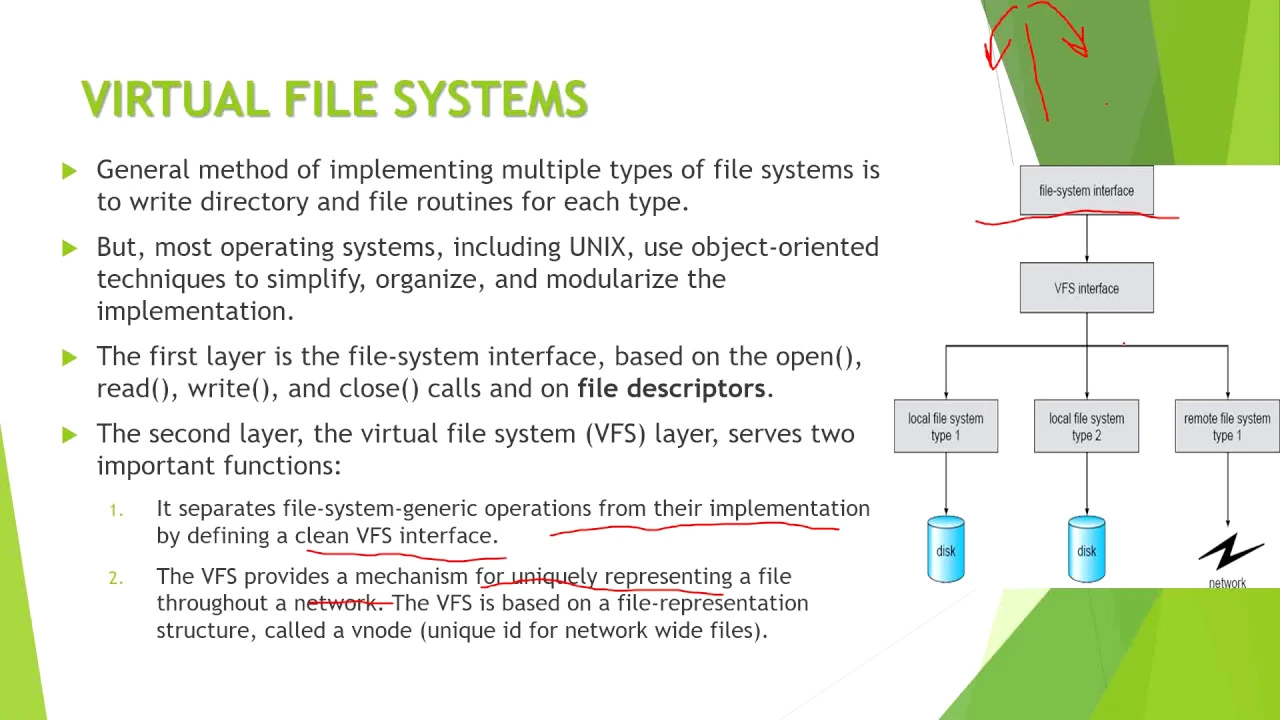
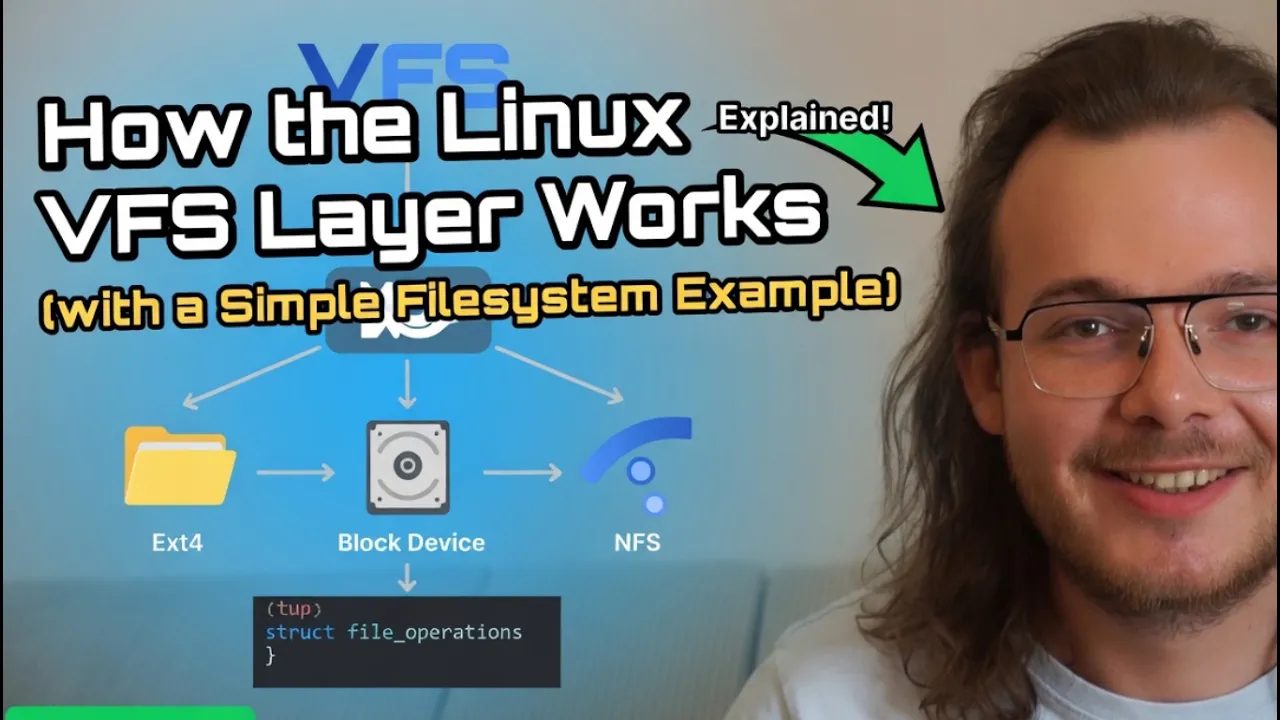
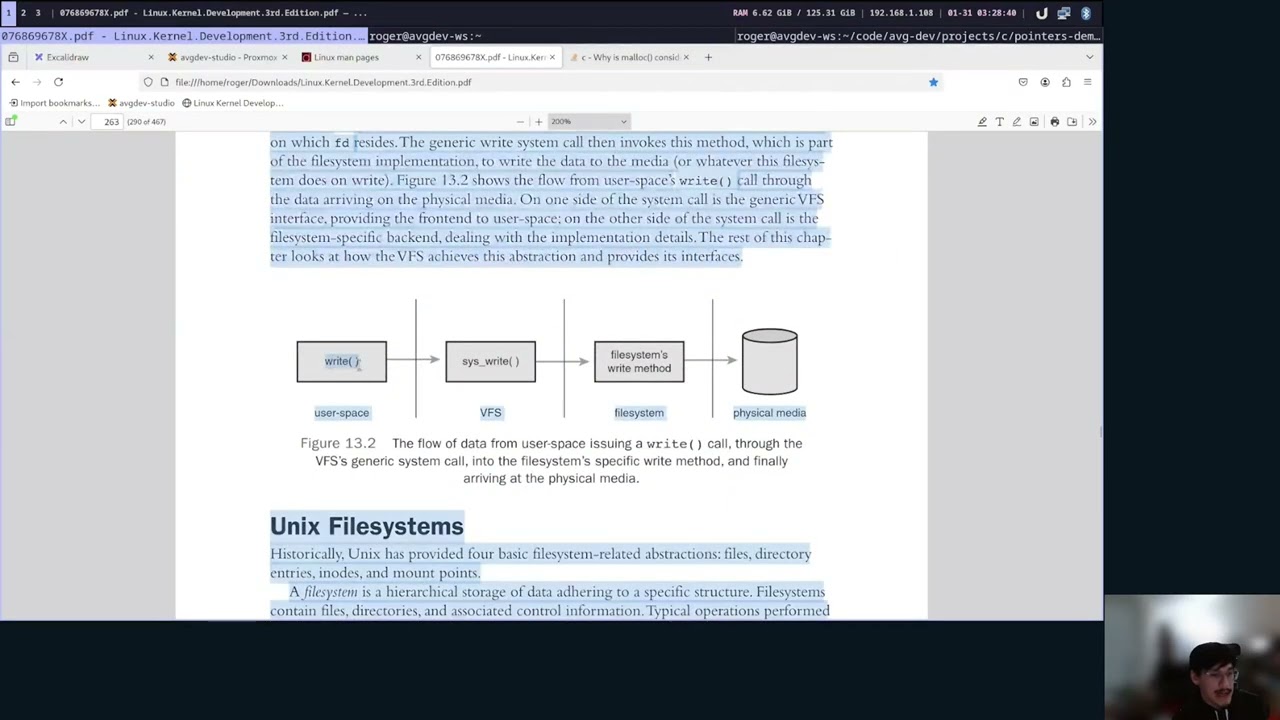
Added:Basic Linux filesystem concepts, including the Virtual File System (VFS) layer, mounting, inodes, and directory structures.
Fundamental concepts of containerization, specifically how container runtimes isolate file systems using namespaces.
Standard Linux command-line operations, particularly mounting filesystems, bind mounts, and managing file permissions.
The conceptual design of read-only (lower) and read-write (upper) storage layers in software deployment.
In-depth analysis of Docker storage drivers (such as 'overlay2' vs 'btrfs') and configuring container runtime storage backends.
Understanding Copy-on-Write (CoW) mechanics at the kernel level and its performance impact on high-I/O applications.
Security auditing of layered filesystems, including user namespace mapping, file permissions boundary testing, and vulnerability mitigation.
Designing immutable infrastructure and stateless Linux operating systems (e.g., LiveCDs or netboot systems) using OverlayFS.
459 views16likes2:16:47Original Release: 2023-12-21
hell you he can you hear me can you hear me can you hear me I can't hear myself can I hear myself Stu now better now better now better [Music] now this should be it perfect for sorry that wasn't I didn't manage to get the silence mute button at the right time okay I think everything is ready for this before I forgot okay so let's begin shall we so today we're going to be talking about something called overlay file syst system or overlay FS which is essentially a way to Overlay multiple directories or yeah mostly directories one on top of another in a such a way that it allows you to M present them as one file system so they would go like this in layers and at the end present them as one files item one really a bind Mount and it it is in principle immutable with a a right writeable layer it's basic technology that is used by everything from Docker podman to flatback for example and we're going to check it out this technology it's from what I appear really simple to use use to create a bind M that is essentially as many directories stacked on top one top another [Music] so let's see what what we can come up with and have fun and let me just start a virtual machine I should have one uh wait a moment wait a moment so hello everybody so if if you have any questions comments suggestions or otherwise you would like to chat with me I believe chat is over there or there I don't know somewhere somewhere in that location around your screen and type type in it as much as you want because any kind of interactions help and don't forget to like subscribe comment and no he that that won't be a thing I already ate so no more dinners for me so does anyone in chat already know what the overlay FS is I already already started explaining it but if anybody already knows something about overlay FES that would be interesting to here because there or Union file system to be more specific because ORS is just one of them and based on what I'm seeing it's actually relatively easy to use and and create such file systems of course I don't have a I don't have a VM to use so um let's just quickly conjure up a VM we have incus that would be make it that would be the most easiest to create a VM oh I do now if I can remember how to create an VM with incus Inus launch VM VM image to 224 I believe oh okay let's let's look at my screen not just at not just at me right there we are so this is my terminal as you probably already know and let's create a VM with incus incus is a replacement for uh what's his name legs d by canonical and Linux containers with chonic pull pulled legs D from lus containers project and they forked it to create this okay okay VM it's essentially that just a bit different oh my believe that will work really okay second window inclus D Inus I know it used to work SL user bin oh um Locate [Music] in oh Le Inus in sud here we go uh inos has started for some reason it doesn't want to start with this system job great it's now creating a VM Imes oh yeah of course what am I thinking yeah it's retrieving the image it's going to take a little bit to retrieve the image so how are you guys doing in chat oh no device could be found oh crap never never inited that would be interesting [Music] not there initialized I guess we're downloading the image from oh well I guess I have to find a way to fill next few minutes because I guess we're going to be installing things the old school way work manager yay I need to figure out what why this this breaks why this broke I normally don't use incus VMS I just do incus containers so I may just pop this message to to someone I know that might know how to fix this so download complete word manager it is refresh this choose volume next eight course will suffice right and what 16 gigs of RAM 32 gigs of storage uh default net let's go with uh your standard ufi now secure boot apply this and begin installation so you have any questions again chat section any somewhere around here and type it up uh I would like to talk to you guys right now that we're doing this installation stuff that is really not all that interesting or in the what the stream should be about since we should be about talking about overlay fs and we're going to be talking about this moment when installation actually starts I'm going to continue to talk about overlay fs and Union file systems I have bunch more to say but I need to ensure that everything works before I do it yeah yeah yeah yeah yeah yeah nope this will do two two WR a secure password of course as a state server that's it so the is thing about overlay FS uh when we talk about it as an overlay FS itself comparable to many other Union file systems it is Kernel implemented which means it has a kernel driver and you can actually all you have to do is run you don't have to install anything all all you have to do is have a kernel Linux kernel for that for it matter so many of you us Linux users would just be able to use this and why is this useful so again stuff like flatback them to enable a mutable layer on top of an immutable file system of a flatback so you have you know and to actually bring in stuff like certain directories and so on do that with overlay FSS and in many cases with stuff like what I do for example you could let's say uh use overlay FS to have a mutable or immutable config files soal dot files and then on top top of them have a mutable layer let's check that actually we could check that out later and maybe even program something to do that an idea that shouldn't be a actually that hard of a program to write any language will do Rust C python C of course I'm going to do c maybe we'll see but if you have any comments suggestions again please type in chat it actually really really helps uh the algorithm because more more active chatties more more algorithm likes me so chat on please we might have new people join us if there is more tratter did it sound very desperate yes I did do I care no I don't chatting in progress okay and I need to reboot my new VM press and enter no you don't I know you don't uh I many times said this face is for radio and my voice is for silent TV so an biggest oxymoron on the planet or or am I just a who knows this may become a short like this really this part specifically okay it put it up let's see uh and say goodbye to bigp full screen now just bigp in a tiny corner where he shouldn't be probably this is probably the whole thing on screen so we have our output but what we're going to do we're going to actually open up a terminal we can close this who cares for that damage it doesn't work and we're going to do an SSH but first we need to have an IP so bigp and our super secure password it's a strong and secure password if you don't know how to create one of those as as dist he will tell you so now we have an IP SSH 192.168.1 122.
250 and it ask if if this ed25519 key fingerprint is correct which it is I have no idea if it really is but it is and our strong secure password again and here we are o we have 44 updates oo ah we can close this window and full screen this now to start working on overlay file system with overlay FS all you need is a command specifically a mount command and on the second monitor I have open a really really really not okay website because there is no dark mode Arch Wiki it's blue and light light light blue Almost White it's it's a horrible website when it comes to looks information on it it's pretty damn well good so to quote them overlay F allows one usually read right directory 3 to be overlay onto another read only directory 3 all modifications go to the upper writable layer the type of mechanism is most often used for live CDs but there is V wide variety of use cases again like flatback used them Docker Docker images are built of many layers and now we have to smoosh those layers together into one and so they appear like one file system each layer specifically does makes like one one discrete change to the file system so I have to smoosh them together into one file system overlay FS does it or there other other drivers as well like Au fs and so on AFS being another Union file system but the most popular choice being an overlay FS it's it's in kernel since kernel 3.18 and it's enabled by it's enabled in default kernel and overlay kernel module is automatically loaded upon issuing a mount command for overlay FS so to start with ORS we're going to just do a quick to Su so we we don't have to worry about sud sudo all the time and then we go to a root I'm going to make two directories low and work there we going to make anory called Low so there are basically three three modes overlay FS Works in there is a read right mode there is read right over many layers and there is a right mode and read only mode Let's first check out read only mode so let's Mount DD overlay this will this will tell that this is an overlay FS Mount overlay again believe that's the name but not sure then o options and we go lower there equals SL lower uh and then since we're since we're going to check out the what it called the read only mode we're going to do this or we're going to do this semicolon because we we have to say multiple options and we going to do slash low now we're going to also have to define a work directory work there equals slash work there and a directory where it mounts to slash MNT oh no semicolon this there now if we go to slash MNT there is empty why because we didn't actually do anything in low and lower directories so let's exit out of here and do a ount of MNT so any questions in so far meantime I'm going to just quickly tdch up some test files I don't know do I have engine here nope and we're going to put some text into this test this is awesome and now we're going to go into low and I'm going to just do mkd cool MK test no no did test n not test now we going to Al add a file here some couple of files here and now all we're going to do is use the same command again what happens with your screen keep that so this command again and you're going to see the positioning under lower deer under lower deer positioning is very important since it means where in the stack it will be so lower it is more left it is or first is written as far as I understand the more right it is lower in the stack it is that's that's the so we're going to see that in a second so let's go to slash MNT why we find of all the files but we can't create another directory it's a read only file system let's read our cool test test this is awesome because it's in the directory that's leftmost in our Command now let's turn it around no because it's in right mod wait wait no is it just me or is this wrong yeah oh yeah yeah left most it's higher on the stack so it means it is more likely it is actually going to appear so hard the stack it is so let's let's if see if I can find something to draw like imp on my file system nope I don't have do I have something to draw no I do have a new terminal but don't have anything to draw good I am unprepared you are unprepared flatback install and I'm not using the right terminal even I should be using prompt the right terminal I should be using is prompt uh terminal emulator okay we have uh there is there is gimpy starting up interesting now we're going to draw it so if I move this into this now I want it in a corner a corner okay whatever we have our Command right here we B it so we can put it to here on top here we have our Command now if we just figure out how to draw things in there okay here we have our Command Mount DT overlay overlay d o lower deer and since we have our lower deer this um okay this is our this is our first layer this is our low layer if we draw a line This is this layer now how we want to do is we want to add another layer so we're going to add another layer and this is our lower layer this is our lower layer and reading of the layers happens from here to here from down to up now if you want to add an add an add a writable layer so that we have our red write file system we would change our Command to something a bit different let's check it out edit I want to edit text here we go we will be adding a singular additional option to it upper there yes yes and we're going to do it upper there we go now if you check our terminal again we have to first create our upper layer if we move to FL upper we can see there is nothing there and we can confirm go again to MNT that we cannot change our code or our files because they're right read only I almost said write only now that would be a fun one how can a file system be right only that would be one of the most useless file systems ever now we're going to change that command as I said we're going to change it let's just jump here to use this if if this thing can copy there we go we're going to use this okay and we do CD MNT LS and let's create a directory now exist new test exists and if you do Nano does this work yes it does and we can even change files OS release let's rename from pretty name buum to pretty name bigp is awesome OS and what you would know if you look at our low lower layers so lower where OS release exists if we C this OS release it still says Ubunto even though we Chang the name and we can even confirm that and there is Big PO is awesome OS somewhere that's what our upper layer the let this the this layer which I'm going to just draw for you this third layer here this is what it does this is this layer this is read right layer all of these layers are read only what does that mean so all changes happen in in this layer AKA in this directory like in this directory let's check them out TD SL uper and look we have two files an OS release and directory new test let's cat OS release big poot is awesome W that's our new that's our new copy which gets onto top of it so when when the whole system is R it goes lowest oh I have the file slightly upper yeah this is what is happening y y y new files this one is changed boom we go to the upst layer which is uh our read right layer and it says oh I have this file it's different okay plop it instead of the one from a lower layer put this one from the higher layer that's how it determines is a really simple check if you really think about it and then all of that is then mounted so basically a bind mounted onto a simple directory that's all it does and that's how flatbacks work that's how Docker containers work that's how admin container work and so on and I'm going to take a simple second here and I'm going to take a drink so enjoy watching just my terminal let's see if I have Matrix nope I don't have C Matrix on installed I probably should so if you have any questions up until this point please let me know in the chat I'm going to answer them then we can move on to how we can use this in real life come on don't be shy ask questions and any other comments please let me know like is audio okay and so on but yeah again if there are any questions let me know because there are no questions and I don't think I explained it that well for you to for all of you to understand it that quickly I ain't that good of an explainer so okay also got got um myself a fix for what was wrong with incus I'm not going to be implementing it right now but afterwards probably maybe hopefully so let's continue with a more with a more real life example so still have questions come on don't I know you have some questions cuz I ain't that good so spit them out I'm going to answer them and then we can move on okay I guess I don't I don't believe that everybody understood what what I was saying I think you're just you're just not not saying it for the sake of not saying it so come on but let's continue I guess uh before we do of course there there is the the YouTuber thing of like subscribe chat ring the notification Bell and so on all those YouTuber Buzz things we have to say because we need views we need likes we need all of that and check out my older videos check out my my shorts after the stream of course there are a couple of really inflammatory ones I've made so for example let's check out how they're doing I'm going to tell you how they're doing the my my most inflammatory short titled my negative opinions about programming languages part one with 98 views two likes and two dislikes as well did pretty well but zero comments let me drop a link in the chat so we can open it up and check out later submarines uh submarines are interesting technology they are boats that are made to S why oh I know why but why so we have 18 minutes seven that is that would be okay good um I I'm going to check on think while we prepare ourselves for the next phase of our streaming okay doing just okay I need more subscribers that's my problem currently more subscribers are needed so you have if you have friends you can recommend this stream please do and my channel in entirety face face face face H with a z and an F is isn't that a a Counter Strike Team face with a pH is uh something in English and face is a face this the the ugly thing on my head the and for the phase with ph what kind of exam what kind of in what kind of meaning do you mean phase it could be a any stage in series of events or it could be a period of behavior or if you're talking about mathematics phase is uh each wave has a phase face control huh I don't know what that would be that's probably something from the Star Trek so I would know nothing about so now that we have that that done let's check out if you have any dot files here yeah we have some dot files but on the right kind we don't have config files uh control to change okay okay um let's see see I'm first going to need another another VM so keep keep things coming and we can talk while I figure out what to install that will have a lot of dot file we could we could Implement something like this on any ideas actually that doesn't matter for now let's first just open up visual studio yeah I don't need this for now nor this we're going to actually new window it and we're going to all we have is a single window and we're going to go here open folder we're going to create a new folder there uh other locations computer [Music] VAR where is uh Source tools oh yeah this won't work let's go here [Music] um sorry and we're going to Simply create a new directory let's call it hm what should we call it yet another immutable dot file manager let's use the Buzz word so now we just have to pick a language with which we can make this immutable system with Neo fetch yeah if you want know Neo fetch I don't have it of course this is a VM Neo fetch oh I do have it since B stall NE fetch I don't know maybe came with my image with all 2,235 RPMs and 53 flatbacks and 8 gigs of used Ram out of 64 yep and 24 course on my Ryon 9 both of them my threats but yeah so yeah my system is actually a perfect candidate for using something like this I have crap ton of this stuff but first let's write the program so again we haven't yet chosen the language we're going to use let me make a poll um programming language H that not this not not some madeup language YouTube YouTube only allows me to do four items per and what is Borg again uh YouTube is allow to create four for uh aul so I decided to do C or python or let's go with go or rust going to start it up and if you do not choose right I'm going to choose different so choose right and keep on chatting and I'm going to take a take a second or two for a break again in meanwhile you'll be you'll be helping by picking a right option in in the poll that is in the chat window at the top of the chat window so see yeah as soon as I fix this text again pick right don't pick wrong and I am back these are few exercises to remain to remain better and maybe even have no problem holding these for another 3 to four hours of course that's not how much F we will need but let's see what kind of choice you guys have made and I see the choice you have chosen is python why python that's the one I didn't want you to choose again you still have a bit of time for me to for for to change your mind and choose something much better let's see if you will the meantime I'm going to I'm going to wait up a bit and the race is on we have one choice of CP one choice of python and one choice of rust now we just need someone to to pick go and this will be an no I shouldn't make it in all of them am not insane I want to make this a sustainable project not a well that and yeah now now what can I do with this poll between four choices four people choose four options come on someone else please pick something as a fifth pick so we have our option we again we have we have C we have python we have go and we have r please speak something good we're going to be wait wait for four minutes till 10th minute of the poll starts and and then we're going to be selecting our leader uh I'm really bad at frust but I barely know it but I do know it I can say that so so it appears we don't have yet have a winner but then again the deciding wot stays with me so if that what does a how to say this to not be offensive a sausage a German Austrian sausage have to do with anything or is it uh yeah I don't we want to know who the winner is and the winner is so you can hear the what I'm doing and the winner is you won't guess it actually can decide let's end this bone let's start another one yep and now we have only two options remaining what to choose please be nice rust versus go pick your winner currently with 0% in the lead is currently with 100% the lead this go and now with 50% between both choices between rust and go we're seeking for our third third voter to decide our our winner please somebody pick something and in the meantime I'm just clicking around waiting for somebody to tell me who the winner will be these are not musical tones keep that but keep on typing it looks good on my charts sh nits what is she NS looks like we may have a winner and we're going to wait uh wait a single minute before we announce the proper winner so we're at flat 10 minutes past midnight my time and there it is 10 minutes past midnight the end of ball and the winner is go with 66% of votes which by my calculations out of three votes means two of them good job goang yay whoever decided to just pop in for that vote not a fan but hopefully you say something in the chat so we learned Who You Are I'm relative with go I know how to write it good I wouldn't say I'm good with go so let's begin first we're going to need to develop an environment as I can see you can see already see my vs code let's produce a developer environment for goang for that I'm going to go into one of my Registries and search for go which I have here what I have to do is pull it using command here I'm going to have to log in so you go off [Music] screen and you here bman login here we go I am logged in we can [Music] repo the image it is pulling if you again if you're going to have any questions or you already have any questions comments suggestions so on let me know in the chat section somewhere on on around here somewhere and I'll let let you know the answer and now we're going to just do podman run it Das name goang and we're going to plop you on here and we have our go L environment now we're going to just remote we're going to select this one boom and we close this now we can do go and we have go yay go link environment set up with oci that's how I roll now we're going to just open a simple directory where there's no directory as such there slash source and one the code SL Source here I'm going to just quickly going to create a GitHub a public GitHub repository and we're going to name it again um projects nope in here new reper new reper here new reper we're going to name it immutable do file manager ID IDM a weird name for at this point but yeah immutable. file manager here we go I'm going to just do a quick code run I need to do it here because uh okay oh yeah this here get config Global and name yeah yeah yeah allow authorization boom if you want to check out our new repository we should have a r me you can check it out in the link found in the chat go check it out this this will house our new immutable do file manager which in future might have additional features we see and we might actually develop them right here on stream in next streams or I might develop them myself there are few things I would like to do so we're going to see now we have our repo close this open this and here we go we're going to need to do go in it uh not go in it go help go mod in it possibly yep go mod in it IM mutable so do s C slash um SL slash mutable do file manager believe it is the link correct y here we go here it is yep now we just need to create a single go file main.go and we can begin so go extension by go teat Google there are some some files are missing that I want to install in future in this so here they are go PLS go tests go and so on [Music] uh Z I don't have a chat chat so this is as join as you're going to get so where do you want to join zany since I am alone talking into a microphone letting you guys hear me but if you want a chat do that in the chat section all around somewhere here in the YouTube sphere of things I don't know and don't forget to like subscribe ring the notification Bell and I just lagged because this is a stream and there is no comment section yet but do chat chats actually really help uh the stream succeed Z why would I call you on uh Discord right now uh I'm doing quite okay right now right in the middle of stream doing and let's call it an somewhat interesting thing good good that you address that problem now let's begin what are you meing missing here the whole file so because I am good at go I'm going to Google how to write a main function which of course is package space immutable dot file manager and then we go punk main everything will happen in main because me uh there this is what you wanted right okay main Funk is unused why is main Funk unused does this need to be main oh yes it does so let's begin shall we yeah so since we're trying to do a very simple program we need to make it not simple so we need to read a Json file first because why not well we need we need some configurations of course how are we going to know where to point our new overlay FES and from where to get our new overlay FS stuff of course so we're going to begin with a simple definition of our new Json and for that I'm going to again use some help by the good old people are there is somewhere um there's some amazing things around for go yes yes yes so first we're going to do a but there is one I want not this one is one I want this really nice uh is this one yes it is go by example leave this one has Jason yes it does nice so yes uh no it's not unionizing I'm going to be making a union a tool to make Union file systems or to make a union file system that will be doing config files so instead of having dot files on your repository all you create all you do is create a I don't I don't know a uh oci image so a podman image a Docker image you push it onto a registry you place into your config file in your home directory a link to that Union that that image it pulls that image down and smacks that and combines that file system in that directory in that single single directory that comes from the image it's going to combine it with another image that will be a mutable layer on top and this will be a two- layer overlay FS which we're going to just simply place where your normal do config file exists and for that we're going to use overlay effect F uh a type of Union file system that that is part of default kernel and it's used by things like flatback Docker podman and so on to create the amazing things that that we can do with layers is going to be a layered way to do dot files without having a g repository because I always hated how we just push to a g repository our DOT files so make another another do file manager just by by my ideas at some point I want to have to write a oci client so that will be an next stream let's first just point it let's first make it do basic unionizing of two directories plus a right layer and be done right but we need to first read a read a simple and very important config file so that would be by using a type of config which is a struct and here inside we're going to do name okay let's let's just do um how to do an array oh yeah config uh and uh locations and this will be an array and I have to learn how to do an array because I already forgot because it's been a while okay so now we know how to do this I want to do an array with undefined sides locations I'm going to another type of location direct this of door of Loc of DST location SRC location both of these are strings and they also have a simple additional annotation of believe this yep Json this the location and Json SRC location now we have locations we're going to do uh location that's it and this going to compare they were never used which is on because this one was used and then me just do simple first we need to read the file so our go by example which you can check out here in the chat link is in the chat it's an amazing Learning Resource and last time I wrote go was I a year ago so it's been a while reading files and here we go we have our files ring okay yeah file data error colon equals os. rate file and we're going to point this file to um go so okay we just have to get this now this should be a string uh so it be a uh Home D colon equals this no this yeah and we have a error declared and not used oh that's an error of course we're going to do a check of error and this is going to cry that something is wrong uh undefined yeah UND find quick fix let's go and we're going to do if ER dot error then oh error equals nil yeah I should have thought of that call nil then move this here P do print line error that's it and file data will be file string oh no actually I don't need file string I can do that later home there is um fmt do format string or is it do Dot yeah mhm now yeah formatting strings in go is weird I I know okay so do h f okay then you go is string slash no not this this slash dot dot dot file i.
file Json and here we're going to do Heder and home there complains because oh there and now All That Remains is file data which we're going to just used for unmarshalling so unmarshalling AKA this is how Json calls uh distalization so we're going to do um uh jason.
uh oh R uh so this will be conf colon equals config this believe this is correct then we do Chase Sun Dot unmarshall then we do a bite array of pile data and then we just put a pointer apparently to conf there it is that's it that's apparently it to get our that to that okay oh yeah I see where I went wrong should now work right nope uh still wrong I believe that and now it's Json dech but it's not exported Who would know what that means now we have that we can just go conf DOT locations oh yeah for this no for range in cons.
locations unexpected V let's do a for Loop see where I can find one for range there okay for Loop here we go for look we should be actually a range of conf do locations this this is a what type let's learn range k v now this is for struct we only have a single one so this should be I and underscore right I think this is correct oh this is for key value pairs I believe this is all I need since it's not a key value pair yep I think that's correct so if you have any questions comments suggestions or other such let me know in chat somewhere around there and I'm going to since I'm right now talking like this I'm going to take a drink so watch the whole screen without my horrible face question mark question mark what hip that okay we're back now I want to know what under e is huh B what under B would be oh okay so we can throw this away and put I here no I didn't destination location and Source location Source location is the current way of doing things because we won't yet be implementing our uh implementing the oci stuff we're going to just be doing a simple mapping from One Directory to a work directory to a mutable directory onto our location no I didn't so we're going to go with simple Constructor command sequence but we're going to start start with data so final command colon equals P dot print F and I'm going to go Mount and I going to help with the be help from which I'm going going to put here I'm going to isolate everything but the primary layer at which point I can now barely read dasht overlay overlay Das o lower there equals and here we have our first string this string will be Source directory and then we do this colon worker equals we're going to do another string this will be our home directory string because then we're going to go slash. local slash let let's call it do oh let's put a name here as well name ring Chason name then we're going to do another one of this s dot on dot dash work there and then comes call Upper equals basically same as here exit instead of for do Dash mutable and the point of where to do it which is this slash S because Source location is already there now what we're going to need is here this and we have our first one so it's our lower there which is our source uh I Source direct source location then we're going to go second one will be uh our home so home there I do name home there and I do name and then for the last one we're going to do I do destination location long command as hell we're currently approaching our almost second hour of the stream so yeah at the point of second hour I'm either either going to continue with stream or I'm going to go or end it if I continue with stream I'm going to take a 5 minute break do a couple of exercises then continue I need to exercise otherwise yeah not a good idea to not exercise decided that so now we need to run a process I to figure out how to run a process spawning spawning and executing [Music] processes so apparently that would be with exac DOT command and now here the hard part apparently it should be should be not that like that apparently this would this should be mount mount final command without Mount here like that and then we do oh yeah uh comma X X colon equals and then we do exet dot wait this will wait for it to be over now let's do a test first we're going to need to create our I do do files. Json CD this our home directory MK Deer uh no nan. i.
files.
Jon and we do this then we do location colon death this Name colon col t uh DST location destination location of our test will be slash home not slash root slash.
test Source location will be slash root slash source and here we go oh I forgot something I need to wrap this in this this should work now all I need to do is open our terminal and do go run no go files restart go run main.
goo and now we should have an un file system on our location but we don't probably because I probably messed something up CD LS LS Lo no we don't I'm going to change MK deer I do uhuh oh wait mad.
test Source location is MC source Source touch test we're going to see file test we're going to see what happens so in the meantime we're going go to do local MK de what did we name this shind deck test test D worker and test Dash mutable let's try it again go go run main go ex do DD out I want to read STD out of course that would be useful oh output um error colon equals extend. output boom check error and then we do boom do print line ring of output and now we run nothing why nothing please don't tell [Music] me if this doesn't work uh soon we may just take this and switch to another batter language maybe or I might figure it out in between streams because why not that it shouldn't be that hard not actually exting command already started oh let's try it out Mount Dash the overlay uh oh yeah inside uh such a thing as this it won't even work I'm going to push this and first push commit push yes sure why not everybody go Marvel in the excitement of the new open source project immutable. file manager in the chat you have the link you can go if you have GitHub Go trowa Star a follow and you may see this evolve from a small to a big project and thank you everybody who did a who gave me likes now it's eight likes wow uh if you're watching this say hi don't be afraid and I'm going to try and do some more coding because apparently there are a lot of people watching before don't going to take a drink so camera goes up for a moment because my throat is very very scratchy for some reason hello and let's continue so this is the first basic thing is the it actually pulling should just placing directories now what we want at the end is the have a an oci client out of this so let's see what we need to actually pull images down from an OCA repository we need a lot so we ar going to do it I'm going to tell right now we're going to be using other things to do that for us for example Scopia or some go Library let's see if I can um containers go uh GitHub containers uh group there is a group believe called containers that has all sorts of different things on it let me find it um containers owner boom yeah here it's the the one that does SP man work with container images this might be it let's see no no I don't need build D no really as manage by containers H Scopia that's our command line [Music] option App Store hardwar netwark hbe build Source image compos F compos Fest now is just another one of or another one of Union file systems CI CP lip krun pman compos sidas storage plugin k run VM ooh interesting bubble wrap the the underpinnings of that fuse overlay FS not interested uh Jail uh V quit uh pman hello oci spec contain RS lip trust no no no quad containers yeah okay work with container images image a set of go libraries aimed at working very container images and container image releases I believe this is what we need oh hello hello everybody hello DT and everybody is around there and no no zy JavaScript isn't amazing I don't do JavaScript content sorry JavaScript uh and me don't go and go well together and JavaScript is Javascript has a place in the world it's called browser don't put it anywhere else it wasn't made for that JavaScript for for that reason is a single threaded there is no multi- threading in JavaScript which is already a problem there is pseudo multi threading using a sync but it's actually all happening on a single thread so there is no actual real asynchronous or that's actually the wrong word multi-threaded operation so having two threads work at the same at the same time that's not the thing in JavaScript rust is a proper language for low level it it has a reason to be an a kernel it is memory safe better for any kind of uh such operation as kernel than actually C is it's slightly less lower level let's see but can do things in much safer way it makes memory leaks and such crap a lot harder to achieve and I don't think there is actually many more languages Beyond SE and Ras today that are actually wor being included in konel stalman can learn any other language he wants to actually go theyy no no no no no no no JavaScript is an interpreted language which automatically means it's not low level it's it's not compiled down to machine code normally and no JavaScript JavaScript was made to manipulate Dom but then at one point someone decided what if we allowed people at uh what it called what you allow fronted people to to write backand doesn't work sorry that's not what ja was made so we're stretching already already a questionable piece of technology even further Kudo no same problem like as Java it's an interpreted language partially it compiles down to uh intermediate code which is then run inside what is known as uh it's known as ja v machine do you know if you want to hear a joke I can tell you guys a joke knock knock someone type who's there two minutes later Java virtual machine that's the problem with Java virtual machine it takes a long time to start uh cry oen about um typescript definitely an improvement over JavaScript but still same problem at the end of the day same problem it is taking a language that is already out of its element and trying to cram it into even more out of its element just makes it easier to do so yes but most of Android is written with you guess it C only the top most lay is written with Java or more specifically nowadays most of it is written in what's that other thing called or by jet brains cotlin which yeah uses jav virtual machine but when the operating system is made to run only one thing that's the Java virtual machine yeah it will be fast DG seriously typescript isn't pointless it's in the name why typescript isn't pointless type types strict typing is a very very very important thing in languages everything should be strictly typed well that's a problem because they don't they don't actually have strict typing full but in my opinion everything should be strictly typed you should have it has to be either strictly string or strictly int or strictly whatever initialization set it is because that's normal because you can initialize it but once it's initialized it can strictly be only that type unless you dispose it then it can be again and that name is freed up again and it Los us all its values but yeah now I believe this is what we want because Scopia uses this so let's implement it now this Library ships as a go module DT is not and you are trolling me right now and apparently you're a moderator in this chat I didn't know that but Mac OS isn't the best OS for development Macos is the best OS for certain people yes for those that are currently at this point because Linux batteries suck batteries on Linux and laptop suck those who are for a long time away from wall stuff for stuff like I don't know traveling why does Linux Foundation use Macos or Mac systems because employees at Linux Foundation are and chronical for that matter work are aren just Linux people they're people who use computers and have to get their work done and they're used to using certain workflows so as a good employer you give them tools to deploy uh TG this isn't isn't actually a file system this is a already existing file system called overlay FS it's in the kernel already from from way then 3.18 I'm just making a tool that will make it easier to take to automatically take a directory and make it have a orlay FS so for example if you want to have I I like to I I call this tool immutable dot file manager if you have if you put dot files into a scratch based oci image so oci image with a image base image scratch it's a empty file system you take that kind of an image you add your own dot files you place that into a directory you play that image in directory then you just run this tool and it at startup replaces your do config file with that with that basically with that image content with a mutable layer on top so it is like the the actual basis of it is mutable except it has a tiny layer which is a directory that is mutable it's actually the best way to manage dot files in my opinion no yeah you're yes yes you are essentially you could actually do that if you really wanted but it would not work very well yes you're giving it access to your entire file system yes technically you could containerize it but it wouldn't work very well at that point because contain because overlay FS is over FS it's kind of like taking any kind of dot file manager you know you have yadam or whatever it is called now just take that yadam away put my tool there and have you do whatever you want you could even have mutable Etsy files if you want it why not AKA everything should be yeah checks and balances will be put in there of course I'm going to I'm going to later on when I actually make this tool serious it's going to get a giant disclaimer do not use this tool it's it's in very early development keep that in theory yes in practice who knows it's it's NX it's useless and doesn't work very well do not use this it's in extremely early development nios is a pain in the ass but in theory this should work in nios it's markdown DT it's markdown kud I probably shouldn't have used word useless but it really closely approaches that because it has horrible horrible documentation and like 90% of things you want to do you can do unless you are either either you you talk with people do a crap ton of research because their documentation is that horrible or at least last time I checked it it was that horrible maybe they've done things to change it but I don't believe it because it's Nick they had 20 years to do it uh zy maybe after the stream I'm I'm probably going to finish soon anyway I'm going to just uh push this change and then let's try to add this uh containers what do we call image to our thing so first we to figure out how to add it I hate this ships as go module very useful okay we need some huh I hate go why did I use go so yeah what need to point to um package we want what do we want um image image image image image image image image H package no yeah but the next time I'll figure out what we need and I'll we'll talk about it and do everything okay so I guess this is the part we're going for 2 hour 50 minutes we did good so let's do this thank you everybody for watching don't forget to like subscribe comment and H notification Bell um and again thank you for watching and and don't forget computer is just a tool use it however you like to to get your job done thank you and goodbye oh yeah before we end next time we have we're probably going to do stuff with grafana so uh Saturday probably do stuff with grafana we're going to check out grafana maybe do some Linux setings with grafana and then next week we're going to pick up on this project and just continue with writing this project hopefully it will actually end up being good again thank you for watching and goodbye
Up Next
19:03
Building Containers from Scratch in Go: A Technical Guide
@ContainerCamp
191.8K views•2016-10-13

87:26
Introduction to Secure Multiparty Computation with Yehuda Lindell
@fhe_org
7.7K views•2021-02-04

4:55
HTTP Requests Explained: GET, POST, PUT, DELETE
@codecademy
103.1K views•2021-10-07

19:25
Enigma Machine Mechanics: WWII Encryption Explained
@JaredOwen
13.2M views•2021-12-11
Related Study Plans & Knowledge Roadmaps
Structured learning paths in Computer Science
computer-science
Container Runtimes: Namespaces, Cgroups & Go
01Linux Systems & Go Programming Foundations
02The Core of Isolation: Chroot and Filesystems
03Linux Namespaces: Process Isolation
+ 3 more learning modules
32h6 modules
Explore Roadmap
computer-science
Building a CHIP-8 Emulator: Rust & CPU Basics
01Computer Architecture Foundations (Bits & Bytes)
02Rust Programming for Systems Development
03CHIP-8 Virtual Hardware Specifications
+ 2 more learning modules
32h5 modules
Explore Roadmap
computer-science
Building BitTorrent: Go, P2P & Concurrency
01Go Fundamentals & Concurrency
02Networking Foundations & P2P Architecture
03Bencode Parsing & Torrent Metadata
+ 3 more learning modules
26h6 modules
Explore Roadmap
computer-science
Actor Models (C++ Concurrency & Lock-Free)
01C++ Multi-Threading Foundations
02Thread Pools and Task Scheduling
03Atomics and Lock-Free Queue Design
+ 3 more learning modules
45h6 modules
Explore Roadmap