



![Engineering Mechanics class 1 [] Mechanics of rigid body class 1 [] Civil engineering in bengali](https://i.ytimg.com/vi/RdONViD_23I/sddefault.jpg)













![[Webcast] The New Release of the AnyBody Modeling System, version 5.2](https://i.ytimg.com/vi/p1IB8MAIu-w/maxresdefault.jpg)


![[Webcast] - Simulating Man-machine Symbiosis](https://i.ytimg.com/vi/gQkbr4JTglw/maxresdefault.jpg)




OpenSim is an open-source software platform for musculoskeletal modeling and simulation that enables researchers to analyze human and animal movement through a pipeline involving inverse kinematics (computing joint angles from motion capture data), inverse dynamics (estimating forces and moments), and static optimization (solving muscle redundancy to determine muscle activations). The software supports both GUI-based workflows and MATLAB/Python scripting, with applications ranging from assistive device design to clinical research on conditions like cerebral palsy and spasticity.
OpenSim Tutorial: Musculoskeletal Modeling for Jump Simulation
Added:Fundamentals of classical mechanics and rigid-body dynamics, including kinematics, kinetics, and the distinction between forward and inverse dynamics.
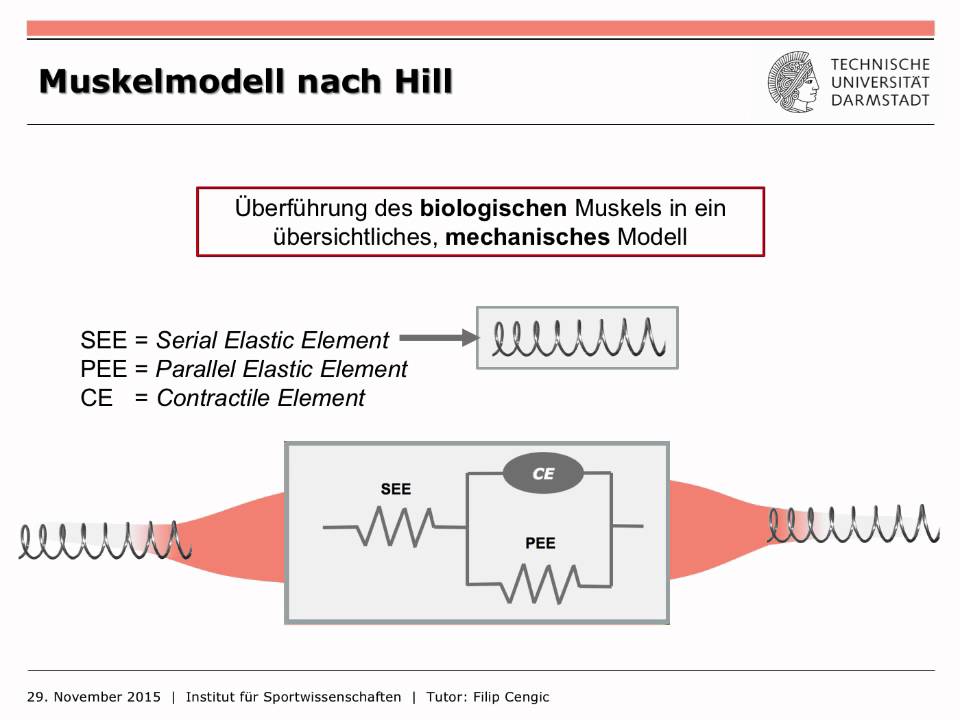
Basic skeletal anatomy and neuromuscular physiology, specifically how muscle-tendon units generate force and the concepts behind Hill-type muscle models.
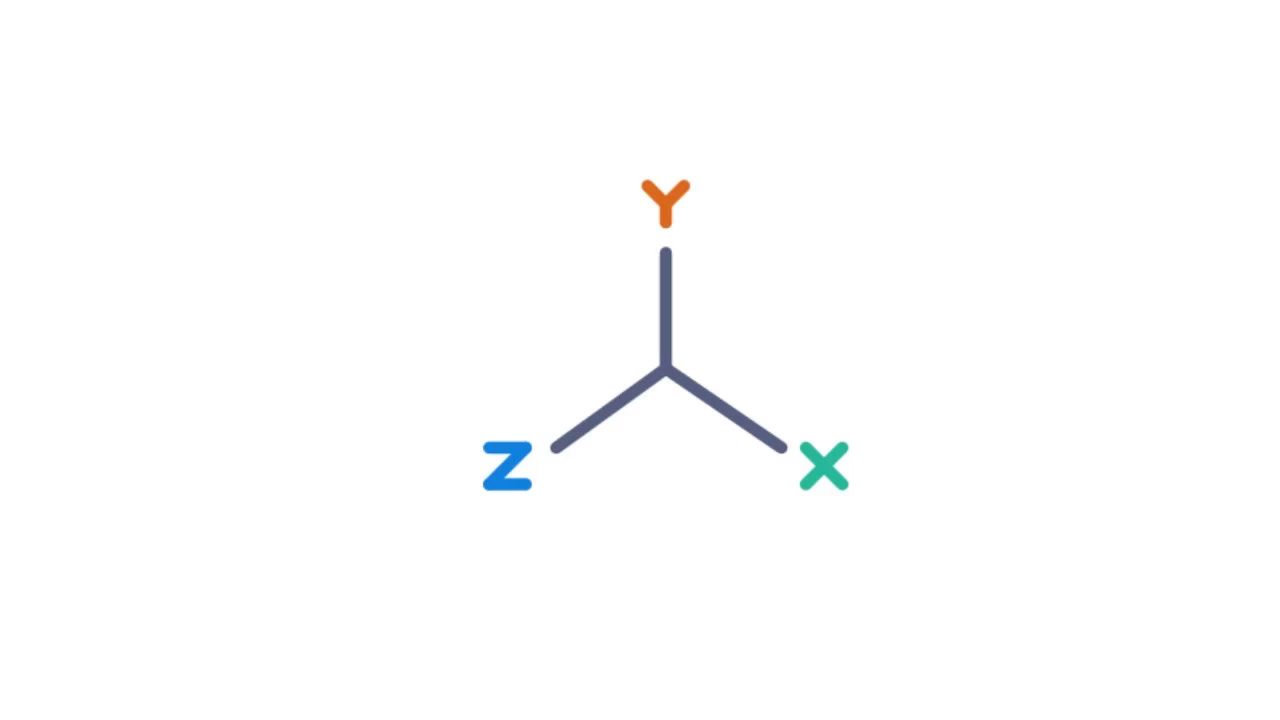
Understanding of motion capture data acquisition, coordinate systems, and how experimental marker trajectories are used to define human movement.
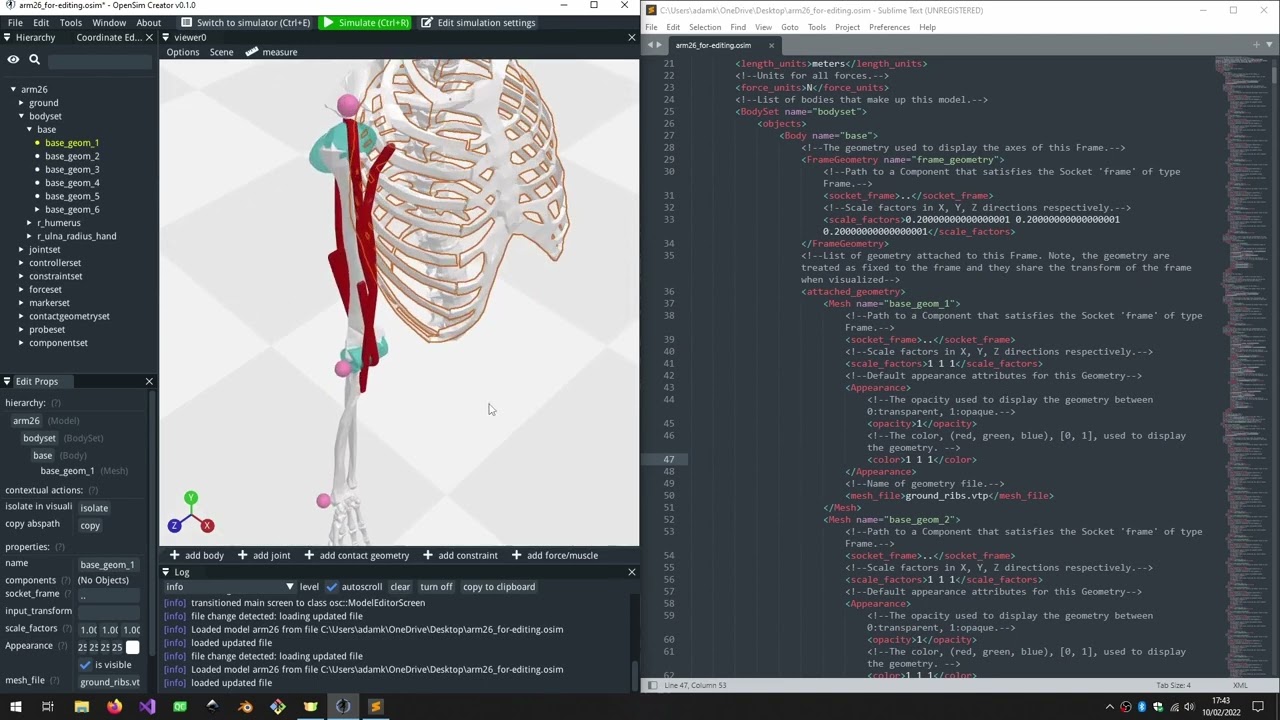
Familiarity with the basic OpenSim software ecosystem, including the user interface and core file formats like .osim (models) and .mot (motion data).
Advanced muscle force estimation techniques in OpenSim, such as Static Optimization (SO) and Computed Muscle Control (CMC) to resolve muscle redundancy.
Predictive simulation and trajectory optimization to synthesize novel movements (e.g., maximizing jump height) without relying on experimental motion capture data.
Model scaling and customization, including adjusting musculoskeletal geometry and muscle-tendon parameters to match subject-specific anthropometrics.
Integration of assistive devices, such as simulating the effects of ankle-foot orthoses or exoskeletons on jumping performance and muscle activation.
Programmatic execution and analysis of OpenSim workflows using the OpenSim API in Python or MATLAB for high-throughput batch processing.
20.4K views270likes55:22Original Release: 2019-10-16
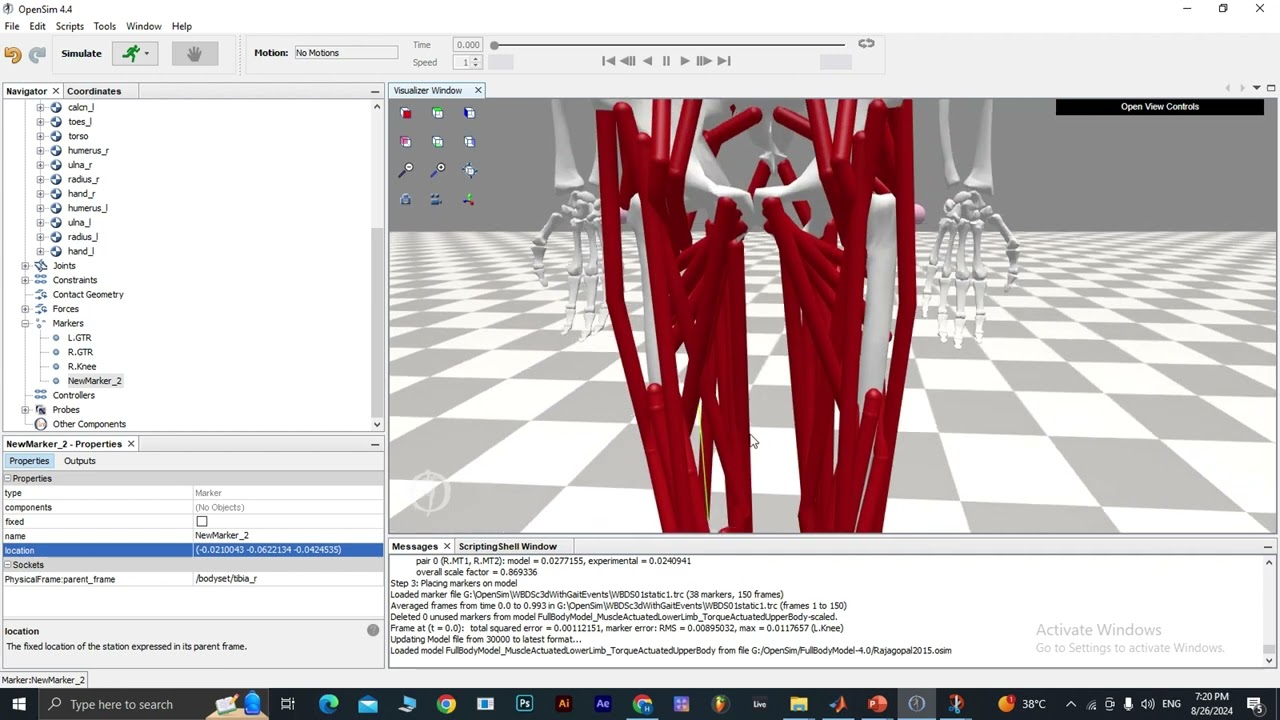
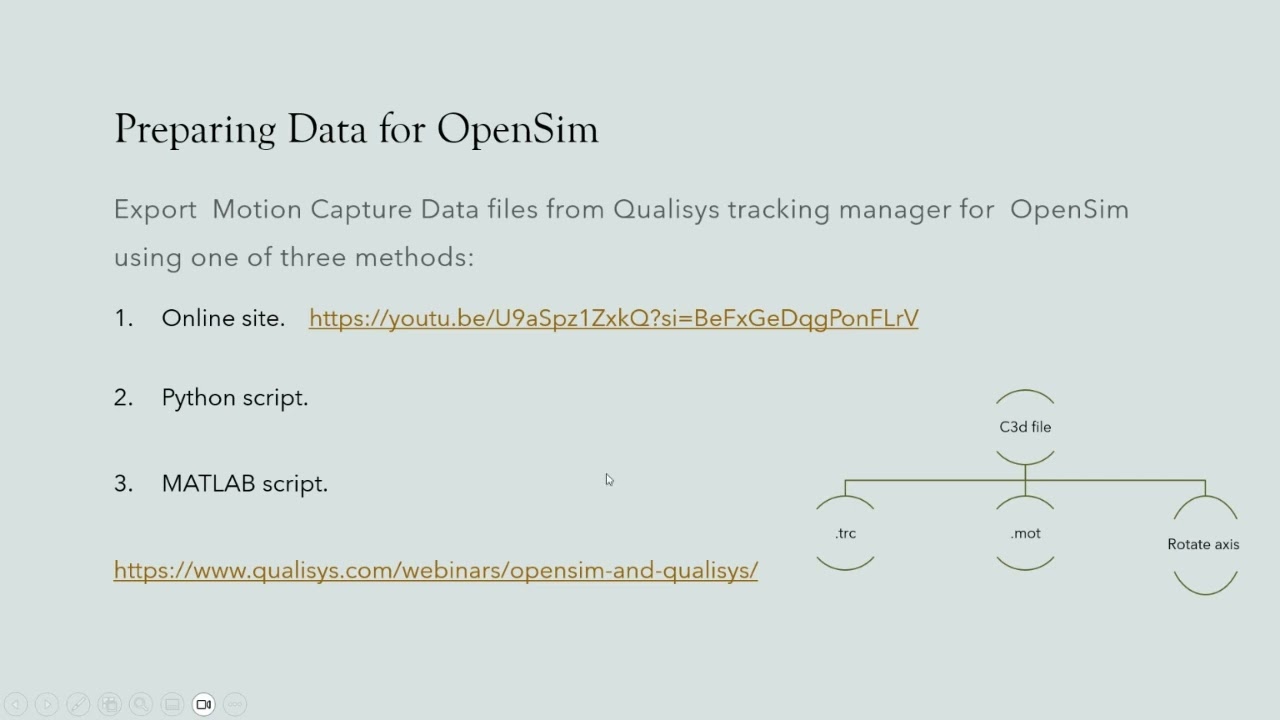
all right so welcome everyone to the open sim webinar I'm pleased to be presenting as part of the European society of biomechanics webinar series as son I'm getting some audio from you so I'm going to go ahead and hang up the Skype call okay so I'm excited to be speaking to researchers from all around the world to introduce you to open sim this is your first time learning about it or if you're already a member of the open sim community I'll show you some of the new features of open sim 4.0 which is the latest version of the software I'll also give you an update on new research happening in the community and some pointers on how to get started with open sim and learn more my name is Jennifer Hicks I'm the Associate Director of the National Center for simulation in rehabilitation research which develops and supports the open sim software and the open sim community so open sim is an open source software package for modeling the musculoskeletal system and simulating movements open sim is used by researchers around the world to study a wide range of movement so this slide shows a few exciting examples of how open sim is being used also Robbie Balasubrahmanyam of Oregon State University is using the software to model the effects of artificial tendon networks and simulate how they affect hand motion after a tendon transfer maryline van der quote from the view and Amsterdam is using open sim to simulate the effects of muscle spasticity Stefan Bergen and colleagues at Imperial College are using the software to simulate fetal kicks in the womb and Bryan Umberger and Frank sup of the University of Michigan and UMass Amherst are using open sim to model the limb socket interface and amputees so users are pushing the software to new and exciting uses which necessitates a set of flexible tools for studying movement where we'll learn more about these tools in today's webinar and I hope you'll be able to apply them in your own research I'm just gonna check in quickly ok I don't see any comments so it sounds like you guys are still hearing and seeing the slides okay so I will keep going so here's the plan for our presentation this morning first I'll talk a little bit more and get some background about what OpenSim is then I'll do a live demo showing some of the key features of the software and hopefully the technical details there go more smoothly than getting the webinar started and then I'll close by talking about how to learn more and get started so first what is open sim so open sim is free and open source software for modeling humans and animals and simulating their movement open sim can model many structures including biological and mechanical systems so open sim has components and tools to emulate neural control it also has biological joints so humans are not composed for example of all pin joints and you can model the physiological complexity of real joints models can be tuned and scaled to represent individual subjects and we also provide sensors to estimate things like metabolic energy consumption during movement muscle tendon diamond we also have models of muscle tendon dynamics and models of ligament and joint contact an open sim can also model non biological structures like assistive devices and prosthetics so we've designed open sim to be flexible and modular so that others can extend and adapt the software to their own research needs I see that someone raised a hand or sent a Chad so we'll definitely take questions and you can type those in the Q&A panel of the zoom interface but I'll answer those questions at the end of the webinar so models in going back to the presentation models and OpenSim can be as simple or as complex as you need so combining just the elements that you want for example on the left and on the model on the left is a simple hopper model with a block and two links and on the right is a model with 23 degrees of freedom and 92 muscles and you can query the model or anything components to understand and compute what you'd like to learn from a simulation for example one type of component you can include in a model is muscles and you can output things like the fiber length through the fiber power the force multi-force multipliers and many more quantities during a simulation joints are another component in opensim from joints you could compute an output joint reaction forces these are just a couple of thing examples of what you can extract from an open sim model and we'll learn more about the open sim components and these outputs in the demo a little later the open sim provides a user-friendly GUI or graphical user interface that allows easy access to this underlying functionality this GUI is now cross-platform running on both Mac and Windows in the GUI you can load and visualize models there's a suite of tools for importing experimental motion capture data and then computing things like inverse kinematics inverse dynamics and then generating muscle driven simulations and we'll see more about this in the demo you can also develop and share models with open sim for any of you in the audience who've developed your own models you know that creating a new model is a lot of work so open sim also provides a repository of models so you don't have to reinvent the wheel when you're starting a new study so we have an online repository of models and I'll show just a couple example here examples here so Matt de mares who is a grad student in our lab created a model with physiologically accurate models of the ankle and stress stretch reflex controllers to understand the role of reflexes and preventing ankle inversion injury cats teal and others have created models to simulate crowd the Crouch gait pattern and children with cerebral palsy age ASAP and colleagues created a model of the shoulder with a physiological scapula thoracic joint that's fast and accurate compared to bone pin data and you can also create animal models so this ostrich model was developed by rankin and colleagues to study locomotion we carefully test all of our simulations by comparing them to a wealth of experimental data including joint kinematics joint moments grande reaction forces muscle activation patterns muscle forces and joint reaction forces verification and validation are vital for any type of simulation and so ease a suite of tests to ensure we can trust our software and the results of the simulations that we share we also provide guidelines to the community so that researchers new to modeling and simulation can better understand what verification and validation steps are needed to trust the results of a new study they're performing opensim is a software package but it's also a community and this community continues to grow and diversify open sim community has thousands of users and hundreds of experts around the world and this map shows visits to our documentation over the last year so it really shows the worldwide impact we're starting to have this bar graph shows the publications citing open sim organized by research category sorry just checking to I saw a question pop up but again I'll answer those at the end so each bar in this bar graph shows the percent of publications that come from a given discipline as we see that open sim is used for biomechanics research and also in robotics computer science and the neurosciences open sim is enabling interdisciplinary collaboration between bio mechanist sand all these other fields this next plot shows pre-nup shows the cumulative number of unique users of open sim since its release in 2007 as of yesterday over 40,000 individuals have downloaded the software so now let's get started with the demo so that you can see open sim in action I'll use the demo to highlight some of the key features for users who are getting started and also show a couple of the new things in 4.0 to demo the software software we will generate and analyze a muscle driven simulation of a vertical jump with a counter movement so hopefully that video played ok for you we're using a simplified model with 18 muscles and 10 degrees of freedom and the video showed a preview of the motion that will simulate so you can see the jumping motion and you also see the muscles turning from blue to red as the muscles are activated so here the topics we'll cover in the demo will become more familiar with open Sims graphical user interface then we'll analyze motion capture data of a subject jumping and then do solve for muscle activations that generate a jumping motion and we'll do some simple analysis of the activations and other quantities that we compute before we start with the live demo of the software I'll give some important background about the overall simulation pipeline and how to go about importing your experimental data into open sim so for many muscle driven simulations the simulation pipeline looks something like this we start with experimental motion capture data the motion of interest this data is often in the form of the C 3d file and as I've opened sim 4.0 you can use open sim directly to read in the C 3 data with C 3d data with marker and ground reaction forces you can preview this experimental data in the GUI as shown in the image on the right hand side but typically everyone's lab an experimental setup is a little bit different so you'll need to first do some transformations and other clean up and prep of your data many users researchers and users have MATLAB so we provide open sim capabilities through MATLAB scripting so in this slide I'll show some simplified code that demonstrates the process that you use to import your C 3d data so first we lead in our data open Cyndi's is something called adaptors to help convert from different data file types like C 3 D or TRC to open since data file formats now we created an adapt and then read in tables with marker and force data from the c3d file then in MATLAB you can do post-processing like for example rotating the lab coordinate system to match the open Sims coordinate system or computing center of pressure then you can write your files to TRC and STL files which the opensim tools use like to open some tools for inverse kinematics and dynamics can use those files to run the analyses we've already done this pre-processing for the demo today and we provide example MATLAB to utilities with your open sim distribution to help you complete this process for your own data so we've read in our experimental data to get marker positions these marker positions will be used by open sims inverse kinematics tool to compute joint angles the joint angles together with run reaction forces are used by the inverse dynamics tool to compute joint moments and the static optimization tool to compute muscle activations so these are the this is an overview of the steps we'll perform in the demo and I'll go into more detail for each as we step through alright so let's go ahead and switch over to open sim expand open sim so here is the open sim graphical user interface when you first launch the application you'll see some links to our documentation including the users guide and examples to get going we need to load a model so I will load the jumper model that we're going to use in the example and while that's loading can someone just confirm for me that they can see that the open sim application is showing up okay oops let's see okay looks like we're good thank you guys okay so let's go ahead and continue with the demo so here's the example that we'll use in the example you see its skeletal geometry the simplified set of muscles the model markers that will try to match to the experimental data in the IKE a step note that to save time I've already scaled this model to match our experimental subject this is a key phase in the process and you can see our user guide and past webinars to learn more about how to scale your model you can use your mouse or trackpad or your keypad as well to zoom in and out and change the view so can zoom in and out go up and down I'll point out the other key components of the application so again this is the visualizer window where you can visualize your model or experimental data up here the video controls allow customized playback for a loaded or computed motion they're grayed out now because we haven't generated or loaded emotion yet the messages window gives the status of open Sims operations and then over here we have a navigator which shows your loaded models and the models components so for example we can the bodies that make up the model the pelvis the femur the joints that connect to bodies there are no constraints or contact geometry in this model it does have forces and the form of muscles are our force generating elements and then again we have markers in the model as well the coordinates pane shows the degrees of freedom of the model and their coordinate values and speeds and then if we select say a body in the model we can go or any of the other components in the Navigator we can go down to this properties panel which shows detailed information about a model component the model component that's selected as well as the outputs which we'll learn about a little bit later in the demo so we want to analyze that jump so let's go ahead and get started with that and we'll begin with an inverse kinematics analysis also kinematics is the study of motion an object's position velocity and acceleration and in opensim the purpose of inverse kinematics is to find the joint angles of the model the best reproduce the experimental data that we measured for a particular subject in trial open sim determines this best match by solving a weighted least squares optimization problem with the goal of minimizing marker error in this tutorial the experimental data used by the I k2 l-- are the experimental marker positions of a subject performing a maximum height jump and with the results of the kinematics analysis we'll be able to probe the model in motion for quantities such as jump height and takeoff speed so I can find the inverse kinematics tool under the set of tools so I'll go ahead and launch the ik2 l-- in preparing for the webinar i saved what's called a setup file which has all the settings for running AI K so I'll go ahead and load that so I don't make any mistakes during the webinar and I'll talk through what each of the inputs are so the MA is the jumper model we have a set of for the 44 markers the marker data is in jump markers TRC we're going to process from point six to one point nine five and hit the output where we're gonna save the motion file is right here the inverse kinematics solution jumping MOT and then I said it was a weighted optimization when I was talking about I case you can apply different weights to the markers but in this case to indicate for example how much you trust each value but in this case we've set all the values to one but you can adjust those for your own simulations and setup so go ahead and run inverse kinematics and we see the model jumping and landing so we can play that back it may be a little bit choppy over the webinar format but hopefully you guys at least get the general sense that we have a simulation of a jump here we can use the playback to get a sense of the max height it looks like it's the time that the max occurs it looks like it's a little bit after 1.6 seconds we can also plot the joint angles that we computed so I'm launching from the tool menu the plotter tool and for my Y quantity I can look at those inverse kinematics results and let's plot the hip flexion and knee flexion and ankle plantar flexion and our X quantity will be as a function of time and I'll go ahead and add those curves to the plot and we see that the joints are flexing flexing during the counter motion and extending during the push-off and then stay our extended and stay fairly constant during the flight phase and another question that we might have so we have these joint angles but something that isn't directly outputted from the inverse kinematics analysis that looks at joint angles is the position of the hand and the position of the center of mass throughout the jump but we can use the new output reporter and OpenSim 4.0 to easily compute those things so I talked about the properties and the outputs earlier in the demo if we go ahead and look at the model and its outputs we see that the model has an output called the center of mass position so we can use that to plot the center of mass position throughout the drum and then we can look at the outputs of the bodies as well if I find the hand let's look at the right hand we can see that we can also plot the position of the hand or time as an output so to get those outputs for the motion of interest I'll use the analyze tool so I'll go ahead and load the analyze tool again I've already created pre-populated a setup file so we don't miss anything so I'll go ahead and load that my output reporter set up for getting positions the motion is the result of the inverse kinematics that we just ran we're going to look at the same time range the results will go to this folder results position outputs this is just a kinematics analysis so we don't have actuators and external loads to worry about and if we go to the set of analyses we see that we have this output reporter and if I edit that we can see that the output path so those are kind of like file paths but paths to different outputs in the model and we see we have the center of mass position and then find the body set the right hand and the position of the right hand so if I go ahead and run that I can close the tool while it's running it playback really quickly but we have the same motion and now if we bring up the plot tool again we should be able to go ahead and plot the hand and the center of mass position over time and get some information about the jump height so here's the folder that I used results position output I'll go ahead and open that so the result was that you saw it you see it's a back three that means it's a 3d vector so we have the x y&z coordinates of the center components of the center of mass position I happen to know that Y corresponds to the vertical so I'll go ahead and plot the Y for the center of mass and the Y for the position of the right hand again we want to plot as a function of time I'll go ahead and add those curves so in red we see the center of mass position over time we start at about 1 meter and change to 1.5 so it looks like the change in position from the start to the end was about a half a meter and then the max height reached was almost two and a half meters and if we hover hover over we see that as we found when we were visualizing the motion the max height occurs at a little after one point six seconds into the trial so this is some kinematic analysis of the movement with opensim we can also look at the moments and forces involved in the movement and to do that we'll start with an inverse dynamics analysis next also dynamics is the study of kinematics and the forces and moments that produce those kinematics the purpose of inverse dynamics is to estimate the forces and moments that cause a particular motion OpenSim determines these by forming and solving the models equations of motion based on the models kinematics structure and inertial properties the joint angles that describe the motion and external force data in this tutorial the inverse dynamics tool will analyze the joint angles from the inverse kinematics step that we just ran and the external ground reaction force data from the experiment and with the results we'll be able to examine for example the coordination and timing of the saggital joint moments to generate a max height jump and we'll also look at whether we think the subject has a dominant limb driving the motion so I'll go ahead and launch the inverse dynamics tool and again load a setup file my inverse dynamics setup and so again the input is the inverse kinematics solution I will use a low-pass cutoff frequency of 6 Hertz to filter out high frequency noise in the eye Kara's ult's again will process the same time range but the results in a results folder and now we have external loads and this file specifies to apply the ground reaction forces in our ground reaction force file to the model in particular we'll apply them the forces the moments to the right and left calcaneus of the model so I'll go ahead and run inverse dynamics and it's already done and again we have the same jumping motion and so now we can go ahead and look at the joint moments as well so I'll bring up our trusty plot tool again and this time plot the inverse dynamics results and so I said earlier we were curious about whether the subject has a dominant limb in the jump so let's plot the let's look at the right and left knee and right and left ankle flexion moments again we'll plot as a function of time and add them to the curve all right and so if we look at the knee in red and green we see the red the ankle moment for the right knee is a little higher and there's a more pronounced difference at the ankle so these results would indicate that the subject may have a dominant right limb in jumping but we probably want to collect some more data to be sure so the power of OpenSim is that it includes muscle models so we can probe the function of muscles in the motion so well the motion of the model is completely defined by its positions velocities and accelerations the distribution of muscle forces that drive the motion is not completely determined this is because the model for example has more muscles than degrees of freedom and so the static optimization tool solves this muscle redundancy problem at each time step by computing the muscle activations that generate the necessary joint torques and minimize the sum of squared muscle activations for all the in the model so in this demo we will use static optimization to resolve the joint moments computed earlier using inverse dynamics into individual muscle activations and forces and this will allow us to better understand the timing and recruitment of individual muscles in driving the max height chunk so let's go ahead and launch the static optimization tool again I will load the setup file I'll go ahead and start running it before I talk through just because this analysis will take a little bit longer since it's more complex than the I K and ideally ran before so again we're analyzing the jumper model our motion is still to inverse kinematics solution and we're using the same six Hertz low-pass cutoff frequency our objective up function to help resolve the muscle redundancy problem will minimize the sum of squared muscle activations and we will choose to use the muscles forced link velocity relation when calculating the results I'm analyzing every two steps to speed it up a little bit same time range same output and here again we're applying the same external loads and we've also added what we call reserve and residual actuators so these for static generating elements can apply small forces and moments to each of the joints in the model and at the models pelvis and these can account for small inconsistencies for example between the model and our actual subject or discrepancies between ground reaction forces and marker data due to experimental error or they can make up for the fact so limitations in our model like we don't have ligaments in this particular model so we're seeing the model move we said you saw the model move slowly it looks like it's done now and the individual muscles changing color from blue to red as they're activated so we see the quads turning on during that counter movement for example and so the since we're done the static optimization problem has been stalled for each time frame of the experimental data so we can visualize and playback the motion and again sorry it's a little bit jumpy over the webinar format but you can see by the colors how the most muscles are being used in the movement and as for the other tools we can also plot our results so this time I will plot the muscle activations so let me go ahead and make sure I'm loading the right file so we saved the output of static optimization and results I will plot the activations and so let's look at gluteus maximus the vast eye and gastroc and again i'll plot as a function of time and go ahead and add those to the curve so previous studies have reported that maximum height jumping is coordinated from the proximal segments to the distal segments in our data and model we see that the recruitment of muscles seems to be consistent with this so first we have the gluteus maximus and red excuse me then the quadricep muscle the bass die which are shown in blue and then the planar flexors the gastroc and green are recruited so the our simplified simulation seems to agree with previous results so this concludes the live demo that we'll do today so I'll go ahead and close OpenSim leave it open in case there's anything to show later and go back to our presentation before I do that I'll make sure there are not any pressing questions okay or technical difficulties okay so let's switch back to our slides okay so a quick recap of the demo that we did so we got an overview of open Sims GUI we then use the GUI to analyze motion capture data of a subject jumping with the inverse kinematics and dynamics tools and open sims new output reporter then we use static optimization to solve for muscle activations that generate a jumping moment motion and we saw how coordination moved from proximal to distal during the jump so one question that you might be thinking and that you should ask about any simulation is it good enough for example our model was simplified and we use static optimization which in open sim doesn't incorporate tendon compliance and so one thing we can do to gain confidence is to compare against experimental electromyography data and here we see a reasonable match between the computed activations in black and the measured EMG and gray but this is just the tip of the iceberg and there are many other comparisons you should do to gain confidence in your simulations for example when running static optimization I pointed out the residual and reserve actuators that we added to the model you should look at the forces and moments generated by these components to make sure it's it is muscles and not these additional actuators that are dominating the movement you can read our paper from 2015 which is cited here for more discussion and recommendations so to wrap up today we'll show you how you can get the software and learn more about how to use open sim in your own research so one way to learn more about open sim and its possibilities is by studying the work of others the example I showed was just one pipeline and a few of the types of analyses you can do with open sim there are many other possibilities so next look give a couple of samples of what some other researchers are doing with open sim so is the first sample OpenSim is increasingly being used to analyze and aid the design of assistive devices this example starts with a study that was led by Tom Machida while he was at Stanford in a 2016 study he began with muscle driven simulations of running created by Sam Hamner a former grad student in our lab used these simulations and open Sims computed muscle control to find the optimal torque patterns for an assistive device acting at the hip knee and ankle and the goal was to reduce the sum of muscle activations squared by having these while having these assistive devices and Tom discovered several patterns in the torque curves predicted for example the optimal device profile didn't usually match the net joint moments generated by muscles so now switching to the right hand side you Klee and his colleagues at Harvard use this discoveries from Tom simulation study to design help design an assistive suit for running so the suit assisted hip extension the bar plot shows the results and the key comparison is the blue versus red bars the suit that used a torque profile based on the simulation results led to a significantly greater reduction in metabolic rate compared to a torque profile that was just a scaled version of the biological moment so the simulation results improve the performance of the assistive device and this is without extensive and expensive human experiments and device iteration so we see this as a big opportunity for biomechanics in particular simulation based design of assistive devices for running walking and also pathological gait researchers are also using open sim to answer clinical questions so one of these researchers is midline bandar crowed she's a former visiting scholar and pilot project awardee with the National Center for simulation and Rehab Research so cerebral palsy is a neurological disorder that leads to a wide range of gait pathologies one contributor to gait pathology is the muscle spasticity that's press and children with CP Maryland's research question was highly clinical the end goal is to understand how muscle spasticity affects muscle function during walking in children with CP as a first step they modelled spasticity and OpenSim they also developed experiments to measure spasticity and in order to accurately simulate the experiments they extended opensim to include a spasticity controller then they compared the forward simulations with spasticity that modeled spasticity to experimental results from their instrumented spasticity test and then next the researchers are incorporating this viscosity controller into simulations to understand how muscle spasticity affects muscle function during walking and it's not just humans OpenSim is also being used to simulate an analyzed animal movement also Jeff Rankin and colleagues at the Royal Veterinary College created a model of the ostrich lower limb the researchers generated simulations of running shown in green and walking shown in yellow in the plot using the computed muscle control in a tool and OpenSim for each muscle groups they computed the negative and positive work performed by the muscles during stance and swing where negative works on the left positives on the right this plot shows the results just for the stance phase the buyer in particular muscles crossing both the hip and knee perform largely positive work during stance contributing to propulsion while the knee extensor has performed negative work shown here acting as brakes so these are just a couple of samples OpenSim is being used for many other purposes for example to study injury mechanisms or to simulate upper extremity motion it's always really exciting to see the many other uses of open sim featured in publications so we provide a wide range of resources to help researchers get started with open sim we have extensive online deck documentation and this page shows the main portal to documentation and support I'll walk through some of the main sections so we have this getting started section which includes a link to download the software a guide to new features a guide to how to install the software one of the places it links is to sim TK org and this is where we post and share the actual software download we also share our source code via github we welcome others including you to contribute their models or contribute to the code for example by helping us fix bugs so we have our documentation so we have a user's guide for users getting started primarily with GUI we have a guide for documentation for individuals using scripting through MATLAB or Python or developing in C++ we have links to key theory and publications and then we have the doxygen which is additional documentation for developers we provide a number of examples and tutorials ranging from introductory tutorials if you're just getting started to more advanced tutorials that use MATLAB scripting and C++ we have troubleshooting so the forum which I'll show you a little bit more about on the next slide we have best practices which includes a link to the validation and verification paper I mentioned earlier and other best practices from our lab and others as well as frequently asked questions for troubleshooting the forum is a great resource so you can get help from the Stanford OpenSim team and also the rest of the open sim community and I want to thank anyone in the audience who's already asking and also helping us to answer questions as well because we really do want this to be a community resource so you don't have to start from scratch we also provide links to existing models datas and tools models data and tools developed by our lab and elsewhere and then we also have our teaching hub which to the open sin YouTube page pay and then pages from past courses and workshops for example here's the YouTube page which hosts videos from past webinars that MCS rrr has run galleries of examples and more if you want to learn more about the software you can also check out our recent publication in PLoS computational biology as well to close before we switch to questions I want to acknowledge the huge team of contributors that make opensim possible some of the key contributors to open sim 4.0 from Stanford are shown on this slide thank you to them and thank you to everyone who gave us feedback and helped with beta testing of the software it was a true team and community effort OpenSim has been supported by a wide range of brands with a big portion coming from the National Institutes of Health in the US which funds our National Center for simulation and Rehab research and what with that I want to thank you all for joining and being flexible and switching the hosting platform and with that I will go ahead and switch to answering questions so if you have questions I know there's both a chat interface and a QA interface I'm gonna go ahead just to simplify I will look at the the QA interface so if you have a question please answer it in the in the Q&A or please ask it in the QA so I can eat it more easily keep track all right so the there's a question from Carlos Cohn call base apologies if I have mispronounced it is it possible to convert c3d c3d data with the OpenSim GUI to M TRC files without MATLAB so you can read those in but the getting them into the so you could read them in and plot them but to get them into the to do the pre-processing and cleanup steps you generally do need to use MATLAB or the other option if you don't have MATLAB is Python which can help in the future we hope to add more tools to directly support the you know the manipulations that you need to do in the GUI another question this is from Joseph Garrett Sullivan so recent work from Brian Umberger and Frank sup has demonstrated promising predictive simulations for walking with assistive devices but their work relied on using direct collocation methods our collocation methods featured are supported and OpenSim if not is support for collocation methods planned and so this is already in the works and should be available more widely soon so we had a workshop at is be if anyone was there so it's called open sim moko and it does it has direct collocation methods using open sim models examples and documentation and that should be out sometime this year hopefully the initial at least an initial beta version that others can use so keep an eye out for that so so a question from Lex am i seeing it correctly that you can change the exponent for the static optimization objective function and yes you can do that you can just change the exponent the benefit of the OpenSim mochou which I was talking about is that it would it does support even more flexible and varied optimization functions so that will be something to look out for so a question from this one on when I try open some first I need to import the model and then we need to scale but I didn't see you scale I did the scaling ahead of time scaling is really important as I mentioned to get a good scaled version of your model particularly if you're doing inverse dynamics and muscle generated simulations but it does typically take some time and iteration to get a good scaled model which is why I did ahead of time in the NCS or our webinar series we did a webinar just about scaling and you can find that on the NCS our our YouTube page to learn more about the process of scaling and also in our user's guide let's see so there's a question could you briefly describe the difference between using static optimization or our array and computed muscle control and why I chose static optimization for the demo so static optimization is solving statically at each time step is one difference so I couldn't use the activations to drive a forward simulation where as computed muscle control will allow you to do that computed muscle control also allows you to incorporate tendon compliance which might be important for example if you have a higher speed movement like running as far as RRA this is a good thing to bring up is so what the RA step is is to help reduce the residuals that are applied by making small adjustments to the model and the inverse kinematics to essentially help F equal MA we need to have F equal MA and there'll be no small differences as I mentioned between the model and your actual subject or some error in your experimental forces versus marker data and so with the RA we can try to reduce as I said some of those residual forces that are applied and it's actually using usually helpful to do that before running static optimizations when you're running simulations that you're going to use in research so let's see other questions apologies I'm sorting and reading through these so I have there are some questions that I'm seeing just about getting started so places to get started are generally looking at we have so tutorials 1 2 & 3 under the introductory examples and reading through the user guide as well another thing that can be helpful is to look at the NCS our our webinar series if there are is research that is similar to the type of research that you want to do to check those out another exciting thing that's happening is that since there are a growing number of experts outside of Stanford in using opensim some of those researchers are starting to run introductory tutorials in different locations like for example LC Yonkers and Friedel de Groote have run and others have run some OpenSim tutorials in Europe for the past few years as well let's see so there's a question about marker sets so you can change the details of the of the marker set to match your own so you can change these names for example these markers and and how many there are in either associated with your model too to customize to your own setup so there was a question on the force's file so I could go ahead and bring that up and show a little bit more detail oops let me go ahead and load the inverse dynamics setup file so here's the file I had already pre created it but you can also create it on your own so you can have so in this case we had and this is often a case and gate we have a right and left ground reaction force the forces data is in this jump forces mot file and for each of the force you can specify the body that the force should be applied to whether it applies force and/or torques what reference system the forces are expressed in and these dropdowns are just specifying the name like which name in the file which column in the file corresponds to X Y Z so that's the and there's more detail in the user's guide as well um so we're getting pretty close to ten I know we started a little late so I'll take a couple extra questions and then if there are questions that I don't get to I will either we can send out a link to our FAQ section if the question is already dressed addressed there or can add it if it's not already readily available in the FAQ let's see there's a question about I'm you based motion capture and that's something else that is in development and we hope to share soon so keep an eye out for that there's a question about which programming languages are needed if you're able to just use the tools that are available in the GUI you don't need to know programming if you're trying to do something that isn't readily available in the GUI there's a lot you can do with MATLAB or Python scripting or if it's if you're trying to for example create a new kind of muscle model then you'd probably need to program in C++ there's a question about accounting for so static optimization models tendons as rigid that's only true for the static optimization analysis if you're generating forward simulations or using the computed muscle control it does include compliance of tendons so I'll go ahead and answer one more question before we go ahead and wrap up so how can we perform a what-if study for simulating a perturbation or extreme loadings and that and for doing those kinds of extreme perturbations that's typically the case where you need to move to a predictive simulation where you're potentially generating a completely new movement and so if you want to learn more about the process for that thomas gaiden Beek is a researcher in the netherlands and he's actually giving a webinar as part of our NCS are our webinar series where he'll talk about a platform called Scone which is designed to aid the process of generating predictive simulations where you're not directly trying to follow measured experimental motion capture data so that should be a fun webinar that's actually next week on Thursday so you can see that on the open sim web page to register for that as well so since we're we're getting past 10 o'clock I'm going to go ahead and wrap up the webinar thank you again to everyone who joined I will look through the questions and add them to the FAQ if they're not there and make sure that we get a link on the YouTube page or perhaps the son could email email out a follow-up email as well so thank you again to everyone for joining and we'll hope to see you again at another webinar at a conference or opensim workshop and thank you again bye everyone
Up Next

15:25
AT&T Archives: Nike Zeus Anti-Missile System (1961)
@ATTTechChannel
91.3K views•2011-07-15
30:32
Ultrasonic Transducers: Resonant Frequency Measurement and Horn Design
@imajeenyus42
229.9K views•2017-02-22

54:16
Polymer Environmental Degradation: Mechanisms & Stabilization
@iit
1.8K views•2012-07-10

33:39
How a Student's Question Saved a NYC Skyscraper from Collapse
@veritasium
22.8M views•2025-04-26
Related Study Plans & Knowledge Roadmaps
Structured learning paths in Engineering
engineering
Building Acoustic Levitators: Physics & Arduino
01The Physics of Sound and Standing Waves
02Piezoelectric Transducers and H-Bridge Drivers
03Arduino Programming: Generating 40 kHz Signals
+ 2 more learning modules
14h5 modules
Explore Roadmap
engineering
Building Peltier Cloud Chambers: Particle Tracks
01Cosmic Rays & Cloud Chamber Physics
02Thermoelectric Cooling (TEC) Fundamentals
03Custom Liquid-Cooling Loop Design
+ 2 more learning modules
18h5 modules
Explore Roadmap
engineering
Yagi-Uda Antennas: Modeling, Build & VNA Test
01Introduction to RF and Antenna Fundamentals
02Yagi-Uda Antenna Design Principles
03Antenna Modeling and Simulation in 4NEC2
+ 2 more learning modules
18h5 modules
Explore Roadmap
engineering
ECG Monitor Design: Op-Amps, Filters & Noise
01Electronics & Breadboard Basics
02Op-Amps and Instrumentation Amplifiers
03Bioelectricity and ECG Fundamentals
+ 2 more learning modules
18h5 modules
Explore Roadmap