




![코호트 분석, 이렇게 하면 된다! - [ 데이터 분석, 이렇게 시작하자! ] 시리즈 두 번째](https://i.ytimg.com/vi_webp/CWuG0JKO8Po/maxresdefault.webp)

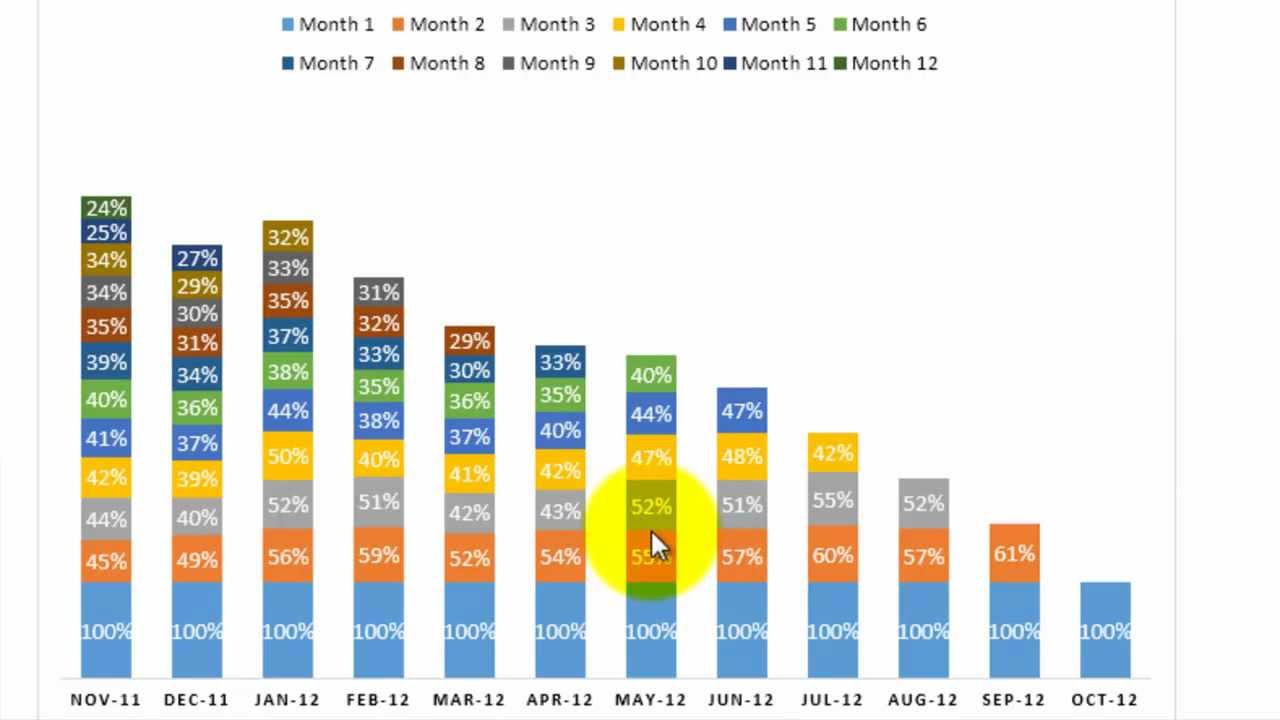




















Churn rate in SaaS businesses is calculated by tracking customer cohorts over time, where each month's customer additions are tracked and their retention is modeled based on contract length and renewal rates; the churn rate is then derived by dividing the number of customers lost from each cohort by the beginning customer count for that period, with the calculation accounting for different contract terms (month-to-month vs. annual) and renewal patterns to provide accurate monthly and annual churn metrics.
Calculating SaaS Churn Rate: A Complete Guide
Added:Fundamental concepts of the Software-as-a-Service (SaaS) business model, including Monthly Recurring Revenue (MRR) and Annual Recurring Revenue (ARR).
Basic principles of cohort analysis, which involves grouping customers based on their sign-up date or common characteristics.
Elementary algebra and matrix notation, specifically how matrices can be used to organize multi-dimensional data points.
An understanding of simple customer retention concepts (the basic definition of why and when customers stop subscribing).
Differentiating between advanced churn metrics, such as Gross Revenue Churn, Net Revenue Churn, and Logo/Customer Churn.
Developing predictive churn models using survival analysis and machine learning algorithms to identify high-risk accounts.
Calculating and optimizing the Customer Lifetime Value to Customer Acquisition Cost (LTV:CAC) ratio using accurate, contract-adjusted churn rates.
Designing actionable customer success strategies and playbooks aimed at improving Net Revenue Retention (NRR) and expansion revenue.
674 views12likes30:13Original Release: 2022-08-31
hey everybody welcome smarthelping.com i'm jay uh i hope you're ready to learn i'm going to teach you how to calculate churn rate with the sas um business and it can be monthly month-to-month contracts or contracts that have uh terms that are more than one month we'll go through all the logic i'm gonna build it i will upload this to a google sheet and you can access access it for free in the in the description box below before i get started don't forget to check out smarthelping.com if you go to the sas page at the top i use the the method i'm going to talk about here i use an enterprise sas model with three tiers i use it in this rolling revenue forecaster i use it in the sas pricing simulator um i use it in this general mobile app model and i will be using it in the new product as a service model that comes out soon i've been working on the live stream on that the last couple of days you can check out more sas stuff here i'm just gonna do the churn calculation today and let's get into it so we're gonna do one tier so here's my customer uh price customer tier we're gonna go to go over a period of um five years so one tier very simple all i need to calculate here is um how many customers are added per month because remember you can't really calculate churn you know because for a customer to leave they have to first come in and be onboarded so we have this customers customers added very simple let's just do a random number rand between let's do i don't know 20 35 and 100.
so here's your customers we'll go over five years when we need to know the month and the year so we'll go around up here okay so we just have a simple algorithm calculating how many customers are being added each month that's the first thing let me go let's go for a full five okay so we have that let's just copy and paste values there this is just arbitrary numbers of customers added per month so that's my main input i'll freeze this and now that i have this we have to do matrix tab matrix calculations is the only way to do it correctly and i'll show you why at the end so let's go i usually do matrix one and to do this you do months at the top and go months going down you can follow along with me pretty easily so we're going to go 60 months down if you work in sas this is very valuable or if you want to 55 6 7 8 9 ten okay this is the best in practice methodology this is the most correct way you can talk to a billion dollar company you can talk to a startup this is the best way to forecast sas churn and we're going to do a churn by percentage of customer leaving as well as dollar amount okay so we have our matrix here the first thing we need to calculate is when the customer joined so i simply do a if statement and i want to calculate if this month equals this month here then i want to pull the number of customers that added otherwise zero i'm gonna drag that down and over so i'm gonna lock going down here and lock going over here and sheet one we're going to lock going down here but we want it to drag over still and you'll see this little you can see the customers added like this so this gives us a nice reference point that's our first matrix next we need to know the age and i'll show you why in the next step so this is age age we do a count function our logic string it's if this is greater than zero then one otherwise zero in the first row and then account for we drag this over one and then we adjust the formula to also account for if b63 is greater than zero then b63 plus one otherwise zero otherwise to the first string whoops would it be 63 is greater than zero b60 plus one otherwise do this okay so now i have a nice count so i know the age of each cohort because i need to know that to know where they are at in their life and based on the churn rates i can calculate the churn so i have h now that i know the age and the count that joined each month we need to define the churn and i'll just put uh once the detail matrix and then i'll have something like a validation where i'll put here we want to define in months we have and this actually is where you can define if it's month to month or not so let's say uh we're going to put this let's add another space here and let's say uh contract length in months so your contract length and months it could be one if it's month to month or it could be 12 months contracts or what have you let's put if we put uh let's say let's say six just arbitrary number then this needs to calculate every six months and we say what's the renewal rate and that's you don't actually define the churn rate the return rate is a result of these other calculations let's say the renewal rate upon the contract being up let's say it's 80 percent what that means every six months eighty percent of the customers that are there are remaining and you'll see how you can actually even modify this to be a dynamic uh calculation if you want so renewal rate we don't care about churn or retention rate well this is retention rate we care we don't care about the monthly churn rate though we want the renewal rate at every contract renewal now if it's month to month then you do one and then this says okay every month you have 80 left or if it's 96 or 99 whatever it might be let's say every one month let's go back to original thing six months and we retained 80 at renewal we go here and so the next number is this plus our number here so we want to know in month one through six they're all there so it's always 100 in the first cohort and then on month seven it's going to be this amount left so this can be dynamic and then we simply say this we can actually lock the reference to monthly detail c4 and drag this down as far as you want we'll just go down if it's once a month at 60 so that's the max you'd have and all you do is simply now so you have your starting amount you're always at 100 the first period the first renewal rate is always whatever your renewal rate is here and then every subsequent renewal rate is the same and to get a smooth calculation you simply say i want eighty percent minus the difference between these two and you lock these two and then you drag that down it's going to take the same amount off as proportional every time and these could be a decimal in case the the percentage is lower and you want to see it that's it oh and then uh you also want to use the max formula so you want to wrap this in a max and say i want the max value of this or 0 in case because you never want to go negative with this it doesn't make sense to go negative and there it is so at 80 percent renewal every six months month 70 of 80 month 13 16 with 1940 125 20 and by 131 you have none left now you can see how this could be dynamic you can actually define the percentages in each uh at each renewal rate if you have data and you know it's like you return let's say you retain fifty percent after the first renewal and then you retain forty percent for that and thirty and the retention is higher the further you go that's fine you can actually override this and just put the percentage in that's left at each renewal period for each cohort so there's that um so there and i can change this if i go let's say month to month and 95 percent this is gonna take off five percent every month until i get to zero so you can see how that changes dynamically or it could be 12 month contracts 80 renewal rate now i have that uh month 13 i renew 125 et cetera so i can reference that in this calculation here so we do a third matrix set sorry if i'm going fast but you can't follow along there will be a free sheet link in the description box you can follow along this is remaining and you'll see how this this translates into um churn rate i'll show you when we get we'll get there all right so for remaining i just want the max value of this whole row depending on where it went how many were there and i can lock this but i do want it to drag down so i want the max value of that times and then i want to do a vlookup one of the rare times when vlookup is completely fine to use if you look up the age in months against the validation row here a b two i don't do an exact match i want it to be yeah we just want to close a bracket not exact match and let's see we want to lock a and b so it doesn't drag over vlookup b63 can go and that's fine now in theory look at that although we can wrap this with the if error so we don't get those n a calcs now check this out look at what's my term 12 months so 1 2 3 4 5 6 7 8 9 10 11 12. i have 12 for the first 12 months i have all 45 customers still there now what happens to month 13 i have 80 left if i keep going look at 125 we now have 27 left of the ignition 45. so the way you model it is you figure out how many are left over time of each monthly cohort okay very simple and i can sum that up if i wanted this is not going to be used anywhere but this will tell me the total customers that exist over time it's a check so you can sum that up and there you go now moving on we want to calculate churn so we know how many customers are left we need to know how many we're actually losing from each cohort now watch if it's month-to-month same one and let's say 95 renewal rate every month so there's my schedule now look at this we're losing people every month based on that retention rate and then we're adding also people and this is our total over time okay so remaining we have but we don't care about remaining as much we want to know what's the retention rate that's the whole reason why we're doing this so we go to another set of matrices here let's copy and paste this we have churn the number and to get the number we're going to use we're simply going to say this will equal the difference in this minus the previous period but we have to use a min max so that's how many are are lost and the first one is always zero because you never lose anybody in the very first month they sign up it's at least one month but here this needs to be a max of this or zero because or no sorry let's adjust the calculation being switches around this is actually going to be this minus this and then if you scroll over here and down you see we don't want those negatives in there on the very first month so we'll do a max of this and zero there you go so we drag this over now we can see our actual churn number churned in each cohort over time so that's how much we're losing and you see it takes uh 20 months if we have a 95 retention and the contracts last one month it takes 20 months to to deplete a full cohort there's our churn amount every month right so we have we have our turn rate or turn them out we need to turn rate though so to calculate the rate what do we do well we do a little schedule here saying beginning customers added lost ending churn rate okay so beginning you always start with zero added is this number here lost is coming from the matrix tab here that we just did ending is beginning plus added minus lost i'm trying to do this quick right so here's that and then i'll also set the beginning rate here in the next month to the ending amount here and now we have a quick count here's the customers there they are churn rate we simply take the amount lost here divided by the beginning customer count that's it there's return rate calculation now you see it's kind of different than you might expect and it's really dependent upon what when how many customers added were added and when um and you can see even with the five percent or uh you're essentially saying and ninety five percent renewal saying every month you lose five percent but as that relates to a percentage of the whole you can see how the numbers change because you're adding different amounts over time so here the churn rates higher is because you've added more before and now you're losing uh more relative to the current balance let's say my customer's uh contract length was 12 watch how this changes the turn rate is going to go way far down yeah 0.4 percent now because ninety-five percent renewal at twelve months contracts let's say it's eighty percent here still a very high amount um now interestingly so we've calculated here's how you do the churn rate um interestingly if the amount added was the exact same every month that's the only way it makes sense to just do an average percentage on a month-to-month co only if it's month-to-month contracts in that case the churn rate will be the same as soon as you get to a stabilized amount of customers so here we get up to at um month 21 we have nine five and look at that it's 9.5 percent forever it'll always be 9.5 percent if you just continually add 45.
so that's a very interesting way to perceive it and it's the best in practice way okay now if you wanted to do dollar amount you just apply what's the average you know you do the same calculation here but you just say how much are they paying dollar you know and there's more advanced stuff like in my enterprise value contract uh enterprise sas model you define contract values in a little bit different way but here you can just say dollar paid per month we'll just do a real simple calculation let's say it's five dollars you just multiply the amount you have here times five and that's it so now i can assign see dollar amounts and the churn rate since we're just doing everybody's five dollars the the actual percentage uh and we're not saying that the contract values increase at renewal rate so there's not really going to be a difference in the percentage churn dollar amount versus the count but if you had a more complex model it could but you can see here this churn rate is just going to be the same as the account since every customer is worth the same now it gets complex like i said you can add logic here to say at each renewal rate the total amount their pain rises for whoever stays that's mainly for enterprise customers now if you wanted to do on an annual basis you just copy this over your annual detail let's show five year calculation because a lot of times you need to see the annual churn okay so we have a zero count we don't need this we don't need this uh this is zero we just say added is going to be sumifs monthly detail here added if the year is matching this and let's lock here and here in here okay so here's added here's lost same calculation otherwise same calculation here except for now you're going to do the amount paid per well let's see you couldn't actually you'd have to calculate since they're different contract values this has to be a sumifs as well and you would really just say if you're doing annual revenue you can't really calculate it based on the amount count here because you have different amounts over time so you don't have enough amount necessary let's see how would you do this on an annual basis yes actually so this this would just be for churn so if you took this let me undo that if this amount so you have 540 you added 2 700 worth of mrr you lost 742 ending is this amount um since they're month-to-month contracts there's no way to actually calculate a total churn on an annual basis it actually doesn't make sense here could you you're adding some and losing some over time so in theory you can't really do a calculation you'd have to know how many customers were how many customers that existed at the beginning of the year are still remaining now you don't know that with this calculation what you would have to do let's think about this actually this is kind of interesting on an annual basis you would have to look at how many customers so the end of year one you basically would have this many and of these customers at year one how many are left at the end of year two would be the calculation and so it would be this amount 18 and that would be the churn you'd lose 18 of 25.
now to make that on an annual basis or aggregate basis actually never done that it's always a monthly churn rate that you can do let's think about this so this doesn't make this actually doesn't make sense this gives you your customer counts over time which is fine but it's not your actual churn it's not your turn at all your churn would be i think you have to manually do this because you have to sum up each cohort and you'd have to say so if we do if i did an example of this i could say year one ending customer count so we could go take the sum of this let's see end of year one would be right here and end of so this is how many you have at the end of year one and you want to say see how much you have at the end of year two from that cohort you would then go to the 12 months row here so i want 12 and i want to see at the end of month 20 actually that's the churn rate we need to we need to actually do the remaining amount hold on so we'd take sum of the remaining amount at the end of year one so here's 392.
so we could do an index i know we couldn't do an index we could not no we couldn't here's ending year one and then we do end in year two which would be at the uh once 24.
how many are left of the initial 12.
so you can see how you have to actually take only a portion of that 81.
so you lost how many well the difference between these two 310. so your churn rate is this divided by this 80 percent and that's with month-to-month contracts at ninety-five percent renewal rate so you want any customer account year two ending customer count churn rate so that says of year one the customers added in the first one the the any customer account at 112 was 391 of that same cohort how many were left in another 12 months well 81.
so the churn rate you lost 310 of that 391 in a period of 12 months so churn rate 80 percent now this is very interesting if these were 12 months actually you don't so this is not relevant none of this is relevant unfreeze and i've actually never done this calculation in a sheet because it's not able to be dynamic but you can manually go in and calculate it based on the matrix now the monthly trend rate is completely good this can be automated dynamic it makes sense if uh let's watch what happens if we say this is a 50 retention rate and a 12 month term okay and now look one two three four five six one two three four five six so here we we actually churn rate for 12 months average we have 66.7 percent but that really doesn't mean anything all you really care about is what the churn rate every month compared to the beginning customer account and that's the number resulting from this renewal rate if we go to our annual detail look at that 50 percent now why is that 50 percent because this is 50 and the contract term is 12 months so that makes complete sense there that's exactly what it should be and that will only be like that if you actually you only add the same amount of customers every month i believe so if you started changing this let's say this is 44 it's 20.
oh wait still 50 percent let me put three in here remaining now why is this still saying 45 what did i do here want one two three d4 oh shoot i'm in one i'm in here four uh hold on let me go back here so if you had less customers here you still fifty percent turn but different numbers so this makes this still does make sense you have the same turn right no matter how many so this could be 33 22.
you still get the right rate if you do this calculation and you could do this for year one your two you can do the same logic from year two to three year three to four year four to five but it has to be done manually as far as summing up the cohorts from year to year now on a monthly basis this these numbers get wonky here because you've got different amounts of people adding over time and then your actual account that are being lost it's going to be relative to when they were adding in their the customers that were added but this is correct even though it looks kind of weird that's that's the right churn rate if we put this all back to 45 one month contracts now it's weird with a one-month contract you're losing well all of them in a hundred percent rental rates only fifty percent let's put this at maybe uh eighty you're still losing them in so let's see month-to-month we'd have to do something less than a 1 12 let's say 92 percent so your turn rate you're still losing about all of them let me look at this yeah i mean 12 months the only 12 percent left let's do 96 percent so now look the trend rate goes up tonight 62 percent and that was just a retention a renewal rate from 92 you have a trim rate of 99.
if your monthly renewal rate is 96 your annual return rate is only 62 now instead of 90 something so that's the importance of churn this is how to calculate on a monthly basis this is how to calculate an annual basis i hope you like the free tool and you learn something here uh i think it's very interesting concepts and i'll see you guys on the next one don't forget to check out smarthelping.com for more templates like i said you can get full footage models for sas companies here that have revenue expenses different tiers freemium logic uh expense logic cost of goods sold all kinds of stuff terminal value and i'll see you guys later
Up Next

17:49
How Churn Can Kill Your Startup: A SaaS Guide to Retention Metrics
@slidebean
44.9K views•2021-07-28
46:36
Retention Habits of Top DTC Ecommerce Brands Revealed
@SendItPodcast
44K views•2026-03-03

15:23
Decoy Effect: How Pricing Psychology Influences Consumer Spending
@bobinvestsUS
90K views•2026-01-05

17:30
The Planned Obsolescence of Light Bulbs and Tech
@veritasium
25.3M views•2021-03-26
Related Study Plans & Knowledge Roadmaps
Structured learning paths in Business
business
Pop-Up Retail: Strategy, Design & Execution
01Introduction to Pop-Up Retail & Strategic Goal Setting
02Budgeting, Site Selection, and Legal Essentials
03Experiential Retail Design & Visual Merchandising
+ 2 more learning modules
15h5 modules
Explore Roadmap
business
Reg CF: Startup Funding, Marketing & Launch
01Introduction to Equity Crowdfunding & Reg CF
02Platform Selection & Legal Preparation
03Crafting High-Converting Campaign Assets
+ 2 more learning modules
14h5 modules
Explore Roadmap
business
Productized Services: Scaling Solo Freelance
01Foundations of Productized Services
02Packaging and Scope Definition
03Pricing and Subscription Models
+ 2 more learning modules
15h5 modules
Explore Roadmap
business
Gov Procurement: Find, Bid & Win Contracts
01Introduction to Government Procurement & Business Setup
02Small Business Certifications & Set-Asides
03Finding and Analyzing Contract Opportunities
+ 2 more learning modules
14h5 modules
Explore Roadmap