
















This tutorial demonstrates how to install YOLOv8 on Raspberry Pi OS Bookworm 64-bit and create custom object detection models. The process involves installing necessary packages (OpenCV, Ultralytics, torch, torchvision, torchaudio), capturing training images of custom objects, annotating them using LabelImg, organizing data into training and validation folders, and training the model in Google Colab. The trained model can then detect custom objects like Arduino Uno and ESP32 boards using the Raspberry Pi camera module.
YOLOv8 Setup & Custom Model Training on Raspberry Pi 4 with Bookworm OS
Added:Basic Linux command line proficiency and familiarity with Raspberry Pi OS (specifically Debian Bookworm environment).
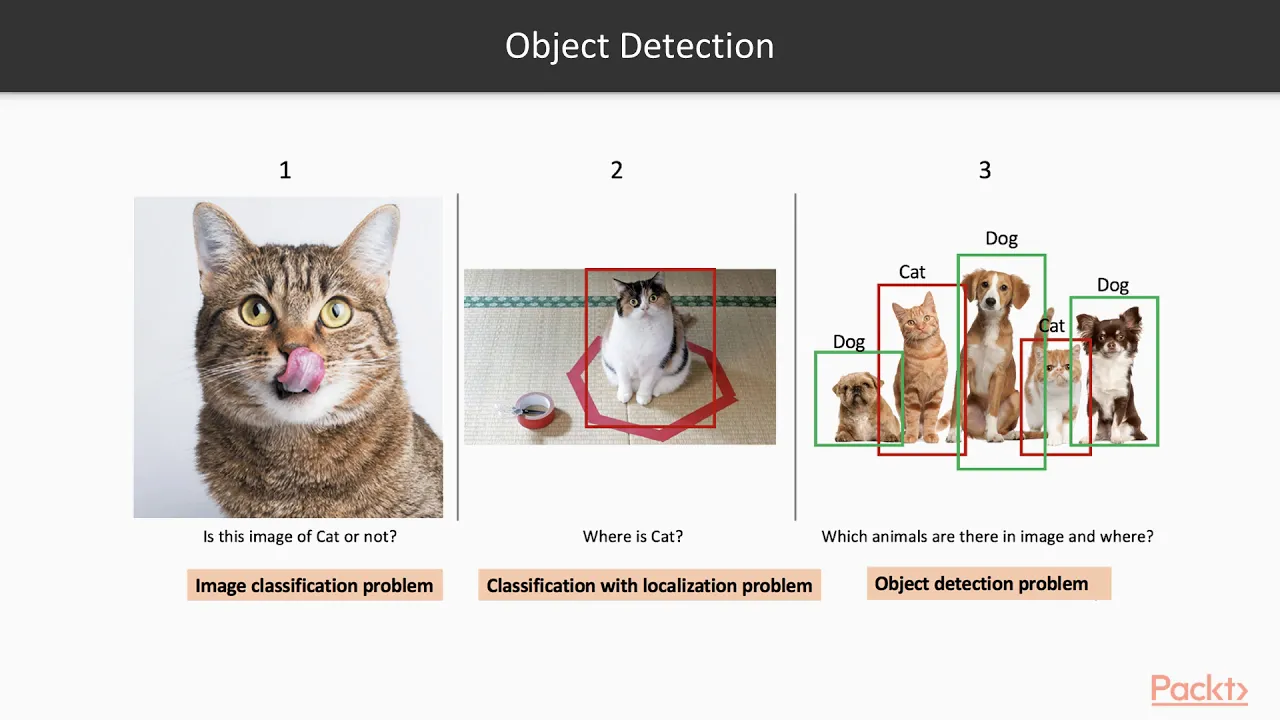
Fundamental concepts of Computer Vision, including the distinction between image classification, localization, and object detection.
Intermediate Python programming skills, including managing virtual environments and package installation via pip.
The core conceptual framework of the YOLO (You Only Look Once) architecture for real-time object detection.
Model optimization techniques for resource-constrained edge computing, such as INT8 quantization and ONNX runtime conversion.
Integrating hardware accelerators like the Coral Edge TPU or Hailo-8 AI kit to significantly increase inference speed (FPS) on the Raspberry Pi.
Implementing multi-object tracking algorithms (such as ByteTrack or DeepSORT) in conjunction with YOLOv8 for temporal video analysis.
Deploying the local detection system into a broader IoT network using communication protocols like MQTT or lightweight web APIs.
34.3K views0likes45:27Original Release: 2023-11-20
Hello friends and welcome to YouTube channel Freedom Tech and in this session what we are going to learn in this session we are going to configure YOLO object detection also we are going to create our own custom object detection model for YOLO on latest Raspberry Pi OS book Warm 64bit version but before we move to our practical friends if you learn something from our videos please consider to subscribe our Channel okay friends thank you so much and let's get started so friends today we are going to install YOLO V8 also we are going to create our own custom model for YOLO V8 on latest Raspberry Pi OS book War 64-bit version for that I have create a new repository this is completely fresh installation of book warm on Raspberry Pi 4 simple so as I mentioned for today's session I have create a new repository I will mention the link you need to Simply copy paste the link inside the browser rpy book War yate then go to the code click on download zip and it will download our ZIP format repository as you can see we successfully download our repository now minimize the browser go to the file manager and go to the downloads this is what our repository IN Zip format right click then click on extract here and it will extract with our folder name so RP book from yellow Hy main just click on Cut go to the home and just paste here our repository that's it we have done so now first we want to install a packages so just open Terminal and as I mentioned this is completely fresh installation of bookor so if I run here sudu pip3 sudu pip 3 install open CV hyph python this is what our first package for YOLO sudu space pip3 space install space open CV High python if I hit enter then as you can see you will face this kind of error so for that simply inside our repository I have create a simple text file rpy b.txt so right click open with the text editor and then here we have our first command as you can see this one this one command sudu RM so just copy the command copy it open Terminal and then just paste that command inside our terminal and just hit enter that's it now clear the screen and minimize the text editor minimize file manager now if we run our pip3 command again so of course for ultral litics for yo first we need open CV so sudu pip3 space install space open CV hyen Python and if you hit enter and then now as you can see now it will install open CV on our Raspberry Pi book warm operating system so when you install completely fresh book warm on Raspberry Pi 4 first you need to run this command so just copy it and paste inside the terminal and just hit enter that's it now we can simply install our packages with the help of pip3 on Raspberry Pi book War 64-bit version so it will install our open CV hyen python package meanwhile I will pause video so friends we successfully install open CV hyphen python so for tics we want to again open our text editor file and here it is as you can see this is the second command this is the second command for ultral litics for ultral litics we need a particular version of torque package talk vision and talk audio so I have mentioned the full command you need to copy the second command copy it and just paste inside the terminal and then remove this for yolow because this is only text so the command like this way it will look like this way sudu space pip3 space install space talk 2.0.1 version then talk Vision then this is the version of torque vision and torque audio and this is the version of uh talk audio that's it then just hit enter now as you can see it will install our all packages so friends we have completed our installation talk talk vision and talk audio now we can simply install ultral litic so let's just clear the screen and again we want to run the command sudu space pip3 space install space ultral litics this is what our Command sudu space P3 space install space ultral litics and then just hit enter so friends as you can see now it will install ultral ltic on our Raspberry Pi book War 64-bit version so friends as you can see we successfully install ultral altic package also on our raspberry piip book forarm sudu space 53 install ultral litics then it will install ultral litics done now let me again clear the screen and clear and then one last package which is sudo pip3 install CV Zone sudu space pip3 space install space CV Zone and it will install CV Zone so friends as you can see now it's installing CV Zone then successfully install CV one now we successfully installed all our packages simply minimize the terminal Min close the text editor and open our Tony python ID so go to the menu programming Tony then click on switch to switch to regular mode click on okay now close the Tony python ID again go to the menu programming Tony python ID that's it so we successfully open our Tony python ID and on latest Raspberry Pi book War we have python 3.11.2 simple so I have already create a code for y basic object detection so let's just open our code and here I'm going to use a Raspberry Pi 4 camera module so if you don't know how to use or how to connect the camera module Raspberry Pi camera module with Raspberry Pi 4 so I already created the video I will mention the link you need to Simply watch the video and then connect the camera module with Raspberry Pi 4 so I already connect my camera module with Raspberry Pi 4 so simply open repository and cam dopy as you can see right click open with Tony and it will open our code inside our Tony python ID as you can see import CV2 then Pi camera to import P camera this is how we are going to call our raspberry pi4 camera module and you at pre-train object detection module which we are going to use here yellow V8 n. PT Nano PT because we are right now working on our Raspberry Pi 4 so we are going to use yolow V8 and. PT pre-train model then coco. txt inside our repository we have our coco. txt file if I open with a text editor so we have here our classes here it is as you can see we have here all the classes person toothbrush that's it so this is what our basic code then this is how we will get our coordinates for drawing the rectangle so now let's just run our code so let me close untitle and if I start the code it will first download our Yow V at n. PT a pre-train object detection model and then it will start our object detection so friends as you can see it's down down loading yolow V8 n. PT model and then friends as you can see it's detected me as a person here it is so we have successfully configured YOLO V8 on our raspberry pi4 and it's detecting me as a person it is completely live we use our Raspberry Pi 4 camera module it little bit slow because on Raspberry p 4 right now I am recording also also we are using yolow v8n object detection that's why it's really slow but it's really work great with yellow V8 n. PT model on Raspberry Pi 4 that's it so we have successfully detecting our object with the help of yo8 on our Raspberry Pi 4 using Raspberry Pi camera module done so we have done with our basic object detection now we want to create our own custom model so for that simply first we need our data so here we are going to detect ardino Uno board and esp32 board this is what our custom object so for that we need images so images we are going to use our live camera module and then we are going to capture images for our data so for that again open file manager go to the rpip book form and inside that I have create IMG dopy code so just open IMG dopy with Tony python ID here it is as you can see we have open our IMG dopy with Tony python ID so now it will capture 30 images with the help of our PI camera it will capture 30 images here you can simply increase the number of images as per your require M suppose if you want to go with 130 images you need to Simply mention 130 so if you want to go with five images simply mention five then it will capture five images of object so now we are going to capture add 30 images also ESP 32 board 30 images so max frames 30 then here C2 do IM right here we want to mention the folder where we want to save our images so so inside our repository we want to create a new folder let's just say images click on okay and then right click to the folder which we just create then click on copy as a path minimize the file manager and here from images let's just remove all these things and press contrl + V control+ v v as a victory just press control+ V and it will past our path of the folder where we want to save our images so/ home SLP this is what our repository and inside that we create our images folder simple and then this IMG is basically name of our image so here first we are going to capture our ardino images so ardino arino hyen Uno arjuno hyphen Uno and the extension of our image is basically jpg now it will capture 30 images name of images basically ardino Hy Uno with do extension uh do jpg extension and it will save all the images inside our images folder now what we want we want to Simply move our ardino no board in front of our Rasberry pi4 camera module in different different angle in different different angle we want to move our ardino no board then it will capture each angle 30 images simple so let's just save the code and if I start the code so we have done so if you open the file manager images folder and inside that as you can see we have 30 images if you go and if you open with image Vier here it is as you can see we have all 30 images that's it so for today's session I have only mentioned 30 images but in real scenario you need more images so we have done with ardino board now here simply remove Ardo Uno and we want to mention here esp32 save it and run the code so as you can see I move the esp32 board in front of my camera module the raspberry pi4 camera module now if you open again the repository this is what our repository inside images folder so we have Ardo images and then we have esp32 word images here it is as you can see esp32 word and then Ard no so this is how this is how we can simply capture our data using Raspberry Pi for camera module for C object detection so done we have our data ready now we want our label IMG software on Raspberry Pi for book War so for that again open repository and here I have mention label im. txt Simple Text file right click open with text editor and this is what our packages so just copy the first package copy it open the terminal and just per just paste it here and just hit enter it will install P qy Hy Dev tools on our Raspberry Pi book War 64bit version so friends as you can see we have done now our label IMG package so just copy it and just press paste sud3 install label IMG and just hit enter now it will install level IMG on our book War so as you can see friends we have done now let's just clear the screen and there is error for label IM G on book Warm let me first show you the error then we are going to Sol our error for label IMG so run the command like this way label La just type the lab and press the tab button it will autoc complete our Command which is label IMG then just hit enter it will open our label IMG software as you can see it's open now here as we always do we want to select open DI then our repository inside that we have images folder and then inside that we have all our images then change save di again same repository images folder and click on choose so we successfully select our di folder and save now here we want to select yellow so just click on and just select the yellow then click on create rectangle box and if if you move your cursor for drawing the rectangle then software is closed then software is closed so how to solve this error for that simple just close all these things and then open file manager and go to the file system route and then go to the USR USR folder then go to the local folder then go to the lip folder then python 3.11 this is what our python version and this packages and inside that we have lip folder so here we want to search for lip folder as you can see Li IBS lips folder just click on it and here the canvas dop so this is the default canvas dop and inside our repository if I open again new file manager and this is what our repository and inside that repository I have mentioned the new canvas. Pi so we want to remove this default canvas. pi and we want to we want to Simply mention our can new canvas. Pi inside our /usr /local lip python 3.11 dis packages and lips folder so here we want to remove this one file and simply we want to change with our new file which I have mentioned inside our repository this one canvas. Pi so simply open the terminal and first what we are going to do we want to Simply copy this path so just select and copy copy it the path just write this way copy open Terminal and then run the command like this with sudu space RM space hyphen RF this is the command sud do space RM space hyphen RF then again space and then just paste our path let me check here this one this is what our path we copy it and if we open our terminal right click yes now simply click on paste and as you can see we past our path where we have our canvas do P so this is what our folder part for lips and inside that which file we want to delete we want to delete our canvas dop so just mention canvas canvas or you can simply you can simply if I open lips folder again and if you copy the path of our file which we want to remove like this way canvas.
just right click then click on copy as a path again open Terminal and then just remove the path and just paste the path which we just copy just paste it now here it is as you can see we have our file so simply we can now hit enter so just hit enter and if you open lips as you can see now there is no canvas. Pi now we want to move our canvas. PI from Repository to our folder which is lips so simply what we are going to do we want to Simply open a new tab and run the command CD space our repository if you run here LS command first CD and our repository this one RP so CD space RP just press T it will autoc complete our repository name then just hit enter if you run LS command and the file which we want to move the name of that file is canvas. pi so run the command like this way sudo space sudu space MV MV means move command sud to space MV space mention the file name which we want to move which is canvas CA just press tab button because we have here cam. Pi so let's just say can then it will autocomplete our file canvas. Pi that's it so soon space MV command for moving our file so which file we are going to move we are going to move our canvas. PI so sud space MV space canvas. pi and where we want to move we want to move inside our lips folder so again copy this path just right click copy it open Terminal and just paste it over here just paste it like this way so the command is now like this way sto space MV space the file which we want to move then again space and where we want to move we want to move inside SL USR local leap python 3.11 dis packages and lips folder now just hit enter now if you open lips as you can see we successfully move our new canvas dop file inside lips folder done now just go back and one more file which we want to change so for that we want to go inside label IMG folder here it is as you can see this one the label IMG just click on it and here we have label IMG dop so we want to move this file also with our file so inside repository I have mentioned here also as you can see I have mentioned the label IMG dop so same way same way just select the file copy as a path and open Terminal then here run the command same way sudu space RM space hyphen RF and the path which we copied of our label IMG dop just paste it and then just hit enter now if you open label IMG There Is No Label IMG dop because we remove it now the new tab so here we are now inside our repository so same way sudu space MV space so name of our file which is label label IMG dop let me check this one label imgp as you can see this one so sudu space MV space label I Capital label IMG dop this is what our file which we want to move and again simply where we want to move we want to move inside our label IMG folder so just copy the path open Terminal and just paste it and then just hit enter that's it now if you open label IMG there is our our label IMG do PI which we change done now close all these things just close it and this terminal we are going to minimize now we are ready let's just clear our screen now we want to run our label IMG software so label LA Press tab button it will autocomplete our Command if you hit enter and that's it we open our software now same way open DI go to the repository inside that we have images folder inside that images folder we have our all images choose this is what our images with our object add in unob board again we want to change the save di so go to the repository same folder images folder click on choose that's it now here we want to select our yolow so just click on yolow yolow and now create rectangle box and now as you can see the software is working the software is not deleted or we can not deleted basically software is not shut down it's still open now here simply mention our class name arino Hy Uno Ardo Uno click on okay save image so if you go inside our repository open the images and as you can see this is what our first image and their text file so if you open the text file with text editor and this is what our rectangle coordinates for yate means our label IMG is now successfully working on latest python 3.11 version on book Warm 64bit version that's it now simply we want to draw a rectangle box on on each image so we save our first image go for next image create rectangle box draw a rectangle box click on okay because the class is same again save next image create rectangle box draw rectangle box on AR no no board AR no no click on Okay click on Save next image so this is how now I will draw a rectangle box on each ardino image now meanwhile I will pause video so friends we have done with ardin now as you can see this is what our esp32 so same way create rectangle box draw a rectangle box on esp32 board and now you want to create our new class which is esp32 click on okay just save it go for next image create rectangle box draw a rectangle box click on okay save Save It Go for next image create rectangle box draw rectangle box on us32 board click on okay save it now this is how I will draw a rectangle box on each esp32 meanwhile I will pause the video so friends as you can see we have done with drawing rectangle on each image with the help of label mg so we have done with this process as you can see this is what our last image so let's just close our label IMG software we have done now open the repository and this is what our repository inside that images here it is as you can see the ardino their text file and then we have esp32 each esp32 image their text file here it is as you can see so we have done with label IMG now here we want to create again a new folder so I am right now now inside our repository here it is as you can see this is what our repository so inside that repository we are going to create a new folder and mention the folder name same as I'm going to mention so mention the create the new folder Freedom te so right click new folder Freedom T because in Google cab file this while I have mentioned the freedom Tech folder so you want to create here new folder and mention the name freedom Tech so I have created the freedom Tech folder let me show you like this way as you can see Freedom Tech open Freedom Tech and again here we want to create a two new folder so right click new folder images and then again next folder is labels so create a freedom Tech folder go inside the freedom Tech folder and then again create a two new folder the first one is images and another one is labels now again go inside images folder and here also we want to create two new folder we need to create a two folder so first one is basically training training and the next one is basically validation simple so training and validation go to back and same way go to the labels here also we are going to create training and validation folder so right click training validation simple click on okay so let me show you again go to the go to the repository here we create Freedom Tech folder inside that we create labels and images folder so again go to the images folder here we create training folder then validation folder go back again go to the labels folder same way training folder and validation folder go back and go the images folder where we have our all images here it is as you can see the images folder inside that we have all our data the images with the text file just select all the images cr+ a right click then copy it copy all the data just copy it go back go to the freedom Tech images training paste here all the data which we copied that's it same way validation just paste it that's it then go back go back same way inside labels we have training and validation just copy paste all the data just paste inside training data and go validation just paste it all the data inside validation also so we copy the data from our images folder and we paste inside Freedom Tech folder images folder training folder then validation folder then go back back labels folder training folder copy paste the data and validation folder copy paste the data that's it done now we want to create this Freedom Tech folder as a zip file so for that again open uh label IMG txt inside that I have mentioned the command so label im. txt just right click open with text editor and this is the command this one sud space zip this will create a zip file so just copy the command Comm open Terminal let me show you like this way full screen clear the screen and now again LS command we want to go inside our repository because inside that repository we have our freedom take folder so run the command like this with CD space RP just press tab button hit enter LS command here it is as you can see we have freedom Tech folder so just paste the command which we copied from our text file this is the command so this command will basically create Freedom Tech folder as a zip file along with the data which we have inside our freedom Tech images training validation Freedom Tech labels training validation so just hit enter as you can see it's creating zip files done so if you open your repository as you can see we have freedom tech. zip now we want to move this file on our Google Drive so friends as you can see I have open my Google Drive so here simply right click go to the file upload and select the file which we want to move so our repository inside home RPI book form and freedom tech. zip this is what our file Freedom tech. zip click on open now it will upload our freedom tech. zip on our Google Drive so here it is as you can see now it's uploading here it is uploading so meanwhile simply we are going to open our Google collab so here it is I have opened my Google collab then we want to upload our collab file so click on upload browse then go to the repository so home this is what our repository and this is what our collab file select it select now it will upload our collab file on Google collab so friends we successfully upload our collap file on Google collap so go to the runtime change run time type then select Python 3 and then here we want to select T4 GPU click on Save then click on connect now it will connect our CA file so friends as you can see we successfully connect now we want to run our cell one by one so first cell just click on play button then the next cell it will install tics so click on play button it will run our next cell so friends as you can see we have done so just scroll down go for next cell so here we are going to import our module so just click on play button done now we are going to cross check our yolow V8 so here it is the model which we are going to use yellow V8 and. PT as I mentioned because we are on Raspberry Pi 4 so we are going to use use a nano module yellow n. PT so just select it and it will cross check our yellowed is perfectly install or not on Google collab using the image the doc do jpg as you can see dog. jpeg image from roboplow and the result is basically save it means we successfully install ultral litic then now we want to mount our Google Drive because on Google Drive we have our freedom tech. zip file so if you go inside the drive so we have done one upload completed so we have done with uploading process so simply we can mount our Google Drive so click on play button so connect to click on connect to Google [Applause] Drive then here we want to select the Gmail ID then just scroll down click on allow click on allow and now it's mounting our Google Drive so friends as you can see we successfully Mount our Google Drive and here it is what our freedom te. zip now simply we want to unzip our fre tzip so next command click on next cell and it will unzip our images as you can see r.jpg the text file esp32 that's it so now we have done now what we want we want to create a data. yl file so just select the folder this one select it then go to the data sets here it is as you can see data set so just click on data sets and go to the freedom te here and these three dots as you can see these three dots just select it and click on new file and we want to create as I mentioned we want to create here data. yaml so data. yl data. yl just hit enter and it will create data. yml file so now just click on that data. IM IML and it will open our file so right now there is nothing because the file is empty so we want to copy paste the code from our repository so again open our repository and inside that I have mentioned data.txt text file so open with text editor right click open with text editor and this is the code so just copy it as it is just copy it open our data. yml as you can see we open already and just paste it here the code allow that's it we paste our code from our data.txt to our data. yl and here we want to select our class names so our first class is basically ardino so mention here ardino hyon Uno and our next class is basically ESP [Music] ESP 32 board esp32 and R noo and then class number of classes is basically now two so this is how you need to mention the classes name and the number class inside the data. yl so right now we have only two classes so I have mentioned the two class names and the number of classes is basically two simple then now press control+ sr+ s like this way control+ s it it will save our file then close it done now scroll down and here this is what our training command so here as you can see model is basically yellow V at s. PT but as I mention we are going to use a nano model so we want to Simply mention here yolow V8 n. PT n. PT and then now we are ready we want to Simply run our cell and it will start 100 apox 100 APO as you can see it will start 100 apox and it will create our own custom model with the help of this model we can detect our ardino board also the esp32 board with the help of our raspberry pi4 camera module so the process is started and as you can see the process is started 1 out of 100 so it will take some time meanwhile I will pause video so friends as you can see we have successfully completed our process and our model is basically save inside runs detect train so here it is whatever runs detect then train folder then we have WS folder and inside that w we have base. PT so this is what our model so just click here and download now it will download our b. PT model so friends as you can see we download our model so we want to move our model inside our repository so click here sh folder and then this is what our best.
PT right click cut then go to the repository and the freedom Tech folder no not Freedom Tech folder here here we want to mention because this is what our repository not Freedom Tech so here we want to Simply paste our model name click on paste and then we have our base. PT done now simply close all these things close the browser also close this one text file also now here minimize all these things close terminal open Tony python ID and close imgp and this is what our main code cam.
Pi so here of course now we want to mention our own custom model so instead of yn. PT we are going to mention best.
PT best. PT now we want to create our own Coco txt file simple so open repository right click new file Coco one.txt Coco 1.txt and inside that just open with a text editor and here we want to mention our class name so arino r no just a minute R Doo Uno arjino Uno and esp32 that's it arjino Uno and esp32 this is what our class name and we want to I I just create a new Coco one.txt file for our own custom base. PT model so we have done here now file my file Coco 1.txt that's it now all is good now if we save the code if you run the code so friends as you can see it started our Raspberry Pi for camera module and as I mention I'm same time recording so that's why it's slow now if I show ardino Uno board in front of our raspberry per for camera module and as you can see it's detecting arino Uno board there is a rectangle box and the class name is ardino uno then we have esp32 board and as you can see now it's detecting esp32 board so friends it means we successfully create our own custom model and we detect our own Customs object with the help of Yola V using Raspberry Pi 4 camera module on latest raspberry pios book War 64bit version remember one thing we use here YOLO V at n. PT model so it's really work good it's really work fast on Raspberry Pi 4 because right now I am recording that's why it's little bit slow I hope you learn something from this video we'll meet our next video till then thank you take care and bye-bye
Up Next

52:54
Deploying YOLOv8 on NVIDIA Jetson Edge Devices: A Practical Guide
@Ultralytics
8.2K views•2023-03-29

12:54
Triumph of Orthodoxy Icon: Byzantine Art & History Explained
@BenCallan
2.1K views•2024-08-06

9:49
FastAPI vs Flask vs Django: Choosing the Right Python Web Framework
@TechWithTim
302.5K views•2024-05-26

1:42
Game of Thrones Opening Credits: A Cinematic Analysis
@gameofthrones
46.3M views•2011-04-18
Related Study Plans & Knowledge Roadmaps
Structured learning paths in General & Interdisciplinary Studies
general-studies
Elevator Engineering: History, Physics & Cities
01From Hoists to Safety Brakes: The Dawn of Vertical Lift
02Hydraulic vs. Traction: The Engineering Physics of Elevators
03Modern Speed, Safety, and Algorithms
+ 2 more learning modules
12h5 modules
Explore Roadmap
general-studies
Rubber: Material Science, History & Geopolitics
01Origins of Natural Rubber & Mesoamerican History
02The Chemistry of Natural Rubber & Vulcanization
03The Geopolitics of the Rubber Boom & Colonization
+ 2 more learning modules
12h5 modules
Explore Roadmap
general-studies
Containerization: Evolution, Logistics & Trade
01Ancient Trade & Bulk Cargo: Amphorae to Barrels
02The Industrial Revolution & Cardboard Packaging
03The Containerization Revolution: Malcom McLean
+ 2 more learning modules
12h5 modules
Explore Roadmap
general-studies
Textile Tech: Evolution, Labor & Global Impact
01Pre-Industrial Textiles: Handloom & Cottage Industry
02Mechanization: The Spinning Jenny to the Power Loom
03The Factory System & Global Labor Transformation
+ 2 more learning modules
10h5 modules
Explore Roadmap