










![[AUTOML24] Automated Reinforcement Learning](https://i.ytimg.com/vi/3vYlUGRk6oY/maxresdefault.jpg)








![[ML News] AI-generated patent approved | Germany gets an analog to OpenAI | ML cheats video games](https://i.ytimg.com/vi_webp/SPOqoI0zOPQ/maxresdefault.webp)


This video demonstrates how to automate hyperparameter tuning for deep reinforcement learning agents using Python's argparse module, enabling researchers to systematically test different parameter combinations (such as learning rates, epsilon values, and discount factors) by running multiple Python commands with various parameters, generating uniquely named output files that track which parameters affect learning performance, thereby saving significant time compared to manual experimentation.
Automating Hyperparameter Tuning for Reinforcement Learning Agents
Added:Fundamentals of Reinforcement Learning (RL), including concepts like agents, environments, policies, and reward structures.
Basic understanding of Deep Learning hyperparameters (such as learning rate, batch size, and discount factors) and how they influence model convergence.
Intermediate Python programming skills, particularly running scripts via the command-line interface and passing basic arguments.
Familiarity with standard Deep RL algorithms, such as Deep Q-Networks (DQN) or Proximal Policy Optimization (PPO).
Integrating specialized hyperparameter optimization frameworks like Optuna, Ray Tune, or Hyperopt to leverage Bayesian optimization instead of manual grid search.
Implementing Population-Based Training (PBT) to dynamically adapt hyperparameter values during the RL agent's training lifetime.
Scaling automated tuning pipelines across distributed computing resources or cloud platforms (e.g., AWS, GCP) to run parallel experiments.
Setting up experiment tracking and visualization systems like Weights & Biases or TensorBoard to analyze and compare automated search trials.
5K views111likes18:00Original Release: 2019-06-08
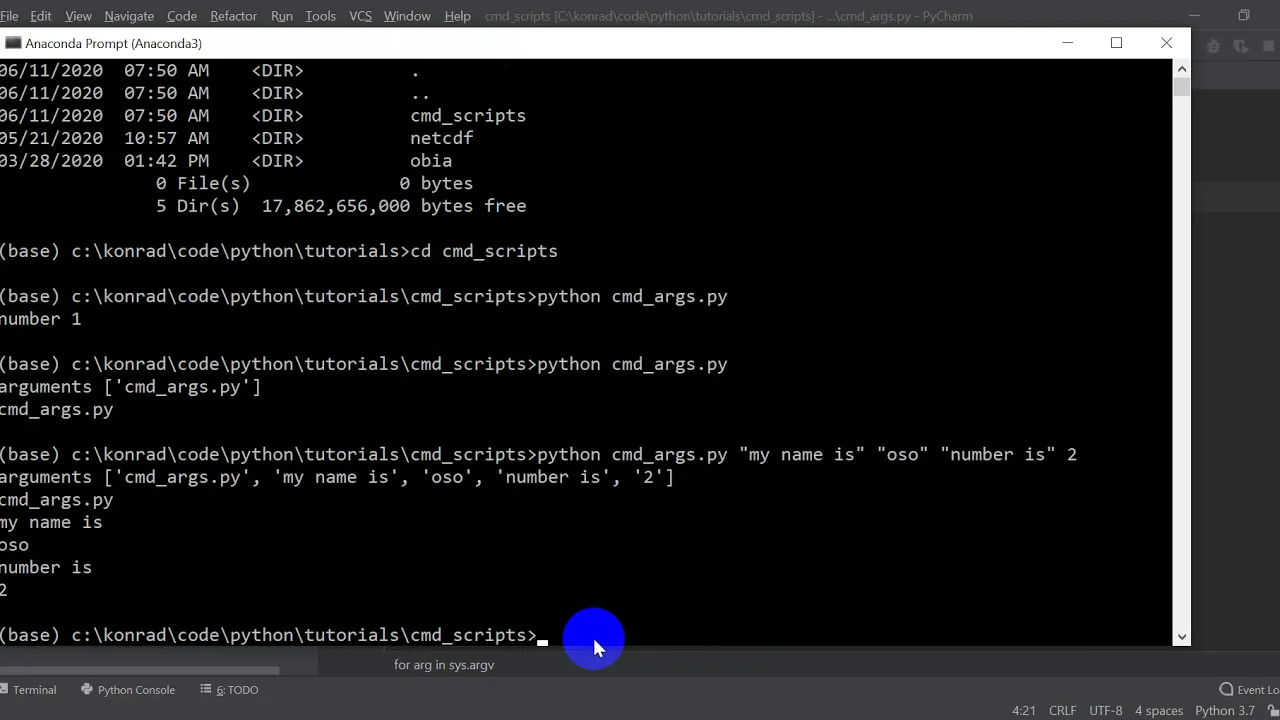
what's up everybody in this video you are gonna learn a simple process for automating the testing and training of your deep reinforcement learning agents you don't need any prior exposure to the command line all you need to be able to do is follow along let's get started so the core module we're gonna need for this is art parse and this is a built in module for python that allows us to parse command-line options will also need gin and we're going to use a deep Q learning agent from my YouTube github repository just for simplicity so we will import that learning learning deep Q learning utils import plot learning and if you didn't know if you have a nested directory structure you can use the period to separate the directories and the final thing should be the file that you want to import from - the dot PI extension of course but you can use this to traverse a directory structure to import modules from files from other directories just to make your life simpler so you don't the copy stuff back and forth and we'll be using the simple deep Q Learning Network from a previous video I did I will link that here if you want to check it out it's pretty good so we want to enter our main program and we need to create a parser so what this does is it will parse command-line options from text from the command line into either a strings integers floats or whatever data type we need and we're gonna pass these to the creation of our model to actually automate the process of training so it's important to have a description so that way when you come back to this in six months you know what you were doing let's actually do this utility for training our ell models and then you want to go about the process of adding arguments so when you're processing command-line arguments you can either have one - or - in the case of the arc parser we're using here if you don't have a - then it is a required option so I'll show you that so type equals int default equals one and you always want to have a help statement so that way people can know what is going on so help equals number of games to play so I need to go back up here and fix my directory structure one second you tube not reinforcement learning tube dot and so let's go ahead and pause not pause here but let's go ahead and create these arguments to see what it is that we're working with to get a feel for how this works so you want to say Argos equals parser dot at sorry parse args and so then we can say print are you stopped in games and that will print the number of games that we pass in so let's go ahead and run that from the command line let me head to the terminal and I'll show you how it works so here we are let's go ahead and run it I have a feeling I I can see the code I definitely forgot a equal sign in the name equals main I will prove that to you see ya forgot that let me go ahead and add that save and run and okay what we see is an error the following arguments are required in games so if we head back into the code editor and add in the - then it becomes optional so let me show you that so right here I have added in the - in front of n games and that makes it optional so just remember that the - makes argument optional and that way if you want to enforce strict requirements on the usage for the end user then you go ahead and leave off that - so that it throws an error when they try to run it without a required parameter let's go back to the terminal and run this once more to see what we actually get okay so let's run it again and we get one so that is the default value for the number of games okay so that's pretty cool we added in the - it makes it optional now let's say in games 100 and it prints out a hundred precisely as you would expect that's pretty cool so let's go back to the code editor and add in a whole slew of parameters that we would use for training reinforcement learning agents so that we can automate this process okay so now it's just a matter of adding in a whole slew of parameters that we're going to be using for the automated training of our agents and the end goal of this is to be able to type in a command at the terminal and then walk away and come back in the morning to a bunch of pretty plots and tell you how all of your combinations of parameters did that's important for fine-tuning your models will do broad steps you know order magnitude type changes in learning rates and such and see how that affects the agent and then you can come back the following day and fine-tune around those points that look like they might be promising so let's add another argument and that will be a learning rate and as of course type float a default I don't know let's say zero zero one maybe we're using atom who you can even set the optimizer to be a command line parameter and then just modify the code in the model class definition to accommodate multiple optimizers equals learning rate for optimizer and we will add in also for a deep Q learning agent you can see that's what I'm going to be using here the simple D queuing from torch we're going to need an epsilon end and that is the final value for the epsilon greedy action selection gradual decay over time zero point sorry zero one let's say now zero to five so that way it takes some amount of random steps so okay so I'm gonna go ahead and speed this up while I type in the rest of the arguments there's nothing really magical about the arguments I'm adding I just want to show you the process for automating your training of reinforcement learning agents so let's do this real quick okay so that is pretty much all the parameters we're gonna need for training our agent so we had the number of games that's the number of games it's gonna play the learning rate that is of course the learning rate for the Adam optimizer epsilon end is where the epsilon value will settle after it's been decreased over some number of steps you want to leave that finite so that you get continued exploration - a and B is the environment so this is important for of course making the environment and I've left it here to be flexible so that way you can not only choose different environments but you can embed the environment name within the file name when you plot the learning function the factor for decreasing Epsilon the starting value for epsilon of course the maximum I forgot the - their default into a million that's of course the memory size for your batch replayed dimensions from the environment batch size number of actions and gamma which is your discount factors so all the parameters you'll really need in actions of courses and something you're gonna be playing with dims you won't be playing with but things like the maximum memory epsilon epsilon decrement things like that you could play with to see how it affects the performance of your agent so first thing we need to do is we need to change the input dimensions into something we can use for the model because recall I use and start unpacking in the in the definition of the class so we will say args dot dims equals list args dims that will turn it in from an integer into a list and then we can go ahead and make our environment so Jim make args dot E&V and of course this is a string so it'll make lunar lander v2 in this case and we need an agent so we can call the agent we'll pass it gamma the starting epsilon the learning rate dims batch size a number of actions help if I could type that correctly number of actions RS max mem EPS end and args dot eps decrement so this will take all the parameters from our command line and turn it into an agent so next we have to actually play a sequence of games so we will say at the top of all of them Epsilon history and scores are empty lists this will keep track of the epsilon over time so that we can see how the score increases as a function of decreasing Epsilon and then of course that empty list for the score is to keep track of the scores from every episode so we want to iterate our end games over a number of games and you want to set the reset the environment at the top of every one we set you're done flag set your score to zero and play your episode so we'll choose an action based on the observation go ahead take that action get the reward done info and new observation and return keep track of your reward and then you want to store that transition observation and action observation underscore I need a reward in their reward come on and the done flag and then of course set the hold state to be the new state and tell the agent to learn at the end of every episode we want to append the agents epsilon to the epsilon history list Epsilon and append this score for the episode and every 10 games we want to print out a statement that lets us know that it's learning so if I modulus 10 equals 0 and I greater than zero calculate an average MP that mean scores max of either 0 or I minus 10 all the way up to I plus 1 and then say print episode I score score buts average score F and the epsilon good grief modulus I can't type today 3f modulus agent dot epsilon if otherwise just print episode I score score and then one last thing to take care of at the end of all of the games you want to make a list with the game numbers sorry the episode numbers I plus one for I in range are set in games and set file name and that is Argos not EMV plus underscore alpha plus string of our learning rate plus gamma let's say string of our gamma plus dot PNG so the point here is that you want to name this file based on whatever parameters it is that you're changing so if you're playing with alpha and gammas hyper parameters then you would embed those in the file name so that way when you look at different files you know ok I changed the learning rate here here and here I changed gamma here here and here so that way when you look at the data you can say ok this is the effect that changing that parameter had on the performance of our agent you can do other stuff as well so for instance you could say up here you could define a parameter for the number of nodes in the fully connected layers or any other real parameter of the model you could even do the well that's probably the last the the optimizer sorry you could also do the optimizer and just change the model file to change out the miners optimizers based on whatever parameters you pass into it so that's pretty powerful I'm not modifying the file to do that but it is certainly a possibility and some I would recommend it's it's a great option for testing hyper parameters and model architectures in an automated fashion so that you know how to sit there and type stuff into the command line over and over again but that is the essence of automating your testing so let's go to the terminal and run this and see how many typos I made so here we are in the terminal let's go ahead and run this and see if it works so I already have the commands here just for brevity let's play something like instead of ten games let's do let's say 100 games and let that run and that'll take a second to run and when it's done I will show you the learning plot so you can see the output of the model and kind of get an idea of how useful this would be in actual practice so one second alright so you can see this finished running and the agent learned precisely as B would expect right only a hundred games so it's not you know completely beating the game but you know whatever so let's take a look at the plot to make sure everything turn out precisely as we'd expect so you can see here that the plot is actually exactly what you'd expect you know you have the blue line they show us how Absalon decreases over time a sharp decrease and then the orange plot shows clear evidence of learning over time and I don't know if you can see the file name in the window here but yeah it's on the left here if you look over to the left this is named lunar lander - v2 underscore alpha zero zero 1 gamma 0.98 dot PNG so the file name has the precise structure we'd expect so when you come back the following day you can decipher what actually the what the effects of the parameters were and that will make your life significantly easier so let's go back to the terminal one final time to see how you would actually run multiple versions of a model in series so that way you get a whole bunch of plots to wake up to so the key to making this work is of course the command line itself now there may be ways of automating iterating through various parameters but this is just a quick and dirty way of doing this whoops one over one so what you want to do is just take this and copy it ctrl C and then you go all the way to the end two ampersands and whoops I didn't want to do that so you don't want to copy the enter but what you want to do is put two ampersands and run it twice and then say on the second time you could add in an extra zero to the learning rate or you can change epsilon n two to five or five or whatever you change whatever parameters you want and make sure that the file name reflects whatever parameters you're going to change but you just separate the extra commands with and double ampersand and that will actually execute two commands in series if the first is successful and you can do this any number of times so you can have 10 different Python statements you can have 10 different Python statements in a row and if you're on a POSIX environment you can actually stick this into a separate file and run it so that way you can edit it one time on a line by line basis and make sure it looks all nice and pretty so that is it for my process for automated training of reinforcement learning agents and testing out hyper parameters model architectures and the like if you found this helpful please share it helps a channel get discovered leave a comment down below a like subscribe if you haven't already and I'll see you in the next video do you mind
Up Next
19:49
Getting Started with ESP32: A Step-by-Step Tutorial
@tomasztarnowski4434
582.1K views•2021-10-28

12:54
Triumph of Orthodoxy Icon: Byzantine Art & History Explained
@BenCallan
2.1K views•2024-08-06

9:49
FastAPI vs Flask vs Django: Choosing the Right Python Web Framework
@TechWithTim
302.5K views•2024-05-26

1:42
Game of Thrones Opening Credits: A Cinematic Analysis
@gameofthrones
46.3M views•2011-04-18
Related Study Plans & Knowledge Roadmaps
Structured learning paths in General & Interdisciplinary Studies
general-studies
Elevator Engineering: History, Physics & Cities
01From Hoists to Safety Brakes: The Dawn of Vertical Lift
02Hydraulic vs. Traction: The Engineering Physics of Elevators
03Modern Speed, Safety, and Algorithms
+ 2 more learning modules
12h5 modules
Explore Roadmap
general-studies
Rubber: Material Science, History & Geopolitics
01Origins of Natural Rubber & Mesoamerican History
02The Chemistry of Natural Rubber & Vulcanization
03The Geopolitics of the Rubber Boom & Colonization
+ 2 more learning modules
12h5 modules
Explore Roadmap
general-studies
Containerization: Evolution, Logistics & Trade
01Ancient Trade & Bulk Cargo: Amphorae to Barrels
02The Industrial Revolution & Cardboard Packaging
03The Containerization Revolution: Malcom McLean
+ 2 more learning modules
12h5 modules
Explore Roadmap
general-studies
Textile Tech: Evolution, Labor & Global Impact
01Pre-Industrial Textiles: Handloom & Cottage Industry
02Mechanization: The Spinning Jenny to the Power Loom
03The Factory System & Global Labor Transformation
+ 2 more learning modules
10h5 modules
Explore Roadmap