










![[모두의 로보틱스] 13강 Trajectory generation](https://i.ytimg.com/vi/ukGBskbyrJo/maxresdefault.jpg)
In robotics, objects in free space have six degrees of freedom (three translational movements along X, Y, Z axes and three rotational movements around these axes: pitch, roll, yaw), which can be fully characterized by providing an entire coordinate system rooted at the object's center; however, robots typically have fewer degrees of freedom in actuator space due to physical constraints, and forward kinematics mathematically derives the relationship between actuator motions and the robot's end-effector position and orientation.
Introduction to Robotics: Coordinate Systems and Forward Kinematics
Added:Basic Linear Algebra, specifically matrix multiplication, vectors, and rotation matrices.
Fundamental Trigonometry, including sine, cosine, and coordinate transformations in 2D and 3D space.
Concept of Rigid Bodies, understanding how objects move in space through translation and rotation.
Familiarity with basic Cartesian coordinate frames (X, Y, Z axes) and their orientation.
Inverse Kinematics, which involves calculating the joint angles required to position a robot's end-effector at a specific point in space.
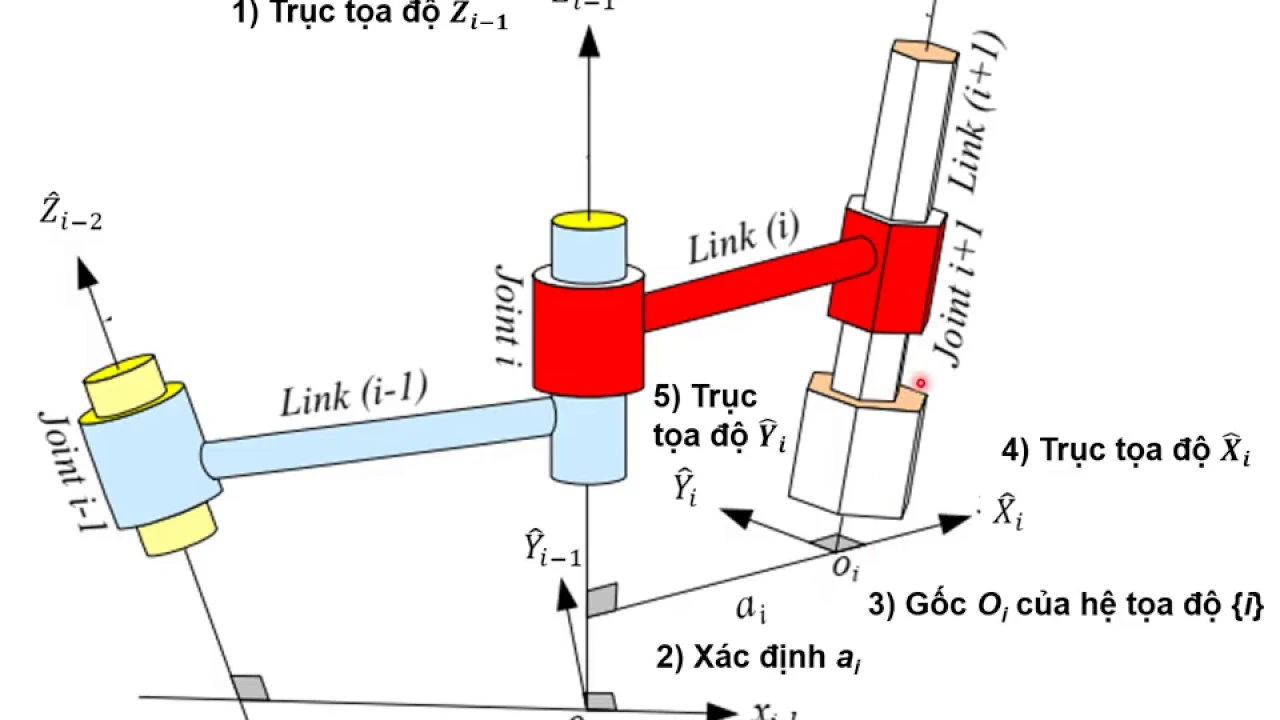
Denavit-Hartenberg (D-H) Parameters, a standardized mathematical convention for attaching coordinate frames to robot links.
Velocity Kinematics and Jacobian Matrices, to understand the relationship between joint velocities and end-effector velocity, as well as kinematic singularities.
Robot Dynamics, exploring the forces and torques required to produce motion using Newton-Euler or Lagrangian mechanics.
Trajectory Generation and Path Planning, learning how to program smooth, collision-free paths for a robotic arm.
264 views2likes24:08Original Release: 2023-10-11
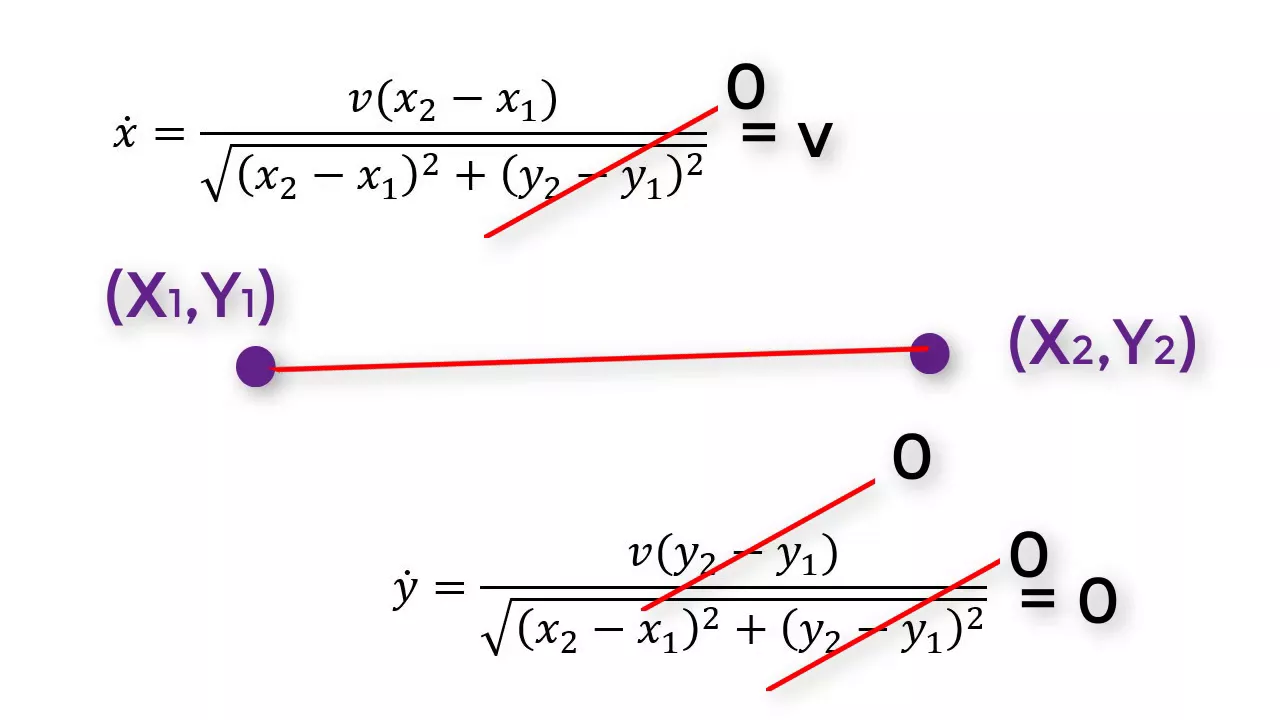
[Music] all right let's do a small recap on reactive behaviors and state machines from the previous model so far you should have completed around 45% of part one and that is this course here on Cera that is a third or this is a brief video on the content of module 4 we will start with a recap on module 3 and some administrative things so far you should have completed around 45% of part one that is this course of the specialization some of you are already ahead at this point and others haven't really started and submitting the assignments you are still totally fine but doing this later will get much harder and content will get more challenging starting today so if you haven't started yet I employ you go ahead and do the assignments in depth and get into the habit of regularly chipping ahead away on the content when we talked about reactive behaviors I explained you how very basic behaviors work by tying the actuation directly to sensing and this is still relevant for today's most successful robots like the rber that uses such behaviors to find its charging station and dock we also talked about formal definition for State machines and when you do the write up in the peer review for reactive behaviors you were asked to draw out a state machine that follows this definition the idea is to have states that very clearly delineate the behaviors that the robot implements and events which are indicating to the robot that it should switch its state some of you have already jumped a gun if you want and provided extended finite State machines in this case people added variables to augment the state and thereby get away with lesser states that need to be drawn this is technically correct but it's not what is asked and I think it's important for you to understand what extended finite State machines are you will usually need them when you cannot enumerate all states on paper for example if you want to have a robot that does n u-turns before stopping you would need to Dy draw as States up to end ter turns so the first turn then you drive then you hit the next opticle and so on until you have the nth turn and here the variable of the number of turns is implicitly encoded in the number of states that you draw now what you can also do is you can introduce a counter which counts the number of states but you have to understand that updating this counter is a side action that doesn't happen in the state but happens right when you decide that the state transition happen Happ s in extended fin State machine syntax this is known as a guard condition which is the event that you already known that is followed by an action and usually you put a slash there you put the guard condition first and then you put the action so for example in this case we have no gut condition in the beginning we directly jump into the drive state but we do have an action which sets the counter to zero also after every turn we have an event which we call here has turned but then we have an action that increments the counter now we get away with just three states when we are driving and there's an obstacle and the counter is n then we stop otherwise if the counter is smaller than n we do the U-turn so again you can use this but this is not what has been asked asked in the first peer review all right so today we will talk about coordinate systems degrees of freedom and forward kinematics so first before we start talking about coordinate systems we want to introduce the word degrees of freedom so this is a little confusing because some people think that degrees means like degrees like 3° or 5 degrees no degrees means something like the extent of motions that you can do and here the idea is that you have three axises in a coordinate system that something can move along so it can move forward or back it can move sideways or to the other side and it can move down or up in addition we have rotations around these axis so an airplane for example can pitch that is putting its nose up and down it can roll that is turning to the left or to the right and it can yaw which is turning around at Center and so with that we talk about six diens six dimensions in the degrees of freedom the three translations X Y and Z and the three rotations with this we are getting a 6D pose we are interested not only in the position of the center of the aircraft but we will also need to know the angles of pitch yaw and roll these six numbers fully characterize the state of the plane unfortunately it's not as easy when you think about how to describe the pose of this robot here we can easily provide you with a vector that tells us where the robot is in space so there are three numbers here X Y and Z but you will find quickly that providing three numbers really requires not only providing the numbers but also the order of rotation so for example I could say I have to rotate by 120° around the x- axis then I have to rotate by 20° around the z-axis and then I have to rotate around the y- AIS not only does this require additional information which is the order but it also turns out that this doesn't always work so the only way to Red determine the pose the complete pose of an object in space is pro by providing an entire coordinate system with this cornate system that is rooted at the center of the object I can fully determine the orientation of the object in space when we talk about coordinate system one thing that is important is the right hand rule are actually the two right- Hand rules if you want to remember whether the Y coordinate axis goes this way or that way take your right hand and align the thumb with your x-axis and I actually recommend you to do that right now while you're listening to this you use your pointing finger and point it along the y- AIS and then you use the middle finger to align it with the z-axis and so there's no way of doing this the wrong way once you indicate IND at which way y goes you know where Z has to go in order to understand how the direction of rotation Works take your right hand again and Casp your hand and now Orient the thumb with the direction of one of the axes and look at the direction your fingers point and this is the direction that the positive orientation is going uh there is a video on Kera where we do all of this in webots and you can see these numbers directly and you know change them and see what happens I recommend you to watch that we want do this here again now we also talk about why we need much less than nine values to express rotations so you might have seen that in webos it's uses axis angle or qu turn notation which is getting away with four numbers how this is done is a little much right now but I want to give you some intuition why four numbers are actually enough so when you think about the pose of a robot as three vectors that is three basis vectors like this is the x- axis this is the y axis and that is the z-axis that determine the coordinate system at the location of the robot you will find that these three basis vectors are orthonormal orthonormal means that they're orthogonal and that they're normal that means their length is one so what does that mean orthogonal means that once you know two of these vectors you can compute the third one because it must be orthogonal to the other two it's like the right- hand rule once you have put out the X and the y axis you will know where the z-axis is so we can actually drop these three values if they're not given you could compute them secondly the vectors are normal that means they are length one which that what that means is if I give you two numbers only you can compute the third number because you know that the over length of the vector needs to be one so if I tell you that the first Vector is one Zer you will know that the next entry is zero and likewise if I tell you there's a vector of 0 0 you would know well the third entry must be one now these four numbers are not what axis angle or quoran notation are but they provide you with an intuition of why four numbers are actually enough now the word degrees of freedom is confusing on a different level because it is used in two different contexts the first one is the degrees of freedom of the object in cartisian space so cartisian space is XYZ it's a 3D coordinate system in which you can have um a be a point but also have an orientation which is given by the orientations around the axis you can see that with the airplane when you have it in the air the information of where the center is is not enough I need to know the pitch axis y axis and roll axis rotations now there are some spaces like a plane like a tabletop or something like this where you cannot have all of these degrees of freedom but you are limited for example on a plane that is on a table you have only three degrees of freedom you can drive in X and Y you can't go up and down and you can rotate around the z-axis but you cannot rotate into the table by rotating around X and Y there's a different context for the word degrees of freedom which we refer to the degrees of freedom in the actuat space so the plane might be only fully defined in 6° of freedom but it has only three degrees of freedom in actuator space it is a Thruster with which it can drive forward or fly forward is the better word and then it has pedals and sticks that allow it to roll around the xaxis and Pitch around the y- axis so these three degrees of freedom are all it can do so we would say the airplane has three degrees of freedom another example we have the human arm which has six degrees of freedom in cartisian space and here we look at the wrist because that is where the tool is attached in the human case it's of course a hand but this is where we interested in the degrees of freedom we don't want to know the degrees of freedom of the shoulder or the elbow we want to know the degrees of freedom of the tool that we can attach to the wrist and in this case the arm can move in 6df as other objects but when we look at the degrees of freedom and actuator space we will find that it actually has seven degrees of freedom so it can Flex the shoulder or abduct the shoulder there's a rotation degree of Freedom here you can flex your elbow you can rotate the forearm and then you have two of freedom in the wrist so you can go up and down or left and right so not you can't rotate the wrist this happens here in the forearm and as always we don't count both directions but one degree of freedom is given by either directions so in this case we count 1 2 3 4 5 6 7 and you can easily verify this well why do you want to do that if you only can reach 60° of Freedom well it it adds redundancy so with that configuration I have the opportunity to reach a certain pose with more than one orientation now if you have six degrees of freedom I think you have up to 16 possible um ways of reaching a certain pose that is the maximum with 7even degrees of freedom it's even more if not infinite think about the wrist uh holding still and then move your elbow up and down and you will find that there's an infinite number of poses that you can um or infinite number of ways that you can achieve a certain pose now when you look at the epac or another robot that drives on the ground like the Roomba it has only three degrees of freedom in cartisian space it cannot move up and down so it only has the X and Y uh degrees of freedom translation and it can rotate around the z-axis so total this gets it to 3° of freedom in cartisian space now if you look at the actuator space you will find that it has only two Motors and with those it can achieve forward motion and rotation around the z-axis it cannot move sideways it can only rotate and move back and forth so it has two degrees of freedom in actuator space this also roduce us to the idea of wheels and how they affect the degrees of freedom the most common wheel is the so-called standard wheel which can turn and thereby move left and right in this image but it can also turn or pivot on a point and you can easily see that in webots when you set one wheel to zero speed and the other to some speed then you will see how the robot pivots around a single point which is the contact point of its standard wheel when you look at an office chair uh this is called a cter wheel which can turn like the standard wheel it can pivot on the ground but it can also pivot on the top where it's mounted so this has three degrees of freedom and it doesn't provide any constraints to the robot so when you mount a Custer wheel it just provides support for the robot but doesn't constrain it when you mount a standard wheel you know that you cannot move sideways of that standard wheel so if you mount uh two standard Wheels orthogonally to each other the robot cannot move forward or backward and it can't uh it can only rotate around the pivot point of one of the standard Wheels there's another wheel which is called the so-called Swedish wheel and you can explore that in rewards 2 it has rollers that are diagonally mounted and which allow the robot to not only pivot around the center axxis but essentially Drive sideways finally there's the spherical wheel which is like the cter wheel but those also exist in an actuated fashion so to memorize here all Wheels can add degrees of freedom or constraints and when I say add think about um a robot which has only one standard wheel all it can do is move left and right or back and forth if you want but it cannot rotate now if you add another wheel in a smart manner it can also rotate or you can further constrain the robot motion so uh we've seen in the beginning the example of the mechanical wind up toy that doesn't fall off the table it is um in standard differential wheel configuration as we call it with this two standard wheels and it has uh a ball bearing here at the beginning beginning at the tip so that doesn't add any constraints but once the third standard wheel hits the ground it creates a constraint and effectively takes one degree of Freedom away here is an example of the ca ubot which has four Swedish wheels and when all of these wheels drive forward then the robot moves forward but if these two wheels Drive in the opposite direction Direction than the hind Wheels the robot actually drives sideways the reason for this is because it wants to drive diagonally but then it cannot and the two diagonal motions cancel each other out and it drives to the left when you have both of these wheels go forward and the other two wheels go backward the robot turns on the spot so this robot can reach three degrees of freedom in on the plane and move omnidirectionally when you look at manipulators things are a little bit easier because every motor usually adds a degree of Freedom so to the left here you see a very simple lever which has one degree of Freedom there's a motor here then we add another motor on another link and this arm can reach two degrees of freedom and finally we add the third degree of Freedom or the third actuator and now the robot can reach all 3D po 3D degrees of freedom in the plane which are a position on the X and Y plane as well as a rotation around Z now we can also add more degrees of freedom here which doesn't help us to reach more degrees of freedom we are still limited to three degrees of freedom because we are stuck to the plane but we get a lot more opportunities to reach them in a redundant fashion and just uh so you see that here um the the robot here with two degrees of freedom doesn't has any redundancy because even if I would flip this over the orientation of the claw would change while here I have the opportunity to flip this over to the other side and keep the claw in this orientation thereby I can reach this orientation already with two different configur ations now here are some rear word examples their CA ubot has four degrees of freedom you can see this by counting the motors it can pivot here then it has a motor here two three and the fourth motor is there now the base provides an additional 3° of Freedom so with this we have S degrees of freedom that are actuated we are now able to reach all the 6 Dee of freedom in in cartisan space with many different configurations the ab IRB robot has 6° of Freedom they a little difficult to see here there's a motor one two three and then there are the fourth motor and then there are two more Motors in the wrist now we can do this mathematically by actually looking at the location of each of the wheels and starting to derive equations that relate the rotation of the wheel to the motion of the center there is a separate video on Cera that you can watch so I would skip here right to the results and what we get is six equations one for each degree of freedom and expressions that relate the speed of the left and the right wheel to the translation in the X Direction you see that two of the equations here are empty and two of the equations for the rotations and this is actually the mathematical way to see whether you can reach these degrees of freedom or not if you don't have equations for these then you just have two degrees of freedom if we somehow would have found an expression for Delta y then the robot would have three degrees of freedom uh we also note that there's a Delta here because these are just incremental motions so I cannot compute the X and Y and um Omega uh Relationships by a single equation what I have to do is I have to add them up and you see here as the robot moves forward eventually it will change its y position in the world coordinate system we will do this in the next module all right in summary objects in the world have six degrees of freedom unless they are constrained in some way usually on the plane where there are 3 degrees of freedom and you really need to geometrically reason about how the different actuators of the robot allow the robot to move and thereby how much how many degrees of freedom it really had you will get some experience and be able to just count the motors but then there are certain edge cases where it becomes more difficult then you really have to write down the equations and look at how many distinct Solutions you get we have also formally computed the forward kinematics as it's called of a typical robotic platform which is very common in service Robotics and Industry what remains to do I'd like you to go to the quiz uh do the reading then solve the quiz on coordinate systems and degrees of freedom and maybe you can get started now implementing this forward kinematics in webots which is the next subsection in this module
Up Next
19:33
Inverse Kinematics for 3D-Printed Robot Dog | XRobots Tutorial
@jamesbruton
139.3K views•2020-03-31

58:25
MathWorks Virtual RoboSub Simulation Environment | Webinar 2026
@RoboNationInc
209 views•2026-03-10

11:04
How to Build a Self-Balancing Robot: Arduino Nano & MPU6050
@easytechzones
16.8K views•2022-03-09
25:22
Micromouse: The Fastest Maze-Solving Robots on Earth
@veritasium
23.5M views•2023-05-24
Related Study Plans & Knowledge Roadmaps
Structured learning paths in Robotics
robotics
Building Delta Robots: Kinematics & Pico
01Foundations of Delta Robots & Mechanical Design
02Electronics and Microcontroller Setup with Pi Pico
03Delta Robot Kinematics and Coordinate Math
+ 3 more learning modules
65h6 modules
Explore Roadmap
robotics
Building Ballbots: Dynamics, Kalman & LQR
01Embedded Electronics & Omniwheel Actuation
02Ballbot Kinematics & Rigid Body Dynamics
03IMU Sensors & Kalman Filter State Estimation
+ 2 more learning modules
42h5 modules
Explore Roadmap
robotics
Micromouse: Hardware, PID Control & Flood-Fill
01Electronics & Teensy Microcontroller Basics
02Sensors and Actuators: Motors, Encoders & IR
03Precision Movement: Implementing PID Control
+ 2 more learning modules
35h5 modules
Explore Roadmap
robotics
CDPR: Kinematics, Arduino & Winch Control
01Foundations of Arduino & Basic Electronics
02Stepper Motors and Winch Mechanics
03Kinematics of 2D Cable-Driven Robots
+ 2 more learning modules
28h5 modules
Explore Roadmap