




























To fulfill Shopify orders using Amazon FBA inventory, connect your Shopify account with Amazon through the Shopify Help Center, configure shipping settings (offering standard shipping based on order value rather than weight), sync products by changing inventory management to 'managed by Amazon Marketplace' and entering Amazon SKUs, then manually fulfill orders by clicking 'request fulfillment' and selecting the customer's shipping method, with Amazon handling the rest of the fulfillment process.
Shopify Amazon FBA Integration: Free Order Fulfillment Tutorial
Added:The fundamentals of e-commerce store operations, specifically how order creation, payment processing, and fulfillment workflows operate within the Shopify ecosystem.
The mechanics of Amazon FBA (Fulfillment by Amazon), including inventory storage, Multi-Channel Fulfillment (MCF) services, and Amazon's fee structures.
Core principles of inventory management, such as Stock Keeping Units (SKUs), stock levels, and the concept of real-time inventory synchronization.
Basic understanding of APIs and third-party application integrations, including how data (like tracking numbers and order details) is transmitted between distinct software platforms.
Advanced Multi-Channel Fulfillment (MCF) strategies, including optimizing shipping rates, delivery speeds, and configuring branded packaging for Shopify orders fulfilled by Amazon.
Cross-platform returns management, learning how to handle customer returns on Shopify and route them back to Amazon's fulfillment centers efficiently.
Financial management and profitability analysis, specifically calculating the net margins of Shopify sales after accounting for Shopify transaction fees and Amazon MCF fulfillment costs.
Scaling to a multi-channel inventory management system (such as using dedicated middleware or ERPs) when expanding sales to platforms beyond Shopify and Amazon.
18.7K views507likes7:11Original Release: 2020-03-13
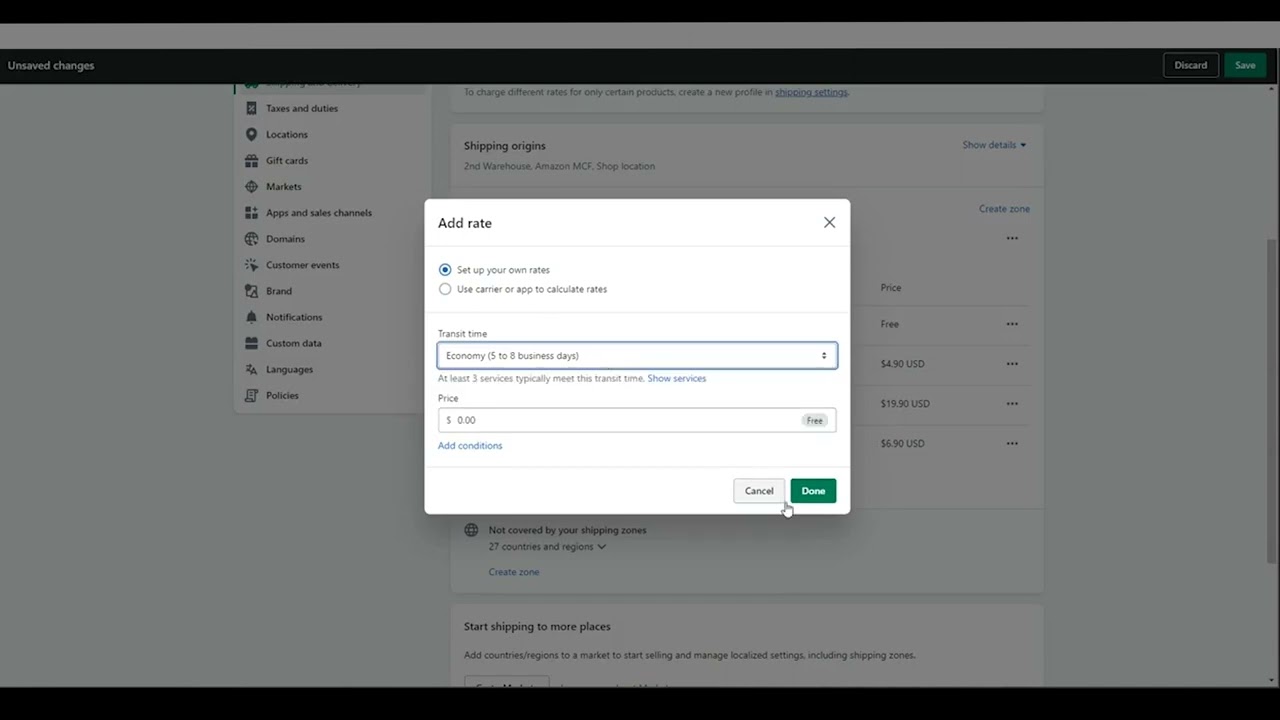
what's up everyone I'm filming my kitchen right now rather than my usual filming setup and that's because I wanted to quickly address a question I get a lot which is when you take orders on Shopify how do you fulfill those using Amazon FBA and that's a great question all Amazon sellers should have their own website they can take orders through now it doesn't have to be on Shopify you could use something like Commerce or another ecommerce platform but I personally use Shopify and tons of other people do and it's really good platform to go with because it's easy and quick to set up the value of having your own website is that when someone buys from you they're completely your customer you get their contact info their shipping info and you can follow up with them for more marketing upsells etc when someone buys for you on Amazon they're technically Amazon's customer so that means they get to keep all the info and recently Amazon has been making it harder and harder to share information so they're not sharing as much information with us as they used to and you definitely don't get any emails or phone numbers as an Amazon seller you probably already have inventory stored with Amazon using FBA so the question is once you get an order on your Shopify website how do you fulfill that using the inventory you already have stored with Amazon and that's what I'm going to show you right now so the first step is to connect your shop fly' account with your Amazon account and how we do that is by going to the shop Play Help Center go ahead and search fulfillment by Amazon and it should be this first document here fulfillment by Amazon currently shop fly says the integration is only available for Amazon accounts in the United States in Canada so if you ever integrated an app with your Amazon account before it's the exact same process if you never have that's completely fine it'll walk you through step by step but all you have to do is click on this link here and it'll take you by the steps to integrate your two accounts now this next step is actually one of the main reasons why I wanted to make this video and that's because Shopify says that do a lot of things that I have found to not be necessary so we'll take each of these steps one by one you don't have to create a separate rate for each amazon shipping option right here you can just do if you just want to offer standard shipping I do that on my shop I just offer standard shipping I don't offer two day shipping I've actually found Amazon Fulfillment to be really fast so I haven't really needed to offer two-day shipping or one-day shipping but if you want to offer that you can now the next step here it says to copy the name of the shipping rates and put those in the shipping write names field I found that not to be necessary you can change the naming if you want just make sure if you change the naming that you change it to something that you understand for example if you take standard shipping and you call it free shipping if you're offering free shipping on your store and you want to call it free shipping as opposed to standard shipping that's completely fine just make sure you know what that is if you change two-day shipping to some other naming sequence just make sure you know that that's the two-day one so you select it and the third step down here is this the base the criteria on the order weight not price I actually do the opposite on my store and it works completely fine so I have the shipping price based on the order value if the customer spends a certain amount in the order they pay shipping if they spend over a certain amount they get free shipping so you can set it up based on price not an order weight and it still work fine now if you are getting errors with thinking you could always come back this help document and follow it step by step but like I said I haven't found it to be necessary and it works completely fine so the next thing we need to do is connect our products on Shopify so that they sync over with Amazon you can do this by creating a new product or if you already have products on Shopify you can edit them as well the first section we need to take a look at is the inventory section so the first thing you want to do is change the inventory from managed by Shopify to managed by Amazon Marketplace web and this next thing here is really important which is you need to put your Amazon SKU here if you go onto your Amazon account go to manage inventory there should be a column there that says SKUs pick the correct SKU for the product and place it right here you can also go to edit your product on Amazon and find your skier there as well keep track quantity selected because the nice thing about this integration is it will sync your inventory from Amazon so when you make a sell on Shopify it will - it from your inventory on Amazon and if you're making sales on Amazon it will show less inventory available on Shopify the next section we need to take a look at is shipping you can keep this as a physical product selected and this next part here relates to what I mentioned before which is you do not actually have to set it up based on what you can set the shipping price based on the order value but if you want to set it by weight you can adjust that here I don't mess with anything in the cus information and leave that blank and if you have variants all you would have to do is go into each variant hit edit and you'll see these options and you put in the SKU for each variant and edit it the same way and the next step is to go ahead and fulfill the orders once you receive them now the one downside to the Shopify integration is you have to fulfill the orders manually there are some other multi-channel fulfillment apps available so if you get up to a very high volume of orders on your Shopify store you can always look into one of those and use that instead but fulfilling it on Amazon manually is really easy just takes a couple clicks and you can just go in at the end of the day fulfill the orders and that's that all you need to do is come in here and click request fulfillment once you click request fulfillment you'll be brought to the next page you can leave everything exactly as is just make sure you select the shipping method that the customer selected so I only offer standard shipping so for me it's always standard shipping but if you want to also offer expedited shipping you could go ahead and select that if the customer paid for that and you can leave everything else the same you don't have to put in a tracking number and you can leave this selected so the customer will get notified once the order is shipped and then all I have to do is click fulfil items and it will sync it over to Amazon and then once you've requested the order to be fulfilled if you scroll down on the orders page you'll see your timeline and you'll see down there that it has been requested for fulfillment and then everything else will be taken care of by Amazon so once that order is shipped your customer will receive an order confirmation and it will go from there I also wanted to mention the fees that Amazon charges for these fulfillment orders so just recently Amazon actually announced that they're going to be changing the fee structures so starting on April 1st 2020 these are the current multi-channel fulfillment fees so those are the multi-channel fulfillment fees are the fees that you'll be charged when you fulfill an order through another channel like Shopify go ahead and look at your product what your size is what the way is and you can find in here what it's going to cost if you're not sure what size your product is go into the help documents on Amazon search to find product sizes and find what category yours fits in but as an Amazon seller you probably know that already go in here find it most will probably fall into this category here of the large standard size so about between 550 and just on six dollars is probably what you're gonna pay per order that's for a single unit and if they buy multiple units your shipping price will go down as well and that's all there is to it really simple to set up if you have any questions go ahead and throw it down in the comments if you enjoyed the video please take a second to like it if you're new here subscribe turn on notifications and I'll see you in the next one you
Up Next

26:55
Optimizing Order Picking Methods with Odoo 15
@Odoo
17.2K views•2021-10-07

12:54
Triumph of Orthodoxy Icon: Byzantine Art & History Explained
@BenCallan
2.1K views•2024-08-06

9:49
FastAPI vs Flask vs Django: Choosing the Right Python Web Framework
@TechWithTim
302.5K views•2024-05-26

1:42
Game of Thrones Opening Credits: A Cinematic Analysis
@gameofthrones
46.3M views•2011-04-18
Related Study Plans & Knowledge Roadmaps
Structured learning paths in General & Interdisciplinary Studies
general-studies
Elevator Engineering: History, Physics & Cities
01From Hoists to Safety Brakes: The Dawn of Vertical Lift
02Hydraulic vs. Traction: The Engineering Physics of Elevators
03Modern Speed, Safety, and Algorithms
+ 2 more learning modules
12h5 modules
Explore Roadmap
general-studies
Rubber: Material Science, History & Geopolitics
01Origins of Natural Rubber & Mesoamerican History
02The Chemistry of Natural Rubber & Vulcanization
03The Geopolitics of the Rubber Boom & Colonization
+ 2 more learning modules
12h5 modules
Explore Roadmap
general-studies
Containerization: Evolution, Logistics & Trade
01Ancient Trade & Bulk Cargo: Amphorae to Barrels
02The Industrial Revolution & Cardboard Packaging
03The Containerization Revolution: Malcom McLean
+ 2 more learning modules
12h5 modules
Explore Roadmap
general-studies
Textile Tech: Evolution, Labor & Global Impact
01Pre-Industrial Textiles: Handloom & Cottage Industry
02Mechanization: The Spinning Jenny to the Power Loom
03The Factory System & Global Labor Transformation
+ 2 more learning modules
10h5 modules
Explore Roadmap