


















This tutorial demonstrates how to serve machine learning models as APIs using FastAPI, a high-performance framework that automatically generates interactive documentation (Swagger and Redoc) for API endpoints. The process involves installing FastAPI and Uvicorn, creating a FastAPI application, defining routes with decorators, loading pre-trained machine learning models using pickle, and implementing prediction endpoints that accept input data, transform it using feature vectors, pass it to the classifier, and return predictions. The tutorial shows how to run the API using uvicorn with the --reload option for automatic server restart on code changes, enabling real-time testing of the deployed machine learning model through HTTP requests.
Serve Machine Learning Models as APIs with FastAPI
Added:Fundamental Python programming, including modern features like type hinting and asynchronous execution (async/await).
The basics of Machine Learning workflows, specifically how to train, evaluate, and serialize (save) models using libraries like scikit-learn or PyTorch.
Core web development concepts, including HTTP methods (GET, POST), request/response cycles, and the JSON data format.
Containerization of the FastAPI application using Docker to ensure consistent environments across deployment stages.
Deploying the containerized API to cloud platforms (e.g., AWS, GCP, Azure) and setting up production-grade ASGI servers like Uvicorn with Gunicorn.
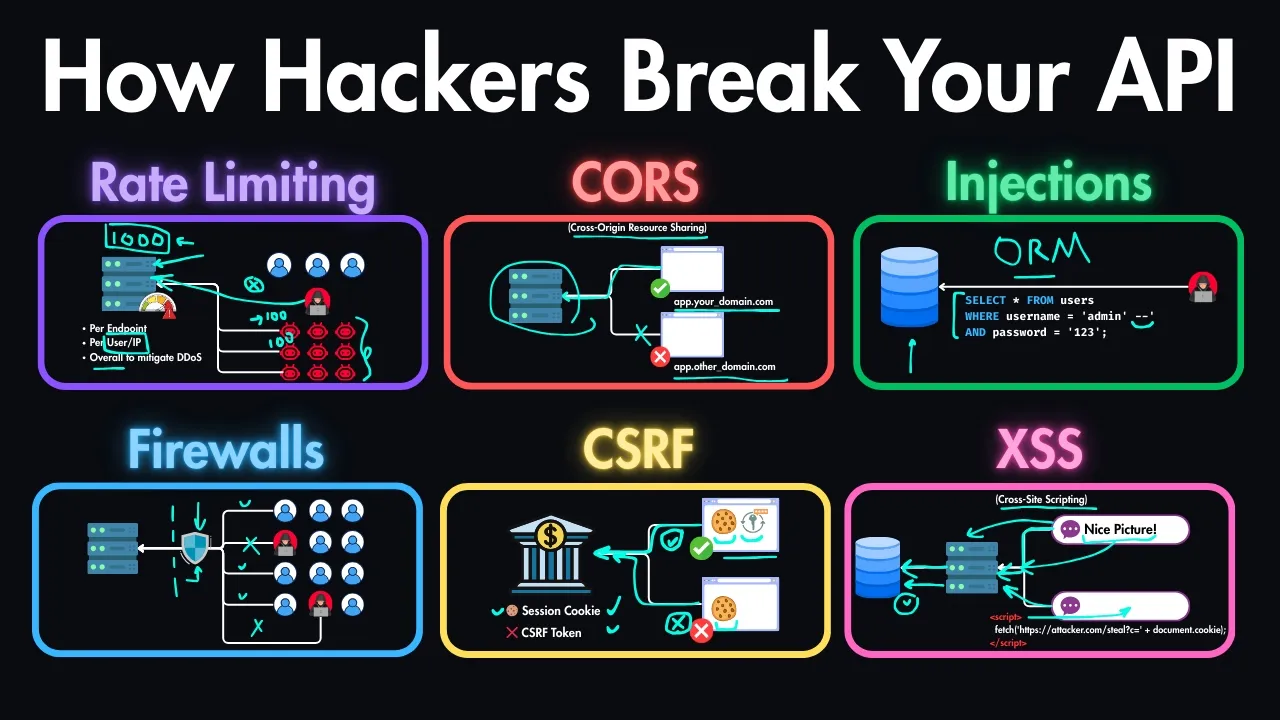
Implementing API security measures such as CORS, rate limiting, and user authentication/authorization (e.g., OAuth2).
Introduction to MLOps principles, including model monitoring for data drift, logging API latency, and setting up CI/CD pipelines.
25.5K views462likes21:19Original Release: 2019-12-29
hello everyone welcome back again my name is Jessie and it is a wonderful tutorial we're trying to see how to save our machine learning models as an APA right so be in a very nice frame rate call first API which is a high performance framework that allows us to build EPS with simplicity so let's see how to work with it so first of all let's install the switching story just going to go it pip install first epi right and then first epi requires you to use any SGI server which is called ubiquinone hi back on so it's going to be pissed off first API and then UV cone these are the main requirement to install or to work with first it professor let's move on I'm just going to quit my phone which is going to be create a folder called ml up then I'll sit into ml up then you create our first file called up dot pi the last loop in our file and unless start writing some code okay so first of all first API is very very powerful it combines the best of all the various treatment that you have already write as from flags to swagger to all of these things very interesting into one package making it quite interesting so now let's see how to work with it so the basic stuff is that just going to input Pacific on so imports Ubik on there's going to be the only be easy to save giving you you can't say power up that's the first thing then we need to go it from from fast API imports fast API right the last one supposed to be capped off right that is how to work with it then the next thing that we have to initialize our app so let's initialize our up it up then I'm going to quit it's Riley so it's going to be fast API press we can they are to option you can just put debug let's go to through here or you can omit it right so any of them is going to work perfectly so let's go without a twist that is a big idea now we need to be able to initialize or critter it mate so if main then it's going to give it our simple stuff which is going to be our unicorn that's run then I'm going to pass in the app so the app here is referring to this up here right and then it's going to take the nest again which is going to be host is going to be our look how host which is going to be 127.0.0.1 right and then the next one is another thing is our potent eyes to the poor that you want to listen to so by default less good pots which is going to be put it out right that is a big idea so we have created something very simple in Pedic so we running it from this particular option now let's create our face also just like just like just like flux right so you also use decorators we're going to put our face the critter it's going to be up but gets tweaked enough it's an API so it supports all the REST API verbs right you can just go with a blood kit then give you a route right so this how to create a simple route so there's going to be our route then it's going to be like this something very basic then from here I'm just going to define my function so let's call it us something very basic so you can call it as Indus and then you just do whatever sort of a retain come put it in can't just return something like let's say our test is going to be hello API allow us write API Buddhist satellite is it's not the very busy right so that is how to make it so you can just go with this particular function it is going to work or I can just put the asynchronous caption they all should right so any of them is going to make now let's run this simple app that you have created so I'm just going to go back to our location yes there are two means of two menus or vanity the first version option is just go to Python 3 then the particular name of the averages under spike then it's going to loop in it and run X because we are using this particular option using the if me write it in the evening so it allows us people to run this particular app well without giving us any arrow so they're going to run give us the particular pot that is running on so let's copy this particular pot completely spot and then you paste it here if I surrounded the face method of runnin our upright using Python so it's going to run it is going to give us our test which was a test we found here right hello API body is very very interesting and very simple but they disadvantage of run it in this way that if I change this one to API borders to something like let's say API Travis I save it it's good at it identify the change right but if I go with this option so that is a solution right it's not showing stuff until I close it so that is why we have to use the next option of running late so let's screw this one now let's run it with the next option which is going to be UV con UV cone right then I'm going to supply some other stuff with it what argument you be using it are going to go in it so the atom is going to be our up so this up here it's referring to this particle fr right the app is referring to this particular file here tells the name of the file then the next option is going to be our up here this referring to this but cooler up right so in case these powers Nima's me this is going to be called me right it's going to be me right but here just leave us up so good to be up then the app again which is referring to this particular up here up right here that is a big idea then I'll just go which lets us reload so this is the only thing we need to enable us to run to achieve account and then it's going to run it's right even if you make changes it's still going to see the changes and reload right as a physical idea so let's go on this little option professor is running on this particular port so if I come back here right and i refresh it again to refresh it now you're going to see our lava stay right to even I can change this one to the old one let's the API masters Santa like this API masters I save it and i refresh it go to show the Masters de right it's going to take the change here then we find if i refresh the back again it's going to give us the result right that is the basic idea which we have the lavas here the best if i refresh it is what is coming right if ETSU that is the basic ideas who is going to identify the changes you take the change here and then shut down and restart again that is a basic idea which they reload so there's a best method of running it right even when you are deployment is one of the best method of running it ok now let's see how to add a machine aspect to it so first epi comes with a lot of things so with this little cookie of quittin if I come back to this place then just go back with backslash doc a group a flash talk I'm going to get the documentation a saga documentation which is very very interesting right we just need to could have written very very cool right so it's loading the swagger or open API documentation very interested and then like I see the real stuff so cannot get here can see the various parameters the real option can let me try it out then give us the option of as Keating something right very very interested and then get a lot of things can also do so this is including swagger is all right so in case you're using flux we drive use flash swagger to enable us to do that but first API allows you to be able to do that to get all at once together with this little code right this little code is allowing us to do all of these things very interesting and I don't know a little can also check for every doc if I go with redox don't give us a very nice documentation so DL two options do you have the docs and we have the red doc right you're going to load every doc they're going to be a very nice documentation very interesting and it's going to give us some interesting information about it very very interesting a very simple cool so now let's see some how to add some other stuff to it so first of all let's see how to pass in ultimate I'm just going to go to the same thing I half yet keep on to pattern on ultimate is very simple so it's very simple so I can just copy this one and then let's pass it here and unless you give it a different function so this much and let's call it us let's say get item right to get attempt right or get item something very simple and then we can paste it here let's spit something like I say attempt something else like items they're not passing the query like me that I want to do so I can just pass in a name here so let's give it a speci name right it and then you just pass in the name here if I pass in the name you can just keep you can actually define the particular datatype right wait and this watch will appoint by game blesses strength there's going to identify that this particular stuff is only a string that is one way of doing it but let's go with the simplest method they fit and then what you can do is that we can now passed in our name here right you can pass in the name option here so let's give it our name okay so this is going to be test that's called us name pivot so something very basic so I save it now and I come back to here right we have our doc even if I refer the Red Rock going to see a whole new documentation for it going to detect the changes detecting the changes that is made right shutting down detecting the changes and if I even with the red dot can see that is giving us some interesting information about it perfect so it's going to give us our get itself right then it's also going to give us the gate items out of the bust right we just let just this little code I've got to get items API documentation with the requirement we just named very very interested and even you can see how to work on it something very simple right these are out now if I go back to the dogs so let's go back to the dogs here it's going to be dog will give out the swagger option right which is very interesting and very cool lutely swagger it's even on the face index which is this place as well as that gets one and then when I get to the Miss planet with a get option you can't do some interesting stuff so I can just go with the gates and I'm going to see the various parameters I need to supply the name that is required and then some videos interest and stuff right which the data type in description for the schema so which here I can even go with tryouts then I can pass in my values less personally name like let's say mark right if I great mark and I could execute it's going to pass the Mac day you go see that just passed Emma and I type here and then consider just pass it here also then it has given us is that our result body and then very interested right so that is something very cool about it the schemas are resolved here right name is Mac that is very very interested so we can even run it with this vertical option right the same option that you run here you can run it I so I can even come back to this place and they pass in my item they're not passing less a mock right if I greet Mac it's going to give us stay just one in five format very interested so let's change it from this option to something different like let's say George it's also going to change it and give us the John very very aggressive so you can use it in several formats right so the user can I use it in this format or the user can't just go with the normal dogs option right and then it's going to give you get the other option of doing it in a simple way right that is very interesting very cool simple stuff out of the boss now let's see some other stuff you can also do and it's about a dandy machine and an aspect to it so it is going to be our camera last but doesn't mean I did behind this we want to be our amen mmm aspect right so how do we do that so let's first of all inputs job lip so you know to be our ml like it is that you be using civilian input your bleep job lips or the animal package but we didn't to serialize our up alright our model that you already saved and always so I'm just going to be using our famous module that yep interest in a classifier up you'll be right reckon only so I'm just going to go to our doctor writers I'm going to have models right a little bit idea so let's do that right so I'm going to copy the models and put it inside the same location so this is my model so I'm going to copy it and I'm going to paste it here right so ready to be the same play that um so a model is here right so we have all our models here we have our gender transfer models right okay so let's see how to record it so I'll just come back to where we are now here then I'm going to load our Victoria so it's going to be our gender doctor either then I'll go to obtain visit open let me expand it to return 0 or pin and I'm going to pass in my mother who's going to be our model so we're going to be our models / so we are going into this particular for that we have right is our models folder and I'm going to go with our agenda vectorizer that's pickle that is a first time for you reading and then you're going to open it a sweet bite so that theory right pivot that is all now the next thing we need to do is that we need to be able to load it right we have open our file now let's do it inside a particular format so we're just going with gender and also CV as for a contact riser then I'm going to use your blip to load our stuff so job lipids load I'm going to load our gender Victoria that's all that we need to track we are done with so we have new to quit our victories and unless we go on our windows she's going to do something very simple Vijender let's call this our envy or I hope this or less for this can be module in our passing same thing I did above so we're just going to be the same thing right this is going to be the same I just copied this one here and I'm going to change this one to is referring to this naive is here so envy motto not read about model you're going to open a sinful then from here I'm going to load it into my classifier gender CLS for classifier then I'm going to use your bleep to load our gender now you this although it is very very interesting right so you can make let's make it to the same so it looks more the same so V then this is going to be alright so yeah now in it I've made to load our fact I this ruler motors now let's see how to use our models and on our advertisers within our up in a very simple so disciplines with a DSLR aspect you can use poast or I can use guests right any of them go to XLS professor for go it get and I'm going to go my route so going to be predicted just like I've been doing always right and then I'm just going to pass in like me just as we did here right this team a committee is really adventurer person is now you're going to pass on our name because a class why fascinate then I'm going to give it a sink then I pass in my function so fragile is going to predict and then this function takes the argument of the name if it so not less work on it so we have a vectorized data let's go to our vectorize name right there now passing my gender classifier or gonna contact writer choose it to transform our name right into practice so we're going to be transformed which I've been doing all the time I'm going to pass inside list then to hurry so to re-write FS we're done with it now we have to send this particular bertrise name to our classifier so let's do us let's go transportation it's going to be very simple she's going to be our gender classifier window don't predict now passing my vectorize that is all that we need right if it is we are going to be getting our result so now I'm going to give it a simple condition to eat my prediction okay so they're getting a face value it's called to zero if that is the case and I want you to see that my result let's go to female right so 0 is for female and then male is for results is for one price so result is code to me right all the variability so we have to do something very simple now from here we can our retainer is also let's return it to return on it here a 10 then look up passing our original newsletter original it now name right which is going to be the name that we have I'm going to go with a predation pressure it is going to be our prediction that we have which is thought to be a result found the variable X we have new to create a simple API the basic idea that we are trying to do the same thing I've been doing all over all over again but in this case we are using first EP a-- so let's see what you have so far so I'm just going to reload it won't identify the changes so if I go back to the redox refresh it hopefully not going to give us any arrows who's finishing the service we're going to restart now if I come back here hopefully is going to identify the changes perfect suit us identify the changes that's restarted now it has given us our prediction option right so we see that you can have our prediction rowdy also right so this is something very simple so I'll just go with the gate then I can open it here and then consider you have our name here then I can try it out like I'm listing the name is who are famously me I'll be even is Mary then I'll go execute it's going to analyze it and give us their prediction so Mary was sent to this muscular out where were sent to this request URL and then because originally must Mary and Anna prediction as female very very interesting right so you can also do the same thing here so I can just come back to the URL and go wait to predict / Mary just going to make and give us the same results right so total us prediction or journey Miss Mary prediction is female very very interesting and also give it a name like let's say something different so that is a big idea right behind what you have done so fast if a great schmuck I hope MUC is mil precise to mark was giving us a smell very very interested so our app is working well if I come back to my Braddock most we're going to get some interest in the commutation right including what you have done so far the new start we added is going to add those two committed shifts to it a very simple way so so which I'll just write in one simple code here right on one once cuckoo birds are getting all of these things out of the post so you see that even as our in this hour gets items and our prediction route if I click on the prediction given us the parameters that are required the response and then the various information about it very very interesting and very very intuitive with just simple code right that is the power of fast EP a-- now let's see another way so this is for this for get right you can also do the same thing for post so you know just only get but kind of good news for post but and just copy the same thing and then let's do it post growth there art for put using post right the same option I'll go eat post now and then good identified Changez i refresh it to give us two different options right one for the gate and then one for their post so let's go back here I didn't find any changes so it's finished about process is going to rerun it again and give us our result so in a nutshell the basic idea is that first of all you're just going to import your normal package that is your account and then the first API then you pause me to not even use this you go to import job lip right you luteum what does any of you is right this is for appetizer and this is for our model right then the next thing we need is that we are going to initialize our up then we'll create our first route and our second route which we just did to know something and from the Machinima learn aspect you can just follow through the same thing right this is something very busy and this one of the width of doing it the other way that can also define a model can also define class model and then you just pass in your stuff right there's another way of doing it which we will discuss later so that's the basic idea but it's the simplest method right very very interesting so let's see our results now so now if I come back and refresh again refreshing loading our redox purse we still have our in this get get get an end post right and if I click on a post will give us a different result right now I can come back to the docks and I was also going to wait for us so this is the docks then I can see it loading you have our get get get pushed in and filled on a post like also post a resort to try it out post in a name which is Jessica I'll go it at the cute because we're going to back right both of them is going to echo it using that's what the result give to us using post right so you can use this protocol option to get your result back and then this is how it's getting you can also get the resort so thank you for watching this tutorial so in case you have any question or contribution can just put aside a comment section below and please don't forget to subscribe stablest seen an assertion stay blessed
Up Next

8:42
Keynes vs. Hayek: The Economics Rap Battle Round Two
@RadicalDiscourse
5.8M views•2011-04-28

12:54
Triumph of Orthodoxy Icon: Byzantine Art & History Explained
@BenCallan
2.1K views•2024-08-06

9:49
FastAPI vs Flask vs Django: Choosing the Right Python Web Framework
@TechWithTim
302.5K views•2024-05-26

1:42
Game of Thrones Opening Credits: A Cinematic Analysis
@gameofthrones
46.3M views•2011-04-18
Related Study Plans & Knowledge Roadmaps
Structured learning paths in General & Interdisciplinary Studies
general-studies
Elevator Engineering: History, Physics & Cities
01From Hoists to Safety Brakes: The Dawn of Vertical Lift
02Hydraulic vs. Traction: The Engineering Physics of Elevators
03Modern Speed, Safety, and Algorithms
+ 2 more learning modules
12h5 modules
Explore Roadmap
general-studies
Rubber: Material Science, History & Geopolitics
01Origins of Natural Rubber & Mesoamerican History
02The Chemistry of Natural Rubber & Vulcanization
03The Geopolitics of the Rubber Boom & Colonization
+ 2 more learning modules
12h5 modules
Explore Roadmap
general-studies
Containerization: Evolution, Logistics & Trade
01Ancient Trade & Bulk Cargo: Amphorae to Barrels
02The Industrial Revolution & Cardboard Packaging
03The Containerization Revolution: Malcom McLean
+ 2 more learning modules
12h5 modules
Explore Roadmap
general-studies
Textile Tech: Evolution, Labor & Global Impact
01Pre-Industrial Textiles: Handloom & Cottage Industry
02Mechanization: The Spinning Jenny to the Power Loom
03The Factory System & Global Labor Transformation
+ 2 more learning modules
10h5 modules
Explore Roadmap