

![[Устарело] Всё об экструдерах 3D принтеров. Принцип работы, решение проблем, инструкция по сборке.](https://i.ytimg.com/vi_webp/5ZxN1LFajrw/maxresdefault.webp)




![Curso GRATUITO de N8N Para Iniciantes [VERSÃO COMPLETA] | Autotic](https://i.ytimg.com/vi/RJ6mqfm0UyQ/maxresdefault.jpg)







3D printing is fundamentally a tool that requires technical understanding for maintenance and troubleshooting, not just a hobby; PLA is the best starting filament due to its affordability and ease of use, while TPU requires moisture drying and careful temperature control; the 3D printing aesthetic cannot be hidden and demands post-processing for professional results; and users should avoid brand cultism, keep backups of software and files, and prioritize learning 3D modeling over downloading generic models.
3D Printing Lessons: 12 Years of Experience, 30 Minutes of Advice
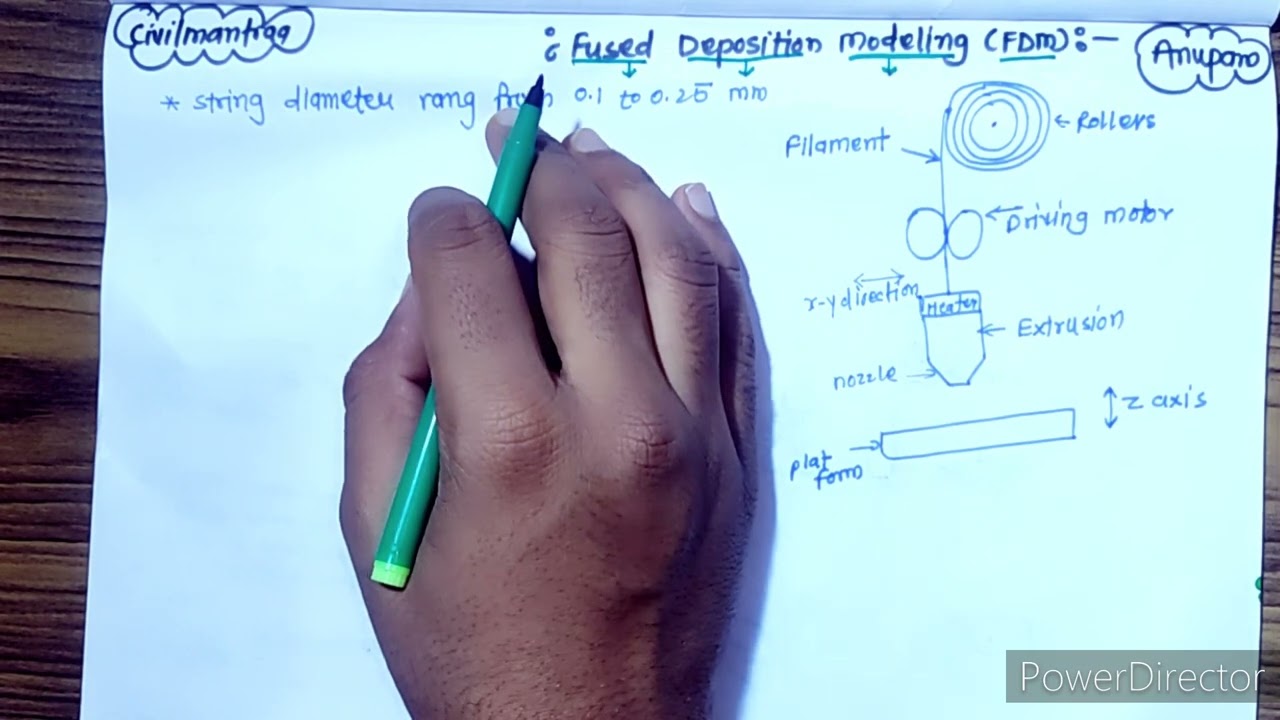
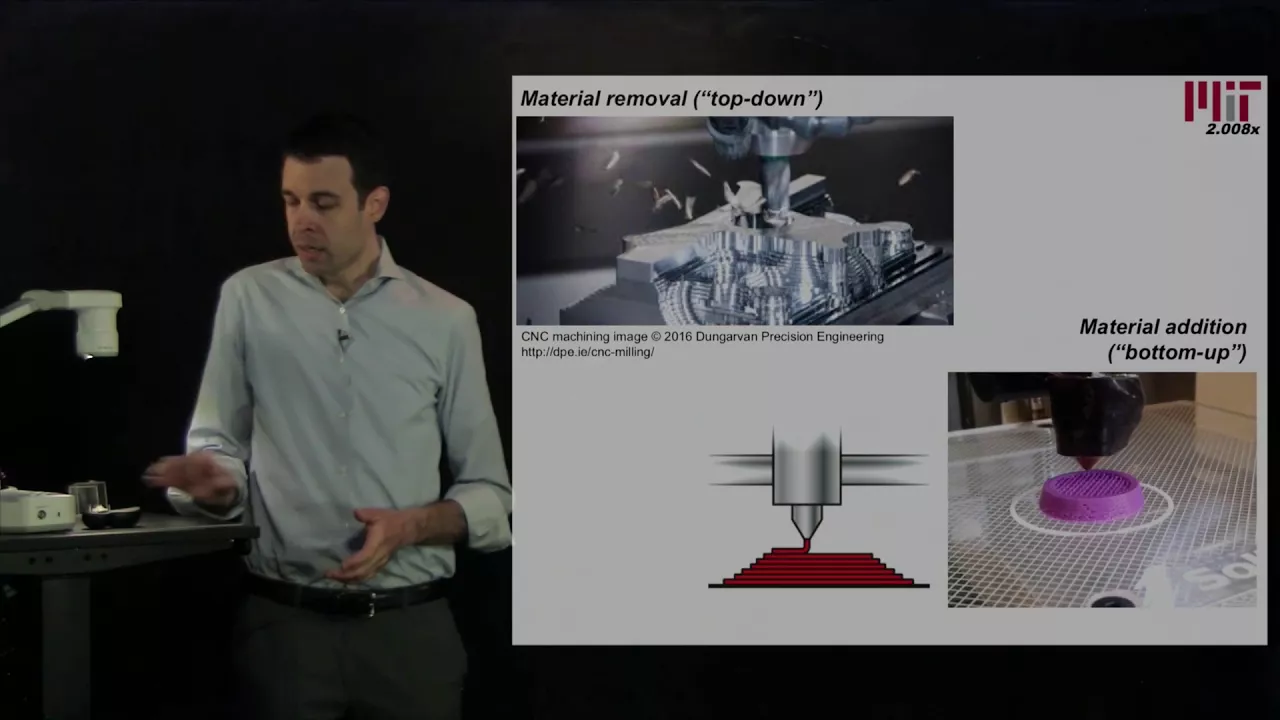
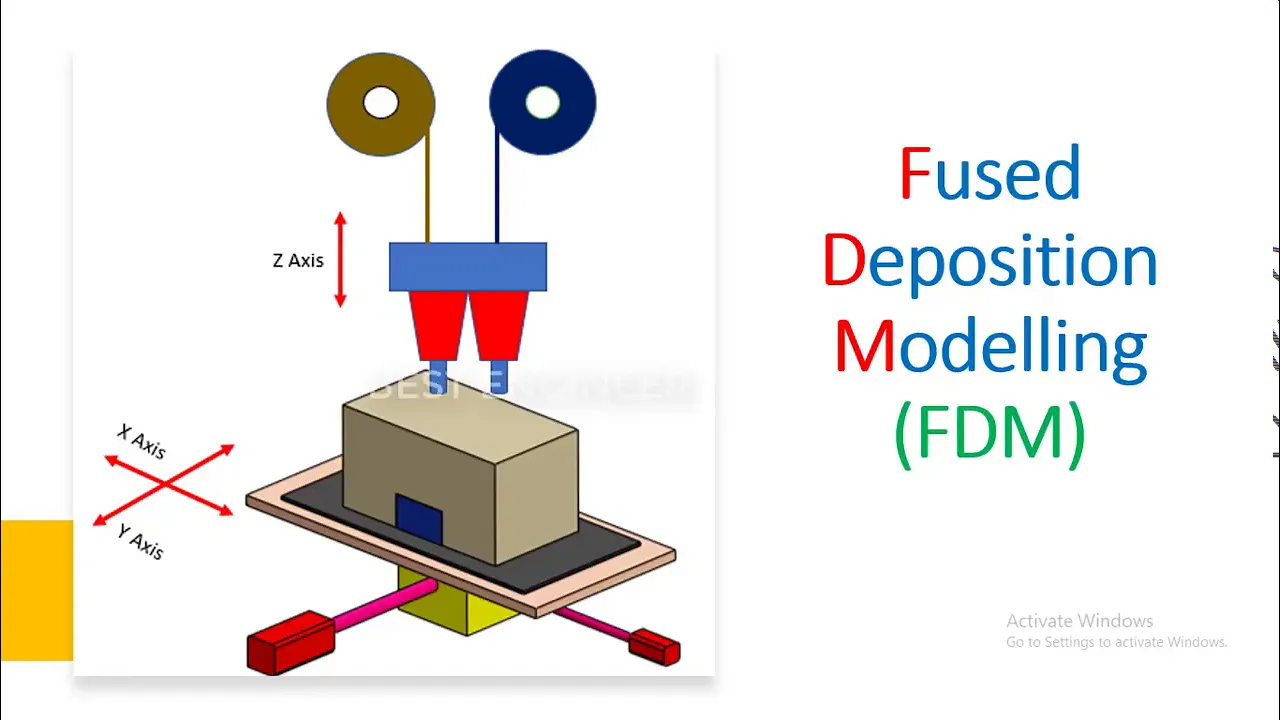
Added:Understanding the basic mechanics of additive manufacturing, specifically how Fused Deposition Modeling (FDM) printers deposit material layer-by-layer.
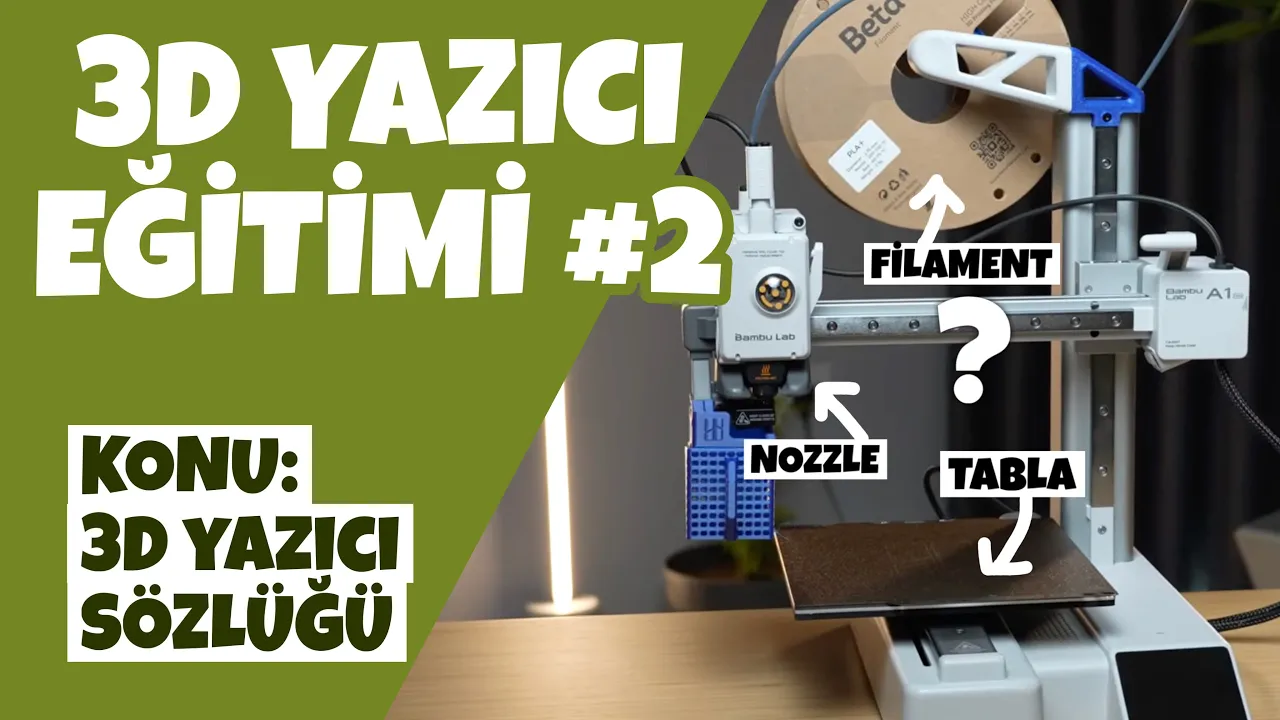
Familiarity with standard 3D printing terminology such as slicer, hotend, build plate, extruder, and infill.
A basic awareness of common thermoplastic materials used in consumer printing, such as PLA and PETG, and their primary characteristics.
Conceptual knowledge of the workflow chain: from 3D CAD modeling (STL/OBJ file generation) to slicing (G-code generation) to printing.
Advanced Design for Additive Manufacturing (DFAM) principles, including topology optimization, overhang angles, and self-supporting structures.
Deep dive into slicing software optimization, mastering parameters like retraction, acceleration, print speed, and custom support structures.
Post-processing and chemical finishing techniques, such as acetone vapor smoothing for ABS, sanding, priming, and structural reinforcement.
Hardware maintenance and calibration procedures, including manual and automatic bed leveling, extruder E-step calibration, and hotend thermal runaway troubleshooting.
55.5K views3.4Klikes30:21Original Release: 2025-08-31
3D printers are an incredible technology, but if you're just getting started, or even if you've been using them for a while, it can be pretty overwhelming. There's just so much to learn. I've been using 3D printers since 2012. And let me tell you, there's so many things I've picked up along the way that I wish I knew way back then, and that's what this video is all about.
Let's get started.
>> Microscopic.
>> How's it going, guys? Angus here from Makers Muse where it's my aim to empower your creativity through technology and yeah, I've been using 3D printers for quite some time. I picked up my first personal 3D printer, the Teeter Time Up Mini, back in 2013, and I've been using them ever since. And let me tell you, there's a lot that I've learned that I just wish I knew at the start. and I would have saved a heck of time, lots of money, and also there's a few safety things in there that I was a little bit sketchy on that now I know a lot better, and hopefully I can save you any unexpected trips to the emergency department as well. Now, we'll kick off things with something that people often just don't really consider getting into 3D printing, and that's the fact that 3D printers can be a tool or a hobby, but generally they're a bit of both. You see, 3D printers are a tool in the way that you send them a file, they print them, and then you end up with a finished object, whether that's FDM 3D printers, resin 3D printers, or even industrial 3D printers. But to keep these machines working, well, you kind of need a bit of technical knowhow. You need to know how to replace things like the nozzles, which are consumables. You need to know how to unblock jams, clear failed prints, and that sort of thing.
And back in the day, you actually needed to know a lot more than that, like soldering and updating firmware and all that sort of stuff. So although I got into 3D printing to use the machines as a tool, I kind of had to have that background, knowing how to take things apart and troubleshoot and repair complex electromechanical systems. And a lot of people don't really consider that when they get into 3D printing, especially if you're buying them for like a child. Most modern 3D printers are pretty good, but things can still go wrong and you're not going to be able to just take it back to the store you bought it from and say, "Hey, fix it."
Because often these are shipped in from overseas. And at best, you'll get parts sent to you that you'll then need to install yourself. And that's after troubleshooting and figuring out what the problem actually is. So, really consider early on, is 3D printing a tool for you or a hobby? Because you can lean way into the hobby side and make a 3D printer from scratch. there's all sorts of open source plans, kits, and that sort of thing. And if you have an engineering background or tinkering background, or even if you're studying something like mechatronics, then a 3D printer as a hobby would actually be a really uh beneficial thing to do. But for most people, they just want to print things that have designed or downloaded off the internet. And in that case, a 3D printer as a tool is really important and something you really should consider early on your relationship with 3D printers and the fact that you will at some point need to get hands-on to fix something. And if you're not comfortable with that, then I would use 3D printing services instead of owning a machine yourself. And just on the back of 3D printers being a tool, just like any tool, they're only worth having if you have a use for them. It can be really sexy and exciting to say, "Oh, I'm getting to 3D printing. you know, I'm going to learn this cool technology and print, I don't know, download things and print them and it'll be great. It's just not really a good enough reason to spend all of that money and set up and learn how to use a 3D printer if you don't have a really good use for it. But I find with most 3D printing enthusiasts who use 3D printing successfully for their projects, they do have that use and it can just be one thing that justifies the entire outlay of setting up a 3D printer. For example, if you're designing custom mounts for hardware and you don't have any any capability of buying that specific mount, then the 3D printer could very quickly justify itself, especially the fact you can design it and get it done and printed within your own home within a matter of hours. That's a good use. Or maybe you do want to design a 3D print toys as a collaborative thing with your kid. Then that's also a good use case for a 3D printer cuz they can be hands-on in the design and printing stage. And then with the resin 3D printers, there's a fantastic justification if you want to download and print miniatures for Dungeons and Dragons games or faux hammer for example, that is a great use case because if you print enough miniatures, you'll very quickly pay off the cost of the printer versus buying them from the store and you have a gigantic range of digital downloads of these miniatures to choose from so you can find the exact one you want or of course, which I encourage, design your own. learn how to use sculpting software like Blender to design your own miniatures and then print them. That's another great use case for that sort of printer. But if you don't have that key need for a 3D printer, then I don't really recommend getting one. Instead, again, use 3D printing as a service and find out, hey, I'm actually getting really good value from this. I'm spending a lot of money getting prints done. I' I could easily justify the cost of this printer over a course of time versus using those external services.
Then it's like, well, it's a no-brainer.
you get the machine. But if you don't really have a good reason, then I wouldn't do it. And if you do already have a machine and you don't really want it, then hey, there's actually a pretty strong secondhand market for 3D printers. Check up on Facebook Marketplace and maybe you'll find another hobby you're interested in.
Sorry, just my thoughts. Because on the back of buying a printer just to print things, something I've learned over the years is the fact that yes, there are so many models online that you can download and print, but the vast majority of them aren't very good. they kind of suck. Uh, and that's like no one's fault, right?
Because people are uploading things for free. They share them and that sort of thing. But let's say you want to download a a mount, like a camera mount or something for a certain camera. Well, you might have very specific use cases and you want to find that mount perfect for your use. Well, someone's uploaded one that is for the camera, but it's for their specific use, and it's not quite right. Or maybe they've used software like SketchUp to design it, which means the STL or their mesh file is full of errors and then it doesn't print properly. And then you have the whole world of paid files. And yeah, absolutely. If you want miniatures and stuff and you can't design them yourself, you can justify it, but it gets expensive really quickly. And I really want to stress that the value of 3D printers aren't to just print the same models again and again and again.
Even though they're not exactly what you want, it doesn't matter what you're sending to the printer, it will print it. So why not print exactly what you want tailored to your needs? Which is why I think from the start, from a really early stage, you should try to get really, really good at 3D modeling.
It can be really scary. I know 3D design. I've started it back in high school. I think I was like 14. I was trying to use RhinoCad to design combat robots and it was a huge learning curve.
Then in university, I went to Solid Works. Again, I spent several years using that program. Still barely scratched the surface on its capabilities. And I've been using Fusion 360 or Autodesk Fusion now for a very long time. And only now am I comfortable doing very complex assemblies using things like form studies and mates and that sort of stuff. It takes a really long time, but just chip away at it bit by bit. Watch tutorials and you don't have to spend money to learn 3D modeling. Blender is completely free.
And if you're more of an artistic type, then you can use this sculpt workflow within Blender to push and pull essentially virtual clay to design things. It's really intuitive. And if you have that knack, you can design amazing things. I know many people who do. And then there's free card, which yes, I have had some issues with in the past, but it is free and I will be revisiting again on the channel soon.
And it is more than capable of designing simple things. On Shape has a free online cloud plan. Fusion has a free plan, although it is, you know, limited.
You might get locked out. The fact is, choose one and just stick with it. Learn over time because the combination of 3D modeling and 3D printing in the same environment is probably the most powerful fusion of technologies I have ever come across. And I I'm not being hyperbolic here. I genuinely believe that you can go from an idea or a problem to a sketch to a design to a print within hours and solve that problem. There's no other no other technology that can do that. It's amazing and you can do it on budget hardware with free modeling software.
Don't be scared. Learn 3D modeling from the start from any program you feel comfortable with and you can thank me later. Something else I wish I knew really early on is the fact that PLA is actually totally fine for most printing applications. It's really affordable.
It's easy to print. It's got good dimensional stability. So when you print, your dimensions are going to be quite accurate. The tolerances are going to be quite tight. And honestly, it's pretty tough as well. It's actually, as long as you don't get it too hot. It's really tough. That's the only downside with PLA is if you heat it up too much, it will soften and it's not suitable for high temperature environments, which is where you might need to go to an engineering material. But anything lower than that, unless you have a really specific use case, PLA is fine. I have so many functional prints done in PLA I use around the house that have lasted years and years and years with no issues at all. So, if you're just getting started, don't get sucked into that rabbit hole of, oh, what's the toughest new filament I can get? Oh, these crazy carbon filled nylons and stuff like that. It's it's not necessary. So, if you're just getting started, don't go down that rabbit hole of trying to find the toughest, strongest filament possible because your application might not even need it and they're going to be much more expensive and far more difficult to print correctly. After 3D printing for so many years, I mean, what 2012 to 2025? Uh, yeah, that's a while.
Something I've become quite uh aware of is the rise of microlastics and that problem in the environment and interacting with our bodies. Right? You can't avoid plastics. They're everywhere. And I get it. We don't really have a good way of recycling or dealing with plastics. And with 3D printing, I used to print in the same environment I worked in. I used to have it in the studio. I'd be printing and then I'd be working. And that probably wasn't very good. 3D printers make that create fumes and these um they call box.
And of course, there'll be little bits of plastic that degrade and and fill the room and whatever. And I really try to avoid that now. And I wish I tried to avoid it more starting out. So with 3D printers, I keep them in a separate room, their own like environment that is kept separate. So if there's any fumes, they can off gas and it doesn't affect me personally. I'm not breathing it in all the time. And I try to print with PLA, which is a bioplastic. Now PLA, it's still not easily biodegradable. And I will say that most brands of PLA now are a mix of different plastics and the PLA because PLA by itself is quite brittle. So, you don't really know what's in that PLA filament and don't think it's just going to be safe. And then there's other more dangerous plastics like POM or acetel, which when it gets heated too much makes um for the hardhide gas, stuff like that. So, be aware, do your research early on of what these plastics uh could be like when they're in in the environment, how these printers operate, and try to keep them separate from your living area. Don't have printers in your studio and your your workshop where you're working in. I will say that the my whole microplastics thing, you're probably more likely to get microplastics from wearing plastic clothing. So, something I do these days is I try to remove plastics from my everyday life in general. Like, I'll only wear cotton or wool. And I don't use plastic takeaway containers. I'll use like glass containers to store food in the fridge, stuff like that. That's just what I've started to do. And I kind of wish I did early on, but time will tell if we all going to become affected by microlastics from 3D printing. But I'm going to try to minimize it as much as possible. If you're just getting started with 3D printing, it can be tempting to send a model to the printer that's complex in one go and just say, "Hey, support material on. Let's send it and I'll just remove the supports afterwards." And for stuff like, you know, this deathclaw model I did a few years ago, if you printed it in one go, it might work, but the amount of support material you'd have to remove and how delicate the features would be is really not that uh that good. it's not a really suitable use of the technology. We can be smarter about that. And that's something I recommend early on is to look at your models and be like, is this suitable to be printed as is or should I chop it up? Should I change the orientation? Should I do something to the design to make it print better, make it have less support material, stronger?
So, if you have the layer lines, you imagine the layer lines of a 3D print are like a wood grain. This is more applicable to FDM than it is to resin printers. Resin printers are more homogeneous in their strength, but FDM is layer by layer with that line of extruded filament. So, if you have a really tall, thin detail vertically, it's going to be really weak because it's only got really thin cross-sections of those layers. If you lie that down the print bed, it's got a much much longer cross-section and it's going to be stronger. So, if your design requires details that are only uh printable in one direction than the other, maybe divide that file up into parts and assemble it afterwards if you can get away with it. Or try to find a compromised orientation where you get the best of both worlds and you can get a print that's going to be as strong as possible. I did a video years ago showing the printing of a headphones holder. and that headphone holder, there's various compromises as to what has the best surface finish because vertically you'll have the best detail.
So if you want text, for example, the the edge of the print vertically will will resolve the best text. But if you want strength, then yeah, you do kind of want to align it in the sideways orientation like in this this clip where you're going to get the best strength possible and also you can compromise and get a fairly good resolution of that text and curve. And if you're going to 3D printing thinking you can produce prints and parts that don't look 3D printed, unfortunately that's just not really possible. Even if you go with a really really fine layer height, any curved surface or angled surface will kind of show that stepping, especially curved surfaces, that's really obvious that it's been 3D printed cuz those layers cannot perfectly resolve a curve.
At least until we do proper three-dimensional printing, which is uh possibly coming with contours. But at this stage, you can't really hide that.
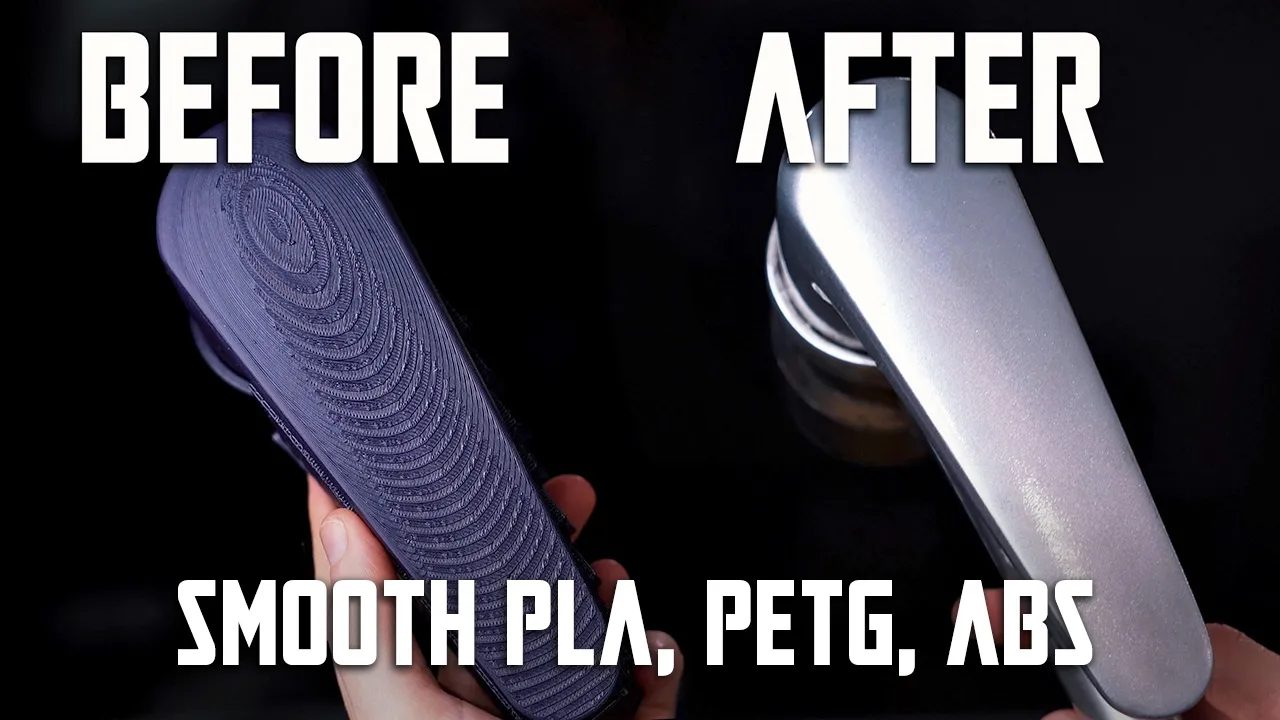
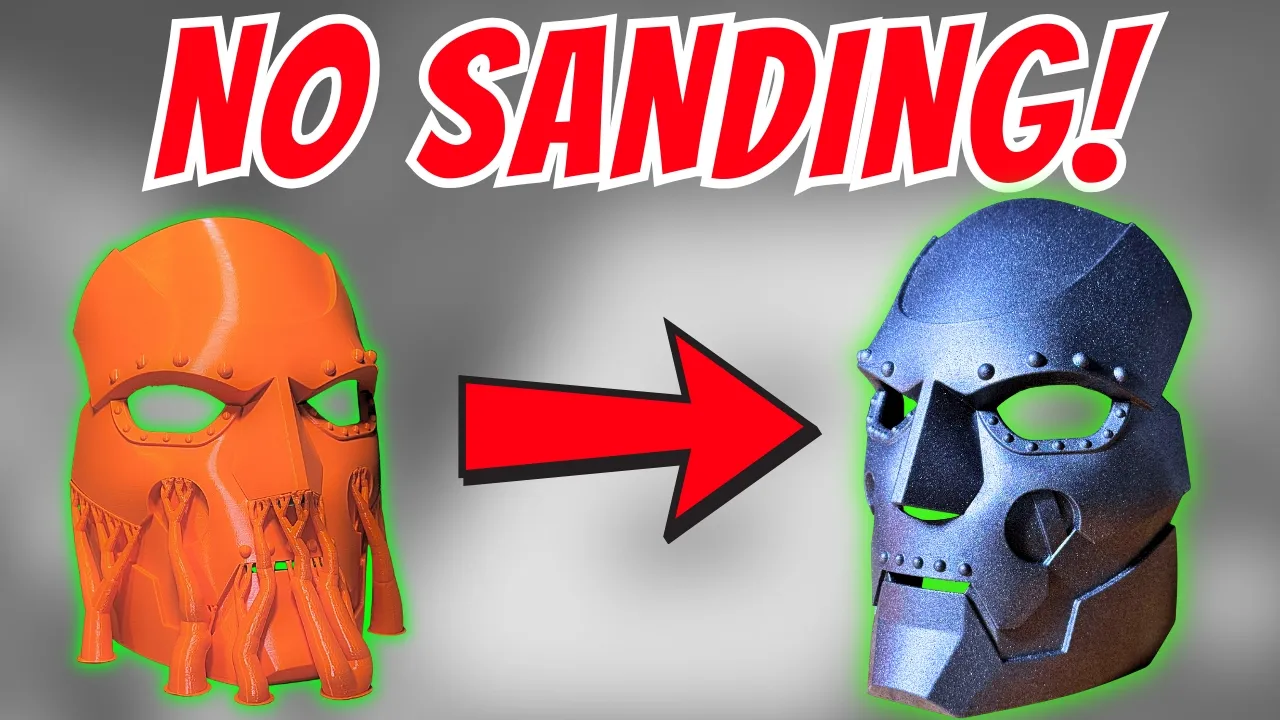
So, if you're designing parts, they have to look perfect, then you will need to consider some kind of post-processing technique after you print to clean it up. Don't don't try to rely on setting your layer height to be the finest possible, like 50 micron or something.
It's just going to take forever, and you'll still have layers that you can see. Set it at something reasonable like 150 micron or maybe 100 if it's a small part. And then consider the fact you may have to use a high build spray putty or that sort of thing like a primer filler which can then fill the gaps and you sand it back. And then because you're using that spray putty to fill in those gaps between the layers, you can get a much smoother result fairly quickly. But you will have to use a bit of elbow grease to do it. You can't just get a m get a print straight machine. All 3D prints look 3D printed. And I know that sounds really stupid, but I don't think the 3D print aesthetic looks good. I think it looks kind of crap. And if you're trying to sell it as a aesthetic or sell it as a like a nicel looking part, the the audience isn't stupid.
They're going to see that and be like, "Nah, it looks pretty naff, doesn't it?
That's 3D printed." No one's wowed by the technology anymore. It's not 2010, right? When 3D printing sort of exploded in popularity, even though it's been existed, it existed way back in like the 80s, right? Invented in 1979, but in the 2010s, that's when it really hit the mainstream. And people were like, "Wow, 3D printing, that's cool." And they liked the texture. They like to see that it was printed. Now, people really don't. Don't kid yourself. If you want to print finished products for customers, then you'll need to do something to post-process it to make it look better. And hey, if you're enjoying this video so far, I have so many more tips available in my ebook, The Ultimate Guide to 3D printing tips and tricks, updated to 2025. You find links to it in the video description below. Next up, I want to talk about TPU. Now, I did say that PLA is just generally the go-to filament that I will use. And early on, I was like, "Oh, it's not very good.
It's totally fine." But also, I was really scared to print with TPU for a really long time. And I'm kicking myself about it because TPU is an amazing filament. It is so indestructible. It's incredible. And modern TPUs are actually fairly easy to print. You can print them on a Bowden setup if you go slow enough, but ideally, you want a direct drive.
that something that's like 90 98A shore hardness is totally easy to print.
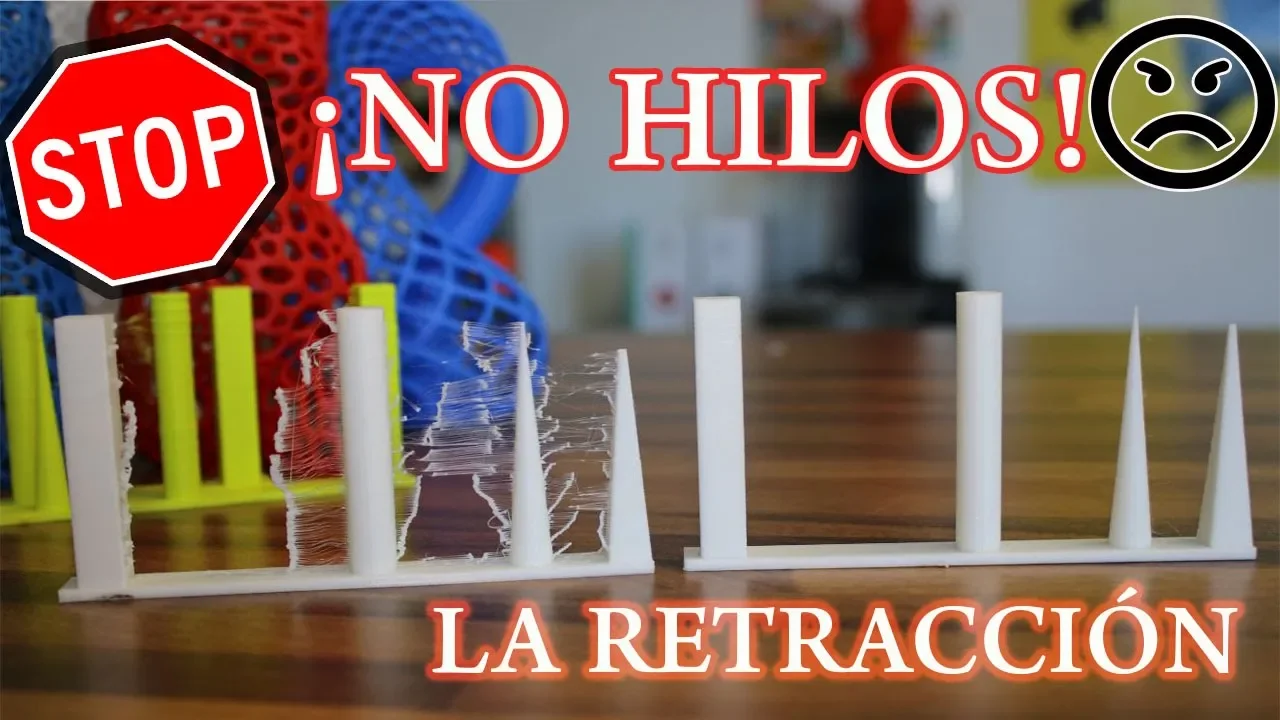
Totally fine. But something you need to be really aware of with TPU is it strings like crazy and it absorbs moisture from the air like crazy. That means it's what's called hyroscopic. So moisture from the air will just wick into the filament. Like the filament itself is a desicant which is why filaments ship with desicants, right? To try to remove any moisture. But if you open up a roll and expose it to the elements, within 24 hours, I'd say the the roll of TPU would have absorbed enough moisture to bubble and spit and string like crazy and ruin the print quality. So, if you're printing with TPU, you must use a filament dryer. You don't have to buy a commercial one. I've used a a food dehydrator, like, you know, dehydrates banana into banana chips and that sort of thing. I've used that sort of thing for years to dry filaments, particularly TPU um and nylon. The next thing to get better prints with TPU that not many people are aware of is that you need to enable this feature in your slicer that stops the the tool head from jumping between points and instead forces it to go along the contours of the print as much as possible. And that means that there won't be any stringing or much reduced stringing because it's moving between actual built-up areas of the print versus jumping between which will leave those nasty spiderwebby filament string strands that are really annoying and very much a telltale sign of TPU. It's very hard to remove those. Some harder TPUs you can get it you can kind of get them dry enough and print fast enough that the jump will not really string but generally they will string and that's something that you just have to be aware of. And this setting will really help reduce stringing. Again, something I didn't really know of till many, many years later. But there is also an awesome tool for quickly removing those strings should they occur. That is a hot air gun. And this is actually something I picked up fairly early, but not many people nowadays are aware of this cuz it's sort of like old knowledge, right?
But a hot air gun is an indispensable tool for your 3D printing experience.
You can do so many things with them. So, let's say you have an enclosed printer like the Bamboo X1 Carbon. It's enclosed, but it's passively heated.
It's not actively heated chamber, right?
So, it's cold winter. You open it up.
You blast the chamber with a hot air gun to warm up that ambient temperature quicker than the hot the heat bed by itself would do because it'll only sort of passively disperse that heat slowly.
Whereas the hot air gun at the start of the print where you really want it to be hot so that first layer sticks well and doesn't warp in those really annoying challenging materials like ABS and polycarbonate and nylon. You blast a chamber with heat, close it and the printer will heat up quicker and you'll get a much better resulting print cuz it's got that high ambient temperature.
But a hot air gun passed over a print with strings will also really quickly remove those strings cuz they're really thin so they absorb the heat real fast and they'll just sort of melt back to the part. But be aware that a hot air gun is so hot. It's miles above how hot a hair dryer gets. So they can easily burn you. Really easily. So pass over the print real fast with like, you know, a bit of speed. You'll get you'll get it with through practice. But don't linger on the print because it'll melt it.
Especially PLA. If your PLA is stringing, you can you can remove the strings with a hot air gun quickly. But PLA, again, that very low temperature resistance will just soften and squish real fast with a hot air gun. So, I really only use a hot air gun these days for removing TPU strings. And for that, it works fantastic. So, it's worth getting one just for that. But again, if you need to heat up a chamber quick and it's like quite a cold temperature, ambient temperature, hot air guns also really good for that as well. Oh, yeah.
I also forgot to mention something that also the hot air gun is great for is if you have a print and some areas are white. For example, you tear away a black print from a raft or remove supports and it's got those sort of white blemishes on it. That's because the plastic has crazed in those areas, it's developed these little micro cracks and those micro cracks uh refract reflect the light differently to the actual black plastic itself and it comes up as like a white blemish. A hot air gun again fairly quickly over those blemishes, those crazed areas will just like reform them, melt them slightly and restore the color of the print in that area. So again, really handy tip. I generally use this on ABS plastic, not on PLA because it doesn't do it as much and it melts, but ABS is really susceptible to crazing. And if you put in a raft and bottom looks crap, hit it with that hot air gun and it just really quickly restores the color. So, again, another vote for getting hot air gun early on in your 3D printing journey.
And now, a little bit about safety.
Scraper blades and side cutters are incredibly dangerous if you don't use them correctly. Thankfully, a lot of the modern 3D printers have a flexible print bed. You can remove it. It's magnetic.
Flex the print off and not worry about digging in with a scraper blade. But, if you do have to remove a stubborn print with a scraper blade, I have heard horror stories. I've seen the most gruesome injuries done from these razor sharp scraper blades. Could you imagine you're trying to hold the print bed in place and push on it? Look at this.
Right? You could easily easily go straight into the the side of your thumb into that web of your finger. I've heard of people losing nerves uh getting nerve damage. Uh massive scars from stabbing themselves. And again, the side cutters that these printers ship with, they're often crap for a start, right? Um in my ebook, I recommend one of the first things to get is a proper pair of side cutters cuz they are very useful, but you want good ones, but they're usually sharp. So, when you're removing support material or side cutters, it can be really easy to slip and stab and get yourself nasty. And these things are sharp and also they contaminated, right?
They've been scraping print beds with glue and all sorts of print additives.
They got dust and workshop gunk on them and then you're stabbing yourself with them. So, that's real bad. Uh, you can wear gardening gloves. A lot of printers actually used to ship with gardening gloves, but even those aren't good enough to stop you from getting stabbed from some of these like really sharp blades. So, my advice, never never force a scraper blade towards any part of your body. Not your legs, not your hands, not not anything. And with side cutters, just be really mindful of like the leverage you're doing. Like just use a bit of force leverage. Don't push, right? Don't try to stab things. With side cutters, I often use these picks, these sharp metal spikes essentially to remove support material from BS and that sort of thing, like tight areas that you can't get a side cutter into. And they're really useful. I'd recommend getting some. But again, if you force these, right, and you stab yourself, you're going to have a bad time. That's, you know, an easy easily a trip to the emergency department, right, to get stitches and who knows what else if you get infected. So, please don't don't uh grab your side cutters or or your scraper blade. uh while you're tired, while you're distracted, while you're drunk. Uh think about it and make sure you're taking your time to remove support material. Or again, ideally, don't print with any support material at all. Design your files cuz remember, you're learning how to use design software to not really need support.
Print it differently. Have overhangs covered with bridges or 45° versus just needing support. Avoid it as much as possible. It is getting easier and easier to print, but support material is still a bane of my existence, and I avoid it as much as possible cuz I hate fiddling with these little side cuts and things, and it puts plastic everywhere, which is a pain in the ass. Taking a slight interlude to give the tally some attention. Look how big she is now.
Little street cat. Look at her tail.
Look at this tail. Curly whirly tail.
She always demands attention at the most annoying of times, which is right now.
And she will get it while we proceed.
Now, I want to talk about cultism in 3D printing briefly. And this is like it might sound strange, right? But people viciously defend brands for some reason.
And I've always found it a bit strange.
I wanted to touch on it because if you're just getting into 3D printing, you might see some discourse online when you talk about, "Hey, I just got this cool 3D printer of people saying, oh, that brand's terrible. They do blah blah blah." Or, "Oh, that's you should have gotten this one." Or, "Yeah, you got the best one. All the other others are terrible." It really annoys me because a brand's a brand and a printer is a printer. Again, these are tools, right?
You send files to them and they print.
If they don't print, then they're a crap 3D printer. I've reviewed so many 3D printers that just don't really work properly and the brand is irrelevant. If the printer is good, then it's good and you should enjoy using it. You should get it. But if it's bad, then it's not good, right? But people seem to have this idea that only certain brands are good and everyone else is terrible or um and you are uh an idiot for buying it and you've made a bad choice and etc etc. And they sort of had this again cultism sort of thing going. I really do implore you if you're just getting started don't buy into it. Enjoy the machine you got. I hope you did your research to get one that is good because again there's a lot to choose from. But yeah, if you chose a machine that fulfilled your needs, has the features you want within your budget, and you're happy to use it, and it does the job, it actually works, then enjoy using it.
Stuff stuff what everyone else has to say because it doesn't actually matter.
A tool is a tool. I use a cordless drill that works because it's I needed a cordless drill. Do I care what brand that cordless drill is? No. I couldn't even tell you what it is. I didn't even look. But it does the job and that's all that matters. So again, I hope you're able to avoid this whole cultisman thing in 3D printers. I don't know why it's been going on for years and years. There used to be a brand called to which was a kit and it was a crap kit.
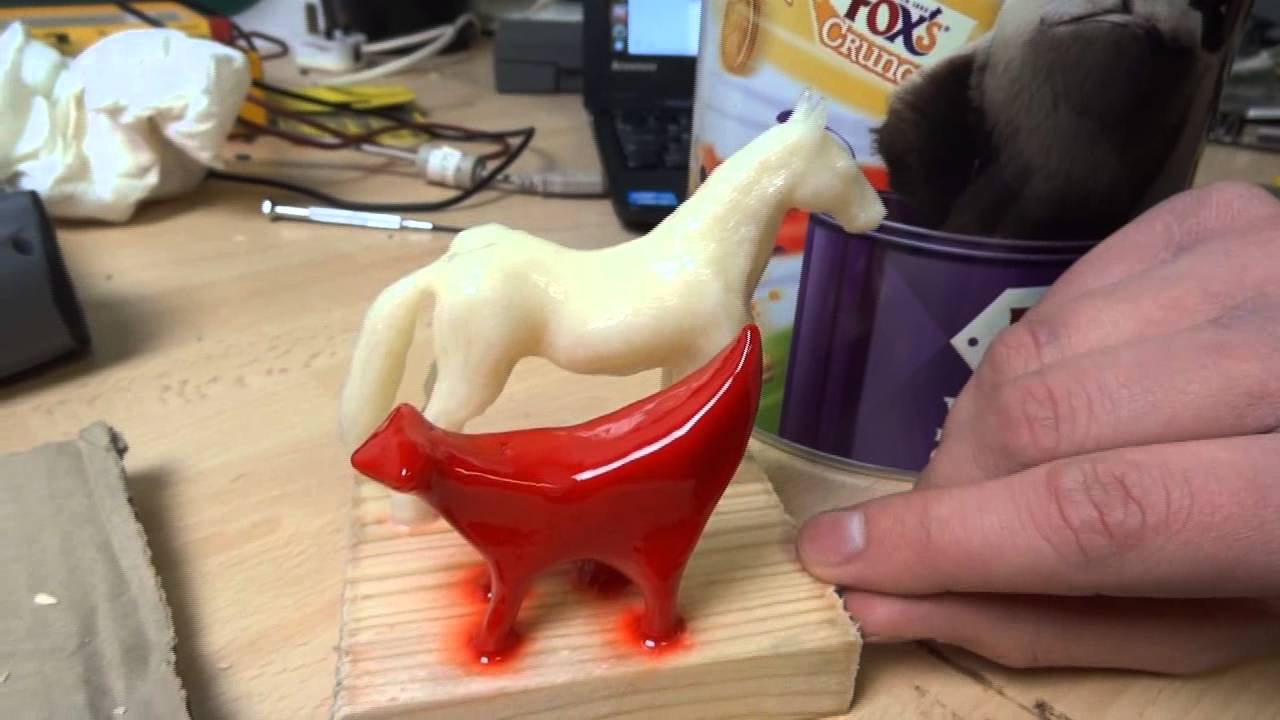
It was terrible, but people were obsessed with it because it was so cheap and you could make it good by spending a lot of money and time to fix it. But there was like a cult around to for some reason. I don't know why it happens, but please just avoid it at all costs. And finally, something I wish I did early on, and I wish again I wish I could go back and change this is I wish I kept copies of software that was free and open source that I used and files that I used all the time for my printing because over the years, many pieces of software have vanished and many files that I used to use have disappeared as well. Now, whether it's the the domain is no longer maintained, it disappears, or brands decide, hey, we're releasing stuff that's for free that we really should be charging for and they decide to take it all down. You never know how long stuff's going to last online. And unfortunately, one of my favorite bits of software is dying, and that is Meshmixer. I used Meshmixer for most of my 3D printing journey. It got better and better and better, and then Autodesk priorities changed, and they shift a lot of their their attention to Fusion. They put a lot of the features of Meshmixer into Fusion, but not all of them. And the thing is, Fusion is kind of free if you're an enthusiast or education, but it's definitely not free for most people. It's like $1,000 Australian a month to get the Fusion suite, plus add-ons. Whereas Meshmixer was completely free. And Meshmixer did things that you still can't do in any other mesh software I'm aware of. For example, you can mask areas of a mesh and then plain cut that area and it won't affect the rest of the mesh, which is great if you have like a figurine and you want to cut the arm off but not cut the torso. You can do that in Meshmixer, but I don't think you can do it in anything else. Nothing I'm aware of. If you do know, let me know in the comments below. But Meshmixer is dying. Um, it will disappear. There's a version that I used to use, which I don't have access to anymore cuz the old computer died, where it would automatically thicken thin areas of a print. I used it for a My Little Pony tutorial way, way way, way back in the day. You can't get that version anymore. And a similar sad story is Windows 3D Builder. It's been removed from the Microsoft Store. You can't get it. Um, I have it installed and you can kind of get it through some backway, but that is probably going to be closed really soon as well. 3D Builder is really powerful and useful for fixing files, for fixing mesh files, and doing basic edits. It's gone. There used to be something called Tinker Play, which was based on Tinkercad. And it essentially allowed kids to design their own articulated action figures where you could get parts and then mash them together and it would actually sort of join the the joints together so you can see how it look. You could import things, do Tinkercad functions like, you know, add and subtract and that sort of thing. But Tinker Play is dead. You can't get it anymore. So, if there's a bit of software that you use and you want to keep it, then please stick it on a USB stick or SD card or hard drive or I don't I don't care and make a backup of it because I wish I did that because 3D printing was like a communitydriven effort for a long time. Now, it's money.
People want to make money off 3D printing and therefore you don't have free things and a lot of those free programs either became abandoned or they got removed by the companies that are now trying to tighten that noose and squeeze the cash out of you. So that's the final thing I want to touch on in this video. I hope you found it useful.
If you're new to 3D printing, again, welcome. It is a fantastic technology and you can do so many things with it.
everyone I meet has like one idea of what they want to use 3D printing for regardless of the technology. And I think that's fascinating and so interesting to see. But again, there's just so many things that I've learned through trial and error that I would ideally help you avoid. And if you enjoy this video and want to see more, subscribe to Makers Music. My aim again to empower your creativity through technology. And catch you again very shortly. Bye.
Up Next

9:03
3D-Printed FPV Quadcopter: Build, Flight, and Failure Analysis
@michaelrechtin
78.8K views•2023-08-25

12:54
Triumph of Orthodoxy Icon: Byzantine Art & History Explained
@BenCallan
2.1K views•2024-08-06
25:35
Fusion 360 Beginners Guide: Design & 3D Print a Maker Coin
@MakersMuse
271.9K views•2017-03-31

1:42
Game of Thrones Opening Credits: A Cinematic Analysis
@gameofthrones
46.3M views•2011-04-18
Related Study Plans & Knowledge Roadmaps
Structured learning paths in General & Interdisciplinary Studies
general-studies
Elevator Engineering: History, Physics & Cities
01From Hoists to Safety Brakes: The Dawn of Vertical Lift
02Hydraulic vs. Traction: The Engineering Physics of Elevators
03Modern Speed, Safety, and Algorithms
+ 2 more learning modules
12h5 modules
Explore Roadmap
general-studies
Rubber: Material Science, History & Geopolitics
01Origins of Natural Rubber & Mesoamerican History
02The Chemistry of Natural Rubber & Vulcanization
03The Geopolitics of the Rubber Boom & Colonization
+ 2 more learning modules
12h5 modules
Explore Roadmap
general-studies
Containerization: Evolution, Logistics & Trade
01Ancient Trade & Bulk Cargo: Amphorae to Barrels
02The Industrial Revolution & Cardboard Packaging
03The Containerization Revolution: Malcom McLean
+ 2 more learning modules
12h5 modules
Explore Roadmap
general-studies
Textile Tech: Evolution, Labor & Global Impact
01Pre-Industrial Textiles: Handloom & Cottage Industry
02Mechanization: The Spinning Jenny to the Power Loom
03The Factory System & Global Labor Transformation
+ 2 more learning modules
10h5 modules
Explore Roadmap