













![Content-addressed distributed data structures [SpeakeasyJS]](https://i.ytimg.com/vi_webp/VtzpJU4Cns8/maxresdefault.webp)
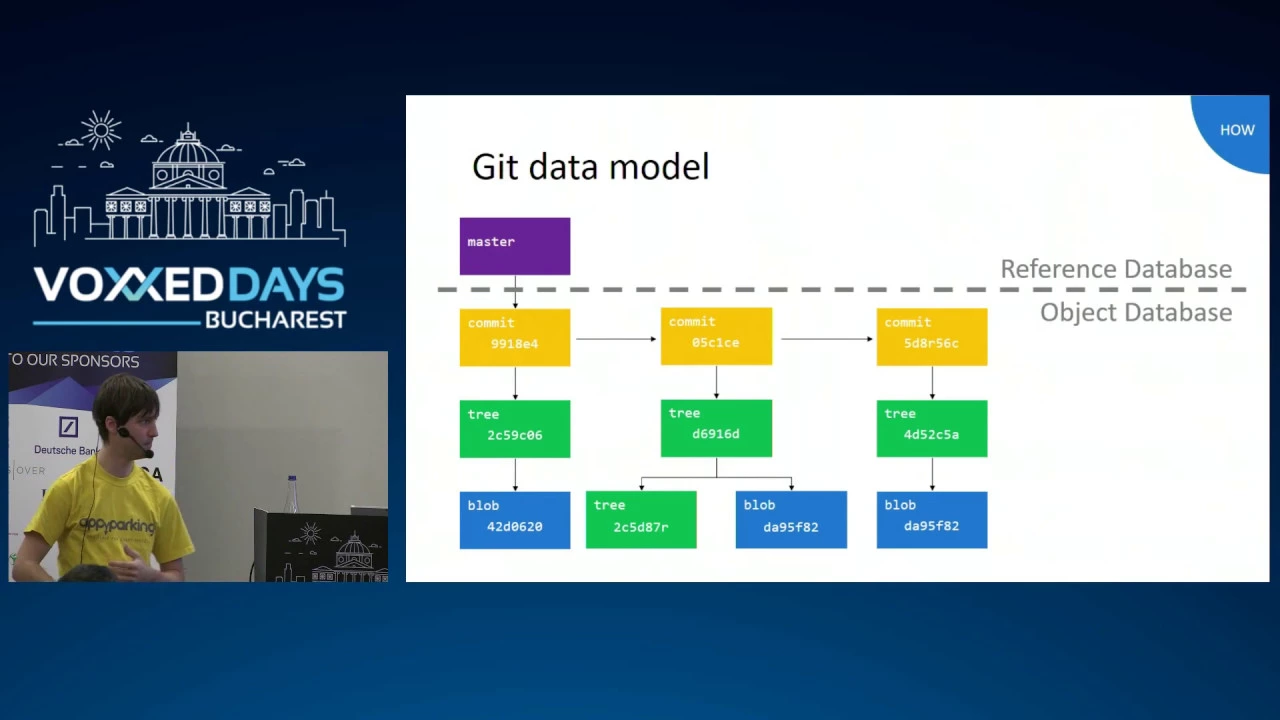
Git is fundamentally a content-addressable system where all data is stored as immutable objects (blobs, trees, and commits) identified by SHA-1 hashes of their contents; blobs store file contents with type and size, trees represent directory structures pointing to child objects, and commits record changes with parent pointers forming a DAG, enabling efficient version control through compression and garbage collection that reduces storage overhead by storing only differences between similar files.
Git Internals: Content-Addressable Data Structures and Algorithms
Added:Basic proficiency with standard Git workflows, including commits, branching, merging, and the staging area.
Fundamental understanding of data structures, particularly Trees and Directed Acyclic Graphs (DAGs).
Core concepts of cryptographic hashing functions, such as SHA-1, and how they map arbitrary data to unique, fixed-size identifiers.
Basic knowledge of how traditional file systems organize directories, files, and metadata.
Hands-on experimentation with low-level Git 'plumbing' commands (e.g., git cat-file, git hash-object, git write-tree) to manipulate the object database directly.
In-depth study of delta compression algorithms and the mechanics of packfile generation and index (.idx) files.
Designing and implementing a simplified version control system (VCS) clone in a high-level language to reinforce content-addressable storage concepts.
Exploring broader applications of Merkle Trees and content-addressable storage in modern distributed systems, such as IPFS, BitTorrent, or Blockchains.
30.5K views924likes1:09:20Original Release: 2020-05-10
hey guys uh it started right I think it has whatever be the case we are going to be talking about git as a software engineer today so the reason I've chosen this title as a software engineer is because a lot of us when we join an organization for the first time or even if we are doing our project for the very first time uh we want to know about what's the best way to do a project I think um what happened with me my personal experience was when I was in second year college uh I wanted to do a project with one of my friends and we had a lot of project files so whenever we would change any file we would actually send an email to each other so uh let's say there's 50 files you make any changes you would send it to your friend uh and then they would have their own changes locally so there used to be a mess like you would take some of the changes over here sometimes there would be a conflict and you would manually remove these things so this was uh the the way in which we did our project now this is this is horrible okay this sucks instead you have a software called git which does everything for you when it comes to Version Control all right um is there is there anyone over here who still uses emails for doing their projects I'll take that as a no no uh so firstly uh I'll just start this at 905 so till then set up your computers I'll just show you what I'm going to do I'll switch off the webcam you can see I'm over here uh I go to my GitHub directory uh I will make a directory let's say I'm I'm starting a new project okay uh and you guys should do it too I mean open up your terminals I'm giving you 3 minutes take some coffee whatever you like um but start doing this um you know in your own local computer so that you get to know what's going on over here so make directory sample project yeah now I have a sample project directory so I'll just go into that CD sample project um perfect so now I'm inside my sample project in fact that is completely empty as you can see uh but if I do a get in it in fact let's just wait at this time 905 guys uh grab your coffee uh open up your terminals set things up whichever directory you want to make your project in that's where we will go uh and if you're watching this after the live session you can jump directly to the fifth minute and you can figure out what's going on uh but I'm just going to give our live people a little time you know to to set up okay till then I'll just take a few questions on the chat there's 2 minutes for that uh okay Akash Gupta says what is inside system design course oh God you you got to sneak peek into this this this is supposed to come out in sometime that's a interesting leak that's the reason why you should use a VM you know for this kind of stuff but yeah system design course is quite interesting I I have a set of videos which are going to come up uh and you'll get more details in maybe a week or something let's see uh most likely in a week or two the the course should be out so good catch over there okay there's one more minute uh is there any question you guys have on git or in general software engineering after which we'll start as tantri is asking branching Sam branching yes there's going to be some talk about what a branch is and hopefully hopefully the concepts that will be talked about today will will be you know uh something that will make get very clear to you okay uh sham Gandhi please talk about open source contribution 2 thanks in advance that's a very vague question you can probably frame it better and you have I think um yeah too bad uh you're spamming the board I'll have to ban you I'm such a positive guy in general but okay 905 guys we are uh getting back to the coding bit perfect so I'm assuming that you guys have the the branch open so I mean your your terminals open um and what I'm going to be doing is I'm going to be making a git project so I have a project with me currently it has nothing okay um and what I'm going to do is I'm going to init it I'm going to start I'm going to tell G that hey this is a git project so please look into it so the command for that is git in it right and boom so initialized an empty git repository what would this do actually so LSUS La okay we have a dogit file but if you want to see all the directories in your in your current folder uh you can do a du minus C okay so once you have typed in get in it do a duus c and you'll see this so your project has no files except in the do Gip folder uh and you have no objects over here so this is quite interesting what is git after all git is a I'll just type that over here it's a Content addressable system right so content addressable system is what it is basically it has a bunch of content it has addresses for those content so that you can link to that content and there's a system so behind all the madness there is some Auto so you can actually uh view the content right okay uh now Contra addressable system you saw that there are no objects so what content do you have nothing you have nothing right now so you have to actually make a file right to to get something on kit so I'm just doing this uh touch coding. text so I I made a file coding. text and now I'm going to be writing something in this uh coding.
text I love coding let's say okay now if I just print this out it's writing I love coding okay so it's a file it has I love coding in it but the important thing is I want to actually add this to git so git add coding. text this is the command to add files into git basically telling git that hey this is a file I want you to take care of okay so that's how things work here boom now let's do uh duus C it's going to tell you what are the files which are visible okay interesting so earlier if you remember the objects directory had nothing inside it now it has something inside it it's got these eight characters um or I'm not too sure I think this is 8 bytes yeah so but the 8 bytes are not coming from the info or the pack folder they're coming from here so what is this thing let's LS that and you're seeing this long number what E6 900 6551 so on and so forth are actually is is a hash okay so when we say git add what git did is it went to coding. text read the contents of the file and hashed it as we'll see now so cat dogit objects E6 inside there's just one file so I do this and inside you should be able to see the data of uh the file that we just created okay I'll give you guys um some time to catch up but what I've done till now is I have created a project I have added a file to get uh and I can see that there are certain objects inside okay and boom Oh okay uh so once I did cat cat basically prints the contents of a file um this garbage came out like this makes no sense okay XK is not what I wrote I wrote I love coding so that is weird um have a look over here I said I love coding uh and in fact I cat the file earlier and it comes to I love coding but over here there's garbage so basically what's happened is git is actually compress the file using something called a z Li Library okay uh and I'll prove it to you uh by using this cheat sheets of commands I have here so basically it goes print F uh the cat file and what was it again E6 right here E6 the file and over here what I'm doing is I'm uncompressing the file basically this entire command what it is doing is it's uh taking the file which is this one over here that we just created uh and then the the compression is going to be decompressed all right but um and you're going to be able to see the contents of the file so as you can see over here it's blob 14 I love coding quite simple and quite useful actually because if you understand what's going on inside git it's not magic what git is doing is every file that you create it's actually compressing that file and storing it so that if you write really large files the the amount of memory used by you will be less that's the basic idea but it just didn't store I love coding it also stored this stuff stuff blob and 14 what are these things look at 14 and look at I love coding the length of I love coding which is I Space 2 over here + 4 6 7 uh and then 10 and then you have three more over here so you have 13 characters over here and the blob is of 14 uh length 14 we'll see why this is the case but it's saying that the file length is 14 and the type of the file is blob which means it is a binary large object basically it is a bunch of random binary characters that's what it's saying okay so now I have uncompressed this file and I've have shown you that this file is nothing but just a gzip compressed file so what I'll do is git gives you a few Plumbing commands which actually let you read these files so git cat file uh E6 is the file I want to read and then there's 90 after it so oh ignore that that was a wrong command U my minus P tells you pretty print okay so I love coding is the content of the file um if you have what is see the size of the file 14 so minus s so git is doing nothing great it's decompressing this file and then telling you that the size is 14 over here the um cat file I mean the the file itself is I love coding and the type of the file I can do with a minus t which is blob okay so this bit is simple uh it stores three things the type of the file the size of the file and the contents of the file okay and I was talking about this entirely like ridiculous number this huge number e690 so on and so forth this is actually the Sha one hash of this file content so um let me just show that to you Echo minus E so this is going to print the thing um we said I love coding right so I'll just print that over here okay and I'm going to take a sh sum of this right guys are people following along like are you guys able to view things properly okay uh there's some complaints on a lot of spam coming uh in the chat time to ban people time to purge people this is my favorite job actually but I'll just give you 30 seconds guys to catch up with what's going on now uh I have just created a file I wrote into that file I'm now kind of inspecting what's going on inside the git data structures okay Ali soli that's a really good comment um awesome like you guessed it I I don't think you guessed it you know it so that's [Applause] great okay so let's take the shaam and you get oh you get a completely different sham so this is this is not we what we have so it's not just taking the contents of the file it's taking the contents of the of the temporary file that it has created or rather of the file that it has created so um I say Echo this stuff and this should work so the Sha sum of this should be equal to e690 so on and so forth okay boom and it's not the reason for this is because I said this 14 characters right and we just counted 13 so there is a null character over here it starts with a null character of the file so shasam now will be correct e690 uh and basically what git is doing is it's taking this entire shasam using the first two characters to bucket the the hashes like bucket the files and the rest of it is identifier inside that so if you know about hash Maps that's exactly what it's doing in your local memory [Applause] okay guys have a drink while you're doing this because I mean water why I'm doing this because it's going to be it's going to be a pretty intense thing so you'll need to learn um quite a few things very quickly if you have not worked with kit earlier okay are things making sense till now yeah between branches okay do you have any doubts guys on this till now what we have done is we have just seen that a file in git is is nothing but the identifier of the file is nothing but the Sha of the contents of that file and the contents itself are the type the size and the the text inside that file okay so whenever you write code technically what you're doing is you're doing this uh the the contents here and then it's going to be a blob and of size 14 Perfect all right so let's move on we have had a git add till now we can also commit the stuff that we have done right now so uh we have I love coding we have added that to git now we want to commit whatever we have done so git commit minus a the message will be let's say first comment as a software engineer of course I'm great at naming okay so we have a commit we have one file changed one Insertion I love coding uh in the coding. text file what this did is it created an object called a commit object and as we'll see um in this V minus c yeah so earlier we had E6 with us now we have two more objects 14 and E2 okay that's quite interesting because the number of objects you had initially were just one one file but with one commit you had two files created additionally so what are these files um let's see so firstly I want to actually print out this file 14 so get T file get uh objects uh 14 yeah but as you can see I need to actually remove the the bucketing of this file so that we can we can read it so minus p14 is going to be the commit itself wonderful so you can see in the comet uh there's a tree object this is actually the root directory okay a tree is very similar to Unix directory it's actually even simpler than a Unix directory uh and E2 a is going to be that file but the author is me uh the committer is also me okay wonderful so what do I do here now I can just print the CER file so get cat file minus s 14 e0 and this will be basically the size of text of the file okay and the type itself is a commit object okay uh and what about this cat file I mean what about this tree so let's try to see that also so print that I want to print the tree the tree has a blob in it okay e690 is the file we created so the tree is saying hey there's a file which is of type blob e690 uh and its name is coding.
text all right guys is this is this clear what we have done is we have created a structure uh which is I'll just show you over here you can run through the commands for now I'll just um open up the browser and add this explanation diagram over here so that's what we are doing if you have any doubts then let me know there's a lot of commands I've just entered so you might have some doubts uh and I will be answering as many as I can docks key okay oh God so this is the structure of the file that we have you can see that there's a tree which is the root directory the topmost tree uh it has directories inside it so those are subd directories in the git project so you might have let's say the top directory being your project name in our case it is sample project inside you might have a subdirectory which says all the config files stay here so inside the config files you have File 2 file three file 4 uh and in the coding file let's say the one on the left the coding directory you have just one file so that is how the structure of the directories and the files are it's very similar to Unix actually uh but the commit itself is actually pointing to the root directory of your project so whenever you say get commit minus am and you you actually commit the what you have the local repo what you do is you make this new commit object which points to a tree as we can see over here right uh if you if you go over here you can see that the commit object is pointing to E2 a and what is E2 a it is I'll just pretty print that so get cat file minus P yeah it's just the uh the directory we had actually it's e690 no no e690 is the is the blob entry we have so E28 is the tree that we have yeah I'll just prove that to you by saying what type is it so that's a tree type okay so till this point I think things are quite clear what we have done is we have gone into the dogit folder um and we have seen what are the things that it contains so git itself is like U like a database right it has objects inside it uh those objects have particular sizes it has some sort of hash bucketing which is based on the contents of the file the file contents themselves are zipped that's it and there's a structure to this directory the structure is commit object points to the root directory the root directory contains the information of where which subd directories and sub files it contains uh and then as you keep going down in the leaf nodes all of them will be files uh and that's your basically your git project perfect so this is what we have uh in in git um let's head to the next section some interesting questions I have for you uh I I'll just I mean I'll wait for the answers in the comments if you rename a file in git does that change the the contents of the file like uh the first file that we played with was I think E2 right uh E6 E6 is the file so e690 right I'll just do a git cat file minus P e690 okay I love coding what if I change the name of this file so I have in my uh project coding. text I say move coding.
text to uh let's say java. text I don't really know let's say youtube. text yeah okay now I do LS I have youtube.
text um now I say get add youtube. text what do you think will happen to e690 will it be deleted yeah perfect I have some good answers uh in the comments no no no no the Sha does not change right because the contents of the file have not changed the type of the file has not changed the size of the file has not changed so it won't actually make any difference so let's just confirm that du minus C we have in the objects E6 still existing uh and I had done a pretty print right let's do that again I love coding is still there but there are some changes uh have a look at 14 right earlier oh we we still have 1 14 that is quite odd okay but the name of the file has changed ah because we haven't actually committed the file yet so the tree and the commit has still not been created that's the reason why no other files have been added so I'll just I'll just do that get commit minus am renamed file so you see one file has changed zero insertions zero uh deletions get is smart enough to actually tell you that there's a renaming but we'll just confirm that by doing a duus c e614 already existed E2 um existed EB did not exist so just one file has been created now and if you do a kit cat file on that basically I want to print this content out so that says rename file uh and nothing else has changed pretty much but that's quite strange because uh I expected a change in the directory so this commit is going to tell me where it's pointing to so 1449 is what I have here so get cat file minus P blob youtube. text okay so that that directory has changed all right let's just confirm if that was the case earlier uh earlier we had e614 E2 before we did the first comit and 14 e0 was the uh content of the file now we have 1449 oh my God this is such a rare in incident I mean basically what happened is you hash the file the tree object uh and two tree objects came to the same bucket that is highly highly unlikely uh okay because you have like 62 characters per per uh possibilities per character so that's that's huge it's like 3,600 possibilities we found a tree which hits the same bucket but yeah uh it's not like we can M Bitcoins just yet because uh that's much smaller so the probability of this was okay uh but yeah youtube. X is what we have and we have a new comit also so in fact if I if I just go here e690 so um let's do a LS on that so dogit slobs um 14 and you you see that there's two files over here okay so no magic yet um okay so we have answered that question renaming files actually doesn't change the content of the file therefore uh there is no change in the object itself in the blob itself so renaming objects in git is that's why fast right um and that's one of the advantages of Git it doesn't actually make you write the file again if you have just renamed it okay another interesting question is what happens if I make a small change in a file yeah if I make a small change like I add a DOT to the end of a huge object let's say I have a video or something which is 300 GB uh and I add a DOT to the end of the 300 GB and then I save it I I added to git okay so there's a change yes but the change is very small what does git do does git create an entirely new object for this or does it use the diff of the object okay okay there's answers which are saying Delta it will use diff yes new object so there's both answers um okay most of you are saying diff right which seems to be the smart thing to do when is saying that you use a new object perfect both of you guys are right in different situations um let me just show that to you uh let's say I have some big file in my desktop which is a photo of me if there's a megalomaniac over here then you can understand I'm sorry I'm going to copy it onto this directory so we have youtube. text and headshot.png um now l l minus La the headshot file is of reasonably large size it's 1.4 MB okay uh but what I'm going to do is I'm going to add that file to get uh and du minus c yeah as you can see the object at 01 has a file size of 2,888 so that's a very large file okay uh and what do I do with this so I just want to I just want to like see the size of1 now rather I want to Hash so so git minus cat file minus s uh J o1 is that large file that we have and uh right so as you can see the size is pretty big okay and the type is going to be a blob object and this is an image okay um now I am going to do something pretty stupid I'm going to actually go to this massive image and I'm going to this is a PNG um and you know it's got lots of information here on the image itself but I'm just going to go to the end of the file and I'm going to add a DOT for absolutely no reason and as you can see I'm scrolling down this is very exciting okay so let's head to the end and I just added a DOT I wrote and quit the file get add it's already added so get uh commit minus am so I'm just going to um say image added [Applause] okay oh sad isn't it what happened is I added the file to git and it's made two large objects so instead of taking the diff of the file which most of us were hoping for it's actually taken the entire file and put that in 7f and also having the original file in 01 which is a very looks like a very silly thing to do but the thing is when you change the file in git the Sha of the file changes git has absolutely no idea what the Sha Maps too so a sh a good hash function is very hard to reverse you can't get the original contents back so it doesn't know what to do with that with that different sha so it stores it in a different place and therefore you're having a lot of duplication over here your the memory requirements for git can shoot up right this is not a great idea and in fact if you're using the network to pull and push files this is a very bad idea because you're doing a lot of duplicate uh transfers so what do you think is the solution over here in fact I can I can kind of show you the git cat file um the size was huge and if I do the same with 7f which is the other Big File then it's going to be 35 yeah it's it's almost as big okay this is not a great thing to have so so what git does is very smart it actually tells you that you can do garbage collection or whenever you're pushing or pulling from the remote repository it will compress the objects for you so let's manually do that let's say git minus G GC minus minus aggressive so I'm aggressively going to collect all possible garbage in this git project and once I do that it says Delta compression is being used it says that I'm counting the objects and I'm compressing the objects and then finally I'm writing them so now if I do a du minus C which is quite interesting you're going to see that the oh okay that's interesting Why didn't it get rid of this file over here H you know aggressive GC didn't get rid of it um okay so the duplication is still there uh on git it's created a pack file as you can see all the objects have been removed except that original object that we had uh and the pack file is storing the content similar to this one it's it's a very large file uh but I'm actually surprised this was not supposed to happen in this live demonstration that you have two files of the same size uh after doing a garbage collection this should have been removed ideally so what I'll do instead is um kind of kind of change the file again right so uh Vim the headshot uh I go again to the end of the file this is weird and I'll let you know in the comments why this happened but the weird thing is git didn't remove the file right it should have compressed things but um it didn't so get uh commit minus am let's say modified the image uh and I have done a little bit of insertion over here uh and now I say duus C which tells me that there are three files which are large files now if I do a git GC minus minus aggressive yeah uh now let's see what happens okay perfect so earlier you saw that the total size of the G directory was 8,896 bytes now it has compressed it to 9 around 6,000 bytes so earlier around 9,000 bytes now around 6,000 bytes what it's done is it's taken two files the the headshot with a dot in the end and a headshot with two dots in the end and compress them in this pack folder as we can see there's a normally over here which is not compressing the original file so that's very interesting let's actually look into this pack folder what's going on over here so LS dogit objects pack okay there's two files over here one is an index file and one is a pack file guys I'll give you a minute to catch up um but these are the commands we have done till now we have basically created a bunch of files that is LS over here U two of them we have updated them we have tried to rename them we have tried to add just a little bit of data to the end of a large file and see what git does with it the results have been very interesting in one case we have been able to compress the file in one case we have not been able to compress so as you can see instead of instead of around 12,000 bytes in total gate is now just using 9,000 bytes yeah yeah rishipal Singh has a has a good I think I'm not sure if it's a guess or if it's true I'll just confirm that but I not committed the original file that is true uh and probably that's the reason why it has to hang around because uh it can't garbage collected aggressively right now I [Applause] guess guys do you have any doubts up to this point up till this point okay so we have seen how to add a file in get how to actually figure out what kind of databases get using internally it's a Content advisible system also known as a version control system because as you'll see what it's doing is it keeps a graph of objects um one interesting thing I actually committed stuff right so if you do a git log um I'll just head back to the webcam yeah so if I do a git log then it tells me that I have some commits I have modified image as a commit I have image added as a commit and so on so I'll just head to the modified image commit which is this one over here um that kit cat file what happened so our b79 that's probably the thing get oh okay I forgot to add a minus P this is one of the silly things about uh git cat file it should have a default I think of minus P but in any case uh 7B F9 is telling you that the root directory is D1 D6 okay and it has a parent this is very interesting so the commit that we are looking at right if you have a look over here it's a type of commit so the commit object has a parent object what is that parent object it's its parent commit so if I just do a print of that right what we looked at was the modified image commit uh and it's telling you that the parent is 36 3 e6d which happens to be image added okay and it also has a parent so this same command will work here uh which is renamed file that's the parent uh and if I do the last parent of that that is the first commit so you can actually hop down the the comet tree right uh and keep looking at all the Comets this way you just keep going to the parent and this is quite interesting because if you have a merge in Git it has multiple parents the the commit itself the commit object has multiple parents the very first commit has no parents so you can see here there's just a tree there's no there's no parent over here okay perfect now that we have the commit also understood it's a graph that's all we are doing we are creating a graph inside our local storage which is helping us track all changes in our code AS software Engineers we often want to see how did the code develop or even more importantly how do you revert any changes let's say you enter your uh you know you go to office for the very first time is your first day at office and then you screw up which um is something that happens quite commonly it happened with uh me also maybe so uh what happens is then you want to take your changes back so git allows you to do that by just making you point to a different tree okay a tree in history so once you do that your changes are gone you're now pointing to an old piece of code which runs perfectly fine and things are still working okay once you deploy that to production yeah you'll be fine all right guys if you have any doubts on the git thing that we are doing um then let us know okay adya Singh is just banned pure stupidity any doubts okay fine uh also I'm assuming that you guys are able to um fire the commands you know with me so uh it's it's hard because I'm typing quite fast but uh if you not able to see this later on you can watch this video um you know you can just jump to the point that you missed and you can just carry it from there okay so I just cleared the terminal and let's start a fresh um what I want to do is I want to look into this pack file right we had we had a pack file which has actually compressed our our git repository so let's look into this LS yeah we have a index file and a P file so the pack file actually stores the data of the things that you have compressed and the index is something very similar to a database index that's one of the reasons why I like to think of git as a database as a version controlled database all it has is a bunch of events which is commits and addition of files which creates changes in the database all objects in git are immutable uh the reason being that you want to be able to um see what's going on in the past and in the future so when you make it immutable you are not worried about losing changes uh in git right uh and that's it that's all that git is it's just a little bit of fancy processing over a database yeah so let's head back to the code again uh I'll just remove this yeah there's a Comm want to view what's inside a pack file it's called get verify pack and if you do a minus V it prints verbosely okay so G verify Das pack minus V we are going to be reading this pack file boom Oh okay that's because the the file the directory I'm in is not the pack file directory yeah pack um sell okay this seems like a mess I'll just try to improve it a little bit okay guys I'll just try to improve this a little bit give me a few seconds on this I want you guys to be able to see what's uh going on inside the terminal when I when I actually type this out yeah perfect so this is what I have uh I have done a verify pack on the pack file uh and the pack file is telling me that I have a bunch of objects inside me four of them are commets two of them three of them are blobs and there's a few trees also inside so what it's saying is that I have taken all these objects and I've have compressed them but the interesting thing is that this object over here 7 F35 is that big massive object you know which is the cat file minus s u it's that big object right but have a look at 7f now it's saying that um right over here this object is just 55 bytes long while this object 2bb 59 is a huge file so get git is saying that both these files are of similar size they're both massive but the pack file is telling me that this file is massive but this file is really small 7f is really small and the reason for that is because we actually have compressed the file uh 2 55 bytes and we have taken the difference so that's obvious over here in this bit 2 bb5 is my parent is being told by 7 of 35 so inside the pack folder itself you have another graph which says that I am a file but I may have a PA who I'm pointing to which provides the diff of Me versus them okay which helps you compress files that's it so pack files are actually making your storage requirements lesser it's able to let you do more with lesser space and also across the network whenever you push or pull any file this is what you want to do right so that's what the pack file is doing using um using a graph itself and I'll just just prove it to you there's this thing over here which tells you that um 7 F35 uh is actually I just printed that out yeah the sizes are the same and we have just used this um graph structure to reduce the content perfect now we have actually looked deep into git uh we know how a pack file was uh how a pack file works we know how the objects are constructed we know how the database is working next let's see how branches work okay so I'm on the master Branch right now but um I want to make a feature so get checkout minus B my feature okay yeah I've switched to a new branch which is my feature now if I actually say which branch do I have I can just run this command LSUS La get references heads in fact why should I just jump to it DC minus u duus c yeah so git has a bunch of references uh and those head references are what I want to see so LS heads it tells you there's master and there's my feature okay and if I say what's inside my feature nothing and there's nothing inside my feature um of course that's because my feature is actually not a directory it's a it's a file itself right uh let's cat that file so get I mean cat this file and you have this huge number over here okay what is this 7B 49 let's see um kit cat file minus P 7 b49 I think it's a commit so not a valid object name that's very very odd um okay uh I've created my feature Branch uh and it's telling me the branch has been created from head but this is odd because 7 okay let's do a duus c again just to see whether I have missed it or not oh perfect I think 7B F9 was what was that oh okay so that is a typing error that's why you should always use copy paste uh and as you can see this is actually a commit right the type is commit and you have the modified image being pointed to by my feature so now if I say that um I want to make a small change so I I want to say touch um first file. text get add first file get commit added another um now if I print what's going on in my feature the feature has changed right it's it's actually pointing to something new now B 034 so git cat file will give me what's going on there yep added another so it's pointing to a new directory for for G that is like a directory like it's a tree object right perfect so what we are seeing is that every branch that we create is nothing but just a commit object it's a pointer to a commit object that's why it's called a reference yeah it points to commit object which in turn points to the root directory of the version of the G project that you in so branches are quite simple to understand uh and if you create a new branch and you go on making commits then obviously your uh your branch ID changes your reference changes uh and in master let's have a look at Master you're still pointing to an old comit so um latest comit is right here 7 b49 yeah and then it also has the parent commits over here okay great so till this point if everything has been clear you can take a minute um we will again resume at 9:55 2 minutes for uh just catching up with the commands and figuring out how a new reference is made we call them branches but forget their references we call stuff commits trees um files but for git there are nothing but objects yeah uh and the addresses for us are basically links to a folder and stuff but for G they are just objects with the SHA so the link itself the the file name itself is the link that's all that get is after this we'll get to rebase so um I mean how does rebase work in git so that might be quite interesting in fact a lot of people screw up in rebas um yeah it's it's interesting to know about it so 2 minutes guys till you you can just type the commands on your own terminal and kind of catch up okay moit is saying are you going to private this video afterwards please don't no I won't private it uh it's a it's a live session but that doesn't mean that I'll uh I'll take it down um it will have certain sections which are for example right now there's nothing happening yeah for the next minute but uh I think these live sessions are useful especially uh now when there's a lockdown you might want to spend let's say an hour every day just figuring out how software engineering tools work because when you will get back I mean when you join your um your company your very first one you want to be well prepared so I was thinking of actually starting a classroom session like series which is going to ramp people up on that aspect G is one thing I have in mind there's also um code reviews is another thing let's see who I can get on the channel for that uh that will be quite interesting I haven't asked R Jen yet but you can probably message him and tell him that hey would you be interested in a code review with gorov uh that would be interesting uh it's very important uh when you're working as a software engineer it's one of the most timec consuming things let's say and you're expected to do it well so there system design there's an expectation that you know your time complexities there's expectation that you understand the tools you're working with Git is a common Tool uh and also of course the ID you're working on but the ID I feel like you can get a hang of it pretty quickly kit is a database which has a lot of stuff going on under the surface so a lot of people use gate but they never understand what's going on inside uh which is one of the reasons why they can't create a new version control system if it comes to it so which is a shame actually I I don't I don't I don't like using tools for years together without understanding what's going on inside uh maybe I'll have to eat my words later with Adobe premere but yeah okay uh it's 9:56 guys let's head back to coding bit Yeah so the terminal is on the webcam is off and what we are going to do is we going to figure out how rebase works so rebase G rebase is nothing but change the history of the project I'm in so if I do a git log yeah this is a log of all the commits that I have done till now uh and I can see that there's a few coms like added another modified image image added uh and so on so this guy really needs to be fired whoever this guy is because he sucks at naming but um you have rebase which can fix this okay let's say you you really named your commits horribly and you want to change the names of the comments so get minus minus rebase um I'm sorry get rebase is the command you want to make it an interactive one and you want to say that I want to go back three commits from the current commit so head is the current commit and uh go back three commits sorry there's a til over here yeah okay so I don't want modified image and I don't want added another but image added makes sense for me so I just say pick the commits I want to I can actually edit stuff I can squash stuff uh and I can I can fix up this is basically um you know just a squash but without the commits log message so that's actually what I want to do so let's do that F over here and F over here um now you're seeing something that I'm rewriting the history of git so if the commits earlier pointed to I mean these are commits right these are commit objects where are they going to go let's see so you WR quit you have successfully rebased um if I do to uh get log now you see image added renamed file and first commit right so modified image and uh added another are gone so I've just changed the history of git but if I do a g GC minus- aggressive okay now a DC minus U the U minus C rather uh we have the Pack file and everything done uh but it shouldn't be having the the old commits but yeah you can see basically your history has changed right so that's pretty useful if you want to change your history now I am not a fan of rebase I think it's a it's it no longer belongs in the software engineering U field according to me but there's a lot of people who are really interested in keeping the history maintained through git so they want to see a commit and they want to see the next commit and they want to figure out how to how did the project evolve through git um which is fine you want to see how the project evolved that's okay but there are other tools for that but this is useful get rebase interactive can actually let you change the history of git uh and there's another use case where uh git rebase uh can come in handy so what I'll do is I'll just start a video right uh which you can you can view and that will explain how get rebase Works nothing to worry about I have actually sh this video so yeah okay yeah okay U this is weird uh so look m uh that I have actually put over here are in this video but you can of course see it in the uh the Youtube live session itself in fact I think I'll put this video up as an unlisted video in the description itself so that will explain rebas much better instead of you know uh me setting this up and trying to do this live uh so I'll just get back to the webcam yeah or maybe I can take it in the next session it's been an hour anyway so guys do you have any doubts uh we can talk about rebase next time or something but do you have any doubts on the the current video that we just took like the the stuff we did on gate you might feel like like most people uh when you see this session is what the hell you just made get more complicated or you you went into so much detail I wanted to know how git I mean how I can use git instead of how git works but me I have seen Engineers starting with just tell me how to use it and get away I mean I'll get away from how it's working versus Engineers who go like oh how's that working maybe maybe not immediately like because there's Everything to learn in life so uh they don't they don't attack every problem with I need to know up to Binary how the thing is working but when they get the time they go and they read about how does that thing work internally which helps them uh long term so this is a detailed video far more detailed than the original hey get push job done get pull oh you have a directory get clone you have a new project those things are trivial commands yeah those things are called postlane commands in git basically they they wrap a lot of um complexity and give you a nice abstraction while these are called Plumbing commands so if you're creating a new washroom let's say uh you have the nice tiling outside and you have the plumbing the real engineering work going on inside these are uh Plumbing commands I think we'll just end the session in two more minutes guys if you have any doubts then let me know oh this back to back swe hey so tashar Shasta is asking a question which is quite uh interesting it's the video will be on the channel if you guys join Midway or if you guys join towards the end of the of the broadcast that's fine this video will be on YouTube it will be not unlisted also it will be public whoever wants to know about the G interns you can actually share this video with your friends and they can watch it at 2X or something or just you know Skip the parts where there was a lot of talking because um you need that for a live audience you need people to catch up but you can do this actually in your own local terminal and you'll get the same sha hashes because the content has not changed right so uh that's how that's how you can be sure that this will work okay rishipal is saying it seems that if you modify the files before committing a new object is created but if you modify after committing just the Delta is stored that's not true actually uh that's that's true not technically uh when you commit the file it's not going to be storing the Delta it's going to be keeping the original files but when you do a garbage collection which runs automatically whenever you're pushing or pulling from the remote directory that is when the files will be compressed into the pack file and that will be stored in your local storage to save space local storage actually don't care about you want to reduce the bandwidth requirement when you're sending a project like if you have 300 MB instead of that if you can compress it to 10 MB that's a big saving when it comes to um you know sending across the network local St is like 300 MB what's a big deal okay guys last minute with pull mangotra session on using G through intellig I okay so U yeah these were the final thoughts I forgot to tell you this um if you want to use git or any software and you have some stuff which is um which is helping you which is making your life easier like intellig any ID which is helping your life easier helping make your life easier do that okay the terminal commands that I showed you that's not how you add files in Gate as a software engineer you you can do it in a remote box where you have no other choice but if an ID is giving you the the safety of a correct command the ease of use and all that then always use an ID never go and start typing commands over here and check out the objects except for a play project yeah it wastes so much time a lot of people I've have seen get checkout minus B new Branch what why are you doing that use the intellig uh program yeah another thing is if you want to use git for history I don't think think it is a good idea the main reason being you're coupling code with your history yeah this is a business use case the reason you want to read this is not so much to see the history of the code you want to see the history of how a system developed or you want to rever to a particular point this is different this is U code yeah so you can use a tool called archinist I'll post all these things in the in the description um and that actually allows you to decouple code from history I'll just show it to you actually arist fabricator um let's turn on Chrome yeah this is this is what I'm talking about what this does is you have better ways to review code you have better ways to share code basically in your team git still handles the the lowlevel data database thing but archinist is built on top of it which helps you do reviews better and it separates out all that thinking of how should I name this commit like screw the name of the commit just focus on uh writing good code committing things and finally when you're making a difference when you're actually pushing to master that's when people will see the change and they'll they'll either accept or reject based on based on the quality of the code not on the history of the code okay guys I think we are done um thanks for tuning in there's like 300 of you guys who remained initially you guys were like 600 or something but it's always shocking to me that uh so many people sit down and talk about G and listen to it uh thank you for tuning in uh thank you for trying out the commands locally uh I'll see you soon most likely the next live session is going to be on code reviews I'll try and get somebody uh to review my code or I'll review their code and we'll talk about what are some good practices over there the whole idea of this playlist this particular playlist that I'm making is is to prepare people who are entering the software engineering industry or who want to like be good software Engineers so um these things are essential good code reviews understanding git uh and and a few other topics that I have actually noted down so we'll get to that also see you
Up Next

99:43
Git for Ages 4 and Up: Visual Guide to Version Control Basics
@HackersOnBoard
204.9K views•2013-03-25

87:26
Introduction to Secure Multiparty Computation with Yehuda Lindell
@fhe_org
7.7K views•2021-02-04

4:55
HTTP Requests Explained: GET, POST, PUT, DELETE
@codecademy
103.1K views•2021-10-07

19:25
Enigma Machine Mechanics: WWII Encryption Explained
@JaredOwen
13.2M views•2021-12-11
Related Study Plans & Knowledge Roadmaps
Structured learning paths in Computer Science
computer-science
Container Runtimes: Namespaces, Cgroups & Go
01Linux Systems & Go Programming Foundations
02The Core of Isolation: Chroot and Filesystems
03Linux Namespaces: Process Isolation
+ 3 more learning modules
32h6 modules
Explore Roadmap
computer-science
Building a CHIP-8 Emulator: Rust & CPU Basics
01Computer Architecture Foundations (Bits & Bytes)
02Rust Programming for Systems Development
03CHIP-8 Virtual Hardware Specifications
+ 2 more learning modules
32h5 modules
Explore Roadmap
computer-science
Building BitTorrent: Go, P2P & Concurrency
01Go Fundamentals & Concurrency
02Networking Foundations & P2P Architecture
03Bencode Parsing & Torrent Metadata
+ 3 more learning modules
26h6 modules
Explore Roadmap
computer-science
Actor Models (C++ Concurrency & Lock-Free)
01C++ Multi-Threading Foundations
02Thread Pools and Task Scheduling
03Atomics and Lock-Free Queue Design
+ 3 more learning modules
45h6 modules
Explore Roadmap