





















The Corpus of Contemporary American English (COCA) is a free, web-based monitor corpus containing approximately 425 million words of American English text, developed by Mark Davies and his team at Brigham Young University. This video introduces the COCA interface, demonstrating how to use wildcards (asterisks with and without spaces), lemmatization (square brackets), and display options (list vs. chart) for effective corpus searches. Key concepts include understanding that raw frequency alone is insufficient for meaningful analysis, normalizing frequencies per million words for valid cross-text-type comparisons, and recognizing that graphical displays require careful interpretation. The video emphasizes that successful corpus research requires clear research questions, strategic use of search tools, and awareness of data limitations.
COCA Tutorial: Introduction to Corpus of Contemporary American English
Added:[Music] Hi, in this video I'm going to show you some of the basics of using the corpus of contemporary American English or KOKA which is a corpus with a free web-based interface. Koka is a monitor corpus meaning that it is constantly growing in a sense capturing the ongoing life of a language variety in this case American English. Koka is very large, about 425 million words when I recorded this, and has some very powerful search and analytic tools. In this first video, I'm only going to cover some of the basics of searching and data displays. In other videos, I go over more advanced search functions like how to use part of speech tags and collocations. So, let's get [Music] started. First, go to the website corpus.bu.
byu.edu. There you will find a list of links to the BYU family of corpora.
These corpora developed by Mark Davies and his team are all incredibly useful research tools. Though I'm starting out with Koka, all of the research interfaces are similar. So what you learn here you can apply to the other corpora and I encourage you to try them out. Okay. So now click on the link for KOKA. This will take you to the KOKA interface. There are three areas of the interface that I want to call your attention to. The first is the area on the left, which is where you input your search strings and control how the data you generate will be displayed. The second is the top part of the screen where your word lists or charts will be displayed. And the third is the bottom part of the screen where your concordance lines will be displayed. I will walk you through each of these, but before you can do any searching, you will need to create a login. The login is at the upper right of the screen. If you are a new user, just click on the registration link and follow the directions. And don't worry, it's free.
After you've registered, go ahead and log in and we can get started. Okay, let's look at where you'll input your searches. In this video, we'll be working with the top three areas. The top area controls how the data you generate will be displayed.
Below that, there is the field for typing in your search string. There's also a collocate search field and a part of speech tags list. Those last two options are covered in later videos.
Here we won't be using those. And before we move on, note the two buttons. The search button is self-explanatory. Just like Google, it executes your search.
But next to it is a reset button. This button resets all of your search options to their defaults just as you see them now. This is useful if you do some advanced searches and want to start over. It's worth remembering. Finally, there's an area for selecting sections.
I'll explain more about those after we look at the chart display. Okay, let's do some simple searches. We'll start by typing a word or phrase into the search field. Let's type in thing. After we hit search, Koka generates a result displayed to the right. In that result, we get a number.
This is the raw frequency. That is how many times our search string, in this case thing, appears in the corpus. Note that by itself this information doesn't tell us very much. We can generate more information by clicking on the result.
This will produce all of the concordance lines or keywords in context. This information is important, but I will return to it later. For the moment, just remember you can generate concordance lines by clicking on the result. Let's return to the issue of why our search didn't give us a lot of useful information. This is because of how we designed our original search.
Whenever you do a search, you need to think about the kind of question you want answers to and what kind of data will answer that question. Our search wasn't motivated by any particular question. As a result, we left the display as list, which is the default.
As a rule of thumb, you want to display lists when you're asking a question that is likely to result in multiple answers.
For example, we might ask, "What words most frequently occur before the word thing?" As with most questions that you might ask, there are multiple ways of carrying out the search in Koka, but I will start with a simple one. In Koka, you can use the asterisk as a wild card.
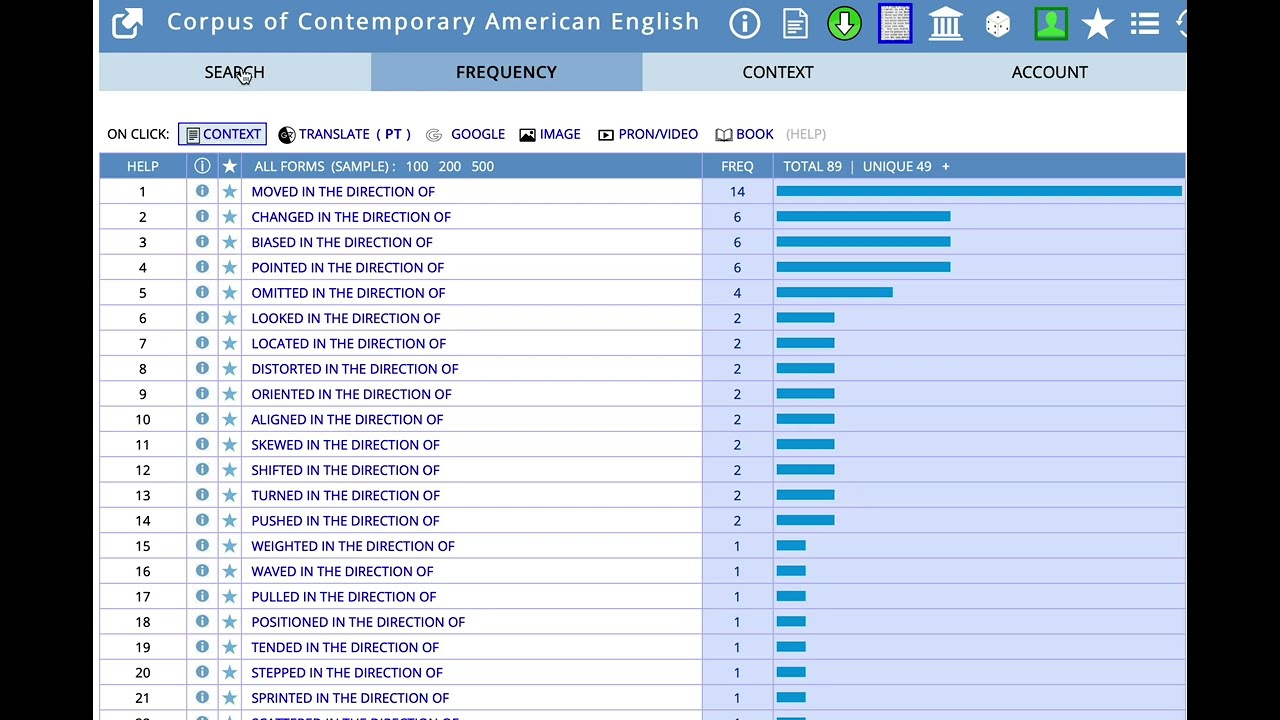
If set off by a space, the asterisk will stand in for a word or punctuation mark. So, we can type in an asterisk followed by a space, then thing. According to the results, the most frequent word that occurs before thing is one. This is actually a little surprising given that thing is a noun.
And the words that that usually occur immediately before most nouns are the determiners 'the' and a. Now, in addition to having the asterisk stand in for an entire word, you can use it to stand in for part of a word. As an example, type in the asterisk immediately followed by thing without a space. The most frequent result is something followed by thing. Also notice that the sixth most frequent token is clothing and the seventh is breathing.
Now let's see how a search like this might help us answer a more interesting linguistic question. To do that, we're going to leave Koka for a moment and take a quick side trip. One area of linguistic interest is lexicon. A lexicon can be the vocabulary of a person or of a variety. And one area of lexography that we can investigate with a monitor corpus like koka is the spread of new words. The study of new words is an established area in linguistics. The journal American speech has a long-running column called among the new words. Here's an old one discussing among other things the spread of the combining form cyber. We'll get to what combining forms are in just a second.
The American Dialect Society also votes on the word of the year at our annual meeting. Here we are, a bunch of rowdy linguists. And sometimes the winner is a new or at least a newish word. In short, we have an established interest in researching these things. But before we collect some data, we need some understanding of where new words come from. One common way to form a new word is through blending. Take two existing words like smoke and fog and we get smog. Let's take a look at another example. Bromance, which might appear like a blend of brother and romance, but this isn't quite accurate. It's actually a combination of bro and romance. Bro is a clipping of brother that exists as its own word or free morphe. Shock the system, bro. Yeah. It has also developed into a combining form. Remember cyber combining forms are modified forms of words that occur in combination with other morph themes. So we have combining forms like mega and light that are common resources for creating new words and bro is one of these. In addition to having a bromance, you can take a brocation or you might post your bro file. And of course if you have a bromance you can also get a broce. Now, with this little bit of background information, we can do some more interesting searches on Koka.
Unfortunately, bro would be a tough one to start with. Think about what we would get if we just search for bro followed by the asterisk. We get a lot of extra data that wouldn't be relevant if we were going after new word formations.
So, let's try one that'll be a lot easier. Licious. As a combining form, Licious has been helped along by a couple of pop culture forces.
Bubbleicious Gum and Destiny's Child's Bootylicious.
[Music] And Licious also has the benefit of being relatively easy to search for using Koka. Type in the asterisk followed immediately by Licious without any space.
The first two results, delicious and malicious, aren't relevant to our search. But then we get some potentially interesting data. If we were doing even an informal analysis of the data, this is where concordance lines would become important. Click on the result for Pinkalicious. Looking at the concordance data, we find that Pinkalicious is the name of a book and a musical. In fact, many of the results for Licious are actually proper names. Now, this doesn't mean that these results are uninteresting. However, functioning as a name and functioning as a modifier are two entirely different things, and we would want to make that distinction. Babelicious is one that functions as a modifier. If we look at those concordance lines, we find that Babelicious is used once to describe a man, Lenny Kravitz, once to describe a woman, Ellen Degenerous, and twice to describe fashionable self-presentation, a haircut and styles. If we look to the left, we find information about the years in which these results occur, as well as the place. In this case, three of the four results come from Cosmopolitan magazine. Also, the concordance lines tell us what sections of the corpus the results come from.
Here we have one result from fiction and three from magazine. This brings us to another important feature of Koka. The corpus is balanced among five different text types. Spoken, fiction, magazine, newspaper, and academic. We can use this in a couple of ways. We can search within a specific text type using the sections options or we can use the chart display to compare the frequencies of a feature across different text types. Let's start by drawing the chart display. We'll go back to our original search term thing. Type in thing, but change the display to chart. To the right, you'll see that Koka generates a couple of useful charts. The first shows the distribution of our search term thing across text types. It's most common in spoken and least common in academic. You'll also find a couple of different numbers. The top one is the raw frequency in that text type. The one below is the frequency per million words. That is the normalized frequency. You can't compare frequencies without normalizing them because the number of words in one part of the corpus is not going to be exactly the same as the number of words in another part of the corpus. Normalizing the frequencies allows us to compare them. To the right, you'll find a chart showing frequencies for every 5 years beginning in 1990. And again, those are normalized per million words. This this allows us to see if there is a change in the pattern of use over time. In this case, the use of thing has remained pretty stable. Finding the distributions of features across different text types can give us important information about how language varies by context and use.
This knowledge can contribute to our understanding of register and genre. The distribution of thing, for example, might suggest something about the use of generalized language in spoken discourse and the preference for greater specificity in academic registers. But be careful in your interpretation of distributions.
Let's say we're interested in testing the conventional warning about using the first person in academic writing. We want to know is this actually true in practice. So, we're going to search for the first person plural we. The chart looks convincing. Our first impression might be that conventional advice is absolutely correct. Weii is clearly far more common in spoken discourse than it is in academic writing. However, its frequency in the academic text type over 2,000 per million words is significant. While it's true that the first person plural is marked for spoken discourse, it is also true that is often used in academic discourse as well. We might then want to find out more about how it is used in academic writing. If we click on the bar in the chart, we can look at the concordance lines for that text type.
So these lines are all in the academic text type. We can also look at distributions within the text type. We can do this by clicking on the heading. Here we find the first person plural is most common in philosophy and religion as well as in miscellaneous academic writing, but it is also quite common in science and technical writing.
The important advice here is to always interrogate your data. Graphical displays of data can be convincing, but you need to think carefully about the information that they present. Let's do another one. This time we'll type say into the search field. The results suggest that say is far more frequently used in spoken language than any of the other text types. However, if we were interested in the distribution of the verb say, our search is capturing only the forms that are realized as say, like the first person, I say, but we're missing other forms like says and said. To search for all forms of a word, what is called lemitizing the results, we can put square brackets around the word we're searching for. When we do that with say, our results are very different. Now, the newspaper text type has the most frequent use of the token. Lemitization is a feature that you'll likely use a lot, and I can't emphasize its importance enough. When you begin doing more advanced collocation searches, like looking for what nouns collocate with a particular verb, most often you'll want to be looking at all forms of that verb.
So, this is an important feature to remember. We might be interested in why this is happening in our example. One way we can get more information is to use the sections option. Change the display to list and select spoken from the sections option. The results show all forms of say that appear in that text type in order of their frequency. So in the spoken text type say is the most common form. If we repeat the search but select newspaper as our section we find that said is the most frequent form. We can also search for synonyms of say. We do that by putting an equal sign in front of say inside the square brackets.
And this time we'll ignore sections. So we're searching in all text types. You'll find this generates some potentially puzzling results. The first result is about. If we want only verbs like express and declare and articulate, you will need to use part of speech tags which is the subject of the next video.
But before we finish here, we could also ask another question about say. How exactly is the past tense said being used in this in these various text types? In particular, what is the distribution of its use in direct versus indirect speech? Briefly, direct speech is discourse quoted directly from a speaker. For example, they said, "We'll be there in a minute." Indirect speech is reported discourse that isn't quoted.
For example, they said that they were going to be late. From these examples, we can see a couple of patterns. In the first set is followed by a comma and in the second, it is followed by that. So, let's see how these work as search strings. To try and find a distribution of said being used to introduce direct speech, we'll we'll try typing in said followed by a comma.
You can in fact search for punctuation in Koka, but you need to separate the punctuation mark from other words with a space. So, we'll need to put a space between said and the comma. And we'll change our display to chart. Our search shows that this string is most common in fiction, which is not particularly surprising. Nonetheless, we should check our results to see if, in fact, our search captured what we were hoping.
If we look at the concordance data for fiction, we find that the first line is actually not direct speech. However, the rest of the concordance data actually looks pretty good. Now, let's try said that. In this case, said that is most common in spoken followed by newspaper.
If we look at newspaper, we find that our search did in fact produce almost exclusively reported speech. This brings me to my last point before we wrap up this video. Whenever you use a complex corpus like Koka to investigate more complicated grammatical patterns like direct versus indirect speech, no search is going to be perfect. In our search, we saw a problem with the sentence initial clause that said. We also missed all of the instances where said appears at the end of a sentence. In the second, we missed all instances of indirect speech where that is omitted. The goal is to refine your searching techniques to provide the most robust data that is relevant to the questions you are asking. Also, be aware that your data will have its limits.
Recognizing those limits will be key to your successful analysis. Okay, that was a lot. Now, let's take a moment for a quick review. First, use the display options to control your data output. Do you want to see how a word or phrase is distributed across text types? Use the chart display. Do you want to see a list of collocates or forms? Use the list display. Use the asterisk as a wild card. Set off with a space. it will stand in for a word or punctuation mark without a space. It will stand in for part of a word. Use the square brackets to lemitize or search all forms of a word. Use the equal sign inside the square brackets to search for synonyms of a word.
If you're using punctuation in a search, for example, to search for a word or phrase at the beginning of a sentence, set off the punctuation mark with a space. Finally, always be aware of the questions you want answers to and what sort of data will answer those questions. Try different searches. Play around. If the interface gets messed up, just hit the reset button and always be aware of and be able to articulate the limits of the data you generate. That's it. Thanks for watching.
Up Next
AntConc 4.2 Tutorial: Getting Started with Corpus Analysis
@AntLabJPN
50.6K views•2023-01-16
Whole Brain Architecture: First International Workshop 2024
@thewholebrainarchitecturei9784
640 views•2024-07-22

FastAPI vs Flask vs Django: Choosing the Right Python Web Framework
@TechWithTim
302.5K views•2024-05-26

Game of Thrones Opening Credits: A Cinematic Analysis
@gameofthrones
46.3M views•2011-04-18
Related Study Plans & Knowledge Roadmaps
Structured learning paths in General & Interdisciplinary Studies