Multi-Agent AI: LangGraph, CrewAI & Workflows
Learning Goal: Design, orchestrate, and deploy collaborative multi-agent AI systems using LangGraph or CrewAI to automate complex business workflows.
- Estimated Total Study Time: 38 Hours
- Prerequisites: Basic logical thinking, a computer with Python 3.10+ installed, and an active internet connection to access LLM APIs.
Module 1: Python & API Foundations for AI
Module Overview
This foundation module introduces you to Python programming basics, secure management of API credentials, and programmatic connection to OpenAI APIs. You will learn how to write basic scripts, load configuration files, and construct simple API requests to interact with Large Language Models.
Recommended Videos

-
Why this video: It covers the ground-level basics of Python syntax, explaining variables, standard types (strings, lists, dictionaries), functions with parameter definitions, and simple control flow—vital building blocks for writing agent definitions and tools.
-
Knowledge Checkpoint:
- Write a Python function that takes parameters and returns a formatted dictionary.
- Initialize, modify, and access elements inside a list and a nested dictionary.
- Run a local
.pyfile from your terminal and handle basic system arguments.

-
Why this video: Keeping API credentials secret is crucial. This video explains how to utilize
python-dotenvto separate configuration from codebase logic, loading environmental variables cleanly into your environment. -
Knowledge Checkpoint:
- Create a
.envfile in your root folder and define variables such asOPENAI_API_KEY. - Import
osand usefrom dotenv import load_dotenv; load_dotenv()to access keys viaos.environ.get(). - Configure a
.gitignorefile to ensure sensitive configurations are never committed to git repositories.
- Create a

-
Why this video: It bridges Python fundamentals with LLM architectures, detailing how to install the
openaiclient package, authenticate, and configure your first API call to retrieve structured generation results. -
Knowledge Checkpoint:
- Set up the official
openaiSDK within a Python virtual environment. - Send a programmatic completion or chat payload to a GPT model.
- Extract the generation message from the API response payload cleanly.
- Set up the official
Module 2: Core Concepts of Autonomous AI Agents
Module Overview
This module transitions you from static chat systems to autonomous agents. You will examine the core differences between simple text completion and agents that utilize planning, memory, and the ReAct (Reason and Act) framework to iteratively solve non-trivial problems using tools.
Recommended Videos
-
Why this video: This academic yet highly practical lecture explains the core mechanics of the ReAct (Reasoning + Acting) loop. You will learn how LLMs decompose complex assignments step-by-step into "Observation, Thought, Action" loops.
-
Knowledge Checkpoint:
- Understand the theoretical paradigm of ReAct and how model outputs are parsed into tool calls.
- Sketch out the logical flow diagram of a model execution block that evaluates its progress recursively.
- Differentiate between a direct prompt chain and a non-deterministic agent loop.
-
Why this video: Instead of hiding agents inside a black-box framework, this guide shows you how to write the agentic control loop from scratch using raw Python. This clarifies how tools are parsed, executed, and fed back into prompt contexts.
-
Knowledge Checkpoint:
- Build a loop that captures agent decisions to call custom functions.
- Execute Python functions dynamically based on tool parameters supplied in JSON by the LLM.
- Return tool results back into the conversation context array.

-
Why this video: Discusses the architectural trade-offs between having one master single-agent system tackle everything versus breaking requirements into a modular multi-agent setup where components have scoped contexts and target roles.
-
Knowledge Checkpoint:
- Identify when to use a single complex agent prompt versus multi-agent configurations.
- Understand how manager and specialized worker roles split the computational load of tasks.
Module 3: Orchestrating Multi-Agent Systems with CrewAI
Module Overview
You will learn to orchestrate structured, collaborative teams using the CrewAI framework. This includes specifying agent personas (with roles, backstories, and goals), establishing explicit task structures, assigning localized tooling, and comparing sequential versus hierarchical patterns.
Recommended Videos
-
Why this video: An exhaustive masterclass covering the core components of CrewAI. It demonstrates how to initialize agents, define execution requirements, and establish cohesive pipelines that transform a set of inputs into structured outcomes.
-
Knowledge Checkpoint:
- Install CrewAI and set up a basic agent configuration using standard Python classes.
- Define the parameters:
role,goal, andbackstoryfor a newly instantiated agent. - Write tasks that target specific agents, specifying exact fields for input and output requirements.
-
Why this video: Explores how to transition from sequential tasks (Agent A -> Agent B -> Output) to hierarchical structures that run research loops and execute complex corporate logic via automated managers.
-
Knowledge Checkpoint:
- Configure a manager agent utilizing CrewAI's process configurations.
- Implement and test custom tooling subclasses with structured input validation schemas.
- Run execution sessions in verbose mode to analyze intermediate delegation steps.

-
Why this video: Explores how to make a CrewAI application user-friendly. You will build a Streamlit web application that lets non-technical users input parameters, trigger the execution loop, and monitor agent progress on a UI dashboard.
-
Knowledge Checkpoint:
- Integrate a background CrewAI execution thread within a responsive Streamlit session layout.
- Capture user parameter variables directly from form interfaces and parse them to the crew initialization step.
- Stream real-time agent output onto the UI screen.
Module 4: Cyclic and Stateful Workflows with LangGraph
Module Overview
LangGraph allows you to construct precise, cyclic state machines. In this module, you will master stateful orchestration, conditional logic routing, cyclical loop executions, and human-in-the-loop interruption patterns to build safe and predictable agents.
Recommended Videos
-
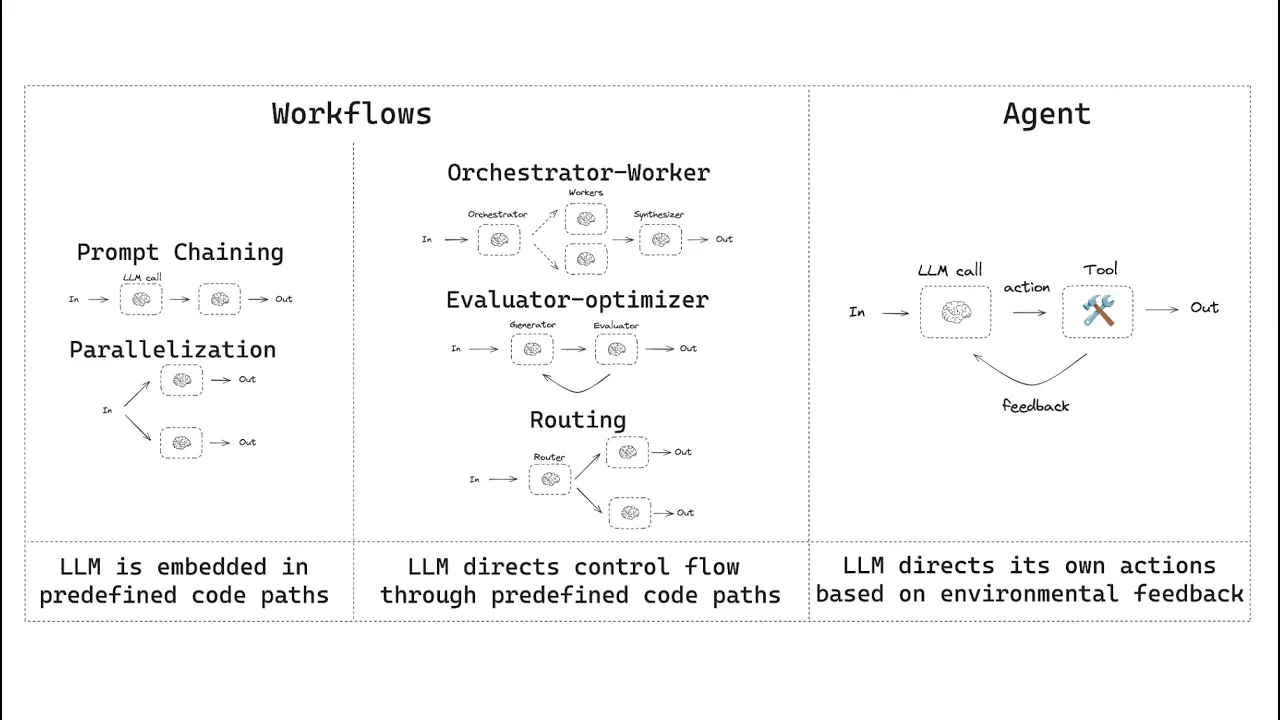
Why this video: Presented by the creators of LangChain, this video clarifies why deterministic cyclic systems are essential. It details how stateful graphs replace random prompt generation with structured decision trees.
-
Knowledge Checkpoint:
- Differentiate between standard execution sequences and stateful cyclic graphs.
- Map out an agent workflow with conditional nodes that route based on API response payloads.
- Use LangGraph tools to create a graph execution outline.

-
Why this video: A hands-on tutorial that covers the exact Python syntax for LangGraph. It details how to set up states using
TypedDict, configure nodes with functional logic, define routing edges, and compile your graph into a cohesive pipeline. -
Knowledge Checkpoint:
- Create a
Statedefinition schema usingTypedDictand append conversation messages using LangChain’sadd_messagesschema. - Use the
StateGraphobject to register custom nodes and establish transitions. - Apply conditional routing functions based on whether an input string requires validation.
- Create a
-
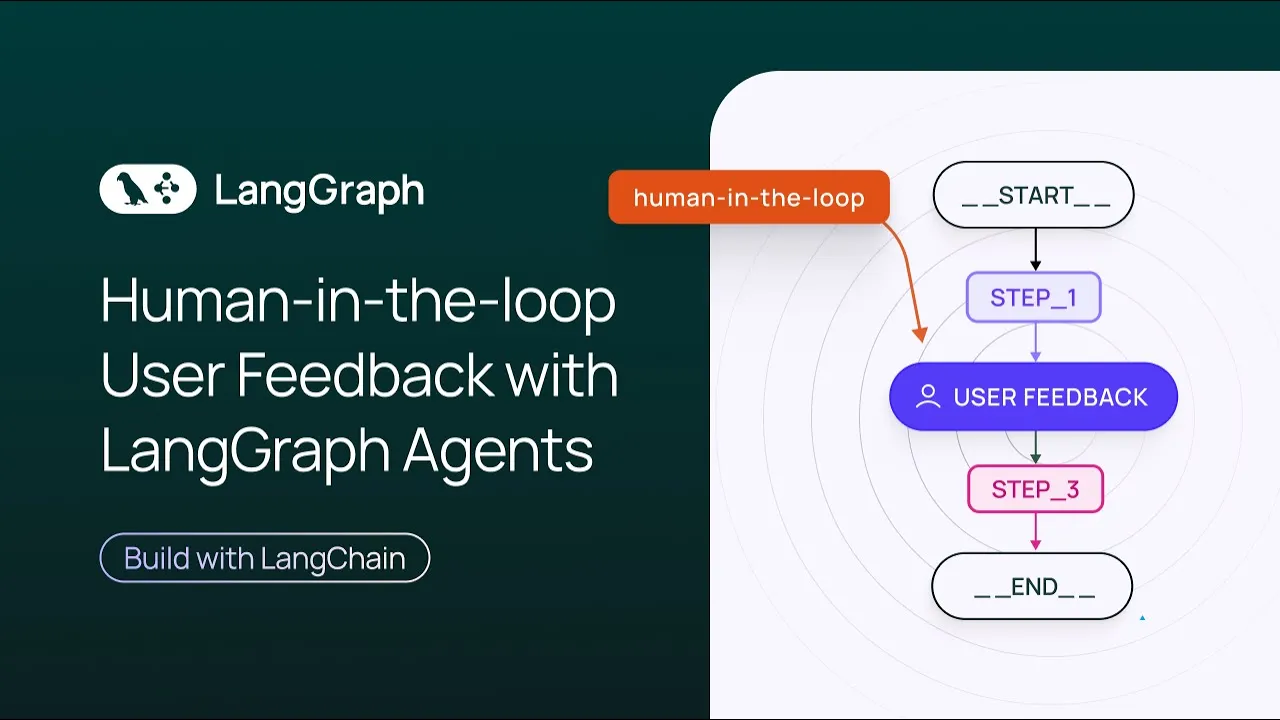
Why this video: This video addresses a key framework feature: Human-in-the-Loop workflows. You will learn how to configure interrupts to pause graph execution, request manual validation, and edit the graph's state before resuming.
-
Knowledge Checkpoint:
- Configure breakpoint conditions in your LangGraph compiler.
- Pause the graph execution sequence before a sensitive tool node is called.
- Fetch the pending state, alter variable contents, and successfully trigger resumption of graph execution.
Module 5: Equipping Agents with Memory, RAG & Custom Tools
Module Overview
Give your agents superpowers by integrating custom data retrieval tools, persistent memory, and agentic RAG structures. This module focuses on writing secure wrappers for proprietary APIs, building document lookup utilities, and persisting multi-session chat states.
Recommended Videos
-
Why this video: A clear guide on converting standard Python logic, data storage operations, or document checks into clean agent tools. You will learn to write secure wrapper functions that accept parameters from agent loops.
-
Knowledge Checkpoint:
- Write a custom Python tool complete with a detailed docstring specifying its input arguments.
- Build a search tool that fetches data from vector directories.
- Handle potential exceptions inside tool scripts to prevent agent loops from crashing.

-
Why this video: Shows how agentic RAG works. It demonstrates a multi-step design where agents evaluate retrieved context for relevance and decide whether to fetch more information or formulate an answer.
-
Knowledge Checkpoint:
- Set up an evaluation step that grades document relevance before generating a final response.
- Connect your LangGraph pipeline to a document retrieval model to support context-aware answers.

-
Why this video: Covers memory management by implementing checkpointers. This enables you to persist agent states and conversation histories across different sessions.
-
Knowledge Checkpoint:
- Import
MemorySaverfrom thelanggraph.checkpoint.memorypackage. - Compile your graph specifying a checkpointer instance.
- Resume a prior session conversation by supplying a unique
thread_idto the config dict.
- Import
Module 6: Production Deployment, UI, and Monitoring
Module Overview
Learn to ship your multi-agent workflows to production. This module covers debugging agent executions in LangSmith, bundling codebases inside interactive interfaces (like Chainlit), and deploying pipelines behind robust web endpoints.
Recommended Videos

-
Why this video: Walks you through the deployment lifecycle. It demonstrates how to wrap your complex LangChain and LangGraph agent pipelines into robust, web-ready web service endpoints using LangServe.
-
Knowledge Checkpoint:
- Create a deployment server script that exposes yourcompiled graph state.
- Create API routes that allow client web applications to post data directly to the graph.
- Send payload tests to verify structured JSON responses.
-
Why this video: This video demonstrates how to deploy agents to production cloud platforms. It covers scaffolding project repositories, local testing, and hosting using the official LangGraph CLI tools.
-
Knowledge Checkpoint:
- Scaffold an agent repository structure using official template layouts.
- Configure environment variables securely on remote servers for production deployment.
- Deploy and update your agent service directly from your local terminal using CLI commands.
-
Why this video: Essential for diagnosing issues in production environments. This video teaches you how to use LangSmith to trace and debug agent actions, track nested tool calls, evaluate outputs, and audit costs.
-
Knowledge Checkpoint:
- Set up LangSmith tracking keys in your project environment variables.
- Trace every step of an agent run, inspecting the prompts sent and tool outputs received.
- Analyze latency bottlenecks and track API token usage across your workflow.
💡 Independent Study Note (Resolving Feedback Gaps): While LangServe and the LangGraph CLI are excellent deployment routes, enterprise systems often require custom API wrappers.
- Independent Learning Activity: Research how to expose a LangGraph state machine inside a custom FastAPI backend.
- Search Query:
How to deploy LangGraph agent to production FastAPI- Key Objective: Write a FastAPI router endpoint
/chatthat accepts a query string, runsgraph.stream(), and yields streamed LLM tokens and tool actions back to a client.
Course Map
This map outlines the recommended pathway through the modules. Learn Python and LLM foundations first, explore agent theory, and then master stateful loops in LangGraph or collaborative teams in CrewAI before deploying your production-ready systems.
Key People Index
Meet some of the researchers, developers, and educators featured throughout this curriculum:
- Harrison Chase (@LangChain): Founder of LangChain and LangGraph. He is a leading figure in developing frameworks for structured, stateful AI pipelines.
- Tim Ruscica (@TechWithTim): A prominent educator specializing in Python fundamentals, backend development, and building functional agent workflows from scratch.
- Cole Medin (@ColeMedin): An engineer and content creator known for his practical guides on deploying agent frameworks to production and building custom API setups.
- Brandon Hancock (@aiwithbrandon): An AI developer and educator focused on building practical, multi-agent business automation solutions using CrewAI.
Final Self-Assessment
Complete this comprehensive self-assessment to verify your mastery of multi-agent development before deploying your systems to production:
- Secure Setup: You can setup clean virtual environments, install dependencies, and configure environment variables safely via
.envfiles without committing secrets to public repositories. - Raw ReAct Loops: You understand the theory behind "Observation -> Thought -> Action" loops and can implement a simple agent loop from scratch in pure Python.
- Crew Design: You can define a collaborative CrewAI team with specialized roles, backstories, and sequential tasks to accomplish business objectives.
- State Control: You understand the difference between linear chains and cyclic graphs, and can build a LangGraph workflow using
TypedDictschemas. - Routing Logic: You can write conditional routing functions that analyze output messages to determine the next graph node to execute.
- Human-in-the-Loop: You can configure breakpoints in LangGraph to pause execution, solicit human feedback, update states, and resume securely.
- RAG Integration: You can build custom, typed retrieval tools that query external data sources and integrate context directly into your agent's reasoning loop.
- Session Memory: You can configure persistent memory checkpointers to persist conversation context across multi-session thread runs.
- Traces and Auditing: You can connect your pipelines to LangSmith to trace execution steps, debug errors, and measure token usage.
- Production Deployment: You can package your agent architectures behind LangServe or custom FastAPI endpoints to serve web application clients.